

Overview

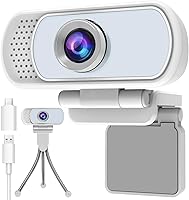
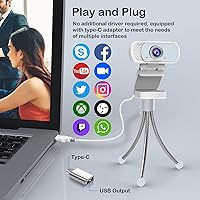
The Hrayzan WN5 1080p USB Webcam is a compact, white-finished camera that arrived in early 2024 and has already climbed into the top 110 in its Amazon category — a solid start for a budget-tier device. What stands out immediately is what comes in the box: a mini tripod, a physical privacy cover, and a USB-C adapter, which is more than most competitors bother to include at this price. Plug-and-play setup means no drivers to hunt down and no software to install. Just connect it, open your preferred video app, and you are ready. It is clearly aimed at remote workers and students who want a reliable, no-fuss camera for daily calls.

Features & Benefits

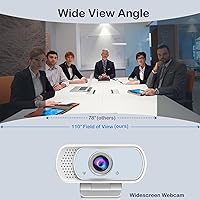
At its core, this webcam captures video at 1920×1080 using a CMOS sensor, outputting in MJPG and YUV formats for stable, broadly compatible footage. The 110-degree wide-angle lens is notably generous — it pulls in more of the room without forcing you to reposition your chair, which is genuinely useful in tighter home office setups. The built-in microphone applies noise reduction over PCM audio and, while it will not replace a dedicated mic for serious recordings, it holds up reasonably well for everyday call clarity. The physical privacy shutter is a small but meaningful touch for security-conscious users, and the included tripod adds real placement flexibility beyond balancing it on a monitor bezel.

Best For

This USB webcam fits comfortably into a few specific situations. It is a natural choice for remote workers and students who log significant hours on Zoom, Teams, or Google Meet and want something dependable without overspending. First-time webcam buyers will appreciate the zero-configuration experience — there is genuinely nothing to set up. The white finish appeals to anyone who cares about matching peripherals to a clean, modern desk. The lightweight build and included tripod also make it practical for people without a fixed workspace, since moving it between rooms or locations takes no effort at all and requires no reconfiguration on the receiving device.

User Feedback

Buyers respond positively to the Hrayzan camera overall, most often praising image clarity for the price point and how quickly it gets running — often under a minute. The bundled accessories earn consistent mentions, with many reviewers noting genuine surprise at finding a tripod and USB-C adapter included. On the critical side, a recurring complaint involves low-light performance, which is underwhelming in dim rooms — not unusual for this sensor class, but worth knowing. Several buyers also note that the microphone struggles in larger spaces. Build quality comments are mixed, with some questioning whether the lightweight plastic housing and cable will hold up to daily long-term use.

Pros

  • Plug-and-play setup works immediately on Windows, macOS, Chrome OS, and Android TV with zero driver installation.
  • The 110-degree wide-angle lens captures more of the room without needing to reposition your chair or monitor.
  • Comes bundled with a mini tripod, privacy cover, and USB-C adapter — solid value straight out of the box.
  • The physical privacy shutter blocks the lens completely, giving security-conscious users real peace of mind.
  • Lightweight and compact enough to move between rooms or pack for travel without any hassle.
  • Built-in noise-reduction microphone performs adequately for everyday video calls in quiet environments.
  • Compatible with major platforms including Zoom, Skype, Google Meet, OBS, and FaceTime.
  • White finish suits modern desk setups where matching peripheral aesthetics actually matters.
  • At this price tier, image clarity in good lighting conditions consistently earns positive reactions from buyers.
  • Mini tripod in the box provides flexible placement options that clip-only webcams simply cannot match.

Cons

  • Low-light image quality drops noticeably in dim or poorly lit rooms, which is a real limitation for evening users.
  • The built-in microphone struggles to pick up voices clearly from more than a couple of feet away.
  • Plastic build quality feels lightweight in ways that raise durability questions for long-term daily use.
  • Cable construction has drawn concern from some buyers about how well it holds up over time.
  • Wide-angle lens can introduce visible edge distortion, which may be distracting during video calls.
  • No autofocus — fixed-focus optics mean the camera cannot compensate if you move around during a call.
  • Image output, while acceptable, lacks the sharpness and color accuracy of mid-range webcams even at matching resolutions.
  • No dedicated software or app means users have no way to manually adjust exposure, white balance, or brightness.
  • The tripod included in the box is minimal and may feel unstable on uneven surfaces.
  • Buyers expecting strong performance across both video and audio may find the combined quality underwhelming compared to pairing a better webcam with a separate microphone.

Ratings

Our AI rating system analyzed verified global buyer reviews for the Hrayzan WN5 1080p USB Webcam, actively filtering out incentivized, bot-generated, and low-quality feedback to surface what real everyday users actually experience. The scores below reflect a honest, balanced synthesis — strengths are credited where earned, and recurring pain points are not softened or ignored. Whether this webcam fits your needs or falls short depends heavily on your lighting setup, use case, and expectations for this price tier.

Value for Money
88%
For buyers comparing options in the budget webcam space, the Hrayzan camera consistently earns praise for delivering more than expected at its price. The bundled tripod, USB-C adapter, and privacy cover are accessories that competitors often sell separately, which gives this package a tangible edge when buyers calculate total cost.
While the accessories add real value, the core camera hardware itself is not exceptional — buyers who overlook the bundle and focus purely on image or audio quality may feel the price is only marginally justified compared to similarly priced bare-bones webcams.
Image Quality
74%
26%
In well-lit rooms during daytime calls, the 1080p output produces clear, watchable video that holds up respectably for everyday Zoom and Teams meetings. Several buyers noted it was a visible improvement over their laptop's built-in camera, which is the baseline most users are upgrading from.
The fixed-focus CMOS sensor struggles noticeably once ambient light drops — evening calls or dimly lit home offices expose a soft, slightly grainy image that is hard to ignore. Edge distortion from the 110-degree wide-angle lens has also come up in user feedback as a minor but recurring annoyance.
Low-Light Performance
51%
49%
With a direct desk lamp or ring light providing adequate front lighting, the camera manages to produce acceptable footage even outside daylight hours. Buyers who already own supplemental lighting and understand the camera's limitations tend to report fewer complaints about this aspect.
Without dedicated lighting, low-light performance is genuinely poor — this is one of the most consistent criticisms across buyer reviews. The f/2.8 aperture and budget CMOS sensor simply cannot compensate for dim environments, and there is no automatic exposure adjustment to soften the impact.
Ease of Setup
93%
Plug-and-play functionality is where this webcam earns its highest marks without much debate. Buyers across Windows, macOS, and Chrome OS consistently report that the camera was recognized and ready within seconds of plugging in, with no drivers to install and no software menus to navigate.
A small number of users encountered issues where the camera was not automatically selected by their preferred app, particularly when switching between video platforms on the same machine. This is a minor configuration nuance rather than a true setup failure, but it caught some first-time webcam buyers off guard.
Microphone Quality
63%
37%
In quiet home office environments, the built-in noise-reduction microphone captures voice clearly enough for casual calls without requiring an external mic. Colleagues on the other end of Zoom or Meet calls generally report hearing voices without significant complaints in controlled settings.
The microphone's pickup range is limited, and it loses effectiveness fairly quickly in larger rooms, open-plan spaces, or environments with background noise. Several buyers specifically flagged that the audio felt thin or distant compared to a standalone USB microphone, limiting its appeal for anything beyond basic calls.
Build Quality
58%
42%
The compact white housing is visually clean and fits unobtrusively on a desk or monitor, and the form factor is genuinely lightweight enough to tuck into a bag without a second thought. For casual daily use in a stationary home office, the construction is adequate.
The lightweight plastic build raises durability concerns for buyers who handle their peripherals frequently or aggressively. The USB cable in particular has drawn skepticism in reviews, with some users questioning how well it holds up after months of regular plugging and unplugging.
Wide-Angle Lens
76%
24%
The 110-degree field of view is a practical advantage for users with cluttered desks or small rooms, capturing enough of the scene to frame a natural-looking shot without forcing the user to sit rigidly centered. Remote workers in tighter home setups found this particularly useful.
The trade-off for such a wide angle is noticeable barrel distortion at the edges of the frame, which some buyers found visually distracting during video calls. Users seated at larger desks may also find the wide field of view picks up more background clutter than they would prefer.
Privacy Shutter
89%
The physical sliding shutter earned consistent positive mentions from privacy-conscious buyers who appreciate a hardware-level solution over relying on software permissions. The reassurance of knowing the lens is physically blocked — not just disabled in an app — resonated strongly with remote workers handling sensitive calls.
The shutter mechanism on a budget-tier device is inherently a small plastic sliding component, and a handful of buyers noted it felt slightly loose or imprecise after extended use. It functions correctly, but it does not inspire the same confidence as the machined shutters found on premium webcams.
Accessory Bundle
86%
The inclusion of a mini tripod, USB-C adapter, and privacy cover in the box is a genuine differentiator at this price point, and buyers repeatedly cited these extras as a reason they chose this camera over similar alternatives. Getting all three without a separate purchase adds immediate practical value.
The mini tripod, while useful, is basic — it works reliably on flat surfaces but wobbles on anything uneven, and it will not satisfy buyers looking for meaningful height adjustability. The USB-C adapter is functional but short, which can be awkward depending on port placement on certain laptops.
Compatibility
91%
Support for Windows XP through 11, macOS, Chrome OS, and Android TV is about as broad as any webcam in this class offers, and buyers across different operating systems reported consistent plug-and-play recognition. Compatibility with Zoom, Skype, OBS, FaceTime, and Google Meet was specifically confirmed by users across multiple platforms.
A small subset of buyers noted minor inconsistencies when switching between apps on the same machine, particularly on macOS where camera access permissions occasionally needed manual adjustment. These are edge cases rather than systemic failures, but they are worth noting for users who regularly jump between conferencing tools.
Portability
84%
At just 6.4 ounces with a compact footprint, this USB webcam is easy to drop into a bag and take to a library, coworking space, or another room entirely. Students and hybrid workers who are not tied to a fixed desk mentioned this as a practical day-to-day advantage.
The cable length, while sufficient for standard desk use, can be a limiting factor when positioning the camera away from the computer in portable setups. Buyers who wanted more flexibility in placement occasionally found themselves wishing for a longer cord or a cable extension.
Daytime Video Clarity
78%
22%
Under natural daylight or bright indoor lighting, the camera produces a clean and stable 1080p image that holds up well for professional video calls. Buyers working near windows or with good overhead lighting consistently reported satisfactory results for their daily meeting needs.
Even in good lighting, the output lacks the crispness and color accuracy of mid-range webcams — fine detail like text on a whiteboard or small facial features can appear slightly soft. Users upgrading from a higher-tier webcam may notice the quality gap more acutely than first-time buyers.
Software Experience
72%
28%
Because no companion software is required or provided, the experience stays clean and interference-free — the camera simply works within whatever platform you already use. Buyers who dislike bloatware or third-party apps appreciated not having anything extra running in the background.
The absence of any camera management software also means there is no way to manually tweak exposure, white balance, saturation, or brightness. Buyers who want fine-grained control over their image output will find this limiting, especially when trying to compensate for challenging lighting conditions.

Suitable for:

The Hrayzan WN5 1080p USB Webcam is a practical pick for anyone who needs a reliable daily-driver camera without spending much. Remote workers attending back-to-back video calls on Zoom, Teams, or Google Meet will find it handles the job without fuss, especially in well-lit home offices or dedicated workspaces. Students joining online classes benefit from the plug-and-play simplicity — there is no software to configure, no drivers to install, and no learning curve. The 110-degree wide-angle lens is also a quiet advantage for people with cluttered desks or awkward room layouts, since it reduces the need to rearrange your setup around the camera. Anyone who wants a portable, lightweight webcam they can move freely between rooms or even take to a library will appreciate how little friction is involved. The bundled tripod and USB-C adapter add genuine out-of-the-box value for buyers who would otherwise need to source those accessories separately.

Not suitable for:

The Hrayzan WN5 1080p USB Webcam is not the right tool for buyers who need consistently sharp video in low-light conditions. The CMOS sensor at this price tier struggles in dim rooms, and no amount of software correction fully compensates — if your workspace relies on candlelight, a single desk lamp, or evening ambient light, expect noticeably degraded image quality. Content creators, streamers, or anyone producing videos intended for public audiences will likely find the image output too soft and the built-in microphone too limited for professional-quality recordings. The microphone, while adequate for casual calls, loses effectiveness in larger rooms or spaces with significant background noise, making it a poor standalone audio solution for serious use. Build quality is also a consideration — the lightweight plastic construction and the cable have drawn skepticism from long-term users, so buyers expecting this to survive years of heavy daily use may be disappointed. If your priority is premium optics, autofocus, or studio-grade audio, this webcam will leave you wanting more.

Specifications

  • Resolution: Captures video at 1920×1080 (1080p full HD) using MJPG and YUV output formats for broad software compatibility.
  • Sensor: Uses a CMOS image sensor, which is standard for webcams in this price category.
  • Field of View: Features a 110-degree wide-angle lens that captures a broad scene without requiring the user to reposition the camera.
  • Aperture: Fixed aperture of f/2.8, which provides reasonable light intake under well-lit conditions but limits low-light performance.
  • Focus: Fixed-focus lens with a minimum focal distance of 0.5 mm; there is no autofocus mechanism included.
  • Microphone: Single built-in microphone with noise reduction processing, outputting audio in PCM format for clean voice capture during calls.
  • Connectivity: Connects via USB-A; a USB-C adapter is included in the box for use with modern laptops and devices.
  • Privacy Shutter: A physical sliding privacy cover is built into the camera housing, fully blocking the lens when not in use.
  • Included Tripod: A compact mini desktop tripod is included, allowing tabletop placement independent of a monitor or laptop screen.
  • OS Support: Compatible with Windows XP, 7, 8, 10, and 11, as well as macOS, Chrome OS, and Android TV out of the box.
  • Software Support: Works with major video and streaming applications including Zoom, Skype, FaceTime, Google Hangouts, OBS, and YouTube.
  • Driver Requirement: Fully plug-and-play with no additional drivers or software installation required on any supported operating system.
  • Weight: Weighs 6.4 ounces, making it light enough to move between locations without adding meaningful bulk to a bag.
  • Package Size: Ships in a box measuring 4.88 × 3.03 × 2.44 inches, compact enough to store easily when not in use.
  • Model Number: Manufactured under model number WN5 by the brand Hrayzan.
  • Color: Available in white with a USB-C variant designation, designed to complement modern neutral-toned desk setups.
  • BSR Ranking: Holds a Best Sellers Rank of #103 in the Webcams category on Amazon as of its evaluation period.
  • Release Date: First made available for purchase in February 2024, making it a relatively recent entry in the budget webcam segment.

Related Reviews

HuddleCamHD HC-WEBCAM-94
77%
83%
Video Quality (Daylight)
51%
Low-Light Performance
91%
Field of View
94%
Ease of Setup
57%
Audio Quality
More
MTORED TWC-25 1080p Webcam
74%
74%
Video Quality
51%
Low-Light Performance
61%
Microphone Quality
93%
Ease of Setup
88%
Value for Money
More
ASUS Webcam C3 1080p HD USB Camera
85%
88%
Video Quality
72%
Audio Quality
94%
Ease of Use
85%
Field of View
90%
Adjustability (Tilt/Rotation)
More
Akyta 1080P Webcam
Akyta 1080P Webcam
82%
88%
Video Quality
85%
Audio Quality
94%
Ease of Setup
82%
Field of View
80%
Noise Reduction
More
ZIQIAN 1080P USB-C Webcam
74%
78%
Daytime Image Quality
54%
Low-Light Performance
94%
Plug-and-Play Setup
61%
Microphone Quality
76%
Wide-Angle Lens Coverage
More
Nulaxy C900 USB Webcam
84%
88%
Video Quality
82%
Microphone Performance
94%
Ease of Setup
75%
Field of View
91%
Privacy Shutter Feature
More
Svcouok pT011 1080p Webcam
75%
74%
Image Clarity
63%
Low-Light Performance
58%
Microphone Quality
93%
Ease of Setup
77%
Wide-Angle Coverage
More
TOUCAN 1080P Webcam with Microphone
88%
89%
Video Quality
91%
Microphone Performance
95%
Ease of Use
88%
Field of View
93%
Privacy Protection
More
NexiGo N980P
NexiGo N980P
78%
83%
Video Clarity
88%
Frame Rate Smoothness
71%
Low-Light Performance
79%
Wide-Angle Lens
62%
Built-in Microphone
More
Hrayzan W4LS 2K Webcam
77%
78%
Video Clarity
84%
Lighting System
62%
Microphone Performance
93%
Ease of Setup
57%
Build Quality
More

FAQ

It works on both. The Hrayzan WN5 1080p USB Webcam is compatible with macOS alongside Windows 7 through 11, Chrome OS, and Android TV. No driver installation is needed on any of those systems — just plug it in and your operating system should recognize it automatically.

No, you do not. This webcam is fully plug-and-play, which means your computer handles the rest once you connect it via USB. Just make sure your video calling app has selected it as the active camera, especially if you have another webcam already connected.

Yes, it is compatible with both, along with Skype, Google Meet, FaceTime, OBS, and several other popular platforms. As long as your software lets you choose a camera input, this webcam will show up as an option the moment it is connected.

In a quiet, reasonably sized room, the built-in microphone does a decent job of capturing your voice clearly for calls. That said, it is a single built-in mic with noise reduction rather than a directional or studio-grade setup, so it can struggle in larger rooms or noisier environments. If audio quality is a priority for you, pairing it with a separate USB microphone is worth considering.

It is a physical shutter — a small sliding cover that you move manually over the lens. That means no software process, no setting to toggle, and no way for an application to bypass it while it is closed. It is a simple but genuinely reassuring feature for anyone privacy-conscious.

Honestly, low-light is where this camera shows its budget-tier limitations most clearly. The f/2.8 fixed aperture lets in a reasonable amount of light, but without a sensor designed for dim environments, the image gets noticeably softer and noisier when lighting is poor. A desk lamp pointed at your face will make a significant difference if you use it in the evening.

It is a compact mini tripod — functional for tabletop use on flat surfaces, but not designed for demanding setups. On a stable desk it does the job fine, especially if you want the camera positioned lower than your monitor. On uneven or soft surfaces it can feel a little wobbly, so just keep that in mind.

Yes, a USB-C adapter is included in the box, which is more than most webcams at this price bother to provide. You do not need to buy anything extra to connect it to a modern laptop with only USB-C ports.

In good lighting, yes — you will likely see an improvement over most built-in laptop cameras, which tend to be quite basic. The 1080p output is cleaner and the wider field of view is more flattering for most desk setups. The gap narrows in lower light, but for daytime or well-lit calls it is a meaningful step up.

The housing is lightweight plastic, which keeps the overall weight low but does raise some questions about long-term durability. The cable in particular has drawn mixed comments from buyers who use it every day. For occasional portability it is fine, but if you need something built to survive daily rough handling, the construction may not inspire full confidence over a multi-year period.