Overview

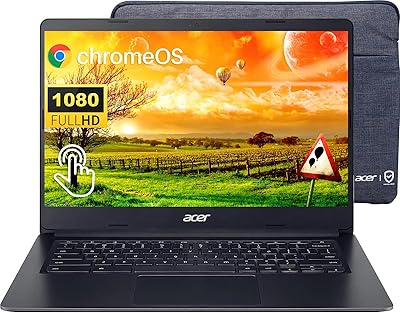
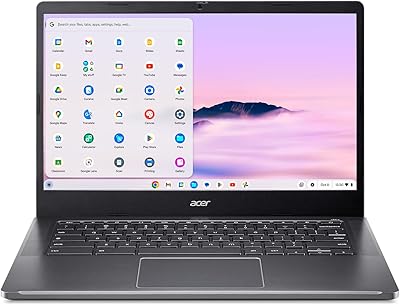
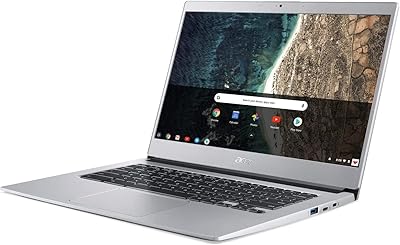
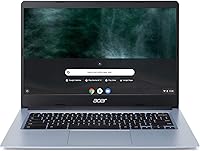
The Acer Chromebook 314 14-inch Touchscreen Laptop is a no-frills, everyday machine aimed at users who live inside Google's ecosystem and don't need much beyond it. Launched in 2020, it's showing its age by current standards — the specs were modest at launch and feel more so now. That said, Chrome OS keeps things snappy for basic tasks in ways a similarly priced Windows laptop often can't match at the same tier. The 14-inch touchscreen is a genuine standout at this price point. Just be clear-eyed going in: if you need demanding software, video editing, or heavy multitasking, this isn't built for that job.
Features & Benefits

The Celeron N4000 processor handles the basics reliably — Google Docs, YouTube, casual browsing, and a handful of Android apps from the Play Store run without much complaint. Where things strain is multitasking: with only 4GB of RAM, opening a dozen tabs while streaming audio causes noticeable slowdowns. Storage is 64GB locally, which fills faster than you'd expect, making the bundled 100GB of Google Drive a necessity rather than a bonus. The backlit keyboard is a thoughtful addition, and the two USB 3.0 ports cover everyday connectivity. On battery life, Acer advertises 12.5 hours, though real-world figures run considerably shorter depending on screen brightness and workload.

Best For

This budget Chromebook is a strong fit for middle and high schoolers who need something reliable for assignments, video calls, and research without the upkeep headaches of a traditional OS. Seniors and light users who stay mostly in a browser will find it more than capable. It also works well as a shared household backup device — one anyone can grab without worrying about malware or complicated updates. If your daily routine revolves around Gmail, Docs, and streaming, the Acer 314 genuinely earns its keep. It's not for creative professionals or anyone dependent on Windows-specific software. Simplicity is its core strength.

User Feedback

Owners consistently appreciate how little maintenance Chrome OS demands — no virus scans, no sluggish update cycles. The touchscreen draws particular praise for being responsive and accurate at this price. On the flip side, users running multiple apps simultaneously frequently report lag creeping in sooner than expected. Buyers switching from Windows mention a real adjustment period; some software they relied on simply has no Chrome OS equivalent. Build quality earns mixed marks — the plastic chassis feels light but not especially solid, and hinge durability surfaces as a concern in longer-term ownership reviews. Overall sentiment leans positive for light, single-task use.

Pros

  • Chrome OS stays fast and secure over time with automatic updates — no manual maintenance required.
  • The 14-inch touchscreen is genuinely responsive and well-suited for casual browsing and schoolwork at this price tier.
  • Lightweight at under 4 pounds, making it easy to carry between classes or rooms.
  • Backlit keyboard is a practical touch that many budget Chromebooks skip entirely.
  • Built-in virus protection and sandboxed apps give peace of mind for family or shared use.
  • 100GB of Google Drive storage comes bundled, helping offset the limited local storage.
  • Two USB 3.0 ports cover most everyday connectivity needs without requiring a hub.
  • Chrome OS has virtually no learning curve for anyone already using Gmail, Docs, or YouTube regularly.
  • Boot times are impressively quick — this Chromebook is ready to go in seconds.

Cons

  • 4GB of RAM creates noticeable slowdowns when multiple tabs or Android apps are open simultaneously.
  • The 1366x768 screen resolution feels dated — text and images look soft compared to sharper displays on competing devices.
  • 64GB of local storage fills quickly; heavy reliance on cloud connectivity is essentially mandatory.
  • The Celeron N4000 processor, released in 2019, lacks the headroom to handle anything beyond light workloads.
  • Acer advertises up to 12.5 hours of battery life, but real-world usage tends to fall well short of that figure.
  • The plastic build feels lightweight in a fragile sense — long-term hinge durability has been flagged in user reviews.
  • No support for Windows software or full desktop applications limits its versatility significantly.
  • Users switching from Windows face a real adjustment period, and some tools they depend on have no Chrome OS equivalent.
  • The screen's low resolution and modest brightness make it less comfortable for extended viewing or outdoor use.

Ratings

Our AI rating engine analyzed thousands of verified global purchases of the Acer Chromebook 314 14-inch Touchscreen Laptop, actively filtering out incentivized, duplicate, and bot-generated reviews to surface what real everyday users actually experience. The scores below reflect an honest cross-section of buyer sentiment — strengths are credited where earned, and recurring pain points are not softened. Whether this budget Chromebook earns a place in your home or school bag depends heavily on how well its trade-offs align with your actual needs.

Value for Money
78%
22%
For buyers who need a basic school or light home device and are not willing to spend heavily, the Acer 314 delivers a touchscreen and backlit keyboard at a price point where many rivals offer neither. Users who understood what they were buying consistently rated it as money well spent.
Buyers who expected Windows-level versatility or snappier multitasking felt the value proposition weakened quickly. Given that the hardware dates back to 2020, newer Chromebooks at comparable prices now offer noticeably better specs for the same outlay.
Performance
54%
46%
For single-task use — loading a Google Doc, streaming a YouTube video, or joining a video call — the Celeron N4000 handles the job without obvious hesitation. Students running Google Classroom assignments day-to-day generally found it adequate for their needs.
Open more than six or seven browser tabs simultaneously, or run a heavier Android app alongside web tools, and the 4GB RAM ceiling becomes a real problem. Users doing anything remotely demanding reported sluggishness that grew more frustrating over extended sessions.
Display Quality
61%
39%
The 14-inch IPS panel produces decent color accuracy for casual streaming and browsing, and the touchscreen response drew consistent praise for being accurate and lag-free. For a device used primarily for schoolwork and video calls, most users found the screen perfectly functional.
The 1366x768 resolution is a genuine weak point — text and images look noticeably soft compared to Full HD displays now common even at lower price points. Several users mentioned eye strain during longer sessions, and the screen struggles in brighter ambient lighting.
Battery Life
66%
34%
Most users got comfortably through a full school day or a standard work-from-home shift on a single charge. When used conservatively — moderate brightness, primarily browser-based tasks — the battery genuinely holds up well for a portable everyday device.
Acer's advertised 12.5-hour claim is hard to replicate in real-world conditions. With video streaming or Android apps running, users consistently reported figures closer to 6 to 8 hours, making the marketing figure feel misleading rather than aspirational.
Build Quality
58%
42%
The laptop is light and easy to carry, which students and commuters appreciated. At under 4 pounds, it sits comfortably in a backpack without adding bulk, and the slim profile tucks neatly into most bags.
The all-plastic chassis lacks the rigidity buyers hoped for at this price. Hinge durability surfaced repeatedly in longer-term reviews, with some users reporting loosening or creaking after several months of daily opening and closing.
Keyboard & Trackpad
72%
28%
The backlit keyboard was a consistently appreciated feature — practical for low-light study environments or evening use. Key travel feels reasonable for a budget device, and most users adapted to the Chrome OS layout quickly.
The trackpad is functional but not precise — users doing anything requiring fine cursor control found it frustrating. A small number of reviewers noted the keyboard flex under firm typing, which reduces confidence in the overall input feel.
Ease of Setup
88%
Chrome OS setup is about as frictionless as laptop onboarding gets — sign in with a Google account, and the device is ready within minutes. Reviewers who bought this for elderly parents or younger kids specifically highlighted how little hand-holding was required.
Users without a Google account or those unfamiliar with the ecosystem needed a bit of initial guidance. The absence of a traditional Windows desktop occasionally confused first-time Chromebook users who expected a familiar interface.
Storage Practicality
49%
51%
The bundled 100GB of Google Drive cloud storage meaningfully extends the effective capacity for users who keep most of their files online. For browser-first users with minimal local file needs, the arrangement works without obvious friction.
64GB local fills up faster than most buyers anticipate — Android app installs, offline files, and downloaded media eat through it quickly. Users without reliable Wi-Fi access found themselves constantly juggling space, and there is no path to hardware expansion.
Chrome OS Experience
69%
31%
The operating system boots in seconds, runs lean, and stays fast over time thanks to automatic background updates. For users already embedded in Google's ecosystem — Drive, Gmail, Meet, Docs — the experience feels cohesive and low-maintenance.
Windows converts frequently found the transition disorienting, and the absence of popular desktop applications is a hard limitation. Chrome OS works beautifully within its lane, but that lane is narrower than many buyers initially assume.
Touchscreen Responsiveness
74%
26%
For a Chromebook in this price bracket, the touchscreen is surprisingly capable. Users appreciated being able to tap through web pages, pinch-to-zoom on documents, and interact with Android apps in a more intuitive way than a trackpad allows.
The touch functionality is best suited to casual interaction rather than precision input. The low screen resolution limits how much the touch experience can shine, and the display does not fold back for tablet-style use, capping the feature's utility.
Portability
81%
19%
At 3.75 pounds and under an inch thick, this budget Chromebook is genuinely easy to carry between classes, rooms, or coffee shops. Students who carried it daily consistently noted it never felt like a burden.
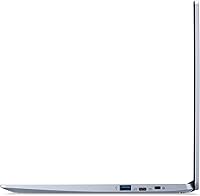
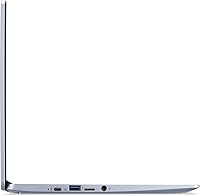
The 14-inch footprint, while manageable, is not as compact as 11- or 12-inch alternatives aimed specifically at younger students. The slim chassis also means limited port selection — there are no USB-C data ports or an SD card slot.
Connectivity
63%
37%
Two USB 3.0 ports handle most everyday needs — plugging in a mouse, a USB drive, or a wired headset — without requiring a hub for basic use. The 802.11ac Wi-Fi held up reliably across various home and school network environments.
The lack of USB-C for data or display output is a real shortcoming by modern standards — this machine cannot connect to a USB-C monitor or fast-charge via a universal cable. No HDMI port is also a notable omission for classroom or presentation scenarios.
Long-term Durability
55%
45%
Chrome OS continues to receive automatic security and performance updates, which helps keep the software side of the device running smoothly well beyond the purchase date. Software-wise, users found performance did not significantly degrade over time.
Hardware longevity is the bigger concern — the plastic body and hinge construction are not built for years of rough daily use. Several reviewers with units two or more years old noted physical wear that felt premature for the investment.
Audio Quality
52%
48%
The built-in speakers are adequate for low-volume video calls and casual listening in quiet environments. For a lightweight school device where headphones are often used anyway, the speakers rarely become a dealbreaker.
At higher volumes the speakers distort noticeably, and there is little bass or depth to the sound. Users who tried to use this Chromebook for casual music listening or shared video watching in a room found the audio underwhelming compared to even modest competing devices.

Suitable for:

The Acer Chromebook 314 14-inch Touchscreen Laptop is a practical choice for students, light home users, and anyone who spends most of their computing time inside a browser or Google's suite of apps. Middle and high schoolers will find it more than capable for assignments, research, video calls, and streaming — and the low-maintenance nature of Chrome OS means parents don't need to worry about viruses or complicated software updates. Seniors or less tech-savvy users who primarily want to browse the web, check email, and stay connected over video chat will feel right at home with its simple, clean interface. It also makes a solid secondary or shared household device — something anyone can pick up and use without setup friction. If your workflow revolves around Google Docs, Sheets, Drive, and Gmail, this Chromebook fits that routine without unnecessary complexity.
Not suitable for:

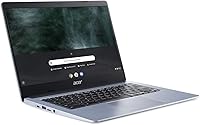
The Acer Chromebook 314 14-inch Touchscreen Laptop is a poor match for anyone whose work depends on Windows-native software, Adobe Creative Suite, or locally installed professional applications — Chrome OS simply doesn't support them. With only 4GB of RAM and a Celeron processor launched back in 2020, power users who routinely juggle many browser tabs, run Android apps alongside web tools, or do anything remotely demanding will hit walls quickly. The 64GB local storage is tight enough that users relying heavily on offline files — downloaded media, large documents, local archives — will find themselves constantly managing space. The 1366x768 screen resolution, while acceptable for casual use, is noticeably dated compared to what competing Chromebooks and budget Windows laptops now offer at similar price points. Anyone expecting a Windows-like experience or planning to use this as a primary productivity machine for demanding daily work will likely come away frustrated.
Specifications

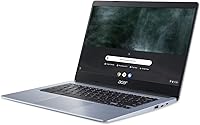
  • Display Size: The screen measures 14 inches diagonally with an HD IPS touchscreen panel.
  • Resolution: Native resolution is 1366 x 768 pixels, which is standard HD rather than Full HD.
  • Processor: Powered by an Intel Celeron N4000 dual-core processor running at up to 2.6 GHz.
  • RAM: Equipped with 4GB of LPDDR4 memory, soldered to the motherboard and not user-upgradeable.
  • Storage: Includes 64GB of eMMC flash storage built into the board, with no option to swap in a traditional SSD.
  • Operating System: Runs Chrome OS, Google's browser-centric operating system, with access to Android apps via the Google Play Store.
  • Cloud Storage: Comes bundled with 100GB of Google Drive storage, which helps compensate for the limited local storage capacity.
  • Battery Life: Acer rates battery life at up to 12.5 hours, though real-world performance typically falls shorter depending on screen brightness and workload.
  • Wireless: Supports 802.11ac (Wi-Fi 5) dual-band wireless for reliable home and school network connectivity.
  • USB Ports: Features two USB 3.0 Type-A ports for connecting peripherals, storage drives, or charging accessories.
  • Keyboard: Includes a backlit keyboard, which is a practical feature not always found on Chromebooks in this price category.
  • Graphics: Uses Intel UHD Graphics 600, integrated into the Celeron N4000 chipset, suitable for video playback and light tasks only.
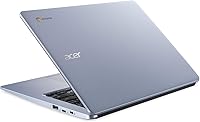
  • Weight: The unit weighs 3.75 pounds, making it light enough for daily carry in a backpack or bag.
  • Dimensions: Physical footprint measures 12.81 x 9.13 x 0.78 inches, keeping it compact enough for smaller desks and travel bags.
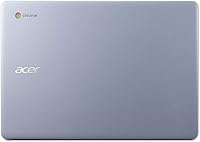
  • Color: Available in a Silver finish with a plastic chassis construction throughout.
  • Release Date: This model was first made available in May 2020, making it several years old relative to current Chromebook releases.
  • Optical Drive: No optical drive is included, which is standard for modern ultra-thin laptops and Chromebooks.
  • Power: Powered via an included AC adapter rated at 240 volts with a Lithium Metal battery pack built in.

Related Reviews

Acer Chromebook 314 14″ Laptop
78%
88%
Value for Money
84%
Display Quality
81%
Battery Life
62%
Performance
79%
Touchscreen Responsiveness
More
Acer Chromebook Plus 514 CB514-4HT
79%
83%
Everyday Performance
86%
Display Quality
78%
Touchscreen Responsiveness
81%
Battery Life
77%
Build Quality & Design
More
ASUS Chromebook CM14 (CM1402CM2A-DS44)
72%
83%
Value for Money
88%
Build Quality & Durability
74%
Performance & Speed
58%
Display Quality
84%
Battery Life
More
HP Chromebook 14a-nf0009nr 14-inch Laptop
82%
91%
Battery Life
88%
Portability & Weight
92%
Value for Money
80%
Performance for Everyday Tasks
85%
Display Quality
More
Acer Chromebook Spin 514 i5-1334U 8GB 512GB SSD 14-inch
86%
88%
Performance
92%
Battery Life
85%
Build Quality
87%
Display Quality
91%
Portability
More
HP Chromebook 14 AMD A4 Laptop
75%
83%
Value for Money
71%
Performance
67%
Display Quality
74%
Build Quality
88%
Portability
More
Acer Chromebook Plus 514 Touchscreen Laptop, Intel i3-N305, 8GB RAM, 512GB SSD
85%
88%
Overall Performance
90%
Display Quality
85%
Battery Life
87%
Portability
92%
Value for Money
More
HP Chromebook Plus x360 14-inch 2-in-1 Laptop
76%
78%
Display Quality
82%
Performance & Speed
71%
Battery Life
81%
Build Quality & Hinge
76%
Keyboard & Trackpad
More
Acer Chromebook 514 14-inch Laptop
69%
83%
Display Quality
61%
Performance
76%
Battery Life
81%
Keyboard & Typing
74%
Build & Portability
More
HP 14-dq0020nr 14-inch Laptop 64GB
80%
72%
Performance
94%
Portability
88%
Battery Life
81%
Build Quality
75%
Display Quality
More
HP 14 Celeron 14-inch Touchscreen Laptop
68%
74%
Value for Money
52%
Performance
43%
Storage Adequacy
91%
Portability
61%
Display Quality
More

FAQ

Not directly. Chrome OS does not run Windows software. However, you can use the web-based versions of Microsoft Word, Excel, and PowerPoint through a browser, or work in Google Docs and Sheets, which handle most of the same tasks. If your workflow depends on specific Windows-only programs, this machine is not the right fit.

For light, focused use — a handful of browser tabs, Google Docs, YouTube, or a video call — 4GB is workable on Chrome OS. Where it starts to struggle is when you pile on multiple apps simultaneously or run heavier Android apps alongside web browsing. If you tend to keep many tabs open at once, you may notice slowdowns.

The touchscreen is responsive and accurate enough for scrolling, tapping links, and light navigation. It is not a precision drawing surface, and the 1366x768 resolution means images and text are not as crisp as on a Full HD display. For a school or casual home device, it works well. For anything requiring fine touch input, it has limits.

It can do some things offline — Google Docs, Sheets, and Slides have offline modes, and downloaded files or media stored locally are accessible without Wi-Fi. That said, Chrome OS is fundamentally designed around cloud connectivity, so a significant portion of its usefulness depends on having an internet connection available.

Acer advertises up to 12.5 hours, but that figure is based on controlled, light-use conditions. In typical day-to-day use with moderate screen brightness and a mix of browsing, video, and app use, most users report getting somewhere between 6 and 8 hours. Still solid for a school or work day, but manage expectations around the maximum claim.

The Acer Chromebook 314 14-inch Touchscreen Laptop is genuinely well-suited for students at that level. It handles Google Classroom, research, document work, and video calls without issue. Chrome OS is easy to manage, updates itself automatically, and is resistant to malware. The backlit keyboard and touchscreen are practical bonuses for school use.
No on both counts. The RAM is soldered to the motherboard, and the eMMC storage is not designed to be replaced by end users. If local storage becomes a concern, the best workaround is using an external USB drive or relying on the included Google Drive cloud storage.

There is a real adjustment period, especially if you rely on software that does not exist on Chrome OS. The interface itself is simple and intuitive, but the absence of a traditional file system and Windows-specific apps can be disorienting at first. Most users adapt within a week or two for basic tasks, but some never fully replace their Windows habits.

The chassis is all plastic, which keeps the weight down but does not feel particularly sturdy under pressure. The hinge has drawn some concern in user reviews over time, particularly with heavy daily use. It holds up fine for careful everyday carry, but it is not built to withstand rough handling or drops the way ruggedized education-focused Chromebooks are.

Yes, the Google Play Store is available and functional on this Chromebook, giving access to a wide range of Android apps. Performance varies by app — lighter utilities and streaming apps run well, while more demanding or graphics-heavy apps may feel sluggish given the Celeron processor and 4GB RAM. It expands what the device can do, but with some practical ceiling.