

Overview
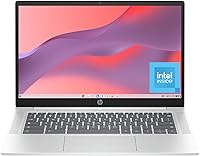
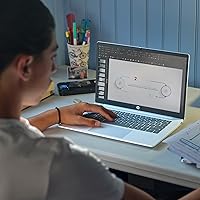
The HP Chromebook 14a 14-inch Laptop is HP's 2024 answer to a straightforward question: what do you actually need from a laptop if most of your day happens inside a browser? Powered by Intel's N100 processor and running Chrome OS, this Chromebook keeps things lean by design. The real surprise at this price tier is the 14-inch FHD IPS display — sharp, wide-angle, and easy on the eyes during long sessions. Just go in clear-eyed: this is a web-first machine built for Google apps, streaming, and light productivity. It is not a Windows replacement, and it was never meant to be.
Features & Benefits
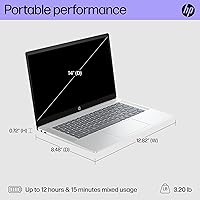
The FHD IPS panel is genuinely one of the HP 14a's strongest selling points — colors look accurate, viewing angles hold up even when someone is watching over your shoulder, and the anti-glare coating makes it usable near a window. The N100 chip handles everyday tasks without complaint: a dozen tabs, a YouTube video, a Google Meet call. Battery life consistently reaches double digits in real-world use, which is rare to see delivered at this price. The physical camera shutter is a small but useful addition for anyone doing frequent video calls. At 3.2 pounds, this budget Chrome laptop disappears easily into any backpack.
Best For
This Chromebook makes the most sense for students from middle school through college who live inside Google Workspace — Docs, Slides, Classroom, Meet. It works equally well for a parent buying a dedicated school device without worrying about malware or complicated updates. Remote workers looking for a lightweight second machine to handle emails and video calls will find it capable enough. That said, if your work depends on desktop software — Adobe apps, local databases, anything requiring Windows — this is simply not the right tool. The HP 14a is built for people who want a low-maintenance, cloud-first daily driver, nothing more.
User Feedback
Buyers consistently praise the display brightness and clarity for something at this price point, with several noting it looks better than expected out of the box. The keyboard also draws positive remarks for comfortable extended typing. Where feedback gets more mixed is multitasking: users who stack 15-plus tabs or run Google Meet alongside other apps report noticeable slowdowns — a direct result of the 4 GB RAM ceiling. The 64 GB onboard storage surprises some buyers, though Chrome OS's cloud-first approach softens that limitation in practice. Long-term build quality reports trend positive, with no widespread structural complaints surfacing among verified purchasers.
Pros
- The 14-inch FHD IPS display looks noticeably sharp and color-accurate for a laptop at this price point.
- Anti-glare coating makes the screen comfortable to use near windows or in bright rooms.
- Battery life regularly reaches 10 to 12 hours in real-world use, covering a full school or work day.
- The physical webcam privacy shutter is a practical, trust-building feature for frequent video callers.
- At 3.2 pounds, this budget Chrome laptop slides into a backpack without adding meaningful weight.
- Chrome OS handles security and updates automatically, requiring almost zero maintenance from the user.
- The Intel N100 processor keeps everyday browsing and Google Workspace tasks running without noticeable stuttering.
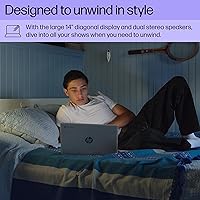
- Upfiring speakers produce clearer, more directed audio than the downward-firing setups common at this tier.
- The keyboard has earned consistent praise from buyers for comfortable, responsive everyday typing.
- Chrome OS has no history of viruses, making this Chromebook a safer choice for younger or less tech-savvy users.
Cons
- 4 GB of RAM causes real slowdowns when juggling many browser tabs alongside video conferencing apps.
- 64 GB of onboard eMMC storage fills up quickly for users who work with any local files or media.
- Only one USB 2.0 and one USB 3.0 port leave very little room for peripherals without a hub.
- The HP 14a cannot run Windows software, which is a hard dealbreaker for users tied to specific desktop apps.
- eMMC storage is noticeably slower than SSD in read and write speeds, which can affect file handling.
- Offline functionality is limited compared to traditional laptops, making poor connectivity a real problem.
- RAM is not upgradeable, so the 4 GB ceiling is permanent with no future-proofing option.
- The Intel UHD integrated graphics cannot handle any serious local gaming or GPU-intensive creative work.
- Wi-Fi is capped at 802.11ac with no Wi-Fi 6 support, which may matter in congested network environments.
Ratings
Our AI rating system analyzed thousands of verified global purchases of the HP Chromebook 14a 14-inch Laptop, actively filtering out incentivized, bot-generated, and duplicate submissions to surface what real buyers actually experience. Scores reflect an honest synthesis of both the praise and the frustrations that show up consistently across international markets. Where this Chromebook punches above its weight and where it falls short are both represented transparently below.
Display Quality
Performance
Battery Life
Value for Money
Storage Adequacy
Build Quality
Keyboard & Trackpad
Webcam Quality
Speaker Quality
Portability
Connectivity
Chrome OS Experience
Setup & Ease of Use
Thermal & Fan Noise
Suitable for:
The HP Chromebook 14a 14-inch Laptop was clearly designed with a specific type of user in mind, and for that user, it delivers real value. Students from middle school through college who spend most of their day inside Google Docs, Slides, Meet, or Classroom will find it more than capable for their daily workload. Parents who want to hand their kids a durable, low-fuss device that stays updated automatically and sidesteps the malware risks of Windows will appreciate the peace of mind Chrome OS provides. Remote workers who need a reliable secondary machine for email, video calls, and light document work will get through a full day on a single charge without stress. If your digital life revolves around the Google ecosystem — Drive, Gmail, YouTube, and Chrome extensions — this Chromebook fits that workflow naturally and without compromise.
Not suitable for:
The HP Chromebook 14a 14-inch Laptop is an honest, capable machine, but it will frustrate buyers who have not thought carefully about what Chrome OS actually means in practice. Anyone who relies on Windows-only software — Adobe Creative Suite, Microsoft Office desktop apps, local gaming titles, or specialized business tools — will hit a wall immediately, since those applications simply do not run here. The 4 GB RAM ceiling is a genuine limitation for power users; stacking more than ten or twelve browser tabs alongside a video call starts to show lag, which becomes annoying quickly if multitasking is central to how you work. The 64 GB onboard storage also demands a cloud-first mindset — users who prefer storing large files, media libraries, or offline content locally will find the space gone faster than expected. If you are hoping this Chromebook can serve as your only computer for demanding or versatile work, it is the wrong tool for the job.
Specifications
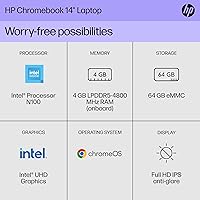
- Display: 14-inch FHD IPS panel with a 1920x1080 resolution, 178-degree wide viewing angles, and an anti-glare coating for comfortable use in varied lighting conditions.
- Processor: Intel N100 processor clocked at up to 3.4 GHz, designed for efficient everyday computing with a focus on low power consumption.
- RAM: 4 GB of DDR5 system memory, soldered to the motherboard and not user-upgradeable.
- Storage: 64 GB eMMC internal storage, suited for a cloud-first workflow given the inherent capacity and speed limitations of eMMC compared to a traditional SSD.
- Operating System: Chrome OS, Google's browser-centric operating system that receives automatic security and feature updates without user intervention.
- Graphics: Intel UHD Graphics integrated into the N100 processor, capable of handling FHD video playback and standard web content but not dedicated gaming or GPU workloads.
- Battery Life: HP rates battery life at up to 12 hours on a single charge under typical usage conditions.
- Webcam: HP True Vision HD camera with a built-in physical privacy shutter that mechanically blocks the lens when not in use.
- Speakers: Dual upfiring speakers positioned to direct audio toward the user rather than downward into the desk surface.
- Weight: The laptop weighs 3.2 pounds, keeping it practical for daily carry in a school bag or work tote.
- Dimensions: The chassis measures 12.82 x 8.48 x 0.72 inches, making it slim enough to fit comfortably in standard laptop sleeves.
- Wireless: Wi-Fi 5 (802.11a/b/g/n/ac) with Bluetooth support for wireless peripherals and accessories.
- USB Ports: Connectivity includes one USB 2.0 port and one USB 3.0 port, with no USB-C port listed among the confirmed specifications.
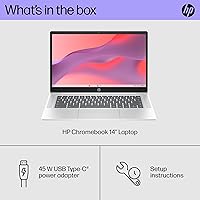
- Charging: The unit charges via a 45-watt power adapter included in the box.
- Power Source: One lithium-ion battery is built into the unit and included with purchase.
- Color: Available in a Silver finish with a plastic chassis construction consistent with the budget laptop category.
- Release Date: This model was first made available in April 2024, making it a current-generation Chromebook as of this writing.
- Warranty: HP typically covers Chromebook hardware with a one-year limited warranty; buyers should verify coverage terms at the time of purchase.
Related Reviews
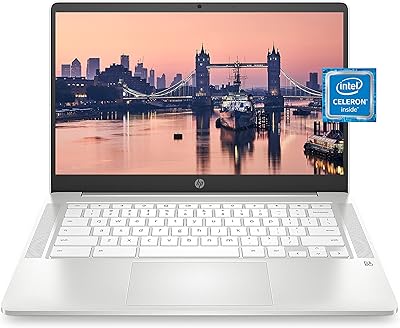

HP Chromebook 14 AMD A4 Laptop
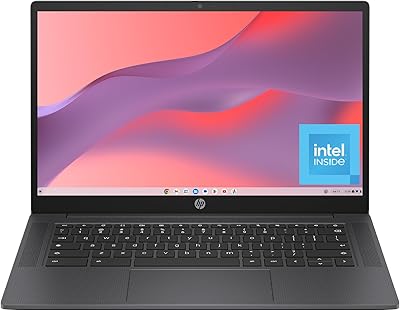
HP Chromebook 14a-nf0099nr

HP 14-dq0020nr 14-Inch Laptop

HP Chromebook Plus x360 14-inch 2-in-1 Laptop


HP 14 Celeron 14-inch Touchscreen Laptop

ASUS Chromebook CM14 (CM1402CM2A-DS44)
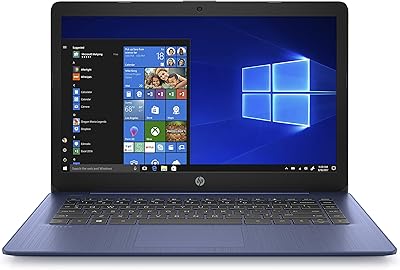
HP Stream 14-inch Laptop