Overview

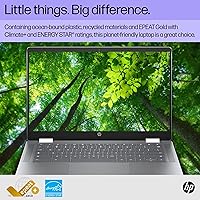
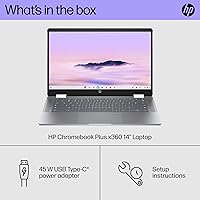
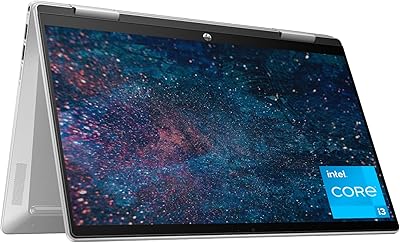
The HP Chromebook Plus x360 14-inch 2-in-1 Laptop is HP's 2024 entry into the elevated Chromebook Plus tier, aimed squarely at students, remote workers, and everyday users who want more than a bare-bones browser machine. The 2-in-1 convertible design is a real differentiator — flipping between laptop and tablet modes genuinely changes how you use the screen day to day. Chrome OS keeps things fast, secure, and refreshingly low-maintenance, though it's worth being upfront: if your work depends on Windows-only software, this machine will hit its limits quickly. Think of this Chromebook Plus as a productivity and media device, and it delivers on that promise comfortably.
Features & Benefits

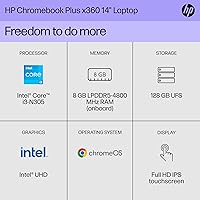
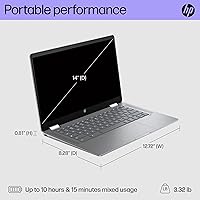
The 14-inch FHD IPS touchscreen is one of the strongest arguments for choosing the HP x360 14 over cheaper alternatives — colors are vibrant and touch response in tablet mode feels accurate. Under the hood, the Intel Core i3-N305 is an 8-core chip that handles dozens of browser tabs, video calls, and document editing without slowdown, supported by 8 GB of fast LPDDR5 RAM. Storage is 128 GB UFS, which loads apps noticeably quicker than the eMMC drives typical at this price. Battery life hovers around 10 hours in everyday use — enough for a full school day. At 3.32 lbs, day-to-day portability is genuine rather than just a spec-sheet claim.

Best For

This convertible Chromebook is built for people who prioritize reliability and simplicity over raw horsepower. Students and remote workers will find it covers all the essentials — Google Workspace, video conferencing, web browsing, and light media — without the maintenance overhead of a Windows machine. It also works well as a shared household device for streaming and casual use. If you live in a browser and the occasional Android app, Chrome OS fits naturally into your routine. That said, creative professionals or anyone dependent on Windows desktop applications should look elsewhere — the color gamut won't satisfy photographers or designers, and there's no Thunderbolt port for high-speed peripherals. Know what you need, and it's a well-matched tool.

User Feedback

Buyers who've used the HP x360 14 consistently praise the hinge durability — the 360-degree mechanism holds up through repeated folding into tent and tablet mode, which isn't always a given at this price. Display color and clarity relative to cost also draw frequent compliments. Where opinions split is battery life: real-world numbers tend to fall short of the official spec, with many users landing closer to 7 or 8 hours under typical loads. Chrome OS compatibility is a recurring concern for those switching from Windows, particularly around software gaps. On the upside, keyboard feel earns consistent positive marks for a machine in this class, and overall buyer sentiment leans favorable among those who understood what they were buying.

Pros

  • The 14-inch FHD IPS touchscreen delivers crisp, vibrant visuals that punch above the typical quality at this price tier.
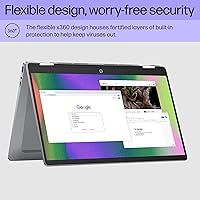
  • The 2-in-1 hinge is sturdy and practical, making the switch between laptop and tablet mode feel purposeful rather than gimmicky.
  • Chrome OS stays fast, secure, and up to date automatically — there is essentially no maintenance burden on the user.
  • The Intel Core i3-N305 handles everyday multitasking comfortably, with no noticeable lag across browser-heavy workloads.
  • 128 GB UFS storage loads apps and files faster than the eMMC drives found in most competing Chromebooks at similar prices.
  • At 3.32 lbs and under an inch thick, this convertible Chromebook is easy to carry in a backpack all day without fatigue.
  • Real-world battery life comfortably covers a school day or standard workday for most users.
  • Keyboard feel earns consistent praise from buyers, especially for a machine in this class.
  • The platform has never had a virus — a genuine advantage for non-technical users and shared household devices.

Cons

  • Users switching from Windows frequently hit frustrating compatibility walls with software that simply does not exist on Chrome OS.
  • The 62.5% sRGB color coverage is noticeably below average and rules out any serious photo or design work.
  • Real-world battery life often falls 2 to 3 hours short of the official specification under typical mixed-use conditions.
  • RAM is soldered onboard with no upgrade path, so 8 GB is the ceiling for the lifetime of the device.
  • Wi-Fi 5 (802.11ac) is dated — buyers who have invested in Wi-Fi 6 or 6E home networks will not get full speed benefit.
  • The 250-nit display brightness can struggle in direct sunlight or bright outdoor settings.
  • There is no Thunderbolt port, limiting high-speed peripheral and external display options compared to Windows competitors.
  • Android app support on Chrome OS remains inconsistent — some apps work well, others feel awkward or crash unexpectedly.
  • No optical drive and limited local storage may feel restrictive for users not fully committed to cloud-based workflows.

Ratings

Our AI rating system analyzed thousands of verified owner reviews for the HP Chromebook Plus x360 14-inch 2-in-1 Laptop from buyers worldwide, actively filtering out incentivized, bot-generated, and duplicate submissions to surface what real everyday users actually experienced. The scores below reflect a balanced synthesis of genuine praise and recurring frustrations — nothing is glossed over. Where this convertible Chromebook earns strong marks, you will see why; where it falls short, that is reflected just as honestly.
Display Quality
78%
22%
For a mid-range Chromebook, the IPS panel draws consistent praise for producing sharp, well-saturated colors during streaming and everyday web use. Students and remote workers particularly appreciate how readable the 1920x1080 screen is during video calls and document work at typical indoor brightness levels.
The 62.5% sRGB coverage is a recurring sore point among buyers who expected better color accuracy — photographers and anyone doing visual creative work quickly noticed that colors look less faithful than on competing panels. At 250 nits, the screen also fades noticeably in bright rooms or near windows.
Performance & Speed
82%
18%
The Intel Core i3-N305 handles the everyday Chrome OS workload with confidence — buyers report smooth performance even with 15 or 20 browser tabs open alongside a video call. The 8 GB of LPDDR5 RAM makes a tangible difference compared to 4 GB entry-level Chromebooks that start to stutter under similar loads.
Push the machine beyond its comfort zone into Linux app environments or heavier Android applications and the cracks begin to show. A handful of users noted occasional lag when running multiple demanding Android apps simultaneously, a reminder that this is not a machine built for heavy lifting.
Battery Life
71%
29%
Most users covering a standard school day or a typical remote work session report getting through the day without reaching for a charger, which is exactly what this class of device promises. Light users browsing and writing documents often land comfortably in the 8 to 9 hour range.
The advertised 10-plus hour figure does not hold up under real mixed-use conditions for most buyers. Video calls, higher screen brightness, and active Android app use routinely pull real-world battery life down to 6 or 7 hours, which is notably below what the spec sheet implies.
Build Quality & Hinge
81%
19%
The 360-degree hinge consistently earns positive mentions from buyers who use it daily — it feels firm, does not wobble, and holds position reliably whether the device is in tent mode for a presentation or fully flipped into tablet orientation for reading. The overall chassis feels more solid than what you typically find at this price.
Some buyers noted the plastic body picks up light scratches over time, and the Mineral Silver finish, while attractive initially, shows wear around high-contact areas like the edges and palm rest after several months of regular use.
Keyboard & Trackpad
76%
24%
Typing on this Chromebook Plus over extended sessions feels more comfortable than the shallow keyboards common in budget laptops — key travel is reasonable and feedback is consistent. Remote workers who spend hours in documents or email report few complaints about hand fatigue.
The trackpad, while functional, lacks the precision and smoothness buyers accustomed to premium Windows or Mac trackpads might expect. A small number of users also noted inconsistent palm rejection when typing quickly in tablet-adjacent positions.
2-in-1 Versatility
79%
21%
The ability to fold into tent mode for watching content or flip fully into tablet mode for reading and light sketching is genuinely useful in daily life, particularly for students moving between note-taking and leisure. The touchscreen response in all positions is accurate and responsive.
Without a bundled stylus, the tablet mode experience is mostly limited to finger-based touch interaction, which feels less polished than competing convertibles that include a pen. Heavier users also note that at 3.32 lbs, this is not a device you want to hold like a tablet for extended periods.
Chrome OS Experience
74%
26%
For users already living in Google's ecosystem — Docs, Drive, Meet, Classroom — Chrome OS is a smooth and genuinely pleasant operating environment that stays fast, updates quietly in the background, and has not had a recorded virus in its history. The learning curve for Google-first users is essentially zero.
Users migrating from Windows consistently flag software compatibility as a real frustration, particularly around productivity tools, desktop-class creative apps, and niche professional software that simply does not exist on Chrome OS or its Android app equivalents. This is the platform's most significant limitation and the leading cause of buyer regret.
Storage & UFS Speed
77%
23%
The UFS storage architecture gives this convertible Chromebook a noticeable edge over eMMC-equipped rivals — app launches and file access feel snappy in day-to-day use, and the faster storage contributes to the overall impression of a responsive machine.
128 GB fills up faster than many buyers anticipate once Android apps, offline files, and downloaded media start to accumulate. Without an expandable storage slot on this model, users who are not disciplined about cloud offloading may find themselves managing storage actively within the first year.
Portability
86%
At 3.32 lbs and under an inch thick, this machine slides into a backpack without adding burdensome weight, and students carrying it across campus or commuters putting it in a shoulder bag consistently report that portability is one of the device's most underappreciated practical strengths.
While the weight is fine for a 14-inch convertible, buyers expecting something approaching ultrabook-level lightness may be mildly surprised — it is not feather-light, just reasonably manageable, and in tablet mode the weight becomes more noticeable than in laptop form.
Wireless Connectivity
63%
37%
Wi-Fi 5 handles typical household and office environments without issue, and Bluetooth connectivity for headphones, mice, and keyboards works reliably in daily use. For the majority of buyers, the wireless performance is invisible in the best possible sense.
Wi-Fi 5 (802.11ac) is a dated standard in a 2024 device — buyers who have upgraded their home networks to Wi-Fi 6 or 6E will not benefit from the faster speeds their router supports. No Thunderbolt port also limits high-speed wired connectivity options for users who care about that.
Display Brightness
61%
39%
Indoors and in controlled lighting, 250 nits is workable for most everyday tasks, and the IPS panel's viewing angles mean sharing the screen with someone beside you does not require awkward repositioning.
250 nits is genuinely insufficient for outdoor or bright-window use, and this is a complaint that appears across buyer reviews with some regularity. Users who expected to use this device on a patio or in a sunny café find the screen washes out to the point of discomfort.
Value for Money
83%
Relative to what this class of Chromebook delivered just two or three years ago, the HP x360 14 offers a meaningful step forward in processor capability, storage speed, and build quality for the price. Buyers who set appropriate expectations around Chrome OS consistently feel they got a good return.
Some buyers feel the price could buy a capable entry-level Windows laptop, and when Chrome OS limitations are factored in, the value equation becomes more subjective. The lack of a stylus, the dated Wi-Fi standard, and the non-upgradeable RAM all take small bites out of the long-term value argument.
Webcam & Audio
67%
33%
The built-in webcam performs adequately for video calls in well-lit spaces — meeting participants report clear enough image quality for Google Meet and Zoom sessions, which is the primary use case for most buyers in this category.
Low-light webcam performance degrades noticeably, and the speakers, while passable for solo media consumption, lack bass and volume depth that would make them suitable for group viewing or casual presentations without an external audio device.
Setup & Ease of Use
88%
Buyers praise how quickly this convertible Chromebook is ready to use out of the box — sign in with a Google account and within minutes the device is configured, apps are available, and everything is synced. For non-technical users or families setting up a shared device, this simplicity is a genuine selling point.
The ease of setup masks an adjustment period for anyone coming from a traditional desktop OS environment. New Chrome OS users occasionally find the file management approach and the absence of a traditional application installer confusing in the first week of use.

Suitable for:

The HP Chromebook Plus x360 14-inch 2-in-1 Laptop is a strong match for students, remote workers, and households that center their digital lives around a browser and Google's ecosystem. If your daily routine involves Google Docs, Sheets, Meet, or Classroom, this machine handles all of it without breaking a sweat or demanding much from you technically. The convertible hinge makes it genuinely useful for students who like to switch between note-taking in laptop mode and reading or sketching in tablet mode. Remote workers who spend most of their day in video calls, web apps, and cloud-based tools will find the performance more than adequate, and the long battery life means fewer interruptions during back-to-back meetings. Families looking for a shared device for streaming, light browsing, and the occasional Android game will also get solid value here, especially given that Chrome OS essentially runs itself with automatic updates and strong built-in security.
Not suitable for:

The HP Chromebook Plus x360 14-inch 2-in-1 Laptop will frustrate buyers who depend on Windows-native software — there is no workaround for apps like Adobe Premiere, full Microsoft Office desktop versions, or specialized industry tools that simply do not exist on Chrome OS or Android. Photographers and designers should be aware that the display covers only 62.5% of the sRGB color space, which makes accurate color-critical work unreliable on this screen. The Intel UHD integrated graphics can handle casual gaming at modest settings, but anyone expecting to run modern PC titles at playable frame rates will be disappointed. There is no Thunderbolt port, which limits connectivity for users who rely on high-speed external drives or advanced docking setups. Power users who regularly push a machine with video editing, large spreadsheet modeling, or local software compilation will find the hardware ceiling arrives sooner than they would like.

Specifications

  • Display: 14-inch FHD IPS touchscreen with 1920x1080 resolution, multi-touch support, edge-to-edge glass, and a micro-edge bezel design.
  • Brightness: The panel outputs 250 nits of peak brightness, which is adequate for indoor use but may wash out in direct sunlight.
  • Color Gamut: The display covers 62.5% of the sRGB color space, which is below average and not recommended for color-sensitive creative work.
  • Processor: Intel Core i3-N305 with 8 cores, 8 threads, up to 3.8 GHz boost clock via Intel Turbo Boost, and 6 MB L3 cache.
  • RAM: 8 GB LPDDR5 RAM running at 4800 MHz, soldered onboard with no user-upgradeable slot available.
  • Storage: 128 GB UFS internal storage, which offers faster sequential read and write speeds than the eMMC storage found in most entry-level Chromebooks.
  • Graphics: Intel UHD integrated graphics, capable of 4K video streaming and casual gaming at 720p without a discrete GPU.
  • Battery Life: HP rates battery life at approximately 10.15 hours; real-world use typically lands closer to 7 to 8 hours under mixed workloads.
  • Weight: The device weighs 3.32 lbs, making it practical for daily carry in a backpack or tote without significant fatigue.
  • Dimensions: Physical footprint measures 12.72 x 8.28 x 0.81 inches, keeping the chassis slim enough to fit comfortably in standard laptop sleeves.
  • Wireless: Supports Wi-Fi 5 (802.11a/b/g/n/ac) and Bluetooth for wireless connectivity; Wi-Fi 6 is not supported on this model.
  • Form Factor: 360-degree hinge design enables four usage modes: laptop, tent, stand, and full tablet, with multi-touch screen support in all positions.
  • Operating System: Ships with Chrome OS, Google's cloud-first operating system with automatic updates, built-in virus protection, and Android app support via Google Play.
  • Memory Type: LPDDR5 memory operates at 4800 MHz, providing power-efficient high-bandwidth performance suited to multitasking in a battery-dependent device.
  • Keyboard Finish: Features a paint-cover and keyboard frame finish with a textured base for improved grip during use in laptop and tent modes.
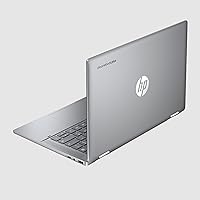
  • Color: Available in Mineral Silver, a neutral matte-style finish that resists obvious fingerprinting better than glossy alternatives.
  • Ports & Wireless: Wireless connectivity is via Wi-Fi 5 and Bluetooth; specific port configuration includes USB-C and USB-A, with no Thunderbolt support.
  • Year Released: This model was made available in March 2024 as part of HP's Chromebook Plus lineup, which targets the upper mid-range Chrome OS segment.

Related Reviews

HP Envy x360 14″ 2-in-1 Laptop
75%
82%
Build Quality
79%
Display Quality
76%
Performance
77%
Keyboard & Trackpad
68%
Battery Life
More
HP Envy x360 16-inch 2-in-1 Laptop (Core Ultra 5 125U, 16GB, 1TB)
76%
88%
Display Quality
83%
Performance & Speed
79%
Build Quality & Design
61%
Portability & Weight
67%
Battery Life
More
Dell 14 Plus Laptop DB14250-14-inch 2.5K, Intel Core Ultra 7, 16GB RAM, 1TB SSD
85%
91%
Performance
94%
Display Quality
85%
Battery Life
88%
Build Quality
86%
Keyboard Usability
More
HP OmniBook X Flip 14″ 2K Touch-Screen 2-in-1 Laptop, AMD Ryzen AI 7 3500U, 24GB RAM, 1.5TB Storage
86%
92%
Performance
90%
Display Quality
88%
Multitasking & RAM
94%
Storage Capacity
84%
Portability & Weight
More
HP Chromebook 14a-nf0009nr 14-inch Laptop
82%
91%
Battery Life
88%
Portability & Weight
92%
Value for Money
80%
Performance for Everyday Tasks
85%
Display Quality
More
Samsung Chromebook Plus V2 64GB
74%
88%
Portability & Build Quality
83%
Display Quality
91%
Built-in Stylus
67%
Performance for Everyday Tasks
74%
Chrome OS Experience
More
HP Chromebook 14 AMD A4 Laptop
75%
83%
Value for Money
71%
Performance
67%
Display Quality
74%
Build Quality
88%
Portability
More
HP 14-dq0020nr 14-inch Laptop 64GB
80%
72%
Performance
94%
Portability
88%
Battery Life
81%
Build Quality
75%
Display Quality
More
Acer Chromebook Plus 514 CB514-4HT
79%
83%
Everyday Performance
86%
Display Quality
78%
Touchscreen Responsiveness
81%
Battery Life
77%
Build Quality & Design
More
HP Pavilion x360 14-inch Laptop, 13th Gen Intel Core i3, 8GB RAM, 256GB SSD
82%
80%
Performance
92%
Portability
85%
Display Quality
88%
Battery Life
83%
Build Quality
More

FAQ

Not directly. The HP Chromebook Plus x360 14-inch 2-in-1 Laptop runs Chrome OS, which does not support Windows software. You can use Microsoft 365 through a browser or the Android app versions from Google Play, but those are not identical to the full desktop applications. If you rely heavily on Windows-native tools, this machine will feel limiting.
Buyer feedback is generally positive on this front. The 360-degree hinge feels solid and holds its position well, whether you are using it as a tablet for reading or propped in tent mode for a video call. It does not feel flimsy the way cheaper convertibles sometimes do, which is one of the more appreciated build qualities on this model.

It is usable in the shade or in a room with indirect light, but 250 nits is not going to cut it in direct sunlight. If you regularly work outdoors, the screen will wash out and become harder to read. For indoor environments it is perfectly fine.

For most Chrome OS users, yes. Since Chromebooks are built around cloud storage and streaming, local storage requirements are lower than on a Windows machine. If you plan to store a lot of Android apps, offline files, or downloaded media, you will want to manage storage consciously or use Google Drive for overflow.

No — the 8 GB of RAM is soldered directly to the motherboard and cannot be upgraded or replaced. The storage is also fixed. What you buy is what you get for the life of the device, so factor that in if you tend to hold onto laptops for more than three or four years.

Yes, it handles this kind of use well. Google Meet, Zoom via browser or Android app, and Microsoft Teams all run without issue on this hardware. The processor and 8 GB of RAM are comfortable territory for video conferencing alongside open browser tabs, which covers the typical student or remote worker workload.

The official figure is around 10 hours, but real-world use tends to land in the 7 to 8 hour range depending on screen brightness and what you are running. For a school day or a standard office day, that is usually sufficient. If you are running video calls heavily or keeping brightness high, plan to charge earlier.

Casually, yes. The Intel UHD graphics can handle Android games from the Play Store, and it can stream games through services like NVIDIA GeForce Now or Xbox Cloud Gaming without much trouble. For locally installed PC gaming, the hardware is not designed for it — expect modest frame rates at low settings on any game that runs via Linux or Android.

There is a short adjustment period, especially if you are used to having a traditional file system and desktop applications. Most people get comfortable within a few days. The main friction point is when you reach for a Windows program and realize it is not available — that is less of a learning curve and more of a platform limitation to be aware of going in.

For reading, streaming, and casual touch use in tablet mode, it works well. The screen is responsive and the hinge holds the position firmly. For drawing or sketching, it does not include a stylus in the box, and while some USI styluses are compatible, this is not a device designed around pen input the way a dedicated drawing tablet or high-end 2-in-1 would be.