Overview

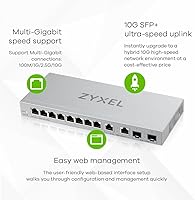
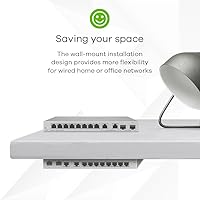
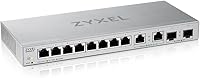
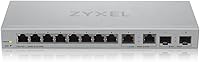
The Zyxel XGS1010-12 12-Port Multi-Gigabit Managed Switch is one of the more practical upgrades available for anyone pushing beyond standard gigabit networking without wanting to spend enterprise money. Packed into a compact silver chassis, it combines eight standard GbE ports, two 2.5G ports, and two 10G SFP+ uplinks — a port mix that covers most prosumer or small office scenarios in one unit. What separates it from a plain unmanaged switch is the web-managed interface, which gives you real traffic control without needing CLI experience. It sits flat on a desk or mounts to a wall, a flexible form factor that matters when networking gear has to fit into tight or unconventional spaces.
Features & Benefits

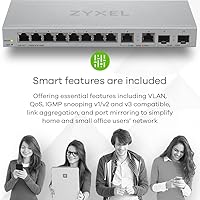
The eight GbE ports handle everyday device connections — laptops, printers, smart TVs — while the two 2.5G ports are where things get interesting for NAS users or anyone with a newer workstation motherboard that supports multi-gig speeds. The pair of 10G SFP+ fiber uplinks are well-suited for connecting to a core switch or a server with a 10G NIC, giving this Zyxel switch real backbone potential. VLANs, QoS, and traffic monitoring are all handled through a browser-based GUI — no command line required. The unit runs quietly, making it comfortable to keep on a desk, and the plug-and-play behavior on standard ports means initial setup takes minutes, not an afternoon.

Best For

This multi-gigabit managed switch is a strong fit for home lab builders running a NAS, a Proxmox or ESXi host, or both, who want proper network segmentation without paying for a full enterprise stack. It also makes sense for small businesses or creative professionals who have upgraded to 2.5G-capable machines and finally want their switch to keep up. Gamers with high-end motherboards featuring 2.5G NICs will appreciate having ports that actually match their hardware. Anyone who has outgrown a basic unmanaged switch but finds enterprise gear too complex or too costly will find the XGS1010-12 lands in a genuinely useful middle ground.

User Feedback

Users consistently praise the XGS1010-12 for reliable port performance and a reasonably approachable web UI, especially those stepping up from fully unmanaged hardware. Real-world throughput on the 2.5G and SFP+ ports tends to meet expectations, with NAS transfers and server uplinks performing well in practice. On the critical side, buyers new to managed switches often flag thin documentation — figuring out VLAN configuration without prior experience involves some trial and error. Several reviewers mention the plastic chassis feels modest, though durability complaints are rare. A handful of users have noted occasional firmware quirks post-purchase, but nothing that appears widespread or consistently disruptive to daily operation.

Pros

  • The mixed port layout — GbE, 2.5G, and 10G SFP+ — covers multiple speed tiers in one compact unit.
  • Web-managed interface makes VLAN and QoS setup accessible without needing CLI experience.
  • Real-world throughput on 2.5G and SFP+ ports consistently meets expectations for NAS and server use.
  • Plug-and-play behavior on standard ports means basic setup takes minutes for first-time users.
  • Desktop and wall-mount flexibility lets it fit into home labs, shelves, or small office spaces.
  • Quiet operation makes it a practical choice for desk-side or living space deployments.
  • The XGS1010-12 sits at a price point that would have bought a basic gigabit switch just a few years ago.
  • Zyxel has a solid track record in the prosumer networking space, which adds confidence in long-term support.

Cons

  • Documentation is thin, and first-time managed switch users often have to rely on community forums to get through initial VLAN setup.
  • The plastic chassis feels modest and may not inspire confidence in rougher or less climate-controlled environments.
  • Only two 2.5G ports limits simultaneous multi-gig device connections for larger home labs.
  • Occasional firmware quirks have been reported by a subset of users after updates.
  • No built-in PoE support means separate hardware is needed if you power access points or IP cameras.
  • The web UI, while usable, lacks the polish and responsiveness of higher-end managed switch interfaces.
  • Wall-mount hardware and accessories are not always included in the box, requiring a separate purchase.
  • With only 12 ports total, growing networks may outgrow this switch faster than expected.

Ratings

The scores below reflect an AI-driven analysis of verified global user reviews for the Zyxel XGS1010-12 12-Port Multi-Gigabit Managed Switch, with spam, bot activity, and incentivized feedback actively filtered out before scoring. Each category captures what real buyers consistently praised or criticized in their own words, giving you an honest picture of where this switch excels and where it falls short. Both the strengths and the friction points are represented transparently so you can make a genuinely informed decision.

Port Versatility
91%
Users repeatedly highlight the mixed-speed port layout as one of the most practical things about this switch in real home lab and small office setups. Having GbE, 2.5G, and 10G SFP+ in one box means buyers rarely need a second device to cover different speed tiers across their network.
With only two 2.5G ports, users running multiple NAS units or several 2.5G-capable workstations at the same time hit a ceiling quickly. A few reviewers specifically wished for four 2.5G ports instead of two to better serve growing prosumer environments.
Value for Money
88%
Buyers consistently describe this Zyxel switch as punching above its price class, particularly when comparing it to competitors offering fewer port speed tiers at the same cost. For home lab builders who would otherwise need two separate switches, the all-in-one layout represents a genuine saving.
Some users feel the plastic construction undermines the value story slightly — paying for multi-gig performance but receiving a chassis that feels budget-grade creates a mild disconnect. A small segment of reviewers believe closer competitors offer slightly better build materials for a comparable outlay.
Web Management Interface
79%
21%
For buyers stepping up from an unmanaged switch, the browser-based GUI lands well — VLAN setup, QoS rules, and port monitoring are accessible without a single command line. Users with even moderate networking familiarity report completing initial configuration within 20 to 30 minutes.
The interface feels dated compared to more modern managed switch UIs, and responsiveness can be sluggish when navigating between menus. First-time managed switch users frequently note that the UI layout is not intuitive enough to figure out entirely on its own without outside help.
Setup Experience
86%
Plug-and-play behavior on the standard ports means the switch is immediately functional right out of the box, which is a real comfort for users who just want reliable connectivity without touching any settings. Several reviewers described the initial hardware installation as taking under five minutes.
While the physical setup is simple, configuring managed features for the first time is where friction appears. Users coming from completely unmanaged backgrounds often spend extra time hunting for community guides because the included documentation does not walk through common scenarios in enough detail.
Throughput Performance
89%
Real-world throughput on both the 2.5G copper ports and the 10G SFP+ uplinks consistently meets rated speeds in user testing, with NAS transfers and server backup jobs completing noticeably faster after upgrading from a standard gigabit switch. Gamers and content creators with compatible hardware report that the bandwidth improvement is immediately tangible.
A small number of users noted occasional throughput inconsistencies on the SFP+ ports when using certain third-party transceivers, suggesting compatibility testing is worth doing before committing to a specific module brand. These issues appear to be edge cases rather than a widespread pattern.
Build Quality
63%
37%
The switch is compact and light enough to sit unobtrusively on a desk or mount cleanly to a wall, and the overall assembly feels solid enough for static indoor use. Users in home lab or office environments generally report no physical issues after extended deployment.
The plastic chassis is the most consistently criticized aspect of the hardware — buyers at this price tier expect at least a partial metal enclosure, and several reviews use words like flimsy or cheap to describe the feel in hand. It does not affect performance, but it does affect perceived quality at unboxing.
Documentation Quality
51%
49%
The quick-start card is clear enough to get the switch physically connected and reachable on a network without much trouble. For buyers who only ever use it as an unmanaged switch, the documentation is entirely sufficient.
Anything beyond basic connectivity — VLAN configuration, QoS tuning, port mirroring — is covered superficially at best in the included materials. A notable portion of user reviews mention relying on third-party YouTube walkthroughs or community forums to complete configurations that should be covered in the official guide.
Noise Level
93%
The fanless thermal design is genuinely appreciated by users who place the switch in living rooms, home offices, or on open desks — there is simply nothing to hear during operation. Multiple reviewers specifically upgraded to this switch from a fan-cooled unit and cited the silence as a quality-of-life improvement.
In environments with poor airflow or where the switch is enclosed in a tight cabinet, the passively cooled chassis can run warm to the touch during sustained high-throughput sessions. This is a minor concern for most users but worth noting for anyone planning to enclose it in a sealed space.
Firmware Reliability
67%
33%
The base firmware on the XGS1010-12 runs stably for the majority of users over long periods, with core switching functions operating consistently without requiring reboots or resets. Most buyers report a set-it-and-forget-it experience once their configuration is dialed in.
Post-update firmware issues have been reported by a visible minority of users, including occasional port behavior quirks and web UI glitches that appeared after applying an update. While Zyxel does release patches, the release notes are not always detailed enough to know what risks a given update carries.
Physical Flexibility
82%
18%
The ability to deploy this switch either flat on a desk or wall-mounted is genuinely useful in compact home lab setups where rack space is limited. The footprint is small enough that it fits comfortably on a shelf alongside a NAS or mini PC without dominating the space.
Wall-mount hardware is not always reliably included in every retail package, which has caught some buyers off guard during installation. A few users also found the power adapter cable shorter than ideal for certain mounting positions.
Compatibility
84%
The switch works well with a wide range of devices across its port types — standard RJ45 connections are universally compatible, and the SFP+ slots accept both Zyxel-branded and popular third-party modules or DAC cables in most cases. Users integrating this into mixed-brand home lab environments report smooth interoperability.
Compatibility with certain off-brand SFP+ transceivers can be hit or miss, and a subset of users needed to try multiple module brands before finding reliable ones. This is not unique to this switch, but it adds a small research burden for buyers sourcing budget uplink hardware.
Future-Proofing
87%
As 2.5G NICs become standard on consumer motherboards and NAS devices, the port mix on this Zyxel switch looks increasingly well-positioned for the next several years without requiring a replacement. Buyers who invested early in multi-gig infrastructure report the switch aged well relative to their other hardware upgrades.
The two-port limit on 2.5G connectivity will eventually feel constraining as more devices in a typical home lab gain multi-gig capabilities. Users planning to expand their 2.5G device count beyond two should consider whether this switch will still meet their needs in two to three years.
PoE Support
22%
78%
For users who have no need to power devices directly from the switch, the absence of PoE is entirely irrelevant and does not affect the core use case at all. Buyers who already own separate PoE injectors or a dedicated PoE switch for their access points are unaffected.
The complete lack of any PoE output is a genuine blocker for buyers who want to consolidate their network hardware by powering access points, IP cameras, or VoIP phones from a single switch. This is the single most common reason reviewers cite for returning or replacing the unit.
Brand Support
72%
28%
Zyxel has an established presence in the prosumer and SMB networking space, and firmware updates have been issued for the XGS1010-12 since its launch, which gives buyers reasonable confidence in continued support. Community forums and third-party resources for Zyxel managed switches are reasonably well-populated.
Official customer support responsiveness receives mixed reviews — some users report quick and helpful responses, while others describe slow turnaround times for technical queries. The depth of Zyxel's self-service knowledge base for this specific model is considered thin by a portion of the user base.

Suitable for:

The Zyxel XGS1010-12 12-Port Multi-Gigabit Managed Switch is built for the kind of buyer who has outgrown a basic unmanaged switch but has no interest in paying enterprise prices or wrestling with a full CLI. Home lab enthusiasts running a NAS, a hypervisor, or a mix of both will find the port layout genuinely practical — the 2.5G ports align well with modern NAS devices, while the 10G SFP+ uplinks handle server or backbone connections without bottlenecking. Small business owners or prosumers who want to segment guest traffic, prioritize VoIP, or simply understand what is happening on their network will benefit from the web-managed interface without needing a certification to use it. Content creators and power users with 2.5G-capable workstations or gaming rigs will finally have a switch that matches their hardware rather than limiting it. Anyone thinking a few years ahead — as multi-gig NICs become standard on consumer motherboards — will appreciate having the infrastructure already in place.
Not suitable for:

The Zyxel XGS1010-12 12-Port Multi-Gigabit Managed Switch is not the right choice for buyers who need a fully unmanaged, zero-configuration plug-in solution and never want to think about network settings. If you run a demanding enterprise environment requiring Layer 3 routing, advanced OSPF or BGP configurations, or deep CLI control, this switch will feel limited — it is firmly a Layer 2 web-managed device. Users who need more than 12 ports, or who specifically require a full rack-mount chassis with redundant power options, will need to look elsewhere. The plastic build may also give pause to buyers who expect metal construction at this price tier, particularly for installations in less controlled environments. Anyone on an extremely tight budget who only needs basic gigabit connectivity and has no use for VLANs or QoS will likely find cheaper unmanaged options more than sufficient for their actual needs.

Specifications

  • Brand: Manufactured by Zyxel, a networking hardware company with a long track record in prosumer and SMB switching equipment.
  • Model Number: The exact model identifier is XGS1010-12, also referenced in some listings as XGS1210-12-ZZ0102F.
  • Total Ports: The switch provides 12 total ports across three speed tiers: 8x Gigabit Ethernet, 2x 2.5G, and 2x 10G SFP+.
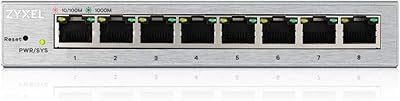
  • GbE Ports: Eight RJ45 ports operate at standard Gigabit Ethernet speeds, suitable for connecting everyday wired devices.
  • Multi-Gig Ports: Two RJ45 ports support 2.5G speeds, designed for NAS devices, newer workstations, or 2.5G-capable access points.
  • SFP+ Uplinks: Two 10G SFP+ fiber uplink ports allow high-bandwidth backbone connections to a core switch or 10G-equipped server.
  • Switching Capacity: Total non-blocking switching capacity is 24 Gbps, sufficient to support simultaneous multi-speed traffic across all ports.
  • Management: The switch is managed via a browser-based web GUI, supporting VLAN, QoS, port mirroring, and basic traffic monitoring.
  • Form Factor: Compact desktop design with wall-mount support included, making it adaptable to shelves, racks, or wall installations.
  • Power Input: The unit operates on 12V DC external power via an included adapter.
  • Case Material: The outer enclosure is constructed from plastic, finished in silver.
  • Item Weight: The switch weighs 2.64 pounds, making it light enough for easy repositioning or wall mounting.
  • Dimensions: Product dimensions are listed as approximately 11.81 x 11.81 x 11.81 inches, though real-world footprint is notably compact.
  • Interface Types: Physical interfaces include RJ45 copper ports for standard and 2.5G connections, plus SFP+ slots for fiber or DAC cable uplinks.
  • Launch Date: The XGS1010-12 first became available in May 2024, making it a relatively recent addition to Zyxel's managed switch lineup.
  • Compatibility: Compatible with standard Ethernet devices including desktops, laptops, gaming consoles, NAS units, and servers with matching NIC speeds.
  • Noise Level: The switch uses a fanless or low-noise thermal design, making it suitable for quiet home or office desktop environments.
  • Network Layer: The XGS1010-12 operates at Layer 2, supporting web-managed features without Layer 3 routing functionality.

Related Reviews
NETGEAR XS512EM 12-Port 10G Multi-Gigabit Smart Managed Switch
87%
88%
Performance under Load
93%
Ease of Setup
90%
Energy Efficiency
85%
Connectivity Options
91%
Build Quality
More
Zyxel GS1200-8 8-Port Gigabit Managed Switch
82%
88%
Ease of Setup
83%
Web Interface Usability
79%
Build Quality
97%
Noise Level
81%
VLAN Performance
More
Zyxel MG-105 5-Port 2.5G Unmanaged Switch
80%
93%
Network Performance
97%
Ease of Setup
89%
Value for Money
62%
Build Quality
98%
Noise Level
More
MokerLink 12-Port Gigabit PoE+ Unmanaged Switch
74%
93%
Ease of Setup
86%
PoE Reliability
88%
Build Quality
91%
Value for Money
94%
Fanless & Noise
More
Binardat 10G12-1200GSM 12-Port Managed Switch
75%
91%
Value for Money
88%
Feature Depth
74%
Setup & Usability
71%
SFP Module Compatibility
82%
Build Quality
More
MokerLink 12-Port 10G SFP+ Managed Switch
74%
91%
Value for Money
93%
Feature Depth
88%
Network Performance
82%
Build Quality
47%
Fan Noise
More
Cudy GS1016E 16-Port Managed Gigabit Switch
78%
88%
Value for Money
84%
Ease of Setup
83%
Build Quality
76%
Web Management Interface
81%
VLAN Functionality
More
Tenda TEG208E 8-Port Managed Gigabit Switch
85%
94%
Value for Money
88%
Ease of Setup
91%
Build Quality
93%
Network Performance
97%
Noise Level
More
NETGEAR GS308E 8-Port Managed Network Switch
81%
93%
Reliability & Uptime
96%
Silent Operation
67%
Ease of Setup
78%
Web Management Interface
88%
Value for Tier
More
NETGEAR GS305E 5-Port Gigabit Managed Switch
76%
93%
Value for Money
84%
Setup & Ease of Use
81%
Build Quality & Durability
88%
Network Performance & Throughput
97%
Silent Operation
More
Zyxel GS1100-16 16-Port Gigabit Ethernet Switch
85%
88%
Performance
94%
Ease of Setup
91%
Energy Efficiency
85%
Build Quality
92%
Noise Levels
More

FAQ

Not really, at least not for basic use. Plug in your devices and it works out of the box like any unmanaged switch. If you want to configure VLANs or QoS, you will access the web interface through a browser, which is straightforward — though first-timers may need to spend some time getting familiar with the layout since the documentation is not particularly detailed.

Yes. The 2.5G RJ45 ports are backward compatible and work fine with Cat5e or Cat6 cabling you likely already have. You do not need to rewire anything to take advantage of the higher speeds on those ports.

The two 10G SFP+ slots are compatible with standard 10GBASE-SR, 10GBASE-LR, and similar SFP+ modules, as well as passive or active DAC (direct attach copper) cables. Zyxel sells compatible modules, but many third-party SFP+ transceivers also work well in practice.

It runs quietly. The thermal design does not rely on active fans, so there is no fan noise to worry about. It is a comfortable choice for a home office desk or media cabinet where noise matters.

No, this switch does not include Power over Ethernet on any port. If you need to power access points, IP cameras, or VoIP phones directly from the switch, you will need a separate PoE switch or PoE injectors.

Absolutely. If you never touch the management interface, it behaves just like an unmanaged switch — plug in your devices and they communicate normally. The management features are there when you need them, not something you are forced to configure.

You connect to the switch via a browser using its default IP address, which is typically printed on a label on the unit or listed in the quick-start guide. From there you log in with the default credentials and can begin configuring VLANs, QoS rules, and other settings.

For a desktop or wall-mounted home or office installation, the plastic chassis holds up fine in normal conditions. It is not ruggedized for industrial use, but for the environments this switch is designed for, durability complaints are rare among actual users.

Yes, any of the eight standard GbE ports can uplink to an existing gigabit router or switch without any issue. If your upstream device supports 10G, you can use one of the SFP+ ports instead for a faster backbone connection.

A small number of users have reported minor quirks after firmware updates, though serious widespread issues are not common. Zyxel does provide firmware updates through their support portal, and in most cases the web UI includes a rollback or recovery option. It is a good habit to check the release notes before updating.

Where to Buy