Overview

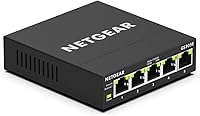
The NETGEAR GS305E 5-Port Gigabit Managed Switch sits in an interesting middle ground — it is not the dumb box you plug in and forget, but it is nowhere near the complexity of a full enterprise switch. NETGEAR calls this tier Smart Plus, which means you get a web-based interface for configuring VLANs, traffic priorities, and basic security, without needing a CLI or a networking degree. For anyone who has maxed out a plain unmanaged switch and wants actual control over their network without a steep investment, the GS305E hits a practical sweet spot. Its compact, fanless body can sit on a desk or mount to a wall, genuinely disappearing into a setup without drawing attention or making noise.
Features & Benefits

Five gigabit ports sounds modest, but for a NAS, a few workstations, and a dedicated IoT segment, it is plenty. The real value is the web-based management GUI, which lets you carve out 802.1Q VLANs, apply QoS rules to prioritize VoIP traffic, and enable IGMP snooping for cleaner multicast handling — all without touching a command line. The GS305E also includes auto DoS protection and storm control, which you rarely find at this price point. IEEE 802.3az compliance means the switch scales back power draw when ports sit idle. No fans, no noise, no moving parts — just a solid black unit that quietly does its job around the clock.

Best For

This 5-port smart switch is a natural fit for home lab enthusiasts who want to practice VLAN segmentation or QoS tuning without committing to costly pro-grade hardware. It works equally well in a small office needing to separate VoIP traffic from general browsing, or a media room where any fan noise from networking gear would be unacceptable. Network-savvy homeowners looking to isolate smart home devices from their main PCs will find the basic VLAN support sufficient for that task. Where this managed switch falls short: there is no PoE, no fiber uplink, and no link aggregation support. Know your requirements before you buy.

User Feedback

With a 4.7 out of 5 rating across more than five thousand reviews, buyer satisfaction for this managed switch is hard to argue with. Recurring praise focuses on how approachable the web interface is, consistent uptime over months of use, and genuinely silent operation. The criticism is fair though: the GUI looks dated, and the NETGEAR Insight app adds little at this product tier. More technical buyers flag the lack of CLI access and absent LACP link aggregation as real drawbacks. Most low ratings come from buyers expecting full Layer 2 or 3 enterprise capabilities from a Smart Plus switch. Set expectations right and disappointment is unlikely.

Pros

  • Basic VLAN, QoS, IGMP snooping, and storm control are all included — rare at this price tier.
  • Completely fanless design means zero noise, even in dead-silent rooms or home theaters.
  • Web GUI setup is accessible enough that non-expert users can configure VLANs without prior experience.
  • All five ports deliver full gigabit throughput reliably under typical small-network workloads.
  • Auto DoS protection adds meaningful baseline security that most unmanaged switches completely skip.
  • Wall-mount hardware is included in the box — no additional purchases needed for a clean installation.
  • IEEE 802.3az compliance actively reduces power draw on idle ports, which adds up in always-on setups.
  • A 3-year limited hardware warranty is genuinely generous for a switch in this category.
  • The GS305E has a strong real-world track record, with thousands of buyers reporting consistent, reliable uptime.
  • Compact footprint fits easily on a crowded desk or inside a media cabinet without dominating the space.

Cons

  • No PoE on any port — a hard dealbreaker for anyone needing to power cameras or access points.
  • The web GUI looks and feels dated compared to similarly priced competitors on the market today.
  • No CLI access whatsoever, which frustrates advanced users who prefer scripted or automated configuration.
  • LACP link aggregation is entirely absent, limiting throughput options to a NAS or server.
  • NETGEAR Insight cloud management integration is too limited at this tier to be practically useful.
  • No SFP fiber uplink port, making it unsuitable for connecting into larger or more complex network backups.
  • Security features stop at storm control and auto DoS — no 802.1X authentication or advanced ACL support.
  • The power adapter adds cable clutter at the rear that takes deliberate effort to manage cleanly.
  • Heat management is fully passive, so enclosed cabinet installations with no airflow carry a long-term risk.
  • Firmware update process through the GUI is cumbersome and poorly documented for less experienced users.

Ratings

The scores below reflect an AI-driven analysis of verified global buyer reviews for the NETGEAR GS305E 5-Port Gigabit Managed Switch, with spam, bot-submitted, and incentivized feedback actively filtered out before scoring. Ratings are distributed across categories that real buyers care about most — from daily reliability to the nuances of the web interface — and the results capture both what this switch does well and where it genuinely falls short.

Value for Money
93%
For the price, getting basic VLAN segmentation, QoS, storm control, and auto DoS protection in a single compact unit is hard to beat. Home lab users especially appreciate that this switch lets them learn managed networking concepts without a large upfront investment.
A small number of buyers felt the cost was harder to justify once they realized the GUI is barebones and certain advanced features — like link aggregation — are simply absent regardless of price.
Setup & Ease of Use
84%
Most buyers had the web interface up and running within minutes of plugging in, with no driver installation required. Users upgrading from a purely unmanaged switch found the learning curve surprisingly manageable for tasks like creating VLANs or enabling IGMP snooping.
The interface assumes some baseline networking knowledge — buyers with no prior exposure to VLANs or QoS occasionally found the terminology confusing with minimal in-app guidance to help them along.
Build Quality & Durability
81%
19%
The all-metal housing feels solid for a switch in this price bracket, and long-term owners frequently mention units running without issue for two or more years in always-on environments. The wall-mount hardware included in the box adds confidence that NETGEAR built this to stay put.
The plastic port bezels and overall aesthetic feel more utilitarian than premium, and a few buyers noted the unit runs slightly warm during sustained heavy traffic — not alarmingly so, but worth noting in enclosed spaces.
Network Performance & Throughput
88%
All five ports deliver full gigabit throughput reliably, and buyers running NAS backups, 4K media streaming, and simultaneous VoIP calls report consistent, drop-free performance. The switch handles typical small-network workloads without any perceptible bottlenecks.
The GS305E is not rated for heavy enterprise traffic volumes, and a small minority of power users pushing simultaneous high-bandwidth transfers across all ports noticed occasional micro-latency spikes under sustained maximum load.
Silent Operation
97%
The fanless design delivers truly zero audible noise — buyers who placed this switch in bedrooms, recording studios, or home theater racks consistently praised it as completely inaudible even in dead-silent environments. This is one of its most universally appreciated qualities.
The absence of active cooling means heat management relies entirely on passive airflow, so installing it in a sealed cabinet with no ventilation is not advisable for long-term reliability.
Web GUI Quality
61%
39%
The interface is functional and gets the job done for standard tasks — creating VLANs, setting QoS rules, checking port statistics — without requiring any software installation beyond a browser. For casual managed-switch users, it covers the essentials reliably.
The GUI design looks noticeably dated compared to rivals, and navigation feels clunky when toggling between configuration sections. Advanced users accustomed to modern switch interfaces from competitors found it frustrating to work with over extended sessions.
VLAN Configuration
78%
22%
Basic 802.1Q VLAN support works as expected for the most common use cases: separating IoT devices, creating a guest network segment, or isolating a NAS from the rest of the network. Home lab users and SOHO buyers found this level of VLAN control genuinely useful.
The VLAN feature set stops well short of what advanced users need — there is no MAC-based VLAN, no protocol-based VLAN, and the overall configuration depth is limited compared to true Layer 2 managed switches.
QoS & Traffic Prioritization
74%
26%
QoS works adequately for basic prioritization tasks like giving VoIP traffic preference over file downloads, which is exactly what most small office buyers need from this switch. Users running Zoom or Teams calls alongside large file transfers noticed real improvement after enabling it.
QoS options are fairly coarse — there is no deep packet inspection or application-aware prioritization, and experienced network engineers will find the granularity insufficient for anything beyond simple port-based or DSCP priority rules.
Energy Efficiency
86%
IEEE 802.3az compliance means the switch actively scales down power consumption on idle or low-traffic ports, which buyers running always-on home lab setups genuinely noticed in their electricity costs over time. It is a practical feature that works quietly in the background.
There is no power monitoring dashboard or per-port consumption reporting in the GUI, so buyers cannot actually measure the savings — they have to take the energy efficiency claims on faith.
Security Features
77%
23%
Auto DoS protection and storm control are real, functional security features that most unmanaged switches completely omit. For a home or small office network, having automatic flood and attack mitigation built in at this price point provides meaningful baseline protection.
Security coverage ends there — there is no 802.1X port-based authentication, no MAC address filtering beyond basic controls, and no support for advanced ACLs, leaving security-focused buyers wanting more.
Physical Footprint & Mounting
89%
The compact form factor sits comfortably on a desk without dominating the surface, and the included wall-mount hardware is a thoughtful touch that many similarly priced switches omit. Buyers who wall-mounted it in a media closet or behind a TV praised how cleanly it installed.
At just over 13 inches wide, it is slightly larger than some buyers expected for a 5-port switch, and the power brick adds a little cable clutter at the back that takes some effort to manage neatly.
NETGEAR Insight App Integration
43%
57%
The GS305E is nominally compatible with the NETGEAR Insight cloud management platform, which is attractive on paper for buyers who manage multiple devices and want centralized visibility.
In practice, Insight integration at this product tier is extremely limited — most of the meaningful remote management and monitoring features require higher-end NETGEAR hardware. Buyers who purchased the GS305E expecting robust cloud management were broadly disappointed.
Link Aggregation (LACP) Support
29%
71%
For buyers who have no need to bond multiple ports for increased throughput to a NAS or server, this omission is irrelevant and does not affect daily use at all.
LACP link aggregation is entirely absent, which is a notable gap for a switch marketed as managed. Users who wanted to bond two ports to a NAS for increased bandwidth had to look elsewhere, and this was one of the more consistent technical complaints from advanced reviewers.
Warranty & Manufacturer Support
82%
18%
A 3-year limited hardware warranty is genuinely generous for a switch in this category and signals reasonable confidence from NETGEAR in the hardware longevity. Buyers who needed warranty support generally reported the RMA process was handled without major friction.
Technical support quality for firmware bugs or software configuration issues received mixed feedback — NETGEAR's support documentation for the Smart Plus tier is thinner than for their higher-end lines, leaving some users to rely on community forums for answers.

Suitable for:

The NETGEAR GS305E 5-Port Gigabit Managed Switch is built for the kind of buyer who has outgrown a basic plug-and-play switch but has no desire to wrestle with enterprise-grade hardware. Home lab enthusiasts who want to practice real VLAN segmentation — isolating a NAS, separating IoT gadgets from their main PCs, or carving out a guest network — will find the Smart Plus feature set more than adequate for those goals. Small and home office setups that need basic QoS to keep VoIP calls crisp while large file transfers run in the background are another natural fit. AV installers and media room builders will appreciate that the fanless design produces absolutely zero noise, making it a clean choice for any acoustically sensitive space. If you are wall-mounting a switch in a utility closet or tucking it behind a TV cabinet, the included mounting hardware and compact footprint make that straightforward without extra purchases.

Not suitable for:

Anyone who needs to power devices — IP cameras, wireless access points, or VoIP desk phones — directly from their switch should look elsewhere immediately, because the NETGEAR GS305E 5-Port Gigabit Managed Switch has no PoE on any port, and that is not something firmware can fix. Network engineers or IT professionals who rely on CLI access, LACP link aggregation, 802.1X port authentication, or advanced ACL configurations will hit a hard ceiling with this switch very quickly. Businesses that need to centrally manage multiple switches via cloud dashboards should know that NETGEAR Insight support at this tier is minimal at best. Users who need fiber uplinks or SFP slots to connect to a larger network backbone will also find this switch too limited for that purpose. Essentially, if your requirements go meaningfully beyond basic VLAN tagging, QoS, and storm control, this Smart Plus switch is the wrong category entirely — a true Layer 2 managed switch from NETGEAR or a competitor would serve you better.

Specifications

  • Total Ports: The switch provides 5 x 10/100/1000 Mbps (gigabit) Ethernet RJ45 ports, all auto-negotiating and auto-MDI/MDIX.
  • Management Type: Managed via NETGEAR Smart Plus web GUI — a browser-based interface requiring no dedicated software installation.
  • VLAN Support: Supports 802.1Q tagged VLANs for basic network segmentation across connected devices.
  • QoS: Basic Quality of Service prioritization allows users to assign traffic priority per port or using DSCP markings.
  • IGMP Snooping: IGMP snooping is supported, enabling the switch to manage multicast traffic more efficiently across the local network.
  • Storm Control: Built-in storm control limits broadcast, multicast, and unknown unicast traffic to protect network stability.
  • DoS Protection: Automatic Denial-of-Service (DoS) attack mitigation is built in and active without requiring manual configuration.
  • PoE Support: This switch has no Power over Ethernet capability on any port — external power supplies are required for all connected devices.
  • SFP Ports: No SFP or fiber uplink ports are included; all connectivity is copper RJ45 only.
  • Cooling System: Fully fanless passive cooling design ensures completely silent operation under all normal usage conditions.
  • Energy Standard: Compliant with IEEE 802.3az Energy Efficient Ethernet, which reduces power consumption on ports during low-traffic or idle periods.
  • Dimensions: The unit measures 12.99 x 7.87 x 1.57 inches, making it suitable for desktop placement or wall mounting.
  • Weight: The switch weighs 1.17 pounds excluding the power adapter, keeping it lightweight and easy to position or mount.
  • Mounting Options: Supports both desktop and wall mounting, with all necessary mounting hardware included in the box.
  • Switching Capacity: Non-blocking switching fabric delivers 10 Gbps total switching capacity across all five gigabit ports simultaneously.
  • MAC Address Table: Supports a MAC address table of up to 2,000 entries, sufficient for small office and home lab environments.
  • Jumbo Frame Support: Supports jumbo frames up to 9,000 bytes, which benefits NAS transfers and storage-intensive workloads.
  • Warranty: Backed by a 3-year limited hardware warranty with NETGEAR ProSAFE lifetime technical support included.
  • Color & Housing: Ships in black with a metal housing designed for durability in both desktop and wall-mounted installations.
  • Link Aggregation: LACP (802.3ad) link aggregation is not supported on this switch model.

Related Reviews
NETGEAR GS308E 8-Port Managed Network Switch
81%
93%
Reliability & Uptime
96%
Silent Operation
67%
Ease of Setup
78%
Web Management Interface
88%
Value for Tier
More
NETGEAR GS305EP 5-Port PoE Gigabit Switch
79%
91%
Ease of Setup
78%
PoE Performance
97%
Noise Level
67%
Management Interface
72%
Build Quality
More
NETGEAR GS105NA 5-Port Gigabit Unmanaged Switch
85%
97%
Ease of Setup
93%
Network Performance
88%
Build Quality
96%
Noise Level
91%
Value for Money
More
NETGEAR MS105 5-Port Multi-Gigabit Unmanaged Switch
76%
96%
Plug-and-Play Setup
88%
Multi-Gig Port Performance
91%
Build Quality & Materials
94%
Fanless & Noise Level
67%
Value for Money
More
NETGEAR GS305P v2 5-Port Gigabit Ethernet PoE Switch
87%
93%
Ease of Setup
89%
PoE Power Delivery
94%
Noise Level (Fanless Design)
85%
Build Quality
91%
Energy Efficiency
More
NETGEAR XS512EM 12-Port 10G Multi-Gigabit Smart Managed Switch
87%
88%
Performance under Load
93%
Ease of Setup
90%
Energy Efficiency
85%
Connectivity Options
91%
Build Quality
More
NETGEAR XS505M 5-Port 10G Multi-Gigabit Ethernet Unmanaged Switch
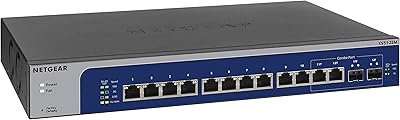
87%
91%
Performance
94%
Setup and Installation
88%
Build Quality
85%
Energy Efficiency
93%
Fanless Operation (Noise Level)
More
D-Link DGS-1100-05PDV2 5-Port Gigabit PoE Managed Switch
82%
92%
Value for Money
88%
Ease of Setup
90%
Quiet Operation
85%
PoE Functionality
87%
Energy Efficiency
More
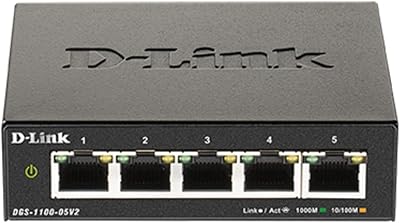
D-Link DGS-1100-05V2 5-Port Gigabit Smart Managed Switch
85%
91%
Value for Money
92%
Ease of Setup
88%
Performance & Reliability
89%
Energy Efficiency
93%
Quiet Operation
More
Tenda TEG1005D 5-Port Gigabit Switch
89%
96%
Setup and Installation
88%
Performance During Heavy Use
85%
Build Quality and Durability
92%
Noise Level (Fanless Design)
90%
Traffic Handling and Optimization
More

FAQ

No dedicated software is needed. The GS305E is managed entirely through a web browser — just connect it to your network, find its IP address (usually via your router's DHCP client list), and log in from any browser. The interface loads without installing anything extra on your computer.

Unfortunately, no. This managed switch has no Power over Ethernet (PoE) support on any of its ports, which means it cannot deliver power to access points, IP cameras, or VoIP phones through the network cable. You would need a separate PoE injector or a PoE-capable switch for those devices.

It depends on what you mean by beginner. If you have never heard of VLANs or QoS, the setup might feel unfamiliar at first, but the web interface is reasonably approachable and NETGEAR provides basic documentation. That said, this switch is really aimed at users who have at least a foundational interest in networking concepts — someone who just needs ports to share internet access would be better served by a cheaper unmanaged switch.

Completely silent. There are no fans inside — zero. You can place it in a bedroom, recording studio, or home theater rack and never hear a thing from it. This is one of the most consistently praised aspects across thousands of buyer reviews.

Yes, and this is actually one of the most popular use cases for the GS305E. The switch supports 802.1Q tagged VLANs, which lets you put IoT devices on a separate logical network so they cannot directly communicate with your computers or NAS. You will need a VLAN-capable router to handle inter-VLAN routing if you want devices on different VLANs to reach the internet.

Technically yes, but practically speaking the Insight integration at this product tier is very thin. Most of the remote monitoring and management features that make Insight useful require higher-end NETGEAR hardware. Buyers who purchased this switch expecting robust cloud-based management have generally been disappointed, so treat the local web GUI as your primary management tool.

No — LACP (802.3ad) link aggregation is not supported on this switch. If bonding ports for higher throughput to a NAS or server is a requirement for your setup, you will need to step up to a more fully featured managed switch that explicitly lists LACP support.

The management interface is only accessible from within your local network by default, which is sensible from a security standpoint. It does not have a built-in remote access portal, so you cannot manage it directly from outside your home or office without a VPN. The switch also includes auto DoS protection and storm control, which provide useful baseline security at the network level.

Yes — it connects to any router or modem with a standard Ethernet port and works as a downstream switch to expand your wired connections. It is not a router or modem itself, so it does not replace either device. You simply plug one port into your router and connect your other devices to the remaining four ports.

Firmware updates are done manually through the web GUI by downloading the update file from NETGEAR's support site and uploading it through the interface. The process works but is a bit clunky compared to switches that support automatic cloud-pushed updates. NETGEAR does release occasional firmware updates for this model, so it is worth checking their support page periodically, especially after first purchase.

Where to Buy