Overview

The Binardat 10G12-1200GSM 12-Port Managed Switch is one of those rare budget finds that makes you do a double-take at the feature list. For a price that sits firmly in mid-range territory, you're getting a fully managed L3 switch with BGP4, OSPF, and RIP support — protocols you'd normally associate with far pricier hardware. Binardat isn't a household name, but this 10G fiber switch has quietly climbed to #204 in Amazon's networking switch category, which says something. One important caveat upfront: fiber-only design means no RJ45 ports whatsoever. If you need copper uplinks, look elsewhere. This targets homelabbers, prosumers, and small businesses who know exactly what they're getting into.
Features & Benefits

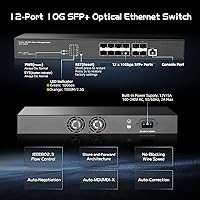
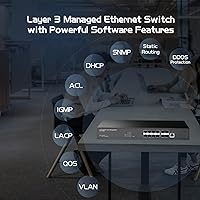
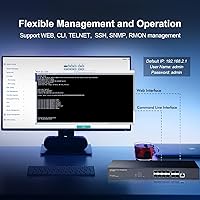
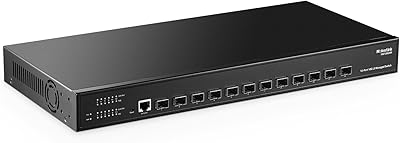
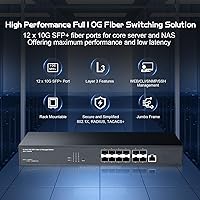
All 12 ports are full 10G SFP+, with backward compatibility for 1G and 2.5G modules, so you're not locked into a single speed tier. The switching fabric runs at 240Gbps in a non-blocking configuration, meaning every port can push wire-speed simultaneously without contention. What really stands out is the management depth — OSPF, BGP4, static routing, ACL, QoS, and DHCP server all onboard, accessible via web UI, SSH, Telnet, or a physical console port. The SFP slots use open standard interfaces with no vendor encryption, so third-party modules work without issue. The metal chassis supports rack, desktop, or wall mounting, and the industrial fan keeps thermals in check during sustained loads.

Best For

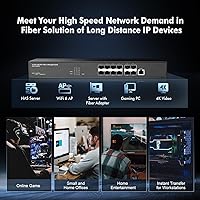
This SFP+ switch hits a sweet spot for homelab builders who want a genuine 10G fiber backbone without spending on Cisco or Juniper gear. If you're running VLANs, need inter-VLAN routing, or want to experiment with OSPF without a separate router appliance, this fits neatly into that role. Small offices with existing fiber infrastructure will appreciate the port density and routing features at this price point. IT professionals looking to test BGP configurations in a lab setting will find the feature set surprisingly capable. It's not the right pick for environments requiring copper RJ45 connectivity, and it's not enterprise-grade — but for its intended audience, it punches well above its cost.

User Feedback

Buyers generally respond well to the web UI accessibility — several users with limited managed switch experience report getting VLANs and routing configured without much trouble. That said, DAC cable users frequently hit a snag: DAC support is disabled by default and must be enabled manually through the web interface under port configuration settings, which catches people off guard. Fan noise comes up regularly, worth noting for anyone planning a home office install. On the module side, cheap off-brand SFPs sometimes go unrecognized; sticking to reputable module brands avoids most frustration. Documentation quality appears to vary — some find it adequate, others wish it were more thorough. Overall, the consensus leans positive for the price.

Pros

  • All 12 ports run at full 10G SFP+ speeds with support for 1G and 2.5G modules as well.
  • The non-blocking 240Gbps switching fabric means no port ever has to wait for bandwidth.
  • L3 routing features including OSPF, BGP4, and static routing are genuinely functional, not just listed on a spec sheet.
  • Open standard SFP slots accept third-party modules freely, keeping long-term costs down.
  • Multiple management interfaces — web UI, SSH, Telnet, and console — give experienced users real flexibility.
  • The web UI is approachable enough that users new to managed switches can get VLANs running without much struggle.
  • Metal chassis with rack, desktop, and wall-mount support covers a wide range of installation scenarios.
  • At this price point, the L3 feature depth is difficult to match from any comparable competing option.
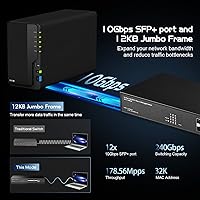
  • The 16K MAC address table handles moderately complex network topologies without issue.
  • Jumbo frame support up to 12KB is a practical bonus for storage or virtualization traffic.

Cons

  • No RJ45 ports at all — every connection requires an SFP module or fiber, adding cost and complexity.
  • DAC cable support is disabled by default and requires a manual configuration step that is easy to miss.
  • Fan noise is noticeable and makes this a poor fit for quiet home or shared office environments.
  • Binardat is a lesser-known brand with no established track record for long-term firmware support.
  • Some off-brand or generic SFP modules go unrecognized, which can be frustrating if you have existing cheap transceivers.
  • Documentation quality is inconsistent and may not provide enough guidance for less experienced users.
  • No SFP modules are included in the box, so the real out-of-pocket cost rises depending on how many ports you need active.
  • As a Chinese third-party brand, post-purchase support options are limited compared to established networking vendors.

Ratings

The scores below for the Binardat 10G12-1200GSM 12-Port Managed Switch were generated by AI after analyzing verified buyer reviews from multiple global markets, with spam, incentivized feedback, and bot activity actively filtered out. Each category reflects what real users consistently praised or complained about, weighted by how frequently those sentiments appeared across independent sources. Both the strengths and the friction points are represented here without sugarcoating.
Value for Money
91%
For buyers who understand what they are getting, this SFP+ switch delivers a genuinely hard-to-match combination of L3 routing features, port density, and 10G speeds at a price that undercuts comparable managed switches by a significant margin. Homelab users in particular report feeling like they got enterprise-adjacent functionality without the enterprise price tag.
The value calculation shifts once you factor in the cost of SFP modules, which are not included and required for every single port. Buyers who did not account for transceiver costs upfront occasionally felt the real total spend was higher than expected.
Feature Depth
88%
The breadth of supported protocols — OSPF, BGP4, RIP, ACL, QoS, SNMP, DHCP server — genuinely surprises users who are used to paying far more for this level of L3 capability. IT professionals setting up lab environments report that the routing feature set holds up well for real-world testing scenarios, not just basic connectivity.
A handful of users found that some advertised features required more digging to locate and configure than expected, particularly within the web UI. The feature list reads ambitiously, and while most functions work, a few edge-case configurations have produced inconsistent results for advanced users.
Setup & Usability
74%
26%
Users new to managed switches generally report a positive first experience with the web interface, finding that basic tasks like VLAN setup and port configuration are accessible without deep networking expertise. The availability of SSH, Telnet, and console access alongside the web UI gives experienced administrators the flexibility they expect.
DAC cable support being disabled by default catches a notable number of users off guard, requiring a non-obvious manual step in the port configuration menu before the cables register at all. Documentation quality is inconsistent, and users who hit edge cases often found themselves searching forums rather than relying on official guidance.
SFP Module Compatibility
71%
29%
The open standard SFP+ slots with no vendor encryption mean that modules from reputable third-party brands work reliably, which is a genuine advantage for users who want to shop around rather than being tied to a single supplier. Most users report that name-brand transceivers from established manufacturers are recognized immediately without any configuration.
Generic or off-brand modules, especially very cheap ones sourced from unknown suppliers, frequently go unrecognized and require either replacement or firmware-level workarounds. This is a real frustration for users who already owned a collection of lower-cost modules and assumed they would work out of the box.
Build Quality
82%
18%
The all-metal chassis feels solid and appropriately dense for a 1U rack device, and users consistently note that it does not feel flimsy or lightweight in the way some budget networking gear can. The industrial-grade fan and the sturdy port construction give it a credible physical presence that matches the feature set.
Fan noise is the most consistently cited physical complaint, with several users describing it as louder than expected for a home or small office environment. The unit is clearly designed with a server room or wiring closet in mind, and it shows when deployed anywhere near a living or working space.
Port Density & Speed
86%
Having 12 full 10G SFP+ ports in a 1U form factor at this price is genuinely competitive, and the non-blocking switching fabric means every port can push wire speed simultaneously without any compromise. Users building out 10G fiber backbones in a homelab appreciate not having to mix in slower uplink ports.
The fiber-only design is a hard limitation that eliminates this switch from consideration for anyone needing even a single copper RJ45 port for direct device connection. There is no hybrid option, which narrows the audience to users who are already committed to fiber infrastructure.
Thermal Management
76%
24%
The industrial-grade fan keeps operating temperatures in check even under sustained full-load conditions, and users running the switch in enclosed rack cabinets report no thermal throttling or unexpected shutdowns during extended operation. The 0–40°C operating range covers most real-world deployment environments comfortably.
The trade-off for that reliable thermal performance is persistent fan noise, which is louder than many competitors in the same price range. A few users have noted the fan runs at a fixed speed regardless of load, meaning there is no quiet idle mode for low-traffic periods.
Management Interface
73%
27%
The web UI covers a wide range of configuration tasks in a reasonably organized layout, and users managing VLANs, link aggregation, and SNMP monitoring report that the interface gets the job done without requiring command-line expertise for most common tasks. SSH access adds a clean CLI option for users who prefer scripting or automation.
The interface lacks the polish of more established brands, and navigating to less common features can feel unintuitive without prior experience on this specific platform. A few users reported that the UI occasionally required a page refresh to reflect configuration changes, which is a minor but recurring annoyance.
Documentation Quality
58%
42%
Users with prior managed switch experience typically find enough in the provided materials to get the core configuration done, and the web UI itself contains enough inline labeling to guide through standard setups like VLAN tagging and spanning tree configuration.
For less experienced users, the documentation falls noticeably short, with several reporting that they had to rely on community forums or third-party tutorials to resolve setup questions that should have been covered in the manual. The DAC cable configuration process in particular is absent or buried in the official materials.
Routing Protocol Performance
83%
OSPF and BGP4 function reliably for the use cases this switch is realistically targeting — homelab routing experiments, small office inter-VLAN setups, and edge deployments with modest peering requirements. IT professionals using it for protocol testing report that convergence behavior and route propagation work as expected under typical conditions.
The switch is not tested or certified for high-scale enterprise routing scenarios, and users who pushed BGP configurations toward more complex topologies occasionally observed stability quirks. It performs well within its intended scope, but the limits of that scope become apparent under heavier routing loads.
Mounting Flexibility
84%
The inclusion of rack mount brackets, desktop rubber feet options, and wall mount support in the same package makes this the Binardat managed switch a genuinely flexible hardware choice for different installation contexts. Users who needed to wall-mount in a small office or set it on a shelf in a homelab appreciated not having to source additional hardware.
The 330mm depth is on the larger side for a 12-port switch, and users with shallow wall cabinets or compact rack enclosures occasionally found the physical fit tighter than expected. The unit is not unusually large by networking standards, but it is worth measuring before ordering for constrained spaces.
Brand Reliability & Support
53%
47%
The product has maintained a strong sales rank and has been available since late 2023 without being delisted, which gives moderate confidence that Binardat is a stable enough supplier to expect continued firmware availability. Users who have reached out to support for configuration guidance report receiving responses, though response quality varies.
Binardat carries none of the brand assurance that comes with established networking vendors — no formal support contracts, no published firmware roadmap, and no certification for interoperability in critical environments. Buyers relying on long-term vendor support or compliance documentation should treat this as a genuine risk rather than a minor footnote.
Firmware & Update Cadence
61%
39%
Users who have had the switch for an extended period report that firmware updates have been made available, and at least one update has addressed specific compatibility issues with certain SFP module types. For a budget-tier brand, the fact that updates exist at all is a meaningful positive signal.
There is no public firmware release schedule, no changelog transparency, and no guarantee of how long the product will continue receiving updates. Users with long deployment horizons have to accept that firmware support could simply stop without notice, which is a legitimate concern for anything beyond short-term or experimental use.

Suitable for:

The Binardat 10G12-1200GSM 12-Port Managed Switch is a strong fit for homelab enthusiasts who want to run a proper 10G fiber backbone without spending thousands on established enterprise brands. If you're already working with SFP+ transceivers and fiber cabling, this switch slots in naturally and gives you a level of routing sophistication — OSPF, BGP4, VLAN management, DHCP server — that typically costs significantly more. Small businesses or offices that need inter-VLAN routing handled at the switch level, without a separate router appliance, will find the L3 feature set genuinely useful in day-to-day operations. IT professionals who want a capable lab environment for testing routing protocols on a budget will appreciate having BGP and OSPF available without needing to justify enterprise licensing costs. The flexible mounting options and solid metal build also make it practical for anyone fitting equipment into a small rack or repurposing a server closet.
Not suitable for:

Buyers expecting any copper RJ45 connectivity should stop here — this SFP+ switch is fiber-only, and there is no workaround short of adding an SFP-to-RJ45 module for each port you need. Anyone running a mixed copper-and-fiber environment as their primary network will find this arrangement cumbersome and potentially expensive when factoring in the cost of additional adapters. Organizations that depend on vendor-backed support contracts, guaranteed firmware update cycles, or certified interoperability testing should look at established names instead, as Binardat carries none of that assurance. The fan noise, while functional, makes this a poor choice for quiet home environments like a living room media setup or a bedroom desk. Finally, users who prefer plug-and-play simplicity without any CLI or web configuration learning curve may find the initial setup more involved than expected, particularly around DAC cable support.

Specifications

  • Port Count: Equipped with 12 x SFP+ slots, all capable of running at 10Gbps line speed simultaneously.
  • Port Speed: Each SFP+ port supports 1G, 2.5G, and 10G SFP modules, giving flexibility across mixed-speed environments.
  • Switching Capacity: The non-blocking switching fabric operates at 240Gbps, ensuring full wire-speed forwarding on all ports at once.
  • Forwarding Rate: Packet forwarding speed is rated at 178.56Mpps using store-and-forward transmission mode.
  • L3 Routing: Supports IPv4 and IPv6 static routing, OSPF, RIP, RIPng, BGP4, and an onboard DHCP server.
  • L2 Features: Includes VLAN, 802.3ad link aggregation, STP/RSTP/MSTP, ERPS, IGMP snooping, and loop detection.
  • Management Access: Fully accessible via web UI, CLI, SSH, Telnet, and a physical RJ45 console port.
  • MAC Table: Supports up to 16,000 MAC address entries with automatic learning and aging.
  • Jumbo Frames: Handles jumbo frames up to 12KB, suitable for storage, virtualization, and high-throughput workloads.
  • Packet Buffer: Onboard packet buffer totals 12Mbit, providing headroom during brief traffic bursts.
  • Dimensions: The unit measures 330 x 230 x 44mm and fits a standard 1U rack enclosure.
  • Weight: The switch weighs 2.66 kg, making it manageable for solo rack installation.
  • Power Input: Accepts universal AC input from 100–240V at 50/60Hz, with a maximum draw of 2A.
  • Operating Temp: Rated for operation between 0°C and 40°C, with storage tolerance down to -40°C.
  • Humidity Range: Operating humidity is 10%–90% non-condensing; storage humidity tolerance extends to 95%.
  • Surge Protection: Differential mode surge protection of ±1KV and common mode ±2KV; ESD rated at ±8KV air discharge.
  • Chassis Material: Full metal construction with an industrial-grade cooling fan designed for continuous operation.
  • Mounting Options: Supports rack mount, desktop, and wall mount installation out of the box.
  • SFP Compatibility: Uses open standard SFP+ slots with no vendor encryption, compatible with multimode, single-mode, and SFP-to-RJ45 modules.
  • Modules Included: No SFP transceivers are included; all modules must be purchased separately before the switch can pass traffic.

Related Reviews
Binardat 6-Port 10Gbps Managed Switch
85%
91%
Performance
88%
Ease of Setup
85%
Build Quality
93%
Speed Flexibility
89%
Network Management Features
More
MokerLink 12-Port 10G SFP+ Managed Switch
74%
91%
Value for Money
93%
Feature Depth
88%
Network Performance
82%
Build Quality
47%
Fan Noise
More
Sodola 12 Port 10G SFP+ Smart Managed Switch
82%
89%
Performance
85%
Ease of Setup
88%
Reliability
91%
Connectivity
80%
Security Features
More
NETGEAR XS512EM 12-Port 10G Multi-Gigabit Smart Managed Switch
87%
88%
Performance under Load
93%
Ease of Setup
90%
Energy Efficiency
85%
Connectivity Options
91%
Build Quality
More
MokerLink 12-Port Gigabit PoE+ Unmanaged Switch
74%
93%
Ease of Setup
86%
PoE Reliability
88%
Build Quality
91%
Value for Money
94%
Fanless & Noise
More
YuLinca 8-Port 10G Managed Network Switch
79%
92%
Port Speed & Auto-Negotiation
89%
Throughput & Switching Performance
88%
Build Quality & Chassis
71%
Web Management Interface
86%
L2 Feature Set Depth
More
TEROW 12-Port PoE+ Ethernet Switch
86%
90%
Value for Money
95%
Ease of Setup
88%
PoE Performance
86%
Build Quality
92%
Fanless Operation (Noise)
More
Cudy GS1016E 16-Port Managed Gigabit Switch
78%
88%
Value for Money
84%
Ease of Setup
83%
Build Quality
76%
Web Management Interface
81%
VLAN Functionality
More
Binardat F19-163GSP 19-Port POE Switch
83%
93%
Ease of Setup
88%
Performance & Reliability
90%
Noise Level (Fanless Design)
85%
POE Power Delivery
82%
Build Quality
More
Sodola 6-Port 2.5G Managed Switch
88%
88%
Performance
93%
Ease of Setup
85%
Build Quality
89%
Energy Efficiency
84%
Compatibility
More

FAQ

No, it does not. Every port on this switch is an SFP+ fiber slot, so you cannot plug in a standard network cable directly. If you need copper connectivity, you would have to use an SFP-to-RJ45 transceiver module in one of the slots, which adds cost per port.

They are not included. The switch ships with the unit itself, a power cable, rack mount brackets, and a console cable, but no transceivers. Budget for the modules you need before you plan your deployment, and stick to reputable brands to avoid compatibility headaches.

Most quality third-party modules work fine because the SFP slots use open standards with no vendor encryption. That said, very cheap or obscure off-brand modules sometimes go unrecognized. If a module fails to register, swapping it out for a module from a known brand almost always resolves the issue.

Yes, but there is a catch. DAC support is turned off by default and needs to be manually enabled through the web interface. Navigate to Switch Config, then Port Config, then Port 10G Mode, and toggle the DAC support option on. Once that is done, DAC cables work without further issues.

It depends on your tolerance for fan noise. The industrial cooling fan is designed for sustained workloads and runs audibly, which is fine in a server closet or rack room but noticeable in a quiet home environment. If near-silent operation matters to you, this switch is probably not the best fit.

Fairly well, actually. The web UI is organized clearly enough that users without deep networking backgrounds have reported getting VLANs and basic routing configured without too much difficulty. It is not as polished as Cisco or Ubiquiti interfaces, but it is functional and navigable with some patience.

Both protocols are genuinely functional, not just nominal checkbox features. You can configure OSPF for dynamic interior routing and BGP4 for more advanced scenarios. For a homelab or small business environment, having both available at this price tier is a real advantage.

The switch fits in a standard 1U rack space at 44mm height, and rack mount brackets are included in the box. It also supports desktop and wall mounting if you do not have a rack, making it flexible for different installation setups.

The most common fix is to replace the module with a new one from a well-known brand running at the correct 10G rate. Low-quality or used modules are the usual culprits when detection fails. If you are using a DAC cable instead of an optical module, make sure DAC support has been enabled in the port configuration settings first.

It is genuinely usable in a small business context, particularly if you need inter-VLAN routing, DHCP services, or ACL-based traffic control without purchasing a separate router. The main trade-offs are the fiber-only design, the lesser-known brand with no formal support contract, and the manual setup steps that a managed service provider might need to handle for less technical staff.