Overview

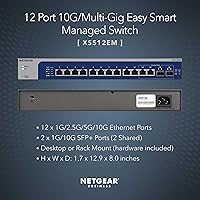
The NETGEAR XS512EM 12-Port Multi-Gigabit Managed Switch sits in an interesting spot — it is not a bare-bones unmanaged box, and it is not a full enterprise stack either. It targets small businesses and serious prosumers who need real managed capabilities without a dedicated network engineer to configure them. All 12 copper ports negotiate from 1G up to 10G throughput over existing Cat6 runs without pulling new wire. Worth flagging early: this multi-gig switch is sold and supported in the US and Canada only. The compact 1U chassis fits comfortably on a desktop or slides into a shallow rack, making placement genuinely flexible.

Features & Benefits

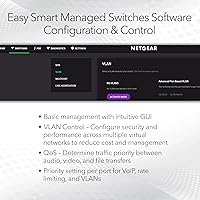
The auto-negotiating copper ports are the headline draw of the XS512EM — each one steps up from 1G to 2.5G, 5G, or 10G based on what the connected device supports, making incremental hardware upgrades practical. The two SFP+ ports deserve a close read: they are shared with two of the copper ports, not independent extras, so the switch always gives you 12 active connections in total. Management runs through a browser-based dashboard covering VLAN segmentation, QoS, IGMP snooping, and link aggregation — useful capabilities delivered without the intimidation of enterprise CLI. Energy Efficient Ethernet reduces idle power draw, and the included rack-mount kit means you can go straight into a 1U slot without a separate order.

Best For

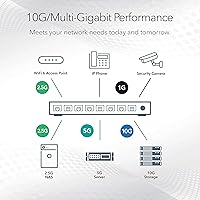
NETGEAR's 12-port 10G switch makes the most sense for buyers already running Cat5e or Cat6 who want faster speeds without a full cabling overhaul. A small video editing studio with two or three editors pushing large ProRes files to shared storage is a practical fit — multi-gig negotiation removes bottlenecks that a standard gigabit switch simply cannot address. Home lab users managing a NAS, a few VMs, and high-throughput workstations will find the port count and managed feature set well matched to their setup. It also suits environments where low-noise operation matters, like open-plan offices. Worth stating plainly: there is no PoE support here, so anyone powering APs or IP cameras will need a separate switch for that.

User Feedback

With a 4.6-star average across 270 ratings, the XS512EM earns consistent marks from a fairly wide range of buyers. The multi-gig copper flexibility and the ability to hit 10G over Cat6 without new cabling get the most praise, and the web management interface is regularly described as approachable compared to heavier enterprise alternatives. On the negative side, a portion of buyers are caught off guard by the shared SFP+ design and feel the port total is overstated in a casual read of the spec sheet. Heat management is a minor but recurring concern under sustained traffic loads — leaving adequate airflow around the unit is worth planning for. The lifetime warranty and next-business-day replacement are frequently cited as reassuring for a long-term infrastructure purchase.

Pros

  • All 12 copper ports auto-negotiate up to 10G, making full use of existing Cat6 cabling with no rewiring.
  • The XS512EM supports VLAN, QoS, IGMP snooping, and link aggregation without enterprise-level complexity.
  • A lifetime limited warranty with next-business-day replacement is genuinely rare at this product tier.
  • Rack-mount hardware ships in the box, so 1U installation requires no separate accessory purchase.
  • Energy Efficient Ethernet compliance measurably reduces idle power draw across all 12 ports.
  • The browser-based management dashboard is accessible enough for non-IT admins to handle core configuration.
  • Quiet operation makes it a practical choice for open offices, home offices, and noise-sensitive environments.
  • 24/7 NETGEAR expert chat support means real assistance is available without waiting for business-hours callbacks.
  • The compact 1U chassis fits equally well on a desktop surface or inside a shallow rack.
  • Compatible with PC, Mac, Unix, and Linux platforms without additional proprietary drivers or software.

Cons

  • The two SFP+ ports are shared with copper ports, so the total active connection count never exceeds 12.
  • No PoE support means a completely separate switch is needed for APs, IP cameras, or VoIP phones.
  • Region-locked to the US and Canada, which fully excludes international buyers from purchase and support.
  • Heat build-up under sustained heavy traffic has been flagged by multiple users in confined or poorly ventilated spaces.
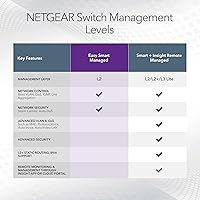
  • The Easy Smart Managed platform lacks the advanced Layer 3 routing features that growing networks eventually require.
  • No CLI or console access limits usefulness for admins who prefer or require command-line configuration.
  • Some buyers find the shared SFP+ port spec confusing and feel the active port count is easy to misread.
  • At this price tier, the investment is hard to justify for very small deployments with only a few high-speed devices.

Ratings

Our AI rating engine analyzed hundreds of verified global buyer reviews for the NETGEAR XS512EM 12-Port Multi-Gigabit Managed Switch, actively filtering out incentivized submissions, duplicate accounts, and outlier bot activity to surface what real network administrators, home lab builders, and small business IT teams actually experienced. Scores reflect a balanced picture — the genuine strengths that keep buyers recommending this switch and the friction points that caused frustration or unmet expectations. Both sides are represented transparently so you can make an informed call before committing.

Multi-Gig Port Performance
93%
This is unquestionably the switch's strongest suit. Buyers running NAS-to-workstation transfers report dramatically faster file moves compared to their old gigabit gear — without rewiring a single Cat6 run. Auto-negotiation across 1G, 2.5G, 5G, and 10G works reliably, and reviewers note the per-port speed headroom feels future-proof for at least several hardware upgrade cycles.
A handful of users noticed that achieving stable 10G on older Cat5e runs required careful attention to cable quality and run length, with a few reporting fallback to 5G on marginal wiring. Performance is excellent when infrastructure is matched, but it does depend on the health of existing cabling more than some buyers anticipated.
Value for Money
76%
24%
Buyers who frame this as a long-term infrastructure investment rather than a one-time purchase tend to feel well-served, especially when factoring in the lifetime warranty and the per-port 10G throughput available without rewiring. For small studios or offices that would otherwise pay a network contractor to pull new cabling, the cost calculus shifts noticeably in this switch's favor.
At this price tier, first-time buyers expecting a consumer-grade buying experience sometimes feel sticker shock, particularly when they realize there is no PoE and the SFP+ port count is shared. Those with lighter workloads or fewer than five high-speed devices often question whether the investment is truly justified for their scale.
Management Interface
81%
19%
The browser-based Easy Smart Managed GUI earns consistent praise for making VLAN segmentation, QoS prioritization, and IGMP snooping accessible to IT-capable but non-specialist users. Small business owners who have dreaded enterprise switch interfaces report that configuring basic managed features on the XS512EM feels surprisingly achievable without external help.
The interface starts to feel limiting for admins who need deeper Layer 3 routing, advanced ACLs, or CLI-level scripting. A few users also noted that the web GUI can feel slightly dated visually and occasionally requires a manual page refresh after applying settings to confirm changes have taken effect.
SFP+ Uplink Design
58%
42%
Buyers who use the SFP+ slots as intended — routing a 10G DAC cable or fiber module to an upstream router or core switch — find the uplink capability genuinely useful for building a fast backbone between closets or floors. For that specific use case, the fiber option adds meaningful topology flexibility at no additional hardware cost.
The shared-port architecture is the single most common complaint in user reviews, and it is easy to understand why. Many buyers see 12 copper ports and 2 SFP+ ports listed and expect 14 simultaneous connections, only to discover after purchase that using an SFP+ slot disables its paired copper port. This feels like a spec sheet transparency issue more than a design flaw, but the frustration it generates is real and recurring.
Warranty & Support
91%
A lifetime limited warranty with next-business-day hardware replacement is a meaningful differentiator at this product tier. Buyers who have actually needed to invoke it report that the process was handled efficiently, and 24/7 chat access to a NETGEAR expert is frequently cited as a genuine reassurance rather than a marketing footnote.
A small number of users report inconsistent first-contact quality from the chat support channel, with some queries requiring escalation before reaching someone with deep switch-specific expertise. The warranty is also tied to the original purchaser, which limits resale value for buyers who might upgrade and sell the unit on.
Thermal Management
64%
36%
In typical office and home lab deployments with reasonable ambient temperatures and open airflow, the vast majority of users describe the switch as running warm but unremarkable. Most report no performance throttling or heat-related stability issues under normal mixed workloads across a standard business day.
Under sustained high-traffic loads — think continuous large file transfers across multiple ports simultaneously — a minority of users have reported notable heat accumulation, particularly in enclosed rack setups without active cooling. Placing this switch in a tightly packed rack with poor ventilation is a configuration risk worth taking seriously.
Noise Level
83%
For an environment-sensitive placement like a home office desk or an open creative studio, the switch's quiet operation is consistently appreciated. Users who have previously dealt with louder enterprise switches specifically call out the noise level as a pleasant contrast, making it practical to deploy close to a workspace.
NETGEAR describes operation as quiet rather than fanless, and the distinction matters in extremely sound-sensitive environments. A small cohort of users with very low ambient noise floors — recording studio adjacent setups, for example — note that the unit is not completely silent, which could be an issue depending on proximity to microphones or listening areas.
Build Quality & Chassis
86%
The metal chassis feels solid and well-constructed for a 1U device, and users report that port connections seat firmly without any looseness or wobble. At 5.5 pounds the unit is light enough for a single person to rack-mount without assistance, which home lab builders in particular appreciate.
A few buyers note that the chassis aesthetic is functional rather than refined — acceptable in a rack but not particularly attractive on an open desktop in a client-facing environment. The power connector placement has also drawn minor criticism from users who prefer rear-panel cable management.
Setup & Installation
78%
22%
Out-of-box setup is generally described as straightforward: plug in, connect a device, navigate to the management IP, and the web interface loads cleanly. The inclusion of rack-mount hardware in the box removes a common friction point that plagues other switches in this class, and most users report being operational within 20 to 30 minutes.
The initial default IP address and first-login process is not as guided as some buyers would prefer, and those less familiar with accessing switch management pages can hit a short learning curve before getting into the interface. The quick-start guide is considered minimal by a portion of reviewers who expected more hand-holding for the price.
Network Feature Depth
69%
31%
For small business and prosumer workloads, the managed feature set covers the important bases well: 802.1Q VLANs, QoS queuing, IGMP snooping for multicast control, 802.3ad link aggregation, and IPv6 support give IT admins enough control to run a properly segmented, prioritized small office network without reaching for a more expensive platform.
Admins who need dynamic routing protocols, advanced ACLs, OSPF, or VRRP will find the Layer 2 management ceiling frustrating. The XS512EM is not designed to replace even a lightweight Layer 3 managed switch, and networks that are growing toward those requirements will likely outgrow this platform within a year or two.
Energy Efficiency
84%
IEEE 802.3az compliance means the switch actively scales down power consumption on ports that are idle or carrying low traffic, which adds up meaningfully in environments where several ports sit dormant during off-hours. Users running the switch 24/7 in home lab environments appreciate that it does not add noticeably to their electricity footprint.
Energy efficiency performance is harder for end users to directly observe or verify without measuring equipment, so it is largely accepted on spec rather than personally confirmed. A few users note that the overall power draw under full 10G saturation across all ports is not insignificant and should be factored into rack UPS planning.
Compatibility
87%
Cross-platform compatibility is a genuine strength — the switch works cleanly with Windows, macOS, Linux, and Unix environments without requiring proprietary drivers or vendor-specific software to manage. For mixed-OS environments common in creative agencies or development studios, this plug-and-play compatibility across operating systems saves meaningful setup time.
International buyers who discover the US and Canada region restriction after researching the product face a hard stop, as the switch is not officially sold or warranted outside North America. This limitation, while clearly documented, still catches a portion of international readers by surprise given the product's global search visibility.
Port Density
74%
26%
Twelve multi-gig copper ports in a 1U chassis is a competitive count for the SMB and prosumer segment, giving a small office or home lab enough connections to cover a NAS, two or three workstations, a wireless access point uplink, and still have spare capacity. Most target buyers find the port count comfortably meets their immediate needs.
Larger small offices or home labs that have grown to 14 or more devices will feel the constraints quickly, especially since using the SFP+ uplinks reduces available copper ports to 10. Buyers at the edge of this capacity ceiling may find themselves needing a second switch sooner than expected.
Documentation Quality
66%
34%
The web management GUI is intuitive enough that many experienced network admins navigate it without consulting documentation at all, and NETGEAR does provide online knowledge base articles that cover the core configuration scenarios most users encounter. For common tasks like VLAN setup and link aggregation, usable guidance exists if you look for it.
The included quick-install guide is widely considered thin for a managed switch at this price, and several buyers note that finding answers to less-common configuration questions requires digging through NETGEAR community forums rather than official documentation. First-time managed switch buyers in particular report that better step-by-step onboarding resources would significantly reduce their setup anxiety.

Suitable for:

The NETGEAR XS512EM 12-Port Multi-Gigabit Managed Switch is a strong fit for small business IT admins and serious prosumers who need multi-gig speeds without the complexity or cost of full enterprise hardware. If your office already has Cat6 cabling in the walls, this switch lets you step up to 2.5G, 5G, or 10G on key devices without touching a single cable run. Creative teams — video editors, photographers, or media producers — who regularly shuttle large files between workstations and shared NAS storage will notice the throughput difference almost immediately. Home lab users building out virtualization clusters or high-performance Plex setups with multiple concurrent streams will also find the port count and managed feature set well matched to their needs. The Layer 2 management interface is approachable enough that a technically capable business owner can configure VLANs and QoS rules without bringing in a consultant, and the lifetime warranty adds genuine long-term confidence for anyone treating this as a core infrastructure investment.
Not suitable for:

Buyers expecting PoE support should look elsewhere before going further — the NETGEAR XS512EM 12-Port Multi-Gigabit Managed Switch carries no PoE budget whatsoever, so powering wireless access points, IP cameras, or VoIP handsets will require a separate switch entirely. International buyers outside the US and Canada should also note that this unit is region-restricted and not officially sold or supported in other markets. Anyone hoping to run a 10G fiber uplink and all 12 copper ports simultaneously will be caught off guard by the shared SFP+ architecture — using the fiber ports means surrendering two copper connections. Buyers who need deep Layer 3 routing features, advanced security policies, or CLI-level control will hit the ceiling of the Easy Smart Managed platform relatively fast. Finally, anyone planning to install this switch in a poorly ventilated enclosure or a high-ambient-temperature environment should be cautious, since some users have reported heat concerns under sustained heavy traffic loads.
Specifications

  • Copper Ports: The switch includes 12 RJ45 ports, each supporting auto-negotiating speeds of 1G, 2.5G, 5G, and 10G over standard Cat5e or Cat6 cabling.
  • SFP+ Ports: Two SFP+ slots support 1G or 10G fiber and DAC connections, but they are shared with two of the 12 copper ports, keeping the total active port count at 12.
  • Max Data Rate: Each port delivers a maximum data transfer rate of 10,000 Mbps (10G) when connected to a compatible 10G device.
  • Management Type: The switch uses NETGEAR's Easy Smart Managed platform, providing Layer 2 web-based management through a browser without requiring dedicated software installation.
  • Managed Features: Supported managed features include 802.1Q VLAN, QoS, IGMP snooping, link aggregation (802.3ad), and IPv6 readiness.
  • Energy Standard: The switch is IEEE 802.3az Energy Efficient Ethernet compliant, reducing power consumption on ports during low-traffic or idle periods.
  • Form Factor: The unit supports both desktop placement and 1U rack mounting, with all necessary rack-mount hardware included inside the box.
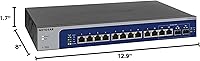
  • Dimensions: The chassis measures 12.9″ L x 8″ W x 1.7″ H, occupying a single rack unit when mounted.
  • Weight: The switch weighs 5.5 pounds, making it light enough for easy desktop repositioning or straightforward single-person rack installation.
  • Max Temperature: The rated upper operating temperature is 50°C, so adequate airflow around the unit is important in warmer or enclosed environments.
  • PoE Support: This switch provides no Power over Ethernet functionality on any port, making a separate PoE-capable switch necessary for powered devices.
  • Warranty: NETGEAR covers the switch with a Lifetime Limited Hardware Warranty for the original purchaser for as long as the product is owned.
  • Replacement Policy: Under the warranty terms, NETGEAR provides next-business-day hardware replacement to minimize downtime in business or critical home lab deployments.
  • Support Access: 24/7 live chat with a NETGEAR technical expert is included, available at any time without requiring an active support contract.
  • Compatibility: The switch is compatible with PC, Mac, Unix, and Linux environments and does not require proprietary drivers for basic operation.
  • Region Availability: This unit is sold and officially supported in the United States and Canada only and is not intended for use in other regions.

Related Reviews

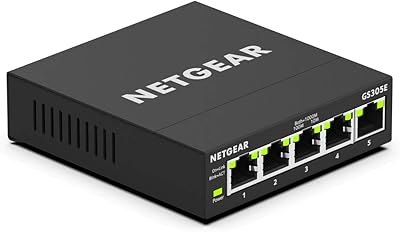
NETGEAR GS305E 5-Port Gigabit Managed Switch
76%
93%
Value for Money
84%
Setup & Ease of Use
81%
Build Quality & Durability
88%
Network Performance & Throughput
97%
Silent Operation
More
NETGEAR GS308E 8-Port Managed Network Switch
81%
93%
Reliability & Uptime
96%
Silent Operation
67%
Ease of Setup
78%
Web Management Interface
88%
Value for Tier
More
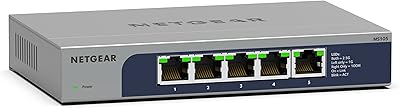
NETGEAR MS105 5-Port Multi-Gigabit Unmanaged Switch
76%
96%
Plug-and-Play Setup
88%
Multi-Gig Port Performance
91%
Build Quality & Materials
94%
Fanless & Noise Level
67%
Value for Money
More
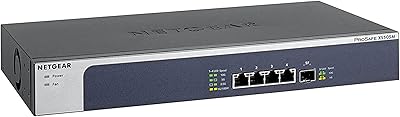
NETGEAR XS505M 5-Port 10G Multi-Gigabit Ethernet Unmanaged Switch
87%
91%
Performance
94%
Setup and Installation
88%
Build Quality
85%
Energy Efficiency
93%
Fanless Operation (Noise Level)
More
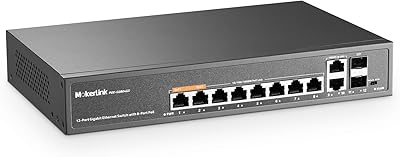
MokerLink 12-Port Gigabit PoE+ Unmanaged Switch
74%
93%
Ease of Setup
86%
PoE Reliability
88%
Build Quality
91%
Value for Money
94%
Fanless & Noise
More
NETGEAR GS608 8-Port Gigabit Ethernet Switch
83%
97%
Ease of Setup
91%
Network Performance
94%
Silent Operation
67%
Build Quality
83%
Value for Money
More
Tenda TEG208E 8-Port Managed Gigabit Switch
85%
94%
Value for Money
88%
Ease of Setup
91%
Build Quality
93%
Network Performance
97%
Noise Level
More
Binardat 10G12-1200GSM 12-Port Managed Switch
75%
91%
Value for Money
88%
Feature Depth
74%
Setup & Usability
71%
SFP Module Compatibility
82%
Build Quality
More
MokerLink 12-Port 10G SFP+ Managed Switch
74%
91%
Value for Money
93%
Feature Depth
88%
Network Performance
82%
Build Quality
47%
Fan Noise
More
NETGEAR GS316 16-Port Gigabit Network Switch
85%
97%
Ease of Setup
96%
Noise Level
78%
Build Quality
91%
Port Performance
88%
Reliability & Longevity
More

FAQ

Cat6 is fully supported for 10G at runs up to around 55 meters, and Cat6A handles the full 100-meter distance. If your building is already wired with Cat6, you can likely hit 10G on most runs without touching a single cable. Cat5e can support 10G too, though at shorter distances, so it is worth measuring your longest runs before assuming full coverage.

No, and this is one of the most common points of confusion with the XS512EM. The two SFP+ slots are shared with two of the 12 copper ports, meaning you always have a maximum of 12 active connections at any one time. If you plug a fiber module into an SFP+ slot, the corresponding copper port goes inactive. Plan around 12 total connections, not 14.

It does not. There is zero PoE support on any port. If you need to power access points, IP cameras, or VoIP handsets, you will need a separate PoE switch for those devices and then uplink it to this one.

NETGEAR describes operation as quiet, and most users confirm it is not disruptive in a home office or open-plan workspace. That said, it is not officially rated as fanless, so conditions like sustained heavy traffic or a poorly ventilated space could affect that. For a typical home office workload it should be unobtrusive.

Yes, reasonably so. The NETGEAR XS512EM 12-Port Multi-Gigabit Managed Switch uses the Easy Smart Managed web GUI, which is a browser-based dashboard covering VLANs, QoS, IGMP snooping, and link aggregation. It is not as polished as a consumer router interface, but someone comfortable with networking basics should be able to configure it without a manual in hand. It is nowhere near the complexity of enterprise CLI-based switches.
Not quite. Because the SFP+ ports share bandwidth with two copper ports, activating a fiber or DAC uplink in an SFP+ slot disables the paired copper port. You can use one or the other on each shared pair, but not both simultaneously. If your setup requires a dedicated fiber uplink plus a full 12 copper connections, this architecture will not support that.

NETGEAR offers a Lifetime Limited Warranty covering the original buyer for as long as they own the unit. For qualifying failures, they provide next-business-day hardware replacement, which is a meaningful commitment for a device sitting at the core of a small office network. 24/7 chat support is included if you need help diagnosing whether a replacement claim is warranted.

Officially, no. The XS512EM is sold and supported in the US and Canada only. International buyers would be purchasing outside NETGEAR's intended distribution, which affects warranty coverage and technical support eligibility. If you are outside North America, check whether NETGEAR offers a comparable model through your local regional channel.

It is a strong match for exactly that use case. If your NAS has a 10G port and your workstations have multi-gig adapters, this multi-gig switch eliminates the bottleneck that a standard gigabit switch creates. Transferring a 100GB video project from a NAS to a workstation goes from taking several minutes to feeling nearly instant. The managed features like link aggregation also let you bond multiple NAS ports for even more headroom.

Yes, the XS512EM supports jumbo frames up to 9KB MTU, which is useful for storage workloads, NAS environments, and virtualization traffic where reducing packet overhead matters. You will need to enable jumbo frames on both the switch and the connected devices for it to have any effect.