Overview

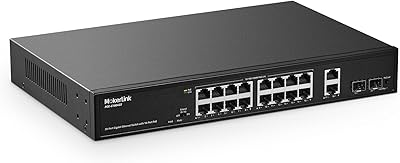
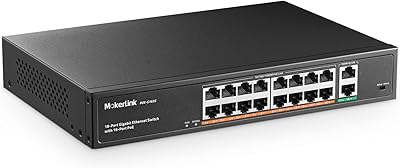
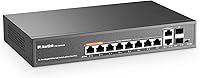
The MokerLink 12-Port Gigabit PoE+ Unmanaged Switch sits in a crowded but competitive corner of the budget networking market, and it holds its own. You get eight PoE+ ports for powering cameras or access points, two standard uplink ports, and two SFP slots for fiber runs — all packed into a fanless metal chassis that stays quiet and feels built to last. There's no software to install, no configuration screen to navigate. Plug it in, connect your devices, and you're done. For small offices or home security installs where simplicity is the priority, the price-to-port value here is genuinely difficult to beat.
Features & Benefits

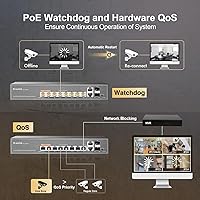
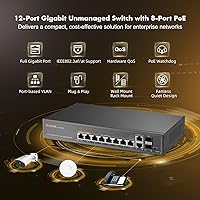
The 120W shared power budget is the number to understand before committing. Spread across eight active PoE+ ports, that works out to roughly 15W per device on average — adequate for standard IP cameras or Wi-Fi access points, but a real ceiling if you're running several high-draw devices simultaneously. The port watchdog — marketed as AI detection, though it's really an automated restart mechanism — is a practical feature for always-on surveillance setups where manual reboots aren't realistic. EXTEND mode isolates each PoE port so devices only communicate through the uplinks, which quietly reduces broadcast congestion without touching any settings. The SFP slots add fiber uplink support for runs well beyond 100 meters.

Best For

This PoE switch is a natural fit for anyone deploying a small IP camera system — four to eight cameras around a house, a small retail space, or a warehouse entrance — where zero-configuration setup matters more than fine-grained control. Installers working in noise-sensitive spaces like reception areas or living rooms will appreciate the fanless operation. The SFP slots make this unmanaged switch a viable option for longer inter-building runs at a price point where that capability is rarely offered. It is not the right tool if you need SNMP monitoring, per-VLAN segmentation, or remote management — those requirements call for a managed switch and a bigger budget.

User Feedback

The MokerLink 12-port carries a 4.3-star average across several hundred verified ratings, which is a solid result for an unmanaged switch in this tier. The most consistent praise centers on quick, hassle-free setup and a housing that feels more substantial than the price suggests. On the critical side, buyers running a full eight-camera load have flagged that the power budget gets uncomfortably tight, especially with newer higher-wattage camera models. A few reviewers found the EXTEND mode behavior confusing — the documentation doesn't make the traffic isolation logic especially clear. Thermal performance under sustained use gets occasional mentions, though no failure pattern appears to follow the warmth.

Pros

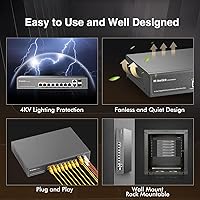
  • Plug-and-play setup means most buyers are fully operational within minutes of unboxing.
  • Metal housing feels solid and durable well beyond what the price tier typically delivers.
  • Fanless design keeps the unit completely silent — a real advantage in office or home environments.
  • Eight PoE+ ports comfortably handles a full small-scale IP camera or access point deployment.
  • SFP slots enable fiber uplinks at a price point where most competitors skip the feature entirely.
  • Port watchdog auto-restart reduces the need for manual intervention on always-on surveillance setups.
  • EXTEND mode provides basic traffic isolation between PoE devices without any configuration.
  • Internal power supply simplifies installation — no external power brick to manage or misplace.
  • Rack-mount and wall-mount options give installers flexibility for different physical setups.
  • Strong owner ratings across a large number of verified reviews suggest consistent real-world reliability.

Cons

  • Total PoE power budget is shared across all ports, which creates real constraints when running many high-draw devices.
  • No management interface means zero visibility into port status, traffic levels, or device diagnostics.
  • Passive 24V PoE devices are explicitly unsupported — a compatibility trap for buyers with legacy equipment.
  • EXTEND mode documentation is unclear, and several buyers have found the isolation behavior confusing in practice.
  • QoS prioritization is limited to only two specific ports, restricting flexibility for mixed-device setups.
  • MAC address table capacity is modest, which could become a limitation in denser or more complex network environments.
  • No firmware update path or vendor management software means bugs or issues cannot be patched after purchase.
  • Heat buildup under sustained full-load operation has been noted by some users, despite the fanless chassis handling typical loads fine.

Ratings

The scores below were generated by our AI after analyzing verified global buyer reviews for the MokerLink 12-Port Gigabit PoE+ Unmanaged Switch, with automated filtering applied to remove incentivized, duplicate, and bot-pattern submissions. Each category reflects the honest distribution of real user sentiment — strengths are credited where earned, and recurring frustrations are not softened. The result is a transparent snapshot of how this switch actually performs in the field, across home security installs, small offices, and light commercial deployments.

Ease of Setup
93%
Buyers consistently describe unboxing to fully operational in under ten minutes with no prior networking knowledge required. Security camera installers in particular praise the complete absence of login portals, driver installs, or configuration steps — connect power, connect devices, done.
A small number of users found the EXTEND mode toggle confusing since the physical switch and its effect on traffic behavior are not clearly explained in the included documentation. Those expecting any on-screen guidance will find none, because there is no interface to speak of.
PoE Reliability
86%
The vast majority of buyers report stable, uninterrupted power delivery to cameras and access points over extended periods. Users running four to six standard PoE cameras describe the power performance as rock-solid, with devices staying online without drops or resets.
When all eight ports are loaded with higher-draw devices, some buyers notice instability or devices failing to receive adequate power. The shared power ceiling becomes a real constraint in dense deployments, and this is the most frequently cited technical complaint in the review pool.
Build Quality
88%
The all-metal housing consistently surprises buyers who expect something flimsier at this price point. Port connectors feel solid and well-seated, and the overall construction gives installers the confidence to wall-mount or rack-mount it without babying the unit.
A handful of users noted that the port labeling and LED indicator legends on the chassis are small and difficult to read in low-light installation environments. The unit also lacks rubber feet in some configurations, which matters for shelf-mounted setups where vibration could be an issue.
Value for Money
91%
The combination of eight PoE+ ports, gigabit throughput on every port, two SFP slots, and a fanless metal build at this price tier is difficult to match in the unmanaged switch segment. Buyers upgrading from older, lower-port-count switches consistently rate the value as exceptional.
A few cost-conscious buyers feel the value calculus shifts if they need to add higher-capacity PoE devices later, since the fixed power budget cannot be expanded. Those who stretch the switch beyond its intended use case end up needing a more expensive managed alternative anyway.
Fanless & Noise
94%
The complete absence of fan noise is one of the most praised qualities across the review pool, particularly among buyers who installed the switch in living rooms, home offices, or open-plan workspaces. Several reviewers specifically upgraded from a noisy fan-cooled switch and called the silence a meaningful quality-of-life improvement.
Under sustained maximum load — all eight ports active with high-draw devices in a warm, enclosed cabinet — a minority of users report the chassis becoming noticeably warm to the touch. No thermal failures have been widely reported, but airflow around the unit is advisable in tightly enclosed rack situations.
PoE Power Budget
67%
33%
For the core use case of four to six standard IP cameras or basic access points, the available power headroom is genuinely sufficient and most buyers in that scenario never bump against any limits. The per-port ceiling of 30W also accommodates a reasonable range of modern PoE+ devices individually.
Running a full eight-port load of modern, higher-wattage devices — such as pan-tilt-zoom cameras or dual-radio access points — pushes the shared budget to its absolute limit and beyond. This is the single most divisive specification among reviewers, with buyers who hit the ceiling feeling misled about real-world capacity.
Port Watchdog
82%
18%
Installers managing remote surveillance systems consistently praise the auto-restart behavior, which handles the occasional frozen camera without requiring a site visit or manual power cycle. For always-on setups where no one is monitoring the network daily, this feature delivers genuine, practical value.
The watchdog behavior is not user-configurable — there is no way to adjust detection sensitivity, delay intervals, or restart logic. A small number of buyers also note that the feature occasionally triggers unnecessary restarts on devices that were functioning normally, causing brief connection interruptions.
EXTEND Mode Clarity
58%
42%
Buyers who took the time to understand EXTEND mode found it genuinely useful for isolating IP cameras from the rest of their local network — a lightweight form of segmentation that requires no managed switch or VLAN configuration knowledge.
The documentation bundled with the switch does a poor job explaining what EXTEND mode actually does in plain terms, and several reviewers report enabling it accidentally and being confused by devices that suddenly could not communicate. This is a feature that needs clearer labeling and a more descriptive manual entry.
SFP Fiber Support
79%
21%
The inclusion of two SFP slots at this price point is a genuine differentiator, and buyers using the switch to bridge connections between separate buildings or floors with fiber runs are consistently positive about the implementation. Compatible SFP modules from standard vendors work without issue.
No SFP modules are included in the box, which catches some buyers off guard. The product page mentions the slots but does not specify which module types have been validated, leaving buyers to figure out compatibility independently — a friction point that generates occasional support questions.
QoS Effectiveness
71%
29%
Buyers who connected a VoIP phone or primary NVR to ports 1 or 2 report that priority traffic performs noticeably better during peak network activity. The hardware-based implementation works without any configuration, which aligns with the plug-and-play promise of the overall product.
QoS prioritization is limited to exactly two ports, which frustrates buyers with more than two critical devices. There is also no transparency into how aggressively the prioritization is applied or whether it is functioning — buyers simply have to trust that it is working.
LED Indicators
74%
26%
The per-port link and activity LEDs give a quick visual status check at a glance, which installers appreciate during initial setup to confirm each camera or device has established a connection. The power and VLAN mode indicators are also clear under normal lighting conditions.
Several buyers note that the LED brightness is calibrated for ideal lighting and can be hard to read in bright ambient conditions or at an angle. There is also no per-port speed indicator to distinguish between 100Mbps and gigabit connections, which would be useful for troubleshooting.
Thermal Management
76%
24%
Under typical real-world loads — four to six cameras running continuously — the metal chassis dissipates heat effectively without any active cooling. The operating temperature range is wide enough to cover most indoor installation environments, including utility closets and unheated spaces.
At sustained full port utilization in poorly ventilated enclosures, the chassis temperature rises enough to be noticeable. Buyers who rack-mount this unit alongside other heat-generating equipment are advised to leave clearance above and below — something the included instructions do not explicitly recommend.
Passive PoE Compatibility
29%
71%
For buyers using exclusively standard IEEE 802.3af or 802.3at devices — which covers the vast majority of modern IP cameras, access points, and VoIP phones — there is no compatibility concern whatsoever, and PoE delivery works exactly as expected.
Passive 24V PoE is entirely unsupported, and this catches buyers with older Ubiquiti hardware or certain proprietary PoE devices completely off guard. Several frustrated reviews stem directly from this incompatibility, and the product description, while it does include a disclaimer, does not make this limitation prominent enough.
Documentation Quality
52%
48%
For a basic plug-and-play deployment — powering a set of standard cameras with no special modes enabled — the included instruction manual covers the essentials adequately and most buyers in this scenario never need more than a glance at it.
Any feature beyond simple plug-and-play, such as EXTEND mode behavior, QoS port assignment, or SFP module compatibility, is poorly documented. The manual reads as a translated summary rather than a detailed guide, and buyers who run into edge cases often find themselves consulting third-party forums for answers.

Suitable for:

The MokerLink 12-Port Gigabit PoE+ Unmanaged Switch is a strong fit for homeowners and small business owners who need to power a handful of IP cameras or wireless access points without the complexity — or cost — of a managed switch. If you're a security installer setting up a four-to-eight camera system in a house, a small retail shop, or a single-floor office, this switch covers that workload cleanly. The fanless operation makes it particularly well-suited for noise-sensitive spaces like reception areas, home offices, or living rooms where fan noise would be noticeable. The two SFP slots are a genuine bonus for anyone who needs to extend a connection between buildings or across distances that standard Ethernet can't cover. And if fiber uplink capability at this price point is on your checklist, very few competing unmanaged switches even offer it.
Not suitable for:

Buyers who need centralized control over their network — port-level monitoring, SNMP alerts, traffic analysis, or per-device VLAN assignments — should look elsewhere, because the MokerLink 12-Port Gigabit PoE+ Unmanaged Switch simply doesn't offer those tools by design. If you're planning to run eight high-wattage PoE devices simultaneously, be aware that the total power budget will constrain you; newer PTZ cameras or multi-radio access points can easily exhaust shared headroom across all ports. Anyone relying on passive 24V PoE equipment — common with some older Ubiquiti hardware — will find their devices unsupported, and that's a compatibility issue worth checking before you buy. IT administrators managing a growing infrastructure or a multi-floor deployment will quickly outgrow what an unmanaged switch can offer, regardless of brand.
Specifications

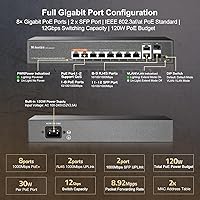
  • Total Ports: The switch provides 12 gigabit ports in total: 8 PoE+ RJ45, 2 standard RJ45 uplinks, and 2 SFP slots for fiber connections.
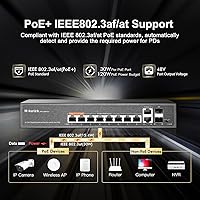
  • PoE Standard: All eight PoE ports comply with IEEE 802.3af and 802.3at, delivering up to 30W per port for compatible devices.
  • PoE Power Budget: The internal power supply supports a maximum combined PoE output of 120W shared across all active PoE ports.
  • Data Rate: Every port — PoE, uplink, and SFP — supports full gigabit throughput at 1000 Mbps.
  • Switching Capacity: The switch offers a total backplane capacity of 12 Gbps, enabling non-blocking throughput across all ports simultaneously.
  • Forwarding Rate: Packet forwarding is rated at 8.92 Mpps, which is appropriate for the traffic volumes typical in small office and home network environments.
  • MAC Table: The switch maintains a MAC address table of up to 2,000 entries, sufficient for small-to-medium device counts on a single network segment.
  • Housing: The chassis is constructed from metal and operates without a cooling fan, making it silent under normal working conditions.
  • Mounting Options: The unit supports both rack-mount and wall-mount installation, with a mounting kit included in the box.
  • Power Input: The switch accepts universal AC input from 100V to 240V at 50–60Hz, with an internal 52V supply — no external power brick required.
  • Dimensions: The unit measures 270 × 181 × 44 mm, making it compact enough for shelf, wall, or 1U rack placement.
  • Weight: Net product weight is 1.1 kg; packaged weight is approximately 1.45 kg including accessories and mounting hardware.
  • Operating Temp: The switch is rated for operation between -10°C and 55°C, covering typical indoor installation environments including unheated utility spaces.
  • Passive PoE: Passive 24V PoE is explicitly not supported; only standard IEEE 802.3af/at devices will receive power through the PoE ports.
  • Management: This is a fully unmanaged switch with no web interface, CLI, or SNMP — configuration is limited to the physical EXTEND mode toggle.
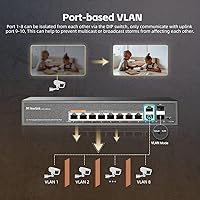
  • EXTEND Mode: When EXTEND mode is active, PoE ports are isolated from one another and communicate only through the uplink ports, reducing broadcast traffic.
  • QoS Support: Hardware-based QoS prioritization is available on ports 1 and 2, ensuring connected critical devices receive bandwidth preference during congestion.
  • SFP Slots: The two SFP slots support 1000M fiber modules for long-distance uplink connections exceeding the 100-meter limit of copper Ethernet.
  • Port Watchdog: An automated port watchdog monitors connected PoE devices and restarts unresponsive ports without requiring manual intervention.
  • In the Box: The package includes the switch unit, a power cable, a rack and wall mount kit, and a printed instruction manual.

Related Reviews

MokerLink POE-G1604GS 20-Port Gigabit PoE Switch
85%
88%
Performance
93%
Ease of Setup
90%
Build Quality
89%
PoE Power Budget (200W)
91%
Noise Level
More
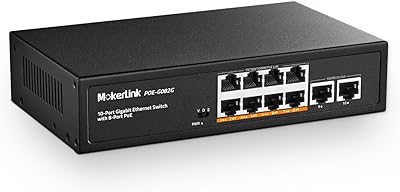
MokerLink POE-G082G 10-Port Gigabit PoE Switch
78%
94%
Ease of Setup
88%
PoE Reliability
83%
Build Quality
91%
Value for Money
71%
Thermal Management
More
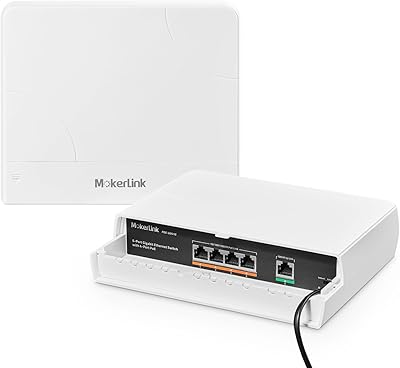
MokerLink POE-G041GO Outdoor Gigabit PoE Switch
81%
93%
Ease of Setup
84%
PoE Power Delivery
78%
Build Quality
76%
Weather Resistance
88%
Value for Money
More
YuLinca 6-Port Gigabit PoE Switch with 4 PoE+ Ports
87%
95%
Ease of Installation
88%
PoE Functionality
91%
Build Quality
87%
Performance and Speed
94%
Fanless Operation (Noise)
More
MokerLink POE-G162G 18-Port Gigabit PoE Switch
77%
88%
Value for Money
93%
Port Density
94%
Ease of Setup
79%
Build Quality
76%
PoE Reliability
More
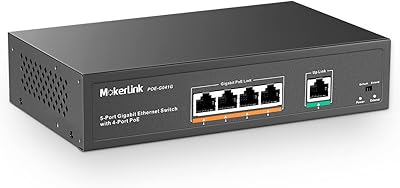
MokerLink 5-Port Gigabit POE Switch
86%
94%
Ease of Setup
88%
Performance
85%
Build Quality
75%
PoE Power Output
91%
Fanless Design (Noise Level)
More
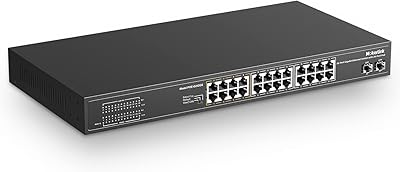
MokerLink 26-Port Gigabit Unmanaged PoE Switch
79%
91%
Value for Money
88%
Port Count & Layout
73%
PoE Power Budget
93%
Ease of Setup
86%
Build Quality & Chassis
More
MokerLink 3-Port Gigabit PoE Passthrough Switch
86%
94%
Ease of Installation
88%
PoE Performance (Power Output)
85%
Build Quality
92%
Compact Design
90%
Value for Money
More
MokerLink EXT-AT13GO Outdoor Gigabit PoE Extender
78%
93%
Ease of Setup
71%
Power Delivery
74%
Build Quality
77%
Weatherproofing
88%
Gigabit Performance
More
MokerLink 8-Port Outdoor Gigabit PoE Switch
81%
93%
Ease of Setup
84%
Build Quality
81%
PoE Performance
77%
Weather Resistance
89%
Gigabit Throughput
More

FAQ

No — the MokerLink 12-Port Gigabit PoE+ Unmanaged Switch is completely plug-and-play. Just connect your power cable, plug in your devices, and they'll start communicating. There's no app, web interface, or configuration screen involved.
Yes, but the total power available is shared across all active PoE ports. If your devices are standard IP cameras or basic access points, running all eight simultaneously is typically fine. If you're using higher-wattage devices like PTZ cameras or multi-radio APs, you'll want to add up the power draw of each device to make sure you stay within the overall budget.

Unfortunately, no. This switch only supports industry-standard IEEE 802.3af and 802.3at PoE. Passive 24V PoE — which some older Ubiquiti hardware requires — is not compatible. Plugging a passive-only device into this switch won't power it, so double-check your equipment's PoE requirements before purchasing.

When EXTEND mode is enabled, the PoE ports stop talking directly to each other and can only communicate through the uplink ports. Think of it as a simple traffic barrier between your powered devices. It's useful if you want to prevent IP cameras or IoT devices from reaching each other on your network, or if you're trying to reduce unnecessary broadcast traffic in a busy setup.

The switch is rated for continuous operation and the metal housing acts as a passive heat sink. Under typical loads — a mix of cameras and access points — it runs warm but well within safe limits. If you're maxing out all ports with high-draw devices in a poorly ventilated space, make sure there's some airflow around it. Most users running standard surveillance setups report no heat issues after months of continuous use.

Yes, that's exactly what the SFP slots are designed for. You'll need compatible 1000M SFP fiber modules and the appropriate fiber cable — neither is included. This is a practical option for connecting a detached garage, outbuilding, or separate floor where copper Ethernet runs would exceed 100 meters.

The name is a bit misleading — it's not artificial intelligence in any meaningful sense. It's an automated monitoring loop that checks whether a connected PoE device is still responding and, if it isn't, cuts and restores power to that port to force a reboot. For security cameras or access points that occasionally freeze, this is genuinely useful because it handles recovery without anyone touching the hardware.

Yes. The two RJ45 uplink ports and the SFP slots will work fine with standard non-PoE devices. The PoE ports can also connect to non-PoE devices — the switch follows the negotiation standards that prevent power from being sent to devices that haven't requested it, so you won't damage your hardware.

A mounting kit is included in the box along with the power cable and instruction manual. It supports both rack and wall mounting, so you're covered for most common installation scenarios without needing to source additional hardware.

The QoS on ports 1 and 2 lets you prioritize the devices connected to those specific ports when the network gets congested. In practice, this is handy if you have a VoIP phone, an NVR, or a primary access point that you never want starved for bandwidth. Connect those devices to ports 1 or 2, and this switch will give their traffic preference over devices on the other ports during busy periods.