Overview

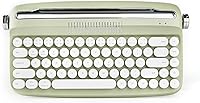
The YUNZII B307 Wireless Typewriter Keyboard has carved out a spot in the growing market for keyboards that look as good as they perform. The Sweet Mint colorway — soft, muted, and pastel — appeals to anyone building a cohesive desk aesthetic without going maximalist. YUNZII has been steadily gaining traction in the compact keyboard niche, and this model reflects that focus on looks-first buyers who still want practical daily use. One thing to be clear about upfront: this retro wireless keyboard uses membrane switches, not mechanical ones. If you depend on tactile feedback or audible click confirmation when you type, that distinction matters quite a lot.
Features & Benefits

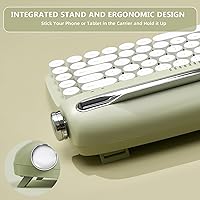
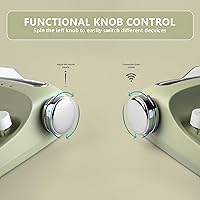
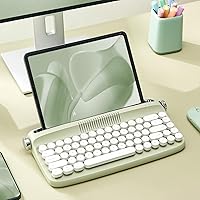
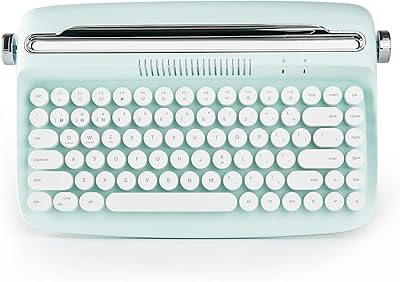
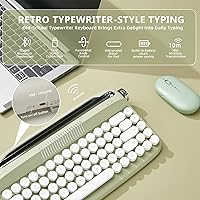
What sets this typewriter-style keyboard apart from typical compact options is the integrated tablet stand built right into the chassis. That 11.6-inch slot holds most phones, tablets, and iPads upright — no separate stand needed on your desk. Connectivity covers Bluetooth 5.0 and USB-C wired, so switching between your laptop and phone is straightforward. The two physical knobs are genuinely useful: one rotates through pairing channels, the other adjusts volume. A built-in rechargeable battery means no hunting for disposable cells. Adjustable rear feet let you dial in your preferred tilt angle. At 68 keys, the layout handles everyday tasks without unnecessary bulk.

Best For

This retro wireless keyboard is a natural fit for people who want their desk to look intentional without spending a lot on individual accessories. Students who type on a tablet or iPad will appreciate having the stand built in rather than buying one separately. It also makes a genuinely thoughtful gift — the mint colorway and retro styling stand out next to generic black keyboards in a way that feels considered. Casual typists will be perfectly comfortable here. However, if you spend hours writing code or long documents and care deeply about key feel, the membrane switches may leave you wanting something more satisfying under your fingers.

User Feedback

Across more than 600 ratings, the YUNZII B307 holds a 4.3-star average — solid for a keyboard at this price tier. Buyers consistently highlight the visual appeal and sturdiness of the integrated stand as genuine strengths, and Bluetooth pairing gets positive mentions for being quick and reliable. On the other side, reviewers coming from mechanical keyboards found the key travel shallow and the typing feel underwhelming. A handful of users noted that battery life is decent but not exceptional during heavy wireless use. Feedback on customer support is mixed — some report helpful responses, others mention slower reply times. Most buyers seem satisfied when they went in with the right expectations.

Pros

  • The built-in tablet and phone stand is a genuinely useful feature that removes the need for a separate desk accessory.
  • Bluetooth 5.0 pairing is quick and reliable, with multi-channel switching handled directly from the left knob.
  • The rechargeable battery means no scrambling for disposable batteries when power runs low.
  • At 68 keys, the compact layout keeps desk footprint small without sacrificing everyday typing functionality.
  • The volume control knob is a small but practical touch that most keyboards at this price simply skip.
  • Adjustable rear feet allow for tilt customization, which makes a real difference during longer typing sessions.
  • Sweet Mint coloring is specific and consistent — it photographs well and coordinates naturally with pastel desk setups.
  • USB-C wired mode offers a reliable fallback when Bluetooth is unavailable or battery is low.
  • At roughly 1.76 lb, this retro wireless keyboard is light enough to move between rooms or pack into a bag.
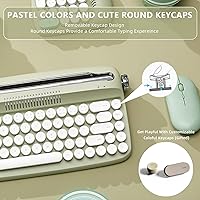
  • The included extra red keycap is a small but fun customization option for personalizing the look.

Cons

  • Membrane switches feel shallow and soft, which will frustrate anyone accustomed to mechanical key feedback.
  • Battery life during heavy wireless use is average at best — power users may need to charge more often than expected.
  • The plastic chassis feels noticeably lightweight, which some buyers interpret as a lack of build quality.
  • No RGB or backlight of any kind, making this retro wireless keyboard difficult to use in low-light conditions.
  • iOS-specific function keys and shortcuts are not fully supported, limiting iPad productivity for some workflows.
  • The 68-key layout omits a numpad, which is a genuine limitation for anyone entering numerical data regularly.
  • Key travel depth is shallower than many typists prefer, leading to faster fatigue during extended writing sessions.
  • Customer support response times have been inconsistent based on user reports, with some waiting longer than expected.
  • The round keycap style, while visually distinctive, can feel slightly unfamiliar during the adjustment period for touch typists.
  • No dedicated media keys beyond the volume knob, which limits quick control for users with complex audio or streaming setups.

Ratings

The scores below reflect an AI-driven analysis of verified global buyer reviews for the YUNZII B307 Wireless Typewriter Keyboard, with spam, incentivized, and bot-generated feedback actively filtered out before scoring. Each category is assessed against real-world usage patterns reported by confirmed purchasers across multiple markets. Both the highlights and the friction points are represented honestly — nothing has been softened to favor the product.

Design & Aesthetics
91%
The pastel mint colorway and round typewriter-style keycaps consistently earn strong praise from buyers building cohesive desk setups. Users frequently mention it photographs well and looks more considered than generic black or white keyboards at the same price tier.
A handful of reviewers noted the plastic finish can look slightly toy-like in person compared to product images, particularly under bright lighting. The retro styling is also polarizing — buyers who prefer a clean, modern look may find it too niche.
Typing Feel
61%
39%
For casual daily use — emails, browsing, light note-taking — the membrane switches do the job without fatigue for most users. The keys register consistently and do not require heavy actuation force, which some lighter typists actually prefer.
Anyone accustomed to mechanical switches will find the key travel shallow and the feedback underwhelming. Multiple reviewers specifically flagged that extended writing sessions feel tiring due to the soft, mushy response on each press.
Wireless Connectivity
84%
Bluetooth 5.0 pairing is widely praised for being fast and stable across Windows, macOS, and Android devices. Users who switch between a laptop and a tablet during the day appreciate the knob-based channel switching, which works without navigating menus.
A small but consistent subset of reviewers reported occasional Bluetooth dropout during the first few days before the connection stabilized. iOS users noted that some function-layer shortcuts do not map correctly, limiting the experience on iPhones and iPads.
Integrated Stand
88%
The built-in tablet and phone holder is genuinely one of the most-praised features, with buyers highlighting how much desk space it frees up by eliminating the need for a separate stand. It holds standard-sized tablets and most iPads securely during active use.
Larger tablets in thick protective cases can sit awkwardly in the 11.6-inch slot, and the slot depth is fixed — there is no angle adjustment for the held device itself. A few users also wished the stand material had more grip to prevent occasional slipping.
Build Quality
67%
33%
The overall construction feels solid enough for everyday desk use, and the keyboard does not flex noticeably when typing in the center. The adjustable rear feet add a reassuring sense of stability when the board is propped at an angle.
The all-plastic chassis is the most common source of disappointment among buyers expecting more rigidity at this price. Some users reported that the keycaps show minor surface scratching after a few weeks of regular use.
Battery Life
69%
31%
The built-in rechargeable battery is consistently appreciated as a practical upgrade over keyboards requiring disposable cells. Light to moderate users report going several days between charges under normal wireless conditions.
Heavy daily users find the battery drains faster than expected, sometimes requiring a mid-week charge. A few reviewers noted that the battery indicator feedback is minimal, making it hard to gauge remaining charge before it dies unexpectedly.
Value for Money
78%
22%
When buyers factor in the integrated stand, dual connectivity, and the distinctive visual design together, most agree the package represents fair value at its mid-range price point. Compared to buying a separate keyboard and tablet stand, the bundled approach saves both money and desk real estate.
Buyers who prioritize typing performance above aesthetics consistently feel the membrane switches underdeliver relative to the cost. A few noted that comparably priced keyboards offer mechanical switches, making the value equation less clear for performance-focused users.
Ease of Setup
87%
Most buyers report the keyboard is ready to use within minutes straight out of the box, with Bluetooth pairing described as intuitive even without reading the manual. The USB-C wired mode works as a simple plug-and-play fallback on all tested systems.
The manual has been flagged as sparse by some users, particularly around multi-device pairing instructions. A few reviewers were initially confused by the knob functions until they consulted online resources beyond the included documentation.
Typing Noise
76%
24%
Membrane switches keep the sound level low enough for shared office spaces and library environments, which several buyers specifically called out as a reason for choosing this over a mechanical option. The round keycaps produce a soft, slightly hollow sound that most find inoffensive.
While quiet by mechanical standards, the keystroke sound has a hollow, plastic quality that some users find less satisfying than expected. In quiet rooms, the individual key thuds are still audible enough to occasionally distract nearby people.
Portability
73%
27%
At 1.76 lb, this retro wireless keyboard is light enough to move between a desk and a couch setup without effort. The compact 68-key footprint also means it fits into most laptop bags alongside other gear.
The integrated stand adds bulk to the overall footprint, making it less streamlined than a standard tenkeyless keyboard for frequent travel. It does not come with a carrying case or protective sleeve, leaving the keycaps exposed in a bag.
Multi-Device Switching
79%
21%
The left knob approach to channel switching is genuinely faster than the function-key shortcut method used on most competing compact keyboards. Buyers who use both a PC and an Android tablet in their workflow found this a meaningful daily convenience.
The number of saved pairing channels is limited, which may frustrate users managing three or more devices regularly. There is also no visual indicator — such as an LED color system — to confirm which channel is currently active without testing it.
Keycap Quality
63%
37%
The round keycap shape is accurate to the typewriter aesthetic and feels consistent across the board, with no obvious unevenness in height or wobble on individual keys. The included spare red keycap is a thoughtful touch for adding a personal accent.
The legends on the keycaps are printed rather than double-shot or laser-etched, which raises legitimate concerns about long-term durability and fading. Several users who had owned the keyboard for more than a few months mentioned early signs of character wear on the most-used keys.
Ergonomics
66%
34%
The adjustable rear feet give a meaningful range of tilt options, and most users find a comfortable angle within the first few minutes. The compact layout also keeps wrist travel short, which lighter typists tend to appreciate during shorter sessions.
There is no wrist rest included, and the low-profile membrane keys do not compensate well during extended typing marathons. Users logging two or more hours at a stretch reported wrist fatigue more quickly than with ergonomically designed keyboards.
Customer Support
57%
43%
Some buyers reported receiving helpful responses from YUNZII when reaching out with setup or compatibility questions, and replacement keycaps were occasionally offered for minor cosmetic issues. The brand does appear to engage with reviews on the platform.
Response times have been inconsistent based on buyer reports, with a notable portion describing waits of several days or more for replies. Warranty claim experiences vary considerably, with some users reporting smooth resolutions and others receiving no follow-up at all.

Suitable for:

The YUNZII B307 Wireless Typewriter Keyboard is a strong match for anyone who wants their workspace to feel curated without investing heavily in individual accessories. Students and remote workers who type on a tablet or iPad will get real, practical value from the built-in stand — it removes one item from the desk clutter equation entirely. Home office setups built around a soft, cohesive color palette will find the Sweet Mint finish fits right in without looking out of place. Casual typists who write emails, take notes, or browse throughout the day will find the membrane keys more than adequate for their pace. It also works well as a gift for someone who appreciates a distinctive aesthetic but doesn't have strong opinions about switch types.
Not suitable for:

The YUNZII B307 Wireless Typewriter Keyboard is not the right tool for anyone who relies on tactile or clicky key feedback to type accurately and comfortably over long sessions. Writers, coders, or data-entry professionals who log serious hours at a keyboard will likely find the membrane feel flat and unsatisfying compared to even entry-level mechanical options. The 68-key compact layout omits a numpad entirely, which is a dealbreaker for finance workers or anyone who enters numbers frequently. The plastic chassis, while lightweight, may feel less premium than buyers expect if they are accustomed to aluminum-bodied keyboards. Those who need seamless iOS support should also verify compatibility carefully, as the keyboard is optimized for Windows, macOS, and Android rather than iOS-specific function keys.
Specifications

  • Switch Type: The keyboard uses membrane switches, which provide a softer, quieter keystroke compared to mechanical alternatives.
  • Key Count: The compact tenkeyless layout includes 68 keys, covering all standard typing functions without a numpad.
  • Connectivity: Supports Bluetooth 5.0 wireless connection and USB-C wired connection, allowing flexible use across multiple devices.
  • Bluetooth Channels: The left knob cycles through multiple Bluetooth pairing channels, enabling quick switching between connected devices.
  • Battery: Features a built-in rechargeable battery that charges via the included USB-C cable, eliminating the need for disposable batteries.
  • Integrated Stand: A built-in device stand with an 11.6″ slot is integrated into the chassis to hold phones, tablets, and most standard-sized pads upright.
  • Control Knobs: Two physical knobs are included: the left knob manages Bluetooth channel selection and the right knob controls system volume.
  • Tilt Adjustment: Adjustable rear feet are included, allowing the keyboard to be propped at a steeper angle for ergonomic customization.
  • Dimensions: The keyboard measures 13.55 x 13.55 x 2.04 inches, making it a compact footprint suitable for most desk setups.
  • Weight: The unit weighs 1.76 lb, keeping it light enough for easy repositioning or occasional transport.
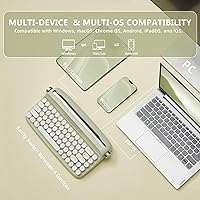
  • Compatible OS: Officially compatible with Windows, macOS, and Android operating systems across both wired and wireless modes.
  • Compatible Devices: Works with PCs, laptops, tablets, and smartphones that support Bluetooth 5.0 or USB-C connectivity.
  • Material: The chassis is constructed from plastic, keeping the overall weight low while maintaining a consistent retro styling finish.
  • Color: Available in Sweet Mint, a soft pastel green colorway designed to complement aesthetic and minimalist desk setups.
  • Key Style: Features round keycaps styled to evoke a vintage typewriter appearance, distinguishing it visually from standard flat-key keyboards.
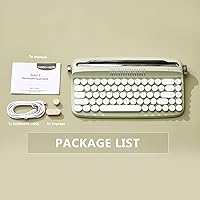
  • In the Box: Package includes the keyboard, one extra red keycap, a USB-C charging and data cable, and a printed user manual.

Related Reviews

YUNZII B303 Wireless Typewriter Keyboard
78%
93%
Aesthetic Design
71%
Build Quality
61%
Typing Feel
78%
Bluetooth Connectivity
82%
Multi-Device Switching
More
SEUNKWANG TK950 Wireless Typewriter Keyboard and Mouse Combo
78%
83%
Build Quality
88%
Typing Experience
79%
Wireless Connectivity
93%
Aesthetic & Design
76%
Backlighting
More
Arteck HW192 Wireless Keyboard and Mouse Combo
78%
78%
Build Quality
72%
Typing Experience
63%
Mouse Comfort & Ergonomics
81%
Battery Life
69%
Wireless Connectivity
More
SHUNJINRUN KB426 Wireless Full-Size Keyboard
77%
83%
Typing Feel & Key Response
88%
Noise Level
67%
Build Quality & Materials
79%
Wireless Connectivity & Reliability
91%
Value for Money
More
Lenovo 300 Wireless Keyboard
86%
89%
Quiet Key Operation
85%
Build Quality
92%
Ease of Setup
80%
Ergonomics & Comfort
91%
Compact Design
More
JLab JBuds Wireless Keyboard
88%
87%
Typing Comfort
94%
Multi-Device Switching
85%
Build Quality
92%
Battery Life
90%
Portability
More
Links9+ Wireless Bluetooth Keyboard
86%
89%
Typing Comfort
85%
Build Quality
78%
Connectivity Stability
90%
Battery Life
91%
Design & Aesthetics
More
Redragon BK7114 Wireless Keyboard
85%
91%
Typing Experience
89%
Connectivity Options
85%
Design and Build Quality
93%
Quietness of Keypress
88%
Compatibility with Multiple Devices
More
Logitech Wireless Keyboard K360
87%
95%
Battery Life
92%
Ease of Setup
83%
Typing Comfort
90%
Wireless Connectivity
85%
Build Quality
More
TECKNET TK-EKB01040BS01 Wireless Keyboard
76%
83%
Ergonomic Comfort
86%
Typing Noise Level
79%
Wireless Reliability
62%
Build Quality
88%
Value for Money
More

FAQ

It connects to iPads via Bluetooth, and basic typing works fine. That said, iOS-specific function shortcuts are not fully mapped, so some special keys may not behave as expected. For general typing and note-taking, most users find it perfectly usable.

It uses membrane switches, not mechanical ones. The typing feel is softer and quieter than a mechanical keyboard, with less tactile feedback per keystroke. If you rely on that satisfying click or bump when you type, this typewriter-style keyboard will likely feel flat by comparison.

The YUNZII B307 Wireless Typewriter Keyboard supports multiple Bluetooth pairing channels, which you cycle through using the left knob. You can pair it with several devices and switch between them without going through the full pairing process each time.
Battery life varies depending on usage intensity and whether backlighting features are active, but general reports suggest it handles several days of moderate use per charge. Heavy daily users may find themselves charging more frequently. It charges via the included USB-C cable, which is convenient.

The integrated stand slot measures 11.6 inches wide, which accommodates most standard tablets and iPads. Very large tablets with thick cases may not sit as securely, so it is worth checking your device dimensions beforehand.

Yes, the keyboard can be used in wired mode via the USB-C cable while it charges, so you are never fully locked out during a low-battery situation. This also makes it a reliable backup if Bluetooth connectivity drops.

The knobs are functional — the right one controls volume and the left one switches Bluetooth channels. They are not decorative. The package also includes an extra red keycap for one of the standard keys if you want to add a small visual accent to the layout.

Membrane keyboards are generally quieter than mechanical ones, and this retro wireless keyboard follows that pattern. The round keycaps produce a soft, slightly hollow sound on each press. It is unlikely to disturb coworkers or roommates in shared spaces, though it is not completely silent.

It is plug-and-play compatible with macOS over both Bluetooth and USB-C, so no driver installation is required for standard use. Some Mac-specific function key behaviors may differ slightly from a native Apple keyboard, but everyday typing and shortcuts work without issue for most users.

The round keycaps can be wiped down with a lightly dampened microfiber cloth for surface dust and smudges. Avoid harsh chemical cleaners on the plastic finish. If needed, individual keycaps can typically be pulled off with a keycap puller for a more thorough clean, though one is not included in the box.

Where to Buy