SEUNKWANG TK950 Wireless Typewriter Keyboard and Mouse Combo
SEUNKWANG TK950 Wireless Typewriter Keyboard and Mouse Combo — image 1
SEUNKWANG TK950 Wireless Typewriter Keyboard and Mouse Combo — image 2
SEUNKWANG TK950 Wireless Typewriter Keyboard and Mouse Combo — image 3
SEUNKWANG TK950 Wireless Typewriter Keyboard and Mouse Combo — image 4
SEUNKWANG TK950 Wireless Typewriter Keyboard and Mouse Combo — image 5
SEUNKWANG TK950 Wireless Typewriter Keyboard and Mouse Combo — image 6
SEUNKWANG TK950 Wireless Typewriter Keyboard and Mouse Combo — image 7
78%
22%

Overview

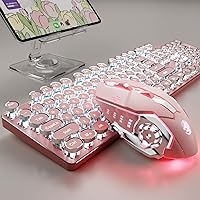
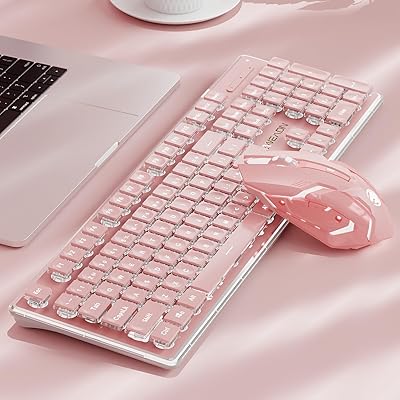
The SEUNKWANG TK950 Wireless Typewriter Keyboard and Mouse Combo arrived early 2025 as one of the more visually striking mid-range peripherals on the market — and it earns that attention. The aluminum alloy top panel immediately separates it from the sea of glossy plastic keyboards cluttering the same price bracket. Pink colorway aside, this retro keyboard combo has real substance: blue mechanical switches that click with satisfying authority, round keycaps that sit naturally under your fingertips, and wireless flexibility built for people who actually juggle multiple devices. It looks good in photos, but in person the build quality genuinely holds up.

Features & Benefits

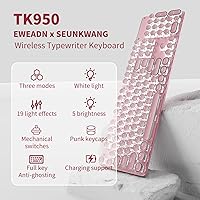
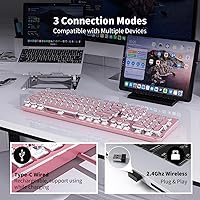
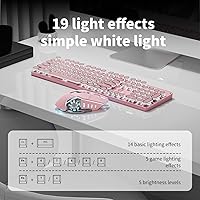
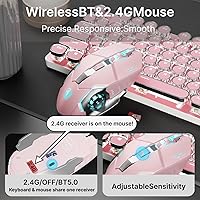
What makes the TK950 practical beyond its looks is the triple connectivity system — Bluetooth 5.0, 2.4GHz dongle, and USB-C wired — letting you keep up to five devices paired at once. Switching between your laptop and tablet is a quick key combination, not a hunt through settings menus. The full 104-key layout with anti-ghosting means fast typists and gamers can press multiple keys simultaneously without dropped inputs. White backlighting cycles through 19 effects, adjustable in brightness and speed, and the double-shot keycaps keep the legends crisp even after heavy use. The bundled mouse handles Bluetooth and 2.4GHz with three DPI settings — no extra dongle juggling required.

Best For

This retro keyboard combo is a natural fit for anyone building an aesthetic desk setup where everything needs to look like it belongs together. Students who hop between a personal laptop, a school tablet, and a phone will appreciate the multi-device pairing without constantly unplugging cables. It also works for light to moderate gamers who want responsive switches and anti-ghosting but are not willing to trade away style for performance. If you have been hunting for a single purchase that covers both keyboard and mouse in a cohesive design, this typewriter-style keyboard saves you the coordination headache. The pink colorway is the obvious draw, but the functional breadth is what keeps it on the desk.

User Feedback

Buyers consistently praise the visual impact and the tactile satisfaction of the blue switches — but those same switches are genuinely loud. In a shared office or library, the clicky noise will draw attention, so quiet typists should look elsewhere. Multi-device switching works, though some users report a brief lag when cycling between Bluetooth connections. The mouse gets mixed reactions: comfortable for shorter sessions, but users with larger hands or long workdays find it underwhelming over time. On the positive side, build consistency appears solid across most units, with few complaints about wobbly keycaps or a faulty dongle. The 48-month brand support adds a quiet layer of reassurance for a mid-range purchase.

Pros

  • Aluminum alloy panel feels noticeably more premium than plastic competitors at the same price point.
  • Five-device pairing with three connection modes covers virtually any multi-device workflow out of the box.
  • Double-shot keycaps will not fade or ghost after months of heavy daily typing.
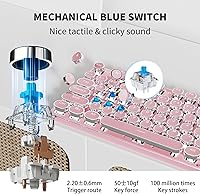
  • Blue switches deliver satisfying, precise actuation that committed typists genuinely enjoy.
  • Plug-and-play setup works instantly across Windows, macOS, iPad, and Android — no driver headaches.
  • The retro keyboard combo ships with a matching wireless mouse, eliminating a separate accessory purchase.
  • 19 backlight effects with adjustable brightness and breathing speed offer solid personalization for a white-LED system.
  • Full 104-key anti-ghosting handles multi-key gaming inputs and fast typing bursts without conflict.
  • 48-month brand support provides a meaningful reassurance that most competitors at this tier skip entirely.
  • Round retro keycaps sit naturally under fingertips and contribute to a more comfortable typing angle.

Cons

  • Blue switch noise is genuinely loud and will disrupt anyone nearby in a shared or quiet environment.
  • Bluetooth reconnection takes one to two seconds per switch, which interrupts fast multi-device workflows.
  • The bundled mouse is too compact for larger hands and fatigues users during extended work sessions.
  • Mouse tracking struggles on textured or non-standard surfaces, limiting where you can comfortably use it.
  • No software or key remapping support means you cannot customize beyond the 19 preset lighting effects.
  • Battery drains noticeably faster with backlighting enabled, requiring frequent top-ups in wireless mode.
  • The pink colorway is the only option — buyers wanting a neutral or dark color scheme have no alternative.
  • Occasional keycap seating inconsistencies have been reported out of the box on a small number of units.
  • The underside plastic and port area feel less refined than the top panel implies at first glance.

Ratings

The SEUNKWANG TK950 Wireless Typewriter Keyboard and Mouse Combo has been evaluated through AI analysis of verified global user reviews, with spam, bot-submitted, and incentivized feedback actively filtered out to ensure the scores reflect genuine buyer experiences. Ratings span everything from build quality and connectivity to mouse comfort and long-term durability, giving you a transparent picture of where this retro keyboard combo genuinely excels and where real-world use reveals its limits.

Build Quality
83%
The aluminum alloy top panel is a standout for this price tier — most buyers note it feels noticeably more solid than competing plastic-bodied keyboards. The keycaps sit flush and stable, and the overall chassis resists flex during aggressive typing sessions.
A small but consistent portion of users report that the underside plastic and cable port area feel less refined than the top panel suggests. A few units have shown keycap wobble on less-used keys after several weeks of daily use.
Typing Experience
88%
Blue switches deliver a crisp, satisfying click that regular typists genuinely enjoy — the tactile bump is well-defined, and actuation feels responsive whether you are drafting long documents or firing off quick replies. The round retro keycaps land comfortably under fingertips.
The same clicky feedback that appeals to enthusiasts becomes a real liability in shared spaces. Office workers and students in quiet environments consistently flag the noise as a dealbreaker, and there is no way to soften it without aftermarket dampeners.
Wireless Connectivity
79%
21%
Supporting up to five paired devices with three connection modes is genuinely useful for people who rotate between a laptop, tablet, and phone throughout the day. The 2.4GHz dongle mode in particular feels stable and low-latency for everyday work.
Bluetooth device switching introduces a short but noticeable delay — typically one to two seconds — that some multi-device power users find frustrating during fast context switches. A handful of buyers also reported occasional Bluetooth dropout during the first few days before connections stabilized.
Aesthetic & Design
93%
This is where the TK950 earns its strongest marks without reservation. The pink colorway, round retro keycaps, and white backlighting combine into a desk setup centerpiece that photographs beautifully and looks even better in person. It is one of the more cohesive-looking combos at this price.
The design appeal is also a limiting factor — buyers who want a neutral or dark colorway have no option here. The white-only backlight, while elegant, will disappoint anyone who expected RGB color customization based on the aesthetic presentation.
Backlighting
76%
24%
Nineteen lighting effects, including five dedicated gaming modes, give users plenty of variety for personalizing their setup. Brightness and breathing speed are independently adjustable, and the double-shot keycaps keep the legends clearly illuminated without hotspots.
The white-only LED is a deliberate design choice, but it limits appeal for buyers expecting color options. A few users also note that the backlighting dims more quickly than expected in power-saving mode, which can feel abrupt during light-use sessions.
Mouse Quality
67%
33%
The bundled mouse covers the basics well — three DPI levels are adequate for switching between precise document work and faster browser navigation, and the dual Bluetooth and 2.4GHz support means it stays in sync with the keyboard without an extra dongle.
User sentiment on the mouse is noticeably more divided than on the keyboard. Buyers with larger hands report it feels compact and fatiguing over long sessions, and tracking precision on textured surfaces drew repeated complaints. For a primary work mouse, many users supplement it with a dedicated replacement.
Multi-Device Switching
74%
26%
The ability to store up to five device profiles and switch via a simple key combination is a practical feature that students and professionals genuinely use. Once you learn the shortcut, hopping between a MacBook and an iPad feels intuitive enough.
The switching lag under Bluetooth is the persistent sticking point. Users who need instant transitions — say, between a work PC and a personal laptop — find the one-to-two second reconnect window slightly disruptive compared to dedicated multi-device keyboards at a similar price.
Anti-Ghosting Performance
86%
Full 104-key anti-ghosting holds up reliably during gaming sessions and fast typing bursts. Buyers who tested it with gaming titles that require simultaneous multi-key inputs reported no missed or conflicting keystrokes, which is exactly what you want from a full-size layout.
Anti-ghosting performance is strong but not a differentiator at this tier — most mechanical keyboards in this range offer comparable results. Hardcore gamers who need ultra-low polling rates may still prefer a dedicated gaming keyboard, but for casual play it is more than sufficient.
Setup & Compatibility
91%
Plug-and-play really works here — no driver installation, no companion software to wrestle with. The TK950 paired instantly with Windows, macOS, iPad, and Android devices in buyer tests, which is a genuine convenience for users who rotate across ecosystems.
Without dedicated software, there is no way to remap keys or create custom lighting profiles beyond the 19 presets. Power users who like fine-grained control will hit that ceiling quickly, though for most buyers the out-of-box experience requires zero troubleshooting.
Battery Life
72%
28%
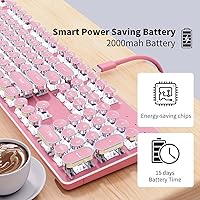
In 2.4GHz wireless mode, most users report several days of moderate use before needing a recharge, which is respectable for a backlit mechanical keyboard. Turning off the backlighting noticeably extends runtime, and buyers who work in well-lit rooms often leave it off anyway.
Bluetooth mode drains faster, and buyers who keep all 19 lighting effects running report charging every one to two days. The warning in the product notes against using the keyboard while charging is a minor frustration for users who hit low battery mid-session.
Value for Money
78%
22%
Getting a full-size mechanical keyboard with an aluminum panel, triple connectivity, and a matching wireless mouse in one purchase offers solid value compared to buying components separately. The 48-month brand support also adds reassurance that most competitors skip at this price point.
The bundled mouse pulls the overall value perception down slightly — if you need a serious work or gaming mouse, you will likely replace it regardless. Buyers who only needed the keyboard sometimes feel they paid a premium for a mouse they ended up ignoring.
Keycap Durability
84%
Double-shot injection molding means the legends are part of the keycap structure rather than printed on top, so they will not fade or rub off with regular use. Several buyers who type heavily every day reported no visible wear after months of consistent use.
A small number of units showed minor keycap inconsistency in how firmly individual caps snap onto stems, with a couple of users reporting a key that needed reseating out of the box. It appears to be an occasional production variance rather than a systemic issue.
Noise Level
52%
48%
For users who actively want audible, tactile feedback — home office workers, solo typists, or anyone who finds clicky switches motivating — the blue switch noise is a feature, not a flaw. It gives each keystroke a satisfying, deliberate feel.
In any shared environment, the noise is objectively loud and a recurring complaint. Library users, open-plan office workers, and anyone who types while others are sleeping or on calls will face friction. This is a structural trait of blue switches and cannot be adjusted or mitigated without hardware changes.
Ergonomics
71%
29%
The built-in adjustable foot stand and stepped floating keycap design help reduce wrist fatigue during moderate typing sessions. Most buyers who use it for a few hours daily report it is comfortable enough without a separate wrist rest.
Extended work sessions of five or more hours revealed fatigue for a noticeable subset of users, particularly those accustomed to low-profile or ergonomically contoured keyboards. The keyboard itself is flat rather than curved, which limits comfort ceiling for marathon typists.

Suitable for:

The SEUNKWANG TK950 Wireless Typewriter Keyboard and Mouse Combo is built for buyers who refuse to choose between a good-looking desk and a functional one. Students who constantly juggle a laptop, tablet, and phone will get real mileage from the five-device pairing system — the ability to switch inputs with a key combination rather than unplugging cables genuinely reduces daily friction. Remote workers in home offices who type for several hours a day will enjoy the tactile feedback of blue switches and appreciate the aluminum panel that holds up to long-term use far better than typical plastic-bodied alternatives. It also makes a strong case for anyone assembling a pink or pastel desk setup, since finding a keyboard and mouse that visually match without buying separately is harder than it sounds. Casual gamers who want anti-ghosting and responsive key actuation without the aggressive aesthetic of a traditional gaming keyboard will find this retro keyboard combo hits a useful middle ground.

Not suitable for:

Buyers who work in open offices, shared apartments, libraries, or any noise-sensitive environment should think carefully before committing to this typewriter-style keyboard — blue switches are inherently loud, and no amount of personal preference changes how they sound to the people around you. The bundled mouse, while convenient, is compact and underwhelming for users with larger hands or anyone who relies on their mouse for precision-heavy tasks like design work or extended gaming sessions. Anyone expecting RGB color lighting will be disappointed, as the backlight is white-only with no color customization available regardless of the lighting mode selected. Power users who want remappable keys, onboard profiles, or companion software for macro creation will hit a hard wall — there is no software support, and what you see out of the box is what you get. Finally, buyers who need instant, zero-lag Bluetooth switching between devices for fast-paced professional workflows may find the brief reconnect delay just disruptive enough to prefer a dedicated multi-device keyboard instead.

Specifications

  • Switch Type: Blue mechanical switches provide tactile, clicky actuation suited to both typing and casual gaming.
  • Layout: Full-size 104-key layout includes a dedicated numpad, function row, and standard navigation cluster.
  • Connectivity: Supports Bluetooth 5.0, 2.4GHz wireless dongle, and USB-C wired connection modes simultaneously manageable across up to 5 paired devices.
  • Panel Material: Top panel is constructed from aluminum alloy, providing scratch resistance and a more rigid feel than standard plastic keyboard frames.
  • Keycap Type: Double-shot injection-molded round keycaps ensure legends remain legible and backlight-clear even after extended heavy use.
  • Backlight: White LED backlighting offers 19 preset effects — 14 standard and 5 gaming-specific — with independently adjustable brightness and breathing speed.
  • Anti-Ghosting: Full 104-key anti-ghosting technology allows simultaneous multi-key input without keystroke conflict or dropped commands.
  • Mouse Connectivity: Bundled wireless mouse supports both Bluetooth and 2.4GHz wireless connection modes independently of the keyboard.
  • Mouse Sensitivity: Mouse offers three switchable DPI sensitivity levels to suit different tracking speed preferences across work and casual gaming tasks.
  • Charging Port: USB-C port is used for wired mode and recharging; the manufacturer advises against using the keyboard while it is actively charging.
  • Compatible Devices: Works with PC, Mac, laptops, tablets, and smartphones across Windows, macOS, iPadOS, and Android platforms without drivers.
  • Driver Requirement: No drivers or companion software are required; the keyboard and mouse are fully plug-and-play out of the box.
  • Package Dimensions: The retail package measures 17.83 x 8.78 x 2.09 inches, accommodating the full-size keyboard and bundled mouse accessories.
  • Item Weight: The complete package weighs 2.46 pounds, reflecting the aluminum panel construction and bundled peripherals.
  • Color: Available exclusively in pink, designed to complement pastel and retro-themed desk setups.
  • Brand Support: SEUNKWANG offers 48-month brand support, which is notably longer than the warranty coverage provided by most competitors in this category.
  • Manufacturer: Manufactured by EWEADN and sold under the SEUNKWANG brand, with availability beginning January 2025.

Related Reviews
SEUNKWANG V3 Wireless Keyboard and Mouse Combo
87%
89%
Ergonomics
82%
Connectivity
94%
Quietness
86%
Battery Life
91%
Setup Ease
More
Arteck HW192 Wireless Keyboard and Mouse Combo

78%
78%
Build Quality
72%
Typing Experience
63%
Mouse Comfort & Ergonomics
81%
Battery Life
69%
Wireless Connectivity
More
Kootop Wireless Keyboard Mouse Combo
87%
89%
Ergonomics and Comfort
91%
Typing Experience
85%
Wireless Connectivity
87%
Design and Aesthetics
83%
Battery Life
More
JOYACCESS Wireless Keyboard and Mouse Combo
82%
88%
Value for Money
83%
Typing Experience
74%
Mouse Performance
86%
Backlight Quality
81%
Battery Life
More
TKVPJYYI Wireless Retro Typewriter Keyboard and Mouse Combo
76%
88%
Design & Aesthetics
71%
Typing Experience
62%
Mouse Performance
58%
Build Quality
83%
Wireless Connectivity
More
UBOTIE Wireless Keyboard and Mouse Combo

79%
88%
Value for Money
74%
Typing Experience
83%
Keycap Design & Aesthetics
67%
Mouse Performance
81%
Wireless Connectivity & Range
More
Arcwares Wireless Keyboard and Mouse Combo
78%
88%
Value for Money
91%
Aesthetic Design
76%
Keyboard Typing Experience
67%
Mouse Performance
84%
Wireless Connectivity
More
FOPETT Wireless Keyboard and Mouse Combo
85%
91%
Typing Experience
87%
Battery Life
94%
Design & Aesthetics
88%
Ergonomics
85%
Build Quality
More
MOFII Wireless Keyboard and Mouse Combo
84%
94%
Ease of Setup
85%
Ergonomics and Comfort
90%
Wireless Connectivity
88%
Design and Aesthetics
83%
Battery Life
More
seenda Wireless Keyboard and Mouse Combo
88%
89%
Typing Comfort
87%
Ergonomics
82%
Wireless Connectivity
94%
Setup & Installation
88%
Key Spacing & Accuracy
More

FAQ

Not really — you hold a function key combination to jump between stored device profiles, and it works without any app or menu navigation. The catch is that Bluetooth switching takes about one to two seconds to reconnect, which most users adapt to quickly but fast-switching power users may find slightly disruptive.

Blue switches are genuinely loud — that is part of their character, and if you are buying this keyboard you should go in with eyes open on that point. In a private home office it is a non-issue, but in an open-plan office, a library, or a shared bedroom, expect the clicking to draw attention. There is no way to quiet them short of adding aftermarket switch dampeners.

Both work on macOS without any drivers or extra software. The key labeling is Windows-standard, so a few Mac-specific shortcuts require learning the equivalent key combinations, but general typing, browsing, and productivity use is fully compatible from the moment you pair it.

The mouse uses the same 2.4GHz dongle as the keyboard, so you only need a single USB receiver plugged in to run both wirelessly. If you want to connect the mouse via Bluetooth instead, that option is also available independently.

With backlighting off, most users get several days of moderate daily use before needing to recharge via USB-C. Keeping the backlight effects running — especially at higher brightness — noticeably shortens that window, with some users recharging every one to two days under heavier illumination settings.

The round retro-style keycaps can physically be removed with a standard keycap puller, but finding aftermarket replacements in the same round profile is difficult since this style is less standardized than traditional Cherry-profile caps. For most buyers, swapping keycaps is not a practical customization path on this board.

It handles casual and light gaming well — full anti-ghosting and blue switch responsiveness cover most everyday game genres without issue. Competitive or fast-paced gaming at a high level is a different story; dedicated gaming keyboards with higher polling rates and more customization options will outperform it there. Think of it as a capable all-rounder rather than a gaming-first peripheral.

Yes, brightness can be adjusted all the way down to fully off using the function key shortcuts, which is the most effective way to extend battery life during long wireless sessions.

The manufacturer specifically advises against using the keyboard while it is charging, which is worth noting if you tend to plug in and keep working when battery runs low. The intended use is to charge when not in use and switch to wireless once charged.

The 2.4GHz dongle connection is noticeably more stable and consistent than Bluetooth for most users — it behaves more like a wired connection in practice, with no perceptible lag during typing or casual gaming. Bluetooth is more convenient for multi-device setups but comes with slightly more variability, especially on first pairing or after extended idle periods.