Overview

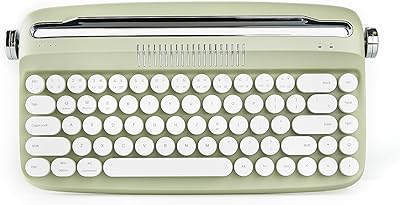
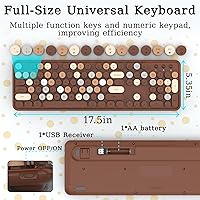
The Links9+ Retro Typewriter Wireless Keyboard arrives at a moment when desk aesthetics have become almost as important as desk function. The coffee-colorful colorway — warm browns, creamy whites, and muted accent tones — gives it a distinctly vintage personality that stands out in a sea of flat, black office peripherals. At this price point, you also get dual wireless connectivity: a Bluetooth channel for pairing with phones or tablets, and a 2.4GHz USB dongle for instant desktop use. That combination is genuinely rare at this tier. Just be clear about what this is: a style-forward membrane keyboard from a relatively small brand, not a precision typing tool for power users.
Features & Benefits

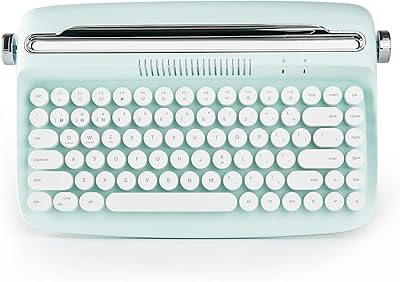
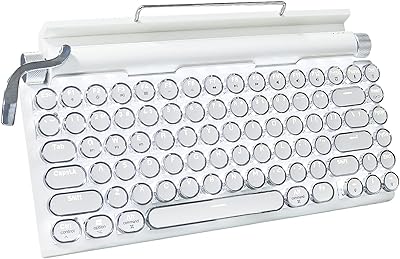
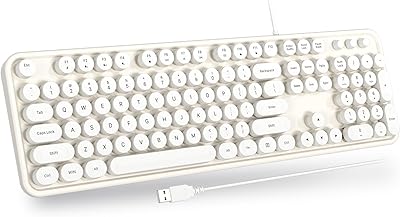
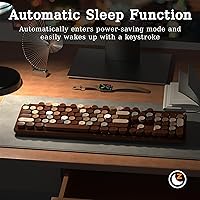
The round keycaps are the first thing you notice typing on the Links9+ typewriter-style board — they sit slightly higher and wider than a standard chiclet layout, giving each keystroke a satisfying thud rather than a sharp click. It's still a membrane board, so don't expect the crisp tactile bump of a mechanical switch. Connectivity-wise, Bluetooth and 2.4GHz both work reliably, though the USB dongle connection tends to feel snappier in daily use. The removable keycaps are a genuine selling point: pulling them off for a proper clean takes seconds and makes a real difference over time. The built-in hotkeys for media and volume are straightforward, and the auto-sleep function is unobtrusive — the board wakes up quickly enough that you barely notice it.

Best For

This retro wireless keyboard makes the most sense for home office workers, remote students, and anyone who spends real time thinking about how their desk looks — not just how it performs. Switching between a tablet for reading and a laptop for writing becomes trivial with the dual wireless setup. It's also a genuinely thoughtful gift option given the distinctive styling and broad device compatibility. What it is not: a serious tool for fast-paced coders, competitive gamers, or anyone who depends on low-latency input. There's no N-key rollover, and the membrane switch feel will frustrate anyone accustomed to a quality mechanical board. Know your audience before buying.

User Feedback

Across buyer reviews, positive sentiment clusters around the visual design and the novelty of the round keycap feel — people genuinely enjoy how this aesthetic keyboard looks on their desk. Setup is consistently described as painless. On the critical side, a recurring thread involves keycap wobble and the relatively shallow key travel, which is a fair observation for a membrane board in this price range. A handful of users mention Bluetooth pairing taking a few tries on certain devices, though it's not a widespread complaint. The plastic chassis draws some commentary about feeling light and inexpensive — accurate, but also expected. Longer-term durability data is limited since this is a relatively recent product, and Links9+ doesn't carry the after-sales reputation of established brands, so that's worth factoring in.

Pros

  • The round keycaps and typewriter-inspired layout give any desk an immediate visual upgrade over standard flat keyboards.
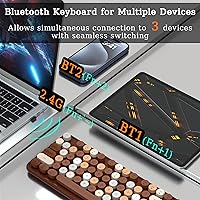
  • Dual Bluetooth and 2.4GHz wireless means you can pair it to a phone, tablet, and desktop without buying separate accessories.
  • Removable keycaps make deep cleaning genuinely easy — a practical feature rarely offered at this price point.
  • Full-size layout with 12 hotkeys keeps media controls and browser shortcuts within immediate reach during daily use.
  • Auto-sleep and a low-battery indicator handle power management quietly without interrupting your workflow.
  • Setup requires no driver installation — plug in the dongle or pair via Bluetooth and you are typing in under a minute.
  • The coffee-colorful colorway is genuinely distinctive and difficult to find at this budget tier from any competitor.
  • Compatible with both Windows and Mac, making it versatile across mixed-device households and most everyday work setups.

Cons

  • Membrane switches offer shallow travel and a soft bottom-out that will feel underwhelming to anyone used to mechanical boards.
  • Some keycaps exhibit slight wobble out of the box, which can feel inconsistent during faster or more forceful typing sessions.
  • Bluetooth pairing reliability has been inconsistent for a subset of users, particularly on first connection with certain devices.
  • The all-plastic build feels lightweight in a way that raises real questions about how well it holds up over years of daily use.
  • Links9+ carries limited brand recognition, making warranty claims and customer support harder to navigate than with established manufacturers.
  • Battery-powered operation with no rechargeable option means AAA cells will need periodic replacing, adding a small but ongoing running cost.
  • No backlighting makes the Links9+ typewriter-style board a poor choice for anyone who regularly types in dim or low-light conditions.
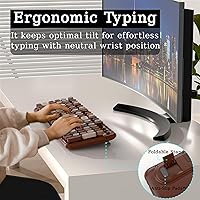
  • The ergonomic tilt claim is modest at best — the fixed angle offers little meaningful adjustment for users who prefer a customizable incline.

Ratings

The ratings below for the Links9+ Retro Typewriter Wireless Keyboard were generated by our AI system after analyzing verified buyer reviews sourced globally, with automated filtering applied to exclude spam, bot-generated feedback, and incentivized submissions. Scores reflect the honest distribution of real user sentiment — both the genuine praise and the recurring pain points that surface consistently across independent purchases. Where this keyboard earns strong marks and where it falls short are both transparently represented in the categories below.
Design & Aesthetics
91%
The coffee-colorful colorway consistently draws enthusiastic reactions from buyers who invest real thought into how their workspace looks. Round keycaps spaced in a typewriter-inspired pattern give the board a retro personality that stands out immediately next to any standard flat keyboard. For desk-setup enthusiasts, the visual payoff here is genuinely strong.
The aesthetic is entirely subjective, and buyers expecting a more traditional or understated look will find the colorway too busy for a professional office setting. A few users have also noted that keycap legends — the printed letters and symbols — show minor inconsistencies in alignment on closer inspection.
Typing Feel
62%
38%
The elevated round keycaps produce a slightly meatier thud per keystroke than a low-profile chiclet board, which casual typists tend to find satisfying. Users who upgraded from a flat laptop keyboard often describe the feel as a pleasant step up, particularly for longer writing or note-taking sessions at a home desk.
Anyone familiar with mechanical keyboards will find the membrane bottom-out underwhelming — there is no tactile bump, no audible click, just a soft cushioned press that can feel imprecise during fast typing. Key wobble on certain caps has also been flagged, which adds to a sense of inconsistency when touch-typing at speed.
Wireless Connectivity
76%
24%
Having both a Bluetooth channel and a 2.4GHz USB dongle in one board means you can keep a laptop paired via Bluetooth while the dongle handles desktop duty — no buying a second keyboard. The 2.4GHz connection in particular is responsive and stable across the full rated 10-meter range for everyday desk distances.
Bluetooth pairing reliability is where the experience gets inconsistent — a subset of users have had to attempt pairing multiple times before it sticks, particularly on first use with certain Android and Windows devices. There is no quick-switch key for toggling between paired devices, which makes multi-device workflows slightly clunky in practice.
Build Quality
58%
42%
For buyers who calibrate expectations honestly to the price tier, the build is acceptable — the board sits flat on a desk without significant flex, and keycaps attach firmly enough for daily light use. At this budget level, the construction is roughly on par with what direct competitors offer in the same segment.
The all-plastic chassis feels noticeably hollow when picked up, and a few users report the board creaks slightly under firm typing pressure. Individual keycap wobble has been flagged across multiple reviews, and long-term durability remains an open question given this is a relatively recent product from a lesser-known brand.
Value for Money
83%
When you factor in dual wireless connectivity, removable keycaps, and the genuinely distinctive aesthetic, the overall package offers more variety than most competitors at this price point. Home office workers and students who want a keyboard that does not look generic tend to feel they got a fair and honest deal.
Buyers expecting durability and support comparable to established brands will find the value proposition weakens considerably over a longer ownership horizon. Limited after-sales infrastructure and unclear warranty terms from a smaller label mean upfront savings could be offset by early replacement costs sooner than expected.
Key Sound
74%
26%
The round floating keycaps produce a noticeably more satisfying thud than a flat membrane board — enough that several buyers mention enjoying the sound during evening work sessions without disturbing others nearby. It carries a mild typewriter resonance that adds to the overall nostalgic experience without being distractingly loud.
The sound profile will not satisfy keyboard enthusiasts looking for a deep, thocky note or a crisp mechanical click — it remains fundamentally a soft membrane thud with no real character underneath the aesthetics. Users in quiet shared office spaces have found occasional keycap rattle on looser caps mildly irritating.
Ease of Setup
89%
Plug-and-play performance is one of the genuine strong suits here — inserting the USB dongle and powering on the board is all it takes for most Windows and Mac users. Bluetooth pairing is similarly fast for the majority: locate the device in system settings, connect, and you are typing within about 30 seconds.
A minority of users have experienced Bluetooth pairing failures on the first attempt, requiring a keyboard reset or a full device restart before it connects cleanly. The included documentation is minimal, so troubleshooting anything beyond the basic setup typically means searching online for community-sourced guidance.
Battery Life
71%
29%
The auto-sleep feature activates after a period of inactivity and genuinely helps stretch AAA battery life for light-to-moderate typists — users who type a few hours a day and step away regularly tend to go several weeks without a change. The 2-second wake time means the sleep function does not disrupt the actual typing experience.
Heavy typists who keep the keyboard active for extended stretches report going through AAA cells faster than expected, and the absence of a rechargeable battery means ongoing consumable costs add up over time. The manufacturer publishes no concrete battery life figure, making it difficult to plan ahead before a set runs dry.
Cleaning & Maintenance
87%
Removable keycaps are a practical differentiator that buyers genuinely appreciate — pulling off a key to clear out crumbs, skin oils, or pet hair takes under a minute with no tools required. People who eat at their desk or work in dusty environments specifically highlight this as a primary reason they chose this board.
Keycap removal requires a firm upward pull on certain keys, and a small number of users report the plastic retention tabs showing signs of wear after repeated removal cycles. Debris that settles beneath the floating keys and reaches the membrane layer is harder to dislodge without more involved disassembly.
Hotkey Functionality
73%
27%
The 12 dedicated hotkeys for media playback, volume, and browser shortcuts work reliably on both Windows and Mac without any remapping software required. Users who frequently adjust audio levels or skip tracks while working find them a genuinely time-saving addition to a full-size layout that already covers all standard keys.
Some hotkey functions behave inconsistently depending on operating system version — particularly browser-related shortcuts, which occasionally fail to trigger correctly on non-default browsers. There is no ability to remap or customize any of the hotkeys, which limits their usefulness for power users with specific or non-standard workflow needs.
Multi-Device Support
77%
23%
Having one device on Bluetooth and another on the 2.4GHz dongle simultaneously gives users a real workflow advantage when swapping between a MacBook and a Windows desktop throughout the day. For buyers managing two workstations, that flexibility delivers more practical value than the modest price point would suggest.
There is no dedicated device-switch button, so alternating between the Bluetooth-paired device and the dongle-connected machine requires a manual toggle rather than a single tap. Users juggling three or more devices will find the two-channel limit frustrating compared to keyboards that support three or more independent Bluetooth profiles.
Ergonomics & Comfort
64%
36%
The keyboard ships with a built-in tilt angle that positions the hands at a slight upward incline, which some users find more natural than a completely flat typing surface during long work-from-home sessions. The full-size layout ensures no key crowding, so finger movement stays predictable for touch typists across a full workday.
The tilt is fixed and non-adjustable, so users who prefer a steeper or flatter wrist angle are simply out of luck — there are no fold-out feet to change the incline. The ergonomic marketing language overstates what is ultimately a modest and fairly standard design choice, not a meaningful comfort investment.
Brand Reliability
56%
44%
For a low-stakes first purchase or a visually appealing gift, the brand's smaller profile is not necessarily a dealbreaker — the keyboard ships functional and performs its core tasks without obvious manufacturing defects for most buyers. Its ranking in the top 2,500 of Computer Keyboards on a major platform suggests a reasonable sales volume.
Links9+ has virtually no established reputation for after-sales support, and warranty terms are not clearly communicated in the product listing — a real concern for anyone encountering a defect months post-purchase. The manufacturing origin carries no recognized keyboard heritage, leaving long-term parts availability and customer support accessibility genuinely uncertain.
Portability
79%
21%
At 1.65 pounds with a fully wireless setup, this retro wireless keyboard is easy to move between a home office desk and a dining table, or to slide into a backpack for a co-working day out. The USB-A dongle is compact enough to leave plugged into a laptop port without snagging on bag linings.
The full-size 17.5-inch footprint takes up considerable bag space and will not fit comfortably inside a standard laptop sleeve alongside a 13-inch notebook. Users who move their keyboard between two locations daily may find the physical bulk adds more friction to that routine than they initially anticipated.

Suitable for:

The Links9+ Retro Typewriter Wireless Keyboard is a natural fit for home office workers, students, and remote workers who treat their desk setup as a personal statement and want a keyboard that contributes to the overall look without demanding a premium budget. If your daily typing consists of emails, notes, and browsing rather than all-day coding sprints or competitive gaming, the membrane switches and full-size layout cover those everyday needs comfortably. The dual wireless options make it practical for anyone juggling a laptop and a tablet, allowing reasonably quick switching without re-pairing headaches. It also lands well as a gift: the distinctive coffee-colorful colorway and typewriter styling read as thoughtful and unique, and broad Mac and Windows compatibility means you rarely need to worry about what device the recipient is running. Anyone prioritizing a clean, cable-free desk on a sensible budget will find this retro wireless keyboard punches above its weight on personality alone.
Not suitable for:

If you type for long stretches and have strong opinions about switch feel, the Links9+ Retro Typewriter Wireless Keyboard will likely leave you wanting — it is a membrane board, and no amount of aesthetic charm changes that fundamental fact. Heavy typists, coders who move fast across the keyboard all day, and gamers who depend on N-key rollover or near-instant response times should look elsewhere without hesitation. The plastic chassis, while acceptable for its price tier, will not satisfy buyers who equate build solidity with long-term confidence in a product. Links9+ is a smaller, lesser-known brand with limited after-sales visibility, so if reliable warranty support and accessible customer service are priorities for you, that is a real consideration worth weighing carefully. This aesthetic keyboard is also a questionable fit for professional office environments where a keyboard is expected to feel as serious as it looks.

Specifications

  • Connectivity: Supports both Bluetooth wireless and 2.4GHz wireless via a USB-A dongle, providing two independent connection options with no driver installation required.
  • Wireless Range: Rated for a wireless range of up to 10 meters (approximately 33 feet) under typical indoor conditions.
  • Key Style: Uses floating round keycaps mounted on a membrane switch base, producing a typewriter-inspired appearance with a softer keystroke feel than mechanical alternatives.
  • Layout: Full-size keyboard layout featuring 12 dedicated function hotkeys for media playback, volume adjustment, and common browser controls.
  • Dimensions: Measures 17.5 inches long by 5.35 inches wide by 1.5 inches tall, occupying a standard full-size footprint suitable for most desk setups.
  • Weight: Weighs approximately 1.65 pounds without batteries installed, resulting in a lightweight feel that some users may perceive as less substantial.
  • Chassis Material: The keyboard body and frame are constructed entirely from plastic, which keeps overall weight low but may feel less premium compared to aluminum-frame competitors.
  • Power Source: Operates on AAA batteries (not included) and features an integrated auto-sleep mode to reduce power draw during periods of inactivity.
  • Wake Latency: Returns from auto-sleep mode in approximately 2 seconds after any key is pressed, resuming normal operation without a manual power cycle.
  • Battery Alert: An onboard indicator light activates when battery levels are critically low, giving users advance notice before the keyboard stops responding.
  • Device Support: Listed as compatible with laptops, desktop PCs, smart TVs, smartphones, and tablets across a broad range of form factors.
  • OS Support: Officially compatible with Windows and Mac operating systems; Bluetooth pairing may also function with iOS and Android devices, though full hotkey support is not guaranteed on those platforms.
  • Keycap Removal: All keycaps are individually removable without additional tools, enabling thorough cleaning of the switch stems and surface beneath each key.
  • Color Variant: The Coffee-Colorful variant features a warm-toned combination of brown, cream, and muted accent-colored keycaps set on a neutral base.
  • Manufacturer: Produced by Dongguan Suoai Electronics Co., Ltd and sold under the Links9+ brand label.

Related Reviews

YUNZII B307 Wireless Typewriter Keyboard
74%
91%
Design & Aesthetics
61%
Typing Feel
84%
Wireless Connectivity
88%
Integrated Stand
67%
Build Quality
More
MOWUX Retro Typewriter Wired Keyboard
78%
93%
Aesthetic Design
67%
Typing Feel
63%
Build Quality
91%
Setup & Compatibility
82%
Value for Money
More
Links9+ Rainbow Wireless Keyboard Mouse Combo
76%
91%
Aesthetic Design
88%
Setup & Ease of Use
86%
Cleaning & Maintenance
84%
Wireless Connectivity
83%
Value for Money
More
YUNZII B303 Wireless Typewriter Keyboard
78%
93%
Aesthetic Design
71%
Build Quality
61%
Typing Feel
78%
Bluetooth Connectivity
82%
Multi-Device Switching
More
Adventurers Retro Typewriter Keyboard 75%
77%
88%
Build Quality
93%
Aesthetic & Design
84%
Typing Experience
67%
Bluetooth Connectivity
86%
Hot-Swap Switch Support
More
Atelus Retro Typewriter Keyboard
77%
91%
Aesthetic Design
67%
Typing Feel
74%
Typing Sound
63%
Build Quality
83%
Keycap Removability & Cleaning
More
SEUNKWANG TK950 Wireless Typewriter Keyboard and Mouse Combo
78%
83%
Build Quality
88%
Typing Experience
79%
Wireless Connectivity
93%
Aesthetic & Design
76%
Backlighting
More
Qwerkytoys Qwerkywriter Typewriter Inspired Retro Mechanical Keyboard
84%
89%
Typing Experience
93%
Design & Aesthetic
92%
Battery Life
88%
Build Quality
77%
Ergonomics & Comfort
More
Arteck HW192 Wireless Keyboard and Mouse Combo
78%
78%
Build Quality
72%
Typing Experience
63%
Mouse Comfort & Ergonomics
81%
Battery Life
69%
Wireless Connectivity
More
INFINMIND K913 Wireless Keyboard
79%
88%
Typing Noise Level
74%
Key Feel & Typing Experience
71%
Build Quality & Materials
87%
Matte Finish & Smudge Resistance
83%
Wireless Connectivity & Stability
More

FAQ

Yes — the Links9+ Retro Typewriter Wireless Keyboard is compatible with both Windows and Mac without any driver installation required. Whether you use the 2.4GHz USB-A dongle or pair via Bluetooth, both operating systems recognize it immediately. Keep in mind that a handful of Mac-specific shortcuts may not map perfectly, which is a standard limitation for non-Apple keyboards rather than anything specific to this model.
The two connection modes are independent, so most users find it easiest to assign each mode to a different device — for example, the dongle plugged into a desktop PC and Bluetooth reserved for a tablet. Toggling between them is handled directly on the keyboard without any software. No re-pairing is needed each time as long as both devices have already been set up.

It is a membrane keyboard — the round keycaps are purely aesthetic and do not change the underlying switch type. The typing sound is a touch more pronounced than a typical flat membrane board, which some people enjoy, but there is no tactile bump or audible click like you would get from a mechanical switch. Anyone who has typed on a quality mechanical board and expects a similar feel will likely find this one disappointing in that regard.

The manufacturer does not publish a specific battery life figure, but the auto-sleep feature helps meaningfully extend how long a set of AAA cells lasts. In practice, comparable membrane keyboards with similar power-saving designs tend to run anywhere from several weeks to a few months depending on daily usage volume. The onboard low-battery light gives you a heads-up before things cut out, so you should not be caught off guard.

In most cases, yes — this retro wireless keyboard will pair with iOS and Android devices using standard Bluetooth, even though the official compatibility list only mentions Windows and Mac. The basic typing experience typically works without issue. Some of the dedicated hotkeys may not function correctly on mobile operating systems, so it is worth testing those before relying on them in your workflow.

No special tools are needed — the keycaps pull off individually with gentle upward pressure using your fingers. Once removed, a soft brush or a quick pass of compressed air clears out any debris from the switch area beneath them. The keycaps themselves can be wiped down with a slightly damp cloth, just make sure the keyboard is powered off before you start.

No, the Links9+ typewriter-style board does not include any form of backlighting. If you type regularly in low-light or nighttime conditions, that is a real limitation to factor into your decision. Backlighting is a common trade-off at this price tier, especially in style-focused designs where the aesthetic takes priority over productivity features.

For most users, once the initial pairing is established it holds reliably through a normal typing session. A smaller number of buyers have reported that the first pairing can occasionally take a couple of attempts on certain devices. If you work in a busy Bluetooth environment or switch devices frequently, using the 2.4GHz USB dongle tends to deliver a more consistent and latency-free experience.

For casual or slow-paced games it is perfectly functional, but for anything competitive it is not the right tool. Membrane switches do not provide the fast actuation or precise feedback that gaming keyboards are designed around, and the lack of N-key rollover means that pressing multiple keys simultaneously may not register all inputs correctly. Anyone who games seriously should look at a dedicated gaming keyboard.

Links9+ is a smaller brand with limited after-sales visibility, and specific warranty terms are not prominently detailed in the product listing, which is worth knowing upfront. Your most reliable path for resolving issues is through the platform you purchased from, using their standard return or dispute process. Given the brand's limited support infrastructure relative to larger manufacturers, buying from a retailer with a straightforward return policy is the most practical safety net.