Overview

The Merdia Triple Mode 100-Key Wireless Mechanical Keyboard sits in an interesting spot in the budget keyboard market — it offers features typically found on pricier boards without asking much in return. The real headline is triple connectivity: 2.4G wireless, USB-C wired, and Bluetooth, all switchable with a single button on the left side. That kind of flexibility at this price is genuinely uncommon. Toss in hot-swap switch support and you have a board that punches noticeably above its weight class. Just keep expectations grounded — this is built for home office work and casual gaming, not competitive play.
Features & Benefits

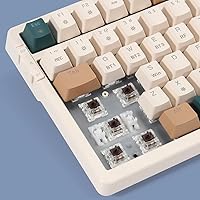
The brown switches here are tactile without crossing into clicky territory — a sensible choice for shared spaces or video call-heavy workdays. Switching between 2.4G, wired, and Bluetooth modes takes a single button press, which sounds minor but genuinely changes how you use a keyboard across multiple devices. The hot-swap feature means you can pull out any switch and drop in a compatible MX-style replacement — no soldering, no technical background required. RGB per-key backlighting looks clean in dim rooms, and the 2.4G receiver tucks into a dedicated onboard slot so it won't wander off and disappear.

Best For

This triple-mode board makes the most sense for people whose daily setup isn't confined to a single desk. Students who type on a laptop in the morning and switch to a tablet later will appreciate the multi-device pairing. It's also a solid pick for anyone curious about mechanical keyboards who wants the option to swap switches without committing to a more expensive custom build. Light gamers who split time between writing emails and playing casual titles will find the brown switch feel comfortable for both. Windows, Mac, iOS, and Android compatibility means it works with virtually any device in your home.

User Feedback

Buyers consistently highlight wireless reliability and switch feel as standout positives — the 2.4G connection in particular gets praised for staying stable across longer work sessions. Hot-swap functionality earns genuine appreciation, with many users confirming it works exactly as advertised. On the flip side, the ABS keycaps will develop a greasy shine under heavy daily use — a known trade-off at this tier, not a manufacturing flaw. Battery life draws mixed reactions, with some reporting multi-week endurance and others seeing shorter spans when RGB is running bright. RGB customization is also limited without dedicated software, something more experienced users tend to flag quickly.

Pros

  • Triple connectivity — 2.4G, USB-C, and Bluetooth — switches with a single button press, no driver required.
  • Hot-swap support works with Cherry, Gateron, and other MX-compatible switches straight out of the box.
  • Brown switches strike a practical balance: tactile feedback without the noise that irritates coworkers or family members.
  • The built-in rechargeable battery removes the ongoing cost and hassle of disposable batteries.
  • Compatible with Windows, Mac, iOS, and Android, making it genuinely cross-platform without workarounds.
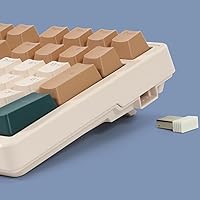
  • The 2.4G receiver has a dedicated storage slot built into the board, so it won't get lost between uses.
  • At its price point, the feature set — wireless, hot-swap, RGB, full size — is hard to match from competing brands.
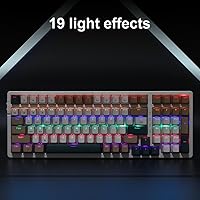
  • Per-key RGB backlighting is a practical bonus for low-light work environments, not just a cosmetic flourish.
  • Four rubber base pads and two adjustable tilt legs keep the board stable and let users dial in their preferred typing angle.

Cons

  • ABS keycaps will develop a greasy shine with heavy daily use — a real drawback for long-term ownership.
  • Battery life is inconsistent across users, with bright RGB settings significantly reducing endurance between charges.
  • No dedicated RGB software means lighting customization is limited to onboard shortcuts only.
  • Bluetooth connection can feel slightly less snappy than the 2.4G mode, noticeable during fast typing bursts.
  • Build materials feel lightweight, which helps portability but makes the board feel less premium on the desk.
  • No per-key or macro programming support, which limits utility for power users or complex workflow setups.
  • The USB-C cable is not braided or reinforced, and may show wear sooner under frequent plug-and-unplug use.
  • No volume knob or media wheel — media controls rely entirely on FN key combinations, which takes getting used to.

Ratings

Our editorial team used AI analysis to evaluate hundreds of verified global reviews for the Merdia Triple Mode 100-Key Wireless Mechanical Keyboard, actively filtering out incentivized, bot-generated, and low-signal feedback to surface what real buyers actually experience day to day. The scores below reflect a transparent picture of this board's genuine strengths and the trade-offs buyers consistently encounter — nothing is glossed over.

Value for Money
88%
Buyers repeatedly flag this as one of the few wireless mechanical keyboards at this price tier to include hot-swap support, triple connectivity, and per-key RGB simultaneously. For home office users comparing it against similarly priced wired-only boards, the feature-to-cost ratio feels genuinely hard to argue with.
A small segment of buyers feel the ABS keycaps and lightweight plastic chassis somewhat undercut the overall value impression, especially when handled alongside pricier alternatives. Those who prioritize long-term material quality over feature count may feel the trade-off less favorably.
Wireless Connectivity
84%
The 2.4G connection earns consistent praise for its stability during extended work-from-home sessions and light gaming — users report no meaningful lag or dropout under normal desktop conditions. The one-button mode switching between 2.4G, Bluetooth, and wired is a daily convenience that buyers frequently single out.
Bluetooth performance draws more mixed responses than the 2.4G mode, with some users noticing a slight input delay during fast typing bursts when paired via Bluetooth. The board can only store one Bluetooth device at a time, which adds friction for users who cycle between three or more devices regularly.
Typing Experience
81%
19%
Brown switches land well with the target audience — people who want tactile feedback without the noise that alienates coworkers or household members during video calls. The key travel feels comfortable across long writing sessions, and the stabilizers on larger keys hold up well without excessive rattle.
Enthusiasts migrating from higher-end boards may find the stock switch feel slightly inconsistent across the full key set, with some keys feeling marginally scratchier than others. The ABS keycaps also develop a slicker surface feel over weeks of heavy use, which subtly changes the tactile experience at the fingertip level.
Hot-Swap Functionality
83%
For buyers new to mechanical keyboards, the hot-swap feature works exactly as advertised — no soldering, no technical knowledge required, just a puller tool and a compatible MX switch. Verified buyers who experimented with Gateron or Cherry switches confirmed the socket held firmly without wobble after swapping.
No switch puller is included in the package, which means first-time users need to source one separately before experimenting. The hot-swap sockets, while functional, have not been tested publicly for high cycle durability, so frequent swappers may want to handle them with care over time.
Build Quality
67%
33%
The board feels solid enough on a desk for everyday productivity use — the rubber base pads grip surfaces well and the tilt legs click into position without play. For a budget-tier board, it holds together acceptably under normal typing loads without flexing excessively.
The plastic chassis feels noticeably lightweight when lifted or repositioned, and the overall shell construction lacks the rigidity that mid-range boards deliver. A few buyers mention the case develops minor creaking sounds over time, particularly around the corners, under firm typing pressure.
RGB Lighting
72%
28%
Per-key RGB looks genuinely clean in low-light environments, and the preset effects cycle through smoothly without flickering or uneven illumination across the key rows. Casual users who just want ambient lighting at their desk find the onboard presets more than sufficient.
The absence of dedicated software means there is no way to program custom per-key colors or save lighting profiles — what you see in the preset rotation is what you get. Running RGB at high brightness also noticeably impacts battery life, which forces a practical compromise between aesthetics and endurance.
Battery Life
63%
37%
With RGB turned off or set to minimal brightness, a number of buyers report usable endurance stretching across several weeks between charges, which works well for those who prefer a cleaner desk without frequent cable interruptions. The USB-C charging port means most users already have a compatible cable on hand.
Battery performance is one of the more inconsistent aspects reported across buyer feedback — endurance under active RGB use drops sharply, and some users report shorter-than-expected cycles even at moderate brightness levels. There is no battery indicator light or software readout, so knowing when to recharge requires guesswork.
Keycap Quality
58%
42%
The legends are wear-resistant under normal use and remain legible after months of typing, which is a reasonable baseline expectation at this price point. Buyers who are not particular about keycap material find the stock caps perfectly functional for daily office work.
ABS plastic develops a shiny, slightly greasy surface on high-contact keys within weeks of heavy daily typing — a well-documented limitation of the material that affects feel more than function. Users who want the matte, consistent texture of PBT keycaps will need to budget for an aftermarket set.
Software & Customization
44%
56%
The onboard FN shortcut layer covers media controls, lighting adjustments, and connectivity switching without requiring any software installation, which keeps setup fast and works reliably across all supported operating systems right out of the box.
Beyond the onboard shortcuts, there is no customization software available — no macro programming, no key remapping, no per-key lighting editor. Power users or anyone who relies on remapped keys for specialized workflows will hit this ceiling quickly and find it a hard limitation to work around.
Multi-Device Compatibility
79%
21%
Cross-platform support across Windows, Mac, iOS, and Android works reliably in practice, and buyers who pair the board with a laptop and a tablet simultaneously report the mode-switching experience as smooth enough for a mixed daily workflow. Mac users confirm core functionality without any driver installation.
Pairing setup for Bluetooth on some Android devices required a couple of extra steps compared to the plug-and-play experience of the 2.4G mode. The board also does not support multi-device Bluetooth memory, meaning switching between saved Bluetooth pairings involves re-pairing rather than a true profile toggle.
Ergonomics & Comfort
74%
26%
The two tilt leg positions give users a reasonable degree of typing angle adjustment, and the full 100-key layout means nothing is sacrificed or crammed to fit a smaller footprint. For users who type for several hours daily, the brown switch actuation force sits at a comfortable middle ground that doesn't fatigue fingers quickly.
No wrist rest is included, and the board's height without tilt legs may feel slightly steep for users who type flat on a low desk. There is no south-facing RGB configuration or alternative angle beyond the two foldable leg positions.
Ease of Setup
86%
Plug in the USB-C cable or insert the 2.4G receiver and the board works immediately — no driver downloads, no account creation, no pairing menus to navigate for the wired and 2.4G modes. Buyers consistently describe the initial setup as one of the fastest and least frustrating they have experienced at this price tier.
Bluetooth pairing requires holding a specific FN key combination that is not clearly labeled on the board, and the documentation included in the box is thin enough that some users had to search online for the correct pairing steps. A clearer quick-start guide would meaningfully reduce setup friction for first-time users.
Noise Level
77%
23%
Brown switches keep the board genuinely quiet enough for open office environments and shared living spaces — the tactile bump registers physically without producing the sharp clicking sound that makes blue switches inappropriate for some settings. Several buyers specifically chose this board for use during video calls without disturbing others on the call.
While quieter than clicky switches, the brown switches still produce audible key noise at normal typing speed that some noise-sensitive environments may find intrusive. The ABS keycaps also produce a slightly higher-pitched sound on impact compared to PBT alternatives, which can amplify the overall acoustic profile under hard typing.

Suitable for:

The Merdia Triple Mode 100-Key Wireless Mechanical Keyboard is a strong match for anyone who juggles multiple devices throughout the day and doesn't want a different keyboard for each one. Remote workers who bounce between a work laptop, a personal computer, and a tablet will find the one-button mode switching genuinely practical rather than a gimmick. Students in shared living situations will appreciate the brown switches, which stay tactile and responsive without disturbing roommates during late-night study sessions. If you've been curious about mechanical keyboards but weren't sure you wanted to commit to a specific switch type, the hot-swap support lets you experiment with other MX-compatible switches down the road without buying a second board. Casual gamers who spend more time in a spreadsheet than a shooter will find this wireless mechanical keyboard comfortably bridges both worlds at a price that doesn't demand justification.
Not suitable for:

The Merdia Triple Mode 100-Key Wireless Mechanical Keyboard will disappoint buyers who need a serious competitive gaming peripheral. The brown switches and overall build are tuned for comfort and moderate use, not the split-second consistency that dedicated gaming keyboards are engineered around. Heavy typists who clock long daily hours should know that ABS keycaps will develop a noticeable shine and slicker feel over months of intensive use — PBT keycap boards hold up better under that kind of workload. Anyone expecting deep RGB customization through dedicated software will hit a wall, as there is no full-featured lighting control application included. Users who want a compact travel-ready form factor should also look elsewhere, since the full 100-key layout and 1.68-pound weight make it better suited to a fixed desk setup than a backpack.
Specifications

  • Brand: Manufactured and sold under the Merdia brand.
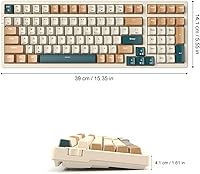
  • Dimensions: The keyboard measures 15.35″ in length, 5.55″ in width, and 1.61″ in height.
  • Weight: The board weighs 1.68 pounds, making it a standard full-size weight for desktop use.
  • Key Count: Features a full 100-key layout covering all standard keys including a numpad.
  • Switch Type: Equipped with brown mechanical switches offering tactile bump feedback without an audible click sound.
  • Hot-Swap: The PCB supports tool-free hot-swapping with any MX-compatible switch, including Cherry and Gateron variants.
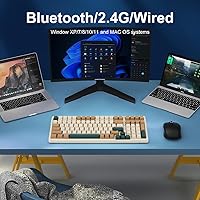
  • Connectivity: Supports three connection modes: USB-C wired, 2.4G wireless via nano receiver, and Bluetooth wireless.
  • Mode Switching: A dedicated button on the left side of the board toggles between wired and wireless connection modes instantly.
  • Backlighting: Per-key RGB backlighting is built in and controlled through onboard FN key shortcuts.
  • Keycap Material: Keycaps are made from ABS plastic with laser-etched or pad-printed legends that are wear-resistant under normal use.
  • Battery: Contains a built-in rechargeable lithium-ion battery; no disposable batteries are needed.
  • Charging Port: The keyboard charges via the same USB-C port used for wired mode, so one cable handles both functions.
  • Receiver Storage: A built-in slot on the right side of the keyboard stores the 2.4G nano receiver when not in use.
  • Stability Feet: Two foldable tilt legs and four rubber base pads provide adjustable angle positioning and anti-slip grip on the desk.
  • OS Compatibility: Compatible with Windows 10, 8, 7, XP, Vista, Mac OS, iOS, and Android operating systems.
  • Package Contents: The package includes one wireless keyboard; the 2.4G receiver is pre-stored in the onboard slot.
  • Ratings: Holds a 4.2 out of 5 star rating based on 313 verified customer ratings on Amazon.
  • Release Date: This keyboard was first made available for purchase on September 14, 2023.

Related Reviews
Logitech POP Keys Mechanical Wireless Keyboard
76%
88%
Typing Feel
84%
Build Quality
81%
Wireless Reliability
91%
Battery Life
93%
Design & Aesthetics
More
Keychron K8
Keychron K8
80%
91%
Typing Feel & Switch Quality
88%
Noise Level
86%
Multi-Device Connectivity
67%
Build Quality & Materials
72%
Battery Life
More
Pauroty 60% Wireless Mechanical Keyboard

86%
88%
Connectivity Options
75%
Battery Life
93%
Portability
84%
Ergonomics
91%
RGB Customization
More
Logitech MX Mechanical
81%
88%
Typing Feel & Switch Quality
91%
Noise Level
86%
Build Quality & Materials
93%
Battery Life
87%
Multi-Device Connectivity
More
UBOTIE Dual Mode Retro Typewriter Wireless Keyboard
77%
93%
Visual Design
88%
Value for Money
78%
Connectivity Reliability
61%
Typing Feel
82%
Multi-Device Support
More
Keychron K2 V2 75% Mechanical Keyboard
79%
91%
Build Quality
84%
Typing Experience
86%
Wireless Connectivity
89%
Battery Life
88%
Hot-Swap Feature
More
Womier SK65 65% Wireless Mechanical Keyboard
78%
88%
Build Quality
84%
Typing Feel
81%
Wireless Performance
83%
Sound Profile
86%
Hot-Swap Experience
More
Keychron K4 Bluetooth Wireless Mechanical Keyboard
86%
91%
Build Quality
88%
Battery Life
85%
Typing Experience
90%
Connectivity & Versatility
82%
RGB Backlighting
More
AULA F75 Pro
AULA F75 Pro
82%
91%
Typing Sound & Feel
83%
Build Quality & Construction
89%
Hot-Swap & Customizability
86%
Wireless Performance
82%
Battery Life
More
GUAZI STORE 83-Key Mechanical Keyboard
86%
91%
Typing Experience
88%
Build Quality
86%
Bluetooth Connectivity
89%
Backlighting Customization
80%
Ergonomics
More

FAQ

You can pair this triple-mode board to multiple devices and switch between them using the dedicated mode button on the left side. The 2.4G connection works with one device via the nano receiver, and Bluetooth handles others. Switching takes a second or two — it's not instantaneous like some premium boards, but it's smooth enough for casual multi-device use.

It's actually quite beginner-friendly. The Merdia keyboard is hot-swap compatible, which means you use a small switch puller tool to pop out the existing brown switch and press a new MX-compatible one straight into the socket — no soldering iron, no technical experience needed. Cherry, Gateron, and most other standard MX-style switches will fit without any issues.

It works with Mac OS without any drivers required. You'll use it like a standard keyboard, though some key labels will reflect Windows conventions — for example, the Windows key functions as the Command key on Mac. Compatibility also extends to iOS and Android if you need to type on a tablet or phone.

Battery life varies quite a bit depending on how bright you run the RGB lighting. With backlighting off or dimmed, many users report several weeks of use between charges. Running full-brightness RGB will shorten that considerably — some users see only a few days under those conditions. Charging via USB-C is quick and convenient either way.

There is no dedicated desktop software available for this board. All lighting adjustments are done through onboard FN key combinations, which limits how granular your customization can get. You can cycle through preset effects and adjust brightness, but you cannot program per-key colors or create custom lighting profiles the way you can with software-driven keyboards.

The legends themselves are designed to be wear-resistant and shouldn't rub off under typical use. The more noticeable issue with ABS keycaps over time is surface shine — the keycap tops develop a slicker, slightly glossy feel in the areas your fingers contact most. It doesn't affect function, but it's a cosmetic trade-off that's common across most keyboards using ABS plastic at this price tier.

Yes, you can use the keyboard in wired mode via the USB-C cable while it charges, so a low battery doesn't force any downtime. Just plug it in and keep working — the USB-C connection handles both power delivery and data simultaneously.

It's actually a solid entry point. Brown switches are widely recommended for first-time mechanical keyboard users because they provide tactile feedback without the loud click that can be distracting in shared spaces. The hot-swap feature is a bonus — if you try it and decide you prefer a lighter or heavier switch feel, you can swap without buying a whole new board.

No wrist rest is included. The package contains the keyboard itself, with the 2.4G nano receiver pre-stored in the onboard slot. You would need to purchase a wrist rest separately if that's important to your setup.

The 2.4G connection is the most reliable of the three modes on this wireless mechanical keyboard, and buyer feedback consistently reflects that. It stays stable during sustained typing sessions and holds up well for casual gaming without noticeable input lag. If you're using it primarily at a desk, the 2.4G mode is the one to default to.