Overview

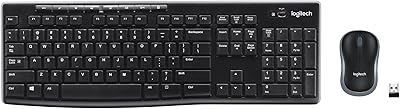
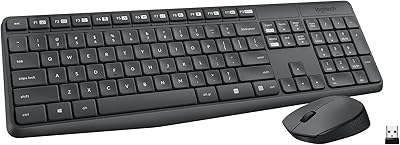
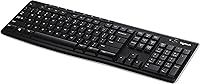
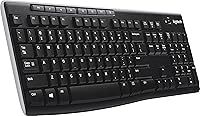
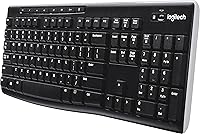
The Logitech K270 Wireless Keyboard has been around long enough to build a quiet, dependable reputation among everyday PC users who just need things to work. No frills, no fuss — just a full-size wireless keyboard that plugs in and gets out of your way. Its Unifying Receiver is a nice touch: one tiny dongle stays parked in your USB port, and you barely notice it is there. The layout includes a numeric pad, which sounds minor until you have spent a week on a compact board without one. Honest caveat: this is a utility-first board, not something you buy for a premium typing feel.

Features & Benefits

The 2.4 GHz wireless connection handles a typical room with no hiccups — the 33-foot range is more than enough for most desk setups, and in practice the signal stays solid. The Unifying Receiver supports up to six compatible Logitech devices, so if you already use a Logitech mouse, you free up a USB slot entirely. The keys carry a UV-resistant coating and a spill-resistant surface, adding real durability for a keyboard that sits on a busy desk day after day. Eight dedicated hotkeys handle media and shortcuts without requiring any software setup. Battery life is reported to last several months on a single set, though actual duration will vary with usage habits.

Best For

The K270 hits a sweet spot for home office users who want a reliable wireless keyboard without overthinking the purchase. If you regularly enter numbers — invoices, spreadsheets, financial data — the full-size numpad alone justifies choosing this over a smaller alternative. It also makes particular sense for anyone already invested in the Logitech ecosystem, since one Unifying Receiver can manage your mouse and keyboard together. Older users or anyone new to wireless peripherals will appreciate how effortlessly it sets up — plug in the receiver and you are typing within seconds. For anyone chasing cutting-edge aesthetics or a premium tactile feel, this Logitech board is probably not the right match.

User Feedback

Sitting at 4.4 out of 5 stars with a strong category ranking, this wireless keyboard earns its rating mostly through consistency. Buyers frequently highlight how easy the initial setup is and how the connection stays dependable across months of daily use. Key spacing draws positive remarks too — the layout feels comfortable for extended sessions without feeling cramped. Where feedback turns critical, it centers on the typing feel itself: the membrane-style keys are relatively soft, which is fine for casual use but can frustrate anyone migrating from a mechanical or high-quality chiclet keyboard. A recurring gripe worth flagging is the lack of backlighting — if you often type in dim conditions, that absence becomes a genuine limitation rather than a minor inconvenience.

Pros

  • Plug-and-play setup takes seconds — no drivers, no pairing screens, no frustration.
  • The Unifying Receiver supports up to six Logitech devices, freeing up USB ports for other uses.
  • Full-size layout with a dedicated numeric pad makes number-heavy tasks noticeably faster.
  • Spill-resistant construction adds real peace of mind on a busy or shared desk.
  • UV-coated keys hold up well over time and resist the fading that cheaper keyboards show quickly.
  • The 33-foot wireless range is more than sufficient for any standard home or office room setup.
  • Eight hotkeys work out of the box for media and shortcuts without requiring any software.
  • Consistently strong user ratings reflect long-term reliability that holds up across years of daily use.
  • Lightweight enough to reposition easily, yet sturdy enough to stay put during normal typing.

Cons

  • Membrane key action feels mushy and imprecise — a real drawback for fast or tactile typists.
  • No backlighting at all, making the K270 a poor fit for dim workspaces or evening use.
  • Relies entirely on a USB-A Unifying Receiver, which is inconvenient for devices with limited or USB-C-only ports.
  • No Bluetooth support means you cannot pair it to tablets, smart TVs, or non-USB devices.
  • Battery compartment requires AA batteries, adding an ongoing cost that rechargeable keyboards avoid.
  • The design is purely functional — there is nothing here for users who care about desk aesthetics.
  • Key travel and feedback may feel dated compared to modern low-profile keyboards at similar price points.
  • No wrist rest included, and the low profile offers limited ergonomic support during long sessions.

Ratings

The scores below reflect an AI-driven analysis of verified global buyer reviews for the Logitech K270 Wireless Keyboard, with spam, incentivized feedback, and bot-generated ratings actively filtered out to ensure accuracy. Each category is scored independently based on patterns found across real-world usage reports, capturing both what users genuinely appreciate and where the keyboard consistently falls short. The result is an honest, balanced picture designed to help you decide whether this board matches your actual needs.

Wireless Reliability
88%
The 2.4 GHz connection earns consistent praise for staying stable throughout a full workday without dropouts or noticeable lag. Users working at typical desk distances report the signal holds firm even with other wireless devices nearby, which is exactly the kind of dependability you want from a daily driver keyboard.
A smaller subset of users noted occasional brief disconnections in environments with heavy wireless interference, such as crowded offices or homes with multiple routers. While these instances appear infrequent, they are worth keeping in mind if your workspace is particularly RF-congested.
Typing Feel
58%
42%
For light everyday typing — emails, browsing, filling in forms — the membrane keys are quiet and inoffensive, which some users in shared or open-plan spaces actively prefer. The key spacing is comfortable and well-proportioned, reducing accidental misfires during normal use.
Anyone stepping down from a mechanical or high-quality scissor-switch keyboard will likely find the feel mushy and unsatisfying. The soft, shallow key travel lacks the tactile feedback that faster or more precise typists rely on, and extended writing sessions can feel noticeably fatiguing as a result.
Setup & Ease of Use
94%
Plug in the Unifying Receiver, flip the power switch, and you are typing — that is genuinely the entire process. Reviewers frequently highlight this as one of the K270's strongest points, particularly older users or those who dread anything resembling a pairing procedure.
There is no display indicator to confirm connectivity status, so if the keyboard fails to respond after setup, troubleshooting requires a bit of guesswork — trying a different USB port or re-inserting the receiver. It is a minor issue, but worth noting for less tech-confident users.
Numeric Pad Usability
86%
The full-size numpad is properly spaced and comfortable for extended data entry, and users who manage spreadsheets or enter invoices regularly highlight it as a genuine productivity asset. It is one of the clearest reasons to choose this board over a compact alternative.
The numpad keys share the same membrane feel as the rest of the board, so tactile precision during rapid number entry is not as crisp as it would be on a dedicated numeric keypad or mechanical alternative. Power users doing heavy bookkeeping may eventually notice the limitation.
Build Quality
72%
28%
For a value-tier keyboard, the overall build feels more solid than the price suggests. The chassis does not flex noticeably during normal typing, and the UV-coated keys show strong resistance to the surface wear and character fading that cheaper boards typically develop within months.
The plastic housing feels noticeably lightweight and budget-grade up close, which will matter to buyers who associate desk peripherals with a sense of quality. A few long-term users also report that some keys can develop a slightly rattly feel over a year or more of heavy use.
Spill Resistance
76%
24%
The spill-resistant design provides a meaningful safety net for the kind of minor desk accidents that happen to everyone — a small coffee splash or a few drops of water. Users who work in casual home environments particularly appreciate having this buffer without paying a premium for it.
It is important to be clear that spill-resistant does not mean waterproof. A significant liquid spill, especially anything sugary, can still damage the keyboard if not addressed immediately by flipping it over and allowing it to dry fully before powering it on again.
Unifying Receiver
91%
The ability to run a Logitech mouse and this keyboard through a single tiny dongle is genuinely useful, especially for users with limited USB ports on their laptop or desktop. The receiver is small enough to leave plugged in permanently without getting in the way.
The receiver uses a USB-A connector, which is increasingly incompatible with modern laptops that ship with only USB-C ports. Users in that situation will need an adapter, which is an added friction point that somewhat undermines the plug-and-play promise.
Battery Life
83%
Most users report going months between battery changes under regular daily use, which is a meaningful convenience — particularly for anyone who finds constantly recharging peripherals annoying. Remembering to turn the keyboard off at the end of the day extends the battery life further still.
Because this keyboard runs on AA batteries rather than a built-in rechargeable cell, you are taking on the ongoing cost and inconvenience of replacements. There is no battery level indicator on the keyboard itself, so the first sign that power is low is often an unresponsive key mid-task.
Backlighting
21%
79%
The absence of backlighting keeps the design simple and contributes to the long battery life, which is a reasonable trade-off for users who always work in well-lit environments and never need to type after dark.
There is simply no backlighting available — not adjustable, not optional, not dimmable. Users who regularly work in the evening, in dim home offices, or in any low-light environment will find this a hard dealbreaker, and it is consistently one of the most cited frustrations in user reviews.
Hotkey Functionality
67%
33%
The eight dedicated hotkeys work without any software installation, covering media playback, volume, and a few application shortcuts that many everyday users will reach for naturally. For the target audience, having them ready out of the box is a practical convenience.
The hotkey selection is fixed and limited to fairly basic functions, offering no way to remap or customize them without third-party software. Power users accustomed to fully programmable macro keys will find this rigid layout underwhelming.
Compatibility
74%
26%
The K270 works across Windows and macOS without requiring any OS-specific setup, making it a reasonable shared option for households that run mixed platforms. On Windows, in particular, compatibility is essentially universal.
Official macOS support exists, but the keyboard labeling and some hotkeys are designed around Windows conventions, which can cause minor confusion on a Mac. Compatibility with modern Windows 10 and 11 is reliable in practice, even though the official spec sheet only lists older OS versions.
Noise Level
81%
19%
The membrane switches produce a noticeably quieter keystroke compared to mechanical alternatives, which makes the K270 a reasonable choice for shared offices, video calls, or households where keyboard noise is a genuine concern for those nearby.
While generally quiet, the keys do produce a slightly hollow, plasticky sound on harder keystrokes that some users find cheap-sounding in a quiet room. It is not distracting, but it does fall short of the near-silent experience you get from premium low-profile keyboards.
Value for Money
87%
At its price point, the K270 delivers a reliable wireless connection, a full-size layout with numpad, spill resistance, and long battery life — a combination that would cost considerably more from many competing brands. For users who need functional basics without overspending, the value proposition is hard to argue with.
If your budget stretches even modestly further, there are competing keyboards that offer a meaningfully better typing feel or add backlighting for not much more. The K270 is excellent value at its tier, but buyers who can spend a little more may find the upgrade worthwhile.

Suitable for:

The Logitech K270 Wireless Keyboard is a strong fit for anyone who wants a dependable, no-setup-headache wireless keyboard for everyday home or office work. If you spend time on spreadsheets, invoicing, or any task that involves a lot of number entry, the dedicated numeric pad is a genuine practical asset that compact keyboards simply cannot offer. It works particularly well for households or small offices already using Logitech peripherals, since the Unifying Receiver lets you consolidate multiple devices into a single USB slot — a small but genuinely useful convenience. Older users or anyone new to wireless input devices will find the plug-and-play setup refreshingly simple: there is no software to install, no pairing ritual, and no learning curve. Budget-conscious buyers who need a keyboard that just works reliably day after day, without paying for features they will never use, will feel right at home with the K270.

Not suitable for:

The Logitech K270 Wireless Keyboard will likely disappoint anyone who cares deeply about how typing actually feels. The membrane-style keys have a soft, shallow action that experienced typists — especially those coming from mechanical or high-quality chiclet keyboards — tend to find unsatisfying over long writing sessions. If you work in low-light conditions regularly, the complete absence of backlighting is a real drawback rather than a minor oversight, and no firmware update or accessory will fix that. Writers, coders, or heavy keyboard users who log many hours a day may find the key feel fatiguing in ways a more refined board would not produce. This Logitech board is also not ideal for users who need Bluetooth connectivity, as it relies solely on its USB Unifying Receiver, which could be a problem on tablets, modern laptops with limited ports, or devices without a free USB-A slot.

Specifications

  • Brand: Manufactured by Logitech, a well-established peripheral brand with decades of experience in input devices.
  • Model: The K270 is the specific model designation for this full-size wireless keyboard in Logitech's value-tier lineup.
  • Connectivity: Connects via a 2.4 GHz wireless signal using Logitech's proprietary USB Unifying Receiver dongle.
  • Wireless Range: Rated for a maximum wireless range of 33 feet under typical indoor conditions.
  • Layout: Full-size keyboard layout including a dedicated numeric keypad on the right side.
  • Hotkeys: Includes 8 dedicated hotkeys for common shortcuts such as media playback, volume, and application launching.
  • Spill Resistance: The keyboard features a spill-resistant design intended to withstand minor liquid exposure during everyday desk use.
  • Key Coating: Keys are UV-coated to reduce character fading from prolonged exposure to sunlight and daily contact.
  • Power Source: Powered by AA batteries; battery life is reported to last several months depending on usage frequency.
  • Weight: The keyboard weighs approximately 1.59 pounds, making it light enough to reposition without effort.
  • Dimensions: Physical dimensions measure 18.1 x 17.2 x 0.8 inches (length x width x height).
  • Compatible OS: Officially compatible with Windows XP, Windows Vista, and macOS operating systems.
  • Compatible Devices: Designed for use with desktop and laptop PCs; not natively compatible with tablets or smartphones.
  • Unifying Support: The included Unifying Receiver can connect up to six compatible Logitech devices simultaneously through a single USB port.
  • Color: Available in black with a modern, understated aesthetic suited for standard office environments.
  • Key Type: Uses membrane-style key switches, which produce a quieter, softer keystroke compared to mechanical alternatives.
  • BSR Ranking: Holds a Best Sellers Rank of #311 in the Computer Keyboards category on Amazon, reflecting consistent demand.
  • Average Rating: Carries an average customer rating of 4.4 out of 5 stars based on verified buyer reviews.

Related Reviews
Logitech K360 Wireless Compact Keyboard

72%
93%
Battery Life
91%
Ease of Setup
88%
Wireless Reliability
79%
Typing Comfort
74%
Build Quality
More
Logitech MX Mechanical
81%
88%
Typing Feel & Switch Quality
91%
Noise Level
86%
Build Quality & Materials
93%
Battery Life
87%
Multi-Device Connectivity
More
Logitech K400 Wireless Touch Keyboard
78%
94%
Ease of Setup
91%
Wireless Reliability
68%
Touchpad Usability
74%
Typing Comfort
88%
Battery Life
More
Logitech Wireless Illuminated Keyboard K800
87%
89%
Typing Experience
91%
Backlighting Performance
85%
Build Quality
80%
Wireless Connectivity
88%
Battery Life
More
Logitech K480 Multi-Device Bluetooth Keyboard
79%
93%
Multi-Device Switching
91%
Cross-Platform Compatibility
88%
Battery Life
84%
Built-In Device Cradle
72%
Typing Comfort
More
Logitech K750 Wireless Solar Keyboard
84%
94%
Solar Charging Performance
88%
Typing Comfort
85%
Build Quality
78%
Wireless Connectivity
91%
Eco-Friendly Design
More
Logitech MX Keys S
Logitech MX Keys S
81%
91%
Typing Feel & Key Response
93%
Multi-Device Connectivity
84%
Build Quality & Durability
94%
Battery Life
76%
Backlighting & Visibility
More
Logitech MK295
Logitech MK295
78%
88%
Noise Reduction
91%
Value for Money
79%
Keyboard Typing Experience
63%
Mouse Comfort & Ergonomics
93%
Battery Life
More
Logitech MK270 Wireless Keyboard and Mouse Combo
82%
96%
Battery Endurance
89%
Wireless Reliability
92%
Value for Money
81%
Typing Comfort
59%
Mouse Ergonomics
More
Logitech MK520 Wireless Keyboard and Mouse Combo
73%
96%
Ease of Setup
88%
Wireless Reliability
79%
Typing Comfort
83%
Battery Life
67%
Mouse Ergonomics
More

FAQ

No, the Logitech K270 Wireless Keyboard is completely plug-and-play. Just insert the Unifying Receiver into a USB port, turn the keyboard on, and it should be recognized immediately by your PC without any driver installation.

Yes, in most cases you can. The Unifying Receiver supports up to six compatible Logitech devices simultaneously, including many Logitech mice and keyboards. You may need to download Logitech's free Unifying software to pair additional devices beyond the keyboard.

Most users report getting several months of regular use from a single set of AA batteries, though the actual duration depends on how heavily you type and whether you remember to switch the keyboard off when not in use. Turning it off at the end of the day will stretch battery life considerably.

Spill-resistant is the accurate term here — the K270 is designed to handle small accidental splashes, like a few drops of coffee or water, not a full cup being poured directly onto it. If you do spill something, flip it over immediately and let it dry fully before using it again.

It is officially compatible with macOS, so it will function on a Mac. That said, the key labeling and some hotkeys are designed with Windows in mind, so a few shortcuts may not map perfectly or may behave differently on macOS.

Honestly, this is one area where the K270 falls short. There is no backlighting of any kind, so if you frequently type in dim or dark environments, you will either need to rely on touch-typing skills or look elsewhere. This limitation is one of the more common complaints from buyers.

The 2.4 GHz connection is generally very stable for typical home and office distances. Within a normal room — say, up to 15 to 20 feet from the receiver — most users report no dropouts or input lag. The rated 33-foot range holds up reasonably well in open spaces, though walls and interference can reduce that in practice.

It is quite different. The K270 uses membrane switches, which produce a softer, quieter keystroke with less tactile feedback than mechanical alternatives. For casual everyday typing and office tasks this is perfectly fine, but if you are used to the crisp click and resistance of a mechanical board, the feel here may seem flat or imprecise.

Yes, Logitech sells replacement Unifying Receivers separately, and they are relatively affordable. As long as you have the Logitech Unifying software installed, you can pair the keyboard to a new receiver without any issues.

Yes, the numpad sits on the right side of the board in the standard full-size configuration, with a complete set of number keys, operators, and an Enter key. It is properly sized — not cramped — which makes it genuinely comfortable for extended data entry or spreadsheet work.

Where to Buy