Overview

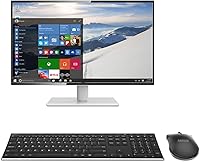
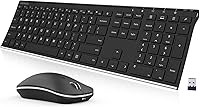
The Arteck HW192 Wireless Keyboard and Mouse Combo is one of those rare budget peripherals that actually looks the part. The stainless steel keyboard surface gives it a presence you wouldn't expect at this price, sitting cleanly on a desk without the cheap plastic feel that plagues most combos in this range. Both devices run off a single nano USB receiver, which is genuinely practical — one port used, nothing to manage. The built-in rechargeable batteries are another quiet differentiator; no hunting for AAs mid-project. It covers Windows 11, 10, and 8, and works across desktops and laptops without any driver fuss. Just don't expect flagship build quality.
Features & Benefits

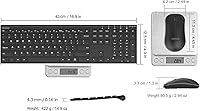
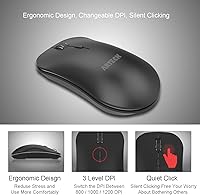
The keyboard's stainless steel top panel does more than look sharp — it resists scratching and fingerprints better than standard plastic decks over time. The layout is full-size with a number pad and dedicated arrow keys, which matters if you're doing any spreadsheet work or data entry. Keys are low-profile with a shallow travel, so typing feels snappy rather than deeply tactile. The mouse follows an ergonomic contour that takes pressure off the wrist during longer sessions. Arteck claims up to six months of keyboard battery life and four months for the mouse on a single charge — those figures are based on two hours of daily use, so your results will vary. Setup is plug-and-play; no software required.

Best For

This wireless combo suits home office workers and students who want a tidy, cable-free desk without overspending. If you've been stuck with a worn plastic keyboard and a mouse that drains AA batteries every few weeks, this rechargeable peripheral pair is a noticeable step up. It's also a comfortable fit for less tech-savvy users — the single receiver means nothing to configure, and broad Windows compatibility covers most setups out of the box. One honest caveat: the mouse runs on the smaller, lighter side. If you have larger hands or prefer a high-grip mouse, you may want to look elsewhere or pair the keyboard with a separate mouse that fits you better.

User Feedback

Buyers consistently highlight the keyboard's solid, premium feel as a pleasant surprise at this price point, and many long-term users confirm that battery life holds up reasonably close to Arteck's stated figures. Setup earns frequent praise too — people who aren't particularly technical appreciate that it simply works straight out of the box. On the downside, the mouse draws the most criticism. Users with larger hands find it uncomfortable over extended periods, and a handful of reviewers note that key travel feels shallower than expected for heavy typists. There are also scattered reports of wireless connectivity dropouts appearing after several months of ownership, though these seem to be the exception rather than the rule.

Pros

  • The stainless steel keyboard surface looks and feels noticeably more premium than plastic alternatives in the same price range.
  • A single nano USB receiver handles both devices, keeping your port usage to a minimum.
  • Built-in rechargeable batteries eliminate the ongoing cost and hassle of disposable AAs.
  • Full-size layout with a numpad makes it genuinely practical for spreadsheet work and data entry.
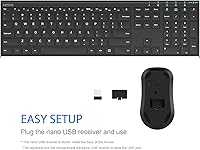
  • Setup is completely plug-and-play — no drivers, no software, no pairing process to navigate.
  • Battery life holds up reasonably well in real-world use, with many long-term buyers confirming close to the stated figures.
  • Low-profile keys produce a muted sound well-suited to shared or quiet workspaces.
  • The 24-month warranty offers solid peace of mind for a product in this price bracket.
  • The nano receiver stores inside the mouse body, so there is no loose dongle to misplace.

Cons

  • The mouse feels lightweight and underfilled — users with larger hands will notice discomfort quickly.
  • Key travel is shallow enough that heavy typists may find extended sessions fatiguing over time.
  • A recurring pattern of wireless dropouts has been reported by users after several months of ownership.
  • There is no DPI adjustment on the mouse, leaving you locked into a single fixed sensitivity.
  • No backlighting of any kind — not ideal for low-light environments or evening use.
  • Battery performance can degrade noticeably after the first year, requiring more frequent charging cycles.
  • The mouse scroll wheel reliability has been questioned by longer-term reviewers past the one-year mark.
  • Compatibility is strictly limited to Windows; Mac and ChromeOS users are largely left out.
  • The combo is full-size and not genuinely portable — it is impractical to pack into a laptop bag regularly.

Ratings

The scores below for the Arteck HW192 Wireless Keyboard and Mouse Combo were generated by AI after analyzing thousands of verified global user reviews, with spam, bot activity, and incentivized feedback actively filtered out. Both the genuine strengths and the real frustrations buyers have encountered are reflected transparently in every category — nothing is glossed over.
Build Quality
78%
22%
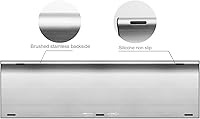
The stainless steel keyboard deck is the standout element here — it feels noticeably more solid than the plastic combos it competes with, and users report it holds up well to daily desk use without visible wear or flex. That material choice alone sets it apart in this price bracket.
The mouse tells a different story. Most reviewers describe it as lightweight in a way that feels cost-driven rather than intentional, and the plastic shell shows scuffs more readily than the keyboard does. It brings the overall build impression down a notch.
Typing Experience
72%
28%
For everyday tasks like emails, browsing, and light document work, the low-profile keys feel responsive and quiet enough for shared spaces. Users who came from older rubber-dome keyboards specifically mention the cleaner, snappier feel as a real improvement.
Heavy typists and anyone used to mechanical keyboards will find the shallow key travel unsatisfying. A number of reviewers note that extended typing sessions feel fatiguing precisely because there is so little feedback to anchor each keystroke.
Mouse Comfort & Ergonomics
63%
37%
For users with average to small hands, the mouse contour reduces wrist strain during moderate-length sessions, and the symmetrical shape works for both right- and left-handed users without adjustment. Casual daily use is generally comfortable for this group.
Users with larger hands consistently flag discomfort during anything beyond short sessions — the mouse simply does not fill the palm, which forces an unnatural grip. This is one of the most repeated complaints in long-form reviews and worth taking seriously before buying.
Battery Life
81%
19%
Arteck's claimed figures of six months for the keyboard and four for the mouse are ambitious, but a solid portion of long-term buyers report that real-world battery life comes reasonably close under normal daily use. The rechargeable design alone saves buyers from the recurring cost and inconvenience of disposables.
Battery longevity drops noticeably for power users who exceed two hours of daily use — the manufacturer's benchmark. A few reviewers also report that the battery indicator gives little warning before the device cuts out, which can catch you off guard mid-task.
Wireless Connectivity
69%
31%
For most users, the 2.4GHz nano receiver delivers a stable, responsive connection across a standard desk distance. The single receiver handling both devices is practical and keeps USB port usage to a minimum, which laptop users in particular appreciate.
A recurring subset of reviewers report intermittent dropouts that begin appearing after several months of ownership — mainly with the mouse rather than the keyboard. While not widespread, the pattern is consistent enough to flag as a known long-term risk rather than isolated bad luck.
Setup & Ease of Use
93%
Plug the nano receiver in and both devices work immediately — no software, no pairing menus, no driver downloads. This is one of the most praised aspects across all user demographics, and less tech-savvy buyers specifically highlight how stress-free the initial experience is.
There is virtually nothing to criticize here for standard Windows setups. The only edge-case frustration comes from users on non-supported operating systems who discover compatibility limits only after unboxing.
Value for Money
84%
At its price point, the combination of a rechargeable battery system, full-size layout with numpad, and a premium-looking keyboard surface is hard to match. Most buyers feel the combo punches above its weight visually and functionally for everyday home or office use.
If you factor in the mouse quality relative to the keyboard, the value proposition feels uneven. Buyers who prioritize mouse performance may find they need to supplement with a better standalone mouse, which erodes some of the combo's cost advantage.
Keyboard Aesthetics
88%
The brushed stainless steel finish consistently draws positive reactions, especially from buyers setting up a clean home office. It photographs well, pairs naturally with modern monitors and desks, and retains its appearance over time without the yellowing that affects white plastic keyboards.
The aesthetic is clean but conservative — there is no backlighting, no customization, and no visual personality beyond the metal finish. Users who want RGB lighting or a more distinctive look will need to look elsewhere entirely.
Mouse Tracking & Precision
71%
29%
For general productivity tasks — web browsing, document navigation, casual spreadsheet use — the mouse tracking is accurate and consistent on most standard desk surfaces. Users doing everyday computing rarely raise any tracking complaints.
The cursor sensitivity options are limited, and users who do any light graphic work or need fine cursor control find the mouse falls short. There is no DPI switch, so you are locked into whatever the default sensitivity delivers.
Portability & Form Factor
76%
24%
The combo is slim and lighter than it looks, making it a reasonable option for users who move between a home desk and a secondary workspace. The nano receiver stores inside the mouse body, so there is no loose dongle to lose during transport.
The full-size keyboard with numpad is not genuinely compact — it takes up standard desk real estate and does not fit comfortably in a laptop bag alongside other gear. Users wanting a truly portable travel setup will find it impractical.
Compatibility
86%
Windows 11, 10, and 8 are all covered without any configuration, and the combo works across desktops and laptops without distinction. For the majority of mainstream home and office users, it connects and functions correctly on the first try.
Mac and ChromeOS users are not officially supported, and several reviewers confirm that functionality is either partial or unreliable on those platforms. If your setup is outside the Windows ecosystem, this is a hard limitation to factor in.
Noise Level
82%
18%
The low-profile keys produce a muted, soft click that is well-suited to shared offices, open-plan home setups, or late-night use. Multiple reviewers working in quiet environments specifically mention appreciating the subdued sound profile compared to louder membrane alternatives.
It is not completely silent — at higher typing speeds the keystrokes are still audible to someone sitting nearby. Users who need near-silent input for recording or extremely noise-sensitive environments may want a keyboard marketed specifically for silence.
Durability Over Time
66%
34%
The keyboard surface holds up well — the stainless steel resists scratching and the keycaps maintain their labeling without fading even after heavy daily use for most reviewers over the first year of ownership.
The mouse durability is more questionable. Reports of connectivity degradation and scroll wheel inconsistency begin appearing in reviews from users past the one-year mark, suggesting the mouse components age faster than the keyboard, which is the weaker link in long-term reliability.
Charging Convenience
79%
21%
A USB charging cable is included, and both devices can be charged from any standard USB port while continuing to be used — at least for the keyboard — which means downtime is minimal. Most users find the charging routine easy to incorporate into a weekly habit.
Charging both devices requires two separate cable sessions since there is no unified charging solution. A small number of users also report that charge-hold performance degrades after the first year, requiring more frequent top-ups than the initial months suggested.

Suitable for:

The Arteck HW192 Wireless Keyboard and Mouse Combo is a strong fit for home office workers and students who want their desk to look put-together without spending a lot to get there. If you spend a few hours a day on emails, documents, spreadsheets, or general browsing, the full-size layout with numpad and the rechargeable battery system cover the basics reliably. It works especially well for people who are tired of swapping out AA batteries every few weeks — the built-in lithium cells and included charging cable make upkeep genuinely low-effort. Windows users on desktops or laptops will find it plug-and-play in the truest sense; there is nothing to install and nothing to configure. It also suits buyers who are upgrading from a worn plastic keyboard and want something that looks and feels more substantial without crossing into premium pricing territory.
Not suitable for:

The Arteck HW192 Wireless Keyboard and Mouse Combo is not the right choice for everyone, and it is worth being direct about where it falls short. If you have large hands, the mouse will likely frustrate you — it is compact and lightweight in a way that forces an unnatural grip during longer sessions, and no amount of adjustment fixes that. Mechanical keyboard users or heavy typists who rely on tactile feedback will also find the shallow low-profile keys unsatisfying for extended writing work. Mac and ChromeOS users should avoid it entirely, as compatibility outside of Windows is unreliable at best. Anyone who needs precise cursor control for graphic work or design tasks will quickly hit the limits of the fixed-sensitivity mouse. And if long-term durability is a priority, it is worth knowing that some users report connectivity and scroll wheel issues appearing after the first year of ownership.
Specifications

  • Keyboard Model: The keyboard unit is the Arteck HW192, featuring a stainless steel top panel and a full-size layout.
  • Mouse Model: The included mouse is the Arteck MW162, designed with an ergonomic contour intended to reduce wrist strain during regular use.
  • Connectivity: Both devices connect via a single 2.4GHz wireless nano USB receiver, which stores inside the mouse body when not in use.
  • Keyboard Layout: Full-size layout with a dedicated numeric keypad, arrow keys, and a standard function row.
  • Key Type: Low-profile membrane keys with shallow travel, optimized for quiet typing in shared or open-plan environments.
  • Keyboard Material: The top panel is constructed from stainless steel, providing scratch resistance and a more substantial feel compared to standard plastic keyboards.
  • Keyboard Battery: Built-in rechargeable lithium-ion battery rated for up to 6 months of use per charge, based on approximately 2 hours of daily use.
  • Mouse Battery: Built-in rechargeable lithium-ion battery rated for up to 4 months of use per charge under the same 2-hour daily usage baseline.
  • Charging Method: Both devices charge via the included USB cable, which connects to any standard USB power source.
  • USB Receiver: One nano USB receiver handles both the keyboard and mouse simultaneously, occupying a single USB-A port on the host device.
  • Compatible OS: Officially compatible with Windows 11, Windows 10, and Windows 8; Mac and ChromeOS are not officially supported.
  • Compatible Devices: Designed for use with desktop PCs and laptops; any Windows machine with an available USB-A port is supported.
  • Package Dimensions: The retail package measures 17.36 x 7.52 x 1.46 inches, accommodating both devices and accessories.
  • Item Weight: The full package weighs 1.54 pounds, inclusive of both the keyboard and mouse.
  • Warranty: Arteck includes a 24-month manufacturer warranty along with stated customer support access for the duration of the coverage period.
  • Package Contents: The box includes the HW192 keyboard, MW162 mouse, one nano USB receiver, a USB charging cable, and a welcome guide.

Related Reviews

CHESONA Wireless Keyboard and Mouse Combo
86%
93%
Multi-device Connectivity
87%
Typing Experience
85%
Battery Life
91%
Design & Build Quality
78%
Ergonomics & Comfort
More
ULSOU Wireless Keyboard and Mouse Combo
85%
88%
Ergonomics and Comfort
92%
Battery Life
84%
Typing Experience
87%
Wireless Connectivity
80%
Mouse Performance
More
GEEZER Wireless Keyboard and Mouse Combo
72%
83%
Value for Money
91%
Aesthetic Design
94%
Ease of Setup
67%
Typing Feel
62%
Mouse Quality
More
JOYACCESS Wireless Keyboard and Mouse Combo
82%
88%
Value for Money
83%
Typing Experience
74%
Mouse Performance
86%
Backlight Quality
81%
Battery Life
More
TKVPJYYI Wireless Retro Typewriter Keyboard and Mouse Combo
76%
88%
Design & Aesthetics
71%
Typing Experience
62%
Mouse Performance
58%
Build Quality
83%
Wireless Connectivity
More
KNOWSQT Wireless Keyboard and Mouse Combo
87%
89%
Wireless Performance
83%
Build Quality
86%
Ergonomics & Comfort
91%
Design & Aesthetics
76%
Battery Life
More
Letton Wireless Keyboard and Mouse Combo
83%
89%
Design & Aesthetics
81%
Ergonomics & Comfort
75%
Wireless Connectivity
90%
Battery Life
92%
Value for Money
More
Cimetech Wireless Keyboard and Mouse Combo
88%
91%
Value for Money
88%
Ease of Use
83%
Connectivity
94%
Portability
85%
Ergonomics
More
Harburfine Wireless Keyboard and Mouse Combo
85%
88%
Ergonomics & Comfort
93%
Quietness & Noise Level
85%
Wireless Connectivity & Range
84%
Battery Life & Power Management
90%
Setup & Installation
More
FOPETT Wireless Keyboard and Mouse Combo
85%
91%
Typing Experience
87%
Battery Life
94%
Design & Aesthetics
88%
Ergonomics
85%
Build Quality
More

FAQ

No, there is nothing to install. Just plug the nano USB receiver into an available port on your Windows PC or laptop and both devices are ready to use within seconds. It is fully plug-and-play.

Yes, one receiver handles both devices simultaneously. You only use up one USB port on your computer, which is particularly handy on laptops where ports are limited.

Arteck rates the keyboard at up to 6 months and the mouse at up to 4 months, based on roughly 2 hours of use per day. Real-world feedback from long-term buyers suggests these figures are broadly achievable under moderate use, though heavier daily sessions will naturally shorten those intervals.

Officially, no. The Arteck HW192 Wireless Keyboard and Mouse Combo is designed and tested for Windows 11, 10, and 8. Some buyers have had partial success on Mac, but functionality is inconsistent and not guaranteed, so it is not a reliable option for Apple or ChromeOS setups.

Honestly, it may not be. The mouse runs on the smaller, lighter side, and a number of users with larger hands report that the grip feels cramped during extended sessions. If you have big hands, it is worth considering a separate ergonomic mouse alongside this keyboard instead.

You charge each device separately using the included USB cable. The keyboard can generally be used while it charges, which minimizes downtime. The mouse is harder to use comfortably while plugged in, but charge times are relatively short.

Losing the receiver is a real problem with any 2.4GHz wireless combo, as these receivers are typically paired at the factory and cannot be substituted with a generic one. Your best option would be to contact Arteck support directly, as they may be able to help within the warranty period.

No, there is no backlighting on this keyboard. If you regularly work in low-light conditions or late at night, that is a meaningful limitation to factor into your decision.

Start by checking whether the battery needs a charge, as a depleted battery is the most common cause of unresponsive behavior. If the battery is fine, try unplugging the nano receiver and reinserting it into a different USB port. In rare cases, a brief power cycle of both devices resolves connectivity issues.

For most users the connection is stable throughout day-to-day use. However, a consistent pattern in long-term reviews shows that a subset of users experience occasional mouse dropouts after several months of ownership. It is not the majority experience, but it is a documented enough pattern to be worth knowing about before you buy.