Overview

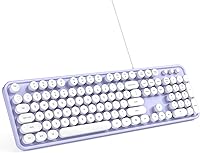
The MOWUX Retro Typewriter Wired Keyboard sits at a curious intersection: it looks like something off a 1950s writing desk but connects via USB in seconds. That visual appeal is the main draw. The round keycaps, purple-and-white color scheme, and vintage styling make it one of the more distinctive options in the affordable keyboard market. Plug it in and it works — no software, no drivers, no fuss. That simplicity matters more than people give it credit for. This is a style-first purchase, and knowing that going in sets the right expectations for what this typewriter-style keyboard actually delivers day to day.

Features & Benefits

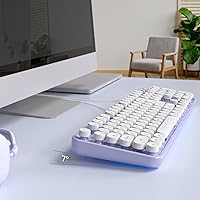
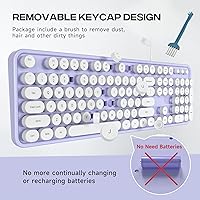
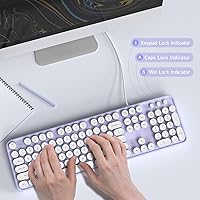
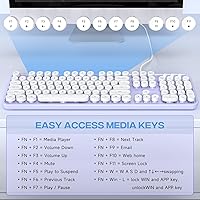
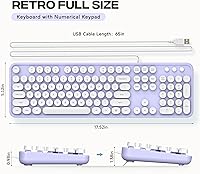
At its core, this retro keyboard packs a 104-key full-size layout — number pad included — which is something many compact aesthetic keyboards quietly skip. The round keycaps have a satisfying visual weight, and the tactile feedback is decent for a membrane board. Don't expect the sharp click of a mechanical switch, but everyday typing, note-taking, and browsing all feel comfortable enough. Foldable rear stands let you adjust the tilt angle, and anti-slip rubber feet keep things firmly in place during longer sessions. Twelve multimedia shortcut combos cover volume, playback, and system access, while small LED indicators flag caps lock and num lock status at a glance.

Best For

This typewriter-style keyboard is a natural fit for anyone building a vintage-inspired desk setup on a modest budget. Students who need a full-size external keyboard for class notes without the hassle of pairing or charging will appreciate the wired simplicity. It works equally well for remote workers who want something that feels more personal than a standard black slab. Chromebook users will find it compatible right out of the box. And honestly, it makes a genuinely thoughtful gift — especially for a writer, a journaling enthusiast, or anyone who has romanticized typing on a typewriter without dealing with an actual one.

User Feedback

With close to a thousand ratings and a strong overall score, the MOWUX wired keyboard has clearly found its audience. Buyers consistently praise how good it looks straight out of the box — the retro aesthetic holds up in real life, not just in product photos. The typing feel gets described as light and comfortable for casual use, though anyone coming from a mechanical keyboard will notice the shallower key travel immediately. The all-plastic build is expected at this price but does feel noticeably lightweight. Mac users should also be aware that some multimedia shortcuts don't function on macOS — a practical limitation worth knowing before purchasing.

Pros

  • The retro round keycaps and purple-white colorway look genuinely striking on a real desk, not just in photos.
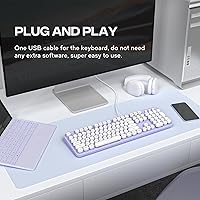
  • Plug-and-play USB setup means no driver downloads, no software, and no pairing headaches whatsoever.
  • Full 104-key layout includes a number pad, which many style-focused keyboards quietly leave out.
  • Foldable rear stands let you dial in a comfortable typing angle for your wrist position.
  • Anti-slip rubber feet keep the board firmly in place even during fast, heavy typing sessions.
  • At its price point, the build quality and feature set represent genuinely solid value for casual users.
  • Compatible with a wide range of systems including Windows, Mac, and Chromebook right out of the box.
  • Twelve multimedia shortcut combos cover everyday controls like volume and playback without extra software.
  • A 12-month warranty gives buyers reasonable peace of mind for an affordable peripheral.
  • Nearly 1,000 buyer ratings with a strong overall score signals consistent satisfaction across real-world use.

Cons

  • Membrane key switches offer noticeably shallow travel — a clear step down from mechanical keyboards in feel.
  • The all-plastic body feels lightweight in a way that can read as fragile rather than portable.
  • Several multimedia shortcut keys do not work on macOS, which is a real limitation for Apple users.
  • Wired-only design rules it out entirely for anyone needing a wireless or Bluetooth setup.
  • The typing sound is a soft thud rather than a satisfying click, despite the typewriter-inspired look.
  • Round keycaps can take a short adjustment period for touch typists used to standard key shapes.
  • No RGB or per-key lighting options for users who want a more customizable visual setup.
  • A single fixed color option limits appeal for buyers whose desk setup uses a different color palette.
  • Long typing sessions may cause hand fatigue due to the membrane actuation and limited ergonomic depth.
  • No dedicated volume knob or media control dial — shortcut combos require two-hand key presses.

Ratings

The scores below reflect an AI-driven analysis of verified global buyer reviews for the MOWUX Retro Typewriter Wired Keyboard, with spam, bot activity, and incentivized feedback actively filtered out before scoring. Each category is weighted against real-world usage patterns reported by confirmed purchasers — not marketing claims. Both what buyers genuinely love and where frustrations consistently surfaced are reflected transparently in every score.

Aesthetic Design
93%
This is where the keyboard genuinely earns its place on a desk. Buyers across the board report that the round keycaps and purple-white colorway look striking in person, often exceeding their expectations from product photos. For anyone building a vintage-inspired or personality-driven workspace, it delivers a distinctive visual impact that standard keyboards simply cannot match.
The single colorway limits its appeal for buyers whose desk setup uses neutral, dark, or non-purple tones. A small number of reviewers found the color saturation slightly different from images, with the purple reading more muted in certain lighting conditions.
Typing Feel
67%
33%
For casual daily use — writing emails, browsing, light note-taking — the membrane keys feel adequately responsive and comfortable enough for shorter sessions. Buyers coming from a chiclet-style laptop keyboard tend to rate the experience positively, appreciating that the round keycap shape does not materially interfere with their typing rhythm after a brief adjustment.
Anyone with a mechanical keyboard background will find the shallow travel and soft thud of the membrane switches underwhelming, even disappointing. The typing feel does not live up to the typewriter aesthetic — the look implies a satisfying clicky experience that the membrane mechanism simply does not deliver.
Build Quality
63%
37%
At its price tier, the keyboard holds together solidly for everyday desk use. The keycaps sit evenly, there is no notable flex in the center of the board during normal typing, and the overall assembly feels consistent enough that most buyers report no defects or rattling keys straight out of the box.
The all-plastic construction feels noticeably lightweight — some buyers describe it as slightly hollow or cheap when handled. Long-term durability remains a question mark, particularly around keycap wear on high-frequency keys, and the overall chassis does not inspire confidence for heavy daily use over multiple years.
Setup & Compatibility
91%
Plug-and-play performance is genuinely one of the strongest points of this typewriter-style keyboard. Buyers on Windows, Chromebook, and even Mac consistently report that the keyboard is recognized instantly with no driver installation required — a real convenience that non-technical users specifically call out as a reason for their satisfaction.
Mac users face a specific frustration: a subset of the multimedia shortcut combinations simply do not function on macOS, which is not prominently disclosed at point of purchase. For Windows users this is a non-issue, but it does mean the keyboard is not fully featured across all compatible platforms as advertised.
Value for Money
82%
18%
Buyers consistently feel the keyboard punches above its price bracket on the visual front — getting a head-turning, full-size retro keyboard without spending significantly more is a genuine win for desk aesthetic enthusiasts. The inclusion of a full numeric keypad at this price point is also frequently highlighted as better than expected.
For buyers prioritizing typing performance over looks, the value equation shifts unfavorably — there are better-feeling membrane keyboards available at a similar price that simply lack the retro styling. The keyboard is best value for those who specifically want the aesthetic, not for those treating appearance as a bonus.
Stability & Grip
79%
21%
The rubber feet on the underside perform well for most buyers, keeping the board anchored on wood, laminate, and glass desk surfaces during standard typing sessions. Several reviewers note that even during faster typing bursts, the keyboard stays planted without needing to be repositioned.
On very smooth or glossy surfaces, a handful of buyers report some minor slippage during more forceful typing. The lightweight plastic body means that without the rubber feet doing their job, the board would shift easily — so surface texture does matter more here than on heavier keyboards.
Ergonomics & Comfort
66%
34%
The foldable rear stands give buyers two usable tilt positions, which most casual users find sufficient for a comfortable typing angle during everyday tasks. For shorter typing sessions of an hour or less, the majority of buyers report no noticeable wrist or hand fatigue.
Extended typing sessions reveal the limits of the membrane key design — the shallow actuation and lack of wrist rest support become more noticeable over time. Buyers who type for several hours daily suggest the ergonomic setup is adequate for occasional use but not optimized for a full workday.
Multimedia Shortcuts
71%
29%
On Windows systems, the 12 multimedia shortcut combinations work reliably for common tasks like adjusting volume, controlling music playback, and launching the mail client. Buyers who use these controls regularly report that they become intuitive quickly and do genuinely speed up day-to-day navigation.
The Mac compatibility gap is a recurring pain point — multiple reviewers specifically flag that several shortcut combos are non-functional on macOS without any warning in the product listing. Even on Windows, the two-hand key combinations feel less fluid than a dedicated media key row would.
Keycap Accuracy & Layout
84%
The 104-key full-size layout is accurately implemented with all standard keys in expected positions, making the transition from a conventional keyboard straightforward. Buyers report that the round keycap shape, while visually different, does not meaningfully disrupt touch typing after a short familiarization period.
Some buyers with larger hands note that the round keycap edges feel slightly different at the edges of each key compared to standard flat-top keycaps, particularly on modifier keys like Shift and Backspace. This is a minor adaptation issue rather than a layout flaw, but it is worth noting for fast typists.
Noise Level
76%
24%
The membrane switches keep the keyboard quiet enough for shared office environments, open-plan workspaces, or late-night use without disturbing others nearby. Buyers working in libraries or co-working spaces specifically appreciate that the board does not generate the sharp clacking noise of a mechanical keyboard.
The noise profile — a soft, slightly hollow thud on each keypress — does not match the auditory expectation set by the typewriter visual design. Buyers hoping for even a subtle vintage click sound are consistently let down, as the acoustic experience is purely functional membrane rather than evocative of its aesthetic inspiration.
Indicator Lights
77%
23%
The caps lock and num lock LED indicators are clearly positioned and bright enough to be visible in both dim and well-lit environments. Buyers note that having dedicated status lights on a keyboard at this price point is a practical touch they use daily, especially when switching between typing and data entry tasks.
The indicator set is limited to just two LEDs with no scroll lock indicator, which some buyers flag as a minor omission. There is also no brightness adjustment, so in very dark environments the indicators can feel slightly harsh compared to the otherwise soft visual profile of the board.
Gifting Appeal
88%
This typewriter-style keyboard lands well as a gift, particularly for writers, students, or anyone with a fondness for vintage aesthetics. Multiple buyers report purchasing it specifically as a present, with recipients responding very positively to the distinctive look and the novelty of the round keycap design.
As a gift for a power user or someone who prioritizes typing performance, it risks falling short of expectations — the membrane feel may disappoint a recipient who already owns or has used a quality mechanical keyboard. Best given to someone who has expressed interest in desk aesthetics rather than a dedicated typist.
Packaging & Unboxing
74%
26%
Buyers generally report that the keyboard arrives well-protected and free of cosmetic damage, with the retro styling making for a pleasant unboxing experience. The presentation feels appropriate for a gift-worthy peripheral and above the standard expected at the budget price tier.
Packaging is functional but not premium — there is no branded insert, quick-start card with clear shortcut guides, or accessory bag for the USB cable. For buyers who care about the full unboxing experience, it feels more utilitarian than the visual style of the product itself might suggest.

Suitable for:

The MOWUX Retro Typewriter Wired Keyboard is a strong match for anyone who cares as much about how their desk looks as how their keyboard performs. Students setting up a home study space, remote workers tired of generic black peripherals, and creative types who want a workspace that reflects their personality will all find genuine value here. It requires zero technical knowledge to set up — plug it into any USB-A port and you are typing within seconds, which makes it ideal for less tech-savvy buyers or anyone who just wants things to work without fuss. Chromebook users and Windows laptop owners in particular will have a completely smooth experience across the full 104-key layout. It also makes a surprisingly thoughtful gift for a writer, journaler, or anyone with a soft spot for vintage aesthetics.

Not suitable for:

Anyone who types heavily for long hours and demands a responsive, satisfying keystroke should look elsewhere — the MOWUX Retro Typewriter Wired Keyboard is a membrane board, and no amount of retro styling changes that underlying reality. Writers or coders putting in eight-plus hours of daily typing will likely find the shallow key travel fatiguing compared to a proper mechanical keyboard. Mac users should also proceed with caution: several of the multimedia shortcut combinations are not functional on macOS, which undercuts a feature that Windows users take for granted. Buyers who prioritize build durability over aesthetics may be underwhelmed by the lightweight plastic construction. And if you need a wireless setup — whether for a cleaner desk or a living room PC — this wired-only board is simply not the right tool.

Specifications

  • Brand: Manufactured and sold by MOWUX, a peripheral brand focused on affordable aesthetic keyboards.
  • Key Count: Full-size 104-key layout including a dedicated numeric keypad on the right side.
  • Key Style: Round retro typewriter-inspired keycaps designed to replicate the look of classic mechanical typewriters.
  • Switch Type: Membrane-based key switches, which provide quiet actuation with moderate resistance and shallow travel depth.
  • Connection: USB-A wired connection requiring no drivers or software installation on supported operating systems.
  • Compatibility: Works with Windows XP, Vista, 7, 8, 8.1, 10, 11, Mac OS, Chromebook, and most USB-enabled desktops and laptops.
  • Multimedia Keys: Includes 12 function-based multimedia shortcut combinations for controlling volume, playback, mail, and system access.
  • Indicators: Two LED status indicators in the upper-right corner display caps lock and num lock states at a glance.
  • Tilt Adjustment: Foldable rear stands on the underside allow the user to raise the back of the keyboard for a more comfortable typing angle.
  • Base Grip: Anti-slip rubber feet on the bottom of the keyboard prevent sliding or shifting during use on smooth desk surfaces.
  • Color: Purple and white colorway with color-matched round keycaps across the full layout.
  • Material: Plastic body construction used throughout the keyboard frame and keycap housing.
  • Dimensions: Package dimensions measure 17.64 x 4.92 x 1.77 inches, reflecting the full-size layout footprint.
  • Weight: The keyboard weighs 1.84 pounds, making it lightweight and easy to reposition on a desk.
  • Backlighting: Single-color backlight support is listed, though lighting intensity and zones are not individually adjustable.
  • Warranty: Covered by a 12-month manufacturer warranty with support available via email contact with MOWUX.
  • Market Rank: Ranked #92 in the Computer Keyboards category on Amazon, based on sales performance data at time of review.
  • Availability Date: First listed for sale on June 9, 2023, making it a relatively recent entrant in the retro keyboard market.

Related Reviews
Atelus Retro Typewriter Keyboard
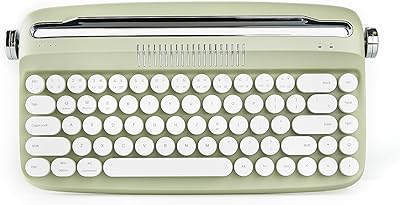
77%
91%
Aesthetic Design
67%
Typing Feel
74%
Typing Sound
63%
Build Quality
83%
Keycap Removability & Cleaning
More
Adventurers Retro Typewriter Keyboard 75%
77%
88%
Build Quality
93%
Aesthetic & Design
84%
Typing Experience
67%
Bluetooth Connectivity
86%
Hot-Swap Switch Support
More
YUNZII B307 Wireless Typewriter Keyboard
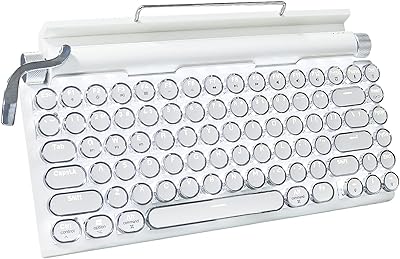
74%
91%
Design & Aesthetics
61%
Typing Feel
84%
Wireless Connectivity
88%
Integrated Stand
67%
Build Quality
More
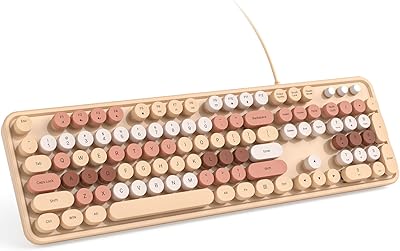
MOWUX SK-693EL Wired Backlit Keyboard
73%
83%
Value for Money
67%
Typing Experience
71%
Backlight Quality
62%
Build Quality
94%
Ease of Setup
More
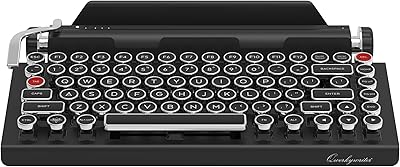
Qwerkytoys Qwerkywriter Typewriter Inspired Retro Mechanical Keyboard
84%
89%
Typing Experience
93%
Design & Aesthetic
92%
Battery Life
88%
Build Quality
77%
Ergonomics & Comfort
More
Azio Retro Compact Mechanical Keyboard
73%
91%
Build Quality
94%
Aesthetic Design
83%
Typing Experience
58%
Noise Level
71%
Wireless Performance
More
Macally SLIMKEYCA Compact Wired Keyboard
77%
83%
Typing Experience
68%
Build Quality
89%
Value for Money
92%
Mac Compatibility
57%
Keycap Durability
More
ANSWERK Typewriter Style Keyboard
88%
89%
Typing Experience
94%
Build Quality
81%
LED Backlighting
88%
Ergonomics
92%
Spill Resistance
More
Evoluent EKB Compact Wired Keyboard
71%
84%
Ergonomic Design
67%
Typing Feel
73%
Build Quality
61%
Hotkey Usability
91%
Connectivity & Setup
More
KNOWSQT Wired Computer Keyboard
85%
89%
Design & Aesthetics
83%
Typing Experience
94%
Ease of Setup
88%
Build Quality
70%
Key Press Feel
More

FAQ

No, not at all. This is a true plug-and-play peripheral — just connect it to a free USB-A port and your computer recognizes it immediately. There is no companion app, no driver disc, and no setup wizard involved.

Yes, it connects and types without any issue on Mac OS. The one caveat worth knowing is that some of the multimedia shortcut key combinations are not compatible with macOS, so functions like mail shortcuts or certain system controls may not respond as expected. Basic typing and the standard keys all work fine.

It is a membrane keyboard. The round keycaps give it a typewriter appearance, but the underlying switches are membrane-based, which means the key travel is shallower and the actuation feel is softer than a mechanical keyboard. For casual typing and daily browsing it works well, but if you are used to the sharp tactile click of a mechanical board, this will feel noticeably different.

Yes, it is fully compatible with Chromebooks right out of the box. Since it requires no drivers, ChromeOS handles it automatically the moment you plug it in.

It is fairly quiet. Membrane switches produce a muffled thud rather than a sharp click, so it is unlikely to bother coworkers or people nearby in a shared space. That said, it is not completely silent — you will still hear the keys bottom out, especially if you type with a heavy hand.

Yes, it is a full 104-key layout which includes a complete numeric keypad on the right side. This is worth noting because many compact or aesthetics-focused keyboards drop the number pad to save space.

Yes, there are foldable stands on the underside that you can flip out to raise the back edge of the keyboard. It gives you a modest incline that most people find more comfortable for extended typing compared to a completely flat position.

It should not. The bottom has rubber feet that grip smooth desk surfaces reasonably well and keep the board from shifting during use. Heavier typists have generally found this effective enough for everyday sessions.

MOWUX offers a 12-month warranty on this product. If something goes wrong, you are meant to contact them directly by email and they will assist with a resolution. As with most budget peripherals, the warranty process is handled by the manufacturer rather than through a retail return portal, so keep your purchase records handy.

Based on consistent buyer feedback, the aesthetic holds up well in real life. The round keycaps and purple-white color scheme photograph accurately, and most owners report it looks even better on their actual desk than they expected. It is genuinely a style-forward choice, and if that is a priority for your workspace, it delivers on that promise at an accessible price.