Overview

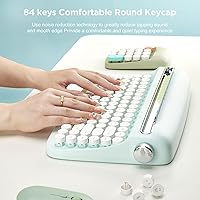
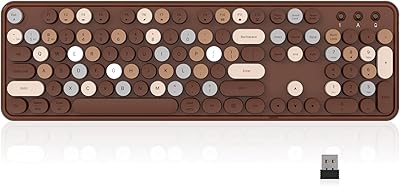
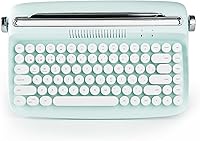
The YUNZII B303 Wireless Typewriter Keyboard sits at an interesting crossroads: it looks like something off a 1950s writing desk but connects to your iPad over Bluetooth 5.0. The round, sculpted keycaps and pastel Sweet Mint colorway are clearly the headline act here — this is a keyboard you buy because it looks great on your desk, not because it out-types a mechanical board. Underneath that charming exterior are membrane switches, which means quieter, softer keystrokes rather than crisp tactile feedback. One practical detail worth flagging upfront: it runs on AAA batteries, not a built-in rechargeable cell, so keep a spare pair nearby.
Features & Benefits

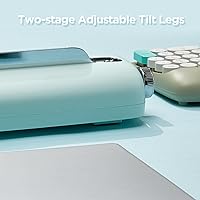
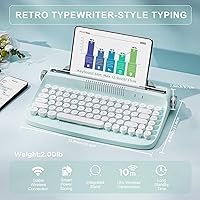
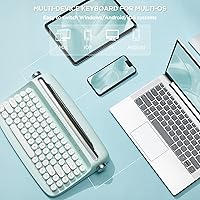
The B303 handles multi-device workflows more capably than its price tag might suggest. Pairing up to three devices — a laptop, a tablet, and a phone, say — and switching between them with FN+1, 2, or 3 is genuinely quick. The integrated tablet stand keeps your desk tidy without requiring a separate accessory, though it accommodates devices up to about 12.9 inches and can feel snug for larger tablets in landscape orientation. Adjustable rear feet let you dial in a comfortable tilt, and the 84-key layout covers everything most users need, including 12 FN-layer shortcuts for media and system controls, all packed into a footprint just over 14 inches wide.

Best For

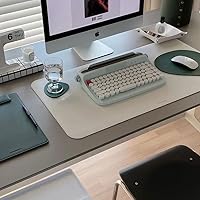
This typewriter-style keyboard is a natural fit for anyone building a cohesive desk aesthetic — think dorm rooms, home offices, or content creator setups where every detail is intentional. Students and casual writers will find the 84-key layout more than sufficient for everyday use, and the keyboard-plus-stand combination genuinely simplifies things for iPad or tablet users. It also works well as a gift: the colorways are distinctive and it photographs beautifully. If you regularly bounce between a phone, tablet, and laptop at the same desk, the three-device Bluetooth pairing makes this retro Bluetooth keyboard a practical daily driver, not just a decorative one.

User Feedback

Across more than 2,600 ratings, the B303 holds a solid 4.2 stars, and the pattern in reviews is fairly consistent. Visual appeal draws the most praise — buyers love how it fits into styled desk setups and how well it shows up in photos. Typing feel divides opinion more sharply: users who prefer quiet, light keystrokes tend to be satisfied, while those coming from mechanical keyboards often find the membrane feedback underwhelming. The Bluetooth connection is generally reliable, though a handful of reviewers mention occasional lag after the keyboard sits idle. Battery life earns positive marks overall, and most find the stand useful for phones and smaller tablets, though it can feel limiting with a larger device in landscape orientation.

Pros

  • The retro round keycap design is genuinely eye-catching and photographs exceptionally well in styled desk setups.
  • Bluetooth 5.0 multi-device pairing lets you switch between three devices instantly without unplugging anything.
  • The built-in tablet and phone stand keeps your workspace tidy without buying a separate accessory.
  • Membrane keys are quiet enough for shared spaces like libraries, open offices, or dorm common rooms.
  • The compact 84-key footprint frees up meaningful desk space without sacrificing essential keys.
  • Adjustable rear feet let you find a comfortable typing angle rather than being locked into one position.
  • Battery life holds up well under light to moderate daily use, with included AAA batteries to get started immediately.
  • Compatible with Windows, macOS, Android, and iOS, so it works across virtually any device you already own.
  • At its price point, the B303 delivers an aesthetic upgrade that would otherwise require spending significantly more on custom builds.
  • Twelve FN-layer shortcuts cover media controls and system functions without needing a dedicated row of keys.

Cons

  • There is no built-in rechargeable battery — AAA cells must be replaced periodically, which adds an ongoing cost and inconvenience.
  • The membrane typing feel is a notable step down from mechanical switches and will disappoint tactile feedback enthusiasts.
  • The integrated stand can feel narrow and unstable with larger tablets, especially in landscape orientation.
  • Some users report occasional Bluetooth reconnection lag after the keyboard has been idle for a period.
  • There is no backlight option, making the keys harder to read in low-light environments.
  • The keycap legends on some colorways have lower contrast, which can cause readability issues under dim lighting.
  • No dedicated number pad means frequent spreadsheet users or data-entry workers will need to adapt or look elsewhere.
  • The relatively light weight of 2.49 pounds means the keyboard can shift on smooth desk surfaces during heavier typing sessions.
  • No wired connection mode limits flexibility if Bluetooth becomes unavailable or unreliable in interference-heavy environments.

Ratings

The scores below for the YUNZII B303 Wireless Typewriter Keyboard were generated by our AI rating engine after analyzing thousands of verified global buyer reviews, actively filtering out incentivized, repeated, and bot-flagged submissions to surface only genuine user experiences. Both the genuine strengths and the recurring frustrations are reflected here without bias, so you get an honest picture of what owning this keyboard actually feels like day to day.
Aesthetic Design
93%
The retro round keycap silhouette and pastel colorways consistently earn high praise from buyers who care about desk cohesion. Reviewers routinely describe it as the most visually striking keyboard they have owned at this price, and it photographs exceptionally well for setup posts and content creation backgrounds.
A small number of buyers note that the pastel finish shows fingerprints and oils more readily than darker keyboards, requiring occasional wiping to maintain that clean look. The aesthetic is also quite specific — if your desk leans industrial or minimal, the vintage styling can feel out of place.
Build Quality
71%
29%
For its price tier, the B303 feels solid enough for everyday desktop use, and most reviewers report no flex or wobble in the keyboard body after months of regular typing. The keycaps are seated firmly and do not wobble individually, which contributes to a more premium feel than the price might suggest.
The plastic shell does not feel especially dense or robust, and a few users note that the keyboard can shift on smooth desk surfaces during more forceful typing because of its relatively light weight. Those expecting a sturdy, heavy board will likely find the construction underwhelming.
Typing Feel
61%
39%
Casual typists and those coming from a laptop keyboard tend to find the membrane action comfortable and forgiving during long note-taking or email sessions. The soft keystrokes are quiet enough for shared environments like dorms or open offices without distracting nearby colleagues.
Anyone accustomed to mechanical switches — even budget tactile ones — will likely find the membrane feedback flat and imprecise. The lack of a defined tactile bump makes fast, accurate touch-typing harder, and a meaningful portion of reviewers specifically cite typing feel as their biggest disappointment with the B303.
Bluetooth Connectivity
78%
22%
Pairing with multiple devices is genuinely well-implemented: switching between a laptop, tablet, and phone via FN+1/2/3 is fast and reliable for the vast majority of users. Bluetooth 5.0 keeps the connection stable across a typical room without dropout during normal daily use.
A minority of users report that the keyboard occasionally takes a few extra seconds to reconnect after sitting idle, which can be mildly frustrating during quick task-switching moments. Reconnection lag is not universal, but it appears consistently enough in reviews to be worth noting as a real-world risk.
Multi-Device Switching
82%
18%
The three-slot pairing system works smoothly for users who split time between a personal laptop, a work tablet, and a phone at the same desk. The FN shortcut switching is near-instant in most cases, removing the need to dig into Bluetooth settings every time you change devices.
The keyboard only supports three paired devices, which is sufficient for most users but can be limiting in setups with four or more regularly used gadgets. There is also no visual indicator beyond a brief LED flash to confirm which device slot is currently active.
Integrated Stand
63%
37%
Having a built-in device stand removes the need for a separate phone or tablet holder on the desk, which buyers in small or curated workspaces genuinely appreciate. For phones and smaller tablets in portrait mode, the slot keeps devices upright and stable without any fuss.
The slot width of around 12.9 inches is tight for larger tablets, and using a full-size iPad Pro in landscape mode inside a protective case frequently exceeds what the stand can comfortably accommodate. Reviewers with larger tablets describe the stand as more suitable for phones than for their primary tablet device.
Battery Life
79%
21%
Under light to moderate typing — emails, note-taking, occasional document work — most users report several weeks of use from a single set of AAA batteries, which is a reassuringly long run time for a wireless keyboard. The included batteries in the box mean you can start using it immediately without an extra trip to a store.
The AAA battery requirement itself is the core friction point: buyers accustomed to USB-C rechargeable keyboards find the need to stock and swap out batteries an inconvenient step backward. There is no low-battery indicator visible to the user without a dedicated app or status light, which can lead to the keyboard dying unexpectedly.
Portability
74%
26%
At just over 14 inches wide and weighing around 2.5 pounds, the B303 is compact enough to slide into a larger bag for moving between rooms or the occasional coffee shop session. The tenkeyless layout gives it a genuinely smaller footprint than full-size keyboards without sacrificing the keys most users rely on daily.
At 2.49 pounds it is noticeably heavier than ultra-slim travel keyboards, and without a dedicated carrying pouch or protective cover in the box the exposed keycaps are vulnerable to scratches during transit. It is better described as desk-portable than truly on-the-go portable.
Compatibility
88%
Working natively across Windows, macOS, Android, and iOS without any drivers or software installation is a practical advantage that simplifies setup for mixed-device households. Reviewers consistently confirm smooth pairing with iPads, iPhones, Android phones, Chromebooks, and Windows laptops without any additional configuration.
There is no dedicated ChromeOS key layout, so some function shortcuts may not map perfectly on Chromebooks without manual remapping. A small number of older Android devices have also been reported to show occasional pairing instability, though this appears to be an edge case rather than a widespread issue.
Key Layout
76%
24%
The 84-key arrangement covers the alphabet, number row, function row, and key navigation keys in a logical, familiar layout that most users adapt to quickly. The 12 FN-layer media shortcuts are a practical addition that handles volume, brightness, and playback control without requiring a dedicated row.
The absence of a number pad will be a genuine limitation for users who regularly enter numerical data or work in spreadsheets. Some buyers also note that the Delete, Home, and End key positions differ slightly from standard layouts, causing minor adjustment friction during the first few days of use.
Setup Experience
86%
The initial Bluetooth pairing process is described as quick and frustration-free by the large majority of reviewers — insert the batteries, press FN+1 to enter pairing mode, select it from your device, and you are done in under a minute. No drivers or companion apps are required on any supported platform.
The included manual is brief and not especially detailed, which can leave less tech-savvy users uncertain about the FN shortcut combinations available on their specific operating system. The absence of an onboarding guide for multi-device setup specifically is a small but recurring complaint.
Value for Money
81%
19%
For buyers whose primary goal is a visually striking, functional Bluetooth keyboard at an accessible price, the B303 delivers a strong return. The bundled stand, extra keycap, and included batteries add genuine value that would otherwise require separate purchases.
Buyers who prioritize typing performance or premium build materials will find more compelling mechanical options available for a modest price increase, which makes the B303 feel like a style purchase rather than a performance one. As a pure typing tool measured against similarly priced competitors, the value proposition is more moderate.
Noise Level
84%
The membrane key construction keeps the keyboard noticeably quiet compared to clicky or tactile mechanical alternatives, making it a considerate choice for shared rooms, late-night study sessions, or office environments where noise is a concern. Multiple reviewers specifically chose this keyboard over louder options for exactly this reason.
While quiet, the keystroke sound is not completely silent — there is a soft thud with each press that can still be audible in very quiet settings like recording environments or sleeping partners nearby. Users who need near-silent operation may want to investigate silent switch mechanical options as an alternative.
Keycap Quality
69%
31%
The round keycap shape is the keyboard's most distinctive physical feature and the legend printing is clear enough for daily use under normal lighting conditions. Most users report that the legends do not fade noticeably after several months of regular use.
The non-standard round keycap shape means aftermarket custom keycap sets are incompatible, locking buyers into the stock aesthetic permanently. Some reviewers also note that the legend contrast on lighter colorways like Sweet Mint is lower than ideal, making individual keys harder to distinguish in dim lighting conditions.

Suitable for:

The YUNZII B303 Wireless Typewriter Keyboard is a strong match for anyone who treats their desk as a curated space, not just a work surface. Students, remote workers, and content creators who want a keyboard that looks as good in a photo as it does in daily use will find it hits a satisfying balance of form and function. It works especially well for iPad and tablet users who want a keyboard and stand bundled together, removing the need for a separate accessory cluttering the desk. Casual typists who write emails, take notes, or browse the web will find the 84-key membrane layout more than adequate for their workload. The three-device Bluetooth pairing also makes it a practical choice for anyone juggling a phone, tablet, and laptop at the same station throughout the day. And if you need a distinctive, photogenic gift for someone who takes pride in their desk setup, this retro Bluetooth keyboard sits comfortably in that sweet spot between useful and genuinely charming.
Not suitable for:

The YUNZII B303 Wireless Typewriter Keyboard is not the right tool for buyers who prioritize typing performance above all else. If you spend hours a day writing long documents and rely on tactile or clicky feedback to maintain rhythm and accuracy, the soft membrane switches will likely feel flat and unsatisfying compared to what mechanical alternatives offer. Power users who expect USB-C charging should also know upfront that the B303 runs on AAA batteries — there is no built-in rechargeable cell, which means ongoing battery management rather than a quick cable top-up. Gamers will find the membrane construction and wireless-only connection entirely unsuitable for fast, latency-sensitive input. Users with larger tablets — particularly those who prefer landscape orientation on a 12.9-inch or bigger device — may also find the integrated stand too narrow to feel secure. If raw productivity, precise tactile feedback, or zero-compromise ergonomics are the priority, this typewriter-style keyboard will leave those needs unmet.
Specifications

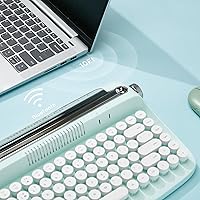
  • Connectivity: The keyboard connects via Bluetooth 5.0, offering a stable wireless range of up to 33 feet (10 meters) from the paired device.
  • Multi-Device: Up to three devices can be paired simultaneously and switched between instantly using the FN+1, FN+2, or FN+3 key combinations.
  • Key Count: The layout includes 84 keys covering the full alphanumeric set, function row, and navigation cluster in a compact tenkeyless arrangement.
  • Key Type: Keys use a membrane switch mechanism, which produces a softer, quieter keystroke compared to mechanical or clicky switch alternatives.
  • Keycap Style: Round, sculpted retro-style keycaps are fitted across the board, reinforcing the vintage typewriter aesthetic throughout the layout.
  • Dimensions: The keyboard measures 14 x 8.6 x 2 inches, offering a compact footprint that conserves desk space without removing essential keys.
  • Weight: The unit weighs 2.49 pounds, making it reasonably portable for moving between rooms or carrying in a bag with care.
  • Power Source: The keyboard is powered by 2 x AAA batteries, which are included in the box; there is no built-in rechargeable battery cell.
  • Compatible OS: Full compatibility is confirmed for Windows, macOS, Android, and iOS across devices including PCs, laptops, tablets, and smartphones.
  • Integrated Stand: A built-in device stand is mounted on the top edge of the keyboard and accommodates phones and tablets up to 12.9 inches wide.
  • Tilt Adjustment: Adjustable rear feet are included, allowing the user to raise the back edge of the keyboard for a more comfortable typing angle.
  • Function Keys: Twelve media and system control shortcuts are accessible via the FN layer, eliminating the need for a dedicated function row of physical buttons.
  • Wireless Range: The Bluetooth 5.0 connection maintains reliable performance at distances up to 33 feet (approximately 10 meters) under typical indoor conditions.
  • Color Variant: The Sweet Mint colorway features a pastel green finish across the keyboard body paired with matching round keycaps and accent details.
  • Package Contents: The box includes the wireless keyboard, one extra red accent keycap, 2 x AAA batteries, and a user manual.

Related Reviews
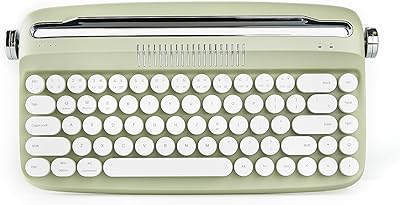
YUNZII B307 Wireless Typewriter Keyboard
74%
91%
Design & Aesthetics
61%
Typing Feel
84%
Wireless Connectivity
88%
Integrated Stand
67%
Build Quality
More
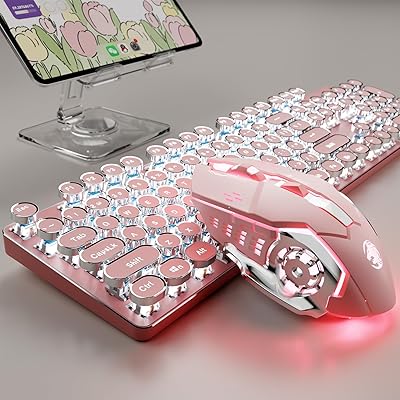
SEUNKWANG TK950 Wireless Typewriter Keyboard and Mouse Combo

78%
83%
Build Quality
88%
Typing Experience
79%
Wireless Connectivity
93%
Aesthetic & Design
76%
Backlighting
More
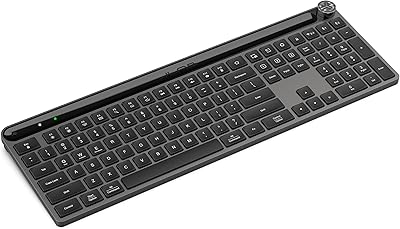
Arteck HW192 Wireless Keyboard and Mouse Combo
78%
78%
Build Quality
72%
Typing Experience
63%
Mouse Comfort & Ergonomics
81%
Battery Life
69%
Wireless Connectivity
More
Logitech K270 Wireless Keyboard
86%
91%
Battery Life
88%
Build Quality
85%
Typing Comfort
83%
Wireless Range
92%
Ease of Setup
More
INFINMIND K913 Wireless Keyboard
79%
88%
Typing Noise Level
74%
Key Feel & Typing Experience
71%
Build Quality & Materials
87%
Matte Finish & Smudge Resistance
83%
Wireless Connectivity & Stability
More
X9 Wireless Ergonomic Keyboard
84%
89%
Comfort & Ergonomics
92%
Wireless Connectivity
84%
Build Quality
90%
Battery Life
75%
Typing Experience
More
Merdia Wireless Mechanical Keyboard
83%
90%
Connectivity Options
88%
Typing Experience
86%
RGB Customization
84%
Build Quality
91%
Battery Life
More
JLab Epic Wireless Keyboard
88%
89%
Connectivity & Multi-device Support
87%
Typing Experience
93%
Battery Life
88%
Build Quality
85%
Ergonomics & Comfort
More
QUASIO Wave Keys Ergonomic Wireless Keyboard with Wrist Rest
75%
83%
Ergonomic Comfort
71%
Wrist Rest Quality
67%
Typing Feel & Key Travel
86%
Wireless Reliability
81%
Mac & Windows Compatibility
More
Soueto WK713 Wireless Keyboard
86%
89%
Typing Experience
94%
RGB Lighting Customization
87%
Battery Life
75%
Build Quality
80%
Device Holder Utility
More

FAQ

The B303 can store up to three Bluetooth pairings. To pair a device to one of the three slots, hold FN+1, FN+2, or FN+3 until the indicator light blinks, then pair from your device settings as usual. Once all three slots are filled, switching between them is just a quick tap of FN+1, 2, or 3 — no re-pairing needed.

Yes, it pairs with iPads and other iOS devices over Bluetooth without any additional software or adapters. It also works with Android tablets, Windows PCs, and Macs, so if you use a mix of devices at your desk it will cover all of them.

It runs on 2 x AAA batteries, which are included in the package so you can use it right out of the box. Battery life will vary depending on how heavily you type, but most users report weeks to months of use under light to moderate daily typing before needing a replacement.

Not really — this is a membrane keyboard, which means the keystrokes feel softer and quieter than mechanical switches. If you are used to the crisp, tactile click of a mechanical board, the feel here will likely seem a little flat by comparison. That said, for casual typing, email, and note-taking, most users find it perfectly comfortable.

No, the B303 is wireless only and does not include a wired USB mode. If your device does not support Bluetooth or you are in a situation where Bluetooth is unreliable, this keyboard would not be a practical choice.

The integrated stand is listed at a maximum slot width of 12.9 inches, so a 12.9-inch iPad Pro is right at the edge of what it can hold. In practice, some users find larger tablets feel snug or slightly unstable in the stand, particularly in landscape orientation. For smaller tablets and phones it works quite well.

No, the B303 does not have keyboard backlighting. The keycaps are not illuminated, so using it in a dark or dim environment may require familiarity with the key positions. If backlit keys are important to you, you would need to look at a different model.

Membrane switches are generally considered quiet keyboards, and this one is no exception. It produces a soft thud rather than a sharp click, which makes it reasonably considerate for shared spaces like offices, libraries, or shared apartments.

The round keycap profile on this keyboard is a non-standard shape, which means standard aftermarket keycap sets will not fit properly. The keyboard does come with one extra red accent keycap in the box, but beyond that, custom keycap compatibility is very limited.

A small number of users have reported occasional reconnection delays, usually after the keyboard has been idle for a while. Pressing any key typically wakes it back up. If you experience persistent disconnection issues, try unpairing and re-pairing the device, and make sure there are no major sources of wireless interference nearby, such as a crowded 2.4 GHz Wi-Fi environment.

Where to Buy