Overview

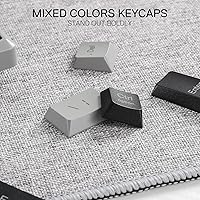
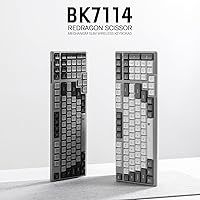
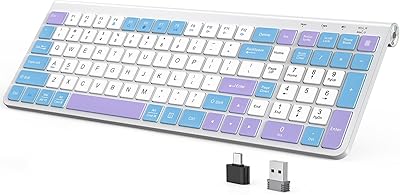
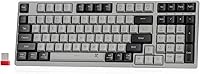
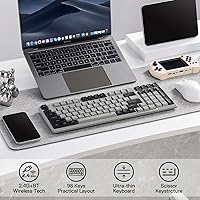
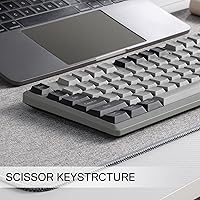
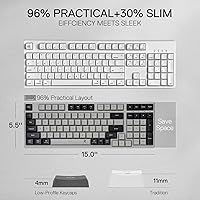
The Redragon BK7114 98-Key Wireless Low-Profile Keyboard is a trim, affordable option that arrived in mid-2024 with a clear target audience: office workers and tidy desk setups who want wireless without the bulk. What makes it stand out at first glance is the mixed-color keycap design — a vintage-inflected look you rarely see at this price point, where most competitors stick to plain black or white. It uses scissor switches, not mechanical ones, so the feel is closer to a laptop keyboard than a clicky desktop board. The 98-key compact layout keeps the numpad while shedding unnecessary space, landing somewhere practical between a full-size and a tenkeyless.
Features & Benefits

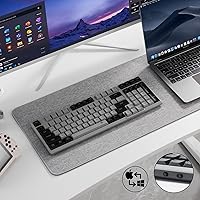
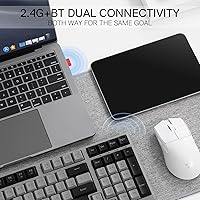
The BK7114 covers wireless connectivity in two ways: a 2.4GHz USB dongle for a stable, low-latency connection and Bluetooth for pairing with up to three devices at once. Switching between them is quick, and a physical side button handles the Windows-to-Mac toggle without any driver installation. The scissor-switch keys are noticeably quiet — the kind of quiet that does not earn complaints in a shared office. Battery life runs on a built-in lithium polymer cell, so there are no disposable batteries to worry about; charging is via the included cable. One honest caveat worth noting upfront: there is no backlight included. If you regularly type in low-light conditions, that absence will matter.

Best For

This slim wireless keyboard makes the most sense for remote workers and students who bounce between a Mac and a Windows machine — the physical OS toggle alone saves real friction. It also suits anyone working in an open-plan office or library where key noise is a genuine concern. Desk minimalists who prefer a bit of visual personality over RGB lighting will appreciate the mixed-color aesthetic, which is genuinely different from the usual monochrome options. It is also a reasonable step up for anyone still using an older membrane keyboard, as long as they are not expecting the tactile depth of a mechanical board. Portability is decent given the slim profile and modest weight.

User Feedback

Early buyers — the review pool is still relatively small at under 60 ratings — generally speak positively about how the keyboard looks on a desk and how reliably the wireless holds up day-to-day. Several mention the typing feel is comfortable for long work sessions, particularly appreciated by those coming from older or noisier boards. On the critical side, a handful of reviewers note that Bluetooth switching between paired devices can occasionally feel sluggish, which matters if fast multi-device toggling is a priority. The lack of backlighting also draws consistent disappointment from users who did not notice it was missing before buying. Worth reading the listing carefully before purchasing.

Pros

  • Supports both 2.4GHz and Bluetooth, covering up to four devices total without extra hardware.
  • The built-in rechargeable battery means no hunting for AA batteries mid-workday.
  • A physical side button handles the Windows and Mac toggle instantly, no drivers needed.
  • Scissor switches keep typing noise low enough for shared offices and quiet environments.
  • The mixed-color keycap design stands out from the sea of plain black and grey keyboards at this price.
  • The 98-key layout retains the numpad while still keeping the overall footprint compact.
  • Compatible with PC, Mac, and tablets out of the box, with no software setup required.
  • At well under the price of most wireless mechanical keyboards, the value-to-feature ratio is solid for office use.

Cons

  • No backlight at all — a real drawback for anyone who works in dim or variable lighting conditions.
  • Bluetooth device-switching can feel sluggish, which matters for heavy multi-device users.
  • Scissor switches feel noticeably shallow compared to mechanical boards, which may disappoint switchers.
  • The wired USB connection is for charging only, so there is no wired-use fallback if wireless drops.
  • With fewer than 60 ratings as of mid-2024, long-term durability data is still limited.
  • Plastic construction feels adequate but does not inspire confidence for heavy daily travel use.
  • No software or companion app means zero key remapping or macro customization options.
  • The mixed-color keycap aesthetic, while distinctive, will not suit buyers who prefer a clean, uniform look.

Ratings

The scores below for the Redragon BK7114 98-Key Wireless Low-Profile Keyboard were generated by our AI rating engine after analyzing verified purchase reviews from buyers worldwide, with spam, bot-submitted, and incentivized feedback actively filtered out. Each category reflects the honest balance of what real users praised and what genuinely frustrated them — nothing has been softened to flatter the product. Whether this slim office keyboard earns a spot on your desk depends heavily on a few specific trade-offs, and those are reflected transparently in the scores.
Wireless Reliability
83%
The 2.4GHz dongle connection holds up well in everyday office environments, with early buyers noting very few dropped inputs or lag spikes during standard typing sessions. For users anchored to one desk, this mode performs exactly as needed without fuss.
Bluetooth device-switching has drawn more mixed feedback — some users report a noticeable delay when toggling between a laptop and a tablet, which becomes irritating in fast-paced multi-device workflows. The connection stability over Bluetooth also appears more variable than the 2.4GHz channel.
Typing Feel
71%
29%
For an office keyboard, the scissor switches deliver a clean, consistent keystroke that feels considerably more refined than a standard membrane board. Users coming from older budget keyboards tend to notice an immediate improvement in feedback and key travel consistency.
Anyone migrating from a mechanical keyboard is likely to find the shallow travel distance and lack of tactile bump underwhelming. The scissor mechanism simply cannot replicate that satisfying resistance, and for heavy typists who spend hours at the keyboard daily, the difference in physical feedback is hard to ignore.
Noise Level
88%
This is one of the BK7114's clearest strengths — the scissor switches are genuinely quiet, and several early buyers specifically mention being able to type in shared offices or during video calls without drawing attention. It handles the open-plan environment test well.
While impressively quiet for a desktop keyboard, it is not completely silent; in a very quiet room the keystrokes are still faintly audible. Users who need near-total silence — for recording environments, for instance — may still find the sound noticeable.
Multi-Device Workflow
68%
32%
The ability to store three Bluetooth pairings alongside a 2.4GHz connection covers a genuinely useful range of devices, and the Mac/Windows toggle button is a thoughtful addition that removes a real friction point for cross-platform users. For someone alternating between two machines a few times a day, the setup works.
Users who switch devices more frequently report that Bluetooth reconnection speed falls short of what they need, with occasional multi-second waits that disrupt momentum. Compared to some competing keyboards at higher price points, the switching experience feels less polished.
Build Quality
62%
38%
The keyboard feels solid enough for everyday desk use, and the low-profile form factor gives it a sleek appearance that holds up well in a tidy workspace. Most users who handle it gently and use it as a stationary office board report no structural complaints.
The all-plastic construction becomes apparent when you pick it up or flex the chassis — there is noticeable flex in the middle of the board under firm pressure, and it does not inspire confidence for frequent travel or bag-tossing. At this price tier it is expected, but it remains a limitation.
Key Layout & Design
79%
21%
The 98-key layout is a pragmatic choice that keeps the numpad accessible without demanding the full footprint of a 100% keyboard. Users who work with numbers regularly — finance, data entry, spreadsheet-heavy roles — tend to appreciate that the numpad was not sacrificed in the name of compactness.
Some function row shortcuts and navigation cluster placements require a short adjustment period, particularly for users switching from a full-size layout. A handful of reviewers note that certain secondary functions are not clearly labeled, which adds a brief learning curve.
Aesthetic & Appearance
84%
The mixed-color keycaps genuinely stand out in a category dominated by plain black and grey boards, giving it a vintage-inspired character that photographs well and earns compliments on desk setups. For buyers who care about workspace aesthetics without committing to RGB, this is a real differentiator.
The color palette is subjective, and a portion of buyers who prefer a clean, monochrome look may find the mixed keycaps busier than expected from product photos. The plastic finish can also attract fingerprints and light surface scuffs over time.
Mac & Windows Compatibility
81%
19%
The physical side toggle for switching between operating systems works as advertised and requires zero software, which is exactly what cross-platform users need. Buyers who use a Mac at home and a Windows PC at work specifically call this out as a genuine convenience.
Some Mac-specific key functions and shortcuts require manual remapping since the keyboard ships with a Windows-first layout. A few macOS users note that certain media or function key behaviors differ from what they expect straight out of the box.
Battery & Charging
76%
24%
The built-in lithium polymer battery removes the recurring cost and inconvenience of disposable batteries, which several buyers highlight as a quality-of-life improvement over older wireless keyboards they owned. Charging via USB-C is straightforward and widely compatible with existing cables.
Redragon has not published a specific battery life figure, which makes it difficult to plan around. A small number of users report that battery drain is faster than expected under sustained Bluetooth use, and the keyboard cannot be used while charging since the wired connection is charge-only.
Value for Money
77%
23%
For buyers whose priority is quiet wireless typing across two or three devices without spending significantly, the BK7114 delivers a feature set that would cost considerably more on branded office peripherals. The dual wireless modes and OS toggle alone represent strong value at this price point.
Once you step back and compare it to mechanical or premium slim keyboards just a little higher in price, the limitations in build quality, Bluetooth switching speed, and typing depth start to feel more significant. It is good value within its tier but not a bargain that punches far above its class.
Setup & Ease of Use
86%
Out of the box setup is quick — plug in the dongle or connect via Bluetooth and the keyboard is ready within a minute, with no drivers or companion software required. Early buyers consistently mention how painless the initial configuration is, especially for non-technical users.
The lack of any companion app means there is no onboarding guide, visual indicator, or troubleshooting tool if something goes wrong during pairing. Users who encounter Bluetooth connection hiccups have to rely on manual key combinations that are not always obvious from the included documentation.
Portability
66%
34%
At 1.56 pounds and with a slim profile, the BK7114 is light enough to slip into a laptop bag without adding significant bulk. Users who occasionally bring a keyboard to a co-working space or coffee shop find it manageable for that kind of irregular travel.
It was not designed as a travel keyboard — it lacks a carrying case, the plastic chassis has no meaningful drop protection, and the keycap finish can scuff in a bag. Frequent commuters who want a daily travel board would be better served by a keyboard built specifically for that use case.
Backlighting
22%
78%
The absence of backlighting keeps the design clean and contributes to a simpler, less cluttered aesthetic that suits minimalist desk setups. It also likely benefits battery efficiency since there is no lighting system drawing power.
There is no backlight of any kind — not even a minimal single-color option — which is a hard dealbreaker for anyone who regularly works in low-light conditions or at night. This is the single most commonly cited disappointment in early reviews and cannot be worked around after purchase.
Key Customization
38%
62%
For users who have no interest in remapping keys or recording macros, the plug-and-play simplicity is actually an advantage — there is nothing to configure and nothing to manage.
There is no software, no onboard macro support, and no key remapping capability whatsoever. Power users, programmers, or anyone with specialized shortcut needs will find this board entirely inflexible, which is a significant limitation compared to even modestly priced programmable alternatives.

Suitable for:

The Redragon BK7114 98-Key Wireless Low-Profile Keyboard is a strong fit for professionals and students who frequently switch between a Mac and a Windows machine, since the physical OS toggle removes a genuine daily annoyance without requiring any software. Anyone working in a shared office, library, or co-working space will appreciate how quietly the scissor switches operate — it is the kind of keyboard that does not attract side-eye from coworkers. The 98-key layout is a practical choice for number-heavy work like spreadsheets or data entry, where losing the numpad to save desk space is not worth it. Desk minimalists who want something visually distinct — without committing to loud RGB lighting — will find the mixed-color keycap look refreshingly different. It also makes a reasonable upgrade for anyone still on an aging membrane keyboard who wants something slimmer and more reliable without spending a lot.
Not suitable for:

The Redragon BK7114 98-Key Wireless Low-Profile Keyboard is not the right choice for anyone who types regularly in dim rooms or low-light conditions — there is no backlight of any kind, and that is a hard limitation, not a minor inconvenience. Enthusiasts who have grown accustomed to mechanical switches will likely find the scissor mechanism too shallow and lacking the tactile feedback they rely on; this is a fundamentally different typing experience and not a substitute. Gamers should also look elsewhere, as the 2.4GHz connection is adequate for office use but the keyboard was not designed with polling rate or anti-ghosting demands in mind. If fast, fluid Bluetooth device-switching is central to your workflow — say, toggling between a laptop and a tablet several times per hour — early feedback suggests the switching speed can occasionally disappoint. Finally, buyers who prefer a full-size layout with dedicated media keys or a fully programmable board will find the feature set here too basic for their needs.
Specifications

  • Layout: The keyboard uses a 98-key, 96% compact layout that retains a numpad while reducing the footprint compared to a standard full-size board.
  • Switch Type: Keys are built on a scissor mechanism, which provides a low-profile, quiet keystroke well-suited to office and shared-space environments.
  • Wireless Modes: Connectivity options include a 2.4GHz USB dongle for low-latency use and Bluetooth 5.0 for pairing with up to three devices simultaneously.
  • Wired Mode: The USB-C port is used exclusively for charging and does not support wired typing or data transfer.
  • Bluetooth Profiles: Up to three Bluetooth devices can be stored and toggled between, in addition to the single 2.4GHz connection.
  • OS Support: The keyboard is compatible with both Windows and macOS, with a dedicated physical side button for switching between the two operating systems.
  • Backlight: No backlight or RGB illumination of any kind is included on this keyboard.
  • Battery: Power comes from a built-in lithium polymer rechargeable battery, which is included in the box and does not require replacement.
  • Weight: The keyboard weighs 1.56 pounds, keeping it manageable for occasional transport alongside a laptop.
  • Dimensions: Package dimensions measure 15.59″ x 6.61″ x 1.34″, reflecting the slim, low-profile build of the unit.
  • Keycap Style: Keycaps are low-profile and feature a mixed-color design, giving the board a distinctive vintage-inspired look compared to standard monochrome keyboards.
  • Material: The keyboard body and keycaps are constructed from plastic, consistent with other keyboards in this value tier.
  • Compatible Devices: The BK7114 is compatible with PCs, laptops, and tablets running Windows or macOS, and can connect to most Bluetooth-enabled devices.
  • Language: The keyboard ships in English, with a standard QWERTY key layout.
  • Availability: This keyboard became available in August 2024 and has a growing but still limited review base as of late 2024.

Related Reviews

Logitech MX Keys S
Logitech MX Keys S
81%
91%
Typing Feel & Key Response
93%
Multi-Device Connectivity
84%
Build Quality & Durability
94%
Battery Life
76%
Backlighting & Visibility
More
Logitech POP Keys Mechanical Wireless Keyboard
76%
88%
Typing Feel
84%
Build Quality
81%
Wireless Reliability
91%
Battery Life
93%
Design & Aesthetics
More
Lofree Flow84
Lofree Flow84
82%
93%
Build Quality
91%
Typing Feel
88%
Switch Quality
78%
Wireless Performance
86%
Hot-Swap Functionality
More
LOFREE Flow Low Profile Mechanical Keyboard
85%
91%
Typing Experience
89%
Build Quality
94%
Connectivity
88%
Customization Options
85%
Ergonomics
More
Logitech POP ICON Keys Wireless Keyboard
81%
91%
Multi-Device Switching
93%
Aesthetic Design
88%
Key Noise Level
74%
Typing Comfort
83%
Build Quality
More
Logitech MX Keys
Logitech MX Keys
80%
93%
Typing Experience
91%
Build Quality
88%
Multi-Device Switching
94%
Battery Life
92%
Cross-Platform Compatibility
More
Nulea RT08 Wave Keys Ergonomic Keyboard
79%
84%
Ergonomic Comfort
67%
Typing Feel
88%
Palm Rest Quality
86%
Wireless Performance
91%
Value for Money
More
Perixx PERIBOARD-426 Wired Mini Low Profile Keyboard
82%
92%
Value for Money
88%
Typing Comfort
78%
Build Quality
95%
Ease of Setup
89%
Portability
More
Arteck HW192 Wireless Keyboard and Mouse Combo
78%
78%
Build Quality
72%
Typing Experience
63%
Mouse Comfort & Ergonomics
81%
Battery Life
69%
Wireless Connectivity
More
Logitech K360 Wireless Compact Keyboard
72%
93%
Battery Life
91%
Ease of Setup
88%
Wireless Reliability
79%
Typing Comfort
74%
Build Quality
More

FAQ

Not simultaneously, but switching between them is easy. There is a physical button on the side of the keyboard that toggles between Windows and Mac modes, and you can pair it to both machines via Bluetooth so swapping takes just a button press. No software or driver installation is needed.

No, there is no backlight of any kind on this keyboard. If you frequently type in dim rooms or at night without overhead lighting, that is a genuine limitation worth factoring into your decision before buying.

The 2.4GHz connection works through a small USB dongle and generally provides a more stable, lower-latency link than Bluetooth. If you are working primarily at a desk with one computer, 2.4GHz is the better daily-use option. Bluetooth is more convenient when you want to pair with multiple devices or connect to something without a free USB port.

You can store up to three Bluetooth pairings and one 2.4GHz connection, for a total of four devices. Switching between the Bluetooth slots is done via keyboard shortcuts, while the 2.4GHz dongle operates as a separate channel.

The battery is built-in and not user-replaceable, which keeps the keyboard slim but does mean you will need to charge it periodically via the USB-C port. The included cable handles charging, though the USB-C connection cannot be used for wired typing.

The Redragon BK7114 98-Key Wireless Low-Profile Keyboard uses scissor switches, not mechanical ones, so the feel is noticeably different. Scissor switches are shallower, quieter, and have a shorter travel distance — similar to a good laptop keyboard. If you are used to the tactile bump or audible click of a mechanical switch, this will likely feel less satisfying to type on.
Switching is reasonably quick for casual multi-device use, but a small number of early reviewers have noted occasional lag when toggling between Bluetooth-paired devices. If you switch between a laptop and tablet many times per hour as part of your core workflow, it is worth keeping that in mind.

It is designed with office productivity in mind, not gaming. The scissor switches, modest wireless latency, and lack of anti-ghosting or programmable macro support make it a poor fit for fast-paced gaming. For typing, spreadsheets, and general productivity work, it performs well within its category.

Yes, it works with tablets over Bluetooth as long as the tablet supports a standard Bluetooth keyboard connection. It pairs with iPads and Android tablets without issue in most cases, though advanced function keys may behave differently depending on the operating system.

It sits somewhere in the middle — the keycaps use a combination of lighter and darker tones rather than bright primary colors, giving it a muted, vintage feel rather than a loud, playful look. Most people who buy it specifically for the aesthetic tend to find it tasteful on a desk, though it is definitely more distinctive than a plain black or grey keyboard.

Where to Buy