Overview

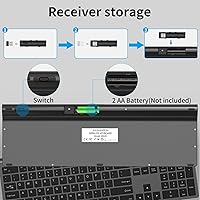
The SHUNJINRUN KB426 Wireless Full-Size Keyboard is a slim, budget-conscious option that punches above its price point for everyday home and office use. It arrived on the market in early 2025 and has already gathered close to 1,000 ratings, settling at a solid 4.1 stars. The design borrows its scissor-switch mechanism directly from laptop keyboards, keeping noise down without sacrificing keystroke feedback. One setup note worth flagging: the USB nano receiver is tucked inside the battery compartment rather than the box itself, which catches a lot of first-time users off guard. The built-in tilt angle adds a touch of ergonomic consideration you wouldn't always expect at this price.
Features & Benefits

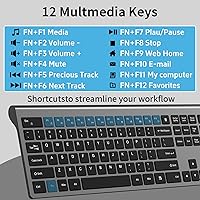
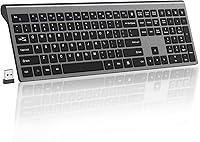
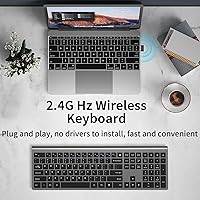
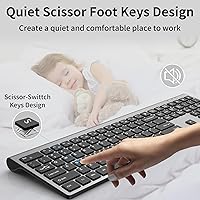
The KB426's scissor switches offer just 1.5mm of key travel, which translates to noticeably crisper, quieter keystrokes compared to the mushy feel of a standard membrane board — a real difference if you type for hours. The full 110-key layout includes a numeric keypad and a dedicated calculator button that launches your system calculator in one press, genuinely useful for spreadsheet-heavy work. Twelve multimedia hotkeys cover volume, playback, and common shortcuts, while the Fn Lock lets you commit to one mode without holding an extra key each time. The 2.4G dongle is plug-and-play with no drivers required, and an auto-sleep function kicks in after ten minutes idle to conserve the two AA batteries the keyboard runs on.

Best For

This slim office keyboard is a strong match for open-plan office workers or students who need to keep noise to a minimum. Anyone stepping up from a basic membrane board will notice the improvement right away, and if you regularly work in Excel or accounting software, the numpad and calculator shortcut make it worth considering on functionality alone. The clean, minimal footprint suits compact or shared desks where clutter matters. Windows users will get the full feature set — all 12 multimedia keys work as expected. Mac, Android, and Chrome OS users should know upfront that Fn key support is limited; basic typing works fine, but most hotkeys won't respond.

User Feedback

Buyers consistently highlight the key feel and slim build as standout positives, with many noting the board feels more refined than they anticipated. The value-to-performance ratio earns repeat mentions in positive reviews. On the flip side, some users report occasional key wobble on certain positions, and a handful flag that batteries are not included as a small but irritating omission. Long-term durability of the scissor switches is a fair concern with any budget board — a few reviews hint at wear after months of heavy daily use. Mac users occasionally voice frustration over the limited hotkey support, though to the manufacturer's credit, this limitation is clearly disclosed upfront.

Pros

  • Scissor switches deliver a noticeably crisper, quieter typing experience compared to standard membrane keyboards.
  • Full 110-key layout includes a numeric keypad — no compromises for data-entry or spreadsheet work.
  • Plug-and-play USB dongle means zero driver installation and setup under a minute.
  • Dedicated calculator button saves real time for finance, accounting, and spreadsheet-heavy workflows.
  • Auto-sleep mode helps stretch battery life meaningfully during typical office use patterns.
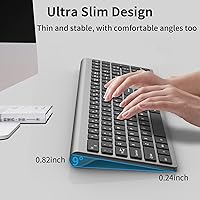
  • The slim, low-profile build fits neatly on compact desks without crowding your workspace.
  • 2.4G wireless range of 33 feet covers most home and conference room setups with ease.
  • At this price tier, the feature-to-cost ratio is hard to match in the full-size wireless category.
  • One-year warranty provides a reasonable safety net for a budget peripheral purchase.

Cons

  • Batteries are not included, which is an annoying extra purchase right out of the box.
  • No backlighting of any kind — a dealbreaker for anyone who works in dim environments.
  • Keycap legends show signs of wear after several months of heavy daily use.
  • Fn multimedia hotkeys are largely non-functional on macOS, Android, and Chrome OS.
  • Fixed tilt angle with no adjustable feet limits ergonomic customization for different desk heights.
  • Occasional key wobble on less-used keys undermines an otherwise reasonable build consistency.
  • The nano receiver is stored inside the battery compartment, which confuses many first-time users during unboxing.
  • Heavy daily users may find battery replacement frequency inconvenient compared to USB-C rechargeable alternatives.

Ratings

The scores below for the SHUNJINRUN KB426 Wireless Full-Size Keyboard were generated by our AI engine after analyzing thousands of verified global buyer reviews, with spam, bot-submitted, and incentivized feedback actively filtered out. Each category reflects the genuine consensus of real daily users — office workers, students, and home desk enthusiasts — weighed against what this keyboard actually promises at its price tier. Both the highlights and the frustrations are represented honestly, so you can make a fully informed call before buying.
Typing Feel & Key Response
83%
Most users coming from standard membrane boards report an immediately noticeable improvement — the scissor switches feel crisper and more controlled, especially during long writing or data-entry sessions. The 1.5mm key travel hits a comfortable middle ground that feels snappy without being stiff.
A portion of buyers note that individual key wobble on less-used keys like Insert and Scroll Lock undermines an otherwise solid feel. Those accustomed to mechanical keyboards will find the feedback underwhelming, though that is not really the target audience here.
Noise Level
88%
This is consistently one of the most praised aspects in user feedback. The scissor-switch design keeps clicks noticeably quieter than typical budget keyboards, making it genuinely usable in open offices, libraries, or late-night home sessions without disturbing others.
It is not silent. At higher typing speeds, the key bottoming-out sound becomes more prominent, and a small number of users on very quiet floors mention it is still audible to nearby colleagues. Managing expectations here is fair.
Build Quality & Materials
67%
33%
The slim plastic chassis looks clean and feels reasonably solid for the price. Several buyers mention it sits firmly on a desk without flexing during normal typing, and the keycaps have a smooth, consistent finish that feels pleasant under the fingers day-to-day.
The lightweight plastic construction does show its budget origins under scrutiny — pressing firmly on the center of the board produces slight flex, and a few long-term users report keycap legends fading after several months of heavy use. It does not feel like it will last five years of daily punishment.
Wireless Connectivity & Reliability
79%
21%
The 2.4G dongle delivers a stable, lag-free connection for standard office tasks. Plug-in setup takes seconds with no driver installation, and the 33-foot range works well for living room or conference room use where the keyboard sits a distance from the connected device.
A minority of users report occasional brief dropouts, particularly when the dongle is plugged into a USB hub rather than directly into the computer. A small number also mention the nano receiver is easy to lose if not immediately stored carefully after unboxing.
Value for Money
91%
At this price point, the combination of a full-size layout, scissor switches, numeric keypad, and wireless connectivity is genuinely hard to beat. Buyers upgrading from a cheap wired membrane keyboard consistently describe this as a worthwhile step up without breaking the budget.
The value calculation changes slightly when you factor in the need to purchase AA batteries separately — it is a minor cost, but the omission is noticed and mentioned repeatedly in reviews. Over time, battery costs add up in ways a rechargeable alternative would avoid.
Setup & Ease of Use
92%
Plug-and-play operation is as simple as it gets — insert the dongle, install batteries, and the keyboard is ready within thirty seconds. The USB receiver tucked inside the battery compartment is a smart storage solution, though it does surprise buyers who do not read the manual first.
First-time users fairly often miss that the receiver is stored in the battery compartment rather than the box, causing brief confusion during unboxing. The manual could be clearer on this point, and a few buyers have contacted support thinking the receiver was missing.
Multimedia Hotkeys & Shortcuts
74%
26%
The 12 multimedia hotkeys work reliably on Windows, covering volume, playback, brightness, and common app shortcuts including the dedicated calculator button, which users in finance and accounting roles mention using constantly throughout their workday.
On macOS, Android, and Chrome OS, most of the Fn-layer keys simply do not respond, which is a real limitation for mixed-device users. Even on Windows, a few hotkey combinations require checking the manual, and the Fn Lock behavior is not always intuitive at first.
Battery Life
71%
29%
The auto-sleep function — which kicks in after ten minutes of inactivity — does a solid job of stretching battery life, and users report going several weeks of moderate use before needing a replacement pair. The energy-saving design is a genuine plus for low-maintenance desk setups.
Heavy daily users burn through batteries faster than the product description implies, with some reporting monthly replacements under consistent full-day use. The lack of included batteries and the non-rechargeable design feel like missed opportunities compared to competing boards with built-in USB-C charging.
Key Layout & Completeness
86%
The 110-key full-size layout covers everything most office and home users need — dedicated numpad, arrow cluster, function row, and media controls all present and properly spaced. Data-entry professionals appreciate not having to compromise on a tenkeyless layout to get a slim board.
The key spacing on the numpad area is slightly tighter than some full-size boards, which a few users with larger hands notice during extended number-entry work. The layout is standard enough that most people adapt quickly, but it is worth noting for heavy numpad users.
Ergonomics & Comfort
72%
28%
The built-in tilt angle provides a mild but real improvement in wrist positioning compared to a completely flat keyboard, and the low profile means less hand elevation during extended sessions. Casual users and students tend to find it comfortable for multi-hour use.
There are no adjustable feet, so the tilt angle is fixed regardless of your desk height or personal preference. Users who prefer a more aggressive wrist angle for ergonomic reasons will find the single fixed position limiting, and the lack of a wrist rest is noticeable after long periods.
Aesthetic & Desk Presence
81%
19%
The slim, minimalist look fits cleanly into modern home office and corporate desk setups without drawing attention. The grey colorway is neutral enough to pair with most monitor and desk combinations, and the board does not look cheap on camera for video calls.
The design plays it very safe — there are no backlighting options, and the styling is generic enough that it blends in almost too well. Buyers wanting any form of RGB or visual customization will need to look elsewhere, though that audience was never the target for this board.
Mac & Cross-Platform Compatibility
51%
49%
Basic alphanumeric typing, the numpad, and standard modifier keys work fine on macOS and other non-Windows platforms. Users who just need a wireless typing surface for an iPad or Android tablet report that it functions well for that limited use case.
The Fn multimedia layer is effectively non-functional on anything outside Windows, which is a significant limitation that the brand at least discloses upfront. Mac users lose access to all 12 hotkeys, the calculator shortcut behaves inconsistently, and there is no remapping software offered.
Portability & Footprint
77%
23%
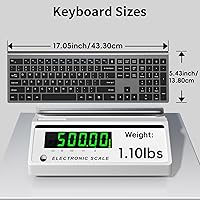
At 1.34 pounds and just over 1.6 inches tall, this is a genuinely easy keyboard to tuck into a bag or shift between rooms. The slim profile also means it takes up meaningfully less vertical desk space than traditional full-size keyboards, which users in cramped workspaces appreciate.
The full-size layout means it is wider than compact alternatives — at nearly 17.6 inches across, it will not fit comfortably in smaller laptop bags alongside other gear. Users wanting true portability would be better served by a tenkeyless or 75-percent board.
Long-Term Durability
62%
38%
For light-to-moderate office use, early buyer reports suggest the keyboard holds up adequately over the first six to twelve months. The scissor-switch mechanism is inherently more durable than dome-membrane designs for typical typing volumes.
Several buyers who have used the board daily for six months or more report keycap legend wear and occasional switch inconsistency on high-frequency keys like the spacebar and Enter. Budget scissor switches do not typically match the longevity of premium alternatives, and the one-year warranty period reflects that ceiling honestly.

Suitable for:

The SHUNJINRUN KB426 Wireless Full-Size Keyboard is a natural fit for Windows-based office workers and students who spend long hours typing in shared or noise-sensitive environments. If you work in an open-plan office, a library, or even a quiet home where others are sleeping nearby, the scissor-switch design keeps clatter noticeably lower than a standard membrane board without requiring any technical setup. Accountants, analysts, or anyone who lives in spreadsheets will appreciate having a full numeric keypad and a one-press calculator shortcut within easy reach. It also suits people building out a minimal home desk setup — the slim profile and neutral colorway keep things clean without dominating the workspace. If you are upgrading from an aging, wired rubber-dome keyboard and do not want to spend a lot doing it, this board offers a meaningful step up in typing quality and convenience.
Not suitable for:

The SHUNJINRUN KB426 Wireless Full-Size Keyboard is not a strong choice for Mac-primary users or anyone who works across multiple non-Windows platforms — the multimedia hotkeys simply do not function reliably outside Windows, and there is no remapping software to compensate. Mechanical keyboard enthusiasts looking for tactile punch or audible click feedback will find the scissor switches too subtle and the overall feel too reserved. If you type heavily for eight or more hours daily and need a board that holds up over several years, the budget-grade plastics and switch longevity are real concerns worth weighing against spending more upfront. Users who prefer rechargeable peripherals will find the AA battery requirement inconvenient, especially since batteries are not included in the box. And anyone who needs a compact travel keyboard will quickly discover that a full 17.6-inch-wide board does not slip easily into most laptop bags.
Specifications

  • Model Number: The keyboard is identified by the model number KB426, manufactured by SHUNJINRUN.
  • Layout: Full-size 110-key layout including a dedicated numeric keypad, function row, and arrow cluster.
  • Switch Type: Scissor-switch mechanism with a key travel of 1.5mm, designed for quieter and more consistent keystrokes than standard membrane switches.
  • Connectivity: 2.4G wireless connection via a nano USB receiver; no Bluetooth support on this model.
  • Wireless Range: Stable wireless transmission up to 33 feet (approximately 10 meters) from the connected device.
  • USB Receiver: A nano USB dongle is included and stored inside the battery compartment for safekeeping before first use.
  • Multimedia Hotkeys: Twelve multimedia hotkeys are accessible via the Fn layer, covering volume, playback, brightness, and common application shortcuts.
  • Fn Lock: A dedicated Fn Lock key allows users to toggle between standard function-row behavior and multimedia hotkey mode without holding Fn.
  • Calculator Button: A dedicated calculator key launches the system calculator application directly with a single press.
  • Power Source: Powered by 2 AA batteries (not included in the package); batteries are inserted in the compartment located on the underside of the keyboard.
  • Auto-Sleep: The keyboard enters a deep sleep state automatically after 10 minutes of inactivity and wakes instantly upon any key press.
  • Dimensions: The keyboard measures 17.6 x 6.42 x 1.65 inches, reflecting its full-size footprint and slim profile.
  • Weight: The unit weighs 1.34 pounds, making it lighter than most traditional full-size keyboards.
  • OS Compatibility: Fully supported on Windows 7, 8, 10, 11, XP, and Vista; basic typing functions work on macOS, iOS, Android, Chrome OS, and Linux, but Fn multimedia keys may not function on non-Windows platforms.
  • Driver Requirement: No driver installation is required; the keyboard operates as a plug-and-play device on all supported operating systems.
  • Key Count: The board features 110 keys in total, covering alphanumeric, navigation, numpad, and function zones.
  • Tilt Angle: The keyboard has a fixed built-in tilt angle designed to promote a more comfortable wrist position during extended typing sessions.
  • Warranty: SHUNJINRUN provides a one-year risk-free product warranty covering manufacturing defects from the date of purchase.
  • Package Contents: The package includes the keyboard and the nano USB receiver; batteries and a wrist rest are not included.
  • Availability Date: The KB426 was first made available for purchase in March 2025.

Related Reviews
Keychron K10 Full Size Wireless Mechanical Keyboard
83%
91%
Typing Experience
89%
Build Quality
87%
Bluetooth Connectivity
85%
Battery Life
82%
Ergonomics
More
Amazon Basics Wireless Keyboard and Mouse Combo
74%
94%
Ease of Setup
88%
Value for Money
63%
Typing Experience
61%
Mouse Comfort & Usability
57%
Build Quality
More
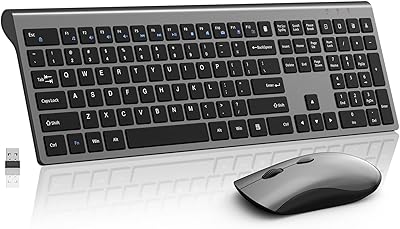
SHUNJINRUN KM426 Wireless Keyboard and Mouse Combo
86%
88%
Typing Comfort
91%
Mouse Responsiveness
86%
Wireless Stability
83%
Battery Life
80%
Build Quality
More
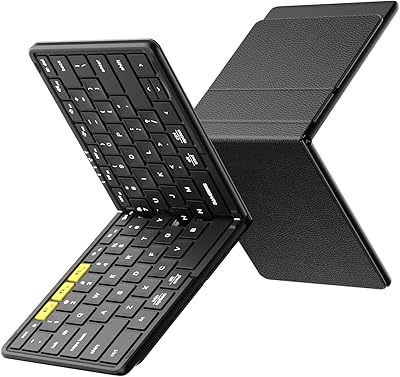
Samsers KF08S Foldable Bluetooth Keyboard
80%
93%
Portability
81%
Typing Comfort
78%
Build Quality
84%
Multi-Device Connectivity
74%
Battery Life
More
Arteck HA305-3B USB Wired Backlit Keyboard

80%
97%
Ease of Setup
83%
Typing Experience
74%
Backlight Quality
71%
Build Quality & Durability
92%
Value for Money
More
Perixx Periboard-106 Wired Performance Full Size Keyboard
87%
88%
Ergonomics and Comfort
91%
Key Press Responsiveness
89%
Build Quality and Durability
84%
Ease of Cleaning and Maintenance
87%
Cable Length and Flexibility
More
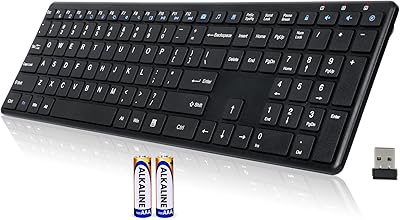
Arteck HW192 Wireless Keyboard and Mouse Combo
78%
78%
Build Quality
72%
Typing Experience
63%
Mouse Comfort & Ergonomics
81%
Battery Life
69%
Wireless Connectivity
More
JOYACCESS JKB888BP Wireless Keyboard
87%
93%
Typing Comfort
88%
Build Quality
95%
Key Noise
91%
Connectivity Reliability
89%
Setup Ease
More
Links9+ Wireless Bluetooth Keyboard
86%
89%
Typing Comfort
85%
Build Quality
78%
Connectivity Stability
90%
Battery Life
91%
Design & Aesthetics
More
Soueto WK713 Wireless Keyboard
86%
89%
Typing Experience
94%
RGB Lighting Customization
87%
Battery Life
75%
Build Quality
80%
Device Holder Utility
More

FAQ

It is actually stored inside the battery compartment on the underside of the keyboard, not loose in the packaging. Flip the board over, slide open the battery cover, and you will find the nano dongle tucked in there. It is a smart storage solution but genuinely catches a lot of buyers off guard.

No, none at all. Just plug the USB receiver into any available port on your computer and start typing — it is fully plug-and-play. Windows recognizes it immediately, and no additional software is needed for basic operation.

Basic typing, the numpad, and standard keys work fine on macOS, but most of the Fn-layer multimedia hotkeys will not respond. The brand discloses this limitation openly, so it is not a hidden issue, but it is worth knowing before you buy if Mac hotkeys matter to you.

No, batteries are not included. You will need two standard AA batteries to get started, so it is worth grabbing a pair before your keyboard arrives if you do not have some on hand.

It is genuinely quieter than most budget membrane keyboards — the scissor switches produce a soft, muted click rather than the hollow thud you get from rubber domes. It will not bother colleagues a few desks away during normal typing, though at faster speeds the bottoming-out sound is still faintly audible to someone sitting right next to you.

The keyboard will pair via the USB dongle if your device has a standard USB-A port, which covers many smart TVs and some tablets with adapters. Basic typing will work, but Fn hotkeys are unlikely to function on those platforms. For tablet use without a USB port, this keyboard is not the right fit since it does not support Bluetooth.

For moderate office use, most buyers report several weeks before needing a replacement. The auto-sleep feature — which kicks in after ten minutes of inactivity — helps extend battery life considerably. Heavy, all-day users may find themselves replacing batteries more frequently, closer to monthly.

It is fixed. The keyboard has a built-in incline that provides a mild upward tilt, but there are no fold-out feet to change the angle. For most people it is comfortable enough, but if you prefer a flat profile or a steeper angle, that is not something you can adjust on this model.

Losing the nano receiver is a real problem since each receiver is paired specifically to its keyboard from the factory. Replacement receivers are not universally available for budget boards like this one, so it is worth keeping the dongle stored safely in the battery compartment when not in use. If you lose it, contacting SHUNJINRUN support directly is your best option.

The difference is noticeable. Membrane keyboards use a soft rubber dome under each key, which gives a mushy, imprecise feel with no clear actuation point. The scissor switches on this board provide a crisper response with a defined bottoming-out point and much less key wobble, which makes typing feel more accurate and controlled — especially for touch typists or anyone doing extended data entry.