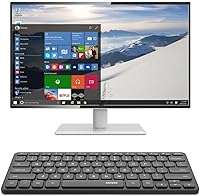
Overview

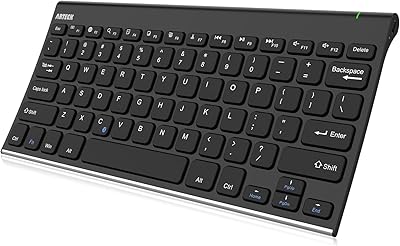
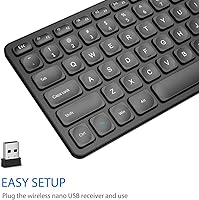
The Arteck HW305 Wireless Keyboard is a straightforward, no-frills option for anyone who wants to cut the cord without spending much. Its most immediate selling point is the ultra-thin profile — at just 0.24 inches thick, it sits almost flat on a desk or lap tray. Connection is handled by a 2.4G USB nano receiver, so there is no Bluetooth setup, no driver installation, and no pairing frustration — it works the moment you plug in the dongle. The built-in rechargeable lithium battery is a genuine convenience upgrade over keyboards that chew through AA batteries. This is a value-tier board: full-size layout, quiet keys, light weight — not a premium typing machine.

Features & Benefits

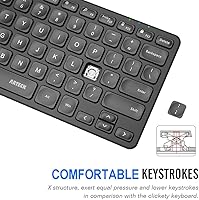
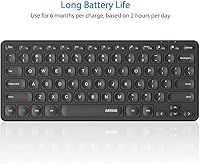
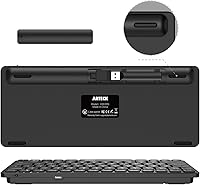
The scissor-switch keys are the highlight here. They feel noticeably quieter than typical rubber-dome membrane keys, with just enough travel to give you a sense of where each keystroke lands — not mushy, not clicky. The 6-month battery estimate sounds impressive, but it is based on roughly two hours of daily use, so heavy typists should expect to recharge more often. Charging via USB-C means you are not hunting for a proprietary cable. The nano receiver tucks into a slot on the back of the keyboard itself, so losing it is much less likely. Media hotkeys round things out nicely for TV and streaming setups.

Best For

This compact keyboard finds its sweetest spot as a living-room media remote — pair it with a Smart TV or a mini PC hooked up to your television and the slim form factor genuinely makes sense. Students and remote workers who carry gear between locations will appreciate the light build and full key count; you do not sacrifice number keys or function rows to get portability. It also works well in shared spaces like classrooms or open offices where typing noise is a concern. That said, if you write code all day or want programmable keys and deep tactile feedback, this wireless keyboard will leave you wanting more.

User Feedback

With close to 1,900 ratings and a 4.5-star average, the Arteck slim keyboard has earned genuine goodwill from buyers, and the praise is consistent. Easy out-of-the-box setup and comfortable key travel for the price come up repeatedly. Where things get more honest: a number of users report some chassis flex and minor key wobble, particularly toward the center of the board. Battery life feedback is mixed — those using it lightly hit impressive runtimes, but heavier users find themselves recharging far sooner than expected. A handful of longer-term owners have also flagged durability concerns after a year or more of daily use. Solid for the price, but not built to last indefinitely.

Pros

  • Instant plug-and-play setup via USB nano receiver — no drivers, no pairing, no frustration.
  • Built-in rechargeable lithium battery eliminates the ongoing cost and hassle of disposable batteries.
  • Scissor-switch keys are noticeably quieter than typical budget membrane keyboards in open or shared spaces.
  • The nano USB receiver stores inside the keyboard body, so losing it during travel is much less likely.
  • USB-C charging means you can use a cable you almost certainly already own.
  • Full-size key layout preserved despite the slim, portable form factor — no number row sacrifices.
  • Media hotkeys work reliably out of the box on Windows for TV and streaming control.
  • At roughly 12 ounces, this wireless keyboard is light enough to carry daily without adding real bag weight.
  • Clean, low-profile black design sits unobtrusively on most desk setups without looking cheap.
  • A 24-month warranty provides a reasonable safety net for a product in this price range.

Cons

  • Chassis flex under firm or fast typing pressure is a recurring complaint, especially near the board center.
  • The 6-month battery claim assumes just 2 hours of daily use — heavy typists will recharge far more often.
  • No Bluetooth support limits flexibility for tablet users or anyone who switches between devices regularly.
  • Key legends on some units begin to fade visibly after 12 to 18 months of daily use.
  • Mac compatibility is inconsistent — several key mappings do not translate correctly without manual remapping.
  • No charging indicator light means you may not notice the battery is nearly depleted until it cuts out.
  • Larger keys like the spacebar can feel uneven or slightly hollow compared to the rest of the key bed.
  • Long-term durability concerns surface in extended-use reviews — not built for a multi-year heavy workload.
  • USB-C-only laptop users will need an adapter to connect the nano receiver, adding an unexpected extra step.
  • The compact right-side key cluster takes some adjustment for touch typists relying on arrow key muscle memory.

Ratings

The Arteck HW305 Wireless Keyboard has been scored by our AI engine after processing hundreds of verified global buyer reviews, actively filtering out incentivized, bot-generated, and duplicate feedback to surface what real everyday users actually experience. Every score below reflects both the genuine strengths and the recurring pain points that show up across independent purchases. Nothing is glossed over — if buyers ran into consistent issues, the numbers reflect that honestly.

Value for Money
91%
For the asking price, buyers consistently report being surprised by what they get — a full-size layout, rechargeable battery, and scissor switches in a slim chassis is a strong package at this tier. Most users comparing it to similarly priced wired options say the wireless convenience alone justifies the cost.
A small segment of buyers feel the build quality does not quite hold up to the price-to-longevity promise over the long run, especially after 12 to 18 months of daily use. If you need a keyboard to last three-plus years of heavy typing, the value calculation shifts.
Ease of Setup
94%
Plug in the nano receiver and start typing — that is genuinely the entire process. Users setting it up on Smart TVs, laptops, and desktop PCs all report zero configuration headaches, no driver downloads, and instant recognition across Windows versions.
The USB-only connection is the one real limitation here: users with USB-C-only laptops or tablets need an adapter, which adds a step and a small extra cost that some buyers did not anticipate before purchasing.
Typing Experience
74%
26%
The scissor-switch keys feel a clear step above mushy rubber-dome keyboards in the same price range. Key travel is short but defined enough that most casual and moderate typists find a comfortable rhythm quickly, especially for emails, browsing, and document work.
Enthusiast typists and anyone used to mechanical boards will find the feedback underwhelming — there is no satisfying tactile bump and the keys can feel slightly hollow under faster, heavier fingers. A few users also noted that the spacebar and larger keys occasionally feel inconsistent.
Build Quality
63%
37%
The slim plastic chassis looks clean on a desk and feels reasonably solid for light to moderate daily use. For a shared home or classroom setup where the keyboard is not being moved around constantly, most users find it holds up well enough.
Chassis flex is the most frequently cited structural complaint — pressing firmly near the center of the board produces a noticeable bend. Some longer-term users report that key caps begin to show wear on the legends after sustained daily use, and a few noted cracking along the battery compartment area.
Battery Life
69%
31%
For light users — someone typing for an hour or two a day, using it primarily for media control or casual browsing — the battery genuinely impresses. Several users report going weeks or even a couple of months between charges with light workloads.
The 6-month claim is a best-case ceiling, not a realistic average. Office workers doing extended daily typing sessions report needing to recharge every 3 to 6 weeks, which is still decent but far shorter than the headline figure. A few users were frustrated by the gap between marketing and reality.
Portability & Form Factor
88%
At roughly 12 ounces and just under a quarter-inch thick, this compact keyboard slips into a laptop bag without adding meaningful weight or bulk. Students and travelers frequently mention it as a go-to travel companion precisely because it does not sacrifice a full key layout for a smaller frame.
The compact width means the right-side keys — particularly the arrow cluster — are slightly tighter than on a standard keyboard. Touch typists who rely on muscle memory for the arrow keys may need a short adjustment period.
Key Noise Level
83%
Compared to typical membrane or budget mechanical keyboards, the scissor switches here are noticeably quieter. Buyers using this in open office plans or late at night report minimal key noise, which is a meaningful quality-of-life benefit in shared spaces.
It is not silent. Rapid typing at speed does produce an audible clatter, and a handful of users working in very quiet environments — recording studios, libraries — found the noise level higher than expected based on product descriptions.
Wireless Reliability
81%
19%
The 2.4G connection is stable across typical desktop and living-room distances, with no reported dropout issues during normal use. Users controlling Smart TVs from a couch report consistent performance within reasonable range.
There is no Bluetooth option, which limits flexibility for users who switch between devices or use tablets and phones. A small number of users also experienced occasional minor input lag, though this appeared device- and environment-specific rather than a widespread defect.
Media & Shortcut Keys
79%
21%
The dedicated media hotkeys — volume, mute, playback control — are well-placed and work reliably out of the box on Windows. For living-room media PC setups and Smart TV pairings, these shortcuts genuinely reduce the need for a separate remote.
The function key shortcuts require a secondary key press, which some power users find less intuitive than dedicated function rows. Buyers on Mac or Linux also report that several hotkey functions do not map correctly without manual remapping.
Charging Convenience
86%
USB-C charging is a smart inclusion at this price point — most users already have compatible cables everywhere. Recharging is quick relative to battery capacity, and the port placement does not interfere with normal keyboard use while charging.
You cannot use the keyboard while charging unless the USB-C cable reaches your power source comfortably, which can be awkward depending on desk layout. There is also no charging indicator light, so it is easy to miss when the battery is running low.
Dongle Management
87%
Tucking the nano USB receiver into a slot on the keyboard body is a genuinely useful design decision. Buyers who regularly pack and unpack their gear for travel or commutes say this small feature eliminates the anxiety of losing the dongle entirely.
The storage slot can be a tight fit depending on the unit, and a few buyers noted the receiver sits loosely in the slot, raising concerns about it falling out inside a bag. It is a minor issue but worth checking when you first unbox.
Compatibility
77%
23%
Works reliably with Windows 7, 8, and 10 machines as well as Smart TVs and Surface devices, making it a versatile pick for households with mixed-use setups. No software installation required means it also works on locked-down corporate or school computers.
Mac compatibility is inconsistent — some users report it works fine for basic typing, but others hit issues with key mapping and missing Mac-specific modifiers. It is clearly optimized for Windows, and buyers on other ecosystems should factor that in.
Aesthetics & Desk Presence
76%
24%
The low-profile black design is clean and understated — it does not look cheap on a desk despite the budget price. Several buyers specifically mention that it blends well into minimalist or modern home office setups.
There is only one color option, and the glossy or semi-gloss finish on some units is a fingerprint magnet. The overall aesthetic is functional rather than distinctive, which matters more to some buyers than others.
Long-Term Durability
57%
43%
For the price, buyers who use this as a secondary or travel keyboard tend to be satisfied over time. The 24-month warranty provides a reasonable safety net and Arteck's customer service has received positive mentions for responsiveness.
Extended daily use tends to expose the build limitations. Key legends fading, minor chassis stress fractures, and occasional switch degradation after 12 to 18 months are recurring themes in longer-term reviews. This is not a keyboard designed for a five-year lifespan.

Suitable for:

The Arteck HW305 Wireless Keyboard is a genuinely practical pick for anyone who wants a clean, low-effort wireless setup without spending much. It fits especially well in living-room media setups — if you have a Smart TV or a mini PC connected to your television, the slim profile, media hotkeys, and stable USB receiver connection make it a natural fit for couch use. Students who carry gear between dorms, libraries, and classrooms will appreciate that the full-size layout does not get sacrificed for the compact footprint, which is a real compromise you often see at this price. Remote workers who only need a secondary keyboard for a travel bag or a hot-desk situation will find it covers everyday typing, video calls, and document work without complaint. The built-in rechargeable battery is also a quiet but meaningful advantage for anyone tired of hunting for AA batteries — charge it once and largely forget about it for weeks.

Not suitable for:

Anyone who spends long hours typing code, writing lengthy documents, or relies on a keyboard as a core productivity tool should look elsewhere before committing to the Arteck HW305 Wireless Keyboard. The scissor switches are decent for casual use, but they lack the tactile definition and long-term key consistency that heavy typists depend on, and chassis flex under sustained pressure becomes a real annoyance over time. There is no Bluetooth support whatsoever, so if you need to pair with a tablet, a phone, or switch between multiple devices without swapping USB ports, this compact keyboard simply cannot do that. Gamers will also want to pass — there are no programmable keys, no anti-ghosting, and the response characteristics are not suited to fast-paced input scenarios. Finally, Mac users should be cautious: key mapping issues and missing Mac-specific modifier functions have been reported often enough that it cannot be recommended as a reliable cross-platform solution.

Specifications

  • Model Number: This keyboard is manufactured under model number HW305 by Arteck.
  • Connectivity: Connects via a 2.4G wireless USB nano receiver; no Bluetooth support is included.
  • Key Mechanism: Uses a scissor-switch (X structure) design for a low-profile, quieter keystroke compared to standard membrane keyboards.
  • Layout: Full-size layout with dedicated media hotkeys for volume, mute, and playback control.
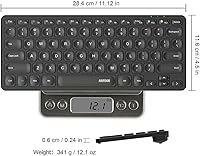
  • Dimensions: Measures 11.12″ long by 4.5″ wide by 0.24″ thick.
  • Weight: Weighs approximately 12 oz, making it one of the lighter full-size wireless keyboards in its class.
  • Battery Type: Equipped with a built-in non-removable rechargeable lithium battery.
  • Battery Life: Rated for up to 6 months per charge based on approximately 2 hours of use per day under typical conditions.
  • Charging Port: Charges via a USB-C port; a USB-C cable is included in the box.
  • Compatible OS: Officially compatible with Windows 10, Windows 8, and Windows 7 operating systems.
  • Compatible Devices: Designed for use with PCs, laptops, Microsoft Surface devices, and Smart TVs with a USB port.
  • Color & Style: Available in black with a modern, low-profile aesthetic suited to minimalist desk setups.
  • Receiver Storage: The nano USB receiver stores inside a dedicated slot on the back of the keyboard to prevent loss.
  • In the Box: Package includes the keyboard, nano USB receiver, USB-C charging cable, and a printed welcome guide.
  • Warranty: Covered by a 24-month manufacturer warranty with customer support provided by Arteck.
  • First Available: This model was first made available for purchase in January 2021.

Related Reviews

Arteck HW192 Wireless Keyboard and Mouse Combo
78%
78%
Build Quality
72%
Typing Experience
63%
Mouse Comfort & Ergonomics
81%
Battery Life
69%
Wireless Connectivity
More
Arteck HW126 Wireless Solar Keyboard
77%
83%
Solar Charging Reliability
88%
Typing Comfort
81%
Build Quality
74%
Wireless Connectivity
86%
Value for Money
More
JOYACCESS JKB888BP Wireless Keyboard
87%
93%
Typing Comfort
88%
Build Quality
95%
Key Noise
91%
Connectivity Reliability
89%
Setup Ease
More
INFINMIND K913 Wireless Keyboard
79%
88%
Typing Noise Level
74%
Key Feel & Typing Experience
71%
Build Quality & Materials
87%
Matte Finish & Smudge Resistance
83%
Wireless Connectivity & Stability
More
Soueto WK713 Wireless Keyboard
86%
89%
Typing Experience
94%
RGB Lighting Customization
87%
Battery Life
75%
Build Quality
80%
Device Holder Utility
More
JLab Epic Wireless Keyboard
88%
89%
Connectivity & Multi-device Support
87%
Typing Experience
93%
Battery Life
88%
Build Quality
85%
Ergonomics & Comfort
More
Links9+ Wireless Bluetooth Keyboard
86%
89%
Typing Comfort
85%
Build Quality
78%
Connectivity Stability
90%
Battery Life
91%
Design & Aesthetics
More
X9 Wireless Ergonomic Keyboard
84%
89%
Comfort & Ergonomics
92%
Wireless Connectivity
84%
Build Quality
90%
Battery Life
75%
Typing Experience
More
FENIFOX Wireless Keyboard and Mouse
86%
88%
Ergonomics
91%
Quiet Typing Experience
85%
Battery Life
89%
Wireless Connectivity
84%
Build Quality
More
Merdia Wireless Mechanical Keyboard
83%
90%
Connectivity Options
88%
Typing Experience
86%
RGB Customization
84%
Build Quality
91%
Battery Life
More

FAQ

It will function for basic typing on a Mac or Chromebook since it is a standard USB HID device, but it is optimized for Windows. Several Mac users report that key mappings for system shortcuts and modifier keys do not translate correctly without manual remapping software, so it is not an ideal choice if macOS is your primary system.

The USB nano receiver is the only connection method — there is no Bluetooth on this model. If you need to switch between devices or connect to a tablet or phone wirelessly, you would need a different keyboard that supports Bluetooth multi-pairing.

Unfortunately, the nano receiver is paired specifically to this keyboard unit, so a generic replacement will not work. The good news is the receiver stores inside a slot on the back of the keyboard itself, which significantly reduces the chance of losing it during travel or storage. If you do lose it, contacting Arteck support directly is the best path forward.

The lithium battery is built into the keyboard and is not user-replaceable. You recharge it via the included USB-C cable, similar to how you would charge a phone or wireless headphones. When the battery eventually degrades after years of charge cycles, the keyboard would need to be replaced rather than rebatteried.

That figure is based on roughly 2 hours of typing per day, so it represents a light-use scenario. If you are typing for 6 to 8 hours daily in an office environment, expect battery life closer to 3 to 6 weeks between charges. That is still quite reasonable, but it is worth calibrating your expectations before you buy.

Most users report it works fine through a powered USB hub. Unpowered hubs occasionally cause connectivity issues with 2.4G receivers in general, so if you experience any input lag or dropouts, try plugging the receiver directly into a port on your machine first to rule that out.

The scissor switches are genuinely quieter than most budget membrane keyboards, and noticeably softer than any mechanical board. In a typical open office, the key noise blends into background noise without standing out. It is not silent, but most coworkers are unlikely to notice it during normal typing.

Yes, you can keep typing while the USB-C cable is plugged in for charging. The main practical limitation is that your cable needs to reach a power source comfortably from your desk position, and there is no LED indicator to confirm when charging is complete, so you will need to track it yourself.

This is where honest feedback matters. For light to moderate use — a few hours a day — most users report it holds up reasonably well within the warranty period. With heavy daily use, some buyers begin noticing key legend fading, minor chassis flex worsening, and occasional switch inconsistency after the 12 to 18 month mark. It is a value-tier keyboard built accordingly, not a long-haul workhorse.

Arteck rates the wireless range at up to about 26 feet under typical conditions, which comfortably covers most living-room setups. Users controlling Smart TVs from a couch report stable, lag-free input at normal couch-to-TV distances. Walls, interference from other 2.4G devices, or large obstructions can reduce that range somewhat, but for open-room use it performs reliably.

Where to Buy