Overview

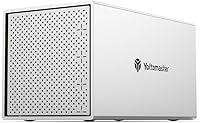
The Yottamaster PS400C3 4-Bay External Hard Drive Enclosure sits comfortably in the mid-range of the desktop DAS market — solid enough for serious storage needs, priced without the premium you'd pay for enterprise-grade hardware. It connects via USB-C and works across Windows, macOS, and Linux without any driver headaches, which is a genuine convenience. One thing worth knowing upfront: this is a non-RAID enclosure. There is no hardware RAID here. If you need that capability, look elsewhere. What you get instead is a straightforward, well-built dock that keeps four drives organized and accessible in one place.
Features & Benefits

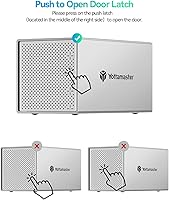
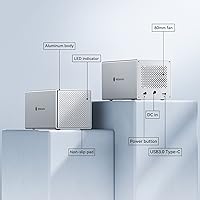
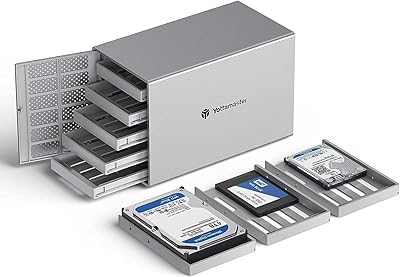
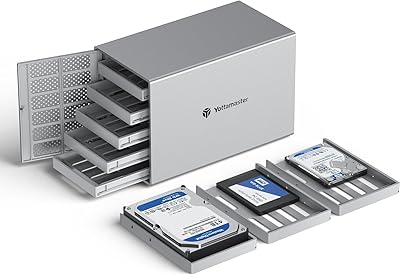
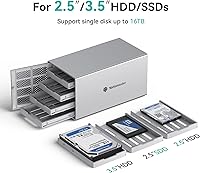
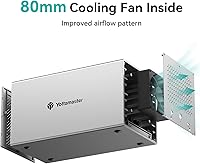
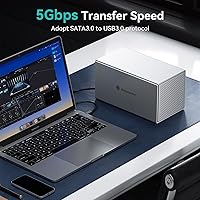
The four removable drive trays slide in and out through a push-open front door, making drive swaps quick and painless — no screwdriver required in most cases. It handles both 2.5-inch and 3.5-inch SATA HDDs and SSDs, and with drives up to 18TB each, you can push the total to 72TB. The aluminum shell does real work on thermals, assisted by an 80mm rear cooling fan and ventilation cutouts front and back. Data moves over USB 3.1 Gen 1 at up to 5Gbps. That is not the fastest interface available, but for bulk archival transfers it is plenty workable. Software RAID via your OS is possible; hardware RAID is not.

Best For

This desktop storage dock makes the most sense for home office users and creators who need a large, centralized archive without the complexity of a full NAS setup. If you shoot video, photograph extensively, or accumulate large project files regularly, having four drives in one tidy enclosure beats managing a tangle of individual USB drives. It also appeals to people who already own spare SATA drives and want a cost-effective way to put them to use. Anyone needing real-time 4K editing performance over a single USB connection may find the speed ceiling limiting, but for backup and archival work it hits the right balance.

User Feedback

Buyers generally appreciate the build quality — the aluminum chassis feels more substantial than you would expect at this price tier, and that sentiment shows up repeatedly across reviews. Setup tends to catch newcomers off guard; brand-new drives need formatting before the system recognizes them, and that requirement is not prominently flagged anywhere. The capacity figure has caused confusion too, appearing as 64TB in some listing sections and 72TB in the title — the gap reflects different assumptions about maximum drive size per bay. Fan noise during extended sessions is a minor but real consideration. Long-term reliability feedback is genuinely mixed, with solid multi-year experiences sitting alongside reports of early failures.

Pros

  • Solid aluminum build feels noticeably more premium than the price would suggest.
  • Push-open front door makes swapping drives in and out genuinely quick and low-effort.
  • Accepts both 2.5-inch and 3.5-inch SATA drives, so existing hardware is easy to reuse.
  • Total capacity scales up to 72TB when using 18TB drives in all four bays.
  • Works plug-and-play on Windows, macOS, and Linux with no proprietary drivers needed.
  • Built-in 80mm fan and aluminum shell keep temperatures manageable during long sessions.
  • A clean, organized alternative to juggling four separate single-drive USB enclosures.
  • USB-C connectivity means broad compatibility with modern laptops and desktops alike.
  • Competitive mid-range pricing makes it accessible for home users and small creators.

Cons

  • USB 3.1 Gen 1 tops out at 5Gbps shared across all bays, limiting heavy simultaneous transfer workloads.
  • No hardware RAID support; users needing data redundancy must rely on OS-level software RAID.
  • Capacity figures in the product listing are inconsistent, appearing as both 64TB and 72TB depending on the section.
  • Fan noise during extended operation has been flagged by multiple users as a minor but persistent annoyance.
  • New drives must be formatted before the enclosure recognizes them, and this is not clearly communicated upfront.
  • Long-term reliability feedback from owners is genuinely mixed, with some early failure reports alongside positive experiences.
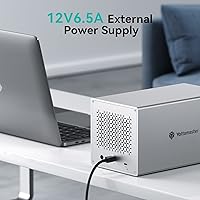
  • Requires an external 12V DC power adapter, adding another cable to your desk setup.
  • No network connectivity — this is strictly a direct-attached device tethered to one host machine at a time.

Ratings

Our AI-generated scores for the Yottamaster PS400C3 4-Bay External Hard Drive Enclosure are derived from analyzing verified global user reviews, with spam, bot-submitted, and incentivized feedback actively filtered out before scoring. The ratings reflect the full picture — genuine strengths and recurring frustrations alike — so you can make a grounded decision rather than one based on cherry-picked impressions. Every category below is scored independently to give you a transparent, category-by-category breakdown of real-world performance.
Build Quality
83%
The aluminum chassis consistently earns respect from buyers who expected something far more plasticky at this price point. In daily home-office use, the enclosure feels stable and substantial on a desk, and the front door mechanism holds up well through repeated drive swaps without becoming loose or rattly.
A small number of longer-term owners report that the door latch can lose some of its firmness after a year or more of frequent use. Fit and finish is generally good but not flawless — a few users noticed minor panel alignment inconsistencies on units that appeared otherwise functional.
Thermal Management
78%
22%
The combination of an aluminum shell and an 80mm rear fan does meaningful work during extended backup sessions or overnight transfers. Most users running multi-hour copy operations report that the drives stay at reasonable temperatures without requiring any intervention or additional airflow.
The cooling solution is adequate rather than impressive — in enclosed desk setups or warm rooms, temperatures can creep higher than ideal. The fan also cannot be speed-controlled, so it runs at a fixed rate regardless of actual thermal load, which is a minor engineering limitation.
Transfer Speed
66%
34%
For the archival and backup workloads this unit is realistically aimed at — offloading footage after a shoot, running nightly backups, transferring large photo libraries — the 5Gbps USB 3.1 Gen 1 interface gets the job done without frustrating bottlenecks. Most home users will rarely saturate it.
Shared 5Gbps across four bays means simultaneous heavy transfers to multiple drives can feel sluggish compared to faster-interface alternatives. Users who expected to use this for direct 4K editing or high-throughput creative workflows often report disappointment once they hit the practical throughput ceiling.
Drive Compatibility
88%
Accepting both 2.5-inch and 3.5-inch SATA drives in any combination across the four bays gives users real flexibility, especially those repurposing drives from old desktops or laptops. The SATA III support means virtually any consumer SATA drive purchased in the last decade slots right in.
NVMe and M.2 drives are not supported at all, which is increasingly relevant as more users migrate their personal drive libraries to NVMe SSDs. There is also no support for SAS drives, limiting options for users with enterprise surplus hardware.
Ease of Setup
63%
37%
The push-open tray system makes physical drive installation intuitive — even first-time enclosure buyers rarely struggle with getting drives seated correctly. On macOS and Linux especially, the enclosure is recognized almost immediately once connected, with no driver downloads required.
New drives needing formatting before recognition catches a surprising number of buyers off guard, generating repeated complaints in user reviews. The product documentation does not clearly walk through this step, and the capacity figure inconsistency in the listing (64TB vs 72TB) adds unnecessary confusion right from the start.
Software RAID Support
47%
53%
For Mac users already comfortable with Disk Utility, setting up a software RAID array across the bays is technically feasible using built-in OS tools. It gives technically capable users some redundancy options without needing to buy a dedicated RAID enclosure.
Software RAID is meaningfully less reliable and more performance-intensive than hardware RAID, and the enclosure offers zero built-in assistance for the process. Users who purchased this unit expecting RAID functionality similar to hardware RAID enclosures have been consistently disappointed, and recovery from a software RAID failure is considerably more complex.
Noise Level
69%
31%
In typical home-office environments with ambient noise from HVAC or other electronics, the 80mm fan blends into the background reasonably well. Users running the enclosure in a separate room or under a desk often report barely noticing it during normal workday use.
In quiet rooms — a dedicated editing suite, a bedroom during nighttime backups, or a library-style workspace — the constant fan hum is noticeable and has been flagged by multiple buyers as a persistent irritant. There is no silent mode or fan-off option when the enclosure is idle.
OS Compatibility
91%
Working across Windows, macOS, and Linux without any driver installation is a genuine strength that removes friction for users switching between systems or operating in mixed-OS environments. Buyers using the dock between a Windows desktop and a MacBook report a truly plug-and-play experience.
A handful of Linux users on less common distributions report minor mount issues, though these appear to be edge cases rather than a systemic flaw. Compatibility is otherwise consistently praised and rarely cited as a source of frustration.
Value for Money
81%
19%
At its mid-range price point, the Yottamaster unit delivers an aluminum build, four functional bays, and broad OS compatibility that would cost meaningfully more from some other brands. For buyers already holding spare SATA drives, the cost-per-bay math works out very favorably.
Users who need hardware RAID or faster-than-USB-3.1-Gen-1 throughput will find themselves paying more for a more capable enclosure, making the value proposition less compelling for those edge cases. A few buyers also felt the included power adapter cable was shorter than practical for typical desk setups.
Long-Term Reliability
58%
42%
Many owners report trouble-free operation for a year or more, particularly those using the enclosure for light-to-moderate archival workloads. Several reviewers specifically mention it running quietly and consistently as a set-and-forget backup destination over extended periods.
The reliability picture is genuinely uneven — early failure reports appear with enough frequency in the review pool to raise a flag, particularly around the power supply and the USB controller under sustained heavy use. The brand is less established than some competitors, and warranty support experiences are mixed.
Tray & Door Mechanism
76%
24%
The push-release front door and individual drive trays make the physical experience of adding or replacing drives feel well-considered. Users who hot-swap or rotate drives regularly appreciate not needing to unscrew anything or disassemble the unit.
The trays themselves feel slightly lightweight relative to the aluminum chassis, and a few users report that tray alignment can become slightly off after many insertion cycles. The door latch, while convenient, does not inspire the same confidence as the enclosure body itself.
Capacity Scalability
84%
Supporting up to 18TB per bay means this desktop storage dock can grow alongside consumer drive technology without becoming obsolete quickly. For home archivists building out large media collections over time, that headroom is a practical long-term benefit.
The conflicting 64TB and 72TB capacity figures in the official listing create unnecessary doubt about what the enclosure actually supports, and this confusion shows up regularly in user questions and reviews. Clearer official documentation would eliminate a frustration that is entirely avoidable.
Port & Cable Design
62%
38%
The USB-C port placement on the rear of the unit keeps the desk-facing side clean, and the connection feels secure once seated. USB-C compatibility with a wide range of modern computers means most users will not need a special cable or adapter.
Only a single USB-C data port is available, so the enclosure connects to one host machine at a time with no direct multi-host sharing. The included cable length has drawn criticism from users with desktop setups where the PC sits on the floor or further from the desk surface.

Suitable for:

The Yottamaster PS400C3 4-Bay External Hard Drive Enclosure is a practical fit for home office users, photographers, and independent video creators who need a large pool of local storage without the setup overhead of a NAS device. If you regularly accumulate footage, raw image files, or project archives and want everything in one organized dock rather than a mess of individual USB drives, this unit covers that need well. It is especially appealing for anyone who already owns spare 3.5-inch SATA drives sitting unused — dropping them into this enclosure is a cost-effective way to put that hardware back to work. The cross-platform USB-C connection means it moves between a Windows workstation and a MacBook without any configuration changes, which is a genuine convenience for mixed-OS households or small studios. For straightforward backup, archiving, and offloading large files at a reasonable pace, this desktop storage dock delivers solid value at its price point.
Not suitable for:

The Yottamaster PS400C3 4-Bay External Hard Drive Enclosure is not the right tool for workflows that demand hardware RAID protection or high-speed sustained throughput. Professionals editing uncompressed 4K or multi-stream video directly from the enclosure will likely hit the ceiling of the USB 3.1 Gen 1 interface, which tops out at 5Gbps shared across all four bays — that is not a flaw so much as an honest constraint of the interface choice, but it matters for demanding real-time workloads. Anyone who needs automatic data redundancy should know that there is no hardware RAID here; software RAID through your OS is technically possible but is not a reliable substitute for a purpose-built RAID enclosure. Users who require network-attached access, remote reach, or multi-user simultaneous connections will also need to look at a NAS instead. Finally, buyers prioritizing absolute long-term reliability for mission-critical data should weigh the mixed durability feedback from longer-term owners before committing.
Specifications

  • Model Number: This enclosure carries the official model designation PS400C3.
  • Drive Bays: The unit houses up to 4 drives simultaneously using individual removable trays.
  • Form Factors: Compatible with both 2.5-inch and 3.5-inch SATA HDDs and SSDs.
  • SATA Protocol: All four bays operate on SATA III, the current standard for consumer SATA drives.
  • Max Capacity: Total supported storage reaches up to 72TB when using four 18TB drives.
  • Interface: Connects to a host computer via a USB 3.1 Gen 1 Type-C port.
  • Transfer Speed: Maximum data transfer rate is 5Gbps, shared across all active bays.
  • RAID Support: No hardware RAID is available; software RAID can be configured through the host operating system.
  • Chassis Material: The outer shell is constructed from aluminum for passive heat dissipation and structural rigidity.
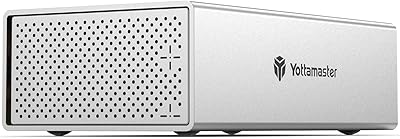
  • Cooling System: An 80mm internal fan works alongside front and rear ventilation holes to maintain airflow during extended use.
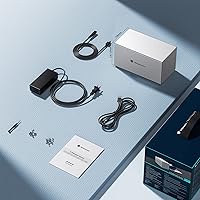
  • Power Supply: The enclosure requires an external 12V DC power adapter, which is included in the box.
  • OS Compatibility: Works with Windows, macOS, and Linux operating systems without requiring proprietary drivers.
  • Drive Installation: Drives are loaded into removable trays accessed through a push-open front door, requiring minimal or no tools.
  • Package Weight: The complete retail package weighs 7.17 pounds including the enclosure, adapter, and accessories.
  • Package Dimensions: The retail box measures 12.09 x 9.69 x 7.56 inches.

Related Reviews

Yottamaster PS500U3 5-Bay External HDD Enclosure
74%
84%
Build Quality
79%
Cooling Performance
61%
Transfer Speed
88%
Drive Compatibility
91%
Ease of Installation
More
Yottamaster PS200U3 32TB 2-Bay Hard Drive Enclosure
72%
83%
Build Quality
79%
Ease of Setup
71%
Drive Compatibility
74%
Transfer Speed
56%
Connectivity & Ports
More
TerraMaster D4-320
TerraMaster D4-320
80%
93%
Ease of Setup
86%
Transfer Speed
71%
Build Quality
88%
Noise Level
82%
Thermal Management
More
Yottamaster PS500C3 5-Bay USB-C HDD Enclosure
72%
83%
Build Quality
57%
Transfer Speed
88%
Drive Compatibility
91%
Ease of Setup
73%
Thermal Management
More
TerraMaster D6-320 6-Bay Hard Drive Enclosure
77%
88%
Build Quality
91%
Throughput Performance
93%
Ease of Setup
89%
Hot-Swap Functionality
79%
Thermal Management
More
ORICO 9948C3 4-Bay 3.5-inch HDD Enclosure
76%
88%
Build Quality
84%
Transfer Speed
79%
Daisy-Chain Functionality
73%
Cooling & Thermal Management
86%
Hot-Swap Usability
More
Yottamaster DF5RU3 5-Bay RAID Hard Drive Enclosure
75%
88%
Build Quality
84%
RAID Configuration
58%
Transfer Speed
83%
Cooling Performance
67%
Ease of Setup
More
Mediasonic HF7-SU31C 4-Bay Hard Drive Enclosure
77%
88%
Ease of Setup
74%
Transfer Speed
82%
Build Quality
71%
Thermal Management
61%
Fan Noise
More
IO CREST SY-ENC50129 8-Bay USB4 40Gbps SATA Enclosure
76%
88%
Build Quality
83%
Drive Compatibility
86%
USB4 Interface & Compatibility
71%
Real-World Transfer Speed
74%
Fan Noise & Thermal Management
More
Tripp Lite U357-002 USB 3.0 Dual Bay External SATA Hard Drive RAID Enclosure
84%
88%
Performance & Speed
91%
Ease of Setup
84%
Cooling Efficiency
89%
RAID Functionality
83%
Build Quality
More

FAQ

Drives are not included. The Yottamaster PS400C3 4-Bay External Hard Drive Enclosure is a diskless enclosure, meaning you supply your own 2.5-inch or 3.5-inch SATA HDDs or SSDs. This is standard for enclosures at this level, and it lets you choose drives that fit your capacity and budget.
The discrepancy comes down to different assumptions about maximum drive capacity per bay. The 72TB figure is based on four 18TB drives, while the 64TB figure references four 16TB drives. Both are technically accurate depending on which drives you use — the enclosure itself does not impose a hard limit below 18TB per bay.

Yes, the USB-C interface connects directly to modern MacBooks without any adapter. The enclosure is plug-and-play on macOS and does not require any driver installation.

The 80mm fan produces a low, consistent hum during normal operation. Most users report it as tolerable background noise rather than a distraction, though in a very quiet room during long sessions it is noticeable. It is not silent, but it is not disruptive either.

Hardware RAID is not supported — there is no RAID controller built in. That said, you can configure software RAID through your operating system. Mac users can use the RAID Assistant in Disk Utility, and Windows users can use Storage Spaces. Just be aware that software RAID is less robust than dedicated hardware RAID and adds some management overhead.

If the drives are brand new, they almost certainly need to be formatted and partitioned before your OS will recognize them. Open Disk Management on Windows or Disk Utility on macOS, find the uninitialized drives, and set them up from there. This is a common first-use step that catches a lot of new users off guard.

Yes, each bay operates independently, so you can mix drives of different capacities and even different form factors (2.5-inch and 3.5-inch) without any issue. The total usable storage will simply be the sum of whatever drives you install.

For most editing workflows — 1080p, standard 4K with compressed codecs like H.264 or HEVC — the 5Gbps USB 3.1 Gen 1 connection is workable. If you are cutting uncompressed 4K or higher-resolution RAW formats and need sustained high throughput across multiple streams simultaneously, you may hit a ceiling. For offline editing and archival-based workflows, it handles the job without much trouble.

The aluminum chassis and 80mm fan combination does a reasonable job keeping temperatures in check during extended operation. Users running overnight transfers report no significant heat issues. That said, it is worth making sure the enclosure has some airflow around it and is not boxed in on all sides.

No, this desktop storage dock is designed exclusively for SATA-based drives. NVMe SSDs use a different protocol and connector and are not compatible with this unit. If you need NVMe support, you would need an enclosure specifically designed for M.2 NVMe drives.

Where to Buy