Overview

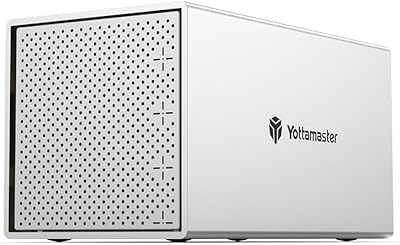
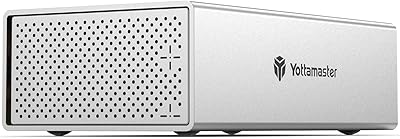
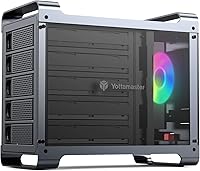
The Yottamaster DF5RU3 5-Bay RAID Hard Drive Enclosure sits in an interesting spot in the desktop storage market — it is priced and built for power users who want real redundancy and serious capacity, without pretending to be enterprise gear. Unlike most competitors at this price point that ship in plastic shells, this five-bay enclosure uses an aluminum unibody chassis that feels genuinely solid. The RGB fan and translucent panels give it a gaming-adjacent aesthetic that works equally well on a media workstation. One honest caveat worth noting upfront: the USB 3.0 interface caps throughput at 5Gbps shared across all drives, which matters if you push heavy sequential reads. It launched in mid-2020 and has accumulated enough real-world reviews to paint a reliable picture.
Features & Benefits

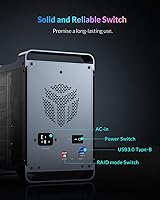
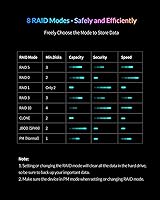
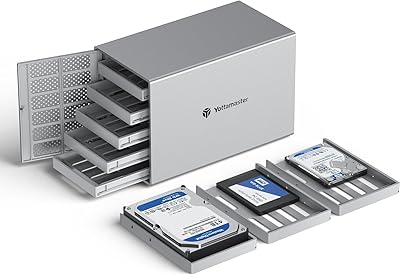
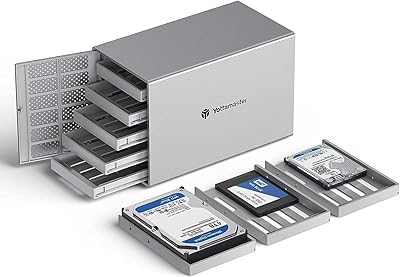
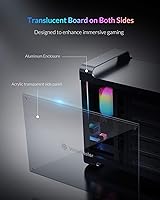
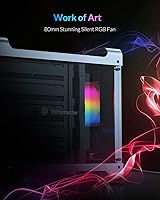
The five-bay enclosure ships with five removable aluminum trays that accept both 2.5-inch and 3.5-inch SATA drives interchangeably — handy if you are mixing old desktop HDDs with laptop-sized SSDs. The hardware RAID switch on the back is one of its better practical touches: flip it to RAID 0, 1, 5, 10, Span, or several other modes and you are running without touching a driver or software panel. SoftRAID support is available if you want dashboard-level monitoring, but it is entirely optional. The built-in power supply handles up to 150W continuously, so no external brick is needed. Cooling comes from an 80mm RGB fan, and the translucent side panels give a useful visual cue that air is actually moving through the chassis. Raw capacity tops out at 90TB with five 18TB drives installed.

Best For

This RAID storage unit makes the most sense for a fairly specific type of buyer. Home lab enthusiasts who want a proper RAID 5 array without the cost and complexity of a full NAS will find this five-bay enclosure worth serious consideration. Photo and video professionals managing large archives will appreciate the redundancy options and solid build — though they should go in clear-eyed about the USB bandwidth ceiling under heavy workloads. Gamers wanting a central home for a large library will find it capable, assuming they are not moving files constantly at high speed. Freelancers and small teams who need straightforward, hardware-configured redundancy without IT overhead are also a natural fit. It is less suited to anyone expecting NAS-level network access or Thunderbolt-class transfer rates.

User Feedback

With a 4.0 out of 5 rating across roughly 186 reviews, this five-bay enclosure earns decent marks overall — but that score reflects real trade-offs, not just minor nitpicks. Owners frequently praise the build quality and cooling, noting the aluminum chassis runs noticeably cooler than cheaper plastic alternatives under sustained load. The physical RAID switch draws consistent positive mentions for making initial configuration genuinely painless. On the downside, the USB 3.0 interface attracts recurring criticism from users who hit speed bottlenecks during sustained multi-drive transfers. A frustration worth flagging for new buyers: unformatted drives will not be recognized out of the box and need to be partitioned first, which catches people off guard. Fan noise is real — not disruptive, but noticeable in a quiet room, marketing claims of silence aside.

Pros

  • Solid aluminum unibody chassis feels noticeably more premium than plastic-shell competitors in the same price range.
  • The physical RAID mode switch lets you configure RAID 0, 1, 5, 10, and more without installing a single driver.
  • Accepts both 2.5-inch and 3.5-inch SATA drives in the same unit, so you can mix drive types across all five bays.
  • Built-in power supply means no external power brick cluttering your desk or cable run.
  • Active 80mm fan keeps drives genuinely cool during long write sessions or continuous operation.
  • SoftRAID compatibility gives more advanced users a dashboard for monitoring array health over time.
  • Up to 90TB raw capacity makes it one of the more scalable options available at this price point.
  • Compatible with Windows, macOS, and Linux out of the box, with no platform-specific quirks reported.
  • Removable aluminum trays with included screws make swapping drives clean and physically secure.
  • Has been on the market since 2020, giving it a meaningful review base and proven real-world reliability data.

Cons

  • The 5Gbps USB 3.0 interface is shared across all five bays, creating a real bottleneck under heavy multi-drive workloads.
  • Brand-new drives must be formatted before the enclosure recognizes them — a step that catches many first-time buyers off guard.
  • No network connectivity whatsoever; a host computer must stay on and connected for any access to the array.
  • Fan noise is consistently audible during operation, despite marketing language that implies near-silent running.
  • No Thunderbolt or USB4 option is available for users who need significantly faster sustained transfer rates.
  • At nearly 9.3 pounds, this RAID storage unit is heavy and not practical to reposition or transport regularly.
  • No hot-swap support, meaning drive swaps during a rebuild require powering the unit down first.
  • RAID rebuilds after a drive failure can be slow given the USB interface, extending the window of data vulnerability.
  • No LCD or clear status display; drive health indicators are minimal and may require SoftRAID for meaningful monitoring.

Ratings

The Yottamaster DF5RU3 5-Bay RAID Hard Drive Enclosure scores below are generated by AI after analyzing verified global user reviews, with spam, bot-submitted, and incentivized feedback actively filtered out. Ratings reflect the full picture — where this RAID storage unit genuinely impresses and where real buyers have run into friction. Both strengths and legitimate pain points are weighted transparently so you can make a confident buying decision.
Build Quality
88%
The aluminum unibody chassis earns consistent praise from users who have handled cheaper plastic alternatives in the same price bracket. Reviewers frequently note that the enclosure feels dense and well-assembled, with tight tolerances on the drive tray slots and no flexing under load.
A handful of users noted that the translucent side panels feel slightly less robust than the main chassis, with minor flex when pressed. The overall construction is solid, but a few buyers expected tighter fit and finish given the price point.
RAID Configuration
84%
The physical RAID mode switch is one of the most frequently praised features — users appreciate being able to flip between RAID 5, RAID 10, and other modes without needing to install software or navigate a web interface. For home lab users and non-technical buyers, this hardware-first approach significantly flattens the setup curve.
Switching RAID modes resets the array, which caught several users off guard and led to unintended data loss during reconfiguration. The mode labels on the physical switch are small and can be hard to read without good lighting, adding friction during initial setup.
Transfer Speed
58%
42%
For archival tasks, media playback, and incremental backups, the USB 3.0 connection holds up reasonably well in everyday use. Users storing large game libraries or photo archives report adequate performance for their typical read patterns, where files are accessed sequentially rather than hammered concurrently.
The shared 5Gbps USB 3.0 ceiling is the single most criticized aspect across reviews, particularly from video editors and users running simultaneous read-write operations across multiple bays. Real-world sustained throughput falls well short of what the drives themselves are capable of delivering, making this a meaningful limitation for bandwidth-intensive workflows.
Cooling Performance
83%
Users running drives continuously for media ingest or overnight backups report that the 80mm fan keeps operating temperatures noticeably lower than passive enclosures they have owned previously. The active airflow design appears to do its job reliably even when all five bays are populated with full-size 3.5-inch drives spinning under load.
The fan is audible at all times — reviewers in quiet home offices or recording-adjacent environments flag it as a persistent background hum rather than true silent operation. It is not loud, but the marketing implication of a silent fan sets expectations that the hardware does not quite meet.
Ease of Setup
67%
33%
Users who arrive with prior RAID knowledge find the hardware switch and tray system intuitive enough to have drives running in under thirty minutes. The included screws and labeled tray slots make the physical installation process clean and logical.
First-time buyers frequently hit a wall when brand-new drives go unrecognized — a formatting and partitioning step that the documentation does not emphasize clearly enough. Several reviewers describe spending an hour troubleshooting what turns out to be a standard initialization requirement, which is an avoidable frustration.
Drive Compatibility
86%
The ability to mix 2.5-inch and 3.5-inch SATA drives in the same chassis is a genuine practical advantage for users consolidating drives from older laptops and desktops into a single array. Compatibility across a wide range of drive brands and capacities has been broadly confirmed in real-world use.
Compatibility is strictly limited to SATA drives — NVMe and SAS drives are not supported, which will rule this unit out for users looking to repurpose newer M.2 SSDs. A few users also noted that very thick 2.5-inch drives required careful tray fitting to seat correctly.
Noise Level
61%
39%
In environments with normal ambient noise — a home office, a living room setup, or a shared workspace — most users report the fan sound fades into the background and stops being noticeable after a few days of use. The tone of the fan is consistent and low-pitched rather than whiny or variable.
In genuinely quiet spaces the continuous hum is hard to ignore, and there is no fan speed control available to reduce noise during idle periods. Users who expected near-silent operation based on product descriptions were among the most vocal critics on this point.
Software & Monitoring
63%
37%
SoftRAID integration gives technically inclined users a real dashboard for monitoring drive health, array status, and rebuild progress — features that matter a lot when you are trusting five drives to protect important data. For users who want visibility beyond the basic LED indicators, the software option adds meaningful value.
SoftRAID is not bundled or free for all users, and the out-of-box monitoring experience without it is limited to basic status LEDs on the unit. Users expecting a built-in web interface or native app for drive management will find the default experience fairly bare.
Value for Money
74%
26%
Relative to NAS devices offering comparable five-bay capacity and RAID support, this direct-attached unit comes in at a more accessible price point with less configuration overhead. For buyers who do not need network access and just want a reliable local RAID array, the per-feature cost is reasonable.
The USB 3.0 interface limits the long-term relevance of this unit as drive speeds and host connectivity standards continue to advance. Buyers who stretch their budget to purchase it expecting a future-proof storage platform may find themselves wanting USB4 or Thunderbolt options within a few years.
OS Compatibility
81%
19%
Windows, macOS, and Linux users all report functional operation without needing proprietary drivers, which makes cross-platform deployment straightforward. Mac users specifically appreciate that the unit mounts reliably and without additional configuration steps after drive formatting.
SoftRAID monitoring software has more mature support on macOS and Windows than on Linux, leaving Linux users reliant on the hardware switch and basic indicators for array management. A small number of users also noted occasional issues after OS major version upgrades that required a re-initialization.
Power Supply
82%
18%
The built-in power supply eliminating the need for an external brick is a quality-of-life feature that desktop storage buyers tend to undervalue until they have dealt with the cable sprawl of adapter-based alternatives. Users populating all five bays with 3.5-inch drives report stable startup without power-related issues.
The power supply does generate heat of its own, which adds a thermal variable inside the chassis. A couple of users who ran the unit in warm environments noted slightly elevated internal temperatures compared to enclosures using external adapters with better thermal separation.
Aesthetics & Design
76%
24%
The RGB fan and translucent side panels give this RAID storage unit a look that works comfortably in both gaming setups and more utilitarian home lab environments without feeling out of place in either. The aluminum finish reads as purposeful rather than decorative, and the overall silhouette is compact given the five-bay footprint.
The RGB lighting cycles automatically with no option to turn it off or customize colors, which some users in productivity-focused environments find distracting during night hours. For buyers who prefer understated hardware aesthetics, the lighting is a minor but uncontrollable annoyance.
Durability & Longevity
77%
23%
Users who have owned this five-bay enclosure since its 2020 launch report that both the chassis and internal components have held up well through continuous operation. The aluminum construction and solid tray retention system appear to contribute meaningfully to long-term reliability compared to budget plastic alternatives.
There is limited long-term data on the internal fan lifespan under heavy continuous use, and replacement parts are not readily available through conventional retail channels. A few longer-term owners have flagged increasing fan noise after eighteen months or more of daily operation as a concern worth monitoring.

Suitable for:

The Yottamaster DF5RU3 5-Bay RAID Hard Drive Enclosure is a strong fit for anyone who needs a large, redundant local storage solution without the complexity or cost of a full network-attached storage system. Home lab enthusiasts and PC builders who want to consolidate multiple drives into a single RAID 5 or RAID 10 array will find the hardware switch approach refreshingly straightforward — no driver installation, no software dependency on day one. Content creators such as photographers and video editors managing archives in the tens of terabytes will appreciate the aluminum build quality and active cooling, which keep drives running reliably during long ingestion or backup sessions. Freelancers and small teams who need a dependable direct-attached storage solution that works across Windows, macOS, and Linux without fuss will also get real value here. Gamers who want a centralized home for a sprawling library are a reasonable fit too, provided they understand the USB 3.0 interface means this is better suited for storage and retrieval than real-time high-throughput streaming.
Not suitable for:

The Yottamaster DF5RU3 5-Bay RAID Hard Drive Enclosure is not the right tool for users whose workflows demand sustained high-speed sequential transfers across all five bays simultaneously — the shared 5Gbps USB 3.0 interface is a hard ceiling that will frustrate professional video editors working with uncompressed or high-bitrate footage. Anyone expecting network-shared access, remote management, or NAS-like functionality will be disappointed, as this is strictly a direct-attached device that requires a host computer to be powered on and connected. Users who prefer Thunderbolt or USB4 speeds for maximum throughput should look at pricier alternatives before committing here. Buyers who are new to RAID should also be aware that brand-new drives need to be formatted and partitioned before the enclosure will recognize them — something that trips up enough first-time users to be worth taking seriously. Finally, those working in noise-sensitive environments like recording studios or bedrooms at night should note that the 80mm fan produces an audible, consistent hum during operation.
Specifications

  • Model Number: This enclosure carries the official model designation DF5RU3, released by Yottamaster in July 2020.
  • Drive Bays: The unit houses exactly five independent drive bays, each accepting one SATA HDD or SSD.
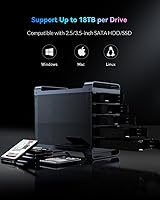
  • Drive Compatibility: Each bay supports both 2.5-inch and 3.5-inch SATA drives, allowing different form factors to coexist in the same unit.
  • Max Capacity: Total raw storage capacity reaches up to 90TB when five 18TB drives are installed across all bays.
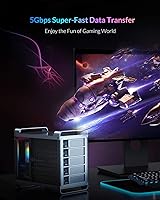
  • Host Interface: The host connection uses USB 3.0 Type-B, delivering a maximum theoretical throughput of 5Gbps shared across all five drives.
  • RAID Modes: Supported RAID configurations include RAID 0, 1, 3, 5, 10, Span, Clone, and Normal (JBOD) modes.
  • RAID Configuration: RAID mode is set via a physical hardware switch on the unit, with optional software-based management available through SoftRAID.
  • Chassis Material: The outer enclosure is constructed from an aluminum unibody, with translucent side panels flanking the cooling fan.
  • Drive Trays: Five removable aluminum drive trays are included, each secured with provided screws to protect drives from vibration and connector stress.
  • Cooling System: An 80mm RGB fan positioned between the translucent side panels provides active airflow to maintain safe operating temperatures during extended use.
  • Power Supply: A built-in power supply rated at 150W continuous output and 280W peak handles all five drives without requiring an external adapter.
  • OS Compatibility: The enclosure is compatible with Windows, macOS, and Linux operating systems without requiring proprietary drivers for basic operation.
  • Item Weight: The fully assembled unit weighs 9.28 pounds, reflecting the density of the aluminum chassis and integrated power supply.
  • RGB Lighting: The 80mm fan features built-in RGB lighting that cycles through colors automatically, visible through the translucent side panels.
  • Connectivity Port: A single USB 3.0 Type-B port on the rear panel serves as the sole data and power-signaling connection to the host system.

Related Reviews

Yottamaster PS500C3 5-Bay USB-C HDD Enclosure
72%
83%
Build Quality
57%
Transfer Speed
88%
Drive Compatibility
91%
Ease of Setup
73%
Thermal Management
More
Yottamaster PS500U3 5-Bay External HDD Enclosure
74%
84%
Build Quality
79%
Cooling Performance
61%
Transfer Speed
88%
Drive Compatibility
91%
Ease of Installation
More
Yottamaster PS400C3 4-Bay External Hard Drive Enclosure
73%
83%
Build Quality
78%
Thermal Management
66%
Transfer Speed
88%
Drive Compatibility
63%
Ease of Setup
More
Yottamaster PS200U3 32TB 2-Bay Hard Drive Enclosure
72%
83%
Build Quality
79%
Ease of Setup
71%
Drive Compatibility
74%
Transfer Speed
56%
Connectivity & Ports
More
MAIWO K25272 Dual Bay Hard Drive RAID Enclosure 16TB
84%
89%
Performance
88%
Build Quality
92%
Ease of Setup
87%
Data Transfer Speed
85%
Compatibility
More
Syba SY-ENC50122 5-Bay RAID Enclosure
71%
83%
Build Quality
78%
RAID Functionality
86%
Drive Compatibility
71%
USB 3.0 Performance
54%
eSATA Usability
More
Tripp Lite U357-002 USB 3.0 Dual Bay External SATA Hard Drive RAID Enclosure
84%
88%
Performance & Speed
91%
Ease of Setup
84%
Cooling Efficiency
89%
RAID Functionality
83%
Build Quality
More
ikuai 3.5″ USB 3.0 Hard Drive Enclosure
80%
93%
Ease of Setup
71%
Build Quality
62%
Cable Quality & Reliability
88%
Drive Compatibility
74%
Data Transfer Speed
More
Cenmate 10 Bay Hard Drive Enclosure with Cooling Fan
82%
89%
Performance
94%
Ease of Installation
78%
Cooling Efficiency
85%
Data Transfer Speed
83%
Build Quality
More
Cenmate Dual Bay Hard Drive Enclosure
78%
83%
Build Quality
78%
Cooling Performance
76%
Transfer Speed
86%
Hot-Swap Functionality
91%
Ease of Installation
More

FAQ

For basic operation, no — the Yottamaster DF5RU3 5-Bay RAID Hard Drive Enclosure uses a physical switch to set your RAID mode, so you can get an array up and running without touching any software. That said, Yottamaster does offer SoftRAID compatibility if you want ongoing monitoring, health alerts, or more granular control over your array configuration.
This is the most common setup hurdle people run into. Brand-new drives ship unformatted and unpartitioned, which means your operating system will not see them until you initialize them using Disk Management on Windows or Disk Utility on macOS. Once you partition and format the drives, they should show up normally.

Yes, each bay independently accepts either size, so you can load a mix of 3.5-inch desktop HDDs and 2.5-inch laptop drives or SSDs without any adapter. Just keep in mind that RAID configurations will be constrained by your smallest drive when it comes to usable capacity.

This is worth being honest about: the USB 3.0 interface maxes out at 5Gbps total, and that bandwidth is shared across all five drives simultaneously. In practice, sustained sequential reads or writes across the full array will hit a ceiling well below what the drives themselves are capable of. For archival storage, backups, or media playback it is perfectly fine — but if you are doing real-time editing of high-bitrate video files, you will likely feel the bottleneck.

RAID 5 is the most popular choice for this type of setup — it gives you redundancy against a single drive failure while only sacrificing one drive worth of capacity across the array. With five drives installed, RAID 5 gives you four drives worth of usable space. If you want stronger redundancy and can afford to lose more capacity, RAID 10 is another solid option.

It produces a consistent, low-level hum rather than a sharp or high-pitched noise, but it is definitely audible in a quiet room. Most people find it unobtrusive in a normal working environment with ambient noise, but if you are sensitive to fan sound or using this in a recording space, it is worth factoring in.

It works with macOS without any issues — the enclosure is recognized natively as a USB storage device once the drives are formatted. Just note that you will want to format the drives as HFS+ or APFS for Mac-native use, or exFAT if you plan to share them across Windows and macOS machines.

In RAID 5, a single drive failure leaves the array degraded but still functional — your data remains accessible while you source a replacement. Once you swap in a new drive, the array begins rebuilding automatically. Keep in mind that during the rebuild window, which can take several hours depending on drive size, the array is vulnerable to a second failure, so do not delay the replacement.

Everything is built in. The enclosure has an internal power supply rated at 150W continuous output with a 280W peak, which is enough to spin up all five 3.5-inch hard drives simultaneously without needing a separate power brick.

The drives sit in removable aluminum trays secured with screws, making physical swaps clean and straightforward — but this unit does not support hot-swapping while powered on. You should power the enclosure down before pulling or inserting a drive to avoid risking data corruption or hardware damage.