Overview

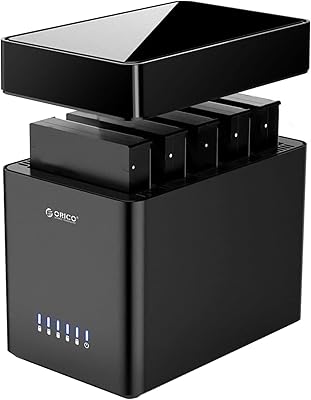
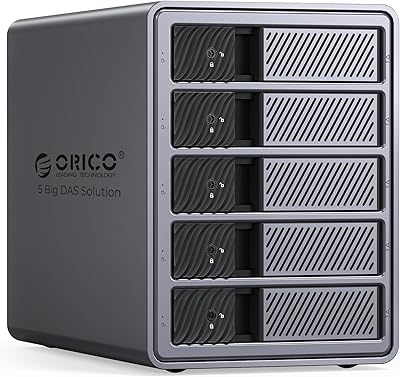
The ORICO 9948C3 4-Bay 3.5-inch HDD Enclosure is built for people who have outgrown single-drive solutions and need serious, expandable desktop storage. The all-aluminum chassis feels dense and purposeful — this is not a plastic enclosure dressed up to look premium. Four drive bays give you meaningful capacity headroom right out of the box, and the daisy-chain capability sets it apart from most competitors in this space. That said, this is not a casual purchase. It sits firmly in the mid-to-high price tier, designed specifically for users who actually need that throughput and expandability, not someone storing a handful of home videos.
Features & Benefits

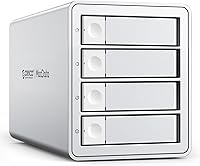
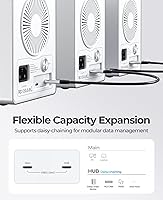
The USB 3.2 Gen 2 interface pushes data at 10Gbps, which translates to noticeably fast transfers when you are moving large video project folders or backing up RAW photo archives. What makes this desktop drive dock stand out is its daisy-chain support — you can link multiple units together, pushing total raw capacity well past 200TB. Keep in mind that each additional unit needs its own power source and your host machine needs an available USB-C port. The per-slot hot-swap function is genuinely useful; pull one drive for a client delivery without touching the others. The built-in power supply handles all four drives simultaneously without any external brick cluttering your desk.

Best For

This 4-bay enclosure makes the most sense for video editors and producers working with 4K or RAW footage who constantly bump into storage limits. It also fits well in small studio environments where a full server rack is not practical but a single-bay unit stopped cutting it a while ago. If you are running a NAS-style archive setup on your desk and want room to scale without replacing your entire system, this is a logical step up. Photographers, colorists, and anyone juggling large asset libraries across multiple active projects will appreciate the independent slot design. Bargain hunters should look elsewhere — this unit is priced for users who prioritize reliability and build quality.

User Feedback

Buyers consistently praise the solid aluminum construction — it feels more like professional gear than a typical consumer peripheral. The daisy-chain feature has earned specific compliments from users who actually chained multiple units, reporting it worked reliably without any driver drama. On the downside, a handful of reviewers noted the fan gets audible under sustained heavy load, which could matter in quiet recording environments. A few users flagged compatibility quirks with certain high-capacity drives, though these appear to be isolated cases. The included cables drew mixed reactions — functional, but nothing special. Most critical reviews trace back to early-unit experiences rather than a recurring design flaw.

Pros

  • Aluminum construction feels professional and durable, a clear step above plastic enclosures in the same category.
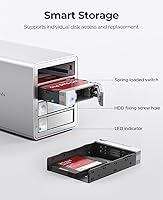
  • Per-slot hot-swap lets you pull and swap individual drives without interrupting the other active bays.
  • Plug-and-play detection works reliably across Windows, macOS, and Linux with no driver installation needed.
  • Built-in power supply keeps your desk clean by eliminating the need for a separate external adapter.
  • Daisy-chain support offers a genuine and tested upgrade path for users whose storage needs keep growing.
  • Transfers large media files quickly enough that it rarely becomes a bottleneck during active editing sessions.
  • Fan runs quietly at idle, making it unobtrusive during lighter workloads or low-activity periods.
  • Sturdy front-to-rear airflow design keeps drive temperatures stable even during extended multi-drive operations.

Cons

  • Fan noise under full four-drive load is noticeable enough to be disruptive in quiet work environments.
  • Included USB-C cable is functional but underwhelming for a product at this price point.
  • The quick-start guide provides almost no guidance on setting up a daisy-chain configuration across multiple units.
  • Some users have reported intermittent detection issues with specific high-capacity HDD models.
  • At nearly nine pounds, this desktop drive dock is strictly a fixed-position piece of equipment — plan your desk layout accordingly.
  • The internal power supply, while convenient, means a PSU failure requires servicing the whole unit rather than swapping a standalone brick.
  • Drive trays require deliberate straight insertion; ambiguous seating can leave you unsure if a drive is fully connected.
  • Long-term reliability data is still limited given the product only launched in early 2024.

Ratings

The ORICO 9948C3 4-Bay 3.5-inch HDD Enclosure scores below are generated by AI after analyzing verified buyer reviews from multiple global markets, with spam, bot-submitted, and incentivized feedback actively filtered out. Ratings reflect the full picture — where this desktop drive dock genuinely earns its price and where real users have run into friction. Both consistent praise and recurring complaints are weighted into every score.

Build Quality
88%
The aluminum alloy shell draws consistent praise from buyers who have used cheaper plastic enclosures before. It sits solidly on a desk without wobble, and the overall fit and finish feels closer to professional AV gear than a typical consumer storage peripheral. Users frequently describe it as something that looks like it belongs in a studio rack.
A few buyers noted minor inconsistencies in panel alignment on early units, and the drive bay trays feel slightly less premium than the outer shell suggests. Nothing structural, but at this price point some users expected tighter tolerances throughout.
Transfer Speed
84%
Running over USB 3.2 Gen 2 at 10Gbps, this enclosure moves large video project folders and RAW photo libraries noticeably faster than older USB 3.0 units. Video editors copying multi-gigabyte DNG or ProRes files report satisfying throughput without prolonged wait times during backups or client deliveries.
Speeds are ultimately capped by the drives installed, and users with older 5400RPM HDDs will not come close to saturating the interface. A small number of users also reported throughput dropping slightly when all four bays were under simultaneous heavy read-write load.
Daisy-Chain Functionality
79%
21%
The daisy-chain capability works as advertised for most users who tested it across multiple linked units, with drives mounting cleanly and transfers remaining stable. For archivists and studio operators who genuinely need to scale beyond a single unit, this feature alone justifies the price premium over non-chainable alternatives.
Each additional unit demands its own power connection and a free USB-C port on the host machine, which can get logistically messy fast. Several buyers were also initially confused by the fact that the advertised maximum combined capacity requires purchasing extra drives and enclosures separately — the box alone stores nothing.
Cooling & Thermal Management
73%
27%
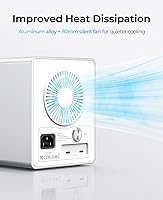
At idle or during light use, the 80mm fan is quiet enough that most users forget it is running. The front-to-rear airflow design keeps drive temperatures in a reasonable range during typical editing sessions, and long-term users report no thermal throttling or unexpected shutdowns during sustained workloads.
Under heavy sustained load — think running four active drives in parallel for extended backup operations — the fan ramps up audibly. In a quiet recording or voiceover environment this could be distracting, and a few buyers wished ORICO offered a fan speed control option.
Hot-Swap Usability
86%
The per-slot independent eject mechanism is one of the more practically useful features here. Pulling a single drive to hand off to a client or swap in a fresh archive disk without disturbing the other three active slots genuinely speeds up workflow in busy studio environments. The eject buttons are firm and deliberate, reducing accidental presses.
A handful of users noted that the drive trays require a confident, straight insertion to seat properly and that slightly misaligned insertions can feel ambiguous — you are not always sure if the drive is fully connected until the OS confirms it. Not a dealbreaker, but worth being aware of.
Power Supply Integration
83%
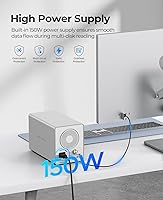
Having a 150W power supply built directly into the enclosure removes the need for an external brick, which makes cable management noticeably cleaner on a busy desk. Users with multiple peripherals especially appreciated not having to find an extra outlet for a separate adapter, and all four drives power up reliably on startup without delay.
Because the PSU is internal, any failure means servicing or replacing the whole unit rather than just swapping a standalone adapter. A small number of users also mentioned the power cable supplied is on the shorter side, which can limit placement flexibility depending on desk setup.
Plug-and-Play Compatibility
81%
19%
Across Windows, macOS, and Linux, the vast majority of users report that drives are recognized immediately after connection with no driver installation needed. This is particularly valued by Mac users who noted that many competing enclosures require third-party software to behave correctly on Apple silicon machines.
A narrow subset of users encountered detection issues in early firmware versions, particularly on certain Linux kernel builds. Most of these cases appear resolved through system updates, but buyers on niche or highly customized OS configurations should be aware that edge-case compatibility issues exist.
Drive Compatibility
76%
24%
The enclosure accepts standard 3.5-inch SATA drives from all major manufacturers — Seagate, WD, Toshiba — without issue in the majority of reported setups. Users who have populated all four bays with high-capacity archival drives report stable long-term operation across mixed drive configurations.
A few buyers flagged intermittent detection issues with specific high-capacity models, particularly some Seagate IronWolf and WD Red drives in certain firmware combinations. These appear to be edge cases rather than a systemic problem, but compatibility testing with your specific drives before committing is advisable.
Noise Level
67%
33%
At rest or during light single-drive reads, the unit runs quietly enough for open-plan office use without drawing attention. Users doing occasional backups or archiving tasks during the day generally report acceptable ambient noise levels that do not interfere with calls or concentration.
This is one of the more divided categories in user feedback. At full load with four spinning drives and the fan at higher RPM, the combined noise output is noticeable in quiet rooms. Buyers working in sound-sensitive environments like podcasting studios or home offices should factor this in carefully.
Cable & Accessory Quality
61%
39%
The included USB-C cable works reliably at the rated speeds and does not exhibit the signal dropout issues some cheaper third-party cables cause. For buyers who just want to get up and running without sourcing additional accessories, the box contents cover the basics adequately.
The included cable is functional but not high quality by any premium standard, and several users replaced it immediately with a higher-rated third-party option. The accessory set overall feels like an afterthought relative to the enclosure itself — no drive rails, minimal documentation, and no cable management aids.
Setup & Installation
87%
Getting drives loaded and the enclosure recognized takes only a few minutes for anyone with basic hardware familiarity. There are no tools required for drive installation in most cases, and the process is intuitive enough that users without technical backgrounds have reported successful first-time setups without consulting documentation.
The printed quick-start guide is sparse and does not cover the daisy-chain setup process in any real depth. Users who attempted to chain multiple units for the first time often had to turn to online forums or YouTube to understand port-through configuration, which felt like a gap for a product at this price tier.
Value for Money
72%
28%
For professionals who will actually push all four bays and use the daisy-chain capability, the pricing reflects real functionality rather than brand markup alone. The built-in power supply, aluminum construction, and 10Gbps interface together justify the cost when compared to budget enclosures that cut corners in all three areas.
For users who only need one or two active drives, the value equation weakens considerably — there are simpler, cheaper options that cover those use cases without the added size and cost. The pricing only makes sense when you are genuinely using the full feature set, and casual or infrequent users will likely feel they overpaid.
Portability & Form Factor
54%
46%
The enclosure has a compact enough footprint to fit on most desks alongside a monitor and peripheral setup without dominating the workspace. The aluminum finish also means it does not look out of place in a professional studio environment where aesthetics matter alongside function.
At nearly nine pounds fully assembled, this is not something you move regularly. The physical size combined with the need for a power cable makes it a fixed-position piece of equipment. Users who assumed it could pull double duty as a travel or field storage solution were consistently disappointed.
Long-Term Reliability
74%
26%
Users who have run this desktop drive dock continuously for extended periods — some reporting over six months of near-daily use — generally describe stable operation with no unexpected drive drops or enclosure errors. The aluminum body does not trap heat the way plastic alternatives do, which likely contributes to consistent long-term performance.
The sample size of long-term reviews is still relatively limited given the product launched in early 2024. A small number of users reported fan bearing noise developing after several months of continuous operation, which raises minor questions about multi-year durability under always-on archiving conditions.

Suitable for:

The ORICO 9948C3 4-Bay 3.5-inch HDD Enclosure is purpose-built for creative professionals and power users who treat storage as a core part of their workflow, not an afterthought. Video editors cutting 4K or RAW footage will appreciate having multiple high-capacity drives accessible simultaneously, with fast enough throughput to avoid sitting around waiting on file transfers mid-session. Small studio operators and solo post-production freelancers who have outgrown a single-bay solution but have no need for a full server rack will find this desktop drive dock hits a practical sweet spot in both size and scalability. The daisy-chain capability makes it especially compelling for archivists and data hoarders who anticipate their storage needs growing significantly over time — linking additional units later is a realistic upgrade path rather than a marketing footnote, provided you plan for the extra power and port requirements upfront. Anyone coming from a budget plastic enclosure who wants something that holds up to daily professional use without constant babysitting will notice the difference immediately.
Not suitable for:

If your storage needs are modest or occasional, the ORICO 9948C3 4-Bay 3.5-inch HDD Enclosure is genuinely difficult to justify. Casual home users who want to back up a personal photo collection or store a media library for occasional streaming have no real use for four bays, daisy-chain expansion, or the robust thermal management this unit offers — they are paying for capabilities they will never touch. The unit is heavy, requires a permanent power connection, and is not designed to be moved around, so anyone hoping to use it as a portable or travel storage solution will be disappointed from day one. Buyers who work in quiet environments — home recording studios, podcast booths, or shared silent workspaces — should also be cautious, since the fan becomes clearly audible when all four drives are under sustained load. And if budget is a primary concern, the value equation simply does not work unless you are populating all four bays and actively using the features that separate this unit from far cheaper alternatives.
Specifications

  • Interface: Connects to a host computer via USB 3.2 Gen 2 Type-C, delivering a maximum interface bandwidth of 10Gbps.
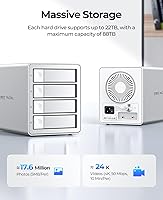
  • Drive Bays: Houses up to four 3.5-inch SATA hard drives simultaneously in four independent, individually ejectable slots.
  • Max Capacity: Supports drives up to 22TB per bay, for a maximum single-unit raw capacity of 88TB with all four bays populated.
  • Daisy-Chain: Up to three units can be linked in a daisy-chain configuration, extending total raw storage potential to 264TB across all connected enclosures.
  • Power Supply: Features an internal 150W power supply that drives all four bays simultaneously without requiring any external power brick.
  • Cooling System: Equipped with an 80mm cooling fan and a front-to-rear ventilation channel designed to maintain safe operating temperatures under sustained multi-drive load.
  • Shell Material: Outer chassis is constructed from aluminum alloy, providing passive heat dissipation and a rigid, impact-resistant enclosure body.
  • Dimensions: The unit measures 10.55 x 5.31 x 6.42 inches, making it a fixed desktop device rather than a portable or travel-ready solution.
  • Weight: The enclosure weighs 8.87 pounds without drives installed, reflecting the density of the aluminum build and integrated power supply.
  • Hot-Swap: Each of the four drive slots supports independent hot-swap ejection, allowing a single drive to be removed or replaced without powering down the other active bays.
  • Driver Requirement: No driver installation is required; the enclosure operates as a plug-and-play device across all supported operating systems.
  • OS Compatibility: Fully compatible with mainstream versions of Windows, macOS, and Linux without requiring any additional software or firmware configuration on standard setups.
  • Transfer Protocol: Uses standard SATA III internally for each drive bay, pairing with the USB 3.2 Gen 2 external interface to maximize throughput for mechanical hard drives.
  • Manufacturer: Designed and produced by Shenzhen ORICO Technologies Co., Ltd., a Chinese manufacturer specializing in storage peripherals and connectivity accessories.
  • Model Number: Official model designation is 9948C3, used for warranty registration, firmware identification, and manufacturer support inquiries.
  • Date Available: This enclosure was first made available for purchase in April 2024, making long-term reliability data still relatively limited at time of writing.

Related Reviews

ORICO DS500U3 5-Bay 3.5″ HDD Enclosure
72%
93%
Ease of Setup
91%
Drive Installation & Swap
67%
Drive Detection Reliability
72%
Transfer Speed
74%
Cooling & Thermal Management
More
ICY DOCK flexiDOCK MB830SP-B 3-Bay 3.5 Inch SATA/SAS HDD Docking Enclosure
83%
93%
Ease of Installation
88%
Build Quality
87%
Performance & Speed
79%
Cooling Efficiency
65%
Noise Levels
More
ikuai 3.5″ USB 3.0 Hard Drive Enclosure
80%
93%
Ease of Setup
71%
Build Quality
62%
Cable Quality & Reliability
88%
Drive Compatibility
74%
Data Transfer Speed
More
Syba SY-ENC50104 4-Bay 3.5” SATA III HDD Enclosure
85%
88%
Build Quality & Durability
91%
Ease of Setup & Installation
83%
Cooling Efficiency
72%
Noise Level
89%
Storage Capacity & Expansion
More
Syba 5 Bay 2.5″/3.5″ SATA HDD External RAID Enclosure SY-ENC50122
85%
87%
Performance
91%
Ease of Use
89%
Build Quality
85%
Data Transfer Speed
90%
RAID Flexibility
More
ORICO 9858RU3 5-Bay RAID HDD Enclosure
75%
88%
Build Quality
84%
Ease of Setup
81%
RAID Mode Flexibility
67%
Transfer Speed
74%
Thermal Management
More
Cenmate 5-Bay Hybrid HDD/NVMe Enclosure
73%
83%
Build Quality
78%
Thermal Management
71%
Transfer Speed
69%
RAID Functionality
76%
Drive Compatibility
More
ICY DOCK ToughArmor MB998SP-B 8-Bay 2.5” SATA/SAS HDD/SSD Mobile Rack Enclosure for 5.25″ Bay
87%
91%
Performance
88%
Cooling Efficiency
89%
Build Quality
93%
Ease of Installation
72%
Noise Level
More
X-MEDIA XM-EN3451 3.5-Inch External HDD Enclosure
75%
93%
Drive Compatibility
91%
Ease of Setup
78%
Build Quality
74%
Thermal Performance
76%
USB 3.0 Transfer Performance
More
Vantec NexStar JX 3.5″ HDD Enclosure
76%
93%
Ease of Setup
78%
Transfer Speed — USB
86%
Transfer Speed — eSATA
74%
Thermal Management
67%
Build Quality
More
ICY DOCK ToughArmor MB604SPO-B 4 Bay 2.5 SSD/HDD & Optical Disk Drive Enclosure
85%
88%
Build Quality
85%
Cooling Performance
91%
Ease of Installation
87%
Value for Money
89%
Compatibility with Drives
More

FAQ

No, you do not. The enclosure works as a plug-and-play device on Windows, macOS, and Linux. Just connect it via USB-C, power it on, and your operating system should recognize the drives within seconds. No additional software is needed for standard setups.

Yes, but there are a few things to understand before getting excited about the maximum numbers. Each additional unit you chain needs its own power connection and uses one of your host computer's available USB-C ports. The advertised maximum combined capacity also assumes you populate every bay in every enclosure with the highest-capacity drives available — the enclosures themselves come empty.

Yes, the ORICO 9948C3 4-Bay 3.5-inch HDD Enclosure has been confirmed by multiple users to work on Apple Silicon Macs without any driver installation. The plug-and-play behavior appears consistent across M1 and M2 machines running recent versions of macOS.
Yes, that is what the independent hot-swap feature is for. Each slot has its own eject button, so you can safely eject a single drive — say, to hand off a project disk to a client — without interrupting whatever the other three bays are doing. Just make sure to properly unmount the drive in your OS before physically ejecting it.

At idle or during light single-drive reads, most users describe the fan as barely noticeable. The situation changes under heavy load — if you have all four drives running simultaneously during a long backup or intensive data transfer, the fan ramps up and becomes clearly audible in a quiet room. If you record audio or work in a noise-sensitive environment, this is worth factoring into your decision.

It currently supports drives up to 22TB per bay, which puts the maximum single-unit capacity at 88TB when fully loaded. As drive technology advances and higher capacities become available, compatibility with newer drives is not guaranteed without a firmware update, though ORICO has generally kept pace with drive capacity growth on comparable products.

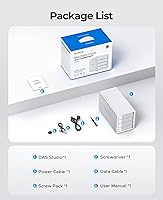
No, this is an enclosure only — no drives are included in the box. You purchase and install your own 3.5-inch SATA hard drives separately. The box does include a USB-C cable and power cable, but all storage media needs to come from you.

Generally yes — the enclosure is not brand-specific, and users have run mixed configurations with drives from Seagate, WD, and Toshiba without issues. That said, a small number of buyers reported occasional detection quirks with certain specific high-capacity models. If you are planning a mixed configuration, it is worth checking recent user reports for your exact drive models before committing.

The printed guide is indeed sparse on this point, and it is one of the more common complaints from buyers. The basic principle is that the first enclosure connects to your computer via USB-C, and the second connects to the first using the expansion port on the back. Each unit in the chain still needs its own power connection. ORICO has some guidance on their support pages, and several users have posted walkthrough videos online that cover the setup more clearly than the included documentation does.

It can handle extended operation, and several users do run this desktop drive dock in a near-continuous archiving role. The aluminum body and active cooling help manage heat over long sessions. The main caveat is that the fan bearing on some units has shown early wear after many months of constant operation, so if you need truly always-on 24/7 reliability over several years, a purpose-built NAS with enterprise-rated drives and a more robust thermal system might be a safer long-term investment.