Overview

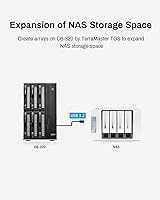
The TerraMaster D6-320 6-Bay Hard Drive Enclosure is a direct-attached storage device — a DAS, not a NAS — built for users who need serious local capacity without the complexity of network configuration. That distinction matters: this desktop storage dock connects directly to your computer via USB, not your router, so there is no remote access, no user accounts, and no streaming to other devices on your network. What you get instead is raw, fast local storage. It ships diskless, meaning you supply your own drives, which keeps the entry cost lower but adds real expense once you factor in six HDDs. It also operates in individual disk mode only — no RAID support whatsoever.
Features & Benefits

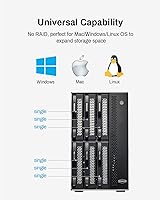
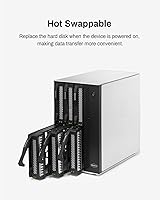
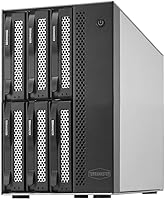
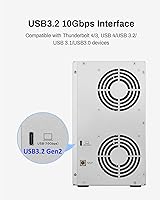
The D6-320 runs on USB 3.2 Gen 2, which tops out at 10Gbps — though keep in mind that spinning hard drives will bottleneck well below that ceiling in real-world use. With six SATA SSDs installed, you can push read speeds past 1,000MB/s, which is genuinely impressive for a USB-connected enclosure. It supports 3.5-inch and 2.5-inch SATA drives, scales to 132TB raw capacity, and works without any driver installation on Windows, Mac, or Linux. Thunderbolt 3 and 4 users get full bandwidth headroom. Hot-swap support means you can pull and replace a drive without shutting down, and the variable-speed fan keeps temperatures in check while staying reasonably quiet under normal loads.

Best For

This 6-bay enclosure is a natural fit for video editors and photographers who keep large working libraries on local storage and need fast read access without latency. It also suits home lab users and small businesses that want a centralized backup target without investing in a full NAS setup. If you already have a Thunderbolt-equipped Mac or PC, you will get the most out of this desktop storage dock — the bandwidth headroom makes a real difference when moving large files. Anyone consolidating multiple single-drive enclosures into one tidy unit will appreciate the form factor. Just know that no software RAID is available, so it suits those who manage drives individually through their OS.

User Feedback

Owners consistently praise the build quality and note that real-world throughput holds up to TerraMaster's advertised numbers — a reassuring sign in a category where spec sheets often disappoint. The hot-swap feature earns particular appreciation from users who rotate drives regularly. On the downside, the lack of RAID caught some buyers off guard; it is worth reading the specs carefully before purchasing. Fan noise comes up occasionally — not disruptive under normal conditions, but noticeable when the unit runs hot during sustained transfers. A few users also found the included accessories underwhelming, particularly the cable. Overall, the sentiment is solid for buyers who understand what they are getting: a straightforward, high-capacity local storage solution with no pretensions of being anything more.

Pros

  • Real-world read speeds consistently match advertised figures, which is not always a given in this category.
  • Hot-swap support lets you pull and replace drives mid-session without interrupting other connected drives.
  • Six drive bays in a compact metal chassis offer serious storage density for a desktop unit.
  • Broad compatibility across USB 3.0 through 3.2 and Thunderbolt 3 and 4 means it works with most modern computers.
  • No driver installation required — plug it in and your OS sees the drives immediately.
  • The variable-speed fan keeps thermals in check without running loud under normal workloads.
  • Supports both 3.5-inch and 2.5-inch SATA drives, giving flexibility when mixing HDDs and SSDs.
  • Metal build quality feels solid and inspires confidence for a unit designed to run continuously.
  • Works natively on Windows, Mac, and Linux without any platform-specific setup.
  • Scaling to 132TB raw capacity provides genuine long-term headroom for growing media libraries or archives.

Cons

  • No RAID support of any kind means redundancy and data protection are entirely up to you.
  • Ships without disks, so the real cost of a fully loaded setup is considerably higher than the unit price alone.
  • The included USB Type-C cable has drawn criticism for feeling underwhelming given the price point.
  • Fan noise increases noticeably during sustained transfers or when ambient temperatures are higher.
  • Only one computer can access the enclosure at a time, ruling out any shared or multi-user workflows.
  • The 10Gbps interface becomes a bottleneck when all six bays are loaded with slower spinning hard drives.
  • No hardware indicator or management software to alert you if a drive is approaching failure.
  • The enclosure is heavier and larger than it may appear in photos, which can be a factor on smaller desks.

Ratings

The TerraMaster D6-320 6-Bay Hard Drive Enclosure has been scored by our AI rating engine after processing verified global user reviews, with spam, bot activity, and incentivized feedback actively filtered out before analysis. Scores reflect real-world ownership experiences across a range of use cases — from professional video editing workflows to home backup setups — and both the genuine strengths and recurring frustrations are transparently captured below.
Build Quality
88%
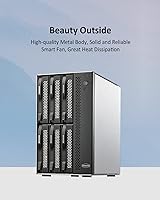
Users consistently describe the all-metal chassis as feeling solid and premium for a desktop storage device. The weight and rigidity of the enclosure inspire confidence, particularly for buyers running it continuously in a production environment where physical durability matters day to day.
A small number of reviewers noted that the drive trays feel slightly less refined than the outer shell, with a plasticky quality that contrasts with the rest of the build. Nothing that affects function, but noticeable at this price point.
Throughput Performance
91%
Real-world transfer speeds align closely with advertised figures, which is not a given in this category. Users editing 4K footage or moving large RAW photo libraries reported sustained read performance that genuinely kept up with demanding workflows when connected via Thunderbolt 4.
The 10Gbps ceiling only tells part of the story — spinning hard drives saturate well below that bandwidth, so buyers loading all six bays with HDDs will see speeds closer to 700–800MB/s combined rather than the headline number. SSDs are needed to approach peak figures.
Ease of Setup
93%
Plug-and-play operation is one of the most praised aspects across all user feedback. Mac, Windows, and Linux users all report that drives are recognized instantly without hunting for drivers, making initial deployment genuinely quick even for less technical buyers.
The lack of any companion software or setup guide means that first-time DAS users occasionally feel left on their own when it comes to formatting decisions or understanding why their OS sees six separate volumes rather than one unified pool.
Hot-Swap Functionality
89%
Hot swapping is frequently called out as a standout practical feature, especially by users who rotate archival drives or regularly swap content between projects. Being able to pull and reinsert drives without powering down the whole unit saves real time in active workflows.
A handful of users reported that their OS occasionally failed to remount a hot-swapped drive without a manual rescan, which suggests the experience can vary slightly depending on the host operating system and USB controller in use.
Thermal Management
79%
21%
The variable-speed fan does a competent job keeping drive temperatures in a safe range during sustained use. Users in cooler ambient environments report that the unit runs quietly enough to sit on a desk without becoming a distraction during long editing sessions.
In warmer rooms or during back-to-back large file transfers, the fan audibly ramps up and stays elevated. Several users flagged this as a recurring irritant rather than a dealbreaker, but it is worth factoring in if your workspace tends to run warm.
RAID and Storage Flexibility
41%
59%
For users who specifically want individual disk management — keeping each project or client archive on its own drive — the single-disk-only approach is actually a clean and predictable way to work. No RAID complexity means no accidental data loss from misconfiguration.
The complete absence of any RAID mode is the most common complaint in negative reviews, and some buyers purchased the unit without realizing this limitation. There is no striping for speed, no mirroring for redundancy, and no option to create a spanned volume in hardware.
Value for Money
72%
28%
As a 6-bay USB 3.2 Gen 2 DAS enclosure with hot-swap support and a metal build, the D6-320 sits at a competitive price relative to comparable options. Buyers who understand what they are getting tend to feel the cost is justified by the throughput and build quality.
The diskless configuration means the true cost of ownership is significantly higher once six drives are factored in. Buyers expecting a complete storage solution for the unit price alone often feel the value proposition weakens when the total system cost is tallied.
Included Accessories
53%
47%
The box contains everything needed to get started — a USB Type-C to Type-C cable is included and functional out of the box. For straightforward setups, most buyers will not need to purchase anything additional to begin using the enclosure immediately.
The included cable drew criticism from multiple reviewers who found it thin and budget-feeling compared to the enclosure itself. Users connecting to Thunderbolt ports in particular reported that upgrading to a quality certified cable made a tangible difference in reliability.
Noise Level
67%
33%
Under light to moderate workloads, the enclosure is quiet enough for an office or home studio environment. The temperature-controlled fan design means it is not running at full speed unnecessarily, which most users appreciate during typical daily use.
Extended heavy transfers push the fan into a noticeably louder operating range, and a few users described the noise as distracting during long overnight backup jobs. It is not excessively loud by any measure, but the variance between idle and load noise is wider than expected.
OS and Port Compatibility
92%
Compatibility coverage is genuinely broad — the enclosure works across Windows, Mac, and Linux without friction, and the USB Type-C connection plays nicely with Thunderbolt 3 and 4 hosts as well as standard USB 3.x ports. This versatility makes it easy to move between machines.
There is no included USB-A adapter, so users with older machines or docks that lack a Type-C port will need a separate adapter or cable. This is a minor inconvenience rather than a functional limitation, but it does add a small friction point for some setups.
Drive Capacity Support
87%
Support for drives up to 22TB per bay means the enclosure is future-proofed against current consumer hard drive capacities. Users building out large media archives or multi-year backup pools find the 132TB ceiling more than adequate for long-term planning.
There is no support for NVMe drives, which limits the maximum achievable speeds compared to NVMe-based multi-bay enclosures. For users who primarily work with SATA drives this is not an issue, but power users eyeing faster storage options will eventually hit a ceiling here.
Physical Footprint
74%
26%
The metal chassis packs six bays into a relatively compact tower form factor that most users find manageable on a desk or shelf. The solid construction means it does not vibrate or shift during operation, which helps with noise perception and long-term drive health.
At 9.02 pounds without drives, the unit is genuinely heavy, and fully loaded it becomes a commitment to leave in one place. Users hoping to move it between workstations regularly or travel with it found the size and weight impractical for anything beyond stationary use.
Reliability Over Time
81%
19%
The majority of long-term owners report stable, consistent performance over months of continuous use. The thermal management system appears to be doing its job, as reports of drive overheating or unexpected shutdowns are rare relative to the volume of reviews.
A small subset of users reported intermittent disconnection events, particularly over USB rather than Thunderbolt connections. This appears to be an edge case tied to specific USB controller chips on certain host machines, but it is worth noting for buyers on older hardware.

Suitable for:

The TerraMaster D6-320 6-Bay Hard Drive Enclosure is purpose-built for users who need a large, fast, locally connected storage pool without the overhead of a networked solution. Video editors and photographers working with high-resolution files will appreciate the ability to consolidate multiple drives into a single enclosure that delivers real throughput — particularly when connected via Thunderbolt 3 or 4. Home lab enthusiasts and small business operators who run regular backups to a dedicated local target will find the capacity ceiling of 132TB raw storage more than adequate for years of growth. If you already manage drives individually through your operating system and have no need for hardware RAID, the simplicity here is genuinely an asset rather than a compromise. The plug-and-play setup also makes it a practical choice for technically capable users who want to get up and running without hunting for drivers or configuring software.
Not suitable for:

Buyers expecting network-attached storage functionality will be disappointed — the TerraMaster D6-320 6-Bay Hard Drive Enclosure is a direct-attached device, meaning it connects to one computer at a time and cannot be accessed by other devices on your network. Anyone who relies on RAID configurations for redundancy or performance aggregation needs to look elsewhere; this enclosure operates in individual disk mode only, so data protection is entirely the user's responsibility through software or manual backup routines. It is also worth remembering that this unit ships without drives, so the true cost of ownership scales significantly once you account for populating all six bays with quality HDDs or SSDs. Users in noise-sensitive environments should be aware that the cooling fan can become audible during extended high-load transfers. Casual users who only need to expand storage by a drive or two will likely find a simpler single- or dual-bay enclosure more practical and cost-effective.

Specifications

  • Interface: Connects via USB 3.2 Gen 2 Type-C, delivering a maximum data transfer rate of 10Gbps.
  • Drive Bays: Houses up to six 3.5-inch or 2.5-inch SATA hard drives or SSDs simultaneously.
  • Max Capacity: Supports up to 22TB per individual drive, for a maximum raw storage pool of 132TB across all six bays.
  • Read Speed: Maximum sequential read speed reaches 1,030MB/s when six SATA HDDs are installed and accessed together.
  • Write Speed: Maximum sequential write speed reaches 1,005MB/s under optimal conditions with six SATA SSDs installed.
  • RAID Support: No hardware or software RAID modes are available; all drives operate as independent, individually mounted volumes.
  • Hot Swap: All six bays support hot swapping, allowing drives to be removed or inserted while the unit remains powered on.
  • Cooling System: An intelligent variable-speed fan monitors drive temperatures and adjusts its rotational speed automatically to balance cooling and noise.
  • OS Compatibility: Fully compatible with Windows, macOS, and Linux operating systems without requiring any additional drivers.
  • Port Compatibility: Works with USB 3.0, USB 3.1, USB 3.2, Thunderbolt 3, and Thunderbolt 4 host ports via the included Type-C cable.
  • Included Cable: Ships with one USB Type-C to Type-C cable; no additional cables or drive adapters are included in the box.
  • Chassis Material: The enclosure body is constructed from metal, contributing to both structural rigidity and passive heat dissipation.
  • Dimensions: The unit measures 8.58-inch L x 5.12-inch W x 8.9-inch H, making it a moderately sized desktop unit.
  • Weight: The enclosure weighs 9.02 pounds (4.1 kg) without any drives installed.
  • Drive Format: Accepts 3.5-inch and 2.5-inch SATA III drives only; NVMe and SAS drives are not supported.
  • Driver Requirement: No driver installation is needed on any supported operating system; the device is recognized automatically upon connection.
  • Power: The unit requires an external power supply to operate, as USB bus power alone cannot support six spinning drives.
  • Disk Mode: Each installed drive appears as a separate, independent volume on the host computer with no pooling or spanning between drives.

Related Reviews

TerraMaster D4-320
TerraMaster D4-320
80%
93%
Ease of Setup
86%
Transfer Speed
71%
Build Quality
88%
Noise Level
82%
Thermal Management
More
Yottamaster PS400C3 4-Bay External Hard Drive Enclosure
73%
83%
Build Quality
78%
Thermal Management
66%
Transfer Speed
88%
Drive Compatibility
63%
Ease of Setup
More
Yottamaster PS500U3 5-Bay External HDD Enclosure
74%
84%
Build Quality
79%
Cooling Performance
61%
Transfer Speed
88%
Drive Compatibility
91%
Ease of Installation
More
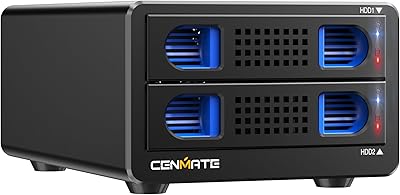
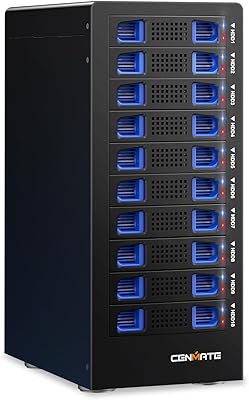
Cenmate 10 Bay Hard Drive Enclosure with Cooling Fan
82%
89%
Performance
94%
Ease of Installation
78%
Cooling Efficiency
85%
Data Transfer Speed
83%
Build Quality
More
Yottamaster PS500C3 5-Bay USB-C HDD Enclosure
72%
83%
Build Quality
57%
Transfer Speed
88%
Drive Compatibility
91%
Ease of Setup
73%
Thermal Management
More
Cenmate Dual Bay Hard Drive Enclosure
78%
83%
Build Quality
78%
Cooling Performance
76%
Transfer Speed
86%
Hot-Swap Functionality
91%
Ease of Installation
More
Cenmate 2-Bay Aluminum Hard Drive Enclosure
77%
88%
Build Quality
83%
Thermal Management
54%
Fan Noise
81%
Transfer Performance
91%
Ease of Setup
More
MAIWO K25272 Dual Bay Hard Drive RAID Enclosure 16TB
84%
89%
Performance
88%
Build Quality
92%
Ease of Setup
87%
Data Transfer Speed
85%
Compatibility
More
Yottamaster PS200U3 32TB 2-Bay Hard Drive Enclosure
72%
83%
Build Quality
79%
Ease of Setup
71%
Drive Compatibility
74%
Transfer Speed
56%
Connectivity & Ports
More
ORICO 9948C3 4-Bay 3.5-inch HDD Enclosure
76%
88%
Build Quality
84%
Transfer Speed
79%
Daisy-Chain Functionality
73%
Cooling & Thermal Management
86%
Hot-Swap Usability
More

FAQ

It only supports SATA drives — both 3.5-inch and 2.5-inch form factors. NVMe drives use a completely different interface and will not fit or function in the D6-320's bays.

Yes, and that is actually one of the best ways to use it. Thunderbolt 4 is backward compatible with the USB Type-C connection, and since Thunderbolt provides more than enough bandwidth headroom, you will get the full benefit of the 10Gbps interface without any bottlenecks on the host side.

The hardware itself has no RAID capability whatsoever — there are no RAID modes to configure. You could technically use software RAID through your operating system, such as Windows Storage Spaces or macOS Disk Utility, but the enclosure plays no role in that; it just presents the individual drives to your OS as separate volumes.

Each drive appears as its own independent volume on your computer. There is no automatic pooling, spanning, or combining of drives — what you put in bay one shows up as one disk, bay two as another, and so on.

Under typical workloads and normal room temperatures, most users find the fan quiet enough to ignore. It does ramp up noticeably during sustained heavy transfers or in warmer environments, so if you plan to run it continuously in a warm room, expect it to be audible — not disruptive, but present.

Absolutely. Since each bay operates independently, there is no requirement for matching drives. You can mix 4TB, 8TB, and 14TB drives from different manufacturers without any issues.

It is designed to handle both use cases. Hot-swap support means you can also pull individual drives while the unit is running without affecting the others, which gives you a lot of flexibility in how you manage drives day to day.

Since there is no RAID, a failed drive only affects the data on that specific drive — the other five are untouched. However, there is no built-in redundancy, so if a drive fails, that data is gone unless you have a separate backup. This is worth thinking through carefully before relying on this dock as your only copy of important files.

If the drives are brand new, yes — your operating system will prompt you to initialize and format them the first time they are detected. Drives you have used in another enclosure or computer will generally be recognized and mounted without reformatting, as long as the file system is compatible with your OS.

The included cable works, but a number of users have noted it feels a bit basic for a unit at this price point. If you are connecting to a Thunderbolt port and want to ensure you are getting reliable high-speed performance, investing in a quality certified USB 3.2 Gen 2 or Thunderbolt cable is a reasonable precaution.

Where to Buy