Overview

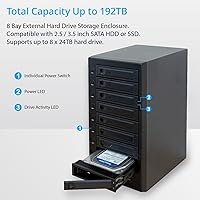
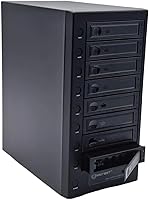
The IO CREST SY-ENC50129 8-Bay USB4 40Gbps SATA Enclosure is a serious desktop storage solution aimed at prosumers, small offices, and anyone managing a growing collection of 2.5-inch and 3.5-inch SATA drives. It supports up to eight drives simultaneously, with each bay accepting disks as large as 24TB — a theoretical ceiling of 192TB raw. The USB4 40Gbps interface adds broad compatibility, working across Thunderbolt 3, 4, and 5 hosts as well as USB 3.2 connections. Built from aluminum and weighing 7 pounds, this 8-bay enclosure is clearly meant to live on a desk, not travel with you. The price reflects that ambition honestly.
Features & Benefits

Each bay has its own independent power button, which is more useful than it sounds — you can spin down a single drive you're not actively using without touching the rest of the unit. Removable drive trays keep things tidy when swapping disks in and out regularly. UASP support helps push real throughput closer to what SATA III can actually deliver, and the smart fan system gives you genuine control over noise versus cooling: auto mode handles most situations, but manual lets you dial it back during quiet sessions. One thing to be clear on — this multi-drive dock is a pure JBOD enclosure with absolutely no RAID or NAS functionality built in.

Best For

This multi-drive dock is a strong fit for people who have accumulated a collection of 3.5-inch HDDs and need somewhere logical to consolidate them. Video editors and photographers working with large raw or footage files will appreciate having up to 192TB of local storage accessible without the overhead of a full NAS setup. It's a practical tool for IT professionals pulling drives from retired machines and wanting centralized access. Thunderbolt 4 or 5 users get plug-and-play compatibility. That said, this is not a budget buy — potential owners should be honest with themselves about whether their actual workflow justifies the premium price tier before purchasing.

User Feedback

Reviewers consistently praise the solid aluminum build and the smooth drive installation experience as genuine highlights. Fan noise draws mixed responses — most users find auto mode acceptable in an office environment, but a few note audible hum when all eight bays are loaded under sustained transfers. Real-world speeds are a common topic too: throughput is bottlenecked by individual HDD performance rather than the 40Gbps interface, and buyers who went in with realistic expectations report satisfaction. The lack of RAID is the most divisive aspect — a dealbreaker for some, completely irrelevant for others. Occasional complaints about the included cable quality also surface in longer reviews.

Pros

  • Eight independent bay power buttons let you spin down individual drives without disrupting the rest of the array.
  • Solid aluminum construction feels durable and well-matched to a permanent desktop workstation setup.
  • Broad interface compatibility covers Thunderbolt 3, 4, and 5 alongside USB 3.2 hosts without adapters.
  • Removable drive trays make swapping and organizing drives significantly faster than tool-heavy fixed designs.
  • Smart fan with three speed levels gives real control over noise in quiet home office environments.
  • UASP support ensures transfer efficiency stays close to the actual ceiling of each installed drive.
  • Accepts both 2.5-inch and 3.5-inch SATA drives, making it practical for mixed collections of HDDs and SSDs.
  • Up to 24TB per bay means buyers can scale total capacity as larger drives become available.

Cons

  • No RAID support at any level is a hard stop for anyone needing basic data redundancy.
  • The included USB4 cable has drawn repeated complaints about intermittent disconnections and subpar performance.
  • Fan noise at higher speeds is noticeable enough to be distracting in quiet home or small office spaces.
  • Drive trays require screws for 3.5-inch drives, which slows down anyone rotating drives frequently.
  • The power brick is bulky and adds meaningful cable clutter to an already heavily cabled desktop setup.
  • Real-world HDD throughput is bottlenecked by SATA III drive speeds, not the 40Gbps interface ceiling.
  • Documentation is thin, leaving first-time multi-bay enclosure users without clear setup guidance.
  • Long-term reliability data is limited given how recently the product came to market.

Ratings

The IO CREST SY-ENC50129 8-Bay USB4 40Gbps SATA Enclosure earned its ratings through AI analysis of verified global buyer reviews, with spam, bot activity, and incentivized feedback actively filtered out before scoring. Across categories ranging from build quality to real-world transfer performance, both consistent strengths and recurring frustrations are reflected honestly. The scores below give prospective buyers a clear, unvarnished picture of where this 8-bay enclosure excels and where it asks for compromise.
Build Quality
88%
The aluminum chassis draws consistent praise from buyers who compare it favorably to cheaper plastic enclosures in the same category. At 7 pounds, it feels substantial on a desk and users report no flex or rattling even with all eight bays fully loaded during long transfer sessions.
A few reviewers noted that the drive tray latches feel slightly less refined than the main body suggests, with occasional reports of trays that require firm pressure to seat properly. Nothing catastrophic, but noticeable given the premium positioning.
Drive Compatibility
83%
Support for both 2.5-inch and 3.5-inch SATA drives across multiple generations makes this enclosure genuinely versatile for users consolidating mixed collections of old desktop and laptop HDDs. Buyers repurposing drives from decommissioned machines report broad plug-and-play recognition across major brands.
A handful of users flagged compatibility hiccups with specific older SATA I drives and a small number of less common SSD brands. These appear to be edge cases rather than systemic failures, but it is worth testing before committing all drives.
USB4 Interface & Compatibility
86%
Thunderbolt 4 and 5 users in particular praise the reliable, immediate recognition with no driver fuss. The backward compatibility chain — covering Thunderbolt 3, USB 3.2, and USB4 hosts — means buyers with a range of workstations and laptops rarely encounter connection issues.
On some USB 3.2 Gen 2 hosts that lack full USB4 certification, a small number of buyers reported inconsistent speeds or the enclosure not being recognized immediately on first plug-in, requiring a cable reseat or port switch to resolve.
Real-World Transfer Speed
71%
29%
For users with SSDs installed in the bays, throughput headroom from the 40Gbps interface is genuinely appreciated. Those running mixed SSD and HDD configurations report that SSD bays perform at their rated ceilings with no obvious bottlenecking from the enclosure itself.
Buyers expecting near-40Gbps speeds with conventional spinning HDDs regularly find themselves disappointed — SATA III HDDs top out around 200 to 250 MB/s per drive, so aggregate throughput is constrained by the drives, not the interface. Managing expectations here is critical.
Fan Noise & Thermal Management
74%
26%
The three-speed manual fan control earns real appreciation from home office users who want quiet operation during light workloads. Auto mode handles typical mixed-use scenarios well, and several buyers confirm the enclosure stays cool even with six or more populated bays running simultaneously.
Under full load with all eight bays active, the fan audibly ramps up and a portion of users find it noticeable in quiet environments. A few reviewers specifically mention that the highest fan speed setting is louder than they expected for a desktop unit meant to sit near a workstation.
Independent Bay Power Controls
91%
This is the feature buyers consistently call out as unexpectedly useful. Being able to spin down individual drives not currently in use — without touching the rest of the array — saves wear and reduces noise during focused single-project sessions. Users managing archival and active drives in the same unit especially appreciate it.
The buttons themselves are small and closely spaced, which a few users with larger hands found fiddly when reaching around a fully cabled enclosure. There is also no status LED per bay on the power button itself, so confirming drive state requires checking the host OS.
Drive Tray Design
79%
21%
Removable trays make swapping drives straightforward compared to tool-heavy fixed-mount designs. Users who rotate drives in and out regularly, such as those managing tiered archival storage, appreciate being able to pre-load trays and swap in seconds.
The trays are functional but not tool-free for 3.5-inch drives — screws are required to secure drives in the tray, which slows down frequent swaps. A small number of buyers also reported that tray labeling options are minimal, making bay identification awkward in a fully loaded unit.
JBOD Functionality
69%
31%
For users who understand what JBOD means going in, the enclosure works exactly as expected — each drive mounts as a fully independent volume, which is exactly what IT administrators and archivists consolidating legacy drives actually want.
The absence of any RAID capability is the single most common source of negative reviews. Buyers who skimmed the listing and expected at least RAID 0 or 1 functionality express real frustration. The no-RAID limitation is clearly disclosed, but it catches enough buyers off-guard to consistently affect satisfaction scores.
Setup & Ease of Use
84%
Most buyers report a straightforward setup experience with no dedicated software required — drives appear as standard volumes immediately upon connection to a compatible host. The physical installation of drives into trays is intuitive even without a manual for users familiar with desktop storage.
First-time enclosure users occasionally find the initial configuration of 8 independent drives overwhelming without a guide, and IO CREST's documentation is considered thin by several reviewers. A brief quickstart card covering volume setup across major operating systems would improve the experience.
Cable & Accessory Quality
61%
39%
The enclosure ships with a USB4 cable included, which buyers appreciate given the cost of quality USB4 cables on their own. For most users running standard desktop setups, the included cable performs adequately for everyday transfers.
The included cable is one of the more commonly criticized accessories — several buyers replaced it early after experiencing intermittent disconnections or lower-than-expected speeds, attributing the fix specifically to a higher-quality third-party cable. For a premium-priced unit, the bundled cable quality feels mismatched.
Thermal Performance Under Full Load
72%
28%
With the fan in auto or medium-speed manual mode, drive temperatures inside the enclosure remain stable during extended transfers involving five or six populated bays. The aluminum body itself acts as a passive heat spreader, and buyers running 24/7 archival workflows report no unexpected thermal shutdowns.
With all eight bays fully populated and under continuous sustained load, a handful of buyers noted drive temperatures crept higher than they would like over multi-hour sessions. The enclosure manages heat adequately for intermittent use but is not optimized for truly continuous heavy-duty workloads.
Value for Money
66%
34%
For buyers who specifically need a high-capacity JBOD enclosure with USB4 connectivity and broad Thunderbolt compatibility, the pricing is justifiable relative to the limited number of alternatives at this bay count and interface standard. The build quality reinforces the sense of a purpose-built tool rather than a budget product.
For anyone who does not strictly need USB4 speeds or the full 8-bay capacity, the price is difficult to rationalize against capable 4-bay enclosures available at significantly lower cost. Value perception splits sharply between buyers with specific use cases and those who bought aspirationally.
Port & Cable Management
67%
33%
The single USB-C connection keeps the host-side cable situation clean and simple, which users with tidy desk setups genuinely appreciate. Power comes via a dedicated adapter rather than bus power, which is appropriate for a unit running up to 8 spinning HDDs.
The power brick is sizable and several buyers flag it as adding to desktop clutter. Rear panel cable organization is functional but not elegant, and with eight drives producing eight sets of tray connectors, the internal cable situation inside a fully loaded unit can feel crowded during maintenance.
Long-Term Reliability
73%
27%
Among buyers who have owned this multi-drive dock for several months, the majority report consistent performance with no bay failures or unexplained drive dropouts. The aluminum construction gives reasonable confidence in durability for a stationary desktop unit.
The product is relatively new to market, so long-term reliability data beyond six to twelve months is limited. A small number of buyers report intermittent bay recognition issues appearing after several weeks of use, though it is unclear whether these stem from the enclosure, the drives, or host OS updates.

Suitable for:

The IO CREST SY-ENC50129 8-Bay USB4 40Gbps SATA Enclosure is purpose-built for people who have outgrown single or dual-bay solutions and need serious local storage capacity without the complexity of a dedicated NAS. Video editors and photographers working with large raw files or 4K footage will appreciate having up to 192TB of directly attached storage accessible through a single USB-C cable. IT professionals consolidating drives pulled from decommissioned desktops and servers will find the JBOD-per-bay setup refreshingly straightforward — each drive mounts independently, no configuration required. Home lab enthusiasts who want bulk storage expansion without committing to a full NAS ecosystem, along with small offices managing archival data, are also well served here. Anyone running a Thunderbolt 4 or 5 workstation or laptop gets plug-and-play compatibility and the full bandwidth headroom the interface offers.
Not suitable for:

Buyers hoping for RAID protection, whether mirroring for redundancy or striping for performance, should stop here — the IO CREST SY-ENC50129 8-Bay USB4 40Gbps SATA Enclosure offers no RAID functionality whatsoever, and no firmware update is going to change that. If data redundancy is a requirement for your workflow, a dedicated NAS with RAID support is the right tool. Users expecting to hit 40Gbps aggregate throughput with conventional spinning hard drives will also be disappointed — real-world speeds are capped by SATA III HDD performance, not the interface. This is not a portable or travel-friendly unit either; at 7 pounds with a sizable power brick, it belongs on a desk and stays there. Budget-conscious buyers who only need two or four bays will find the value proposition thin, since the premium pricing only makes practical sense if you genuinely need all eight bays and a USB4 connection.
Specifications

  • Model Number: The exact model identifier for this enclosure is SY-ENC50129, manufactured by IO CREST.
  • Interface: Connects to the host system via a USB Type-C port running the USB4 standard at up to 40Gbps.
  • Compatibility: Fully backward compatible with Thunderbolt 3, Thunderbolt 4, Thunderbolt 5, and USB 3.2 Gen 2 host connections.
  • Drive Bays: Houses up to 8 drives simultaneously, with each bay featuring an independent power on/off button.
  • Form Factors: Accepts both 2.5″ and 3.5″ SATA hard drives and SSDs within the same unit.
  • Drive Protocol: Supports SATA I, SATA II, and SATA III drives, with per-drive transfer rates up to 6Gbps.
  • Max Drive Capacity: Each individual bay supports drives up to 24TB in capacity.
  • Total Raw Capacity: With eight 24TB drives installed, the maximum total raw storage capacity reaches 192TB.
  • RAID Support: This enclosure operates exclusively in JBOD mode; no RAID configuration of any kind is supported.
  • UASP Support: UASP (USB Attached SCSI Protocol) is supported to improve real-world transfer efficiency over standard BOT mode.
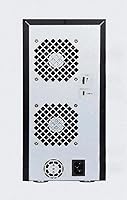
  • Cooling System: A built-in smart fan with a thermal sensor supports both automatic and manual operation across three speed levels.
  • Body Material: The outer chassis is constructed from aluminum, contributing to passive heat dissipation and structural rigidity.
  • Dimensions: The unit measures 12.5″ in length, 10.5″ in width, and 6″ in height.
  • Unit Weight: The enclosure weighs 7 pounds without drives installed.
  • Color: The unit ships in a gray finish consistent with the aluminum construction.
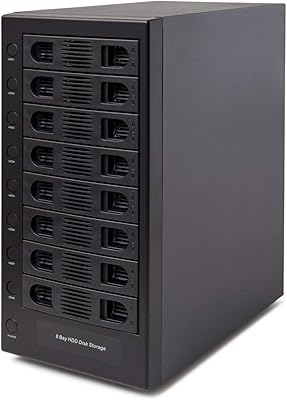
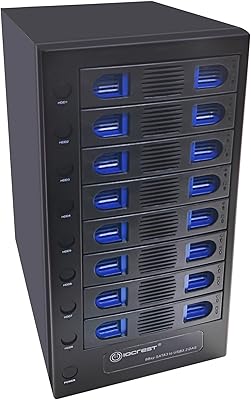
  • Drive Trays: All eight bays use removable drive trays to simplify drive installation, removal, and physical organization.
  • Power Delivery: The enclosure requires an external power adapter; it does not draw bus power from the host USB connection.
  • Date Available: This product was first made available for purchase in July 2025.

Related Reviews

IO CREST SY-ENC50119 USB 3.0 8-Bay SATA Hard Drive Enclosure
84%
92%
Ease of Setup
88%
Cooling Performance
85%
Build Quality
91%
Data Transfer Speed
93%
Tool-less Design
More
IO CREST 8-Bay Tool-Less SATA Hard Drive Enclosure, 22TB Capacity
86%
89%
Value for Money
93%
Ease of Installation
88%
Performance (Speed/Transfer Rate)
85%
Build Quality and Durability
90%
Cooling and Noise Management
More
IO CREST SY-ENC50127 USB 3.2 Type-C Dual Bay HDD + M.2 NVMe External Enclosure
83%
88%
Performance
93%
Ease of Setup
91%
Build Quality
87%
Data Transfer Speed
90%
Cooling/Heat Management
More
ICY DOCK ToughArmor MB998SP-B 8-Bay 2.5” SATA/SAS HDD/SSD Mobile Rack Enclosure for 5.25″ Bay
87%
91%
Performance
88%
Cooling Efficiency
89%
Build Quality
93%
Ease of Installation
72%
Noise Level
More
IO Crest SI-PEX40137 8-Port SATA III PCIe Expansion Card
86%
87%
Performance
90%
Reliability
85%
Installation Ease
91%
Compatibility with FreeNAS/ZFS
88%
Data Transfer Speed
More
Syba SY-ENC50104 4-Bay 3.5” SATA III HDD Enclosure
85%
88%
Build Quality & Durability
91%
Ease of Setup & Installation
83%
Cooling Efficiency
72%
Noise Level
89%
Storage Capacity & Expansion
More
Syba 5 Bay 2.5″/3.5″ SATA HDD External RAID Enclosure SY-ENC50122
85%
87%
Performance
91%
Ease of Use
89%
Build Quality
85%
Data Transfer Speed
90%
RAID Flexibility
More
ICY DOCK ToughArmor MB508SP-B 8-Bay 2.5” SAS/SATA Hot Swap Backplane Enclosure
86%
94%
Build Quality
88%
Ease of Installation
81%
Cooling Performance
90%
Data Transfer Speed
89%
Durability Over Time
More
JEYI Quad NVMe Enclosure 32TB USB4 40Gbps
85%
94%
Data Transfer Speed
91%
RAID Functionality
77%
Cooling Performance
88%
Ease of Setup
85%
Build Quality
More
QNAP TL-D800C 8-Bay JBOD Storage Enclosure
85%
91%
Ease of Setup
87%
Performance and Speed
89%
Build Quality
85%
Compatibility with QNAP NAS
92%
Connectivity (USB 3.2 Gen 2 Type-C)
More

FAQ

No, it does not. The IO CREST SY-ENC50129 8-Bay USB4 40Gbps SATA Enclosure is a pure JBOD device, meaning every drive appears as a completely independent volume on your system. There is no RAID 0, 1, 5, or any other configuration available, and that is a hardware limitation, not something you can enable through software or firmware. If redundancy is a core requirement, a dedicated NAS with built-in RAID support is the better path.
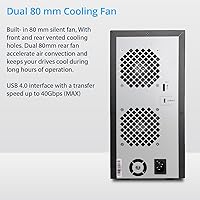
Not with spinning HDDs, no. The 40Gbps figure is the ceiling of the USB4 interface, not a drive speed guarantee. A typical 3.5-inch hard drive maxes out somewhere between 150 and 250 MB/s depending on the model, so your real-world throughput will be limited by the drives themselves, not the connection. Where the 40Gbps headroom genuinely matters is if you install SATA SSDs in the bays, which can push closer to the SATA III cap of around 550 MB/s per drive.

Yes, it works well with Thunderbolt 4 hosts. The USB4 interface is electrically and physically compatible with Thunderbolt 3, 4, and 5, so your MacBook Pro should recognize it immediately using the included or a quality third-party USB4 cable. Each drive will mount as an independent external volume in macOS Finder without any additional drivers.

At low or medium speed in auto mode, most users describe the fan as a mild background hum that blends into typical office ambient noise. The problem arises when all eight bays are fully loaded and under sustained transfer loads — the fan can ramp up to its highest setting, which is noticeably louder and has drawn criticism from noise-sensitive users. For lighter workloads with a partial drive complement, it stays reasonably quiet in auto mode.

Yes, and this is one of the more practical features of this enclosure. Each bay has its own dedicated power button, so you can spin down drives you are not currently using while leaving the rest active. This is handy if you have archival drives sitting alongside working drives — you only spin up what you need.

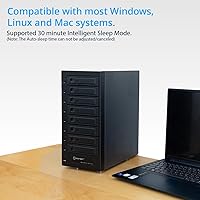
Generally no. On Windows, macOS, and most Linux distributions, the enclosure is recognized as a standard USB storage device and each populated bay mounts automatically. No proprietary software is required for basic use. The fan control may require manual adjustment via the physical buttons on the unit rather than software.

Yes, you can mix form factors freely across the eight bays. The enclosure physically accommodates both 2.5-inch and 3.5-inch SATA drives simultaneously, so there is no need to keep the bays uniform. Just note that each form factor uses the drive tray slightly differently and 3.5-inch drives require screws to secure properly in their trays.

It can run continuously, but with some caveats. Thermal performance with all eight bays populated and under constant load has been flagged by some users as less than ideal over very long sessions. For intermittent workloads or setups where not all bays are active simultaneously, sustained operation is more manageable. If you need a true always-on, always-loaded solution, a purpose-built NAS chassis with better airflow engineering might be more appropriate.

It is a substantial unit — 12.5″ long, 10.5″ wide, and 6″ tall, plus you need to account for the power brick and cables coming off the back. This enclosure is designed to sit permanently on a desk or shelf, not be moved around. Make sure you have a dedicated spot for it before purchasing because it is not a compact device by any measure.

It ships with a USB4 cable, but the bundled cable is one of the more consistent points of criticism from buyers. A notable number of users replaced it early after experiencing intermittent disconnections or speeds below what they expected, with the issue resolving after switching to a higher-quality USB4 cable. For a unit at this price point, it is worth budgeting for a reputable third-party USB4 cable if you want reliable long-term performance.