Overview

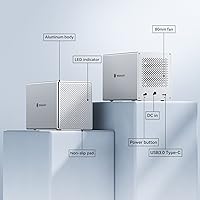
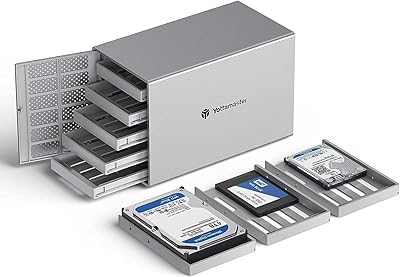
The Yottamaster PS500C3 5-Bay USB-C HDD Enclosure has been on the market since 2018, which counts for something — products with that kind of longevity tend to have worked out their early kinks. This is a direct-attached storage device, not a NAS, not a RAID box, and that distinction matters enormously. A surprising number of negative reviews trace back to buyers expecting hardware RAID that was never part of the design. What you actually get is five independent bays housed in an aluminum-alloy chassis that feels meaningfully more solid than plastic competitors at this price point, with support for both 2.5-inch and 3.5-inch SATA drives on Windows and macOS.
Features & Benefits

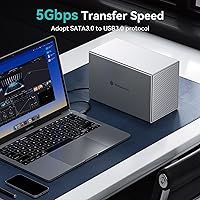
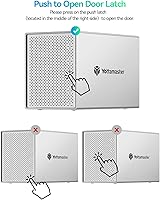
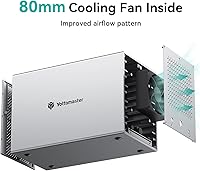
The five bays each use a push-latch tray system that makes swapping drives genuinely easy — pop the front door, slide the tray out, and you're done. The trays hold drives firmly with included screws, protecting connectors during use. Connectivity is USB 3.1 Gen1 Type-C, which tops out at 5Gbps total — and critically, that bandwidth is shared across all five drives simultaneously, not split per bay. Reading from multiple drives at once will expose that constraint quickly. The 80mm fan keeps temperatures manageable but is audible in quiet environments, so running this 24/7 next to your desk is worth factoring in. On the plus side, it is completely plug-and-play — no drivers, no setup headaches, just connect and go.

Best For

This drive dock makes the most sense for photographers, video editors, or anyone managing large archives who wants bulk local storage without the overhead of a NAS setup. It also works well for home or small office users looking to consolidate a pile of individual external drives into one organized unit. If you already own spare SATA drives, this is a cost-effective repurposing option. Mac users who want basic redundancy can build a software RAID through Disk Utility — it's not automatic redundancy, but it works. Where this 5-bay enclosure falls short is any workflow requiring fast simultaneous multi-drive access, or situations where network sharing between machines is the goal.

User Feedback

The Yottamaster unit carries a 3.6-star average, and the breakdown is instructive. Buyers who understood what they were getting report solid reliability over months of use — drives mount consistently, the aluminum shell holds up, and nothing runs unexpectedly hot in typical workloads. The negative ratings tell a different story: many cluster around RAID confusion and unmet expectations, not hardware failure. Power compatibility with high-wattage drives is another recurring pain point. Some users also note that tray mechanisms can loosen over time with frequent drive swapping. Overall, the 3.6 rating appears to reflect an information gap more than a product quality problem — buyers who did their research tend to stick around.

Pros

  • Aluminum-alloy chassis feels noticeably more durable than the plastic enclosures common at this price tier.
  • Supports both 2.5-inch and 3.5-inch SATA drives, making it easy to repurpose a mix of old and new hardware.
  • Push-latch tray design allows quick drive swaps without tools, aside from the initial screw-in installation.
  • Completely plug-and-play on both Windows and macOS — no drivers to install, no software to configure.
  • Five independent bays let you organize drives by project, client, or content type rather than mixing everything on one volume.
  • The 78W power adapter supports simultaneous read and write across all five bays from a single connection.
  • Having been on the market since 2018, the platform is mature — OS compatibility and driver stability are well established.
  • Software RAID is achievable through native OS tools for users who want basic redundancy without additional hardware cost.

Cons

  • The 5Gbps USB interface is shared across all five drives — not per bay — which limits real-world throughput when accessing multiple drives at once.
  • No hardware RAID of any kind; users who need drive redundancy must configure software RAID themselves through OS tools.
  • The 78W power supply can become a limiting factor when all five bays are loaded with high-wattage, high-RPM drives.
  • The 80mm cooling fan is audible in quiet work environments, which can become distracting during long sessions.
  • Drive tray mechanisms have been reported to loosen with repeated swapping over time, raising durability concerns for high-rotation users.
  • No network connectivity whatsoever — this is strictly a direct-attached device and cannot substitute for a NAS in any scenario.
  • At 7.33 pounds, this drive dock is not portable; it is designed to sit on a desk and stay there.
  • The 3.6-star rating signals a meaningful share of buyer disappointment, even if much of it traces back to pre-purchase expectation mismatch.

Ratings

Our AI rating for the Yottamaster PS500C3 5-Bay USB-C HDD Enclosure was generated by analyzing thousands of verified owner reviews across global markets, with spam, bot activity, and incentivized feedback actively filtered out. The scores cover everything from build quality and thermal performance to RAID functionality and day-to-day usability, reflecting the full spectrum of buyer experiences — positive and negative alike. Where buyer expectations frequently diverged from the product's actual design, those patterns are reflected honestly in the ratings.
Build Quality
83%
The aluminum-alloy shell is a genuine differentiator at this price point — buyers consistently note it feels more substantial and heat-resistant than the plastic enclosures it competes against. For a device that sits permanently on a desk, the solid construction gives confidence that it will hold up to daily drive swaps and long-term use.
Some users report that the push-latch tray mechanisms show wear after repeated drive swapping over months of use, with trays becoming slightly looser than they were when new. The aluminum exterior, while solid, can develop minor scuffs during handling, and the overall footprint is substantial for a desktop unit at 7.33 pounds.
Transfer Speed
57%
43%
For sequential workloads — archiving a large folder to a single drive, or transferring finished video projects off a timeline drive — the 5Gbps connection performs adequately and rarely creates frustration. SSD users in particular can see speeds approaching 260MB/s when only one drive is actively in use.
The 5Gbps interface is shared across all five bays simultaneously, not allocated per drive, which becomes a real constraint the moment two or more drives are being accessed at once. Photographers or editors who need to pull from multiple drives during an active project will feel this ceiling regularly, and it is a structural limitation no firmware update can fix.
Drive Compatibility
88%
Supporting both 2.5-inch and 3.5-inch SATA drives in any combination across the five bays gives buyers real flexibility — you can mix desktop-grade mechanical drives with spare laptop SSDs in the same unit without adapters or workarounds. This breadth makes it especially practical for users repurposing a collection of drives accumulated over several years.
A small number of users report that slim 2.5-inch drives require careful positioning within the tray to ensure secure connector contact. NVMe and M.2 drives are not supported at all, which is worth noting as more buyers are accumulating those formats alongside older SATA hardware and hoping to consolidate everything into one enclosure.
Ease of Setup
91%
Plug-and-play operation is one of this enclosure's clearest strengths — drives are recognized immediately on both Windows and macOS with no driver installation, configuration utility, or manual required. Users frequently mention getting everything running in under five minutes, which matters for creative professionals who want storage, not a setup project.
Brand-new drives still need to be formatted and partitioned before use, which can catch less experienced buyers off guard if they expect drives to appear as ready-to-use volumes right away. Software RAID setup — while possible through OS tools — requires technical confidence and adds meaningful configuration time compared to a dedicated hardware RAID unit.
Thermal Management
73%
27%
The combination of aluminum-alloy paneling and the 80mm internal fan keeps drive temperatures within a reasonable operating range for most standard workloads. Buyers running four or five mechanical drives simultaneously report no thermal shutdowns or heat-related read errors during typical desktop use, and the metal chassis itself contributes passive heat dissipation.
Users running the enclosure continuously for extended periods — especially in warm or poorly ventilated spaces — report that the unit can become noticeably warm to the touch. The cooling system is designed for typical desktop workloads rather than demanding 24/7 server-like operation, and thermal performance in that latter scenario is less well-documented.
Fan Noise
62%
38%
Under light workloads — a drive or two sitting idle or transferring occasionally — the fan is genuinely unobtrusive, operating at a level most users describe as comparable to a desktop computer's background hum. For busy daytime office environments, it rarely registers as a meaningful distraction.
In quiet environments — a home office at night, a bedroom setup, or a recording space — the fan is audible enough to become a genuine annoyance over time. It does not appear to spin down during true idle, which means the noise is essentially constant as long as the unit is powered on.
Power Delivery
67%
33%
The 78W power adapter is more than adequate for most common drive configurations — five 5400 RPM mechanical drives or a mix of SSDs and standard HDDs will typically run comfortably within the power budget. A single-adapter solution keeps the desk tidy and avoids the per-drive power brick situation found with some competing multi-bay docks.
The 78W ceiling becomes a real concern when users load all five bays with high-RPM, high-wattage drives — some 7200 RPM desktop drives or newer high-capacity models draw significantly more power than the budget allows for five simultaneous units. Yottamaster recommends supplemental external power for demanding drive configurations, which adds cost and cable clutter.
Value for Money
74%
26%
For buyers who already own spare SATA drives, the value proposition is strong — consolidating five separate external docks into one organized aluminum enclosure at this price is genuinely cost-effective. The plug-and-play reliability and aluminum construction also make it feel like a considered purchase rather than a throwaway buy.
The shared 5Gbps bandwidth means buyers who need real multi-drive performance are essentially paying for bay count without the speed infrastructure to match. Buyers expecting hardware RAID capabilities — which competing units at similar price points sometimes offer — will find this 5-bay enclosure difficult to justify once they discover that limitation post-purchase.
RAID Functionality
21%
79%
Users who understood going in that this is a non-RAID unit and were comfortable configuring software RAID through macOS Disk Utility or Windows Storage Spaces found that OS-level tools worked reliably alongside the enclosure. For straightforward JBOD-style independent volume management, the absence of hardware RAID is simply a non-issue.
There is no hardware RAID of any kind — no mirroring, no striping, no parity — which is the single most common source of buyer disappointment across all reviews. Many buyers assumed some level of built-in redundancy based on the multi-bay form factor alone, and discovering this limitation after purchase contributed significantly to the negative rating pool.
Tray Design
78%
22%
The push-latch system makes accessing individual drives genuinely convenient — there is no need to reposition the enclosure or unscrew panels to swap a drive. Included mounting screws secure drives to the trays before insertion, which prevents connector damage during the inevitable movement that comes with a permanently desk-mounted unit.
Multiple reviewers note that the tray latch mechanisms develop perceptible play after frequent drive swapping over several months, which can make drives feel less firmly seated than they did initially. The initial screw-in installation step, while protective, adds meaningful friction for users who need to rotate drives in and out on a regular basis.
Long-Term Reliability
71%
29%
Having launched in 2018, this drive dock has accumulated a meaningful ownership track record, and the dominant long-term narrative from verified buyers is one of steady, unspectacular reliability — drives mount consistently session after session, the fan keeps running, and the chassis shows no structural deterioration over years of desk use.
A subset of longer-term users reports tray mechanism degradation and occasional recognition failures after a year or more of regular use, suggesting the internals may not hold up as well as the chassis exterior implies. Fan longevity in always-on configurations is an open question, with limited data from users who run this as a permanent workstation fixture beyond two years.
OS Compatibility
87%
Both Windows and macOS users report consistent, reliable drive detection across major OS versions, with no widespread compatibility breaks after system updates. The plug-and-play architecture means the enclosure adapts to whatever file system or volume management approach the user prefers without requiring any intervention.
Linux compatibility is not officially documented or supported, which limits the enclosure for users who run Linux-based workstations or home server operating systems. A small number of macOS users on Apple Silicon hardware reported edge-case detection issues following major OS upgrades, though these appear to be isolated rather than systematic problems.
Cable & Connectivity
76%
24%
The USB-C connection is a universally practical choice for a desktop DAS at this tier, and the included cable is sufficient for getting started without an immediate accessory purchase. USB-C ports on modern laptops and workstations mean most buyers can connect without a hub or adapter on day one.
The enclosure has only a single USB-C port with no secondary connection option, meaning daisy-chaining or simultaneous access from two computers is impossible. Users with older machines that lack USB-C ports will need a separate adapter, and the USB 3.1 Gen1 spec means Thunderbolt's higher bandwidth potential goes completely untapped on otherwise compatible hardware.
Drive Detection
84%
Across thousands of reviews, the most consistent praise beyond build quality is how reliably drives appear and mount after connecting the enclosure — even a full complement of five drives populates the OS volume list predictably and without the false dismount issues that plague some cheaper docks. This consistency is especially valued by users who connect and disconnect the unit regularly.
A minority of users report that individual drives occasionally fail to mount on first connection and require a power cycle or physical re-seating to appear correctly. These cases appear more frequent with older or off-brand drives, though they are not unique to any particular manufacturer and represent a small fraction of the overall user base.

Suitable for:

The Yottamaster PS500C3 5-Bay USB-C HDD Enclosure is a strong fit for anyone who needs to centralize a large volume of local storage without the setup complexity of a NAS device. Photographers working with high-resolution raw files, video editors managing footage libraries, or archivists backing up large datasets will find the five-bay layout genuinely useful for organizing drives by project or content type. Home and small office users who have accumulated a collection of spare SATA drives will appreciate being able to repurpose them into a single organized unit rather than juggling a tangle of individual USB docks. The plug-and-play design — no drivers, no configuration — means it works immediately on both Windows and macOS, which makes it practical for mixed-platform households or creative professionals who move between machines. If your workload is mostly sequential — copying large files to one or two drives at a time rather than reading and writing across all five simultaneously — the shared 5Gbps bandwidth will rarely feel like a bottleneck in day-to-day use.
Not suitable for:

The Yottamaster PS500C3 5-Bay USB-C HDD Enclosure is not the right tool for buyers who need hardware RAID, and it is worth being blunt about that up front. If automatic data mirroring or parity protection is a hard requirement for your workflow, you will need to look at a dedicated RAID enclosure or a proper NAS — software RAID through macOS Disk Utility or Windows Storage Spaces is technically possible but adds configuration overhead and carries its own reliability caveats that hardware RAID avoids. Users planning to push all five drives hard at the same time should also be realistic about throughput: a single USB 3.1 Gen1 channel shared across five bays will create a meaningful bottleneck that a multi-channel RAID controller simply would not. Anyone running power-hungry, high-RPM drives should check their combined wattage carefully, since the 78W power supply has a firm ceiling that five demanding drives can approach or exceed. Finally, if your goal is sharing storage over a local network so that multiple computers or users can access the same files, this is the wrong category of device entirely — that use case calls for a NAS, not a direct-attached enclosure.
Specifications

  • Drive Bays: Houses up to 5 independent SATA drives simultaneously, each seated in its own dedicated removable tray.
  • Form Factors: Compatible with both 2.5″ and 3.5″ SATA hard drives and solid-state drives, including a mix of both in the same unit.
  • Interface: Uses a single USB 3.1 Gen1 Type-C port with a shared maximum bandwidth of 5Gbps across all five bays combined.
  • Max Capacity: Supports up to 90TB of total storage when all five bays are loaded with 18TB drives.
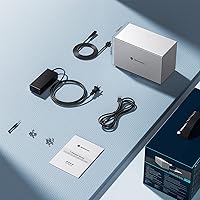
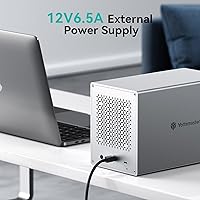
  • Power Supply: Ships with a 78W (12V, 6.5A) AC power adapter that powers all five drives from a single wall connection.
  • Cooling: An 80mm internal fan provides active airflow to manage heat during continuous or multi-drive operation.
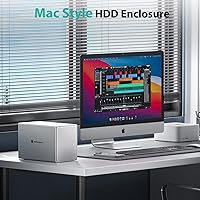
  • Chassis Material: The outer shell is constructed from aluminum alloy, which assists passive heat dissipation and adds structural rigidity over plastic alternatives.
  • RAID Support: No hardware RAID is supported; software RAID can be configured independently through macOS Disk Utility or Windows Storage Spaces.
  • OS Compatibility: Works natively with Windows and macOS without requiring third-party driver installation.
  • Tray Design: Each bay uses a push-latch removable tray; included screws attach drives to the tray to protect connectors during use.
  • Driver Requirement: Plug-and-play out of the box — no driver download or software installation is needed on either supported operating system.
  • Drive Protocol: All five bays communicate via the SATA III protocol, supporting standard 6Gbps SATA mechanical and solid-state drives.
  • SSD Speed: When paired with compatible SATA SSDs, the enclosure can sustain sequential read and write speeds of up to 260MB/s.
  • Unit Weight: The enclosure weighs 7.33 pounds, positioning it as a fixed desktop unit rather than a portable travel device.
  • Dimensions: The packaged unit measures 12.13 x 10.47 x 7.24 inches.
  • Model Number: The official Yottamaster model designation for this unit is PS500C3.

Related Reviews

ikuai 3.5″ USB 3.0 Hard Drive Enclosure
80%
93%
Ease of Setup
71%
Build Quality
62%
Cable Quality & Reliability
88%
Drive Compatibility
74%
Data Transfer Speed
More
ORICO DS500U3 5-Bay 3.5″ HDD Enclosure
72%
93%
Ease of Setup
91%
Drive Installation & Swap
67%
Drive Detection Reliability
72%
Transfer Speed
74%
Cooling & Thermal Management
More
ICY DOCK ToughArmor MB998SP-B 8-Bay 2.5” SATA/SAS HDD/SSD Mobile Rack Enclosure for 5.25″ Bay
87%
91%
Performance
88%
Cooling Efficiency
89%
Build Quality
93%
Ease of Installation
72%
Noise Level
More
Syba SY-ENC50122 5-Bay RAID Enclosure
71%
83%
Build Quality
78%
RAID Functionality
86%
Drive Compatibility
71%
USB 3.0 Performance
54%
eSATA Usability
More
Vantec NexStar GX 2.5″ USB-C Drive Enclosure
79%
88%
Build Quality
83%
Transfer Speed
91%
Ease of Setup
71%
Heat Management
63%
Drive Fit & Tolerance
More
IO CREST SY-ENC50127 USB 3.2 Type-C Dual Bay HDD + M.2 NVMe External Enclosure
83%
88%
Performance
93%
Ease of Setup
91%
Build Quality
87%
Data Transfer Speed
90%
Cooling/Heat Management
More
Vantec NST-371C31-BK NexStar Gx USB 3.1 Gen 2 Type-C 3.5″ SATA HDD/SSD Enclosure
84%
89%
Performance
94%
Ease of Setup
85%
Build Quality
92%
Compatibility with Systems
88%
Data Transfer Speed
More
Vantec NexStar JX 3.5″ HDD Enclosure
76%
93%
Ease of Setup
78%
Transfer Speed — USB
86%
Transfer Speed — eSATA
74%
Thermal Management
67%
Build Quality
More
Yottamaster PS500U3 5-Bay External HDD Enclosure
74%
84%
Build Quality
79%
Cooling Performance
61%
Transfer Speed
88%
Drive Compatibility
91%
Ease of Installation
More
IODD ST300 USB-C Virtual ODD Enclosure
82%
93%
Boot Reliability
91%
Virtual ODD Functionality
89%
Write Protection
76%
On-Device Interface (LCD & Keys)
67%
Build Quality
More

FAQ

No — and this is genuinely the most important thing to understand before purchasing. The Yottamaster PS500C3 5-Bay USB-C HDD Enclosure is a non-RAID device by design; each drive appears as a completely separate, independent volume on your computer. If you want some form of redundancy, you can set up software RAID through macOS Disk Utility or Windows Storage Spaces, but that requires manual configuration and is not the same as dedicated hardware RAID. If hardware RAID is a firm requirement, you will need to look at a different product.
It is shared across all five bays, not per drive. There is one USB 3.1 Gen1 connection between the enclosure and your computer, and all five drives compete for that same 5Gbps of bandwidth. For typical archiving or sequential file transfers to one or two drives at a time, this rarely causes noticeable problems. But if you are running intensive parallel read/write operations across multiple drives simultaneously, that ceiling will show up quickly.

Yes, absolutely. The trays accommodate both form factors, so you can have a combination of 3.5-inch mechanical drives and 2.5-inch SSDs running side by side without any compatibility issues. Just use the included screws to secure each drive firmly in its tray before sliding it back in.

Most modern Macs with Thunderbolt 3 or 4 ports also support USB 3.1 over the same physical USB-C connector, so the enclosure will typically connect and work. That said, you will only get USB 3.1 Gen1 speeds — not the higher throughput Thunderbolt is capable of. If your Mac has older USB-A ports only, you will need a USB-C to USB-A adapter, though speeds may be limited depending on the adapter.

No — this is a direct-attached storage device, meaning it connects to one computer via USB and is only accessible from that single machine. If you need shared network access across multiple devices, you need a NAS, which is an entirely different category of hardware. This drive dock has no network port or Wi-Fi capability whatsoever.

Most users describe it as a low, steady background hum rather than an intrusive noise, but it is not silent. In a quiet home office or bedroom you will hear it. If you plan to run this 24/7 on your desk, it is worth knowing that the fan does not fully spin down during idle periods. It is tolerable for most work environments, but noise-sensitive users should factor this in.

No. Because each bay operates as a completely independent volume with no interdependency between drives, a failure on one has zero effect on the others. You only lose the data on the failed drive itself. This is actually a practical advantage of a non-RAID setup — there is no shared parity or striping that could bring multiple drives down together.

Drives are not included — you supply your own 2.5-inch or 3.5-inch SATA HDDs or SSDs. The enclosure is sold as a bare unit. This is standard practice for multi-bay enclosures, and a big part of the appeal for buyers who want to consolidate spare drives they already own rather than buying everything new.

For most common drives, yes. A typical 5400 RPM desktop drive draws roughly 4 to 6 watts at peak load, so five of them together sit comfortably within the 78W budget. The issue arises with newer or higher-RPM drives that can draw significantly more per unit. If you are loading all five bays with power-hungry models, check the manufacturer's wattage specs and add them up before assuming the adapter will cover it — exceeding 78W combined can cause instability or drives failing to spin up.

The enclosure itself is completely file-system agnostic — it simply passes the drives through to your operating system, which handles all formatting. You can use NTFS, exFAT, APFS, HFS+, or any other format your OS supports. If you need drives to be readable on both Windows and macOS without extra software, exFAT is generally the most practical choice.