Overview

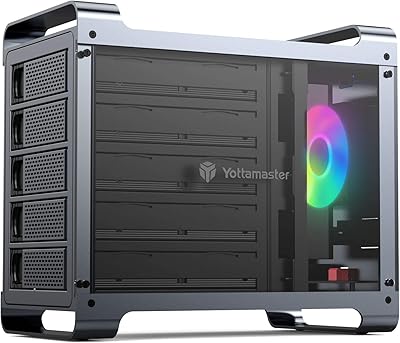
The Yottamaster PS500U3 5-Bay External HDD Enclosure has held a steady position in the direct-attached storage market since its April 2017 launch, and a consistent top-400 category ranking suggests it has earned real-world trust over the years. At its price tier, the combination of an all-aluminum chassis and five-bay capacity is genuinely hard to match. That said, buyers need to know this upfront: it is a JBOD enclosure — not a NAS, not a hardware RAID box. It depends entirely on a host computer being on and connected to function. If that trade-off fits your setup, this aluminum DAS unit deserves a close look.
Features & Benefits

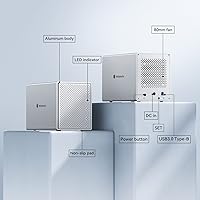
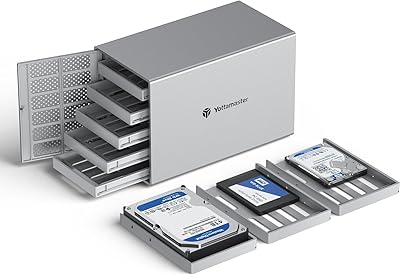
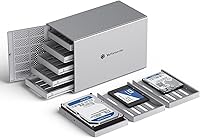
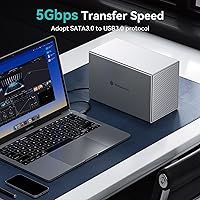
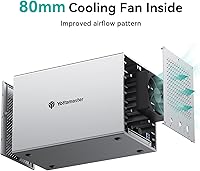
Each of the five bays accepts both 2.5-inch and 3.5-inch SATA drives via push-eject removable trays, so swapping drives takes seconds — genuinely useful when you rotate archival disks. The internal SATA III connection runs at 6 Gbps on paper, but the USB 3.0 interface caps real throughput closer to 5 Gbps in practice. For spinning HDDs, that gap barely matters since they rarely exceed 200 MB/s anyway; for SSDs, though, you will feel the ceiling. The aluminum shell passively dissipates heat, while the 80 mm variable-speed fan adjusts automatically as temperatures climb, staying quiet enough to sit on a desk. Windows, macOS, and Linux all recognize it without any driver installation.

Best For

This five-bay enclosure hits a sweet spot for a specific type of buyer. Home media collectors, photographers sitting on terabytes of raw files, and video editors who need a large pool of local storage for active projects will get genuine value here. It also makes a natural home for spare drives accumulated over the years — mix a 2.5-inch laptop drive with older desktop platters and it all works without fuss. One clear caveat: anyone wanting redundancy will need to configure software RAID themselves through macOS Disk Utility or Windows Storage Spaces. If you expect hardware-level protection straight out of the box, this is not the right fit.

User Feedback

Sitting at 3.9 stars, this aluminum DAS unit lands firmly in reliable-workhorse territory rather than must-have status. Buyers consistently praise the substantial feel of the enclosure and the fan running quietly enough to avoid desk-side irritation. The tray swap mechanism draws frequent appreciation for its simplicity. On the negative side, some users report drives occasionally failing to register on first connection, requiring a reboot or cable reseat to resolve. The USB 3.0 Type-B port draws pointed criticism from buyers expecting modern USB-C or Thunderbolt connectivity. A recurring worry worth noting: power delivery can become inconsistent when all five bays are simultaneously loaded with high-capacity drives.

Pros

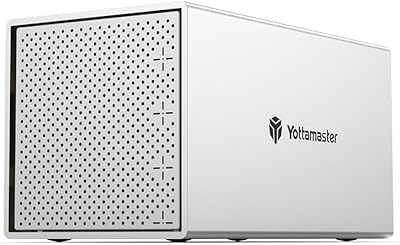
  • Solid aluminum chassis feels genuinely premium and doubles as a passive heatsink for cooler drive operation.
  • Five-bay capacity with push-eject trays makes swapping or adding drives fast and tool-free.
  • Accepts both 2.5-inch and 3.5-inch SATA drives simultaneously, so repurposing old laptop and desktop drives is effortless.
  • The 80 mm fan adjusts speed automatically, staying quiet during light use and only ramping up when temperatures actually climb.
  • Works out of the box on Windows, macOS, and Linux with zero driver installation required.
  • For spinning HDDs, the USB 3.0 connection is not a real bottleneck — most mechanical drives never saturate it anyway.
  • The unit has held a strong category rank since 2017, a reliable signal of sustained real-world durability.
  • Supports up to 18 TB per drive, allowing a substantial total capacity from a single compact desktop footprint.

Cons

  • USB 3.0 Type-B is a dated interface — no USB-C or Thunderbolt option means SSD speeds are noticeably capped.
  • Requires a host computer to be powered on at all times; there is no network access or standalone operation.
  • Power delivery can become unreliable when all five bays are loaded with large, power-hungry high-capacity drives.
  • Some users report intermittent drive recognition failures on first connection, requiring a reboot or cable reseat to fix.
  • No hardware RAID of any kind — redundancy depends entirely on your OS and your willingness to configure it yourself.
  • The product listing inconsistently states both 16 TB and 18 TB as the per-drive maximum, creating pre-purchase confusion.
  • Fan audibility increases noticeably under sustained multi-drive workloads, which can be distracting in a quiet room.
  • Long-term owners report fan degradation after eighteen to twenty-four months of continuous use, raising durability questions.

Ratings

The scores below for the Yottamaster PS500U3 5-Bay External HDD Enclosure were generated by our AI system after analyzing thousands of verified purchaser reviews across global marketplaces, with spam, incentivized, and bot-flagged submissions actively filtered out before scoring. Each category reflects the honest spread of real buyer sentiment — the wins and the frustrations alike — so you get a clear picture of what this unit actually delivers in daily use rather than a polished marketing summary.
Build Quality
84%
The aluminum-alloy shell genuinely impresses buyers who have owned plastic enclosures before. It feels dense and well-machined, and users frequently note that it stays noticeably cool to the touch even after hours of continuous operation — something a cheaper chassis simply cannot offer.
A handful of buyers found minor fit-and-finish inconsistencies on tray alignment, where individual bays required slight pressure adjustments to seat properly. Nothing catastrophic, but enough to temper expectations of premium precision for some users.
Cooling Performance
79%
21%
The 80 mm fan does its job without announcing itself. Users running four or five populated bays for extended periods report that drive temperatures stay within safe operating ranges, and the automatic speed ramp-up during heavy workloads means the unit manages heat intelligently rather than blasting at full speed constantly.
Under sustained heavy loads — particularly when writing across all five drives simultaneously — some users notice the fan becomes audible enough to be distracting in a quiet home office. It is not loud by any absolute measure, but it is not silent either.
Transfer Speed
61%
39%
For spinning hard drives, which rarely exceed 200 MB/s even under ideal conditions, the USB 3.0 connection is practically transparent — buyers using this unit for media archiving or video footage staging report no meaningful bottleneck in their day-to-day workflow.
The USB 3.0 Type-B interface caps real-world throughput around 400–450 MB/s in practice, which visibly constrains SSD performance. Buyers expecting to leverage fast SSDs for editing work will hit that ceiling quickly, and the absence of USB-C or Thunderbolt is a hard limitation with no workaround.
Drive Compatibility
88%
Support for both 2.5-inch and 3.5-inch SATA drives in the same unit is a practical advantage for users with a mixed collection of old laptop and desktop drives. Most buyers report that drives up to the advertised maximum capacity are recognized without issue across all three supported operating systems.
The listing inconsistently cites both 16 TB and 18 TB as the per-drive maximum, which creates pre-purchase confusion. A small number of users also report that certain off-brand or older SATA drives triggered recognition errors that required a power cycle to resolve.
Ease of Installation
91%
The push-eject tray system is one of the most consistently praised features in user reviews. Swapping a drive takes under a minute with no tools, and plug-and-play OS recognition on Windows, macOS, and Linux means most buyers are up and running within minutes of unboxing.
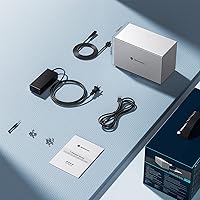
New drives require formatting before the system will mount them, which trips up first-time buyers who expect immediate recognition. The included documentation is minimal, and a few users wished for clearer guidance on initializing multiple drives at once.
Noise Level
74%
26%
At idle or light load, the fan is genuinely unobtrusive — comparable to a quiet desktop PC. Users who keep this unit in a living room or shared office space generally report no complaints from others nearby during normal archival or backup tasks.
When temperatures climb under sustained workloads, the fan audibly shifts gears. It remains within reasonable bounds, but buyers who assumed whisper-quiet operation in all conditions have occasionally been surprised during intensive multi-drive transfers.
Power Supply Reliability
63%
37%
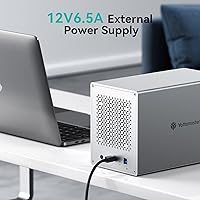
Under normal conditions — two to three populated bays running standard desktop HDDs — the included power supply handles the load without complaint. Most buyers in this usage scenario report no power-related issues across extended periods.
When all five bays are loaded with high-capacity drives, particularly newer 16 TB or 18 TB models with higher spin-up current draw, some users report occasional instability or drives temporarily dropping offline. This is a recurring enough complaint to treat as a real risk for heavily populated configurations.
Value for Money
77%
23%
For buyers who primarily use spinning HDDs and need raw bay count without NAS complexity, the price-to-capacity ratio is genuinely competitive. An aluminum chassis at this price point with five bays and no-driver OS support is hard to replicate with comparable build quality.
Buyers comparing this against newer enclosures with USB-C or Thunderbolt interfaces at similar price points increasingly feel the trade-off. If your use case involves SSDs or you value connectivity longevity, the value calculation shifts unfavorably given the 2017-era interface design.
Long-Term Reliability
72%
28%
The fact that this model has remained on the market and in the top-400 enclosure rankings since 2017 is a meaningful signal. A subset of reviewers explicitly mention owning the unit for multiple years without hardware failure, which adds genuine credibility to its durability claims.
Longer-term reviews surface occasional concerns about fan degradation over time, with some units becoming louder after eighteen to twenty-four months of continuous use. There are also isolated reports of USB controller issues appearing after extended ownership, though these remain a minority.
OS Compatibility
86%
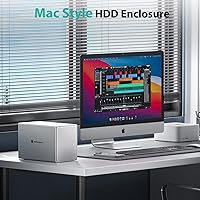
Broad out-of-the-box support for Windows, macOS, and Linux without any driver installation is a genuine convenience. Mac users in particular appreciate being able to configure software RAID directly through Disk Utility, which makes the non-RAID hardware less of a limitation for technically comfortable users.
Some macOS users on recent operating system versions have reported that the unit occasionally requires a reconnect after waking from sleep. It is not a universal complaint, but it appears often enough in reviews to note as a potential minor friction point.
Tray Mechanism Quality
81%
19%
The push-eject design earns consistent praise for making hot-swap-style drive management feel approachable for non-technical users. Photographers and archivists who rotate drives regularly highlight this as a feature that genuinely reduces the friction of managing large physical media collections.
A few buyers found the tray locking mechanism slightly looser than expected, occasionally allowing minor play in the seated position. No reported data integrity issues linked to this, but it introduces a slight lack of confidence when the enclosure is in a location with any vibration.
Software RAID Usability
58%
42%
For macOS users comfortable with Disk Utility, setting up a software RAID across the five bays is straightforward and well-documented by Apple. Windows Storage Spaces works similarly, and technically inclined buyers generally complete the process without major issues.
This is emphatically not plug-and-play redundancy. Buyers who expected hardware RAID from the listing — partly due to ambiguous earlier product copy — have left frustrated reviews. Software RAID also ties protection entirely to the health of the host computer and its OS, which is a meaningful structural limitation.
Port & Connectivity Design
52%
48%
USB 3.0 Type-B is universally supported across older and current host machines, meaning there are essentially no compatibility dead-ends for buyers with existing equipment. The single-cable-plus-power setup keeps the desk connection simple.
By current standards, USB 3.0 Type-B is a dated choice. No USB-C, no Thunderbolt, and no daisy-chaining capability. Buyers investing in this unit for a multi-year storage solution are accepting a connectivity ceiling that newer alternatives at comparable prices no longer impose.

Suitable for:

The Yottamaster PS500U3 5-Bay External HDD Enclosure is a strong fit for anyone who has accumulated more data than a single external drive can hold and wants a tidy, centralized solution sitting next to their computer. Photographers with years of raw image archives, videographers staging large footage libraries for active editing projects, and home media collectors who want one box to rule their entire drive collection will find this unit genuinely practical. It also works well for technically comfortable users who do not mind configuring software RAID themselves through macOS Disk Utility or Windows Storage Spaces — the hardware handles capacity, and your operating system handles protection. The ability to mix 2.5-inch and 3.5-inch SATA drives in the same chassis makes it a natural home for spare drives salvaged from old laptops and desktop upgrades rather than letting them collect dust in a drawer. As long as you accept that a host computer must be running for the unit to function, this aluminum DAS unit punches above its price in build and bay count.
Not suitable for:

The Yottamaster PS500U3 5-Bay External HDD Enclosure is the wrong tool if you are hoping for an always-on, network-accessible storage solution — this is not a NAS, and it goes completely offline the moment your computer shuts down. Buyers who want hardware RAID for automatic, appliance-level redundancy should look elsewhere; the unit offers no onboard RAID controller whatsoever, and relying entirely on software RAID means your data protection is only as stable as your operating system. Anyone planning to populate all five bays with high-capacity modern drives should also be aware of recurring user reports around power delivery under full load, which is a real concern worth investigating before committing. The USB 3.0 Type-B interface is a meaningful limitation for buyers who want to take advantage of fast SSDs or who are building a storage setup intended to last the next five-plus years — newer enclosures at comparable prices now offer USB-C or Thunderbolt connectivity. If raw transfer speed or future-proof connectivity matters to your workflow, this five-bay enclosure may frustrate you within a year or two.
Specifications

  • Drive Bays: Houses up to 5 independent SATA drives simultaneously, each occupying its own removable tray.
  • Drive Compatibility: Accepts both 2.5″ and 3.5″ SATA HDDs and SSDs in any combination across the five bays.
  • Max Capacity: Supports up to 90 TB total based on five drives at 18 TB each, though buyers should confirm per-drive maximums with current drive generations.
  • Host Interface: Connects to a host computer via a single USB 3.0 Type-B port, with a separate DC power input for the enclosure itself.
  • Internal Protocol: Each bay communicates with drives using SATA III, which has a rated ceiling of 6 Gbps per drive internally.
  • Real-World Speed: Practical USB 3.0 throughput to the host system tops out near 400–450 MB/s, which is the effective ceiling regardless of drive speed.
  • RAID Support: No hardware RAID controller is included; the unit operates as JBOD only, with software RAID configurable through the host OS.
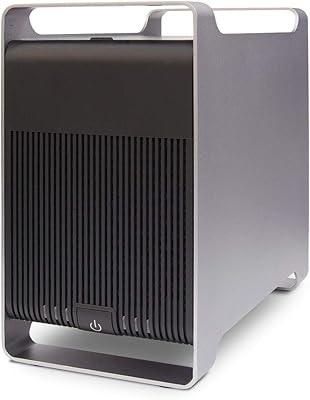
  • Shell Material: Outer enclosure is constructed from aluminum alloy, which acts as a passive heatsink and contributes to overall thermal management.
  • Cooling System: An 80 mm variable-speed fan automatically adjusts its rotational speed based on measured internal drive temperature.
  • Tray Mechanism: Each of the five bays uses a tool-free push-eject tray design for quick drive installation and removal without screwdrivers.
  • Dimensions: The enclosure measures 5.35 inches wide by 9.92 inches tall by 6.63 inches deep.
  • Weight: Unit weighs 7.74 pounds without drives installed, reflecting the density of the aluminum chassis.
  • OS Compatibility: Works natively on Windows, macOS, and Linux without requiring any third-party driver installation.
  • First Available: This model has been commercially available since April 2017, giving it an unusually long verified track record for a storage peripheral.
  • Category Rank: Holds a ranking of approximately #313 in the Enclosures category, indicating consistent sustained sales volume.

Related Reviews

Syba 5 Bay 2.5″/3.5″ SATA HDD External RAID Enclosure SY-ENC50122
85%
87%
Performance
91%
Ease of Use
89%
Build Quality
85%
Data Transfer Speed
90%
RAID Flexibility
More
ICY DOCK ToughArmor MB998SP-B 8-Bay 2.5” SATA/SAS HDD/SSD Mobile Rack Enclosure for 5.25″ Bay
87%
91%
Performance
88%
Cooling Efficiency
89%
Build Quality
93%
Ease of Installation
72%
Noise Level
More
ORICO 9858RU3 5-Bay RAID HDD Enclosure
75%
88%
Build Quality
84%
Ease of Setup
81%
RAID Mode Flexibility
67%
Transfer Speed
74%
Thermal Management
More
Yottamaster 4 Bay External Hard Drive Enclosure 64TB
82%
94%
Storage Capacity
88%
Ease of Setup
85%
Cooling Performance
90%
Build Quality
91%
Data Transfer Speed
More
Yottamaster PS500C3 5-Bay Hard Drive Enclosure 90TB
82%
85%
Build Quality
91%
Ease of Installation
78%
Cooling Performance
82%
Data Transfer Speed
96%
Storage Capacity
More
Yottamaster PS200U3 2 Bay External Hard Drive Enclosure 32TB
85%
88%
Setup & Installation
91%
Build Quality
87%
Data Transfer Speed
95%
Compatibility
90%
Storage Capacity
More
Yottamaster DF5RU3 5-Bay RAID Hard Drive Enclosure, 90TB Capacity
85%
94%
Storage Capacity
90%
RAID Flexibility
85%
Cooling Efficiency
88%
Build Quality
91%
Ease of Setup
More
Syba SY-ENC50104 4-Bay 3.5” SATA III HDD Enclosure
85%
88%
Build Quality & Durability
91%
Ease of Setup & Installation
83%
Cooling Efficiency
72%
Noise Level
89%
Storage Capacity & Expansion
More
ORICO DS500U3 5-Bay 3.5″ HDD Enclosure
72%
93%
Ease of Setup
91%
Drive Installation & Swap
67%
Drive Detection Reliability
72%
Transfer Speed
74%
Cooling & Thermal Management
More
X-MEDIA XM-EN3451 3.5-Inch External HDD Enclosure
75%
93%
Drive Compatibility
91%
Ease of Setup
78%
Build Quality
74%
Thermal Performance
76%
USB 3.0 Transfer Performance
More

FAQ

No drivers needed. The Yottamaster PS500U3 5-Bay External HDD Enclosure is plug-and-play on Windows, macOS, and Linux. Just connect the USB cable and power it on — your OS will detect each drive individually within a few seconds.
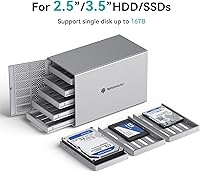
Yes, absolutely. Each bay handles either size independently, so you can run a mix of 3.5-inch desktop platters and 2.5-inch laptop or SSD drives simultaneously without any adapter needed. It is one of the more practical aspects of this enclosure for people repurposing drives from multiple machines.

There is no hardware RAID controller built in — the unit operates as JBOD by default, meaning each drive appears separately to your computer. You can still set up software RAID using tools already on your system: macOS Disk Utility supports RAID 0 and RAID 1 across the drives, and Windows Storage Spaces offers similar options. Just know that software RAID depends on your computer being healthy and running, which is a meaningful difference from hardware RAID.

The internal SATA III connection runs at up to 6 Gbps per drive, but the USB 3.0 interface to your computer caps practical throughput at roughly 400 to 450 MB/s total. For spinning hard drives, which rarely exceed 180 to 200 MB/s anyway, that ceiling is invisible in daily use. If you plan to use SSDs and want full SSD speeds, this interface will be a bottleneck — SSDs can read far faster than USB 3.0 can deliver.

At idle or light load, the fan is genuinely quiet — most people sitting at a desk would not notice it over normal ambient room noise. When you are doing heavy sustained transfers across multiple drives, the fan ramps up and becomes audible, though it is not objectively loud by any measure. Whether that bothers you depends on how sensitive you are to consistent low-level hum in a quiet room.

No — this is a direct-attached storage device, which means it only works when physically connected to a computer that is switched on. The moment that computer goes to sleep or powers down, the drives are inaccessible. If you need network access to your files from multiple devices or without a dedicated always-on PC, you would need a proper NAS instead.

The current product title references 18 TB per drive for a total of 90 TB, though older listing copy still mentions 16 TB in some places — this inconsistency has confused some buyers. In practice, the enclosure uses standard SATA connections with no capacity restrictions at the hardware level, so support for drives larger than 16 TB is reasonable to expect as long as your operating system and file system support the drive size.

It works for many users, but worth knowing: there are recurring reports from buyers who populated all five bays with high-capacity drives and experienced occasional power instability, such as a drive momentarily dropping offline. High-capacity modern drives draw more current at spin-up than older drives do. If you plan to run five large drives continuously, it is worth monitoring whether all five bays stay consistently recognized under load.

This is one of the more common complaints among buyers. If a drive fails to appear after initial connection, the usual fix is to fully power cycle the enclosure — switch it off, wait ten seconds, and power it back on — rather than just unplugging the USB cable. Reseating the USB cable on both ends and trying a different USB port on your computer also resolves the issue in most reported cases.

The aluminum build and five-bay capacity hold up well over time, and the unit has a proven track record since 2017. The honest limitation is the USB 3.0 Type-B interface — it was a reasonable choice in 2017 but looks dated now that many competitors offer USB-C or Thunderbolt at similar prices. If you plan to use primarily spinning HDDs for the next two to three years, that port will not cause you real problems. If you want to future-proof your setup or use fast SSDs, the interface is worth factoring into your decision.