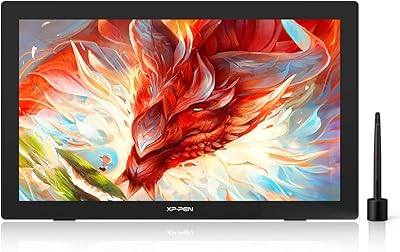
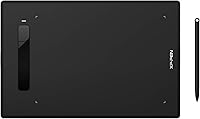
XP-Pen Star G960S Graphics Drawing Tablet
Overview
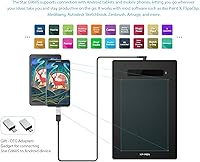
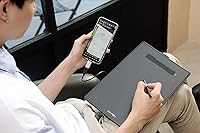
The XP-Pen Star G960S Graphics Drawing Tablet sits in a sweet spot for anyone stepping into digital art without breaking the bank. XP-Pen has built a solid reputation as a credible alternative to pricier brands, and this drawing tablet reflects that: a generous 9x6-inch workspace, reasonable build quality, and enough capability to keep a beginner engaged for months. What genuinely stands out is Android support — plug it into a compatible phone or tablet and you have a portable sketching setup most competitors skip at this price tier. Just be clear-eyed: this is a great starter tool, not something a professional studio would rely on for production work.
Features & Benefits
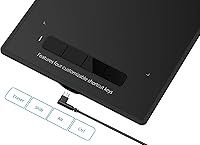
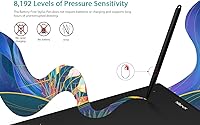
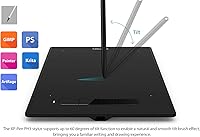
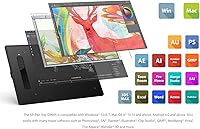
The PH3 stylus is where this XP-Pen tablet earns most of its praise. It is battery-free, so you never have to stop mid-sketch to charge a pen — a small thing that matters enormously during long creative sessions. With 8192 levels of pressure sensitivity, line variation feels natural: thin confident strokes, heavy shaded fills, all responding predictably. The 60-degree tilt support adds another layer of control for shading at angles, much like working with a real brush or pencil. Four programmable shortcut keys handle repetitive commands like undo or brush size, and the tablet connects via USB and works across Windows, Mac, Android, and Chrome OS with broad software compatibility including Photoshop, Krita, and Clip Studio.
Best For
This drawing tablet is a natural fit for beginners and hobbyists who want to explore digital art without committing to a premium price tag. Art students and animation learners will appreciate the active area — 9x6 inches gives you real room to work, not a cramped postage-stamp surface. Online teachers find it useful too, particularly for handwriting on digital whiteboards or annotating slides in real time. What may surprise some buyers is how well it functions as a portable sketching companion when paired with an Android phone or tablet. Manga and comic artists using MediBang or Clip Studio will feel right at home here. It is not the right pick for high-end professional print output.
User Feedback
Buyers consistently highlight the pen feel as a strong point — the surface texture and stylus response draw frequent praise, especially from people coming from paper sketching. The active area size relative to the price is another recurring compliment. On the flip side, some users run into friction during initial driver setup; it is not always plug-and-play on every system, and tweaking pressure curves in the settings takes a bit of patience. The Android pairing mostly works well, though a handful of reviewers mention occasional connection hiccups with specific phone models. A few buyers also note the shortcut keys feel stiff at first, though this tends to loosen up with regular use. Overall, feedback skews positive for casual creators.
Pros
- Battery-free stylus means uninterrupted drawing sessions with no charging downtime.
- The 9x6-inch active area feels genuinely spacious compared to most rivals in this price range.
- 8192 pressure levels give the pen a natural, expressive feel for illustration and lettering work.
- Android support lets you sketch on a compatible phone or tablet — a rare feature at this price.
- Works with a wide range of software including Photoshop, Krita, GIMP, and Clip Studio.
- Four programmable shortcut keys meaningfully speed up repetitive actions like undo and zoom.
- Tilt support up to 60 degrees adds a natural shading dimension to brushwork.
- Light enough at 1.1 pounds to drop in a bag and take anywhere.
- XP-Pen backs it with a one-year warranty and lifetime technical support for peace of mind.
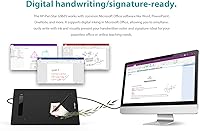
- Microsoft Office inking support makes it a practical tool for educators annotating slides.
Cons
- Driver installation can be frustrating, especially for Mac users encountering recognition issues.
- Shortcut keys feel noticeably stiff out of the box and take time to loosen up.
- Android pairing is not always reliable across all device and OS version combinations.
- No wireless connectivity — the USB cable is the only option, which limits true portability.
- Pressure curve settings need manual tuning; the default calibration does not suit every hand.
- Surface texture wears down visibly in heavy-use zones over time.
- No side buttons on the stylus, which limits quick-access shortcuts for experienced users.
- Some niche software requires extra configuration before full pressure sensitivity kicks in.
Ratings
The scores below for the XP-Pen Star G960S Graphics Drawing Tablet were generated by AI after systematically analyzing verified buyer reviews from multiple global markets, with spam, bot-submitted, and incentivized feedback actively filtered out. The result is an honest, balanced picture of where this drawing tablet genuinely delivers and where real users have run into friction. Both the strengths that keep buyers happy and the pain points that show up repeatedly in critical reviews are transparently reflected in every score.
Value for Money
Pen Sensitivity & Response
Active Area Size
Android Compatibility
Build Quality & Feel
Stylus Comfort & Design
Tilt Support
Driver & Software Setup
Shortcut Keys
Software Compatibility
Portability
Surface Texture & Drawing Feel
Compatibility with Microsoft Office
Warranty & Support
Suitable for:
The XP-Pen Star G960S Graphics Drawing Tablet is a strong fit for anyone taking their first real steps into digital art without wanting to spend a lot to find out if it sticks. Art students and design program enrollees will get genuine mileage out of the 9x6-inch workspace, which is spacious enough to build real drawing habits rather than cramped wrist-flick movements. Online educators and remote teachers will find it practical for handwriting annotations in OneNote or drawing on digital whiteboards during live classes — it handles that workload reliably. Hobbyist comic and manga artists using free or low-cost apps like MediBang, Krita, or Clip Studio will find the pressure-sensitive stylus more than capable for their needs. Perhaps most surprisingly, Android users who want a portable sketching setup that works with a phone or tablet will find this drawing tablet genuinely useful on the go — that flexibility is rare at this price tier.
Not suitable for:
The XP-Pen Star G960S Graphics Drawing Tablet is not the right tool for professional illustrators, graphic designers, or animators who depend on their tablet for client-facing production work. The build is solid for casual use but lacks the durability and precision consistency that heavy daily professional use demands over months and years. Users who are not comfortable doing a bit of driver troubleshooting should also think carefully — installation does not always go smoothly on every system, particularly on Mac, and pressure curve customization requires some patience to dial in. Anyone expecting wireless freedom will be disappointed, as the USB cable connection is the only option and managing it in mobile or classroom settings gets old quickly. Buyers cross-shopping with professional-tier brands should understand that while the Star G960S punches above its weight, it is not a substitute for a premium tablet — it is a capable, honest entry-level tool, and it should be evaluated as exactly that.
Specifications
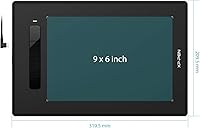
- Active Area: The working surface measures 9 x 6 inches, providing a spacious drawing zone suitable for full arm-movement strokes and detailed illustration work.
- Dimensions: The tablet body measures 12.6 x 8.27 x 0.39 inches, keeping it slim enough to slide into most laptop bags without adding noticeable bulk.
- Weight: The tablet weighs 1.1 pounds, making it light enough for daily transport between home, classroom, or studio setups.
- Pressure Sensitivity: The included PH3 stylus delivers 8192 levels of pressure sensitivity, enabling fine control over line weight and stroke variation across compatible applications.
- Tilt Support: The PH3 stylus supports tilt recognition up to 60 degrees, allowing natural brush angle effects for shading and hatching techniques.
- Stylus Type: The PH3 is a fully passive, battery-free stylus that requires no charging and adds no battery weight to the pen during use.
- Shortcut Keys: Four programmable shortcut keys are built into the tablet body and can be remapped to any frequently used command via the XP-Pen driver software.
- Connectivity: The tablet connects to host devices via USB and does not support Bluetooth or any wireless connection method.
- OS Support: Compatible operating systems include Windows 10, 8, and 7; Mac OS X 10.10 and above; Android 6.0 and above; and Chrome OS 88.0.4324.109 or above.
- Software Compatibility: Works with a wide range of creative applications including Photoshop, Illustrator, SAI, Krita, GIMP, Clip Studio Paint, MediBang, Blender 3D, and Fire Alpaca, among others.
- Office Support: Supports digital inking natively in Microsoft Office applications including OneNote, Word, and PowerPoint for handwriting input and annotation.
- Android Support: The tablet can connect to Android phones and tablets running Android 6.0 or higher, enabling mobile sketching with compatible apps like ibis Paint X, FlipaClip, and MediBang.
- Warranty: XP-Pen provides a one-year limited hardware warranty covering manufacturing defects, alongside lifetime technical support for driver and software issues.
- Model Number: The official model number is StarG960S, used when downloading drivers or contacting XP-Pen support to ensure the correct software version is installed.
- Item Category: Ranked at number 507 in the Computer Graphics Tablets category on Amazon, reflecting a strong and sustained presence in a competitive market segment.
- Release Date: The tablet was first made available for purchase on April 29, 2020, and has not been discontinued by the manufacturer as of the time of writing.
Related Reviews
XP-Pen Star03 V2 Drawing Tablet
XP-Pen Deco 03 Drawing Tablet
XP-Pen Deco MW Wireless Drawing Tablet
XP-Pen Star G640 6x4 Graphics Tablet
XP-Pen Deco 01 V3 Drawing Tablet
XP-Pen Deco Mini7 V2 Drawing Tablet
XP-Pen Artist Pro 14 Gen2 Pen Display
XP-Pen Deco LW Wireless Drawing Tablet
XP-Pen Artist 13.3 Pro Drawing Display Tablet