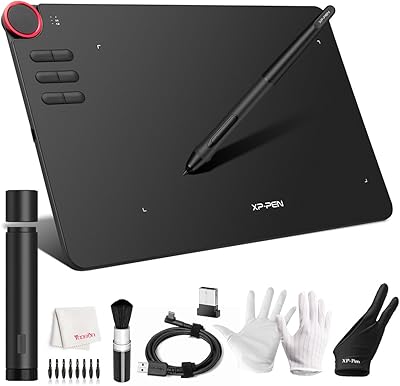
XP-Pen Artist Pro 14 Gen2 Pen Display
Overview
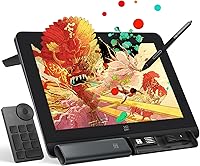
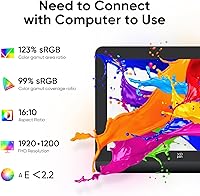
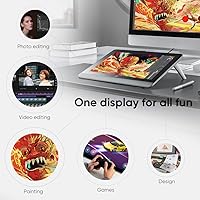
The XP-Pen Artist Pro 14 Gen2 Pen Display sits in an interesting position in the market — capable enough to satisfy working illustrators, yet priced well below the Wacom Cintiq options it directly competes with. XP-Pen has spent years quietly building credibility among digital artists, and this drawing monitor reflects that maturation. The 14-inch screen is a deliberate, practical choice: large enough for detailed work, compact enough to slip into a bag without much fuss. It earned a Good Design Award in 2023, a meaningful signal of genuine build quality. One critical thing to note before purchasing: this pen display requires a connected computer to function — it is not a standalone device.
Features & Benefits
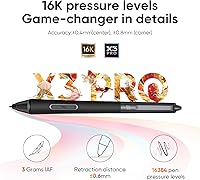
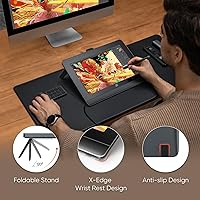
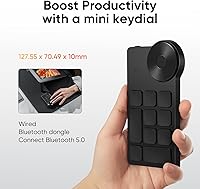
What makes the Artist Pro 14 Gen2 stand out in daily use is the X3 Pro stylus — battery-free, and packing 16,384 pressure levels that register subtle shifts in hand pressure, from thin hairlines to broad fills, with a naturalness that belies its price point. The fully laminated screen keeps the cursor closely aligned with the pen tip, cutting down the parallax gap that frustrates users of cheaper, non-laminated displays. Color reproduction is strong for this tier: 123% sRGB area coverage and a delta-E under 2.2 make it reliable for serious illustration and client work. The bundled foldable stand, wrist rest, and wireless Keydial remote mean no extra purchases on day one. A long-press on the power button also flips the unit into screenless tablet mode, which is a practical option to have.
Best For
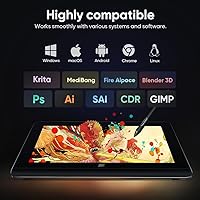
This drawing monitor is a natural fit for illustrators and concept artists who need honest color-accurate output for client-facing work, where a poorly calibrated screen can mean expensive revision rounds. Students stepping up from a screenless tablet will find the transition intuitive — drawing where you look genuinely shortens the learning curve. Animators and storyboard artists benefit from 60-degree tilt support, which makes broad, sweeping strokes feel far more organic. The wide OS compatibility spanning Windows, macOS, Android, Chrome OS, and Linux makes the Artist Pro 14 Gen2 a sensible choice for creatives who hop between platforms. Its compact footprint and built-in stand also suit smaller studio setups where desk space is a constant negotiation.
User Feedback
Across a wide range of reviews, the pen feel draws consistent praise — most buyers describe the X3 Pro as punching above its weight, with pressure sensitivity that feels more refined than the price tag implies. Screen impressions also skew positive, with color vibrancy and brightness holding up well for the majority of users in typical indoor lighting. The wrist rest and Keydial remote tend to earn genuine appreciation rather than being dismissed as filler. The recurring friction point, though, is driver setup: initial configuration can be finicky, and some users report needing multiple attempts before tablet and software communicate properly. The 3-in-1 cable also catches buyers off guard, often shipping in a small white box inside the main package that is easy to overlook.
Pros
- The X3 Pro stylus delivers pressure sensitivity that feels noticeably more refined than what you would expect at this price tier.
- Full lamination keeps the pen tip and on-screen cursor closely aligned, cutting down the parallax that frustrates users of cheaper displays.
- Color accuracy with a delta-E under 2.2 makes this drawing monitor dependable for professional illustration and client-ready output.
- The bundled foldable stand, wrist rest, and Keydial remote let you start working ergonomically right out of the box.
- Broad OS compatibility across Windows, macOS, Android, Chrome OS, and Linux is genuinely rare at this price level.
- The wireless Keydial dial adapts more fluidly to individual workflows than fixed side-button layouts typically allow.
- TUV SUD certified blue light reduction is a thoughtful feature for artists putting in long daily sessions.
- Dual-mode lets you switch to screenless tablet operation with a simple long-press, adding flexibility without extra hardware.
- The compact 14-inch footprint fits naturally on a modest desk and travels without much hassle.
- A Good Design Award 2023 win reflects industrial design care that is evident in the build quality and finish.
Cons
- Driver software setup can be genuinely frustrating, with some users needing multiple attempts before tablet and software communicate reliably.
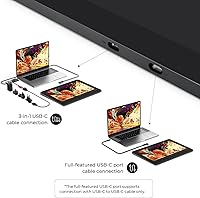
- The 3-in-1 cable ships in a small secondary box inside the main package, making it easy to overlook during unboxing.
- Screen brightness can struggle in very bright rooms or near sunlit windows, making accurate color evaluation harder than expected.
- Artists transitioning from a Wacom setup may face a noticeable adjustment period with pen feel and driver behavior differences.
- Long-term driver support and software update cadence are less predictable than what more established brands consistently provide.
- The 16:10 aspect ratio is not universally preferred and may feel unfamiliar to artists accustomed to standard widescreen proportions.
- Android compatibility requires USB 3.1 with DP 1.2 support, which many Android devices simply do not offer.
- Cable management can become untidy during extended sessions, particularly on desks where rear port access is already limited.
- The overall package weight with all accessories included makes truly lightweight travel a bit more of a commitment than expected.
Ratings
The XP-Pen Artist Pro 14 Gen2 Pen Display has been evaluated through AI-driven analysis of thousands of verified global user reviews, with spam, bot-generated submissions, and incentivized feedback actively filtered out to ensure each score reflects only genuine buyer experience. The results give equal weight to the areas where this drawing monitor genuinely excels and the friction points that real users run into during daily creative work. Every score is calibrated to give you a transparent, complete picture before you commit to a purchase.
Pen Feel & Pressure Sensitivity
Color Accuracy
Parallax & Lamination
Value for Money
Driver & Software Experience
Display Quality
Build Quality & Design
Ergonomics & Accessories
OS & Software Compatibility
Shortcut Controls
Portability & Footprint
Eye Comfort
Setup & Out-of-Box Experience
Dual-Mode Functionality
Suitable for:
The XP-Pen Artist Pro 14 Gen2 Pen Display is built for digital artists who have outgrown screenless tablets but aren't ready to absorb the steep cost of Wacom's professional lineup. Illustrators and concept artists doing client-facing work will appreciate the color accuracy most — a display that honestly represents your palette means fewer correction rounds and more confidence when sending final files. The 14-inch format sits in a practical size range for detailed work without demanding a large dedicated desk, which makes it a strong fit for students sharing workspaces or creatives who move between locations. Animators and storyboard artists who depend on fluid, expressive strokes will get real mileage from the tilt support and high pressure sensitivity, which reward a natural and varied hand. Anyone juggling multiple operating systems across Windows, macOS, Linux, Android, or Chrome OS can use this drawing monitor without hitting compatibility walls that plague some competing brands.
Not suitable for:
Anyone expecting a standalone drawing device should stop and reconsider before purchasing — the XP-Pen Artist Pro 14 Gen2 Pen Display requires a computer connection at all times, and this detail catches a surprising number of buyers off guard after unboxing. Artists who regularly work on panoramic compositions or highly detailed environmental scenes may find 14 inches limiting, particularly if they're used to a larger working canvas. If you have little patience for troubleshooting software or navigating driver configurations, the initial setup process can genuinely test your resolve, especially on less common system setups. Professionals deeply embedded in the Wacom ecosystem — relying on custom pressure curves, specific driver profiles, or niche compatible accessories — may find the friction of switching outweighs the cost savings. This drawing monitor may also underwhelm artists who work predominantly in bright, sunlit environments, where the display's peak brightness can make precise color evaluation harder than ideal.
Specifications
- Screen Size: The active display measures 14 inches diagonally, providing a working area that sits comfortably between portable convenience and enough real estate for detailed illustration.
- Aspect Ratio: The 16:10 panel ratio gives the canvas a slightly taller footprint than standard widescreen displays, which suits portrait-oriented and square-format compositions particularly well.
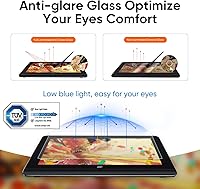
- Display Type: The screen is built with fully laminated, anti-glare etched glass that minimizes the gap between the glass surface and pixel layer, reducing parallax and diffusing ambient reflections.
- Color Gamut: The panel covers 99% of the sRGB color space by volume and reaches 123% of the sRGB area ratio, producing vivid, saturated colors well beyond a standard monitor range.
- Color Accuracy: Factory calibration achieves a delta-E value of less than 2.2, which keeps reproduced colors close enough to the intended values for professional and client-facing illustration output.
- Viewing Angle: A 178-degree wide viewing angle means contrast and color remain consistent whether you are working straight-on or viewing the display at an angle from a tilted stand position.
- Pressure Levels: The X3 Pro stylus detects 16,384 discrete pressure levels, translating subtle shifts in hand pressure into smooth line weight gradations from the lightest sketch marks to full saturated fills.
- Stylus Type: The X3 Pro pen is fully battery-free, requiring no charging and maintaining consistent balance and weight throughout extended drawing sessions without any power management interruptions.
- Tilt Support: Stylus tilt is recognized up to 60 degrees from vertical, allowing supported brush and airbrush tools in compatible software to respond naturally to the hand angle during drawing.
- Connectivity: The drawing monitor connects to a host computer through a 3-in-1 cable that consolidates HDMI video and USB-C data transfer into a single managed bundle.
- OS Compatibility: Supported platforms include Windows 7 and later, macOS 10.10 and later, Android via USB 3.1 with DisplayPort 1.2, Chrome OS 88 and later, and Linux distributions.
- Dual Mode: Holding the power button for three seconds toggles the unit into screenless tablet mode, letting the display function as a standard pen tablet with the screen powered off.
- Eye Safety: The display carries TUV SUD certification for blue light reduction, an independently verified standard intended to lower eye strain risk during long working sessions.
- In-Box Accessories: The package includes the X3 Pro stylus, a 3-in-1 connection cable, the Mini Keydial wireless shortcut remote, the X-Edge wrist rest, and a foldable stand integrated into the unit body.
- Item Weight: The unit weighs 7.17 pounds as listed, reflecting the combined weight of the display, integrated stand hardware, and build materials.
- Package Dimensions: The retail packaging measures 16.02 x 12.48 x 4.21 inches, giving a practical reference for shipping size and storage planning.
- Design Award: The Artist Pro 14 Gen2 received a Good Design Award in 2023, an internationally recognized evaluation that assesses both functional performance and industrial design quality.
Related Reviews
XP-Pen Artist Pro 19 Gen2 Drawing Tablet
XP-Pen Artist 16 2nd Gen Pen Display
XP-Pen Artist 13.3 Pro Drawing Display Tablet
XP-Pen Deco Pro Medium Graphics Tablet
XP-Pen Artist 22 2nd Gen Pen Display

ASUS ProArt Display PA169CDV 15.6” 4K Pen Display

Apple MacBook Pro 14-inch M1 Pro Laptop

HP 14 Celeron 14-inch Touchscreen Laptop
Calibrite ColorChecker Display Pro Colorimeter