Overview

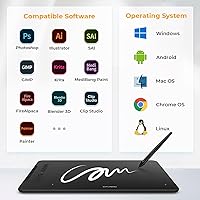
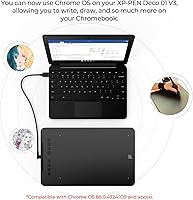
The XP-Pen Deco 01 V3 Drawing Tablet sits in a comfortable spot between the toy-grade tablets that frustrate beginners and the professional gear that strains a tight budget. XP-Pen has spent years building credibility as a serious Wacom alternative, and this drawing tablet reflects that maturity. The V3 iteration brings meaningful refinements over its predecessors without a steep price jump. What stands out most practically is how broadly it plays well with others — Windows, macOS, Android, Chrome OS, and Linux are all supported, along with major software like Photoshop and Clip Studio Paint. For anyone stepping into digital art, that kind of out-of-the-box compatibility removes a lot of early friction.
Features & Benefits

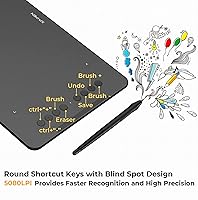
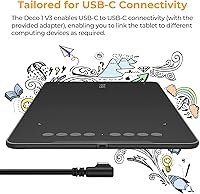
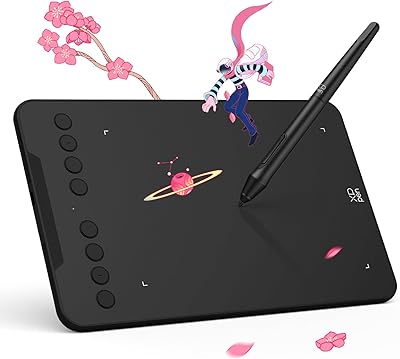
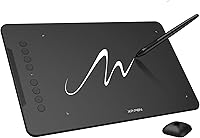
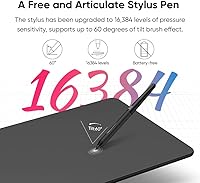
The battery-free stylus is genuinely one of this graphics pad's strongest assets. With 16,384 pressure levels and 60-degree tilt recognition, it responds to light sketching and heavy shading the way a physical pen does — fine lines stay fine, and pressing harder feels intentional rather than accidental. The 10x6.25-inch active area is generous enough for broad, expressive strokes without cramping your arm into a desk corner. Eight customizable express keys speed up repetitive actions like undo or brush switching, and they work for both right- and left-handed setups. USB-C connectivity with included adapters means switching between a laptop, tablet, or Android phone requires no dongle hunting.

Best For

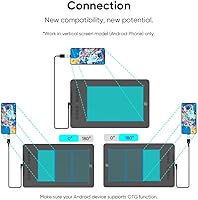
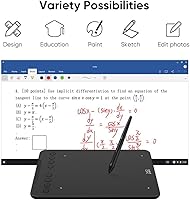
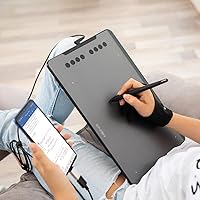
This drawing tablet makes the most sense for beginner digital artists who want something they can genuinely grow with, not outgrow in three months. Illustration and design students will appreciate the large surface and software compatibility when working in Photoshop or Clip Studio Paint on deadline. It also has a loyal following in the OSU rhythm game community, where a wide active area and precise stylus tracking matter more than display resolution. Remote teachers and online tutors use this graphics pad to annotate slides naturally during live sessions. Android users especially benefit — the screen-ratio mapping feature means it actually works on a phone, not just technically supports it.

User Feedback

Buyers consistently praise the surface texture and feel of this drawing tablet — it has just enough tooth to mimic paper without wearing down nibs too quickly. Stylus responsiveness earns high marks, and most users report driver stability improving noticeably after the initial setup. That setup, though, is where friction tends to appear: first-time installs can be confusing, and Android mapping occasionally misbehaves with certain screen ratios. Long-term users also note that the drawing surface shows visible wear with heavy daily use over many months. Still, the recurring theme across thousands of reviews is that the value relative to active area size is genuinely hard to match at this price tier.

Pros

  • The battery-free stylus with 16,384 pressure levels produces natural, graduated line quality right out of the box.
  • A 10x6.25-inch active area gives beginners and students room to draw expressively without cramping their technique.
  • Broad OS support covers Windows, macOS, Android, Chrome OS, and Linux with no extra purchases required.
  • Eight customizable express keys work for both right- and left-handed users, making workflow shortcuts genuinely accessible.
  • At 8mm thin and 2.2 pounds, this drawing tablet slips into a backpack and travels without becoming a burden.
  • USB-C connectivity with adapters means it hooks up to most modern laptops and desktops without hunting for dongles.
  • Tilt support up to 60 degrees adds real shading versatility for artists working in Photoshop or Clip Studio Paint.
  • The drawing surface texture mimics paper resistance closely enough that new users adapt quickly and comfortably.
  • Strong compatibility with major design software means buyers can get to work immediately without worrying about support gaps.

Cons

  • Driver installation is not plug-and-play and can trip up less tech-savvy buyers during first setup.
  • The drawing surface shows visible wear after months of heavy daily use, changing the feel over time.
  • No wireless or Bluetooth option means a cable is always required, which limits desk flexibility.
  • Android performance varies noticeably across device brands, with some models requiring manual workarounds to map correctly.
  • Nib replacement costs are an ongoing expense that the base package does not fully account for.
  • The flush express keys are prone to accidental presses during tablet repositioning until muscle memory develops.
  • Build materials feel functional rather than durable under the stresses of professional daily workloads.
  • Hover height sensitivity for OSU and precise cursor work sometimes needs manual adjustment out of the box.

Ratings

The XP-Pen Deco 01 V3 Drawing Tablet earns its place as one of the most consistently recommended entry-level graphics pads on the market, and these scores reflect that reputation honestly. Our AI analyzed thousands of verified global purchases, actively filtering out incentivized reviews, bot patterns, and spam submissions to surface what real buyers actually experience day to day. The results highlight genuine strengths in stylus performance and value, while surfacing real friction points around software setup and long-term surface durability.
Stylus Pressure Sensitivity
91%
The 16,384-level pressure response is the feature buyers mention most enthusiastically. Artists report that transitioning from light pencil-style sketching to heavy ink-style strokes feels natural and graduated, not jumpy. For beginners especially, this level of control builds confidence quickly.
A small number of users noted that the very lightest pressure strokes occasionally require a recalibration session after extended use. This is more common when switching between devices frequently rather than staying on one machine.
Active Area Size
88%
A 10x6.25-inch drawing surface is genuinely roomy at this price point. Illustrators working on character linework and OSU players tracking fast cursor movement both benefit from having space for full-arm motion rather than cramped wrist-only strokes.
The large footprint that makes it great for drawing can be awkward on small desks. A few users mentioned the tablet takes up more table real estate than expected, which matters in dorm rooms or compact home setups.
Value for Money
93%
This is where the Deco 01 V3 consistently earns top marks. Buyers repeatedly describe it as the most drawing area they could get without stepping up to a noticeably higher spend. For students and hobbyists on a tight budget, that math is hard to argue with.
The value proposition weakens slightly if you factor in potential nib replacement costs over time, which are not always included in starter kits. A few buyers felt the accessories bundle could be more complete given the overall package price.
Driver & Software Setup
61%
39%
Once installed and configured, the drivers are widely reported as stable across Windows and macOS. Users who took time to read the setup guide generally got up and running without major issues, and the XPPen software interface is reasonably clean.
First-time installation trips up a meaningful portion of buyers. Conflicts with older driver versions, confusion around which software version to install, and occasional need to restart the machine mid-setup are recurring complaints. It is not plug-and-play in the way cheaper tablets sometimes are.
Tilt Support Accuracy
79%
21%
The 60-degree tilt recognition works well for shading techniques in Photoshop and Clip Studio Paint. Users doing concept sketching with side-of-nib strokes found it responded predictably and added a useful dimension to their brush control.
At steeper tilt angles approaching the maximum range, a handful of artists noticed slight inconsistency in stroke weight. It is not a dealbreaker, but users doing heavy crosshatching or pastel-style work may occasionally notice the limitation.
Build Quality & Materials
74%
26%
The tablet feels solid for its weight class. The matte plastic body does not flex under hand pressure during drawing, and the express keys click with a satisfying firmness that budget tablets at lower price points rarely match.
The overall construction reads as functional rather than premium. The surface can show scuff marks and smudges with daily handling, and the corners of the unit are not particularly reinforced for drop resistance during commutes.
Surface Texture & Drawing Feel
83%
Buyers consistently describe the drawing surface as having just the right amount of resistance — enough to mimic paper without feeling like you are dragging through sandpaper. For stylus control during detailed linework, that tactile feedback is genuinely helpful.
Heavy daily users report visible surface wear within six to twelve months of regular use. The texture gradually smooths out, which some artists say noticeably changes the drawing feel over time and eventually pushes them toward replacement nibs or surface films.
Portability & Form Factor
86%
At 8mm thin and 2.2 pounds, this graphics pad genuinely fits in a standard backpack sleeve alongside a laptop. Design students who move between classrooms and studio spaces appreciate not needing a dedicated bag just for the tablet.
The USB-C cable, while modern, adds one more item to manage in a packed bag. A few users wished the cable were slightly shorter for portable setups, as the default length creates slack that can be awkward at a cafe table.
Android Compatibility
67%
33%
Actual working Android support is rarer than manufacturers like to imply, so when it functions correctly, buyers are genuinely impressed. Portrait mode mapping and screen-ratio adaptation work well on supported Android 10+ devices with the companion app installed.
Android behavior is inconsistent across device brands. Several users reported that mapping did not behave correctly on certain Samsung and Xiaomi models without manual workarounds. The experience is usable but not polished enough to be a primary selling point.
Express Keys Usability
81%
19%
Eight programmable shortcut keys cover the most common workflow actions — undo, brush size, zoom — without crowding the tablet body. Left-handed users specifically appreciated that the layout accommodates switching orientation without sacrificing key access.
The keys are flush with the tablet surface, which means accidental presses happen occasionally during repositioning. New users take a session or two to build muscle memory and stop hitting the wrong shortcut mid-stroke.
Multi-Device Connectivity
78%
22%
USB-C to USB-C with adapters for legacy ports covers a wide range of setups without needing to buy additional accessories. Switching between a MacBook and a Windows desktop is straightforward, and the included cable quality is adequate for daily use.
There is no wireless option, which increasingly feels like a gap as competitors at similar price points begin offering Bluetooth modes. Users working in tidier desk setups mentioned the cable as their main aesthetic and ergonomic frustration.
Beginner-Friendliness
84%
Beyond specs, the physical design choices — ambidextrous layout, generous drawing area, lightweight body — genuinely lower the barrier for someone picking up a drawing tablet for the first time. Most beginners report feeling comfortable within one or two sessions.
The driver setup experience undercuts the otherwise approachable package. Beginners who are not technically confident can feel stranded if the initial install does not go smoothly, especially without strong in-box documentation to guide troubleshooting.
OSU Gaming Performance
87%
The OSU community is one of the more demanding and vocal user groups for any drawing tablet, and feedback from that segment is largely positive. The large active area, consistent tracking, and low-latency stylus response all align well with what competitive OSU play demands.
Some OSU players prefer a smaller active area for faster cursor travel and remap accordingly, which means they are paying for surface space they deliberately avoid using. The tablet is not tuned specifically for gaming, so hover height sensitivity can require manual adjustment.
Long-Term Durability
62%
38%
For casual to moderate use, the Deco 01 V3 holds up well over the first year. Users who draw a few hours per week report no significant degradation in stylus response or key functionality within standard ownership timelines.
Heavy daily users — those drawing four or more hours a day — consistently flag surface wear and occasional nib deterioration as real long-term costs. The tablet was not designed with professional-grade daily abuse in mind, and it shows after extended heavy use.

Suitable for:

The XP-Pen Deco 01 V3 Drawing Tablet is built for people who are serious enough about digital art to want real tools, but practical enough not to spend a fortune before they know it will stick. Art and design students will get the most out of it — the large active area handles everything from rough concept sketches to tighter illustration work, and it fits in a backpack without drama. Beginners who have been practicing on a mouse or touchpad will notice an immediate improvement in line control thanks to the pressure-sensitive, battery-free stylus. Remote teachers and online tutors will find this graphics pad especially useful for handwriting annotations and live whiteboard demonstrations during video calls. OSU players looking for a wide, responsive surface at a reasonable price consistently rate this drawing tablet among their top picks in its price range. Android users who want genuine tablet compatibility — not just a checkbox on a spec sheet — will appreciate the screen-ratio mapping feature, provided they are running Android 10 or above.
Not suitable for:

The XP-Pen Deco 01 V3 Drawing Tablet is not the right call for working professionals who depend on their tablet for client deliverables every single day. The drawing surface wears down with heavy daily use, and the overall build, while solid for casual work, is not engineered to absorb the kind of punishment a full-time illustrator or concept artist puts a tool through over years. Anyone hoping for a wireless setup will also be disappointed — this graphics pad is strictly wired, and there is no Bluetooth option to keep the desk clean. Buyers who want a display tablet — one where they draw directly on a screen — should look elsewhere entirely, as this is a screenless device. Users who are not comfortable troubleshooting software installs should know upfront that the driver setup has a real learning curve and is not reliably plug-and-play. Finally, if your primary device runs an older version of Android or an unsupported OS, the compatibility promises on the box may not deliver in practice.
Specifications

  • Brand: Manufactured by XP-Pen, a brand with an established track record as a mid-range alternative to Wacom in the graphics tablet market.
  • Model: The Deco 01 V3 is the third major iteration of XP-Pen's Deco 01 line, carrying model designation Deco 01 V3.
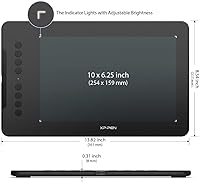
  • Active Area: The drawing surface measures 10 x 6.25 inches, providing generous room for expressive strokes and full-arm drawing motions.
  • Overall Dimensions: The tablet body measures 13.82 x 8.54 x 0.31 inches, keeping the physical footprint manageable on most desks.
  • Thickness: At just 8mm thin, the tablet sits flat and low-profile on a desk or inside a bag without adding noticeable bulk.
  • Weight: The unit weighs 2.2 pounds, light enough to carry daily in a standard backpack alongside a laptop.
  • Pressure Levels: The included stylus supports 16,384 levels of pressure sensitivity, enabling highly graduated control over line weight and brush opacity.
  • Tilt Support: The stylus recognizes tilt angles up to 60 degrees, allowing artists to use side-of-nib strokes for natural shading techniques.
  • Stylus Type: The pen is a battery-free passive stylus, requiring no charging or battery replacements at any point during its lifespan.
  • Express Keys: Eight programmable shortcut keys are built into the tablet body and can be configured for either right-handed or left-handed orientation.
  • Connectivity: The tablet connects via USB-C to USB-C, and includes adapters to support connections to devices with standard USB-A ports.
  • OS Compatibility: Supported operating systems include Windows 7 and later, macOS 10.13 and later, Android 10.0 and later, Chrome OS 88 and later, and Linux.
  • Software Support: The Deco 01 V3 is compatible with major creative applications including Adobe Photoshop, Adobe Illustrator, Clip Studio Paint, and Corel Painter.
  • Android Support: Android compatibility requires version 10.0 or above and the installation of the XPPen Tools Android app for accurate screen-ratio mapping.
  • Handedness: The express key layout and driver software support both right-handed and left-handed users without requiring hardware modifications.
  • Surface Material: The drawing surface features a matte textured finish designed to simulate paper resistance and provide natural stylus feedback during use.
  • Warranty: XP-Pen provides a standard limited warranty on the Deco 01 V3; buyers should confirm current warranty terms directly with XP-Pen at time of purchase.
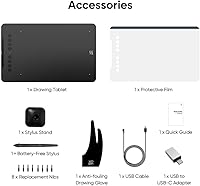
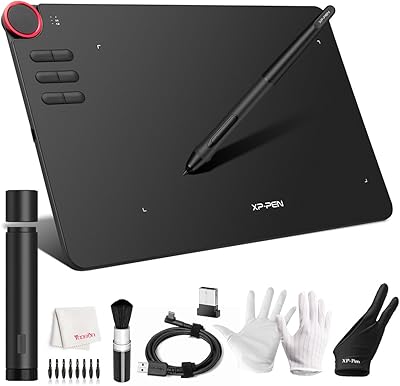
  • In the Box: The package typically includes the tablet, battery-free stylus, USB-C cable, adapter, replacement nibs, and a nib removal tool.

Related Reviews
XP-PEN Deco 03 Drawing Tablet
87%
92%
Value for Money
88%
Drawing Performance
85%
Wireless Functionality
91%
Pressure Sensitivity
84%
Customizability
More
XP-Pen Deco MW Wireless Drawing Tablet
79%
91%
Stylus Performance
83%
Wireless Reliability
94%
Value for Money
61%
Driver & Software Setup
79%
Build Quality
More
XP-Pen Deco Mini7 V2 Drawing Tablet
80%
91%
Value for Money
86%
Pen Performance
58%
Active Area Size
89%
Ease of Setup
74%
Build Quality
More
XP-Pen Deco LW Wireless Drawing Tablet
79%
91%
Stylus Precision & Pressure Response
73%
Wireless Connectivity Reliability
82%
Build Quality & Durability
84%
Drawing Surface Texture
88%
Software Compatibility
More
XP-Pen Star03 V2 Drawing Tablet
76%
93%
Active Area Size
88%
Pen Pressure Accuracy
84%
Stylus Ergonomics
74%
Express Key Usability
69%
Driver Stability
More
XP-Pen Star G640 6x4 Graphics Tablet
78%
91%
Value for Money
86%
Pen Performance
78%
Pressure Sensitivity
63%
Active Area Size
74%
Build Quality & Durability
More
XP-Pen Artist 13.3 Pro Drawing Display Tablet
81%
88%
Screen Quality
91%
Pen Accuracy & Pressure Sensitivity
86%
Parallax & Cursor Alignment
79%
Tilt Functionality
61%
Driver & Software Setup
More
XP-Pen Artist Pro 14 Gen2 Drawing Tablet
87%
94%
Pressure Sensitivity
91%
Color Accuracy
88%
Build Quality
93%
Display Quality
87%
Ergonomics
More
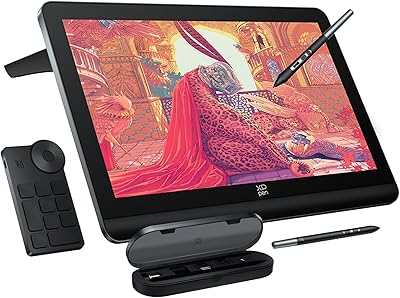
XP-Pen Artist 24 FHD 23.8-inch Pen Display
78%
91%
Pen Precision
88%
Screen Lamination
79%
Display Color Accuracy
62%
Resolution & Pixel Density
84%
Tilt Recognition
More
XP-Pen Artist Pro 19 Gen2 Drawing Tablet
81%
93%
Display Quality
91%
Color Accuracy
89%
Pen Performance
86%
Anti-Glare & Surface Texture
84%
Dual Stylus System
More

FAQ

You will need to download and install XP-Pen's drivers for full functionality — it is not truly plug-and-play on most systems. The good news is the drivers are free and available directly from XP-Pen's website, but plan for 10 to 20 minutes of setup time on your first use. If you have had a previous version of the driver installed, uninstall it cleanly before updating to avoid conflicts.

It does work with Android phones running version 10.0 or above, but you will need to install the XPPen Tools app from the Play Store to get the screen mapping to behave correctly. Results vary somewhat depending on your phone brand — Samsung and stock Android devices tend to work more smoothly than some other manufacturers. If Android compatibility is your primary use case, it is worth checking the XP-Pen compatibility list for your specific device model before buying.

Yes, completely battery-free. The pen draws power inductively from the tablet's surface, so you never charge it or swap batteries. In practical terms, it means you can pick it up after six months of sitting in a drawer and it works instantly, which is a genuine quality-of-life advantage over older active-pen designs.

Most users describe it as having a light paper-like texture that gives the stylus just enough grip to feel controlled without wearing down nibs aggressively. It is noticeably better than the glassy surface some cheaper tablets have. That said, after heavy daily use over many months, the texture does smooth out gradually, which changes the feel a bit.

Yes, both applications are well-supported. Once the driver is installed and the tablet is recognized by your system, pressure sensitivity and tilt should work automatically in Clip Studio Paint, Photoshop, Illustrator, and most other major creative apps. Occasionally you may need to enable tablet input within the application settings, but that is a one-time step.

Absolutely. The driver software lets you rotate the tablet orientation so the express keys sit on the right side, which is the natural position for a left-handed user. The drawing surface itself is symmetrical, so there is no physical disadvantage to left-handed use.

At this price tier, Wacom's options typically offer a smaller active area. This graphics pad gives you noticeably more drawing space for the same money, which matters a lot for beginners who need room to develop their technique. Wacom has a slight edge in driver polish and long-term ecosystem support, but for most beginners and students, the difference in day-to-day use is minimal.

Under moderate use — a few hours a day — nibs last several months before needing replacement. Heavy daily users, particularly those drawing on the rougher surface settings, may go through them faster. Replacement nibs are sold by XP-Pen directly and through major online retailers, and they are not expensive.

Many OSU players actually prefer a large surface like this one because it gives them more room before hitting the tablet edge at high map speeds. The stylus tracking is precise and low-latency enough for competitive play. Some players do prefer to restrict the active area in the driver settings to a smaller zone, which is easy to configure.

XP-Pen has an active support team reachable via their website, and there is a reasonably large community of users on forums and Reddit who share troubleshooting solutions. The most common issues — driver conflicts, tablet not being recognized — usually have documented fixes. It is worth bookmarking XP-Pen's support page before you start the installation, just in case you hit a snag.

Where to Buy