Overview

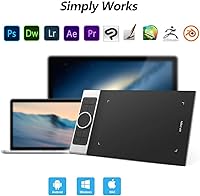
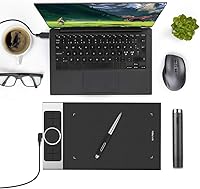
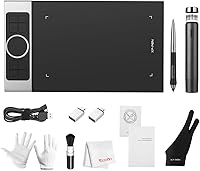
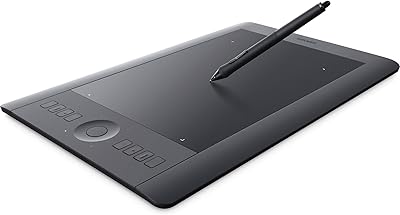
The XP-Pen Deco Pro Medium Graphics Tablet sits comfortably in the mid-range of XP-Pen's Deco Pro lineup — not an entry-level starter, but not a professional display tablet either. Its 11x6 inch active area hits a practical balance: wide enough to sketch freely without cramping your wrist, compact enough to fit most desks without dominating them. What sets this drawing tablet apart at this price point is the dual-wheel control system, something you rarely see on competing tablets in this range. It connects via USB and runs across Windows, Mac, and Chromebook. Solid, dependable, and honest about what it is.
Features & Benefits

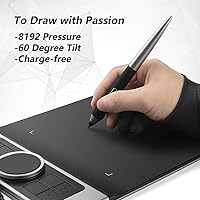
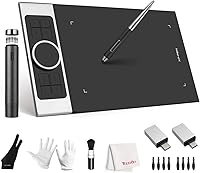
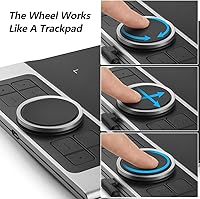
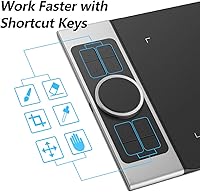
The battery-free stylus is arguably the most practical detail here — no charging, no interruptions, just pick it up and draw. It delivers 8192 levels of pressure sensitivity and reads tilt up to 60 degrees, which means you can shade naturally by angling the pen rather than hunting through menus for a brush effect. The Deco Pro Medium also features a double-wheel mechanism that takes a moment to learn but pays off quickly: the outer ring controls zoom and brush size, while the inner touchpad handles scrolling. Eight programmable keys and side dials let you stay on the canvas longer without reaching for the keyboard.

Best For

This XP-Pen tablet makes the most sense for a fairly specific group of buyers. Digital illustrators who feel cramped on a small tablet will appreciate the generous workspace. Online teachers and presenters will find the pressure-sensitive pen far more expressive than a mouse when annotating slides or demonstrating techniques live. Students in art or design programs get a meaningful upgrade from entry-level pads without a serious financial commitment. Photo editors who rely on nuanced brush control will also find the tilt support genuinely useful. It works equally well on Windows, Mac, and Chromebook, so platform flexibility is rarely a concern.

User Feedback

With a 4.8-star average across roughly 120 ratings, the feedback is positive but limited in scale — encouraging rather than conclusive. Buyers consistently praise the pen feel and the roomy active area, and the dual-wheel setup earns appreciation once users move past the initial adjustment period. That adjustment period is a recurring theme: the wheel controls are not intuitive out of the box, and several users mention driver installation being more involved than they expected. Build quality comes across as solid, though a handful of buyers note the tablet feels slightly heavier than anticipated for a portable setup.

Pros

  • The battery-free stylus never needs charging, so it is always ready when inspiration strikes.
  • 8192 levels of pressure sensitivity allow for genuinely expressive line work across a wide range of digital art styles.
  • The 11x6 inch active area gives hobbyists and educators ample room to work without feeling cramped.
  • Tilt support up to 60 degrees makes natural shading possible without relying on software workarounds.
  • The dual-wheel control system lets you adjust zoom, brush size, and scroll without ever touching the keyboard.
  • Eight programmable express keys can be mapped to your most-used shortcuts, cutting repetitive steps from your workflow.
  • Broad compatibility across Windows, Mac, and Chromebook makes it easy to use across different devices and environments.
  • Works out of the box with major creative software including Photoshop, Illustrator, SAI, and ZBrush.
  • The slim, relatively lightweight build makes it reasonable to pack up and take to a classroom or client meeting.

Cons

  • Driver installation can be more involved than expected, particularly for first-time graphics tablet users.
  • The dual-wheel controls have a noticeable learning curve and are not intuitive without reading the documentation first.
  • No wireless or Bluetooth option means you are always tethered to a USB cable during use.
  • At 2.2 pounds, it is slightly heavier than some buyers expect for a tablet marketed with portability in mind.
  • The review pool is still relatively small, making it harder to assess long-term durability with confidence.
  • Users on less common or older operating system versions may run into compatibility friction not covered in the documentation.
  • No display means you must adapt to the hand-eye disconnect of drawing on the tablet while watching a separate screen.
  • The inner virtual trackpad wheel can feel imprecise compared to a dedicated mouse for tasks requiring fine cursor control.

Ratings

The scores below reflect an AI-assisted analysis of verified buyer feedback for the XP-Pen Deco Pro Medium Graphics Tablet, drawn from global user reviews with spam, bot activity, and incentivized submissions actively filtered out. With roughly 120 ratings to work from, the sample is encouraging rather than exhaustive, so each score is calibrated to reflect both the genuine strengths and the honest friction points real buyers have encountered. Nothing here is padded — where users struggled, the scores show it.

Pen Performance
91%
Users consistently describe the stylus as one of the most natural-feeling pens in this price bracket. The 8192 levels of pressure sensitivity translate into genuinely expressive line variation, and artists transitioning from traditional media often note how quickly they adapt to the pen's weight and response.
A small number of users report occasional initial pressure calibration issues that require a driver reinstall to resolve. Tilt recognition, while functional, is sometimes described as slightly less responsive at extreme angles compared to higher-end competitors.
Active Area Size
88%
The 11x6 inch drawing surface consistently earns praise from users who previously owned smaller tablets, with illustrators noting they can finally make natural arm movements without running out of space mid-stroke. Educators also find the larger canvas helpful for live demonstrations.
For users who prefer a compact setup or work on smaller monitors, the active area can feel oversized and requires recalibration of hand-eye coordination. A few buyers also noted the tablet's physical footprint takes up more desk real estate than they anticipated.
Dual-Wheel Control
83%
Once mastered, the double-wheel system draws genuine appreciation from power users who value keeping their hands on the tablet. The outer ring for zoom and brush size, combined with the inner touchpad for scrolling, reduces keyboard dependency in ways that feel meaningful during long illustration sessions.
The learning curve is real and consistently mentioned in critical reviews. New users frequently find the wheel unintuitive without consulting documentation, and the inner virtual trackpad can feel imprecise for tasks requiring fine cursor placement compared to a physical mouse.
Build Quality
79%
21%
Most buyers describe the tablet as solid and well-constructed for its price tier, with a surface texture that provides enough friction for controlled pen strokes without feeling rough. The body does not flex or creak under normal desk use, which reassures users investing in a mid-range peripheral.
A handful of longer-term users raise mild concerns about surface wear after extended use, and the overall feel stops short of premium. At 2.2 pounds, the weight is slightly higher than some expect, and the tablet does not feel as refined as pricier competitors in hand.
Driver & Setup Experience
61%
39%
For most users on mainstream Windows and macOS versions, the initial driver installation completes without major issues, and XP-Pen does provide regular driver updates that address reported bugs over time. Users on supported configurations generally get up and running within 15 to 20 minutes.
Driver setup is the most commonly cited frustration in critical reviews. Users with pre-existing tablet drivers, non-standard OS configurations, or older hardware frequently report conflicts and failed installations. The bundled setup guide does not adequately prepare buyers for these edge cases.
Software Compatibility
77%
23%
Compatibility with the most widely used creative applications — Photoshop, Illustrator, Clip Studio Paint, SAI, and Krita — is consistently reported as reliable, with pressure sensitivity and tilt registering correctly in most standard workflows. Artists do not typically need to configure anything beyond the initial driver setup.
Compatibility becomes less predictable with niche or less common applications, and a subset of users report pressure sensitivity not registering properly in certain software until they adjust Wintab settings manually. Chromebook compatibility works for basic annotation but is limited for more demanding creative software.
Express Keys & Shortcuts
81%
19%
The eight programmable keys are well-positioned and tactile enough to use without looking away from the screen. Users who invest time in mapping them to their specific workflow — eraser toggle, undo, zoom — report a noticeable improvement in drawing efficiency during longer sessions.
Out of the box, the default key mapping is not particularly intuitive, and the side dial wheels require some deliberate setup before they feel natural. Users who prefer a minimal shortcut setup may find eight keys excessive and somewhat crowded along the tablet edge.
Tilt Recognition
74%
26%
Tilt support up to 60 degrees adds a layer of creative control that artists coming from traditional media find immediately familiar — angling the pen for a broader shading stroke works much as it does with a real pencil. Photo retouchers in particular find this useful for nuanced dodging and burning.
Tilt response is functional but not the most refined in the category, with some users noting a slight lag or inconsistency at shallower angles. In day-to-day illustration work, the difference is minor, but artists who rely heavily on tilt-based brush effects may notice the limitation over time.
Portability
72%
28%
The slim profile and relatively contained footprint make this drawing tablet a reasonable option for users who occasionally move between a home studio and a classroom or co-working space. It fits into most large laptop bags without requiring a dedicated case.
The 2.2-pound weight and USB-only connection reduce its appeal as a truly portable device. Without wireless capability, users are always managing a cable, and the weight adds up if the tablet is packed alongside a laptop and accessories for regular commuting.
Value for Money
84%
Buyers consistently feel this XP-Pen tablet punches above its price point when assessed feature-by-feature, particularly given the dual-wheel control system and generous active area, which are uncommon at this tier. Students and hobbyists in particular describe it as a smart investment relative to alternatives.
Users who encounter driver problems or a steep learning curve with the wheel controls sometimes feel the value proposition weakens if setup takes significant troubleshooting time. Compared to entry-level Wacom tablets at a similar price, a subset of buyers feel the software ecosystem and support documentation need improvement.
Pen Ergonomics
78%
22%
The battery-free design keeps the stylus light and well-balanced, which reduces hand fatigue during multi-hour drawing sessions. Most users find the grip comfortable across a range of hand sizes, and the absence of a charging port keeps the pen barrel smooth and unobtrusive.
The pen does not include a carrying case or clip, making it easy to misplace on a cluttered desk. A few users with larger hands find the barrel slightly narrow for extended sessions, and replacement nibs, while available, require a separate purchase if the included spares run out.
Compatibility Across Devices
82%
18%
Running across Windows, macOS, and Chromebook from a single USB connection is a practical advantage for users who switch between devices, and teachers who use school-issued hardware particularly appreciate not being locked into a single platform. Setup is consistent across supported operating systems.
Android compatibility, mentioned in some product descriptions, appears inconsistent in practice, with users reporting varying results depending on device and app combination. The lack of wireless means the tablet always requires a free USB port, which can be a limitation on thin laptops with fewer ports.
Surface Texture
76%
24%
The matte drawing surface provides enough tooth to simulate a paper-like feel without wearing down pen nibs unusually fast. Artists who draw for several hours at a time appreciate the controlled friction, which prevents the pen from sliding uncontrollably the way it might on a glossy surface.
Over time, the surface texture can show visible wear marks in areas of heavy use, particularly in the center of the active area. Users who press hard with the stylus may notice this more quickly, and unlike some competitors, the tablet does not offer a replaceable surface film.
Learning Curve
67%
33%
For users with any prior experience on a non-display graphics tablet, adapting to the Deco Pro Medium is relatively quick. The express keys and basic pressure sensitivity feel familiar, and most users report feeling comfortable with core drawing functions within the first day of use.
The dual-wheel system and full shortcut customization require a meaningful time investment that casual users may not be willing to make. Absolute beginners with no graphics tablet background sometimes feel overwhelmed by the combination of new hardware habits and driver configuration decisions simultaneously.

Suitable for:

The XP-Pen Deco Pro Medium Graphics Tablet is a strong fit for anyone who needs a capable, mid-range drawing surface without committing to professional-grade pricing. Online teachers and educators will find it especially practical — the pressure-sensitive, battery-free pen makes annotating slides or demonstrating techniques far more expressive than a mouse ever could. Hobbyist illustrators who have outgrown a small starter tablet will appreciate the 11x6 inch active area, which gives enough room to sketch comfortably without requiring a large dedicated desk space. Students in art, design, or media programs get access to tilt recognition and high pressure sensitivity that genuinely supports skill development across major software platforms. Photo retouchers who rely on nuanced brush angle control will also feel at home here, and the broad compatibility across Windows, Mac, and Chromebook means it adapts easily to most existing setups.
Not suitable for:

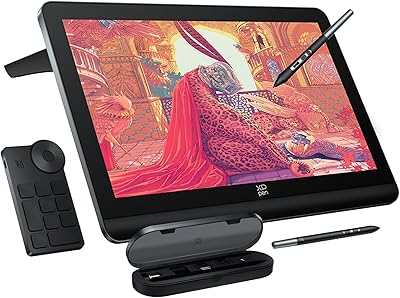
The XP-Pen Deco Pro Medium Graphics Tablet is not the right tool for everyone, and it is worth being honest about where it falls short. Professional illustrators or concept artists who depend on display tablets — where you draw directly on the screen — will find this a step backward, since it requires the mental adjustment of drawing on a surface while watching a separate monitor. Users who are sensitive to setup friction may find the driver installation process more involved than expected, particularly on less common operating systems or older hardware. The dual-wheel control system, while genuinely useful once mastered, has a real learning curve that could frustrate buyers expecting plug-and-play simplicity. Anyone needing wireless freedom will also be disappointed, as the tablet relies entirely on a USB connection with no Bluetooth option. Finally, with just over 100 reviews to draw from, buyers who prefer products with a deep, well-established track record may want to wait for a larger sample of long-term user data.
Specifications

  • Brand: Manufactured by XP-Pen, a brand focused on graphics tablets and display tablets for creative and educational use.
  • Model: The specific model is the Deco Pro Medium, part of XP-Pen's mid-range Deco Pro series.
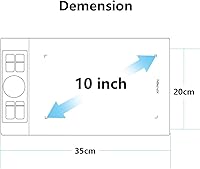
  • Active Area: The drawing surface measures 11x6 inches, offering a generous workspace for sketching, illustration, and annotation tasks.
  • Dimensions: The tablet body measures 9.84 x 5.91 x 3.94 inches, keeping it compact enough for most standard desks.
  • Weight: The unit weighs 2.2 pounds, which is manageable for desk use though slightly heavier than ultra-portable alternatives.
  • Stylus Type: The included stylus uses battery-free EMR technology, meaning it requires no charging and is always ready for immediate use.
  • Pressure Sensitivity: The stylus supports 8192 levels of pressure sensitivity, allowing fine control over line weight and opacity in compatible software.
  • Tilt Support: The pen detects tilt angle up to 60 degrees, enabling natural shading and angled brush strokes without software adjustment.
  • Express Keys: Eight fully programmable express keys are built into the tablet body for quick access to frequently used shortcuts.
  • Dial Wheels: Two dial wheels are positioned on the side of the tablet, configurable for functions such as eraser toggling and brush adjustments.
  • Dual-Wheel Control: A double-wheel mechanism combines an outer mechanical ring for zoom and brush size with an inner virtual trackpad for scrolling.
  • Connectivity: The tablet connects to a host device via USB, with no wireless or Bluetooth connectivity option available.
  • Compatible OS: Officially supported operating systems include Windows 11, 10, 8, and 7, macOS 10.10 and above, and Chromebook.
  • Software Support: Works with major creative applications including Adobe Photoshop, Illustrator, SAI, ZBrush, Autodesk Maya, and 3D Max, among others.
  • Pen Technology: The stylus uses electromagnetic resonance (EMR) technology, which eliminates battery dependency and reduces pen weight noticeably.
  • BSR Ranking: Ranked #165 in the Computer Graphics Tablets category on Amazon at the time of evaluation, indicating solid category visibility.
  • Availability: This model has been available for purchase since June 2, 2017, giving it a multi-year presence in the market.

Related Reviews
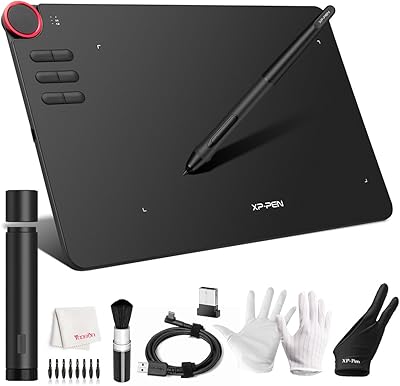
XP-Pen Deco MW Wireless Drawing Tablet
79%
91%
Stylus Performance
83%
Wireless Reliability
94%
Value for Money
61%
Driver & Software Setup
79%
Build Quality
More
XP-PEN Deco 03 Drawing Tablet
87%
92%
Value for Money
88%
Drawing Performance
85%
Wireless Functionality
91%
Pressure Sensitivity
84%
Customizability
More
XP-Pen Deco 01 V3 Drawing Tablet
80%
91%
Stylus Pressure Sensitivity
88%
Active Area Size
93%
Value for Money
61%
Driver & Software Setup
79%
Tilt Support Accuracy
More
XP-Pen Deco Mini7 V2 Drawing Tablet
80%
91%
Value for Money
86%
Pen Performance
58%
Active Area Size
89%
Ease of Setup
74%
Build Quality
More
Wacom Intuos Pro Pen and Touch Tablet Medium (PTH651)
88%
94%
Performance
97%
Precision & Responsiveness
90%
Wireless Connectivity
89%
Customization Options
92%
Build Quality
More
XP-Pen Artist Pro 14 Gen2 Drawing Tablet
87%
94%
Pressure Sensitivity
91%
Color Accuracy
88%
Build Quality
93%
Display Quality
87%
Ergonomics
More
XP-Pen Deco LW Wireless Drawing Tablet
79%
91%
Stylus Precision & Pressure Response
73%
Wireless Connectivity Reliability
82%
Build Quality & Durability
84%
Drawing Surface Texture
88%
Software Compatibility
More
XP-Pen Artist 13.3 Pro Drawing Display Tablet
81%
88%
Screen Quality
91%
Pen Accuracy & Pressure Sensitivity
86%
Parallax & Cursor Alignment
79%
Tilt Functionality
61%
Driver & Software Setup
More
XP-Pen Artist Pro 19 Gen2 Drawing Tablet
81%
93%
Display Quality
91%
Color Accuracy
89%
Pen Performance
86%
Anti-Glare & Surface Texture
84%
Dual Stylus System
More
XP-Pen Star G960S Graphics Drawing Tablet
79%
91%
Value for Money
88%
Pen Sensitivity & Response
89%
Active Area Size
78%
Android Compatibility
74%
Build Quality & Feel
More

FAQ

No, the pen is completely battery-free. It uses electromagnetic resonance technology, which means it draws power passively from the tablet surface itself. Just pick it up and start drawing straight out of the box.

Yes, it supports macOS 10.10 and above, so most Macs running a current or recent operating system should work fine. That said, it is always worth downloading the latest driver from XP-Pen's official site rather than relying on the included disc, as driver updates tend to resolve compatibility edge cases quickly.

It is straightforward for most users, but a few buyers have found it more involved than expected — particularly if you have other tablet drivers installed on the same machine. The safest approach is to fully uninstall any previous graphics tablet drivers before setting up this one, then restart your computer before running the XP-Pen installer.

The double-wheel sits in the center of the tablet and has two layers. The outer mechanical ring lets you zoom in or out and adjust brush size by rotating it, similar to a scroll wheel. The inner section functions more like a small touchpad, handling scrolling and additional custom actions. It takes a session or two to feel natural, but most users find it genuinely useful once it clicks. The manual is worth reading for this feature specifically.

It works well for this. The pressure-sensitive pen lets you annotate slides and diagrams expressively, which is a real step up from drawing with a mouse. It is compatible with screen-sharing tools and annotation software used in most classroom settings, and the broad OS support means it adapts to whatever machine your school or institution provides.

Yes, Chromebook is officially listed as a supported platform. Keep in mind that the level of functionality may vary depending on which creative apps you are running, since Chromebook software ecosystems are more limited than Windows or Mac. For basic annotation and teaching use cases, it holds up well.

The 11x6 inch active area is on the larger side for this price tier. Many competing tablets offer 8x5 or 10x6 inch surfaces, so the extra space is a genuine differentiator, especially if you tend to make broad arm movements when sketching rather than drawing from the wrist.

Yes, all eight express keys are fully programmable through the XP-Pen driver software. You can assign keyboard shortcuts, modifier keys, or application-specific commands. The two side dial wheels are also configurable, so there is quite a bit of flexibility for tailoring the layout to your workflow.

Based on available user feedback, build quality is generally considered solid. The tablet body feels firm rather than flimsy, and the pen holds up well with regular use. A small number of users have raised questions about long-term wear, but there are no widespread reports of early hardware failure. As with any peripheral, treating the pen with care and avoiding dropping it will extend its lifespan considerably.

It works with a wide range of creative software beyond the Adobe suite. Clip Studio Paint, Krita, SAI, and Procreate for Mac are all commonly used with this drawing tablet without issues. The pressure sensitivity and tilt support tend to function correctly in any application that recognizes Wintab or standard tablet input — which covers most serious drawing tools available today.

Where to Buy