XP-Pen Artist Pro 19 Gen2 Drawing Tablet
Overview
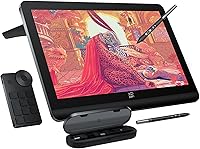
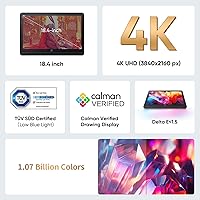
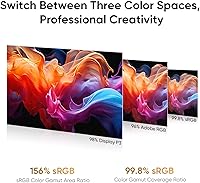
The XP-Pen Artist Pro 19 Gen2 Drawing Tablet is a large-format pen display built for professional creatives who treat color accuracy as non-negotiable. At its core is an 18.4-inch 4K UHD panel — a genuine step up from the crowded field of 13- and 16-inch alternatives that dominate the mid-range. Calman verification and broad gamut coverage across sRGB, Adobe RGB, and Display P3 give photographers, illustrators, and colorists real confidence in what they see on screen. The dual-stylus system and wireless shortcut remote round out a thoughtfully assembled package. That said, this is a desk-bound tool — anyone expecting portability should look elsewhere.
Features & Benefits
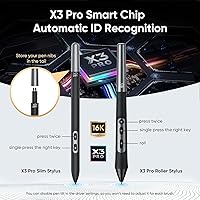
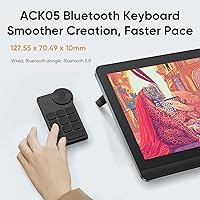
The Artist Pro 19 Gen2 earns its price tag at the display level. The fully laminated panel with AG etched glass cuts reflections without muddying the image, and the TÜV SÜD-certified paper-like surface makes long sessions feel less fatiguing on the wrist. Color fidelity is genuinely impressive — a delta-E below 1.5 means something concrete to anyone who has ever printed a piece and winced at the result. Two styluses ship in the box: a standard Roller and a slimmer option with removable side buttons, both sharing ultra-fine pressure sensitivity and 60-degree tilt response. The wireless ACK05 remote, with its satisfying physical dial, keeps shortcuts close without cluttering the desk.
Best For
This drawing display is best suited to professionals who spend hours daily in creative software — character illustrators handling detailed commissions, retouchers who cannot afford color drift between screen and print, or motion designers grading footage for wide-gamut deliverables. The 18.4-inch workspace is a real advantage for anyone juggling multiple layers or reference windows simultaneously. It is also a smart upgrade path for artists currently on a smaller or HD-only display who want to feel what 4K rendering actually does for fine linework. One honest caveat: the setup assumes a permanent desk. At over ten pounds, this pen display is not something you sling into a bag.
User Feedback
Sitting at a 4.6-star average with a top-100 rank in its category, the Artist Pro 19 Gen2 has clearly found its audience. Buyers regularly highlight display sharpness and out-of-the-box color vibrancy, while the dual-stylus setup earns appreciation from those who switch between brush styles mid-session. The criticisms worth noting: some users report a learning curve with the ACK05 remote customization software, and the unit's physical footprint can catch buyers off guard if they have not measured their desk first. Hobbyists on tighter budgets sometimes feel the price sting post-purchase, while working professionals broadly consider it fair given the hardware on offer.
Pros
- The 4K UHD panel on an 18.4-inch screen makes fine linework and layered compositions genuinely easier to manage at full view.
- Calman-verified color accuracy means less second-guessing between screen and print for photographers and retouchers.
- Two styluses in the box — with distinct ergonomic profiles — let artists assign each to a different tool preset without menu diving.
- The ACK05 wireless remote dial provides satisfying tactile feedback for zoom and brush size that a flat touch ring cannot replicate.
- Full lamination removes the parallax gap, making pen-to-line contact feel immediate and natural during detailed work.
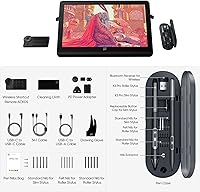
- 23 replacement nibs across multiple nib types ship in the box, covering most artists for well over a year of regular use.
- Dual reversible USB-C inputs plus HDMI make switching between a MacBook and a Windows workstation fast and cable-efficient.
- The anti-glare etched glass and low blue light certification hold up during long studio sessions, reducing end-of-day eye fatigue.
- VESA 75x75mm mount support gives studio users real flexibility in positioning without being locked into the included stand.
Cons
- The driver interface feels dated and takes meaningful time to navigate for per-application profiles or pen tilt settings.
- ACK05 remote key mapping has a steep initial learning curve, especially for macOS users who encounter occasional reconnection delays.
- Some units show subtle backlight bleed in corners — noticeable on dark UI themes during low-light evening sessions.
- The default color profile ships slightly warm and needs adjustment before the display is accurately calibrated for print work.
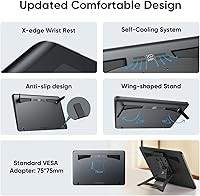
- The included stand offers limited angle range — artists who prefer very shallow or steep drawing angles will likely need a separate VESA arm.
- The X3 Pro Slim stylus grip is slicker than the Roller variant, which can feel less secure at steep tilt angles during fast gestures.
- Linux and ChromeOS users lose access to several driver customization features available on Windows and macOS.
- The included drawing glove is thin and low-quality — most regular users will replace it with a purpose-made alternative quickly.
- At full brightness, slight luminance drop-off is visible toward the lower corners of the panel on certain content types.
Ratings
The XP-Pen Artist Pro 19 Gen2 Drawing Tablet earns its place among the most discussed large-format pen displays of the past year, and these scores reflect what real buyers across global markets actually experienced — not marketing claims. Our AI analyzed thousands of verified purchaser reviews worldwide, actively filtering out incentivized, bot-generated, and unverified feedback to surface honest patterns. Both the standout strengths and the recurring frustrations are represented here without softening either side.
Display Quality
Color Accuracy
Pen Performance
Anti-Glare & Surface Texture
Dual Stylus System
ACK05 Wireless Remote
Build Quality & Design
Connectivity & Setup
Driver Software
Portability
Value for Money
OS & Device Compatibility
Eye Comfort & Fatigue
Included Accessories
Suitable for:
The XP-Pen Artist Pro 19 Gen2 Drawing Tablet is purpose-built for creative professionals who spend serious hours in front of their work and cannot afford to second-guess what they see on screen. Freelance illustrators handling detailed client commissions will appreciate the generous canvas size — there is real breathing room for complex compositions that a 13- or 16-inch display simply cannot offer. Photographers doing print-prep retouching and film colorists grading wide-gamut footage will find the Calman-verified color accuracy genuinely useful, not just a spec to quote. Studio-based artists with a dedicated desk will get the most out of this pen display, especially those who want to mount it on a VESA arm or integrate it into a multi-device workflow switching between a laptop and workstation. Anyone upgrading from an older HD pen display will notice an immediate and tangible difference — 4K resolution changes how fine linework and texture detail look at full composition scale.
Not suitable for:
The XP-Pen Artist Pro 19 Gen2 Drawing Tablet is a poor fit for anyone who needs to draw on the go — at over ten pounds with a footprint that demands a proper desk, it is a committed studio fixture, not a travel companion. Hobbyists and casual digital artists who draw a few hours a week will likely find the investment hard to justify when a much smaller, less expensive pen display would serve their actual needs just as well. Students on tight budgets should think carefully before stretching for this tier — the color accuracy and screen resolution only pay dividends if your workflow genuinely requires them. Users who rely heavily on ChromeOS or Linux as their primary OS may also run into frustrations, as driver feature parity on those platforms lags noticeably behind the Windows and macOS experience. If you are hoping for a plug-and-play experience with zero software configuration, the ACK05 remote and driver customization panel will require a patience investment upfront.
Specifications
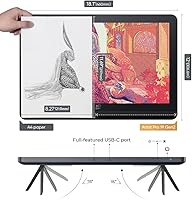
- Display Size: The active display area measures 18.4 inches diagonally, providing a large working canvas suitable for professional illustration and multi-layer composition work.
- Resolution: The panel renders at 4K UHD (3840x2160), delivering sharp detail retention whether zoomed into fine linework or viewing a full composition at reduced scale.
- Color Gamut: Coverage spans 99.8% sRGB, 96% Adobe RGB, and 98% Display P3, making this pen display suitable for web design, print retouching, and wide-gamut video grading workflows.
- Color Accuracy: Calman-verified with a delta-E below 1.5, meaning color deviation from reference values is low enough to trust for professional color-critical output.
- Pen Pressure: Both included styluses support 16,384 pressure levels with an initial activation force of just 3g, enabling very light strokes to register without requiring deliberate pressure.
- Tilt Support: Both styluses detect tilt up to 60 degrees in any direction, allowing natural brush angle simulation; tilt can also be disabled in the driver for artists who prefer consistent stroke behavior.
- Included Styluses: The package ships with the X3 Pro Roller Stylus and the X3 Pro Slim Stylus, each designed with a distinct grip profile to suit different drawing postures and preferences.
- Replacement Nibs: A total of 23 replacement nibs are included across both pen cases — comprising standard and felt nib types for both stylus models — to extend usability without an early accessory purchase.
- Shortcut Remote: The ACK05 wireless remote connects via Bluetooth 5.0, features a physical rotary dial plus 10 fully customizable shortcut keys, and won the Good Design Award in 2023.
- Connectivity: Two reversible USB-C ports and one HDMI input are provided, allowing flexible connection to modern laptops, tablets, and desktop systems without requiring additional adapters for most setups.
- Display Technology: The panel uses full lamination with AG etched glass, eliminating the air gap between the drawing surface and the display layer for improved parallax alignment and a closer pen-to-line feel.
- Anti-Glare Coating: The TÜV SÜD-certified matte surface reduces blue light exposure and delivers a paper-like drawing texture, which helps reduce eye and wrist fatigue during extended creative sessions.
- VESA Mounting: A standard 75x75mm VESA mount pattern is built into the unit, allowing compatibility with third-party monitor arms and stands for flexible positioning in a studio setup.
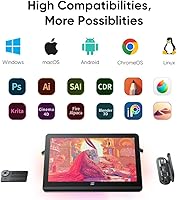
- Compatible OS: The display officially supports Windows 7 and later, macOS 10.13 and later, Linux, ChromeOS 88 and later, and Android via USB 3.1 DP1.2.
- Product Dimensions: The unit measures 19 x 14 x 0.1 inches, occupying a substantial desk footprint that buyers should measure against their workspace before purchasing.
- Product Weight: At 10.08 pounds, this drawing display is intended for permanent desktop use and is not practical to transport regularly between locations.
- Power: A PD power adapter is included in the box, and the display can also draw power through the USB-C connection depending on the host device and cable configuration.
- Color Volume: The display reproduces approximately 1.07 billion colors, supporting smooth gradient rendering and subtle tonal transitions that matter in photographic retouching and painterly illustration.
Related Reviews
XP-Pen Artist Pro 14 Gen2 Pen Display
XP-Pen Artist 13.3 Pro Drawing Display Tablet
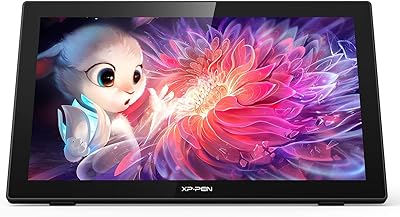
XP-Pen Artist 22 2nd Gen Pen Display
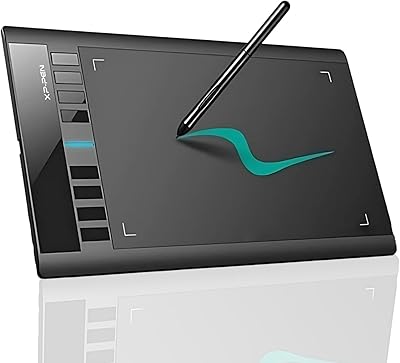
XP-Pen Star03 V2 Drawing Tablet
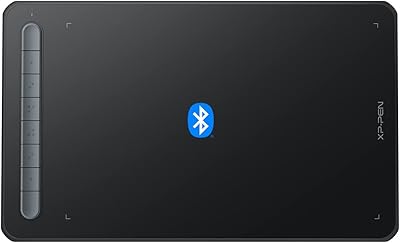
XP-Pen Deco MW Wireless Drawing Tablet
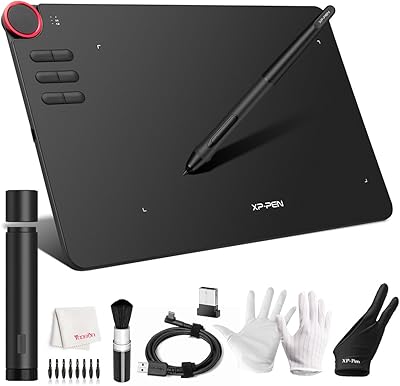
XP-Pen Deco 03 Drawing Tablet
XP-Pen Deco Mini7 V2 Drawing Tablet
XP-Pen Star G640 6x4 Graphics Tablet
XP-Pen Deco 01 V3 Drawing Tablet