Overview

The XP-Pen Artist 22 2nd Gen Pen Display sits comfortably in the mid-range of the pen display market, targeting serious hobbyists and semi-professional artists who want a screen-based drawing experience without paying Wacom Cintiq prices. XP-Pen has built a solid reputation as a brand that punches above its weight class, and this 21.5-inch monitor is a strong example of that. Making the jump from a screenless tablet to an actual display is a significant workflow shift, and this pen display makes that transition genuinely accessible. Just go in with clear expectations — there are real trade-offs to consider alongside the genuine strengths.
Features & Benefits

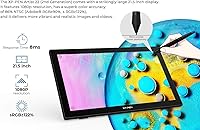
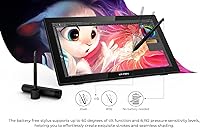
The battery-free stylus is one of the first things you notice — no charging, no weight penalty from a battery cell, just pick it up and draw. With 8192 pressure levels and 60-degree tilt recognition, the pen responds to subtle hand movements in a way that translates directly into natural line variation and controlled shading. The display covers 122% of the sRGB color space, which means colors read as vivid and reasonably accurate for illustration work, though factory calibration can vary between units, so running a quick profile check is worth the five minutes. Connectivity is clean, especially via USB-C to USB-C, and the adjustable stand handles everything from nearly flat to nearly vertical.

Best For

This XP-Pen drawing monitor makes the most sense for intermediate digital artists who have outgrown a screenless tablet and want to draw directly on what they see. It is a particularly strong fit for online educators who need a large, readable annotation surface during live sessions, and for illustration students who want a capable primary peripheral without the financial sting of a Cintiq. Comic and manga artists will appreciate the tilt sensitivity for inking passes and cross-hatching. That said, if you are a complete beginner, a smaller screenless tablet might be a smarter starting point — this display rewards artists who already have some fundamentals and will actually push its capabilities.

User Feedback

Most owners praise the color vibrancy and overall pen responsiveness, with many noting that build quality feels more substantial than the price suggests. The longer-term picture from users who have had it for six months or more is generally positive on durability. Where criticism lands consistently is on pixel density — 1080p across 21.5 inches is noticeable when working up close, especially on fine linework. A handful of Windows users also flag occasional driver hiccups that require reinstallation to resolve. The stand performs well at mid-range angles but can feel slightly unstable at its lowest position. Solid overall, with a few rough edges worth knowing about before buying.

Pros

  • Battery-free stylus stays light and ready through long drawing sessions without charging interruptions.
  • Pen pressure and tilt response translate directly into natural line variation — shading and inking feel controlled, not mechanical.
  • Wide color gamut makes illustration work look vivid and punchy compared to cheaper panels in this size class.
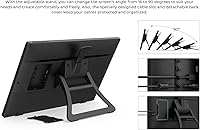
  • The adjustable stand covers a genuinely useful angle range, from nearly flat sketching to upright monitor mode.
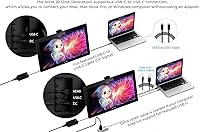
  • USB-C to USB-C connection keeps cable clutter minimal on modern Mac and Windows setups.
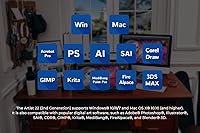
  • Compatible with virtually every major digital art application out of the box, including Adobe, Krita, and Clip Studio.
  • Build quality feels more substantial than the price bracket typically delivers — no flex or creak under stylus pressure.
  • Long-term durability holds up well, with most year-plus owners reporting no significant structural or performance decline.
  • Competitive pricing makes a 21-inch screen-based drawing experience accessible without a Cintiq-level budget.
  • Broad OS support including Linux gives this pen display reach that most competing brands at this price do not match.

Cons

  • 1080p resolution across 21.5 inches is noticeable at close range, especially on fine linework and detailed textures.
  • Factory color calibration is inconsistent between units — a colorimeter check is recommended before serious color work.
  • Some Windows users report pressure sensitivity dropping after system updates, requiring a driver reinstall to fix.
  • Parallax becomes visible at steep angles and near screen corners, which takes deliberate adjustment to work around.
  • At its lowest stand angle, the display can wobble slightly under firm stylus pressure, disrupting precision work.
  • Only five shortcut keys is limiting for artists who rely heavily on keyboard shortcuts for complex, multi-layer workflows.
  • Screen brightness washes out in naturally lit or sun-facing rooms, making accurate color judgment difficult.
  • The screen coating shows wear marks in high-contact zones over time, particularly without consistent use of a drawing glove.
  • Linux functionality depends partly on community-maintained drivers, with limited official support for distribution-specific issues.
  • The cable routing slot on the back is too shallow to fully conceal thick cables, undermining the clean-desk setup it aims for.

Ratings

The XP-Pen Artist 22 2nd Gen Pen Display earns an overall score that reflects a genuinely competitive mid-range offering — not a perfect one, but one that delivers real value where it counts for working artists and educators. These scores were generated by AI after analyzing thousands of verified global user reviews, with spam, bot activity, and incentivized submissions actively filtered out. Both the standout strengths and the recurring frustrations are reflected honestly here, so you can make an informed call before buying.
Pen Precision & Pressure Sensitivity
91%
Artists consistently report that the stylus responds to subtle hand pressure changes with impressive accuracy — thin sketch lines transition into bold ink strokes naturally, and shading with the side of the nib feels controlled rather than guesswork. The 60-degree tilt recognition particularly stands out for hatching and brush-style work.
A small number of users note occasional cursor jitter near the screen edges, which can disrupt precise linework in corners. This is less common on newer driver versions but worth monitoring if edge accuracy is critical to your workflow.
Display Color Accuracy
83%
For illustration and concept art, the wide color coverage makes colors feel punchy and alive right out of the box — reds and greens in particular read with noticeably more depth than cheaper panels. Illustrators working with vibrant character art or editorial pieces tend to praise the display warmly.
Factory calibration is inconsistent between units, and some users find the out-of-box color profile runs slightly warm. Running a calibration profile or using a colorimeter is genuinely recommended, not optional, if color accuracy matters for your print or client work.
Screen Resolution & Pixel Density
62%
38%
For casual illustration, online teaching annotations, and general painting work, the 1920x1080 resolution handles the job without obvious issues. At normal working distances, most users find the image acceptably clean for everyday digital art tasks.
At 21.5 inches, 1080p is a genuine limitation that becomes visible when working close up on fine linework or detailed textures — individual pixels are noticeable. Artists coming from high-DPI monitors or those doing intricate character illustration may find this frustrating over time.
Value for Money
88%
Compared to Wacom Cintiq options at similar screen sizes, the Artist 22 2nd Gen delivers a substantially similar drawing experience at a fraction of the price. For students, hobbyists, and part-time professionals who cannot justify premium Wacom pricing, this display represents a realistic entry into screen-based drawing.
The value equation weakens slightly if you need a high-resolution panel or flawless driver stability out of the box, since those gaps may push you toward spending more elsewhere to compensate. It is outstanding value only when its limitations align with your actual needs.
Build Quality & Materials
79%
21%
The chassis feels notably solid for a mid-range peripheral — there is no flex or creak when pressing firmly with the stylus, which matters during long drawing sessions. Users who have owned the device for over a year generally report no significant physical degradation.
The plastic finish picks up fingerprints and light surface marks fairly easily, and the back panel feels less premium than the front. A few users noted minor cosmetic scuffs appearing after regular desk use, though structural integrity held up well.
Stand & Ergonomics
74%
26%
The integrated adjustable stand is a genuine convenience — flipping between a nearly flat sketching angle and an upright reference monitor position takes seconds and stays where you set it across most of the range. Artists who switch between drawing and viewing reference work appreciate the flexibility.
At the lowest angle settings, a few users report slight wobble when pressing firmly with the stylus, which can be distracting during detail work. The stand mechanism also does not lock into discrete positions, so very precise angle repeatability is not guaranteed.
Driver Stability & Software Setup
61%
39%
Initial setup is straightforward on both Windows and Mac, and the driver interface is clean enough that most users get drawing within minutes of unboxing. Compatibility with popular art software is broad and generally works as expected on first connection.
Driver-related issues are the most consistent complaint in long-term ownership — a subset of Windows users report that pressure sensitivity stops registering after system updates, requiring a driver reinstall to restore normal function. This is not universal but frequent enough to be worth flagging.
Stylus Design & Handling
87%
The battery-free design means the pen is notably lighter than styluses that house a cell inside, which matters enormously after two or three hours of continuous drawing. No mid-session charging interruptions is a quality-of-life improvement that artists who switched from older stylus designs consistently appreciate.
The pen holder, while functional, feels like a budget accessory relative to the rest of the package. Some users also note the side buttons require a slightly deliberate press, which can feel less intuitive during fast-paced work.
Parallax & Drawing Accuracy
67%
33%
At typical straight-on drawing angles, the gap between where the pen tip sits and where the cursor appears is minimal and acceptable for most artists. Central screen accuracy is consistently rated positively across user feedback.
Parallax becomes more noticeable at steep viewing angles and toward the screen corners, which is a known trade-off of this display category at this price point. Artists who work at low angles or frequently draw near the edges may find it takes deliberate adjustment to compensate.
Connectivity & Cable Management
81%
19%
USB-C to USB-C support on modern Macs and Windows machines simplifies the desk setup considerably — one fewer adapter cluttering the workspace. The included cable selection covers most connection scenarios without needing additional purchases for standard setups.
The cable routing slot on the back is a thoughtful touch but not deep enough to fully conceal thick cables. Users with older machines relying on HDMI-only connections also report that managing both a data cable and an HDMI cable creates more desk clutter than the clean USB-C option avoids.
Software Compatibility
86%
Compatibility across Adobe Photoshop, Illustrator, Clip Studio Paint, Krita, and Blender is reliably smooth in the majority of user reports. Digital art students and multi-app professionals rarely encounter compatibility walls when switching between tools.
A handful of users flag pressure sensitivity not mapping correctly in certain niche apps without manual configuration. Compatibility with newer or less common software occasionally requires forum-level troubleshooting rather than plug-and-play behavior.
Display Brightness & Contrast
71%
29%
In typical indoor studio or office lighting, the 250 cd/m2 brightness is adequate and the image reads clearly. The contrast ratio delivers decent shadow separation for painting work done in controlled environments.
In brightly lit rooms or near windows, the display can look washed out and difficult to read accurately. Users working in variable or naturally lit environments consistently flag this as a limitation that affects color judgment during critical work.
Long-Term Durability
77%
23%
Users who have owned the Artist 22 2nd Gen for 12 months or more largely report that the screen surface, pen, and structural components hold up without serious degradation. The pen nibs wear slowly, and replacements are inexpensive and readily available.
Some users report that the screen coating begins to show wear marks in high-contact areas after extended daily use, particularly if a drawing glove is not used consistently. Nib wear accelerates noticeably on the textured screen surface compared to smoother glass alternatives.
Shortcut Keys & Workflow Integration
66%
34%
The five physical shortcut buttons are customizable and genuinely useful once mapped to frequently used commands like undo, brush resize, or layer toggle. Artists who invest time in configuring them report a noticeable improvement in drawing flow.
Five buttons is a relatively limited set compared to competing tablets that offer express keys or dials. Users who rely heavily on keyboard shortcuts for complex workflows often find themselves reaching for the keyboard anyway, limiting how much the onboard keys reduce friction.
Linux Compatibility
58%
42%
XP-Pen officially supports Linux, which is a genuine differentiator in this category — most competing brands treat Linux as an afterthought. Artists running Ubuntu or Debian-based systems can get functional drawing setups without extreme workarounds.
Linux support works in principle but is rougher in practice — pressure sensitivity and tilt function require community-maintained drivers on some distributions, and official support response for Linux-specific issues is limited. It is functional but not polished, and not recommended for Linux users without some technical confidence.

Suitable for:

The XP-Pen Artist 22 2nd Gen Pen Display is built for the sweet spot between casual hobbyist and working semi-professional — specifically, artists who have already developed some fundamentals and are ready to draw directly on a screen rather than hunting for the cursor on a blank tablet surface. Illustration students who need a capable, large-format primary peripheral for coursework will get genuine daily value out of it, as will comic and manga artists who rely on tilt-sensitive inking passes and layered hatching. Online educators and tutors who annotate slides or demonstrate techniques live on video calls will find the 21.5-inch surface gives their audience a clear, readable view. Concept artists and freelance illustrators working on a budget who have been eyeing Wacom Cintiq displays but cannot justify the price difference will find this pen display covers the core workflow needs without a painful financial compromise. It also works well as a secondary display for professional studios that want to add a drawing-capable monitor to a workstation without spending premium money.
Not suitable for:

If you work in close-up detail illustration, intricate character art, or any discipline where pixel-level precision matters at close viewing distances, the 1080p resolution on a 21.5-inch panel will be a persistent frustration — and no driver update will fix that hardware ceiling. The XP-Pen Artist 22 2nd Gen Pen Display is also a poor fit for professional colorists or print production artists who need factory-accurate, consistent color output from unit to unit, since calibration quality varies and the display brightness is not well-suited to brightly lit studio environments. Users on Linux who lack the technical confidence to troubleshoot community-maintained drivers should approach this cautiously, as official Linux support is functional in theory but inconsistent in practice. If you are a complete beginner who has never used a drawing tablet of any kind, a smaller and less expensive screenless option will likely teach fundamentals more efficiently before you invest in a display this size. Finally, anyone with an existing high-DPI monitor workflow who draws reference-heavy work side by side with their canvas may find the resolution gap jarring.
Specifications

  • Display Size: The active screen area measures 21.5 inches diagonally, providing a spacious drawing surface suited to detailed illustration and multi-panel work.
  • Resolution: The panel outputs at 1920x1080 Full HD, which is adequate for most digital art workflows but shows visible pixel density limitations at close working distances.
  • Color Gamut: The display covers 86% NTSC, with sRGB coverage at 122% and Adobe RGB at 90% or above, delivering a wide and vibrant color range for illustration and photo editing.
  • Brightness: Maximum brightness is rated at 250 cd/m2, which performs well in controlled indoor lighting but can appear washed out in brightly lit or naturally lit environments.
  • Contrast Ratio: The panel offers an 800:1 contrast ratio, providing reasonable shadow separation and depth for painting and tonal work in typical studio conditions.
  • Pen Pressure: The included PA6 battery-free stylus supports 8192 levels of pressure sensitivity, enabling fine control over line weight and opacity transitions during drawing.
  • Tilt Support: The stylus recognizes tilt angles up to 60 degrees, allowing natural shading, brush-style strokes, and hatching techniques that respond to the angle of the hand.
  • Report Rate: The pen reports input at 220 or more reports per second, ensuring low-latency response that keeps cursor movement closely synchronized with stylus motion.
  • Pen Resolution: Stylus input is captured at 5080 lines per inch, providing precise cursor positioning across the full drawing surface including near the edges and corners.
  • Connectivity: The display connects via USB-C, HDMI, and USB-A, supporting both modern single-cable USB-C setups and legacy HDMI-plus-USB configurations.
  • Stand Angles: The integrated adjustable stand supports screen angles from 16 to 90 degrees, allowing the display to be positioned flat for sketching or upright as a reference monitor.
  • Shortcut Keys: Five programmable physical buttons are built into the display bezel, customizable through the XP-Pen driver software for commands such as undo, brush resize, or layer toggles.
  • Viewing Angle: The panel supports a 178-degree viewing angle, keeping color and contrast consistent when the screen is viewed from wide horizontal or vertical positions.
  • Compatible OS: The display is officially compatible with Windows 7 and above, Mac OS X 10.10 and higher, and Linux, with driver packages available for all three platforms.
  • Dimensions: The unit measures 538 x 332 x 25.8mm in footprint and depth, with the full packaged product dimensions reaching 23.4 x 16.5 x 5.5 inches including the stand.
  • Weight: The display weighs 19.06 pounds, making it a desk-stationary peripheral rather than a portable device intended for frequent transport.
  • Power Supply: The display is powered via an included AC adapter accepting input from 110 to 240V, with a DC output of 12V at 3A, supporting international power standards.
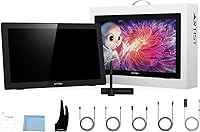
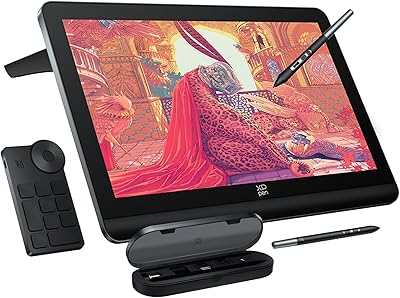
  • In The Box: Each unit ships with the display, the PA6 stylus, a pen holder with eight replacement nibs, USB-C to USB-C cable, USB-A to USB-C cable, HDMI cable, power adapter, power cord, drawing glove, and a cleaning cloth.

Related Reviews
XP-Pen Artist 16 2nd Pen Display
86%
92%
Display Quality
85%
Stylus Performance
78%
Ease of Setup
88%
Build Quality
90%
Ergonomics/Comfort
More
XP-Pen Artist Pro 14 Gen2 Drawing Tablet
87%
94%
Pressure Sensitivity
91%
Color Accuracy
88%
Build Quality
93%
Display Quality
87%
Ergonomics
More
XP-Pen Artist 13.3 Pro Drawing Display Tablet
81%
88%
Screen Quality
91%
Pen Accuracy & Pressure Sensitivity
86%
Parallax & Cursor Alignment
79%
Tilt Functionality
61%
Driver & Software Setup
More
XP-Pen Artist Pro 19 Gen2 Drawing Tablet

81%
93%
Display Quality
91%
Color Accuracy
89%
Pen Performance
86%
Anti-Glare & Surface Texture
84%
Dual Stylus System
More
ASUS ProArt Display PA169CDV 15.6” 4K Pen Display
87%
94%
Color Accuracy
89%
Portability
90%
Touchscreen Responsiveness
85%
Build Quality
92%
Wacom Pen Precision
More
HP All-in-One 22-dd0032 21.5″ Desktop

83%
96%
Space Efficiency
93%
Initial Setup
86%
Display Clarity
71%
Productivity Multitasking
87%
Connectivity & Ports
More
Ozlo Sleepbuds (2nd Generation)
85%
94%
Side-Sleeper Comfort
88%
Passive Noise Masking
82%
Bluetooth Connection Stability
89%
Battery Performance
91%
In-Ear Alarm Function
More
XP-Pen Deco Pro Medium Graphics Tablet
78%
91%
Pen Performance
88%
Active Area Size
83%
Dual-Wheel Control
79%
Build Quality
61%
Driver & Setup Experience
More
Bose QuietComfort Earbuds 2nd Gen
84%
94%
Active Noise Cancellation
91%
Comfort & Fit Stability
88%
Audio Quality & EQ
86%
Connectivity & Multipoint
84%
Microphone & Call Quality
More
Apple AirPods Pro 2nd Gen
89%
95%
Noise Cancellation Performance
91%
Sound Quality
88%
Battery Life
90%
Comfort and Fit
85%
Transparency Mode
More

FAQ

You will need to install the XP-Pen driver software before the pressure sensitivity and tilt functions work properly. Without drivers, the display may function as a basic monitor but the pen will not behave as a drawing tool. Driver installation is straightforward and takes just a few minutes — download directly from the XP-Pen official website to make sure you have the most current version.

The core drawing experience — pressure sensitivity, tilt response, and latency — is genuinely comparable for most everyday illustration and painting workflows. Where Wacom still has an edge is in driver polish, long-term software support, and the feel of the pen nib on glass. For the significant price difference, the Artist 22 2nd Gen delivers around 80 to 90 percent of the Cintiq experience, which is a strong proposition for anyone who cannot justify the premium cost.

It depends on how close you sit and how fine your detail work gets. At a normal arm's-length working distance, the image looks clean enough for most illustration, painting, and annotation tasks. If you regularly zoom into very fine linework or work on detailed textures at close range, the pixel density becomes noticeable. It is not a dealbreaker for most users, but it is worth knowing upfront if resolution-critical work is your primary use case.

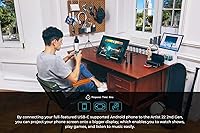
This pen display requires a computer to function — it is not a standalone device and does not connect to iPads or Android tablets. It works with Windows, Mac, and Linux machines, but it needs a host computer running the XP-Pen driver software to operate as a drawing tool.

This is a known issue that a subset of Windows users experience after major system updates. The fix in most cases is to fully uninstall the current XP-Pen driver, restart your computer, and reinstall the latest driver version downloaded directly from XP-Pen's website. Avoid using older driver versions stored locally, as a fresh install of the current release resolves the issue for the majority of affected users.

It works reliably with a wide range of software beyond the Adobe suite, including Clip Studio Paint, Krita, MediBang, FireAlpaca, GIMP, and Blender, among others. Pressure sensitivity and tilt function correctly in all of these with the driver installed. Most niche or less common apps also work, though occasionally a manual configuration step is needed within the app's tablet settings.

Parallax is present but manageable at typical straight-on working angles. When you draw from the center of the screen at a comfortable seated position, the cursor-to-nib gap is small enough that most artists adapt within a day or two. At steep angles or near the corners, the offset becomes more noticeable and may require conscious compensation. It is a trade-off common to pen displays in this price range, not a defect specific to this model.

At mid to high angles, the stand holds steady and does not shift under normal drawing pressure. At the lowest available angle — around 16 degrees — a few users report slight wobble when pressing firmly. If you prefer working at a very flat angle, this is worth knowing. At the angles most people actually draw at, the stand performs well for daily studio use.

Nib lifespan varies depending on drawing style and surface pressure, but most users find them wear slowly with regular use. The display ships with eight replacement nibs in the pen holder, which is enough to last most artists well over a year. When you do need more, they are inexpensive and available directly from XP-Pen as well as various third-party sellers.

Yes, it functions as a standard external display when you are not actively drawing — useful if you want to keep reference images, palettes, or timelines on the pen display screen while working on your primary monitor. The color coverage makes it decent for reference viewing, though for critical color grading as a secondary monitor you may want to run a calibration profile first.

Where to Buy

XP-Pen Official Store | US
In stock $349.99