


Overview

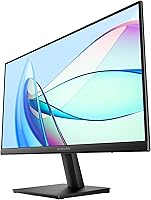
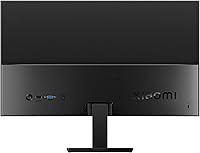
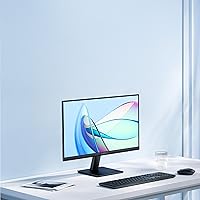
The Xiaomi A22i 22-Inch FHD Monitor is Xiaomi's entry into the desktop display space — a brand far better known for smartphones that has been quietly expanding into PC accessories. The 7.5mm ultra-slim body is the first thing that catches your eye, and it genuinely looks more refined than the price tag implies. That said, two things are worth flagging upfront: the panel actually measures 21.45 inches rather than a full 22, and despite what the product title suggests, the panel is VA, not IPS — a distinction with real consequences for viewing angles and response characteristics. Keep expectations grounded; this is a productivity-first monitor, not a tool for color-critical or performance-driven work.

Features & Benefits

At 75Hz, the A22i keeps everyday tasks feeling responsive — scrolling through spreadsheets or jumping between browser tabs stays smooth without noticeable lag. The 1920x1080 resolution offers a workable pixel density for reading documents and sitting on video calls. Factory color calibration with a ΔE under 2 means colors look decent straight out of the box, though professional-grade accuracy is not the goal here. DC dimming paired with TÜV Low Blue Light certification is a genuine comfort advantage during long desk sessions. The VA panel's 3000:1 contrast ratio also produces noticeably deeper blacks than most IPS displays at a comparable price. HDMI and VGA ports keep connectivity options refreshingly broad.

Best For

This slim office display suits a fairly specific buyer, and it's worth being direct about who that is. Students furnishing a first desk setup or remote workers adding a second screen on a tight budget will find real value here. It's also a meaningful upgrade for anyone still running a 17- or 19-inch monitor from several years ago. If you're editing photos or video, the color limitations of a budget VA panel will frustrate you quickly. Anyone sitting near a bright window should also factor in the 250-nit brightness ceiling before committing. For low-light home offices and general daily productivity, though, it delivers more than its price reasonably promises.

User Feedback

Buyers consistently praise the slim, clean aesthetic — the thin bezels and minimal profile are crowd favorites, and mounting the display on a VESA arm is reported to be easy. The main friction point is panel mislabeling: a noticeable number of buyers felt misled by the IPS reference in the listing, only to receive a VA panel. The bundled stand draws regular criticism for feeling lightweight and slightly unstable. Those working near sunlit windows mention that 250 nits can look washed out on bright days. Color impressions are mixed — fine for everyday tasks, but buyers expecting something closer to true professional calibration tend to come away disappointed. Satisfaction runs highest among those who went in with realistic expectations.

Pros

  • The 7.5mm ultra-slim body looks noticeably more premium than the price suggests.
  • Factory color calibration means decent out-of-box image quality without manual tweaking.
  • TÜV-certified low blue light filtering is a genuine comfort feature for all-day desk work.
  • The 3000:1 contrast ratio produces deep, rich blacks that budget IPS panels typically cannot match.
  • HDMI and VGA ports together cover a wide range of older and newer devices without needing adapters.
  • VESA mount compatibility makes it easy to pair with an aftermarket arm for a cleaner desk setup.
  • At 4.8 pounds, the A22i is light enough to reposition or transport without hassle.
  • The 75Hz refresh rate keeps everyday scrolling and multitasking feeling smooth and responsive.
  • 99% sRGB coverage is respectable for a budget panel used in general productivity tasks.

Cons

  • The product title references IPS, but the actual panel is VA — a meaningful difference buyers deserve to know upfront.
  • At 250 nits, brightness falls short in well-lit rooms or spaces with strong ambient light.
  • The included stand feels lightweight and can be unstable, especially on uneven desk surfaces.
  • The screen measures 21.45 inches, not a full 22 inches as the product name implies.
  • The glossy screen surface increases reflections and glare compared to matte-finish alternatives.
  • VA panels can exhibit color shift when viewed from off-center angles, which matters in shared viewing situations.
  • No height or swivel adjustment on the stock stand limits ergonomic flexibility without a third-party arm.
  • Response times may not satisfy users who occasionally play fast-paced or action-heavy games.

Ratings

The scores below for the Xiaomi A22i 22-Inch FHD Monitor were generated by our AI rating engine after analyzing verified purchase reviews from buyers worldwide, with spam, bot-submitted, and incentivized feedback actively filtered out. Each category reflects the honest distribution of real user experiences — strengths and frustrations alike — so you get a clear picture of where this slim office display genuinely delivers and where it falls short.

Value for Money
78%
22%
At its price point, the A22i packs in factory color calibration, a TÜV-certified eye-care system, and a genuinely slim chassis — features that typically cost more elsewhere. Most buyers who went in with realistic expectations came away feeling they got a fair deal for daily office use.
A handful of buyers felt the panel mislabeling and brightness limitations undercut the perceived value, especially when comparable monitors from other brands occasionally go on sale at similar prices with more transparent specs.
Image Quality
71%
29%
The 3000:1 contrast ratio — a natural advantage of VA technology — makes blacks noticeably richer than what budget IPS panels offer, which pays off during movie watching and dark-background interfaces. Factory calibration keeps colors acceptably natural straight out of the box.
At 250 nits, the display can look flat and washed out in brighter rooms, and the glossy surface compounds the problem with added reflections. Users expecting IPS-grade color consistency across the panel were frequently disappointed by the VA-typical color shift at wider angles.
Design & Build
84%
The 7.5mm ultra-slim body draws consistent admiration — users frequently mention that it looks far more premium than the price implies, and the thin bezels give the desk setup a clean, modern look. At under five pounds, it is easy to reposition or pair with a monitor arm.
Despite the sleek front profile, the build materials feel light to the touch in a way that reminds you this is a budget product. A few users noted minor flex in the rear casing when adjusting the display.
Stand & Ergonomics
52%
48%
The stand does its basic job — the monitor stays upright and offers a simple tilt adjustment that covers most standard sitting positions. Users who paired it with a third-party VESA arm reported a much-improved experience overall.
Stability is a recurring complaint; the stand has a lightweight, slightly wobbly feel that is noticeable on desks with any vibration. There is no height adjustment or swivel, which limits proper ergonomic alignment without an aftermarket arm.
Eye Comfort
81%
19%
DC dimming eliminates the flicker that plagues PWM-dimmed budget monitors, and the TÜV-certified low blue light mode makes a real difference during evening work sessions. Several users with reported screen-fatigue sensitivity specifically mentioned this display was easier on their eyes than previous monitors they had owned.
The low blue light mode does introduce a slight warm color cast that not everyone appreciates, and it cannot be fully dialed out without affecting other picture settings. The effectiveness is also reduced in bright environments where higher brightness — which this panel lacks — would be needed to compensate.
Connectivity
76%
24%
Offering both HDMI and VGA in a budget monitor is genuinely practical — it means the A22i can connect to a modern laptop and an older office tower without requiring any adapter. This versatility is something many competing monitors at this price quietly drop.
There is no DisplayPort, USB-C, or audio output, which limits the display for users with newer workstations that have moved away from legacy ports. Only one HDMI port is included, so switching between two HDMI sources requires manual cable swapping.
Color Accuracy
66%
34%
The sub-2 Delta E factory calibration is a genuine differentiator at this price tier, and for tasks like document editing, web browsing, and video calls, the out-of-box color rendering is good enough that most users will not feel compelled to recalibrate.
Serious photographers or designers will quickly find the 99% sRGB coverage and VA panel characteristics limiting for color-critical work. Color accuracy also degrades noticeably when viewing from off-center angles, which matters in shared-desk or side-by-side monitor setups.
Brightness & Glare
54%
46%
In controlled, dimmer home office environments — the kind with blinds drawn or overhead rather than natural lighting — 250 nits is workable for all-day use. Some users appreciate the lower brightness ceiling for nighttime work as it reduces eye strain at lower settings.
The 250-nit ceiling is a consistent pain point for users in well-lit spaces, and the glossy screen surface amplifies the issue by catching overhead lights and window glare. This combination makes the A22i a poor choice for any workspace that relies on natural daylight.
Refresh Rate & Motion
69%
31%
The step up from 60Hz to 75Hz makes a noticeable difference for everyday use — fast scrolling feels smoother, and cursor movement looks less choppy during quick transitions between windows. For office-centric buyers, it covers the need without overpaying for gaming-tier refresh rates.
VA panels at 75Hz still exhibit some motion smearing in fast-moving content, which casual gamers will notice even if office workers will not. Users who upgraded from a 144Hz display found the motion clarity a clear step down.
Setup & Installation
83%
Assembly is quick — the stand attaches without tools in minutes, and the VESA pattern makes arm mounting equally straightforward. Buyers consistently mention that the monitor is ready to use within ten minutes of unboxing, which is a small but appreciated convenience.
The instruction manual is minimal and assumes a certain level of familiarity with monitor setup. A couple of international buyers noted that the on-screen menu language options were limited depending on the regional firmware version.
Panel Labeling Accuracy
38%
62%
The monitor itself performs reasonably within what a VA panel can realistically offer, and for buyers who researched the actual panel type before purchasing, there were fewer complaints about unmet expectations.
The product title references IPS, which the panel is not — this is the single most cited source of buyer dissatisfaction across reviews. It has created a trust problem that no amount of good performance can fully offset, particularly for buyers who specifically wanted an IPS display.
Out-of-Box Experience
73%
27%
Most users found the packaging protective and the monitor in perfect condition on arrival. The default picture settings are calibrated well enough that many buyers used the display as-is without diving into the on-screen menu at all.
Some buyers received units with slight backlight inconsistency around the panel edges, which is not uncommon on budget VA displays but still disappointing. A few noted that no HDMI cable was included in the box, requiring an immediate extra purchase.
Slim Profile & Desk Presence
87%
The 7.5mm profile genuinely turns heads for a budget monitor — users setting up minimalist workstations specifically call it out as a reason they chose the A22i over bulkier alternatives. It takes up very little desk depth and integrates neatly into tidy setups.
The slim body does mean port access is slightly awkward, with connections positioned in a way that makes cable management less clean than expected. Some users also found the power brick larger than anticipated relative to the monitor's own slim form factor.

Suitable for:

The Xiaomi A22i 22-Inch FHD Monitor was clearly built with a specific type of buyer in mind, and if you fall into that category, it genuinely delivers. Students furnishing a first desk setup will appreciate the slim profile and the ability to connect via HDMI or the older VGA standard, which covers nearly any machine they might already own. Remote workers who spend their days in email, spreadsheets, and video calls will find the 1080p resolution and eye-comfort features — DC dimming, TÜV-certified low blue light filtering — meaningful during long hours at a desk. It also suits anyone looking for a tidy, space-efficient second monitor without a large outlay, particularly in dimmer or controlled-light home office environments where the 250-nit brightness ceiling is less of a handicap. If your priorities are a clean aesthetic, decent everyday image quality, and broad connectivity at an entry-level price, this slim office display checks those boxes reliably.

Not suitable for:

The Xiaomi A22i 22-Inch FHD Monitor has clear boundaries, and buyers outside its intended use case will likely walk away frustrated. Graphic designers, photo editors, and anyone doing color-sensitive creative work should look elsewhere — the VA panel, while factory-calibrated, cannot compete with higher-grade IPS displays in terms of color consistency across the screen. Gamers who care about fast response times will also find the panel limiting, as VA technology tends to trail behind faster IPS and TN alternatives for motion clarity in quick-action scenarios. The 250-nit peak brightness makes the A22i a poor fit for rooms with significant natural light or direct sunlight exposure, where the image can appear washed out. The bundled stand is basic at best, so anyone not planning to mount the display on a VESA arm should be aware they may end up with a wobblier setup than expected. In short, this is a focused tool — useful within its lane, but not a versatile all-rounder.

Specifications

  • Panel Type: The display uses a VA (Vertical Alignment) panel, which delivers strong contrast performance but narrower off-axis color consistency compared to IPS technology.
  • Screen Size: The active display area measures 21.45 inches diagonally, despite the product being marketed under a 22-inch designation.
  • Resolution: Native resolution is 1920x1080 pixels (Full HD), providing a pixel density well suited for everyday office tasks and standard media consumption.
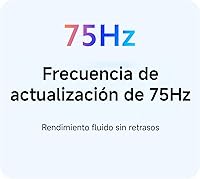
  • Refresh Rate: The panel runs at 75Hz, offering smoother motion than a standard 60Hz display for scrolling-heavy workflows and casual video playback.
  • Brightness: Peak brightness is rated at 250 nits, which is adequate for dim to moderately lit rooms but may fall short in bright or sunlit environments.
  • Contrast Ratio: The static contrast ratio is 3000:1, a notable strength of VA panels that results in noticeably deeper blacks than most budget IPS alternatives.
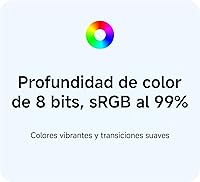
  • Color Gamut: The monitor covers 99% of the sRGB color space, providing reasonable color richness for general productivity and light media use.
  • Color Depth: The panel supports 8-bit color, enabling display of up to 16.7 million colors for smooth tonal gradations in images and video.
  • Color Calibration: Each unit undergoes factory color calibration with a Delta E (ΔE) value below 2, meaning colors are relatively accurate straight out of the box without user adjustment.
  • Viewing Angle: Rated at 178 degrees horizontally and vertically, though real-world color accuracy at extreme off-axis angles is limited by the VA panel technology.
  • Blue Light Filter: The display carries TÜV Rheinland Low Blue Light certification and uses DC dimming to reduce eye strain during extended viewing sessions.
  • Body Thickness: The monitor chassis measures just 7.5mm at its thinnest point, giving it a notably slim profile for its price category.
  • Connectivity: Input options include one HDMI port and one VGA port, covering both modern and legacy device connections without requiring additional adapters.
  • Screen Surface: The panel uses a glossy surface finish, which enhances color vibrancy but can introduce reflections in environments with strong ambient or natural light.
  • Aspect Ratio: The display uses a standard 16:9 widescreen aspect ratio, compatible with the vast majority of modern content formats and operating systems.
  • Dimensions: The monitor measures 19.41 x 6.5 x 14.8 inches with the stand attached, fitting comfortably on most standard-sized desks.
  • Weight: Total unit weight with the stand is 4.8 pounds, making it easy to reposition on a desk or mount on a VESA arm.
  • VESA Compatibility: The monitor supports VESA mounting, allowing users to attach it to a wide range of third-party monitor arms and wall mounts.
  • Power Supply: The unit operates at 12 volts, and power is supplied via the included adapter rather than through a USB-C connection.
  • Availability Date: This model was first made available for purchase in September 2024, making it a relatively recent entry in Xiaomi's monitor lineup.

Related Reviews
KOORUI 22N1 22-Inch FHD Monitor
79%
92%
Value for Money
85%
Display Quality
88%
Ergonomics & Comfort
90%
Eye Care Features
82%
Setup & Installation
More
SANSUI ES-22X3 22-Inch IPS FHD Monitor
83%
88%
Display Quality
91%
Value for Money
85%
Build Quality
82%
Ease of Setup
80%
Eye Care Features
More
Samsung S33A 22-Inch FHD Monitor
75%
88%
Value for Money
91%
Display Contrast
84%
Eye Comfort
87%
Setup & Ease of Use
78%
Viewing Angles
More
HP All-in-One 22-dd0032 21.5″ Desktop
83%
96%
Space Efficiency
93%
Initial Setup
86%
Display Clarity
71%
Productivity Multitasking
87%
Connectivity & Ports
More
SAMSUNG S30GD 22″ FHD Monitor
82%
88%
Display Quality
90%
Performance (100Hz refresh rate)
85%
Design & Build Quality
70%
Ergonomics (Tilt-only Stand)
80%
Eye Comfort (Blue Light & Flicker Reduction)
More
ArcticPro AD24EF2 24-inch Gaming Monitor
73%
88%
Value for Money
82%
Image Quality
79%
Gaming Performance
63%
Build Quality
84%
Connectivity
More
Samsung SR35 27-Inch FHD Monitor
86%
89%
Display Quality
92%
Eye Comfort Features
80%
Build Quality
94%
Ease of Setup
91%
Value for Money
More
Samsung S22R350FHN 22-inch IPS Monitor
76%
84%
Image Clarity
71%
Color Accuracy
88%
Viewing Angles
74%
Refresh Rate & Smoothness
86%
Eye Comfort
More
Viewedge USC2412FDA-P 24-inch FHD 144Hz Gaming Monitor
71%
83%
Value for Money
79%
Gaming Performance
76%
Image Quality
81%
Eye Comfort
63%
Build Quality
More
Amazon Basics 24-inch FHD 1080p Monitor
76%
83%
Image Quality
91%
Value for Money
78%
Refresh Rate & Smoothness
94%
Ease of Setup
52%
Stand & Ergonomics
More

FAQ

This is one of the most common points of confusion with this monitor. The panel is VA, not IPS. The product title is misleading on this point, and it has caused frustration among buyers who were specifically looking for an IPS display. VA panels have better contrast but slightly narrower viewing angles, so it is worth knowing before you decide.

Yes, the A22i includes both HDMI and VGA ports, so it connects to older machines without needing a separate adapter. That dual-port setup is actually one of the more practical features on a monitor at this price point.

Honestly, it can struggle. The 250-nit brightness ceiling is on the lower end, and the glossy screen surface does not help — reflections can become distracting when ambient light is strong. If your workspace gets a lot of direct sunlight, you may want a brighter or matte-finish alternative.

Yes, and many users actually recommend doing exactly that. The bundled stand is functional but lightweight and can feel a bit wobbly. Swapping it for a VESA-compatible arm gives you better stability and more ergonomic flexibility.

It is a reasonable choice for casual or turn-based gaming, but competitive or fast-paced gamers will likely find it limiting. VA panels can exhibit some motion smearing in rapid sequences, and 75Hz, while better than 60Hz, falls short of the 144Hz or higher refresh rates that action-game players typically look for.

Colors are decent for a budget display — the factory calibration keeps Delta E below 2, which is a solid baseline. For general use like browsing, documents, and video calls, most people will not need to touch the settings. That said, if you are doing any serious photo editing or color-critical design work, this panel has limitations that no amount of manual calibration will fully overcome.

Many users report that it does help, particularly during evening use. The TÜV-certified low blue light mode combined with DC dimming (which avoids the flicker common in PWM dimming) makes extended sessions feel less fatiguing than on screens without these features. It is a genuine comfort advantage, not just a marketing checkbox.

The actual panel measures 21.45 inches diagonally, so if you were expecting a full 22-inch screen, you will notice a small discrepancy. In everyday use it is a minor difference, but it is worth knowing if you are comparing against a true 22-inch display.

The stand supports basic tilt adjustment, but there is no height adjustment or swivel built in. For most casual setups it is fine, but anyone who cares about proper ergonomic positioning will want to invest in a monitor arm rather than relying on the stock stand.

Xiaomi typically includes a power adapter with the unit, but HDMI and VGA cable inclusion can vary by retailer and shipment. It is a good idea to verify what is in the box at the time of purchase, and keep a spare HDMI cable handy just in case.

Where to Buy