Overview

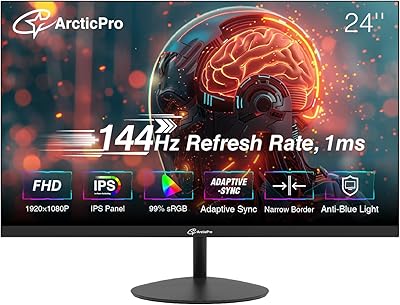
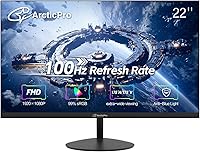
The ArcticPro AD22ZFA 22-inch FHD Monitor is a budget entry-level display from Hangzhou Yulian Technology, a Chinese manufacturer that entered the market in mid-2024. Despite the unfamiliar brand name, it has climbed to #45 in Amazon's Computer Monitors category — a sign that buyers are responding positively. The VA panel technology is worth noting upfront: compared to IPS panels at this price, you get deeper blacks and stronger contrast, though color accuracy at extreme angles can vary. The ultra-slim, 3-sided frameless design gives it a clean, modern look that punches above its price tier. One thing to be clear about before buying: there are no built-in speakers or audio outputs on this monitor, so plan accordingly.
Features & Benefits

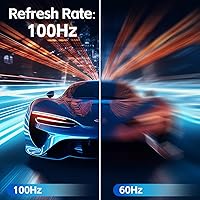
The 100Hz refresh rate is the most practical upgrade this ArcticPro monitor offers over cheaper 60Hz alternatives — motion looks noticeably smoother when scrolling through documents or watching video, and light gaming feels more responsive. The full HD 1920x1080 resolution paired with 105% sRGB coverage produces colors that are richer than you might expect at this price point. That 3000:1 contrast ratio, a natural strength of VA panels, means dark scenes in movies or games have genuine depth rather than looking washed out. The matte anti-glare coating keeps reflections manageable in bright rooms, and the Low Blue Light mode is genuinely useful for long work sessions. VESA 75x75mm support and a tilt-adjustable stand round out a solid ergonomic package.

Best For

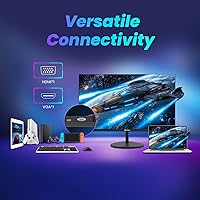
The AD22ZFA makes the most sense for students and remote workers who need a reliable primary or secondary screen without stretching a budget. The inclusion of both HDMI and VGA inputs is a thoughtful touch — it means you can connect an older desktop or laptop that lacks modern ports without hunting for adapters. Light gamers will appreciate the 100Hz panel without paying a premium for specs they may not fully use. The thin bezel makes this 22-inch budget display a natural fit for side-by-side dual-monitor arrangements. Anyone working in a compact space — a dorm room, studio, or small home office — who wants to wall-mount rather than deal with a stand will find the VESA support particularly handy.

User Feedback

Sitting at a 4.4-star average, this ArcticPro monitor earns genuine praise from buyers for its picture quality and value. Most people comment that colors look vibrant right out of the box, and the contrast is noticeably better than older or cheaper IPS screens they replaced. Setup gets consistently good marks — the box includes an HDMI cable and adapter, so most buyers are up and running quickly. On the critical side, some users mention that the factory color calibration runs slightly warm, requiring minor manual adjustments. A handful note that the stand, while functional, feels less rigid than expected, which may explain why several buyers opted for the VESA mount instead. No one mistakes it for a premium panel, but at this price tier, expectations appear well matched.

Pros

  • Deep 3000:1 contrast ratio makes dark scenes in movies and games look far better than typical IPS panels at this price.
  • The 100Hz refresh rate delivers noticeably smoother scrolling and motion compared to standard 60Hz budget displays.
  • 105% sRGB color coverage produces vivid, punchy visuals that feel lively for everyday content and productivity work.
  • Both HDMI and VGA inputs are included, making it easy to connect older and newer devices without extra adapters.
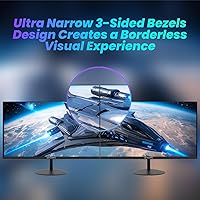
  • The 3-sided frameless design looks considerably more premium than the price suggests, especially in a dual-monitor setup.
  • VESA 75x75mm compatibility lets you ditch the stand entirely and use a monitor arm or wall mount for a cleaner setup.
  • Matte anti-glare coating keeps the screen usable in brighter rooms without harsh reflections disrupting your view.
  • Low Blue Light mode meaningfully reduces eye fatigue during long work or study sessions.
  • Setup is quick and the box includes an HDMI cable and adapter, so most users are running within minutes of unboxing.
  • At its price point, this 22-inch budget display ranks among the top-selling monitors on Amazon for good reason — the overall package is hard to beat at this tier.

Cons

  • No built-in speakers and no audio output at all — you will need external speakers or headphones for any sound.
  • The included stand has no height adjustment, which becomes a real ergonomic limitation for taller users or shared setups.
  • Factory color calibration is inconsistent across units; some arrive with a noticeable warm or green bias requiring manual fixes.
  • Ghosting on fast-moving content is a known VA panel limitation at this price — not ideal for competitive gaming.
  • Brand support infrastructure is thin; warranty resolution with a newer Chinese manufacturer can be slow or unclear.
  • The stand base feels lightweight and slightly wobbly under normal desk conditions — not confidence-inspiring for a permanent setup.
  • No DisplayPort, USB hub, or modern connectivity beyond a single HDMI 1.4 and VGA input.
  • Backlight uniformity issues, particularly in screen corners, affect a minority of units but are worth noting for dark-background use.
  • Only tilt adjustment is available — no swivel or pivot means portrait-mode use is off the table with the stock stand.
  • The OSD manual is poorly translated, making advanced calibration settings harder to navigate than they should be.

Ratings

The ArcticPro AD22ZFA 22-inch FHD Monitor scores presented here were generated by AI after systematically analyzing verified global buyer reviews, actively filtering out incentivized, bot-generated, and duplicate submissions to surface what real users actually experience. Across categories from panel performance to build quality, both the genuine strengths and the recurring frustrations are reflected with equal weight — no spin, no padding.
Value for Money
91%
For a sub-70-dollar display, buyers consistently report being surprised by what they get: a 100Hz VA panel with a frameless design that visually competes with monitors priced significantly higher. Students and home office workers on tight budgets repeatedly call it one of the better purchases they have made for their desk setup.
A few buyers who compared it directly against entry-level Acer and AOC models felt the price advantage shrinks once you factor in that those brands offer more established warranty support and easier returns. The value equation depends heavily on your risk tolerance with a lesser-known brand.
Picture Quality
86%
The VA panel's 3000:1 contrast ratio is the standout — dark scenes in movies and games have genuine depth that flat IPS panels at this price simply cannot match. The 105% sRGB coverage produces punchy, saturated colors that feel lively for everyday content consumption and productivity work.
Out-of-the-box color calibration runs warm on some units, and a minority of buyers report slight backlight bleed in screen corners during full black images. Users doing color-critical creative work will likely need to spend time in the monitor's OSD menu fine-tuning before the image feels accurate.
Refresh Rate & Motion Smoothness
78%
22%
Moving from a 60Hz display to this ArcticPro monitor makes a noticeable real-world difference — scrolling through long documents, fast web browsing, and casual gaming all feel more fluid. Light gamers playing less demanding titles report a genuinely improved experience compared to standard entry-level screens.
VA panels at this price tier carry a known limitation: pixel response times can produce subtle ghosting on fast-moving objects in competitive games or action-heavy scenes. This is not a panel for anyone serious about fast-paced gaming; the 100Hz is best appreciated in everyday use rather than as a gaming specification.
Build Quality & Design
74%
26%
The ultra-slim profile and 3-sided frameless aesthetic make the AD22ZFA look considerably more premium than its price suggests, and buyers setting up dual-monitor arrangements particularly appreciate how minimal the bezels are. The matte finish on the chassis feels clean and resists fingerprints reasonably well.
The stand is the most consistently criticized physical element — it feels lightweight and slightly wobbly under normal desk vibration, and taller users find the height adjustment range limiting. Several reviewers opted to use the VESA mount immediately after unboxing simply to avoid dealing with the stand altogether.
Ergonomics & Adjustability
61%
39%
The tilt range covers the basics for most seated users, and the VESA 75x75mm compatibility opens the door to third-party arms and wall mounts that provide far superior positioning flexibility. For users who already own a monitor arm, the slim and lightweight body makes installation straightforward.
Outside of tilt, there is no height adjustment, swivel, or pivot on the included stand — which is a real limitation for anyone who needs to share the monitor between users of different heights or wants portrait orientation. This is a budget compromise that stands out once you are used to more adjustable screens.
Eye Comfort
82%
18%
The combination of a matte anti-glare coating and a dedicated Low Blue Light mode makes a meaningful difference during extended work sessions — buyers who use this 22-inch budget display for 6 to 8 hours daily report noticeably less eye fatigue compared to glossy or poorly filtered alternatives they used previously.
The Low Blue Light mode does shift the white balance toward warmer tones, which some users find slightly yellow-looking when reading text for long periods. There is no hardware flicker-free certification mentioned, and a small number of sensitive users report mild discomfort during very long sessions.
Connectivity & Port Selection
69%
31%
Having both HDMI 1.4 and VGA inputs is genuinely practical for buyers upgrading from older desktops that lack HDMI outputs — no adapter hunting required. An HDMI cable ships in the box, which is a small but appreciated detail at this price point.
Two inputs is the bare minimum, and there is no USB hub, DisplayPort, or audio output of any kind. Users connecting to a modern laptop who also want to pass audio through the monitor will find themselves needing a separate solution for sound, which adds friction to an otherwise simple setup.
Audio
31%
69%
There is nothing to fault with audio performance expectations if you know going in that this monitor has zero audio capability — buyers who pair it with a desktop speaker or headset report no issues and find the setup perfectly functional for work and entertainment.
No built-in speakers and no 3.5mm audio output whatsoever means this monitor contributes nothing to your sound setup. For buyers who assumed a monitor at this size would at least pass audio through, the discovery post-unboxing can be frustrating — this is a detail worth confirming before purchasing.
Setup & Out-of-Box Experience
88%
The assembly process takes under ten minutes, and the included accessory bundle — HDMI cable, power adapter, and stand base — means most buyers are running without a separate trip to buy extras. Buyers with limited technical experience consistently rate the setup experience as easy and stress-free.
The instruction manual is sparse and clearly translated, which creates minor confusion for users who want to access advanced OSD settings like gamma or color temperature adjustments. A clearer quick-start guide would reduce the learning curve for first-time monitor buyers.
Color Accuracy
67%
33%
For non-professional use — streaming, general productivity, casual photo browsing — the colors look vivid and pleasing, and the wide 105% sRGB gamut coverage helps everyday content pop more than cheaper panels typically allow at this price range.
Factory calibration lacks consistency across units; some buyers receive a well-balanced panel while others get noticeable warmth or slight green bias that requires manual correction. Anyone needing reliable color accuracy for photo editing or design work should look at a calibrated IPS panel instead.
Viewing Angles
72%
28%
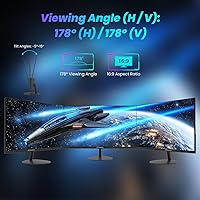
The 178-degree horizontal and vertical viewing angles perform solidly for a VA panel, and users watching content with friends or presenting from the side of a desk report that brightness and color hold up better than expected at wide off-axis positions.
VA panels inherently show some color shift and contrast drop when viewed from steep angles — particularly from below — and this monitor is no exception. In a single-user desk setup this rarely matters, but in shared or collaborative environments where multiple people view simultaneously, it becomes more noticeable.
Brand Reliability & Support
53%
47%
The product has performed reliably for the majority of buyers during the review period, with relatively few reports of dead pixels or early hardware failures. For buyers comfortable with the risk profile of newer brands, the day-to-day experience has been largely trouble-free.
ArcticPro is manufactured by Hangzhou Yulian Technology, a company with limited brand recognition and an unclear long-term warranty support infrastructure in Western markets. If something goes wrong after the return window closes, getting resolution may require more persistence than dealing with an established brand like LG or Acer.
Desk Footprint & Aesthetics
85%
The slim body and minimal bezels on three sides give this ArcticPro monitor a clean, uncluttered look that genuinely suits modern minimalist desk setups. Buyers frequently comment that it looks more expensive than it is, particularly in a dual-monitor arrangement where the thin bezels create a near-seamless visual field.
The base of the stand occupies a modest but noticeable amount of desk real estate, and its plastic construction does not match the visual quality of the screen itself. Users with premium peripherals may find the stand base aesthetically inconsistent with the rest of their setup.

Suitable for:

The ArcticPro AD22ZFA 22-inch FHD Monitor is a strong match for students, first-time monitor buyers, and remote workers who need a capable everyday screen without spending more than necessary. If you are outfitting a home office on a tight budget, the combination of a sharp 1080p image, low blue light mode, and matte anti-glare coating covers the fundamentals for long work sessions without compromise. The dual HDMI and VGA inputs make it especially practical for anyone upgrading from an older desktop that lacks modern ports — no adapter required. Light gamers who want a noticeable step up from a sluggish 60Hz panel will appreciate the 100Hz refresh rate for casual titles, even if it is not built for competitive play. The thin bezels and slim profile also make this an easy recommendation for anyone building a dual-monitor setup on a budget, or anyone looking to wall-mount a screen in a compact living or working space.

Not suitable for:

The ArcticPro AD22ZFA 22-inch FHD Monitor is not the right choice for buyers who need reliable post-purchase support from an established brand — ArcticPro is manufactured by Hangzhou Yulian Technology, a relatively unknown company with limited warranty infrastructure in Western markets, and that is a real risk if something goes wrong after the return window closes. Competitive or fast-paced gamers should look elsewhere: VA panels at this price tier carry inherent pixel response limitations that produce ghosting during high-speed motion, and the 100Hz rating does not change that underlying reality. Color-critical professionals such as graphic designers, photographers, or video editors will find the inconsistent factory calibration frustrating, since some units ship with a warm color bias that requires manual correction and still may not reach the accuracy needed for serious creative work. Anyone who relies on monitor-integrated speakers for daily audio — calls, background music, video conferencing — will need to budget for an external speaker or headset, as this display has no audio output of any kind. Finally, users who prefer a height-adjustable or pivot-capable stand will find the fixed-height, tilt-only base genuinely limiting over time.
Specifications

  • Screen Size: The display measures 22 inches diagonally, offering a comfortable viewing area for single or dual-monitor desk setups.
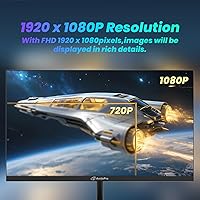
  • Resolution: Native resolution is 1920x1080 Full HD, delivering sharp text and clear detail for everyday productivity and media consumption.
  • Panel Type: Uses a VA (Vertical Alignment) panel, which provides deeper blacks and higher contrast than typical IPS panels at the same price tier.
  • Refresh Rate: Supports a 100Hz refresh rate, offering noticeably smoother motion than standard 60Hz displays for browsing, video, and casual gaming.
  • Color Gamut: Covers 105% of the sRGB color space, producing saturated, vibrant colors that exceed the standard sRGB baseline.
  • Contrast Ratio: Rated at a 3000:1 static contrast ratio, enabling meaningful distinction between dark shadows and bright highlights in low-light content.
  • Viewing Angles: Supports 178° horizontal and vertical viewing angles, maintaining acceptable image quality across a wide range of off-axis positions.
  • Screen Surface: Features a matte anti-glare coating that diffuses ambient light reflections, reducing eye strain in moderately lit environments.
  • Inputs: Equipped with one HDMI 1.4 port and one VGA port, accommodating both modern and legacy device connections without additional adapters.
  • Audio Output: This monitor has no built-in speakers and no 3.5mm audio output, so all audio must be handled by an external device.
  • VESA Compatibility: Supports the 75x75mm VESA mounting standard, making it compatible with most third-party monitor arms and wall mount brackets.
  • Tilt Adjustment: The included stand supports tilt adjustment from -5°(±2°) to 15°(±2°), but does not offer height, swivel, or pivot adjustments.
  • Low Blue Light: Includes a dedicated Low Blue Light mode accessible via the OSD menu to reduce high-energy blue light emissions during extended use.
  • Power Consumption: Draws 36W under standard operating conditions and drops to 0.5W or less in standby mode, keeping energy costs minimal.
  • Dimensions: The monitor measures 1.9 x 20 x 11.6 inches with the stand attached, fitting comfortably on most standard office and student desks.
  • Weight: Weighs 6.69 pounds including the stand, making it light enough to reposition or wall-mount without significant effort.
  • Model Number: The official model designation is AD22ZFA, manufactured by Hangzhou Yulian Technology Co., Ltd under the ArcticPro brand.
  • In-Box Accessories: The package includes one HDMI 1.4 cable, a power adapter, and the monitor stand base — no VGA cable is included.

Related Reviews
ArcticPro AD24EF2 24-inch Gaming Monitor
73%
88%
Value for Money
82%
Image Quality
79%
Gaming Performance
63%
Build Quality
84%
Connectivity
More
KOORUI 22N1 22-Inch FHD Monitor
79%
92%
Value for Money
85%
Display Quality
88%
Ergonomics & Comfort
90%
Eye Care Features
82%
Setup & Installation
More
SANSUI ES-22X3 22-Inch IPS FHD Monitor
83%
88%
Display Quality
91%
Value for Money
85%
Build Quality
82%
Ease of Setup
80%
Eye Care Features
More
Samsung S33A 22-Inch FHD Monitor
75%
88%
Value for Money
91%
Display Contrast
84%
Eye Comfort
87%
Setup & Ease of Use
78%
Viewing Angles
More
HP All-in-One 22-dd0032 21.5″ Desktop
83%
96%
Space Efficiency
93%
Initial Setup
86%
Display Clarity
71%
Productivity Multitasking
87%
Connectivity & Ports
More
SAMSUNG S30GD 22″ FHD Monitor
82%
88%
Display Quality
90%
Performance (100Hz refresh rate)
85%
Design & Build Quality
70%
Ergonomics (Tilt-only Stand)
80%
Eye Comfort (Blue Light & Flicker Reduction)
More
Xiaomi A22i 22-Inch FHD Monitor
70%
78%
Value for Money
71%
Image Quality
84%
Design & Build
52%
Stand & Ergonomics
81%
Eye Comfort
More
Thinlerain 10.1 Inch FHD Monitor
83%
85%
Display Quality
91%
Portability
88%
Setup & Installation
80%
Build Quality
92%
Connectivity Options
More
Dell P2214H 22-Inch IPS Monitor
78%
88%
Image Clarity
79%
Color Accuracy
54%
Glare & Reflections
91%
Ergonomics
86%
Build Quality
More
ArcticPro AD27EF2 27-inch Gaming Monitor
73%
88%
Value for Money
83%
Image Quality
91%
Refresh Rate & Motion
74%
Color Accuracy
67%
Build Quality
More

FAQ

An HDMI 1.4 cable is included in the box along with a power adapter and the stand components, so most buyers can connect and start using it right away without purchasing anything extra. A VGA cable is not included, so if you plan to use VGA you will need to supply your own.

The AD22ZFA only has HDMI 1.4 and VGA inputs, so there is no native USB-C connection. You would need a USB-C to HDMI adapter — a standard, inexpensive accessory — to connect a modern laptop. Once you have that adapter, the connection works fine.

It is genuinely noticeable if you are coming from a 60Hz display — scrolling through documents, browsing the web, and watching videos all feel smoother. For casual gaming it makes a real difference. That said, if you play fast-paced competitive titles, you may notice some ghosting due to the VA panel response time, so keep expectations realistic.

No, it does not. There are no built-in speakers and no headphone jack or audio output of any kind on this monitor. All audio needs to come from your computer, an external speaker, or headphones connected to your device directly.

The stand only supports tilt adjustment — you can angle the screen forward or backward slightly, but there is no height adjustment, swivel, or ability to rotate the display into portrait mode. If you need more flexibility, the VESA 75x75mm mount lets you use an aftermarket arm that offers full positioning control.

ArcticPro is a relatively new brand produced by Hangzhou Yulian Technology in China, and its warranty support infrastructure in Western markets is still developing. Most buyers resolve issues during Amazon's standard return window without needing to go through the manufacturer directly. For long-term support, the experience may require more patience compared to established brands like LG or Acer.

Not necessarily — this is a reported inconsistency across some units rather than a universal defect. The factory calibration can run warm on certain panels. Head into the OSD menu and manually reduce the red channel or adjust the color temperature setting toward a cooler preset, which usually resolves the issue without needing a return.

It is possible for casual use, but not ideal for professional color work. The 105% sRGB coverage is solid, but factory calibration inconsistencies and the inherent color accuracy limitations of budget VA panels make it unreliable for work where precise color matching matters. A professionally calibrated IPS panel would be a safer choice for design professionals.

The three-sided frameless design performs well in dual-monitor arrangements — the thin borders on the top and sides minimize the visual gap between screens. The bottom bezel is slightly thicker, as is common on budget displays, but once both monitors are side by side the overall result looks clean and cohesive.

Wall mounting is straightforward as long as you use a bracket that supports the 75x75mm VESA pattern — which is widely available and inexpensive. The monitor is light at under 7 pounds, so standard single-arm VESA mounts handle it easily. Just note that once you remove the stand, the monitor has no tilt capability unless your mount provides it.