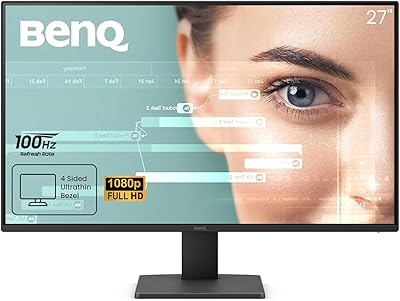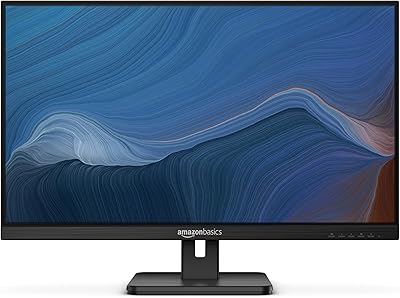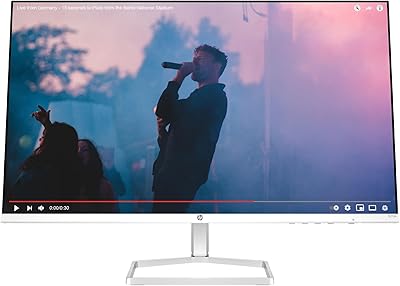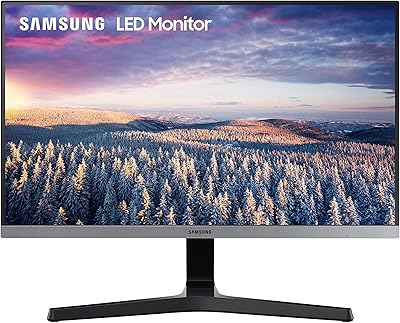

Overview

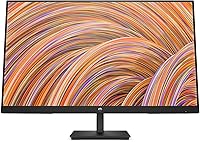
The HP V27i 27-inch FHD IPS Monitor sits comfortably in the everyday monitor category — the kind HP has quietly been good at for years. It launched in late 2020 and has held its ground as a dependable choice for work-from-home setups and general desktop use. This is not a monitor chasing gamers or graphic designers. It is built for people who need a large, reliable screen that gets out of the way and lets them work. The slim profile and clean black finish look genuinely tidy on a desk, and setup is straightforward from the moment it comes out of the box.

Features & Benefits

The IPS panel is probably the V27i's strongest selling point for shared office use — at 178 degrees of viewing angle, colors stay consistent whether you are sitting directly in front or off to the side. The three-sided micro-edge bezels keep the look clean and make dual-monitor setups tidier. One honest note: 1080p on a 27-inch panel is serviceable but not sharp. Text looks noticeably softer than on a 1440p screen at the same size. The hardware blue light filter does reduce eye fatigue during long sessions, though it complements regular breaks rather than replacing them. Tilt adjustment is available, but height and swivel are not — and connectivity is limited to HDMI and VGA, with no USB-C or DisplayPort.

Best For

This 27-inch IPS display makes the most sense for remote workers and students who want a noticeable upgrade in screen real estate without spending heavily on premium specs. If you are moving up from a 21- or 24-inch monitor, the extra size genuinely helps for productivity tasks like keeping documents open side by side. It also works well in shared spaces — a student desk, a small home office — anywhere that benefits from wide viewing angles. Anyone with an older desktop still running VGA output will appreciate the legacy port. Where it falls short is for buyers who need pixel-accurate color, high refresh rates, or flexible ergonomic positioning.

User Feedback

With a 4.6-star average across over 500 ratings, the V27i has earned a solid reputation — but the reviews tell a nuanced story. Most buyers appreciate how quickly it sets up and how good the slim bezels look in person. Brightness levels draw consistent praise, especially from people using it in well-lit rooms. The recurring frustration is pixel density: several reviewers note that 1080p at 27 inches looks noticeably softer than expected, particularly for text-heavy work. Ergonomic limitations come up regularly too — no height adjustment and no swivel means you are committed to whatever angle the fixed stand allows. Build quality and stand stability are rated reasonably well, but this is a dependable everyday pick, not a standout performer.

Pros

  • The IPS panel keeps colors consistent at wide angles, which genuinely matters in shared or multi-seat setups.
  • Three-sided micro-edge bezels give this HP monitor a cleaner, more modern look than its price would suggest.
  • Hardware-level blue light filtering reduces eye strain during long work days without relying on a software overlay.
  • Setup is fast and straightforward — most users are up and running within minutes of unboxing.
  • The VGA port is a quiet but practical inclusion for anyone still using older desktops or projectors.
  • At 27 inches, the screen size offers a genuine productivity boost for anyone upgrading from a 21- or 24-inch display.
  • ENERGY STAR certification and recycled plastic components make it a reasonably responsible choice environmentally.
  • The V27i carries a strong rating across hundreds of verified buyers, reflecting consistent real-world satisfaction.
  • Brightness levels draw consistent praise for performing well in normally lit home office conditions.

Cons

  • 1080p at 27 inches produces softer text and detail than a 1440p panel of the same size — a meaningful trade-off for text-heavy work.
  • No height adjustment, swivel, or pivot on the stand makes finding an ergonomic position genuinely difficult for taller users.
  • DisplayPort and USB-C are both absent, which is a real limitation for modern laptops and newer desktop GPUs.
  • The stand base takes up a fair amount of desk depth, which can feel intrusive on smaller workspaces.
  • No built-in speakers means you will need external audio for video calls or media playback.
  • Color accuracy is average at best, ruling this 27-inch IPS display out for any serious creative or design work.
  • The refresh rate tops out at 60Hz, with no adaptive sync — not workable for even casual gaming.
  • Plastic build quality, while acceptable, feels less premium than competing monitors at a similar price point.
  • There are no USB hub ports, so connecting peripherals still requires reaching for the back of your computer.

Ratings

The scores below reflect our AI-driven analysis of verified global buyer reviews for the HP V27i 27-inch FHD IPS Monitor, with spam, bot-generated, and incentivized submissions actively filtered out before scoring. We examined feedback from everyday home office workers, students, and general users to surface what this display genuinely gets right — and where it falls short. Both the consistent praise and the recurring frustrations are transparently reflected in each category score.

Image Clarity
67%
33%
For everyday tasks like reading emails, browsing, and watching videos, most users find the 1080p image perfectly acceptable. Colors look natural under normal lighting, and the IPS panel keeps the picture consistent whether you are sitting directly in front or slightly to the side.
The pixel density at 27 inches is a genuine weak point — text looks noticeably softer than on a 1440p screen of the same size. Users who sit close to their monitors or work with fine typography frequently flag this as a daily frustration they did not anticipate before buying.
Viewing Angles
88%
The IPS panel's 178-degree horizontal and vertical angles mean colors and brightness stay consistent even when colleagues or family members glance at the screen from across the room. This is especially valued in shared home offices and study spaces where one screen often serves multiple people.
A small number of users noticed very slight color shift at the most extreme off-axis positions, though this is typical for IPS panels at this price level and rarely affects real-world use. It is not a concern for single-user setups.
Eye Comfort
83%
The hardware-level blue light filter is one of the V27i's more appreciated features among users who spend six or more hours daily in front of a screen. Unlike software filters that simply tint the display, this built-in adjustment reduces blue light output without dramatically altering how colors appear.
A portion of buyers expected the Low Blue Light mode to eliminate eye strain entirely and were disappointed to still experience fatigue during marathon sessions. The filter is a helpful layer of protection, but it does not remove the need for regular breaks — something the marketing does not always make clear.
Ergonomics
49%
51%
The available tilt range — 5 degrees forward and 20 degrees backward — is enough to find a comfortable screen angle for most standard desk heights. For users whose sitting position happens to align well with the fixed stand height, no adjustment is ever needed.
The lack of height adjustment, swivel, and pivot is a recurring and pointed complaint from buyers, particularly those who work long hours or use the monitor alongside a laptop. Many users end up propping the stand on books or investing in a VESA arm just to achieve a comfortable eye-level position.
Build Quality
72%
28%
The overall construction feels solid enough for everyday desk use, and the matte black plastic finish looks reasonably clean and professional in a home office environment. Most buyers report no creaking, loose hinges, or structural issues after months of regular use.
The plastics feel noticeably budget-grade when handled up close, and a few users have noted that the stand base feels lighter and less planted than they expected given the monitor's size. It is functional but does not inspire confidence the way a heavier, metal-reinforced build would.
Stand Stability
74%
26%
Under normal desk conditions — typing, clicking, adjusting peripherals — the stand keeps the V27i steady without noticeable wobble. Buyers who set it up in calm work environments rarely report any issues with the screen shifting during use.
On softer surfaces or desks with vibration from mechanical keyboards, some users notice a slight sway when typing. The stand base also occupies a meaningful footprint, which can feel intrusive on compact desks where space is already tight.
Setup Experience
91%
Unboxing and assembly consistently draw positive comments — the stand clicks into place quickly, and most buyers are looking at a working display within ten minutes of opening the box. The included cable and straightforward OSD menu make initial configuration easy even for first-time monitor buyers.
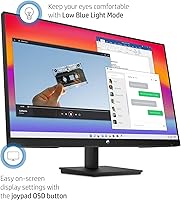
A small number of users found the OSD (on-screen display) button placement on the underside of the panel slightly awkward to reach without looking. It is a minor ergonomic inconsistency that stands out given how smooth the rest of the setup process is.
Connectivity
54%
46%
Having both HDMI and VGA ports covers a wider range of devices than HDMI alone, which is genuinely useful for buyers connecting older desktops or certain projectors that still rely on VGA. For straightforward single-device setups, HDMI delivers a clean, reliable connection.
The absence of DisplayPort and USB-C is a real limitation that buyers with modern laptops run into almost immediately. The two USB ports are a welcome addition on paper, but the overall port selection feels dated for a monitor sold in 2024 — most competitors at this price now include at least one USB-C input.
Bezel Design
86%
The three-sided micro-edge bezel is one of the most visually appreciated features of the V27i, especially among users running dual-monitor setups. The slim borders make the transition between two screens far less distracting than on monitors with traditional thick bezels.
The bottom bezel is noticeably thicker than the other three sides, which breaks the otherwise clean look slightly. It is a common design trade-off for this price tier, but users expecting a truly borderless appearance on all sides may feel mildly let down.
Brightness & Glare
76%
24%
Brightness levels receive consistent praise from buyers using the monitor in naturally lit rooms — it holds up well under overhead lighting without appearing washed out. For typical home office conditions, most users never need to push the display to its maximum brightness setting.
The glossy screen surface introduces reflections in rooms with windows or strong lighting positioned behind the user. In brighter environments, glare can become a distraction that requires repositioning either the monitor or window coverings to manage comfortably.
Color Accuracy
63%
37%
For general consumer use — watching shows, video calls, casual photo browsing — the color reproduction looks natural and pleasing enough that most everyday users never think twice about it. Whites appear clean and skin tones in video conferencing look accurate under typical lighting conditions.
The panel has not been factory calibrated, and wide color gamut coverage is not a feature it offers. Users who have tried to use the V27i for photo editing or color grading quickly notice that colors shift when compared side by side with a properly calibrated display.
Value for Money
81%
19%
For buyers whose needs align with what the V27i actually delivers — a big, comfortable screen for everyday work — the price-to-performance ratio feels fair. The IPS panel, slim bezels, and hardware blue light filter are features that at one point cost significantly more to get in a 27-inch form factor.
Cross-shopping buyers will find that spending a bit more unlocks 1440p resolution, better ergonomics, and USB-C connectivity from competing brands. For buyers who discover those limitations after purchase, the value proposition feels weaker in retrospect than it appeared on the product page.
Energy Efficiency
84%
ENERGY STAR certification is more than a badge here — users who monitor their electricity usage report that the V27i draws modestly in active use and drops noticeably during idle periods. For a monitor left on throughout a work day, the long-term energy savings add up meaningfully.
There is no automatic brightness adjustment based on ambient light, meaning the monitor will not scale down power consumption on its own in a dim room. Users who want smarter energy management need to adjust brightness manually or rely on their operating system's power settings.
Performance for Work Tasks
82%
18%
For the core productivity tasks most buyers purchase this monitor for — document editing, spreadsheets, video conferencing, and web research — the V27i handles everything comfortably. The 27-inch screen size gives enough room to keep two windows open side by side without feeling cramped.
Response time is adequate for office work but can produce minor ghosting on fast-moving content like scrolled web pages or spreadsheet animations at full speed. It is rarely a problem in practice, but buyers accustomed to faster panels may notice the difference.

Suitable for:

The HP V27i 27-inch FHD IPS Monitor is a strong match for remote workers and students who want a meaningfully larger screen for everyday productivity without crossing into premium monitor territory. If your daily tasks involve document editing, spreadsheets, video calls, or casual web browsing, the 27-inch IPS panel delivers comfortable, consistent visuals that hold up well across long work sessions. The wide viewing angles make it a practical pick for shared desks or small offices where more than one person glances at the screen regularly. Anyone still running a desktop with a VGA output will also find the legacy port a genuine convenience rather than an afterthought. For someone upgrading from a smaller or aging monitor, the jump in screen real estate alone will feel like a meaningful improvement from day one.

Not suitable for:

The HP V27i 27-inch FHD IPS Monitor is not the right call for buyers who are serious about image sharpness, because 1080p spread across a 27-inch panel produces noticeably softer text and detail compared to a 1440p screen at the same size. Graphic designers, photo editors, or anyone doing color-critical work should look elsewhere — the panel was not built with color accuracy or wide color gamut coverage in mind. Gamers will also find it underwhelming, as there is no high refresh rate or adaptive sync support to speak of. Ergonomically, the stand is a real limitation: if you need to raise, lower, or rotate the display to fit your posture, you will either need a monitor arm or a different product entirely. Anyone whose laptop or desktop relies on USB-C or DisplayPort output will also run into a dead end, since the V27i offers only HDMI and VGA.

Specifications

  • Screen Size: The display measures 27 inches diagonally, offering a spacious viewing area suited for multitasking and productivity work.
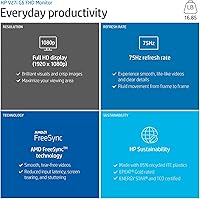
  • Resolution: Native resolution is 1920x1080 Full HD, delivering standard high-definition clarity across the entire panel.
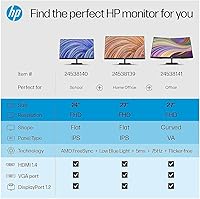
  • Panel Type: An IPS (In-Plane Switching) panel is used, which provides more accurate color reproduction and wider viewing angles than TN alternatives.
  • Viewing Angles: Horizontal and vertical viewing angles both reach 178 degrees, keeping colors consistent even when viewed from well off-center.
  • Bezel Design: Three sides of the monitor feature a micro-edge bezel, minimizing the border between screen and frame for a cleaner look.
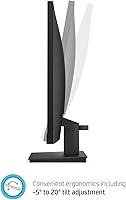
  • Tilt Adjustment: The stand supports a tilt range of 5 degrees forward and 20 degrees backward, but does not offer height, swivel, or pivot adjustment.
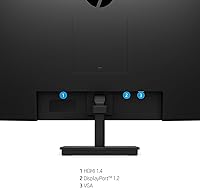
  • Connectivity: The monitor includes one HDMI port and one VGA port for display input; there is no DisplayPort or USB-C connection available.
  • Blue Light Filter: A hardware-level Low Blue Light filter is built into the display, reducing blue light output without requiring a software application.
  • Backlight Type: LED backlighting is used throughout, and the display is confirmed mercury-free in its construction.
  • Certification: The monitor carries ENERGY STAR certification, confirming it meets established energy efficiency standards for display devices.
  • Materials: The chassis incorporates recycled plastic components, reflecting a degree of environmental consideration in the manufacturing process.
  • Weight: The unit weighs 9.9 pounds with the stand attached, making it manageable to reposition on a desk without assistance.
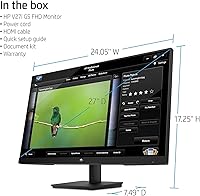
  • Dimensions: With the stand, the monitor measures approximately 24.1 inches wide, 17.6 inches tall, and 7.9 inches deep.
  • Color Finish: The monitor is offered in a matte black finish that blends cleanly with most desktop and home office setups.
  • Aspect Ratio: The display uses a standard 16:9 widescreen aspect ratio, which is compatible with the vast majority of modern video and application formats.
  • Surface Type: The screen surface has a glossy finish, which can enhance color vibrancy but may introduce reflections in brightly lit rooms.
  • USB Ports: The monitor includes one USB 2.0 port and one USB 3.0 port, providing limited peripheral connectivity directly from the display.
  • User Rating: The V27i holds a 4.6-out-of-5-star average rating based on over 521 verified customer ratings on Amazon.

Related Reviews
HP Series 5 524sf 24-inch Monitor
75%
78%
Display Quality
71%
Color Accuracy
67%
Brightness
86%
Eye Comfort
74%
Build Quality
More
Acer SB272 27-inch FHD IPS Monitor
74%
91%
Value for Money
83%
Image Quality
54%
Brightness
78%
Refresh Rate & Smoothness
43%
Stand & Ergonomics
More
BenQ GW2791 27-inch FHD IPS Monitor
80%
83%
Image Quality
91%
Eye-Care Performance
88%
Value for Money
62%
Display Sharpness
47%
Stand & Ergonomics
More
LG 27MP450 27-inch FHD IPS Monitor
77%
78%
Image Quality
71%
Color Accuracy
67%
Gaming Performance
84%
Ergonomics & Stand
83%
Eye Comfort
More
Amazon Basics 27E2UA 27-inch IPS Monitor
78%
92%
Value for Money
84%
Image & Color Quality
88%
Viewing Angles
51%
Ergonomics & Stand
87%
Connectivity & Port Selection
More
HP Series 5 27-inch FHD Monitor
77%
78%
Image Quality
61%
Pixel Density
88%
Eye Comfort
86%
Design & Aesthetics
53%
Ergonomics & Stand
More
Gigastone LM-27FF51 27-Inch IPS Monitor
74%
82%
Image Clarity
54%
Brightness & Glare
76%
Color Accuracy
78%
Refresh Rate & Motion
71%
Build Quality
More
Dell P2714H 27-inch IPS Monitor
70%
78%
Color Accuracy
47%
Text Sharpness
87%
Ergonomic Range
74%
Build Quality
83%
Viewing Angles
More
AOC 27B3HA2 27-Inch FHD Monitor
82%
92%
Value for Money
88%
Display Quality
85%
Matte Finish Performance
90%
Ease of Setup
84%
Build Quality
More
Samsung SR35 27-inch FHD Monitor
74%
88%
Value for Money
74%
Image Quality
86%
Eye Comfort
81%
Build Quality
52%
Stand & Ergonomics
More

FAQ

Not directly out of the box. The V27i only has HDMI and VGA inputs, so you will need a USB-C to HDMI adapter to connect a modern MacBook or similar laptop. These adapters are widely available and inexpensive, but it is an extra step worth knowing about before you buy.

Honestly, it depends on how close you sit and how sensitive you are to pixel density. At a normal desk distance of about 2 to 3 feet, most people find it perfectly usable for documents, email, and web browsing. If you sit close or spend a lot of time reading small text, you may notice the image looks a touch soft compared to a 1440p panel. It is not a dealbreaker for general use, but it is a real difference worth considering if sharpness matters to you.

Yes, the HP V27i 27-inch FHD IPS Monitor is VESA-compatible with a 100x100mm mounting pattern, which is the standard size supported by most third-party monitor arms. Using an arm is actually a great way to compensate for the limited ergonomic adjustability of the included stand, giving you full control over height and tilt.

No, it is a hardware-level filter built into the display itself, which is a meaningful difference from software overlays that simply tint your screen yellow. That said, it reduces blue light output rather than eliminating it entirely. Think of it as one helpful tool for managing eye fatigue, but it works best when combined with regular screen breaks rather than as a complete replacement for them.

Most users report the stand as stable enough for everyday desk use. It does not feel ultra-premium, but it holds the screen steady without notable wobble under normal conditions. Just keep in mind it offers tilt only — no height or swivel adjustment — so what you get out of the box is essentially the fixed working position.

Not really. The V27i runs at 60Hz with no adaptive sync support, which means fast-paced games will show screen tearing and feel less responsive compared to monitors designed for gaming. It will run games just fine visually, but if gaming is a priority, you would be better served by a display with at least a 144Hz refresh rate and FreeSync or G-Sync compatibility.

No, there are no built-in speakers. If you need audio for video calls, streaming, or any media playback, you will need to connect external speakers or headphones through your computer or a separate audio device.

Very straightforward. The stand attaches to the monitor with just a few clicks and screws, and most buyers report the whole process takes under ten minutes. The on-screen display menu for adjusting brightness and other settings is simple to navigate as well.

It is workable for casual personal projects, but not recommended if color accuracy matters to you professionally. The IPS panel produces decent colors for everyday viewing, but it does not cover a wide color gamut and has not been factory calibrated. For serious creative work, a monitor with sRGB or DCI-P3 coverage specifications would serve you much better.

Yes, and the micro-edge bezels actually make this one of the more practical use cases for this display. The slim borders on three sides keep the gap between two screens fairly minimal, which makes a dual-monitor setup look tidy and cohesive. Just make sure your computer has two available video outputs, since each monitor will need its own HDMI or VGA connection.