Overview

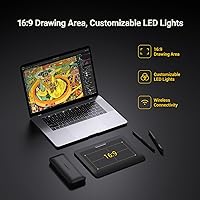
The XENCELABS Pen Tablet Small Drawing Tablet is one of those rare products that feels like it was shaped by people who actually draw for a living — because it was. Xencelabs built this tablet with direct input from working creatives, and that shows in the details. At just 8mm thick, the Pen Tablet Small is genuinely portable, and going wireless removes one of the most common frustrations at a crowded desk. The true 16:9 active area is a practical choice that most competitors still ignore, mapping cleanly to widescreen monitors without awkward dead zones. Available since 2021, this wireless drawing tablet has built a track record that newer entrants simply haven't earned yet.

Features & Benefits

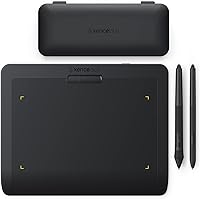
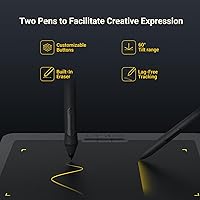
Two pens in the box sounds like a small detail, but it changes the experience more than you'd expect. One is slimmer with fewer buttons, the other is standard-diameter with more controls — switching between them during a long session actually matters. Both are battery-free styluses, so there's no mid-project hunt for a charge. Pressure sensitivity hits 8192 levels with 5080 LPI resolution, which means fine line work and soft shading respond the way they should. The wireless connection holds up reliably across a full workday, with a 16-hour battery that earns its claim. Everything packs into a well-made pen and accessory case — a nice touch that signals this tablet was designed for people who move around.

Best For

This Xencelabs tablet is a strong fit for illustrators and designers working on widescreen setups — the 16:9 active area maps to modern monitors in a way that immediately feels right. If you travel for work or regularly sketch in different locations, the slim profile and wireless operation make it easy to pack without babying it. It's one of the few tablets in this category with full Linux support, which matters more than it might seem to the right user. Artists stepping up from beginner tablets will find the pressure response noticeably more refined. It's less ideal if you're used to a large drawing surface and rely on wide arm movements — the active area is compact, and that's a real consideration.

User Feedback

Owners of the Pen Tablet Small are consistently vocal about two things: the included case and the pen feel. The dual-pen setup draws genuine appreciation — not as a spec bullet, but as a practical daily advantage that users notice after a few weeks of use. Low latency and smooth stroke tracking come up repeatedly in long-form reviews, particularly from people doing detailed illustration work. The main friction point is the active area size. Buyers who previously used larger tablets mention an adjustment period, and some find the compact surface limiting for loose, gestural work. Driver installation is generally smooth on Windows and Mac, though a handful of Linux users report needing an extra step or two. Wireless reliability, for most, is a non-issue.

Pros

  • Comes with two battery-free styluses in different grip sizes — a genuinely useful inclusion, not just a marketing extra.
  • The 16:9 active area maps cleanly to modern widescreen monitors, reducing the hand-eye coordination mismatch many tablet users tolerate.
  • 8192 levels of pressure sensitivity and 5080 LPI resolution deliver line quality that holds up in professional illustration and design work.
  • Wireless operation is reliable across a full workday, with a 16-hour battery life that consistently matches the advertised claim.
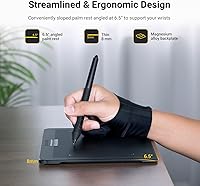
  • At 8mm thin, this wireless drawing tablet is one of the slimmest options available and fits easily in a laptop bag.
  • Explicit Linux support is rare at this price point and makes it a standout choice for users on open-source systems.
  • The included pen and accessory case is well-made and practical — users frequently call it out as a highlight of the unboxing experience.
  • Driver installation on Windows and macOS is straightforward, with minimal setup friction reported by the majority of users.
  • Compatible with a wide range of creative software out of the box, including Photoshop, Illustrator, Krita, GIMP, and Substance Painter.
  • The product has been on the market since 2021, meaning driver updates and community support are well established.

Cons

  • The active area is compact — artists transitioning from medium or large tablets will face a real adjustment period.
  • Only three programmable buttons on the tablet body; users who rely heavily on hardware shortcuts may find this limiting.
  • Some Linux users report needing additional configuration steps during driver setup, despite official OS support.
  • At roughly 3 pounds, the weight is noticeable for a small tablet — heavier than some competitors in the same size class.
  • No built-in screen, which may disappoint buyers expecting a display tablet experience at this price tier.
  • The slim, minimalist design leaves little room for wrist resting along the tablet edge during long sessions.
  • Wireless connectivity requires a USB Type-A port; users on newer laptops with only USB-C ports must rely on the included adapter.
  • The three-button layout, while intentionally minimal, offers less flexibility for users who prefer a more customizable hardware interface.

Ratings

The XENCELABS Pen Tablet Small Drawing Tablet earns a nuanced scorecard below, built by our AI after processing verified buyer reviews from around the world — with bot submissions, spam, and incentivized ratings actively screened out. The scores reflect the full picture: genuine enthusiasm for pen performance and portability alongside an honest look at trade-offs like the compact active area that divide buyer opinion. Both strengths and friction points are represented transparently, so you can judge how well this wireless drawing tablet fits your specific workflow.

Pen Performance
91%
The 8192-level pressure response feels natural from the first stroke, with no noticeable lag even during fast, detailed line work. Artists working on character illustration or precise photo retouching consistently report that thin-to-thick transitions respond exactly as intended, making the drawing experience feel closer to working on paper than most tablets at this price point.
A small number of users have noted occasional tilt sensitivity limitations, and the 5080 LPI resolution, while excellent, does not offer a perceivable advantage over top-tier flagship tablets in raw spec. For most workflows this is inconsequential, but hyper-detail-focused professionals may still notice where the ceiling sits.
Portability
88%
At 8mm thin, the Pen Tablet Small slides into a laptop bag without adding noticeable bulk, and wireless operation means one fewer cable to manage at a coffee shop or client site. Traveling illustrators and remote workers consistently single out the combination of slim build and the included carrying case as making it genuinely easy to take anywhere.
The weight of just over 3 pounds is the main portability caveat — it is not a device you casually toss into a small daypack without noticing it. The wireless setup also requires keeping track of a USB receiver dongle, which is a minor but real friction point when moving frequently between workspaces.
Display Mapping
89%
The 16:9 active area is a genuinely practical advantage that users who previously struggled with 4:3 tablets immediately appreciate. When mapped to a single widescreen monitor, cursor positioning feels spatially accurate and intuitive — a subtle but meaningful quality-of-life improvement that becomes more obvious the longer you work with it.
Users with ultrawide monitors or non-standard display ratios may find the mapping less clean, requiring manual driver adjustments to avoid edge distortion. The 16:9 benefit is also most pronounced in single-monitor setups — users who span input across two displays lose most of the alignment advantage.
Active Area Size
63%
37%
For wrist-driven drawing styles and detailed close-up work — character design, icon creation, photo retouching — the 6.93 × 3.89-inch surface is functional and well-proportioned. Users who have always worked small, or who are stepping up from even more compact beginner tablets, often report feeling comfortable within a few days of adjustment.
This is the most cited pain point across user feedback: artists who rely on large arm movements, loose gesture drawing, or who previously used a medium or large tablet consistently find the active area restrictive. The adjustment period can be significant, and some users ultimately decide the compact surface is a long-term compromise they are not willing to accept.
Value for Money
82%
18%
For what you get — dual battery-free styluses, professional pressure sensitivity, wireless operation, a quality case, and genuine Linux support — the mid-range price sits comfortably without feeling like a stretch. Artists upgrading from budget tablets in particular find the jump in quality substantial relative to the increase in cost.
Buyers on a tighter budget may find the price a barrier when basic entry-level options cover core drawing needs at a significantly lower cost. The absence of a built-in display is also worth flagging, since some buyers at this price tier arrive expecting a screen and are caught off guard.
Stylus Variety
93%
Including two styluses with different grip diameters is an unusually thoughtful design decision that pays off in real use — switching to the slimmer pen for fine linework and back to the standard grip for shading becomes a natural part of the creative routine. Both pens feel well-balanced in hand, and neither ever needs charging or battery swaps.
Neither pen includes tilt sensitivity as a highlighted specification, which is a feature some professional illustrators rely on for natural brush angle simulation. Users coming from tablets with dedicated eraser nibs on the stylus tail may also notice and miss that functionality, as it is absent on both included pens.
Wireless Reliability
86%
In standard studio and home office environments, the wireless connection performs consistently across full workdays without noticeable dropout or latency spikes. Most users who transitioned from wired drawing habits report that within a week they stopped thinking about the connection at all — which is about the best outcome you can hope for in a wireless peripheral.
In heavily congested wireless environments — dense coworking spaces or apartment buildings with many competing networks — a small but vocal group of users report brief, intermittent signal interruptions. Plugging in via USB resolves this instantly, though it partially offsets the wireless freedom that is central to this tablet's appeal.
Driver & Software Setup
77%
23%
On Windows and macOS, driver installation is genuinely straightforward — download, run the installer, and the tablet is fully functional within a few minutes. The driver interface is cleanly designed and allows meaningful customization of pressure curves and button assignments without requiring any technical expertise.
Linux users face a more variable experience: while the OS is officially supported, some distributions require manual configuration steps that the standard installation guide does not cover. A recurring complaint among Windows users involves needing to reinstall or update drivers after major OS updates, which is a minor but consistent friction point.
Software Compatibility
87%
The Pen Tablet Small works reliably with the major creative applications most digital artists actually use — Photoshop, Illustrator, Krita, GIMP, and Substance Painter among them. Users report that pressure sensitivity carries over cleanly between applications once the driver is installed, reducing the need to recalibrate per tool.
A handful of niche or newer creative applications have required community-sourced compatibility tweaks, as official driver profiles are not available for every tool on the market. This is an industry-wide limitation rather than a failing specific to this tablet, but it is worth verifying compatibility for your exact workflow before purchasing.
Button Layout
66%
34%
The three express keys are well-positioned at the top edge and unobtrusive enough that they stay out of the way during drawing. Users who have mapped them to frequently used shortcuts — undo, zoom, and brush size adjustment — find they cover the most common workflow interruptions without needing to reach for the keyboard.
Three buttons is a bare minimum for a tablet at this price, and power users who rely on eight or more hardware shortcuts will find this limiting from day one. There is no touch ring or scroll wheel, which many intermediate and professional users consider a standard inclusion at this tier.
Build Quality
83%
The physical construction feels deliberate and durable — the drawing surface texture strikes a balance between grip and smooth glide that holds up well through extended daily sessions. The included pen and accessory case is a standout addition, built with enough quality that users frequently call it out as a highlight of the unboxing experience.
At 3.08 pounds, the tablet is heavier than its slim profile suggests, which surprises some buyers expecting something lighter. A handful of users have noted that the surface texture shows slight wear after months of intensive use, though this is a common characteristic across tablets in this category rather than a specific defect.
Included Accessories
88%
The pen and accessory case is one of the most consistently praised elements in user feedback — purpose-built for the pens and spare nibs, well-constructed, and it makes the whole package feel premium. For users who draw in multiple locations, it provides genuine protection during transit and keeps everything organized.
Replacement nibs are not included in large quantities, and users who draw frequently will work through them faster than expected depending on their preferred surface texture. The case also accommodates only the pens and accessories — not the tablet body itself — so a separate sleeve is needed for full travel protection.
Linux Support
83%
Official Linux support is rare enough in this product category that it functions as a genuine differentiator for a meaningful segment of professional users. Animators and illustrators on open-source systems report that the tablet integrates well once the driver is installed, without requiring community patches for basic pressure sensitivity and button functionality.
The Linux driver experience is noticeably less polished than its Windows or macOS counterparts — installation documentation is sparse, and kernel version compatibility can create friction on rolling-release distributions. Users on less common distros have occasionally needed to rely on community forums to resolve driver loading issues not addressed in official documentation.
Battery Life
85%
The 16-hour claim is honest — most users drawing actively in wireless mode report landing in the 13 to 16 hour range, which comfortably covers full studio days without battery anxiety. The roughly 2.5-hour recharge window is short enough that an overnight charge or a lunch break keeps the tablet consistently ready.
There is no battery percentage indicator on the tablet body itself, meaning users occasionally discover a lower charge than expected without much advance warning. The tablet also lacks a passthrough drawing mode that would allow uninterrupted wireless use while charging — a small but noticeable gap for users who work through very long sessions.

Suitable for:

The XENCELABS Pen Tablet Small Drawing Tablet is built for creatives who want professional-grade tools without the bulk or the flagship price tag. Illustrators and graphic designers who work on widescreen monitors will immediately appreciate the true 16:9 active area, which eliminates the frustrating coordinate mismatch that comes with older 4:3 tablets. If you split your time between a home studio and a coffee shop, a client's office, or a classroom, the 8mm profile and wireless operation make this a genuinely easy tablet to carry and use anywhere. Linux users in particular will find this one of the very few tablets in its price range that offers explicit, maintained support for their OS — that alone is a meaningful reason to choose it. Artists who have outgrown a beginner tablet but aren't ready to spend on a top-tier device will find the pressure sensitivity and pen resolution competitive with options that cost considerably more.

Not suitable for:

Buyers who are accustomed to working on a large active surface will likely find the Pen Tablet Small's 6.93 x 3.89-inch drawing area a genuine adjustment, and for some, a dealbreaker. If your workflow involves wide, gestural strokes — common in concept art, life drawing, or certain animation techniques — the compact surface can feel restrictive rather than freeing. The XENCELABS Pen Tablet Small Drawing Tablet is also not the right pick for someone who wants a display tablet with a screen, as this is a non-display pen tablet requiring a connected monitor. Casual users who only draw occasionally and are shopping purely on price may find better value in a more basic option. Those deeply embedded in a proprietary tablet ecosystem with specialized drivers or workflows should also verify software compatibility before committing, since switching pen tablets mid-project is never trivial.

Specifications

  • Active Area: The drawing surface measures 6.93 × 3.89 inches with a true 16:9 aspect ratio designed to match widescreen displays.
  • Tablet Thickness: The tablet body is 8mm thin, making it one of the slimmest pen tablets available in its class.
  • Pressure Sensitivity: Both included styluses support 8192 levels of pressure sensitivity, enabling smooth transitions from hairline strokes to thick fills.
  • Pen Resolution: Pen position is tracked at 5080 LPI (lines per inch), providing fine detail accuracy without visible stepping or gaps.
  • Stylus Type: Two battery-free styluses are included: one slim-barrel design and one standard-diameter grip, each with programmable side buttons.
  • Connectivity: The tablet connects wirelessly via its built-in receiver or through a wired USB Type-A connection; a USB Type-C adapter is included.
  • Battery Life: A single full charge delivers up to 16 hours of continuous drawing use under normal operating conditions.
  • Charge Time: The internal lithium-ion battery charges fully in approximately 2.5 hours via the included USB cable.
  • Battery Type: One lithium-ion battery is integrated into the tablet body and is included; no separate battery purchase is required.
  • OS Compatibility: The tablet officially supports Windows 7 and later, macOS 10.12 and later, and Linux distributions with driver installation.
  • Software Support: Compatible with Adobe Photoshop, Illustrator, GIMP, Krita, Inkscape, ArtRage, Sketchbook, Substance Painter, and other tablet-enabled applications.
  • Express Keys: Three programmable express keys are positioned centrally along the top edge of the tablet for quick shortcut access.
  • Item Weight: The tablet body weighs 3.08 pounds, which is typical for a tablet in this size and feature tier.
  • Model Number: The official model number for this tablet configuration is BPH0812W-A.
  • In the Box: Package includes the tablet unit, two styluses, a dedicated pen and accessory case, and a USB Type-C adapter.

Related Reviews
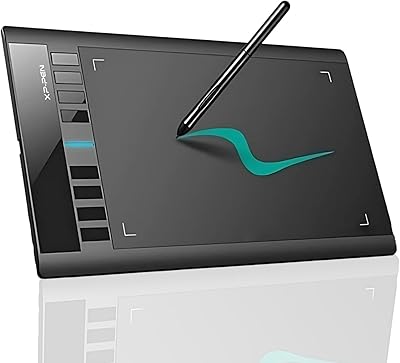
XP-Pen Deco 03 Drawing Tablet
77%
88%
Pen Accuracy & Pressure
83%
Wireless Reliability
61%
Driver & Software Setup
79%
Multi-Function Dial
86%
Active Area Size
More
XP-Pen Star03 V2 Drawing Tablet
76%
93%
Active Area Size
88%
Pen Pressure Accuracy
84%
Stylus Ergonomics
74%
Express Key Usability
69%
Driver Stability
More
HUION Inspiroy 2 S Drawing Tablet
80%
91%
Pen Accuracy & Responsiveness
88%
Value for Money
86%
Portability & Build
84%
Shortcut Keys & Scroll Wheel
63%
Active Area Size
More
XP-Pen Deco MW Wireless Drawing Tablet
79%
91%
Stylus Performance
83%
Wireless Reliability
94%
Value for Money
61%
Driver & Software Setup
79%
Build Quality
More
Wacom One Small Drawing Tablet
78%
84%
Pen Performance
88%
Surface Texture & Feel
66%
Bluetooth Connectivity
62%
Active Drawing Area
91%
Ease of Setup
More
XP-Pen Deco Mini7 V2 Drawing Tablet
80%
91%
Value for Money
86%
Pen Performance
58%
Active Area Size
89%
Ease of Setup
74%
Build Quality
More
HUION Inspiroy Frego Small Wireless Drawing Tablet
87%
90%
Battery Life
93%
Portability
88%
Pressure Sensitivity
85%
Ergonomics
92%
Connectivity
More
XP-Pen Deco 01 V3 Drawing Tablet
80%
91%
Stylus Pressure Sensitivity
88%
Active Area Size
93%
Value for Money
61%
Driver & Software Setup
79%
Tilt Support Accuracy
More
Wacom Intuos Small Bluetooth Graphics Tablet
81%
93%
Pen Accuracy & Pressure Sensitivity
76%
Wireless Bluetooth Connectivity
67%
Active Area Size
84%
Build Quality & Durability
91%
Portability & Form Factor
More
XP-Pen Star G640 6x4 Graphics Tablet
78%
91%
Value for Money
86%
Pen Performance
78%
Pressure Sensitivity
63%
Active Area Size
74%
Build Quality & Durability
More

FAQ

No — both pens are entirely battery-free, so there is nothing to replace or charge inside them. The rechargeable battery lives in the tablet body itself and charges via USB, but the pens are always ready to go.

Yes, the Pen Tablet Small is compatible with Clip Studio Paint, as well as most drawing applications that support standard tablet input. The key step is installing the Xencelabs driver first — once that is done, pressure sensitivity should work correctly inside supported apps without any extra configuration.

Linux is officially supported, which already puts this tablet ahead of many competitors in its category. The general process involves downloading the Linux driver directly from Xencelabs and following the installation steps for your distribution. Most users report a smooth experience, though a small number have needed to troubleshoot on less common distros — checking the Xencelabs support page for your specific kernel version before you start is a smart move.

Yes, the Xencelabs driver software lets you map the active area to a specific monitor in a multi-display configuration. This works particularly well given the 16:9 ratio — it aligns cleanly with one widescreen monitor rather than awkwardly spanning two.

For the vast majority of users, the wireless connection stays stable and consistent across a full workday. Occasional interference has been reported in very crowded wireless environments, but this is not a common complaint. If you ever run into issues, switching to the USB connection is always available and performs identically.

One pen has a slimmer barrel with fewer side buttons, while the other is a standard-diameter grip with more controls. The practical difference comes down to personal comfort — some people prefer a lighter, pencil-like feel for loose sketching, while others want the extra button access during detailed work. Having both means you can try each and keep the one that fits your hand and workflow.

Real-world reports land in the 12 to 16 hour range depending on how intensively the tablet is being used, which means the advertised figure is honest rather than inflated. The roughly 2.5-hour recharge time is also accurate, so running it low during a long session is recoverable with a short break and a USB cable.

For most digital illustration, photo editing, and design tasks, the 6.93 × 3.89-inch surface is workable — especially if you draw from the wrist rather than the full arm. That said, artists coming from medium or large tablets who rely on big, sweeping gestures will find the compact size a genuine adjustment, and for some it will be a dealbreaker. Being honest with yourself about how you draw before buying will save you the hassle of a return.

You will need to install the Xencelabs driver to unlock full functionality, including pressure sensitivity and button customization. Without it, basic cursor movement may work, but the pressure response will not. The driver download is straightforward from the Xencelabs website, and Windows and macOS users typically report a smooth installation that takes about five minutes.

It sits in a mid-range tier, so it is not the cheapest option out there, but it offers features — dual stylus, professional pressure sensitivity, 16:9 mapping, and wireless operation — that clearly outperform budget-level tablets. For a dedicated art or design student who will use it daily, the investment holds up well over time. If you only draw casually or are just starting out, a simpler entry-level tablet might be a more proportionate spend.

Where to Buy