Overview

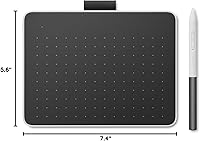
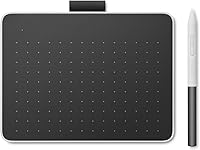
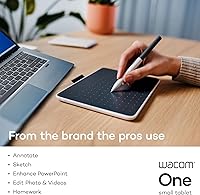
The Wacom One Small Drawing Tablet is Wacom's entry point into the graphics tablet space, refreshed in early 2023 as part of the updated Wacom One lineup. At 7.4″ x 5.55″ and barely a third of an inch thick, it fits comfortably on a crowded desk without demanding much real estate. What makes it stand out from similarly priced competitors is its dual connectivity — you can plug in via USB-C or go wireless over Bluetooth 5.1, which wired-only alternatives at this price tier simply can't offer. It's aimed squarely at beginners and casual creatives who want a reliable, low-friction introduction to digital drawing.
Features & Benefits

The included Wacom One Pen is one of this compact drawing pad's strongest assets. It's battery-free, which sounds like a small thing until you've dealt with a stylus dying mid-session — you never will here. The pen reads tilt and pressure naturally, and while the product listing inconsistently cites both 4096 and 2048 pressure levels (worth noting for transparency), real-world line variation feels responsive and smooth. The high-friction surface adds a tactile resistance that mouse pads and glossy screens can't replicate. Two programmable pen buttons handle shortcuts like undo without breaking focus, and the tablet works across Windows, macOS, Chrome OS, and Android.

Best For

This Wacom starter tablet makes the most sense for people just starting out with digital art, photo editing, or annotation work. Students picking up illustration, educators marking up documents, and remote workers who want more precision than a mouse can offer will all find it capable. It also works well for Android users who want stylus-level input on their phone or tablet without committing to an expensive device-specific pen. The 6.0″ x 3.7″ active area is honestly modest — experienced illustrators may find it cramped for detailed work — but for everyday beginner use, it's more than enough to get started and build real confidence.

User Feedback

Across its reviews, the Wacom One Small earns consistent praise for how approachable it is out of the box — quick setup and a natural pen feel are the highlights buyers mention most. The friction surface gets particular appreciation from users transitioning from paper. On the flip side, Bluetooth connectivity draws mixed responses; occasional signal drops have been reported, though they don't appear to be universal. The active area size is a sticking point for more advanced users, and the pressure sensitivity discrepancy between the product title and spec sheet genuinely frustrates buyers seeking clarity. At 3.8 out of 5 stars, it's a capable starter option with a few rough edges.

Pros

  • The battery-free pen never needs charging, so it is always ready the moment you sit down to draw.
  • High-friction surface texture makes the transition from paper to digital drawing feel genuinely natural.
  • Bluetooth 5.1 support sets the Wacom One Small apart from wired-only competitors at a similar price.
  • Broad OS compatibility — Windows, macOS, Chrome OS, and Android — means it works with almost any setup you already own.
  • Wacom's driver ecosystem is stable and well-maintained, reducing the risk of compatibility headaches after OS updates.
  • Two programmable pen buttons let you assign shortcuts like undo without ever lifting your hand from the drawing surface.
  • Setup is fast and straightforward out of the box, with most users drawing within minutes on desktop platforms.
  • Bundled software trials give beginners a capable starting point without having to research and purchase apps separately.
  • At 7.2 ounces and under a third of an inch thick, this compact drawing pad slips easily into any laptop bag.

Cons

  • The pressure sensitivity level is listed differently in the product title versus the spec sheet, which is a genuine transparency issue.
  • Bluetooth connectivity has produced occasional signal drops for a noticeable subset of users, particularly during longer sessions.
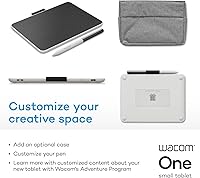
  • No travel case or pen storage slot is included, making it easy to scratch the surface or misplace the pen on the go.
  • The active area size will feel restrictive to anyone moving up from a larger tablet or working on detailed illustrations.
  • Android users get a reduced feature experience — some pressure and tilt functions do not perform as fully as on desktop platforms.
  • Software trials are time-limited, so the bundled value disappears quickly if users do not engage with the apps right away.
  • The drawing surface is not user-replaceable, so wear from heavy use over time cannot be easily addressed.
  • There are no physical shortcut keys on the tablet body itself, which limits workflow options compared to tablets with express key panels.

Ratings

The Wacom One Small Drawing Tablet has been evaluated by our AI rating engine after analyzing verified global buyer reviews, with spam, bot-generated, and incentivized feedback actively filtered out. The scores below reflect a balanced picture — where this compact drawing pad genuinely delivers for its target audience, and where real users have run into frustrations. Both strengths and pain points are represented transparently across every category.
Pen Performance
84%
Users consistently describe the pen as the standout feature of the Wacom One Small. The tilt recognition translates naturally into line variation, and the battery-free design means no mid-session interruptions — something beginners especially appreciate when they're already navigating a learning curve.
The pressure sensitivity listing is inconsistent between the product title and the spec sheet, which has frustrated buyers trying to compare it against competitors. While real-world response feels smooth for most tasks, this ambiguity leaves technically minded users uncertain about what they actually purchased.
Surface Texture & Feel
88%
The high-friction drawing surface is one of the most frequently praised aspects of this compact drawing pad. Users coming from glossy touchscreens or slippery mouse pads remark on how closely it mimics actual paper, which makes the transition to digital drawing feel far less foreign.
Over extended use, the surface texture can show visible wear in frequently drawn areas, which some users find off-putting. Replacement nibs are included in the box, but the surface itself is not user-replaceable, which is a longer-term consideration for heavy users.
Bluetooth Connectivity
66%
34%
The addition of Bluetooth 5.1 is a genuine differentiator at this price tier — being able to draw wirelessly from across a desk or connect to an Android phone without hunting for a cable is a real convenience that wired-only alternatives cannot offer.
Bluetooth reliability is the most consistently raised concern in user feedback. Occasional signal drops during longer sessions have been reported by a noticeable subset of buyers, and the experience appears to vary by device and environment. It works well enough for many, but it is not rock-solid for everyone.
Active Drawing Area
62%
38%
For pure beginners doing sketching practice, annotations, or light photo editing, the 6.0″ x 3.7″ active area is workable and keeps hand movement comfortable on smaller desks. Users who primarily annotate documents or do casual doodling rarely mention the size as a problem.
Anyone attempting detailed character illustration or multi-layer compositions will quickly feel constrained. Reviewers with prior tablet experience tend to rate this area as notably cramped, and users who upgrade from this tablet often cite active area size as the primary reason for switching.
Ease of Setup
91%
Out-of-box setup is widely described as straightforward and fast. Plug-and-play behavior on Windows and macOS means most users are drawing within minutes, and the included quick start guide is clear enough that even complete beginners rarely feel lost during initial configuration.
Android compatibility requires more patience — some devices need secondary USB-A adapters not included in the box, and Bluetooth pairing on Android can involve extra troubleshooting steps that the quick start guide does not fully address.
Build Quality & Durability
74%
26%
The tablet itself feels solid for its weight class at 7.2 ounces, with no flex or creaking reported by users under normal drawing pressure. The slim profile holds up well to daily desk use, and the pen construction feels reassuringly sturdy in hand.
The overall aesthetic and material quality read as entry-level, which is expected at this price point but still noted by users who handle it daily. The USB-C port connection could feel more premium, and a few users mention the cable seating feels slightly loose over time.
Portability
83%
At just under a third of an inch thick and light enough to slip into a laptop bag without thought, the Wacom One Small travels well. Students and remote workers who carry it between locations frequently mention portability as an underrated advantage over bulkier mid-range tablets.
There is no dedicated travel case or protective sleeve included, so users need to source their own solution to avoid scratching the drawing surface in transit. The pen also lacks a secure storage slot on the tablet body, making it easy to misplace when on the move.
Multi-Device Compatibility
79%
21%
Support for Windows, macOS, Chrome OS, and Android in a single device is genuinely broad for this price tier. Chromebook users in particular appreciate having a quality drawing input option, as compatible tablets at this level are relatively limited in that ecosystem.
Full feature parity across all platforms is not guaranteed — some pressure sensitivity and tilt features work better on Windows and macOS than on Android or Chrome OS. Users who primarily work on Android report a narrower feature experience compared to desktop users.
Customization & Shortcuts
76%
24%
Having two programmable buttons on the pen itself is a practical touch that lets users assign frequently used shortcuts like undo or brush size changes without ever leaving the canvas. For users who draw for longer stretches, this reduces repetitive reaching for the keyboard noticeably.
Two buttons is a modest offering compared to tablets with dedicated shortcut rings or express key panels on the tablet body itself. Users who rely heavily on keyboard shortcuts during complex editing workflows will likely find themselves reaching for the keyboard more often than they would like.
Bundled Software Value
77%
23%
Three-month trials of Clip Studio Paint Pro, Magma, and Foxit PDF Editor give new users something concrete to start with immediately, without needing to research and download software independently. For total beginners, Clip Studio Paint alone is a capable introduction to professional illustration tools.
Trial periods are time-limited, and once they expire users face subscription or purchase decisions they may not have budgeted for. The software bundle adds headline appeal but does not represent long-term included value, which some buyers discover only after the trial windows close.
Value for Money
72%
28%
For a first graphics tablet from a trusted brand with genuine Bluetooth connectivity, the Wacom One Small occupies a reasonable position in the market. The Wacom name carries driver stability and long-term software support that cheaper no-brand alternatives often lack.
Buyers comparing it purely on active area and pressure sensitivity specifications against some competing brands may feel the value proposition is thin. The price asks for brand trust as much as raw specs, which is fair for some buyers but a sticking point for those prioritizing technical output per dollar.
Driver Stability
81%
19%
Wacom's driver ecosystem has a long track record, and users of this compact drawing pad largely report stable, consistent driver behavior across Windows and macOS updates. This reliability is something budget tablet brands often struggle to match over the product lifecycle.
A small number of users report needing to reinstall or update drivers after OS updates, which is an occasional friction point. Wacom's driver software interface is also considered dated-looking by some users accustomed to cleaner modern UI design.
Learning Curve for Beginners
86%
The combination of a natural pen feel, paper-like surface texture, and fast setup makes the transition into digital drawing more approachable than with many competing options. Beginners repeatedly describe feeling comfortable with the basics within their first hour of use.
Coordinating hand movement on the tablet with cursor position on screen still takes adjustment time, which is inherent to all non-display tablets rather than specific to this model. Users who expected the experience to feel immediately intuitive can find the hand-eye disconnect initially disorienting.

Suitable for:

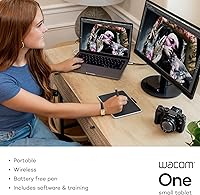
The Wacom One Small Drawing Tablet is a strong fit for anyone taking their first real step into digital art — students, hobbyists, and casual creatives who want a reliable starting point without overcommitting financially or desk space. Educators who annotate documents, mark up presentations, or teach visual subjects remotely will find the pen input far more natural than a mouse for that kind of work. Remote workers who do light photo retouching, sign documents digitally, or sketch out quick visual ideas for clients will also get genuine day-to-day use out of it. It works particularly well for Android users who want stylus-level precision connected to their phone or tablet, since Bluetooth 5.1 support makes that pairing genuinely practical. If you have been drawing with a mouse and know it is holding back your work, this compact drawing pad is a logical and well-supported upgrade from a trusted brand.
Not suitable for:

The Wacom One Small Drawing Tablet is not the right tool for experienced illustrators or anyone planning to do detailed, professional-grade digital painting — the 6.0″ x 3.7″ active area simply does not give you enough room to work comfortably on complex compositions. Users who depend on rock-solid wireless connections for uninterrupted creative sessions should be aware that Bluetooth reliability has drawn mixed feedback, and a dropped connection mid-work is a real frustration some buyers have encountered. The listed pressure sensitivity is inconsistently documented across the product materials, which makes it a harder sell for technically minded buyers who are directly comparing specs against competing tablets. Anyone needing a large active area, dedicated express keys on the tablet body, or a display tablet that shows the image directly under the pen will need to look at higher-tier options in Wacom's lineup or from other brands. This is also not the best choice for users who need full feature parity on Android, as tilt and pressure sensitivity behavior is more limited on that platform than on Windows or macOS.
Specifications

  • Dimensions: The tablet body measures 7.4″ x 5.55″ x 0.31″, keeping it compact enough to fit on a crowded desk or slide into a laptop bag.
  • Active Area: The drawing surface has an active input area of 6.0″ x 3.7″, sized appropriately for beginner and intermediate tasks.
  • Weight: The tablet weighs 7.2 ounces, making it one of the lighter options in its category for portable daily use.
  • Connectivity: Supports both USB-C wired connection and Bluetooth 5.1 wireless, giving users flexibility depending on their device and workflow.
  • Compatible OS: Works with Windows, macOS, Chrome OS, and Android; some Android and older devices may require a separate USB-A adapter not included in the box.
  • Pen Technology: The included Wacom One Pen is battery-free, using electromagnetic resonance technology to track position and pressure without any charging required.
  • Pressure Sensitivity: Pressure sensitivity is listed as 4096 levels in the product title but as 2048 levels in the official spec sheet — buyers should note this discrepancy when comparing models.
  • Tilt Recognition: The pen supports natural tilt recognition, allowing artists to vary stroke width and shading angle by tilting the pen as they would a real brush or pencil.
  • Pen Buttons: The Wacom One Pen features two customizable side buttons that can be mapped to frequently used shortcuts such as undo, erase, or copy/paste.
  • Surface Texture: The tablet surface uses a high-friction matte texture designed to simulate the drag and feel of drawing on paper rather than a smooth plastic or glass surface.
  • Included Software: Comes with three-month trial licenses for Clip Studio Paint Pro, Magma collaborative drawing platform, and Foxit PDF Editor.
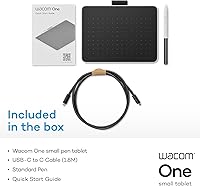
  • Included Accessories: Box contents include the Wacom One Pen, a USB-C to USB-C L-shaped cable, replacement nibs, a nib removal tool, and a printed quick start guide.
  • Pen Battery: The pen requires no battery or charging — it draws power passively from the tablet's electromagnetic field during use.
  • Bluetooth Version: Bluetooth 5.1 is supported for wireless connection, offering a stable low-latency link to compatible laptops, desktops, and Android devices.
  • Manufacturer: Designed and manufactured by Wacom Technology Corporation, a company with decades of experience producing professional and consumer graphics input devices.
  • Release Date: This model was first made available in February 2023 as part of Wacom's refreshed entry-level One product lineup.
  • Power Source: The tablet itself is powered via USB-C connection or through its internal lithium polymer battery when used wirelessly over Bluetooth.
  • User Rating: As of available data, the tablet holds an average rating of 3.8 out of 5 stars based on 178 verified Amazon reviews globally.

Related Reviews

Wacom Intuos Small Bluetooth Graphics Tablet
81%
93%
Pen Accuracy & Pressure Sensitivity
76%
Wireless Bluetooth Connectivity
67%
Active Area Size
84%
Build Quality & Durability
91%
Portability & Form Factor
More
Wacom One by Wacom Medium Pen Tablet CTL-672
84%
92%
Value for Money
89%
Pen Performance (Pressure Sensitivity)
72%
Build Quality
94%
Ease of Setup
90%
Portability/Size
More
XENCELABS Drawing Tablet Small
88%
90%
Performance
95%
Pressure Sensitivity
92%
Portability
88%
Build Quality
85%
Usability
More
Wacom Movink 13 OLED Pen Display
79%
93%
Display Quality
91%
Pen Performance
88%
Portability & Build
89%
Color Accuracy
64%
Value for Money
More
Wacom Cintiq 16 Pen Display Tablet
76%
94%
Pen Accuracy & Responsiveness
88%
Display Color Accuracy
83%
Anti-Glare Performance
86%
Pen Tilt Recognition
81%
Screen Size & Active Area
More
Wacom Cintiq Pro 17 Pen Display
77%
93%
Pen Performance
91%
Display Quality
92%
Color Accuracy
89%
Latency & Responsiveness
86%
Build Quality
More
HUION Inspiroy 2 S Drawing Tablet
80%
91%
Pen Accuracy & Responsiveness
88%
Value for Money
86%
Portability & Build
84%
Shortcut Keys & Scroll Wheel
63%
Active Area Size
More
HUION Inspiroy Frego Small Wireless Drawing Tablet
87%
90%
Battery Life
93%
Portability
88%
Pressure Sensitivity
85%
Ergonomics
92%
Connectivity
More
Wacom Intuos Pro Large Drawing Tablet
77%
94%
Pen Accuracy & Pressure Response
91%
Active Area Size
88%
Build Quality & Durability
58%
Driver Software & Compatibility
83%
ExpressKeys & Touch Ring Customization
More
Wacom Cintiq 22 Drawing Tablet 21.5-inch
84%
94%
Drawing Precision
90%
Display Quality
85%
Ergonomics/Comfort
72%
Ease of Setup
91%
Build Quality
More

FAQ

It genuinely works wirelessly via Bluetooth 5.1 — you can draw without any cable attached. That said, some users have reported occasional Bluetooth drops during longer sessions, so if you need an absolutely uninterrupted connection for professional work, keeping the USB-C cable handy as a backup is not a bad idea.

This is a legitimate inconsistency in the product materials. The title and some marketing copy state 4096 levels, while the official spec sheet lists 2048. Wacom has not publicly clarified this discrepancy. In practice, the pen feels responsive and smooth for everyday drawing, but if the exact number matters for your work, it is worth factoring in before buying.

Yes, it supports Android devices via both USB-C and Bluetooth. Keep in mind that some features — particularly tilt recognition and full pressure sensitivity — may behave differently on Android compared to Windows or macOS. You may also need a USB-A adapter depending on your phone's port configuration, which is not included in the box.

For beginners doing casual sketching, photo annotation, or simple illustrations, the 6.0″ x 3.7″ area works fine day to day. If you have used a larger tablet before or plan to do detailed professional artwork, you will likely find it restrictive. It is honestly sized for getting started, not for complex multi-layer compositions.

You will need to install Wacom's driver software to access the full feature set, including pen button customization. The setup process is generally quick — most users on Windows and macOS are up and running within a few minutes. Chrome OS and Android may require slightly more configuration depending on your specific device.

The Wacom One Small Drawing Tablet ships with three-month trial licenses for Clip Studio Paint Pro, Magma, and Foxit PDF Editor — enough to get started without spending anything extra on software immediately. After the trials expire, you will need to purchase subscriptions or find free alternatives like Krita or GIMP, which are also fully compatible.

No — the pen is completely battery-free. It uses electromagnetic resonance technology, drawing passive power from the tablet itself. You never need to charge it, replace batteries, or worry about it dying mid-session, which is one of the more practical advantages of this compact drawing pad over some competing styluses.

With regular use, the matte surface texture does show wear in the areas where you draw most frequently. The box includes replacement nibs and a nib removal tool, which helps maintain pen feel as nibs wear down. However, the tablet surface itself is not replaceable, so heavy daily users should expect some visible wear over months of use.

Yes, Chrome OS compatibility is officially supported, which is relatively uncommon at this price point and one of the reasons the Wacom One Small appeals to Chromebook users specifically. Basic drawing and pen input work well, though some advanced driver features available on Windows and macOS may not be accessible on Chrome OS.

The main advantages of choosing the Wacom One Small over budget alternatives are driver stability, build reliability, and the Wacom ecosystem's long track record of OS update support. Cheaper tablets often have inconsistent pressure response and drivers that break after major OS updates. You are paying partly for the hardware and partly for the confidence that it will keep working a year or two down the line.

Where to Buy