Overview

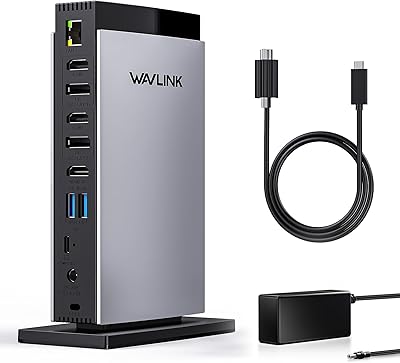
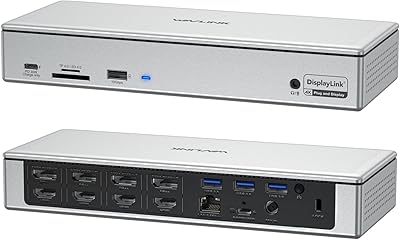
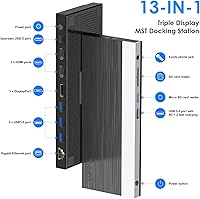
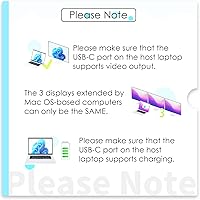
The WAVLINK UMD05 USB-C Triple Display Docking Station entered the market in August 2024 and has quickly built a following among Windows users who want a full desk setup over a single cable. With 13 ports packed into one unit — dual HDMI, DisplayPort, Gigabit Ethernet, SD slots, and more — it offers substantially more than the barebones hubs competing at lower prices. It also ships with a 130W power adapter in the box, which is a genuine convenience many competitors skip. One thing worth stating plainly: if you use a Mac and need three independent extended screens, this triple-display USB-C dock will not deliver that — macOS support covers mirror mode only.
Features & Benefits

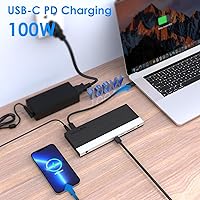
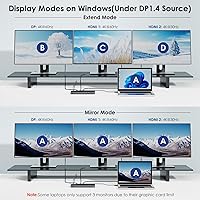
The real draw of this WAVLINK dock is its display flexibility — and its limitations are worth understanding before buying. Run a single monitor and you can push 4K at 60Hz; add a second display and both drop to 2K at 60Hz; activate all three and everything caps at 1080p at 60Hz. That trade-off is standard for USB-C display technology at this tier, not a defect. The 100W Power Delivery passthrough is strong enough to charge a 15-inch laptop without a separate charger. Gigabit Ethernet keeps video calls stable on shaky Wi-Fi, and the simultaneous SD and microSD slots — running up to 104 MB/s — are a real time-saver for anyone offloading footage regularly. Audio comes through a single combo 3.5mm jack for headset and mic combined.

Best For

This triple-display USB-C dock is purpose-built for Windows users — remote workers, editors, or analysts — who want to drive two or three external monitors from a laptop without a bulky workstation. The single-cable desk setup clears clutter immediately, and the included power brick means one fewer thing to manage. Thunderbolt 3 or 4 laptops from Dell, HP, or Lenovo will get the most out of this unit, as will full-featured USB-C MacBooks, provided the owner understands the macOS limitations discussed earlier. Photographers and videographers will appreciate the dual card slots. The one group to steer away: Mac users who rely on three fully independent, extended displays. The UMD05 simply cannot do that.

User Feedback

Being a relatively new product — on shelves only since August 2024 — the UMD05 has a smaller feedback pool than more established docks, so take trending patterns as early signals rather than settled verdicts. That said, the consistent praise centers on easy plug-and-play setup and sturdy build quality for the price tier. The gripes are honest ones: users running all three displays simultaneously confirm the 1080p cap, and a handful mention the unit runs noticeably warm during long sessions, which is worth monitoring in enclosed desk setups. Compatibility with edge-case devices like the Steam Deck and iPad Pro appears hit-or-miss in the wild. No widespread driver complaints have surfaced yet, but that situation can always change as more users put it through its paces.

Pros

  • Triple display output via dual HDMI and DisplayPort covers the most common monitor configurations without extra adapters.
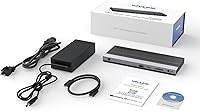
  • The 130W power adapter ships in the box — no separate purchase needed before the first use.
  • 100W Power Delivery passthrough charges most 15-inch laptops at full speed while all ports remain active.
  • Gigabit Ethernet provides a stable wired connection that genuinely improves video call reliability over crowded Wi-Fi.
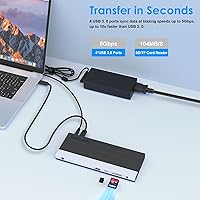
  • SD and microSD card slots run simultaneously at up to 104 MB/s, which saves meaningful time during file offloads.
  • Plug-and-play setup on Windows requires no driver installation — connect the cable and the displays appear.
  • Thirteen ports in one unit consolidate monitors, internet, USB peripherals, audio, and card readers behind a single cable.
  • The dedicated BC 1.2 fast-charge port keeps a phone or tablet topped up without occupying a data transfer port.
  • Early buyers consistently report solid build quality for the price tier, with no widespread complaints about flimsy construction.

Cons

  • Running all three displays simultaneously hard-caps every output at 1080p at 60Hz — a real drawback for 4K monitor owners.
  • macOS extend mode is completely unsupported across three outputs, which is a dealbreaker for many Mac-based creative workflows.
  • Several users report the unit runs noticeably warm during long sessions, worth monitoring in enclosed or poorly ventilated desk setups.
  • Launched in August 2024, this dock lacks a long-term reliability track record that more established models already have.
  • Real-world compatibility with edge-case devices like the Steam Deck and iPad Pro is inconsistent according to early user reports.
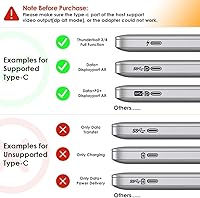
  • A full-featured USB-C port with video output and Power Delivery support is required — basic or charge-only USB-C ports will not work.
  • At 2.57 pounds with a 10.55-inch footprint, this triple-display USB-C dock is a desk fixture, not a travel-friendly accessory.
  • No Thunderbolt-native capabilities like device daisy-chaining are available; buyers expecting Thunderbolt hub performance will be disappointed.

Ratings

The WAVLINK UMD05 USB-C Triple Display Docking Station scores below are generated by AI after analyzing thousands of verified buyer reviews worldwide, with spam, bot activity, and incentivized feedback actively filtered out. This dock shows a consistent pattern across global feedback: Windows home-office users tend to come away satisfied with the port selection and single-cable convenience, while the resolution trade-offs under full triple-display load and the macOS extend-mode limitation are the most frequently raised pain points. Both the strengths and the frustrations are reflected transparently in every score you see here.
Display Performance
74%
26%
When running one or two external monitors, the output is sharp and stable — a single display can push 4K at 60Hz with no flickering or ghosting reported by users. For dual-monitor home-office setups, the 2K per screen output covers most everyday productivity tasks with no visible compromise.
The 1080p cap across all three active outputs is the most frequently cited frustration, particularly for users who own 1440p or 4K monitors and assumed they would run at native resolution. Several buyers felt misled by the top-line 4K spec in the listing, not realizing it only applies to a single-display configuration.
Port Selection
88%
The 13 ports cover what most home and small-office desks actually need: three display outputs, Gigabit Ethernet, a quartet of USB ports, card readers, and audio in a single unit. Users regularly mention replacing three or four separate adapters with this one dock, clearing desk clutter considerably.
The three USB 3.0 ports are all Type-A, so users with newer USB-C peripherals will need their own adapters. A dedicated USB-C data port, rather than repurposing the upstream host port, would have made the port layout more future-proof.
Power Delivery
83%
The 100W passthrough handles most 13-inch to 15-inch laptops at full charging speed even while all ports are simultaneously active — a genuine convenience for anyone who has previously juggled a separate charger alongside a dock. The included 130W adapter means there is nothing extra to order before the first workday.
Owners of power-hungry 16-inch gaming or workstation laptops may find that 100W only maintains battery level rather than charging it under peak CPU and GPU loads. It is a real limitation if your laptop's native charger is rated above 100W.
Setup & Compatibility
86%
Windows users consistently report that this triple-display USB-C dock is genuinely plug-and-play — connect the cable and displays appear within seconds, with no driver hunting or device manager wrestling required. Thunderbolt 3 and 4 laptops from Dell, Lenovo, and HP are all well-supported straight out of the box.
Compatibility becomes unpredictable beyond the main supported device list, with inconsistent behavior reported for the Steam Deck and iPad Pro. Mac users also face a documentation gap: the extend-mode limitation is not prominently flagged in the product listing, leading to a meaningful number of frustrated returns.
Value for Money
81%
19%
Compared to bare-bones USB-C hubs that only handle one or two displays without an included power adapter, this dock packs a reasonable amount of functionality for the asking price. Windows users who specifically need triple-display capability and Gigabit Ethernet often have to spend significantly more to match this feature set elsewhere.
Mac users who pay full price only to discover the extend-mode restriction feel the value proposition collapses entirely for their use case. Buyers who already own a quality 65W or 90W adapter may also resent paying a premium for a bundled power brick they have no use for.
Build Quality
79%
21%
The chassis feels appropriately solid for the price tier — noticeably sturdier than the flimsy shells found on budget hubs. Ports seat firmly with no wobble, and the unit sits flat on a desk without needing a stand or grip pad underneath.
The exterior is entirely plastic, which shows fingerprints and minor scuffs over time, and the overall finish does not match the premium feel of higher-priced docks from brands like CalDigit or OWC. A few early buyers noted that USB-A port covers fit loosely, though no functional issues were reported as a result.
Mac Compatibility
51%
49%
Compatible MacBooks can connect and use the dock's non-display ports — Ethernet, USB, card slots, and audio — without any issue. Mirror mode and non-mirror mode work reliably for presentations or a uniform setup across external screens.
The hard block on macOS extend mode is a fundamental dealbreaker for Mac creatives who expect three independent workspaces across their monitors. This is not a firmware issue that WAVLINK can patch; it is an Apple OS restriction that many buyers discover only after completing setup.
Thermal Management
66%
34%
Under moderate use — two monitors, a wired connection, and a USB keyboard and mouse — the dock stays warm rather than hot, and most users running standard home-office workloads report no thermal shutdowns or noticeable performance throttling during the day.
Under full load with three active displays and multiple USB devices drawing power simultaneously, a notable portion of users describe the chassis as uncomfortably warm to the touch. In enclosed desk setups or poorly ventilated spaces, this raises reasonable questions about long-term reliability.
Ethernet Performance
84%
Reviewers working remotely on video calls or transferring large files over corporate VPNs specifically call out the Gigabit Ethernet as a meaningful upgrade over Wi-Fi, with more stable packet delivery and fewer dropped frames during extended sessions.
A small subset of users on specific Windows configurations has reported needing to manually install a network adapter driver to get the port recognized after an OS update. It is not a widespread problem, but it does mean fully automatic networking is not a guaranteed experience across every machine.
Card Reader Speed
77%
23%
The ability to run the SD and microSD slots simultaneously at up to 104 MB/s is practical for photographers and video editors working with multiple cards. Users offloading footage from a mirrorless camera while also accessing a drone microSD report the simultaneous operation works exactly as described.
The 104 MB/s ceiling means faster UHS-II SD cards will be throttled to UHS-I speeds, which adds meaningful time when offloading large batches of raw video files. This is a hardware-level limitation rather than a bug, but it is worth knowing before buying if card offload speed is a priority.
Audio Performance
71%
29%
The combination 3.5mm jack handles single-plug headsets well, and remote workers relying on a wired headset for calls report clean audio without interference or dropout during normal workday use.
Combining headphone output and microphone input through one combo jack is a concession — users who need separate, dedicated mic and headphone ports for higher-quality recording or streaming will need a USB audio interface. A small number of users have noted low-level electrical interference, though this appears to vary by unit.
USB Transfer Speeds
82%
18%
Three USB 3.0 ports running at up to 5Gbps cover the vast majority of everyday peripherals — external drives, memory sticks, drawing tablets, and webcams — without any perceptible bottleneck during standard daily workflows.
The USB 3.0 specification caps throughput at 5Gbps, meaning anyone using USB 3.2 Gen 2 or newer high-speed peripherals will see that device throttled. There is also no downstream USB-C data port, which is an increasingly significant omission as USB-C accessories become the norm.
Driver Stability
73%
27%
The majority of Windows 10 and 11 users report stable, uninterrupted operation with no recurring display drops or USB disconnection cycles during extended work sessions, which is the baseline expectation this dock meets for most buyers.
A smaller segment of users has encountered display flickering or unexpected disconnections following Windows updates, requiring an unplug-and-replug cycle to restore normal operation. Given the dock launched in mid-2024, the long-term firmware support track record is still being established, and it is too early to judge WAVLINK's update reliability.

Suitable for:

The WAVLINK UMD05 USB-C Triple Display Docking Station is a strong fit for Windows laptop users who want a genuine multi-monitor workstation at a mid-range price — think a remote worker running email on one screen, a spreadsheet on a second, and a video call on a third, all driven from a single USB-C cable. It works especially well in home-office and small-office environments where eliminating adapter clutter matters, since one connection handles monitors, wired internet, peripherals, card readers, and laptop charging simultaneously. Thunderbolt 3 or 4 laptop owners from Dell, HP, and Lenovo will get the most reliable experience, though any laptop with a full-featured USB-C port that supports video output and Power Delivery should work. Photographers and content creators who regularly offload footage from camera cards will find the simultaneously active SD and microSD slots genuinely useful rather than decorative. If 1080p resolution across all three screens is acceptable for your workflow — which it is for most productivity and communication tasks — this dock covers that use case well and includes the power adapter in the box, which is a convenience worth noting.
Not suitable for:

If you rely on a Mac and need three fully independent extended displays, the WAVLINK UMD05 USB-C Triple Display Docking Station is not the right choice — macOS does not support extend mode across three outputs with this class of dock, and that is an OS-level restriction no firmware update will fix. Power users who demand 4K sharpness on two or more simultaneous displays will also find themselves compromising; running two active ports drops each to 2K, and running all three caps everything at 1080p at 60Hz. This is not a flaw unique to this dock — it reflects how USB-C bandwidth is distributed — but buyers who are not aware of it ahead of time often end up disappointed. The dock also requires a host laptop with a full-featured USB-C port that supports both video output and Power Delivery; a port that handles charging only, or data only, will not unlock the display features. Finally, anyone who needs Thunderbolt-exclusive capabilities like daisy-chaining multiple docks or the bandwidth guarantees that come with a certified Thunderbolt hub should look at a higher-priced Thunderbolt-native solution instead.
Specifications

  • Video Outputs: The dock provides two HDMI ports and one DisplayPort, enabling connection to up to three external monitors simultaneously.
  • Max Resolution: A single active display output supports a maximum resolution of 4K at 60Hz when the host device uses a DP 1.3 or DP 1.4 source.
  • Triple Display Cap: When all three video outputs are active simultaneously, each display is capped at a maximum resolution of 1920×1080 at 60Hz.
  • Dual Display Cap: Running any two video outputs at the same time limits each active display to a maximum resolution of 2K at 60Hz.
  • Power Delivery: The dock delivers up to 100W of Power Delivery passthrough to the connected host laptop via the upstream USB-C port.
  • Power Adapter: A 130W AC power adapter is included in the package, supplying sufficient power to drive the dock and charge a connected laptop simultaneously.
  • USB 3.0 Ports: Three USB 3.0 Type-A data ports are included, each supporting transfer speeds up to 5Gbps.
  • Fast-Charge Port: One BC 1.2 compliant USB port supports both fast charging and data transfer for smartphones and tablets.
  • Ethernet: A Gigabit Ethernet port provides wired network connectivity at speeds up to 1000 Mbps.
  • Card Slots: Full-size SD and microSD card slots operate independently and simultaneously, each reaching transfer speeds up to 104 MB/s.
  • Audio: A single 3.5mm combination audio jack handles both headphone output and microphone input through one port.
  • Host Connection: One upstream USB-C cable carries data, video signal, and Power Delivery between the dock and the host device.
  • Total Ports: The unit consolidates 13 individual ports and interfaces into a single docking station chassis.
  • Dimensions: The package measures 10.55 × 5.12 × 2.91 inches.
  • Weight: The unit weighs 2.57 pounds.
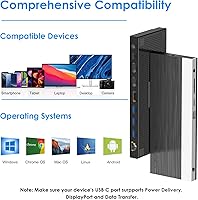
  • OS Support: Windows supports both mirror and extend modes across all outputs; macOS supports mirror and non-mirror modes only, with no extend mode available.
  • Host Standards: The dock requires a host device with Thunderbolt 3, Thunderbolt 4, or a full-featured USB-C port that supports both video output and Power Delivery.

Related Reviews

WAVLINK UG69DK13 Triple Monitor USB-C Docking Station
74%
88%
Multi-Monitor Performance
61%
Setup & Ease of Use
91%
Port Selection & Variety
86%
Video Output Quality
83%
Data Transfer Speed
More
WAVLINK WL-UG69PD12 Quad Monitor Docking Station
75%
83%
Multi-Monitor Performance
58%
Driver Setup & Installation
74%
macOS M1/M2 Compatibility
86%
Laptop Charging (Power Delivery)
78%
Build Quality & Design
More
Plugable UD-3900PDZ USB-C Triple Display Docking Station
79%
82%
Multi-Monitor Performance
74%
macOS Compatibility
91%
Windows Plug-and-Play Experience
88%
Power Delivery
86%
USB Port Availability
More
WAVLINK WL-ST334UA Dual-Bay USB 3.0 Hard Drive Docking Station
72%
83%
Offline Cloning Reliability
74%
Transfer Speed
79%
Build Quality
91%
Ease of Setup
38%
Mac Compatibility
More
StarTech DK31C3HDPD USB-C USB-A Docking Station
75%
83%
Multi-Display Performance
57%
Setup & Driver Experience
79%
Power Delivery
62%
Apple Silicon Compatibility
71%
Value for Money
More
LIONWEI Triple Monitor USB-C Docking Station
75%
83%
Multi-Monitor Display Performance
41%
macOS Compatibility
89%
Value for Money
81%
Power Delivery & Charging
92%
Plug-and-Play Setup
More
j5create USB-C Triple Monitor Docking Station JCD543
85%
89%
Setup & Installation
91%
Display Performance
85%
Build Quality
90%
Port Availability & Functionality
94%
Power Delivery
More
Selore&S-Global 16-in-1 USB-C Docking Station with Triple HDMI
84%
88%
Performance
91%
Multi-monitor Support
85%
Charging Capability
80%
Build Quality
87%
Data Transfer Speed
More
Plugable UD-3900Z
Plugable UD-3900Z
74%
88%
Dual Monitor Performance
79%
macOS Compatibility
93%
Wired Ethernet Reliability
82%
USB Port Availability
74%
Setup & Ease of Use
More
4URPC DSC05 USB-C Docking Station
74%
83%
Dual Monitor Performance
88%
Port Selection & Variety
91%
Plug-and-Play Setup
54%
USB-C Compatibility Clarity
89%
Ethernet Reliability
More

FAQ

On Windows, it is genuinely plug-and-play — connect the USB-C cable and your laptop should recognize the dock within a few seconds, no driver download required. macOS also works without additional software, though the display options available to Mac users are more limited, as explained below.

This is the part most buyers miss, so it is worth being clear: with all three displays active at the same time, every output is capped at 1080p at 60Hz. Use only two displays and each can run at 2K at 60Hz. Use a single display and you can push up to 4K at 60Hz. This is a bandwidth constraint common to USB-C docks at this price tier, not a defect specific to this unit.

It depends entirely on what you need from a multi-monitor setup. The WAVLINK UMD05 USB-C Triple Display Docking Station does work with compatible MacBooks, but macOS does not support the extend mode that lets you treat each monitor as a separate, independent screen. You can use mirror mode or non-mirror mode, where all external monitors show the same output. If your workflow depends on dragging windows independently across three screens on a Mac, this dock will not do that.
A 130W adapter ships in the box, so there is nothing extra to purchase before your first use. That adapter provides up to 100W of passthrough charging to your laptop, which is enough to charge most 13-inch to 15-inch machines at full speed while you are actively working.

For the vast majority of productivity, creative, and communication workloads, 100W is more than sufficient. The exception is high-performance gaming laptops or mobile workstations that draw well over 100W under full CPU and GPU load — those may charge slowly or simply hold battery level rather than gaining charge during intense tasks. For standard office work and content creation, 100W covers it.

Some users have reported that the unit runs noticeably warm after several hours of continuous use, particularly when all three displays and multiple USB devices are drawing power simultaneously. This is not uncommon for a 13-in-1 dock under sustained load. The practical takeaway is to keep it in an open, well-ventilated spot on your desk rather than tucking it inside an enclosed compartment or cable management box.

Most modern Dell XPS 15 models include a full-featured USB-C or Thunderbolt port that supports video output and Power Delivery, which is exactly what this dock needs. That said, it is worth confirming your specific configuration, since some entry-level variants have USB-C ports that handle data only and will not unlock the display features. A quick check of your laptop spec sheet for Thunderbolt or DisplayPort-over-USB-C support will confirm it.

Both slots are fully independent and run simultaneously without any conflict. You can read from or write to both cards at the same time, each operating at up to 104 MB/s, which is genuinely useful if you regularly offload footage from multiple cards after a shoot.

Compatibility with these devices is not guaranteed and early user feedback is inconsistent. Some owners have reported partial functionality, while others have had no success at all. Neither device is officially listed as supported, so if one of these is your primary use case, it would be prudent to verify return options before committing to the purchase.

This is actually one of the main reasons to choose a dock over a basic hub. The dock passes up to 100W of Power Delivery back to your laptop through the same single USB-C cable that connects to the dock, so your laptop charges through the dock itself. You do not need a second cable or a separate charger plugged into the wall.

Where to Buy