Overview

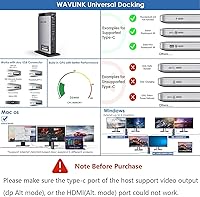
The WAVLINK UG69DK13 Triple Monitor USB-C Docking Station solves a specific and frustrating problem: Apple Silicon MacBooks natively support only one external display, but this docking station uses DisplayLink technology to push that limit to three monitors at once. All three run at 4K 60Hz over a single USB-C cable, which keeps your desk tidy and your cable management sane. It works with macOS, Windows, Chrome OS, Ubuntu, and Android, so it isn't locked to one ecosystem. One critical caveat upfront — laptop charging is not supported, and setup requires installing DisplayLink drivers before anything displays correctly. This is not a plug-and-play device.
Features & Benefits

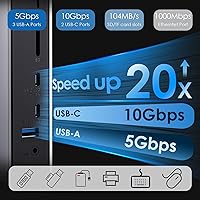
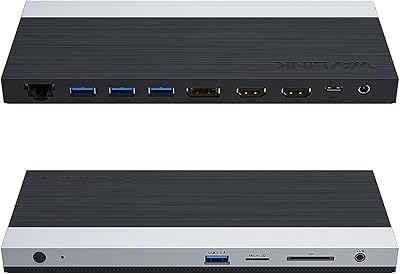
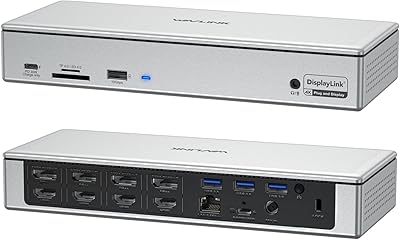
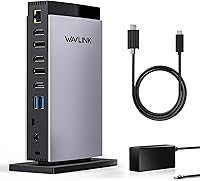
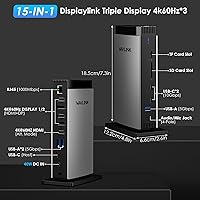
The WAVLINK dock packs a solid range of outputs into a compact tower that sits comfortably on any desk. Three HDMI 2.0 ports and two DisplayPort connections each handle 4K at 60Hz, so you can mix display types without hunting for adapters. On the data side, a 10Gbps USB-C port handles fast external drives, while three USB-A ports manage keyboards, mice, and other peripherals cleanly. Gigabit Ethernet gives you a rock-solid wired connection, and the SD and TF card slots — reading at up to 104 MB/s — make offloading photos or footage straightforward. A 3.5mm combo jack rounds out an honestly well-stocked port selection.

Best For

This triple-monitor hub makes the most sense for MacBook M1, M2, or M3 users who have hit the wall of Apple's native single-display limitation and need a practical workaround. Windows laptop users building a proper home office or workstation will also find it well-suited, particularly since the 15 available ports can absorb most of a typical desk setup through one cable. Photographers and video editors who regularly pull files off SD or TF cards will appreciate having that built into the dock. That said, if you expect to charge your laptop through this hub, look elsewhere — power delivery is absent by design.

User Feedback

Buyers who have successfully set up triple monitors on M-series MacBooks tend to be pleased — that is clearly the headline use case, and it delivers. Stable 4K output and reliable Ethernet are the two things most often praised. The friction points are predictable: the DisplayLink driver requirement catches some buyers off guard, and a handful report minor hiccups after OS updates. Missing laptop charging is the most common complaint by volume — many purchasers simply did not read the fine print. Build quality earns mixed remarks, with some noting moderate warmth under heavy load. Overall, the port count at this price draws genuine appreciation, but setup overhead keeps the rating from climbing higher.

Pros

  • Unlocks triple 4K 60Hz monitor support on M1, M2, and M3 MacBooks, which is otherwise impossible natively.
  • All five display outputs — three HDMI and two DisplayPort — run at full 4K 60Hz simultaneously.
  • Gigabit Ethernet delivers stable, low-latency wired networking without eating up a USB port.
  • SD and TF card slots reading at up to 104 MB/s make the WAVLINK dock genuinely useful for photo and video work.
  • A 10Gbps USB-C port handles fast external SSDs without bottlenecking transfers.
  • Broad OS compatibility covers macOS, Windows, Chrome OS, Ubuntu, and Android.
  • Fifteen ports through a single USB-C cable keeps desk cable management clean and simple.
  • The compact tower form factor takes up minimal desk space for how much it offers.
  • Included 40W DC adapter powers all connected peripherals without relying on the host laptop.
  • WAVLINK offers email and phone support with a stated response window, which is reassuring for a peripheral this involved.

Cons

  • Laptop charging is completely absent — you will need a separate charger running alongside the dock at all times.
  • DisplayLink driver installation is mandatory; first-time setup is not instant and can trip up less technical users.
  • Driver updates after major macOS or Windows releases occasionally cause temporary compatibility issues.
  • Some units reportedly run noticeably warm under a full load of five displays and multiple active peripherals.
  • DisplayLink introduces a small amount of display latency that may be perceptible in fast-motion video or gaming.
  • No Thunderbolt support means bandwidth-hungry use cases like daisy-chaining high-refresh displays are off the table.
  • The dock cannot be used on locked-down corporate or managed devices where third-party driver installation is restricted.
  • At over two pounds, this triple-monitor hub is not practical to carry between locations regularly.

Ratings

Our AI scoring system analyzed verified global buyer reviews for the WAVLINK UG69DK13 Triple Monitor USB-C Docking Station, actively filtering out incentivized, bot-generated, and low-quality submissions to surface what real users genuinely experienced. The scores below reflect both the standout strengths and the recurring pain points found across hundreds of honest assessments. Nothing has been smoothed over — where buyers struggled, the numbers show it.

Multi-Monitor Performance
88%
Users who bought this dock specifically to break Apple Silicon's single-display ceiling report consistent success running three independent 4K monitors at 60Hz simultaneously. For MacBook M1 and M2 owners working across design tools, spreadsheets, and video reference windows at once, this is the core promise delivered.
A small but vocal group notes that DisplayLink-rendered displays have a subtle latency compared to native outputs, which becomes noticeable during fast video playback or motion-heavy tasks. It is not a dealbreaker for productivity work, but anyone with a sensitivity to display responsiveness will notice it.
Setup & Ease of Use
61%
39%
Once the DisplayLink driver is installed and configured, day-to-day use is largely hands-off — plug in the USB-C cable and the monitors come up reliably. Users who took the time to read the setup instructions generally had a smooth first experience.
The mandatory driver installation trips up a meaningful number of buyers who expected plug-and-play behavior. Corporate or managed devices that restrict third-party software installations create a hard wall, and occasional post-OS-update driver conflicts add ongoing maintenance overhead that frustrates less technical users.
Port Selection & Variety
91%
Fifteen ports through a single USB-C cable is genuinely impressive at this price tier. Having three HDMI outputs, two DisplayPorts, multiple high-speed USB-A and USB-C data ports, Gigabit Ethernet, a combo audio jack, and card slots simultaneously available covers the full scope of a productive home office desk without compromise.
The USB-A ports are data-only with no power delivery, which means devices that rely on bus power for charging — like some wireless receiver dongles or certain portable drives — may behave unexpectedly. The port labeling on the physical unit is also reported as small and hard to read in low-light conditions.
Video Output Quality
86%
4K at 60Hz across all five display outputs is well-regarded by users who have tested it with high-resolution monitors. Color accuracy and sharpness are consistently praised for office productivity tasks, and the HDMI 2.0 ports handle most modern monitors without needing adapters.
DisplayLink compression is occasionally visible in very color-sensitive work like photo grading when compared side-by-side with a native Thunderbolt output. This is a DisplayLink technology limitation rather than a WAVLINK-specific flaw, but it is worth knowing for professional creative work where color fidelity is critical.
Data Transfer Speed
83%
The 10Gbps USB-C port handles fast NVMe enclosures and high-speed SSDs well, which users editing large video files off external drives appreciate. Transferring large RAW photo batches through the SD slot at close to 104 MB/s is noticeably faster than older USB 2.0-era docks.
The three USB-A ports are limited to 5Gbps, which is adequate for peripherals but can bottleneck users trying to run multiple fast external drives simultaneously. Bandwidth sharing across active ports under heavy load can reduce real-world speeds below the rated maximums.
Laptop Charging (Pass-Through)
12%
88%
There is effectively no positive to note here from a charging standpoint, as the omission is intentional. Users who specifically researched this before buying and already had a separate charger in their setup report that the absence becomes a non-issue in daily use.
Missing power delivery to the host laptop is the single most complained-about aspect across all reviews. Many buyers did not notice this limitation before purchasing, and discovering it on arrival — meaning they now need their laptop charger running alongside the dock at all times — is a genuine frustration that catches people off guard.
Build Quality
72%
28%
The tower form factor feels reasonably solid for a mid-range peripheral, and the compact footprint is well-suited to a tidy desk arrangement. Users who have used the dock daily for several months report no physical deterioration or port wobble.
The plastic chassis runs noticeably warm under a full load of active displays and peripherals, which concerns some users about long-term thermal reliability. The finish picks up fingerprints and dust easily, and a few buyers described the overall feel as functional rather than premium.
Ethernet Performance
89%
Gigabit Ethernet through the dock consistently performs as advertised, and users working from home on video calls or large file transfers report stable throughput without the drops they experienced on Wi-Fi. IT-focused buyers specifically called out the reliable wired connection as a key reason they chose this hub.
There are occasional reports of the Ethernet connection requiring a driver re-initialization after the laptop wakes from sleep, which adds a minor but repeated annoyance for users in always-on workstation setups. This is not universal but appears often enough in feedback to be worth noting.
Card Reader Utility
78%
22%
Photographers and videographers mention the integrated SD and TF slots as a genuine time-saver, removing the need for a separate card reader on an already-crowded desk. Transfer speeds are fast enough for RAW image batches and compressed video footage from mirrorless cameras.
The card reader does not support UHS-II cards, which limits maximum speeds for users with newer high-performance camera cards. For UHS-I users this is irrelevant, but professional shooters with fast media will hit a ceiling they may not expect.
Audio Performance
69%
31%
The 3.5mm combo jack works reliably with standard headsets for calls and conferencing, which is appreciated by remote workers who use a wired headset as their primary audio device. No significant noise or interference is reported under normal use conditions.
Audio quality is functional rather than high-fidelity — music listeners and podcasters note that the DAC inside the dock is basic at best. Users with higher-end headphones consistently report that plugging directly into the laptop or using a dedicated USB audio interface sounds noticeably better.
macOS Compatibility
84%
M-series MacBook compatibility is the headline use case and it largely delivers — triple monitor setups on M1, M2, and M3 MacBooks are reported as working correctly after proper driver installation. The fact that it solves a problem no native solution addresses earns it real loyalty among MacBook power users.
Major macOS updates — particularly point releases — occasionally break DisplayLink compatibility until an updated driver is released, sometimes leaving users with non-functional displays for a day or two. Users who update their OS immediately on release day tend to encounter this more than those who wait a week or two.
Windows Compatibility
81%
19%
Windows 10 and 11 users report broadly positive experiences, with the dock recognized quickly after driver installation and multi-monitor setups working across a wide range of laptop brands. Business users running dual or triple displays for productivity apps find it reliable in day-to-day use.
Windows 7 and 8.1 are listed as supported but in practice receive limited testing, and a subset of users on older Windows versions report inconsistent behavior. On some Windows laptops with non-standard USB-C implementations, the initial pairing can require a port-swap or reboot before full functionality is established.
Value for Money
76%
24%
For MacBook M-chip users with no native alternative to triple-monitor expansion, the pricing feels reasonable given the problem it solves. The sheer number of ports available relative to cost is frequently cited as a strong point by users comparing it to pricier Thunderbolt-based alternatives.
Windows users who do not need the DisplayLink workaround may find cheaper alternatives that offer similar port counts without the driver dependency. The no-charging-pass-through limitation also makes the value equation feel unbalanced to buyers who assumed power delivery was included at this price point.
Thermal Management
63%
37%
Under light to moderate loads — two or three displays with a few USB devices active — the dock stays at a manageable warmth level and users report no thermal throttling or unexpected shutdowns in normal office environments.
Running all five display outputs and multiple high-speed USB transfers simultaneously pushes the unit into a noticeably hot operating state. A few users expressed concern about placing it in enclosed desk organizers or cable management boxes where airflow is restricted, citing the warmth as a potential reliability risk over time.

Suitable for:

The WAVLINK UG69DK13 Triple Monitor USB-C Docking Station is the right call for MacBook M1, M2, or M3 users who have run into Apple Silicon's built-in one-display ceiling and need a practical, tested workaround. Because it uses DisplayLink technology, it can drive three independent 4K monitors at 60Hz over a single USB-C cable — something no amount of adapters can achieve natively on these machines. Windows laptop users consolidating a cluttered desk into a single-cable workstation will also find real value here, especially given the broad port selection that can absorb most of a typical setup at once. Creative professionals — photographers offloading cards, video editors toggling between reference monitors — will appreciate having SD and TF slots plus high-speed USB ports in the same hub as their displays. If your priority is maximum screen real estate and you are comfortable spending a few minutes installing a driver before first use, this docking station fits that brief well.
Not suitable for:

Buyers expecting to charge their laptop through this dock will be disappointed — the WAVLINK UG69DK13 Triple Monitor USB-C Docking Station explicitly does not support power delivery to the host device, and no firmware update will change that. If your workflow depends on keeping your laptop topped up without a separate charger on your desk, this is a genuine dealbreaker worth knowing before purchase. Users who want a true plug-and-play experience should also look elsewhere; DisplayLink requires a software driver install, and on managed corporate machines or locked-down systems, that installation may not even be permitted. Anyone prone to frustration with occasional driver updates after macOS or Windows patches should factor in that ongoing maintenance reality. Finally, if you only need one or two external monitors, the added cost and setup overhead of this hub likely outweighs its benefits — simpler, cheaper options exist for lighter display needs.

Specifications

  • Brand: Manufactured by WAVLINK under model number UG69DK13.
  • Dimensions: The unit measures 8.11″ long by 5.35″ wide by 4.80″ tall in its upright tower orientation.
  • Weight: The dock weighs 2.44 pounds, making it a stationary desktop peripheral rather than a portable accessory.
  • Display Outputs: Five video outputs are provided: three HDMI 2.0 ports and two DisplayPort connections, all capable of 4K at 60Hz simultaneously.
  • USB-A Ports: Three USB-A 3.2 Gen 1 ports deliver data transfer speeds up to 5Gbps and are designated for data use only.
  • USB-C Ports: One USB-C 3.1 Gen 2 port handles data at up to 10Gbps, while two additional USB-C ports support both data and peripheral charging at 10Gbps.
  • Ethernet: A Gigabit RJ-45 port provides wired network connectivity at up to 1Gbps.
  • Card Slots: Integrated SD and TF card slots support read and write speeds of up to 104 MB/s.
  • Audio: A single 3.5mm combo jack supports both headphone output and microphone input simultaneously.
  • Total Ports: The dock expands a single USB-C host connection into 15 usable ports in total.
  • Host Connection: The dock connects to the host laptop via a single USB-C cable, with no Thunderbolt requirement.
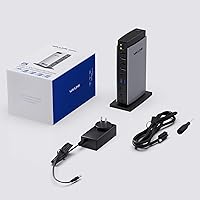
  • Power Input: A 40W DC power adapter is included in the box and is required for the dock to function.
  • Laptop Charging: The dock does not support power delivery to the connected host laptop under any configuration.
  • Display Technology: All display outputs are driven by DisplayLink technology, which requires a software driver installed on the host device.
  • OS Compatibility: Supported operating systems include macOS 10.14 and later, Windows 7 through 11, Chrome OS, Ubuntu 20.04 through 24.04, and Android 5.0 or later with a USB OTG cable.
  • Color: The dock is available in grey with a matte plastic finish.

Related Reviews

LIONWEI Triple Monitor USB-C Docking Station
75%
83%
Multi-Monitor Display Performance
41%
macOS Compatibility
89%
Value for Money
81%
Power Delivery & Charging
92%
Plug-and-Play Setup
More
j5create USB-C Triple Monitor Docking Station JCD543
85%
89%
Setup & Installation
91%
Display Performance
85%
Build Quality
90%
Port Availability & Functionality
94%
Power Delivery
More
WAVLINK USB C Docking Station 3 Monitor 100W PD
87%
90%
Display Performance
88%
Build Quality
85%
Ease of Setup
92%
Charging Speed
87%
Connectivity Options
More
TobenONE UDS041W USB-C Triple Monitor Docking Station
77%
84%
Multi-Monitor Output
91%
Single-Display Performance
93%
Integrated 100W Charging
88%
Data Transfer Speed
79%
Ethernet Performance
More
WAVLINK WL-ST334UA Dual-Bay USB 3.0 Hard Drive Docking Station
72%
83%
Offline Cloning Reliability
74%
Transfer Speed
79%
Build Quality
91%
Ease of Setup
38%
Mac Compatibility
More
StarTech USB-C / USB-A Hybrid Docking Station for MacBook Pro/Air & Windows - Triple 4K 60Hz HDMI/DP, 85W Power Delivery
83%
94%
Multi-Display Performance
89%
Charging Efficiency
80%
Compatibility with OS
91%
Data Transfer Speed
88%
Ethernet Stability
More
StarTech DK31C4DPPD Quad Monitor USB-C Dock
76%
88%
Multi-Monitor Performance
51%
Driver Setup Experience
74%
Power Delivery
91%
OS & Hardware Compatibility
83%
Build Quality
More
WAVLINK WL-UG69PD12 Quad Monitor Docking Station
75%
83%
Multi-Monitor Performance
58%
Driver Setup & Installation
74%
macOS M1/M2 Compatibility
86%
Laptop Charging (Power Delivery)
78%
Build Quality & Design
More
StarTech.com Triple Monitor USB 3.0 Docking Station
83%
89%
Performance
91%
Ease of Setup
88%
Display Support
85%
Connectivity Options
80%
Build Quality
More
Plugable UD-3900PDZ USB-C Triple Display Docking Station
79%
82%
Multi-Monitor Performance
74%
macOS Compatibility
91%
Windows Plug-and-Play Experience
88%
Power Delivery
86%
USB Port Availability
More

FAQ

Yes, DisplayLink driver installation is required before the display outputs will function. You can download the latest driver directly from the DisplayLink website. Without it, your monitors simply will not receive a signal from the dock, regardless of OS.

No, and this is worth knowing before you buy. The WAVLINK UG69DK13 Triple Monitor USB-C Docking Station does not pass power through to the host laptop at all. You will need to keep your original charger plugged in separately alongside the dock.

Yes, that is specifically what DisplayLink technology is designed to solve. Apple Silicon Macs natively cap external display output at one screen, but the DisplayLink driver works around that limitation, letting the dock drive three independent 4K monitors simultaneously.

It connects through a single standard USB-C cable, which is included. Your laptop just needs a USB-C port; Thunderbolt is not required, though the port should support data transfer rather than being a charge-only port.

Yes, all three HDMI and both DisplayPort outputs can run concurrently, each at up to 4K 60Hz. In practice, your laptop's GPU and the DisplayLink driver handle the rendering load, so system performance can vary depending on how demanding your workloads are.

Some users report that the unit runs noticeably warm when all display outputs and USB ports are active simultaneously. It stays within normal operating limits, but do not expect it to stay cool to the touch under a full load. Keeping it in an open, ventilated spot on your desk helps.

Usually yes, but DisplayLink occasionally releases updated drivers after major OS updates to maintain compatibility. If your displays stop working after an OS upgrade, checking for a new DisplayLink driver should be the first troubleshooting step.

At up to 104 MB/s, it is adequate for offloading JPEGs, RAW files, and even compressed video footage from most modern cameras. It is not the fastest card reader available, but it handles everyday creative workflows without frustrating delays.

The dock is designed for laptops with a USB-C port, since that is how it connects to the host device. A desktop with a USB-C port on the motherboard or a dedicated USB-C expansion card could technically use it, but it is really optimized for laptop workstation setups.

DisplayLink does publish a Linux driver, and the dock is listed as compatible with Ubuntu 20.04, 22.04, 23.04, and 24.04. Other Linux distributions may work but are not officially supported, so results can vary depending on your kernel version and configuration.