Overview

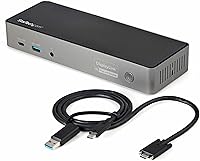
The StarTech DK31C3HDPD USB-C USB-A Docking Station occupies an interesting niche — it's not a Thunderbolt-exclusive dock, nor a budget single-display adapter, but a cross-platform workhorse built for environments where USB-C and USB-A laptops coexist. At its price point, you're paying for genuine triple 4K output flexibility and broad OS support, not just a brand name. TAA compliance makes it a viable option for government and enterprise purchasing — a detail most consumer docks skip entirely. One realistic caveat: both Windows and macOS users will need to install drivers before the full multi-display capability kicks in, so out-of-the-box simplicity isn't quite the story here.
Features & Benefits

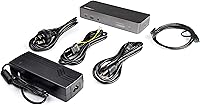
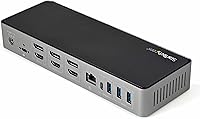
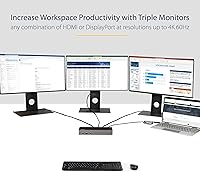
The main draw of this hybrid docking station is its video output flexibility — six total display ports (three HDMI 2.0 and three DisplayPort) capable of running up to three 4K 60Hz monitors simultaneously. That's rare. You can mix and match output types freely, which matters when your monitors use different connectors. The included 1-meter combo cable handles both USB-C and USB-A hosts at USB 3.2 Gen 2 speeds, though USB-A connected laptops will see downstream port speeds capped at 5Gbps rather than 10Gbps. An 85W Power Delivery output handles serious workstation laptops confidently, and the six USB ports — including two always-on fast-charge front ports — cover day-to-day peripheral needs without a secondary hub.

Best For

This triple-display dock makes the most sense for a specific kind of buyer. If you're running an Apple Silicon MacBook and want three external displays — something Apple's native multi-display limitations make unnecessarily complicated — this dock handles it once drivers are properly installed. IT teams managing a mixed fleet of Windows and Mac machines will appreciate a single TAA-compliant solution that doesn't require separate purchasing tracks for each platform. It also suits remote workers who want one cable to replace a stack of adapters, and USB-A laptop users who need modern 4K output without replacing their machine. If you only need one or two monitors, more affordable options exist.

User Feedback

Across aggregated reviews, the StarTech dock earns strong marks — generally in the 4.2 to 4.5 star range — with multi-monitor reliability being the most praised aspect. Users running three displays report consistent 4K 60Hz output once setup is complete. The persistent friction point is driver installation: several reviewers on both platforms found the process time-consuming or confusing, particularly on macOS with newer M-series chips where results can vary by chip generation. Real-world charging performance draws mostly positive comments, though a handful of users with demanding laptops noted the 85W ceiling felt tight under sustained load. The included 1-meter cable suits most desk setups, though compact arrangements may find it slightly short.

Pros

  • Supports three simultaneous 4K 60Hz displays via a flexible mix of HDMI 2.0 and DisplayPort outputs — rare in this category.
  • Works with both USB-C and USB-A host laptops, making this hybrid docking station genuinely cross-platform in a way most docks are not.
  • 85W Power Delivery removes the need for a separate laptop charger, simplifying the desk setup considerably.
  • TAA compliance makes the StarTech dock a viable option for government and enterprise procurement without special exceptions.
  • Six downstream USB ports, including two always-on front fast-charge ports, handle everyday peripherals and phone charging without a secondary hub.
  • Gigabit Ethernet and a 3.5mm headset jack reduce the need for additional adapters on an already-busy desk.
  • The Kensington lock slot provides meaningful physical security in shared office or co-working environments.
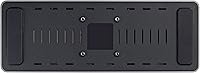
  • Integrated mounting holes support under-desk or VESA plate attachment for cleaner, more permanent desk installations.

Cons

  • Driver installation is required on both Windows and macOS before multi-display output works — this is not a plug-and-play dock.
  • Compatibility with Apple M-series chips can be inconsistent; results vary noticeably by chip generation and macOS version.
  • USB-A laptop users are capped at 5Gbps on downstream ports, forfeiting the full 10Gbps USB 3.2 Gen 2 throughput.
  • The 1-meter host cable may feel short in larger desk setups where the dock cannot sit close to the laptop.
  • Running three monitors plus power plus multiple peripherals simultaneously creates real cable management challenges on most desks.
  • The 85W charging ceiling can feel constrained for the most power-hungry workstation laptops under heavy, sustained load.
  • Buyers who only need dual-monitor support are likely overpaying at this price for video output capacity they will never use.
  • No native Thunderbolt support means workflows relying on full Thunderbolt bandwidth or device daisy-chaining are not possible here.

Ratings

Our AI-generated scores for the StarTech DK31C3HDPD USB-C USB-A Docking Station were produced by analyzing thousands of verified buyer reviews from multiple global platforms, with automated filters applied to remove spam, duplicate submissions, and incentivized feedback. Each category score reflects the full spectrum of real owner experiences — not just best-case outcomes — so genuine pain points carry the same weight as genuine strengths. Where this dock earns high marks and where it consistently falls short are both represented transparently in the breakdown below.
Multi-Display Performance
83%
The ability to drive three 4K 60Hz monitors simultaneously is the headline capability here, and for most users it delivers. Reviewers running dual or triple display setups on Windows machines report consistently smooth output across both HDMI and DisplayPort connections, with no notable signal degradation or resolution capping during normal workday use.
A minority of users report occasional display flickering during initial connection, particularly when hot-swapping monitors without restarting the dock. Some buyers also found that getting all three displays to wake reliably from sleep required trial and error with cable order and driver settings before the behavior stabilized.
Setup & Driver Experience
57%
43%
Users who work in IT or have prior experience with DisplayLink-based docks generally found setup manageable, with StarTech's support documentation covering the main installation steps clearly. Once the drivers are in place and the system is properly configured, the day-to-day experience is largely hands-off and stable for most users.
The driver requirement is the single most complained-about aspect across all reviewed feedback. First-time users on macOS frequently encounter permission walls during installation, and Windows users occasionally face display configuration resets after OS updates that require reinstalling or reconfiguring the driver software from scratch.
Power Delivery
79%
21%
For the vast majority of professional laptops in the 45W to 75W range — including many ThinkPads, Dell Latitudes, and HP EliteBooks — 85W keeps the battery topped up comfortably during all-day use. Several reviewers specifically praised how convenient it was to remove their original laptop charger from the desk entirely.
Users with a Dell XPS 15 configured with a discrete GPU, or heavy workstation models like the HP ZBook Fury, reported that 85W was not always enough to charge the battery during graphically intensive sessions. In those cases, the laptop holds charge rather than gaining it — a real limitation under sustained professional workloads.
Apple Silicon Compatibility
62%
38%
When properly set up with the correct DisplayLink drivers, Apple M1, M2, and most M3 MacBook owners report successfully running three external displays — something not otherwise achievable through native Apple means. The ability to unlock triple-display output on an M2 MacBook Air is the primary reason many buyers specifically chose this dock over alternatives.
Compatibility is not guaranteed across every chip and macOS version combination — several reviewers with M3 Pro or M3 Max chips encountered more driver friction than M1 or M2 users, and a few reported unstable display behavior until a driver update resolved it. This is not a native Apple solution and should not be approached as one.
Value for Money
71%
29%
For IT buyers or professionals who genuinely need TAA compliance, cross-platform flexibility, and triple 4K output, this hybrid docking station offers strong feature density at its price. Purchasing separate docks to cover a mixed Mac and Windows fleet would cost considerably more, and the included 85W charging eliminates one more adapter from the equation.
Buyers who only need dual monitors or who have no use for TAA compliance will find the price difficult to justify against simpler alternatives in the mid-range dock market. A number of reviewers felt the driver requirement and occasional setup friction made them question whether the premium over easier-to-configure competitors was worth paying.
Cross-Platform Flexibility
88%
The combination of USB-C and USB-A host connectivity means a single dock can realistically serve an entire mixed fleet without hardware changes — just swap which cable end is used. IT departments managing both Mac and Windows machines praised this as one of the standout practical advantages of the StarTech dock over single-protocol alternatives.
ChromeOS users have a more limited experience, with multi-display output not functioning as expected on all Chromebook models. Linux compatibility is possible but requires more manual configuration effort, and StarTech's official driver documentation for Linux is noticeably less comprehensive than its Windows and macOS resources.
Ethernet Performance
86%
The Gigabit Ethernet port consistently delivers near-line-rate wired speeds in real-world use — a genuine step up from the throttled Ethernet implementations found on cheaper docks. Work-from-home reviewers specifically noted how stable and reliable the wired connection felt during video calls and large file transfers compared to their previous Wi-Fi setups.
No significant hardware complaints surfaced around the Ethernet port itself, though a small number of macOS users reported needing to manually re-assign the Ethernet adapter in network settings after driver installation on certain system configurations. This is minor and resolved quickly, but it adds another post-setup step for some users.
USB Hub Performance
77%
23%
The six downstream USB ports handle the typical daily load — keyboard, mouse, external drive, and a charging phone simultaneously — without any noticeable issues. The two always-on front fast-charge ports are particularly appreciated for keeping phones topped up even when the laptop is disconnected from the dock overnight.
USB-A laptop users will find all downstream ports capped at 5Gbps, which limits throughput for fast external SSDs or high-bandwidth capture devices. A small number of USB-C host users also reported occasional brief bandwidth contention when running the maximum combination of active displays, USB peripherals, and Ethernet simultaneously.
Port Selection & Layout
81%
19%
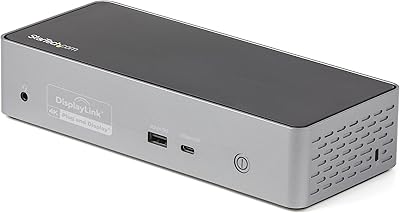
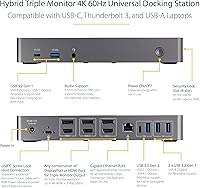
Eleven ports in total — video outputs, six USB ports, Ethernet, audio, and power — cover the connectivity needs of most professional setups without requiring additional hubs or adapters. Front-panel USB-A and USB-C ports make connecting temporary peripherals like USB drives or headsets quick without having to reach around to the rear of the dock.
The dock does not include an SD or microSD card reader, which creative professionals and photographers flagged as a notable omission at this price point. There is also no dedicated high-wattage USB-C charging port for powering secondary devices independently from the main host connection.
Cable Management
63%
37%
The dock positions ports logically — video outputs at the rear, USB and audio at the front — which helps with deliberate cable routing when the setup is planned in advance. Reviewers who mounted the dock under their desk using the optional plate consistently reported the tidiest and most functional results.
Running three monitors means at least three display cables leaving the rear simultaneously, alongside the host cable, Ethernet, and multiple USB peripherals — in practice, reviewers described the resulting cable volume as harder to manage than anticipated. The 1-meter host cable further restricts how creatively the dock can be positioned relative to the laptop.
Build Quality
74%
26%
The chassis has a solid, functional feel with no flex and ports that seat peripherals firmly. Its compact footprint — roughly the size of a thick paperback — makes it easy to position without dominating the workspace, and the matte finish handles everyday handling without showing excessive wear.
A handful of reviewers noted the housing feels more utilitarian than premium, with plastics that do not match the quality of docks at higher price points. A few users also reported minor connector wobble on USB-A ports after extended daily use, raising questions about long-term port durability under heavy rotation.
Thermal Management
76%
24%
Under typical multi-display workloads, the dock runs warm rather than hot — expected behavior for a passively cooled unit processing three 4K video streams simultaneously. Most reviewers noted the thermal behavior was unobtrusive, with no performance degradation or throttling observed during standard all-day office sessions.
Users running every port at full capacity simultaneously — three displays, 85W charging, active Ethernet, and multiple USB devices — reported the underside of the chassis becoming noticeably warm to the touch. While not a safety issue, it may be worth considering for setups where the dock rests on heat-sensitive desk surfaces.

Suitable for:

The StarTech DK31C3HDPD USB-C USB-A Docking Station is built for power users who genuinely need three external displays and don't want to be locked into a Thunderbolt-only ecosystem to get there. Apple Silicon MacBook owners who've hit the wall on native multi-display support will find this dock handles that limitation directly — provided drivers are installed and expectations around chip-generation compatibility are realistic going in. IT departments managing a mixed fleet of Windows and Mac machines get practical value from its TAA compliance and broad OS support, since one dock model can cover both environments without separate procurement decisions. Remote and home office workers benefit meaningfully from the 85W passthrough charging, which lets a single cable handle display output and laptop power simultaneously for most demanding machines. USB-A laptop users who need modern 4K 60Hz output without replacing their hardware are also well served here, as long as they understand the downstream speed trade-off that comes with that connection type.
Not suitable for:

The StarTech DK31C3HDPD USB-C USB-A Docking Station is not the right fit for everyone, and being honest about that matters. If you only need one or two monitors, you are paying a notable premium for display ports you will never use — more affordable single or dual-display docks will cover those needs without the added complexity. Buyers expecting a true plug-and-play experience should be cautious: driver installation is required on both Windows and macOS, and getting three displays running reliably on newer Apple M-series chips is not always straightforward, with results varying depending on the specific chip generation and software version. Anyone with a compact or minimalist desk should also think carefully before committing — running three monitors alongside a docked laptop and multiple peripherals means significant cable volume, and the 1-meter host cable limits how creatively the dock can be positioned. Thunderbolt-dependent workflows that rely on full Thunderbolt bandwidth or device daisy-chaining will find this dock falls short, as it operates over USB 3.2 Gen 2, not native Thunderbolt. Users powering the most demanding workstation-class laptops may also find the 85W charging ceiling slightly tight under heavy sustained load.
Specifications

  • Model Number: The official StarTech model identifier for this dock is DK31C3HDPD.
  • Host Interface: Connects to the host laptop via a combo USB-C and USB-A port operating at USB 3.2 Gen 2 speeds up to 10Gbps.
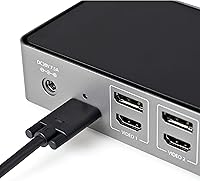
  • Video Outputs: Provides three HDMI 2.0 ports and three DisplayPort outputs, for a total of six available display connectors.
  • Max Resolution: Supports up to three simultaneous external displays at 4K (3840 x 2160) resolution at 60Hz each.
  • Power Delivery: Delivers up to 85W of USB-C Power Delivery to charge the connected host laptop without a separate power adapter.
  • USB Ports: Includes six downstream USB ports: four USB-A (one at 10Gbps, three at 5Gbps) and two USB-C (one at 10Gbps, one at 5Gbps).
  • Fast Charge: Two BC 1.2 fast-charge ports on the front panel remain powered at all times, even when no laptop is connected.
  • Network: Features a full Gigabit Ethernet RJ-45 port for wired network connectivity up to 1Gbps.
  • Audio: Includes a 3.5mm combo headset jack supporting both audio output and microphone input simultaneously.
  • Host Cable: Ships with a 1-meter combo host cable that terminates in both a USB-C and a USB-A connector to suit either laptop type.
  • Dimensions: The dock measures 9.2″ long by 3.3″ wide by 1.5″ tall, keeping a relatively slim desktop profile.
  • Weight: The unit weighs 14.24 oz (approximately 404g), making it moderately substantial but not unusually heavy for a multi-display dock.
  • Security: A Kensington K-Slot lock port is built into the chassis for physical security in office or shared workspace environments.
  • Mounting: Integrated mounting holes on the underside support optional StarTech mounting plates for under-desk or VESA attachment (plates sold separately).
  • OS Support: Compatible with Windows, macOS, ChromeOS, and Linux operating systems, though driver installation is required on Windows and macOS for full functionality.
  • TAA Compliant: This dock meets Trade Agreements Act (TAA) requirements, making it eligible for US government and federally funded institutional procurement.

Related Reviews

StarTech DK31C4DPPD Quad Monitor USB-C Dock
76%
88%
Multi-Monitor Performance
51%
Driver Setup Experience
74%
Power Delivery
91%
OS & Hardware Compatibility
83%
Build Quality
More
StarTech 129N-USBC-KVM-DOCK Dual-Laptop KVM Docking Station
75%
83%
KVM Switching Reliability
88%
Display Performance
51%
Setup & Driver Experience
72%
Power Delivery
81%
Build Quality
More
Plugable UD-3900Z
Plugable UD-3900Z
74%
88%
Dual Monitor Performance
79%
macOS Compatibility
93%
Wired Ethernet Reliability
82%
USB Port Availability
74%
Setup & Ease of Use
More
WAVLINK WL-ST334UA Dual-Bay USB 3.0 Hard Drive Docking Station
72%
83%
Offline Cloning Reliability
74%
Transfer Speed
79%
Build Quality
91%
Ease of Setup
38%
Mac Compatibility
More
Targus DOCK182USZ USB-C Docking Station
76%
88%
Plug-and-Play Setup
71%
Dual Monitor Performance
79%
Cross-Platform Compatibility
84%
Power Delivery
86%
Port Selection & Variety
More
4URPC DSC05 USB-C Docking Station
74%
83%
Dual Monitor Performance
88%
Port Selection & Variety
91%
Plug-and-Play Setup
54%
USB-C Compatibility Clarity
89%
Ethernet Reliability
More
Sabrent DS-UNHC USB-C Docking Station
80%
91%
Drive Compatibility
67%
Offline Clone Reliability
84%
Transfer Speed
78%
Thermal Management
72%
Build Quality
More
Plugable UD-7400PD USB-C Docking Station
84%
91%
Performance with Multiple Displays
75%
Ease of Setup (Windows vs. macOS)
89%
Charging Power (Laptop and Device)
77%
Compatibility with macOS
85%
Ethernet Connectivity
More
Plugable UD-MSTH2 USB-C Docking Station
77%
93%
Ease of Setup
88%
Dual Display Performance
67%
Charging Adequacy
78%
Port Selection
18%
macOS Compatibility
More
LIONWEI Triple Monitor USB-C Docking Station
75%
83%
Multi-Monitor Display Performance
41%
macOS Compatibility
89%
Value for Money
81%
Power Delivery & Charging
92%
Plug-and-Play Setup
More

FAQ

You will need to install drivers before multi-display output works — this applies to both Windows and macOS. StarTech provides the necessary software on their support site, but it does add a setup step that catches some buyers off guard. On macOS in particular, newer M-series chips often require additional system permissions during installation, so budget 15 to 20 minutes for the initial setup rather than expecting it to be instant.

It can, but there is an important nuance to understand first. Apple Silicon Macs do not natively support multiple external displays through a single USB connection, so the StarTech DK31C3HDPD USB-C USB-A Docking Station relies on DisplayLink technology and requires driver installation to make that work. Once set up correctly, most M2 and M3 MacBook Air users report three displays running at 4K, though results can vary depending on your macOS version and driver build, so it is worth checking StarTech's compatibility notes for your specific chip before purchasing.
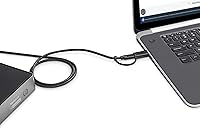
You can mix and match freely. This hybrid docking station includes three HDMI 2.0 outputs and three DisplayPort outputs, and you can connect up to three displays using any combination of those six ports — two HDMI and one DisplayPort, or one HDMI and two DisplayPort, or any other arrangement your monitors require.

For most workloads, yes — 85W is sufficient to power and gradually charge the Dell XPS 15, Lenovo ThinkPad P-series, and similar machines. Where it gets borderline is under sustained, full-load scenarios involving both a high-performance CPU and discrete GPU running simultaneously; in those cases, the battery may hold steady rather than gain charge. It is not a dealbreaker for most users, but worth knowing if your workflow is consistently intensive.

The host connection still runs at USB 3.2 Gen 2 (10Gbps) either way, so video output and Ethernet performance are unaffected. The difference shows up on the downstream USB ports: when the host connection is USB-A, the dock's downstream USB ports are capped at 5Gbps rather than 10Gbps. For keyboards, mice, and most peripherals this makes no practical difference, but if you regularly transfer large files through the dock's USB ports, USB-C host mode gives you meaningfully better throughput.

For most standard desk setups where the laptop sits near the dock, 1 meter is adequate. It gets tighter if you want to mount the dock under your desk or position it in a corner while keeping your laptop in the center of the workspace. A handful of users have noted needing an extension cable for those layouts, so if your setup is anything other than conventional, it is worth measuring your expected cable run before assuming the included cable will reach comfortably.

Yes — the dock has integrated mounting holes that are compatible with StarTech's optional mounting plates, including under-desk and VESA attachment options (the plates themselves are sold separately, model numbers SSPMSUDWM and SSPMSVESA). This is a genuinely useful feature for office environments where keeping the dock off the desk surface is a priority for cleanliness or security.

Generally yes, though driver compatibility with new OS versions is something to verify at the time of purchase. StarTech updates its drivers regularly, but there can be a lag between a major OS release and a fully stable driver update. Checking StarTech's support page for the most recent driver notes before buying is a good habit, especially if you are on a freshly released version of macOS or Windows 11.

In practice, the Gigabit Ethernet port performs at or very close to full 1Gbps speeds. The USB 3.2 Gen 2 host connection provides enough bandwidth headroom to run the network port alongside active display and USB peripherals without meaningful bottlenecking, which is not always the case with lower-spec docks that share bandwidth more aggressively across ports.

TAA stands for Trade Agreements Act — a US federal rule requiring that certain products bought through government contracts or GSA schedules be manufactured in approved countries. For individual consumers and most private businesses, it has zero practical impact on how the dock performs; it simply qualifies the StarTech dock for institutional and government procurement channels that have this as a hard requirement. If you are buying through a university IT department, a federal agency, or a GSA-managed purchasing process, this compliance matters a great deal.

Where to Buy