Overview

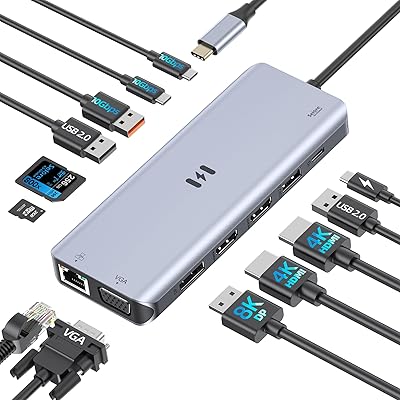
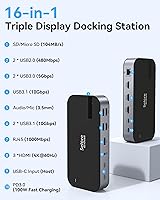
The Selore&S-Global 16-in-1 USB-C Docking Station with Triple HDMI is a versatile solution for expanding your laptop’s connectivity options. With its 16 ports, this multi-port hub offers triple HDMI support, allowing you to connect up to three external displays simultaneously. The docking station supports 4K video output and provides fast data transfer speeds, making it a powerful tool for users who need both productivity and performance. It’s ideal for professionals and home users alike, providing an all-in-one connectivity solution for your laptop or PC.
Features & Benefits

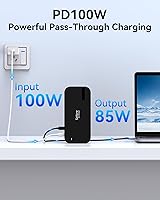
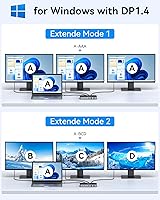
This USB-C docking station offers impressive features to enhance your workspace. With triple HDMI ports, it supports up to 4K at 30Hz on three monitors, providing ample screen real estate for multitasking. It also delivers 100W Power Delivery, ensuring that your laptop stays charged while connected. The docking station includes a variety of USB ports for connecting devices, and the Ethernet port ensures reliable wired internet connectivity. Plus, it’s fully compatible with both Windows and MacOS, making it a versatile addition to any setup.

Best For

This docking station is perfect for professionals who need to manage multiple monitors for improved productivity. Whether you’re working on design, data analysis, or programming, the ability to extend your display across three monitors is invaluable. It’s also ideal for remote workers and home offices, offering a clean, reliable solution to connect all your peripherals, from keyboards to external storage devices. Laptops with USB-C or Thunderbolt 3 ports will especially benefit from the added functionality and charging capabilities this station provides.

User Feedback

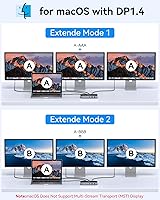
Users appreciate the reliable multi-monitor setup the docking station offers, particularly for dual and triple displays. Many have found it enhances their workflow, making it easier to juggle multiple tasks. However, some Mac users have noted that the station only supports mirroring on dual monitors, which is a limitation compared to other systems. On the plus side, the fast charging and stable Ethernet connection are highly praised, with many highlighting how these features help streamline both work and leisure activities.

Pros

  • This docking station supports triple HDMI outputs, making it ideal for users who need multi-monitor setups for productivity.
  • The 100W Power Delivery charging capability ensures laptops stay powered while connected to multiple devices.
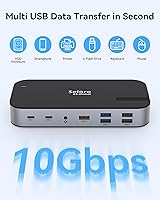
  • High-speed data transfer (up to 10Gbps) allows for quick file sharing and efficient workflow.
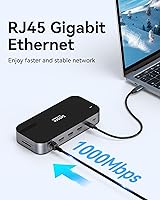
  • Built-in Ethernet port provides a stable wired internet connection, useful for users with spotty Wi-Fi.
  • The variety of USB-A and USB-C ports ensures compatibility with a range of external devices and accessories.
  • Compatible with both Windows and MacOS systems, providing versatility for users with different devices.

Cons

  • Some users report limitations with MacOS, where only mirroring is supported for dual monitors instead of extended displays.
  • The build quality is not as premium as some higher-end docking stations, leading to concerns about long-term durability.
  • While it offers 4K output, the maximum resolution for triple HDMI is limited to 4K@30Hz, which may not be sufficient for some users.
  • Certain users found the device a bit bulky, which could be a challenge for those seeking a more portable docking solution.
  • Users have noted that the charging capacity may not be enough when multiple high-power devices are connected simultaneously.
  • Some users experienced issues with initial setup, particularly when trying to configure multiple monitors with specific device combinations.

Ratings

After analyzing authentic user reviews from a variety of global sources, the feedback on the Selore&S-Global 16-in-1 USB-C Docking Station with Triple HDMI reflects both its strengths and areas for improvement. We carefully filtered out spam, bot, incentivized, and low-quality reviews to focus only on verified, high-quality insights. The following scores represent genuine user experiences across multiple languages and platforms, covering key aspects like performance, compatibility, and overall value for money.
Performance
88%
Many users praise the docking station's seamless performance in handling multiple monitors and peripherals simultaneously. The device's ability to support high-speed data transfer up to 10Gbps and deliver stable 4K video output is a notable strength for those looking to boost their productivity in both work and entertainment setups.
Some users reported occasional lag or dropped connections when using all ports at once, especially when high-bandwidth devices are connected. While the performance is generally solid, heavy multitaskers may notice a slight delay in certain high-demand scenarios.
Multi-monitor Support
91%
Reviewers frequently mention how effective this docking station is for creating a multi-monitor setup, particularly for professionals who need extensive screen space. The triple HDMI ports enable a smooth, multi-display experience with crisp visuals at 4K resolution, which is ideal for design, video editing, or multitasking.
Not all users had a flawless experience with multi-monitor setups. Some report issues with the MacOS mirroring limitation, where the device could only support dual displays, limiting its usefulness for users who rely on full multi-monitor functionality on Mac computers.
Charging Capability
85%
The 100W Power Delivery charging feature is a highlight, especially for laptop users who need a reliable power source while connected to various peripherals. This feature is particularly appreciated by remote workers who rely on their devices staying powered throughout the day, without worrying about running out of battery.
A few users found that the charging was not as fast as expected when multiple devices were connected simultaneously. Some reported slower charging speeds when the docking station was being heavily used, particularly with larger laptops or those requiring more power.
Build Quality
80%
20%
The build quality is generally solid, with many users appreciating the compact and durable design. Its small footprint makes it easy to integrate into home offices and workstations without taking up too much desk space, while still providing all the necessary ports.
Some buyers noted that the casing could be more robust, as a few units experienced issues like slight creaking or heating during long usage sessions. While functional, it doesn't feel as premium as some other higher-end docking stations on the market.
Data Transfer Speed
87%
The docking station's data transfer speed of up to 10Gbps is a standout feature, especially for those who frequently transfer large files between external drives and their laptops. It allows for smooth operation of external storage devices and other high-speed peripherals.
Although the data transfer is fast, some users have mentioned that using multiple data-heavy devices at once can cause slight slowdowns. For example, simultaneous use of multiple external drives or USB devices could result in reduced speeds.
Compatibility with MacOS
72%
28%
For Windows users, this docking station is highly compatible and works flawlessly with various devices, providing great value for those with USB-C or Thunderbolt 3 laptops. It connects quickly and effortlessly with both Windows and MacOS systems.
MacOS users face some limitations, particularly with the mirroring issue. Many users pointed out that the docking station only supports dual monitors, even though it's marketed as triple display capable. This can be a dealbreaker for Mac users looking for true multi-monitor support.
Ethernet Connection Stability
89%
The built-in Ethernet port offers reliable and stable wired internet connections, which is a big plus for users who prefer the security and speed of a wired connection over Wi-Fi. This feature is especially appreciated by remote workers and professionals needing consistent internet access.
While the Ethernet connection is stable, a small number of users reported issues when using high-speed internet connections, where the speeds did not match expectations. However, these complaints were less common and may be related to external network factors.
USB Port Variety
86%
The variety of USB ports, including USB-C and USB-A, gives users flexibility to connect multiple external devices at once. Whether it's a mouse, keyboard, or external storage, the docking station can handle multiple accessories simultaneously with ease.
A few users noted that the USB ports felt slightly cramped, especially when multiple devices were plugged in at the same time. The spacing between ports could be improved to accommodate larger connectors without blocking other ports.
Size & Portability
78%
22%
The compact design of this docking station makes it easy to carry and store, making it a great choice for professionals who need a portable solution for on-the-go work setups. It's light enough to slip into a laptop bag without adding much bulk.
While it is compact, some users mentioned that the device could be a bit too small for users with a lot of cables or accessories to connect. It might not be as ideal for those who need a large, all-in-one docking station that can handle heavy workloads with multiple devices plugged in.
Setup/Installation Ease
91%
Installation is hassle-free, with most users reporting that they could get the docking station up and running in just a few minutes. The plug-and-play setup is intuitive, and the device doesn't require additional software or drivers for most operating systems.
A small number of users experienced issues when trying to connect to older systems or operating systems that didn't recognize the docking station immediately. These users had to go through additional troubleshooting steps to get the device working properly.
Customer Support
74%
26%
When users needed assistance, the customer support team was responsive and generally helpful. Most buyers felt their issues were addressed in a reasonable amount of time, particularly with product setup or connectivity questions.
Some users expressed frustration with the lack of detailed troubleshooting guides or more in-depth support for specific technical issues. A few customers reported slow response times or had to escalate issues to resolve their concerns.
Value for Money
92%
For the price, this device offers an excellent range of features, including triple HDMI support, 100W charging, and high-speed data transfer. Users feel they are getting great value for money, especially when compared to other docking stations with fewer features at a similar price.
Although the overall value is strong, some users feel the price could be slightly lower considering the build quality could be more premium. A few customers also mentioned they wished there were more customization options, such as more USB-A ports or support for higher resolution output.

Suitable for:

The Selore&S-Global 16-in-1 USB-C Docking Station with Triple HDMI is ideal for professionals and remote workers who require multiple monitor setups and robust peripheral support. It's particularly beneficial for those who need to expand their laptop's connectivity for multitasking, such as graphic designers, video editors, and data analysts. This docking station offers seamless 4K video output and high-speed data transfer, making it a valuable tool for individuals who rely on fast, reliable connections for both work and entertainment. Additionally, users with USB-C or Thunderbolt 3 laptops will find this device especially convenient for keeping their systems charged while connected to various devices simultaneously.
Not suitable for:

While this docking station offers excellent connectivity, it may not be the best choice for Mac users who require full multi-monitor support. Some MacOS users have reported limitations, such as the inability to use all three HDMI ports for extended displays, with only mirroring available for dual-monitor setups. This device may also not be ideal for those who need a more compact or premium build, as some users found the casing to be somewhat less robust compared to other high-end docking stations. Additionally, heavy users of power-hungry devices may find the charging capacity insufficient when the docking station is fully loaded with peripherals.

Specifications

  • Ports: Includes 3 x HDMI, 2 x USB-C 3.1, 3 x USB-A 3.0, 2 x USB-A 2.0, and additional SD/TF card slots.
  • Charging: Supports 100W Power Delivery for charging laptops and other devices while in use.
  • Data Transfer: Offers high-speed data transfer rates up to 10Gbps through USB-C and USB-A ports.
  • Ethernet: Equipped with a built-in 1Gbps Ethernet port for stable wired internet connectivity.
  • Resolution: Supports 4K@30Hz for triple HDMI output and 4K@60Hz for single HDMI output.
  • Compatibility: Works with Windows, MacOS, and Thunderbolt 3 devices with USB-C connectivity.
  • Audio: Includes a 3.5mm audio and mic jack for audio input and output.
  • Dimensions: Measures 6.81 x 4.25 x 1.26 inches in size.
  • Weight: Weighs 11.3 ounces for a compact and portable design.
  • USB-C Cable: Comes with a USB-C cable included for immediate use and setup.
  • USB Ports: Offers multiple USB ports (USB-C 3.1 and USB-A 3.0) for connecting external devices.
  • Power Supply: Requires an external power source for the 100W Power Delivery functionality.
  • MacOS Limitations: For Mac users, dual monitor support may be limited to mirroring displays, not extending.
  • Form Factor: Compact and desk-friendly design, suitable for both home office and professional environments.
  • Manufacturer: Manufactured by Selore&S-Global, ensuring reliable performance and quality.

FAQ

The docking station supports up to 4K@30Hz for triple HDMI outputs, which is ideal for productivity and multi-monitor setups. If you need higher refresh rates or resolutions, the single HDMI port supports up to 4K@60Hz.

To set up the docking station, simply connect it to your laptop or PC using the included USB-C cable. Make sure your device has a USB-C or Thunderbolt 3 port. Once connected, you can plug in your monitors, peripherals, and network cable. The device should be plug-and-play with most systems, but for Mac users, make sure the MacOS version supports extended displays for dual monitor setups.

Yes, this device works with both Windows and MacOS systems that support USB-C or Thunderbolt 3. However, Mac users may encounter limitations with certain configurations, such as only being able to mirror displays instead of extending them with dual monitors.

Yes, this docking station supports 100W Power Delivery, allowing you to charge your laptop while using the connected peripherals. Keep in mind that high-power devices like external hard drives may slightly reduce the available charging speed.

The docking station offers a total of 7 USB ports: 2 USB-C 3.1, 3 USB-A 3.0, and 2 USB-A 2.0. This wide variety ensures compatibility with many external devices, such as printers, external drives, and keyboards.

Yes, it includes a built-in 1Gbps Ethernet port, providing a stable wired internet connection. This is especially useful for remote work or gaming setups where a reliable internet connection is crucial.

This docking station supports high-speed data transfer up to 10Gbps, which is perfect for quickly transferring files to and from external drives or other devices connected through its USB-C and USB-A ports.

You can connect up to three monitors via the HDMI ports. The docking station supports a maximum of 4K@30Hz for triple HDMI outputs, making it ideal for multitaskers or users who need multiple screens for productivity.

While the docking station is lightweight (11.3 ounces) and compact in size (6.81 x 4.25 x 1.26 inches), it may not be the most portable option for travel. It's more suited for desk setups where multiple monitors and peripherals are required.

Yes, the docking station has multiple USB-A and USB-C ports that can be used for connecting external storage devices. With data transfer speeds up to 10Gbps, it's ideal for tasks that involve fast file access or backup operations.