Overview

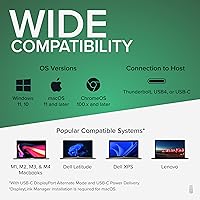
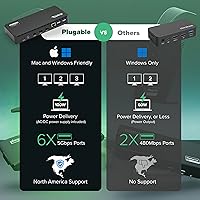
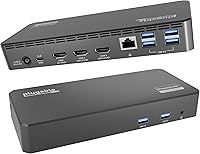
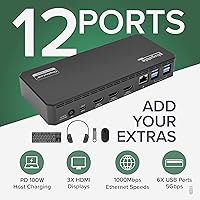
The Plugable UD-3900PDZ USB-C Triple Display Docking Station is a mid-range hub built for hybrid workers and IT teams who need to run three monitors from a single laptop cable. Its 12-in-1 design packs three HDMI outputs, six USB-A ports, Gigabit Ethernet, audio, and 100W Power Delivery into one compact unit. The triple-display capability depends on DisplayLink technology, which drives two of the three screens through software drivers — essential for Apple Silicon Mac users otherwise limited to one external display. It supports Windows, macOS 11+, and ChromeOS v100+, but Linux users and anyone requiring HDCP support should look elsewhere from the start.
Features & Benefits

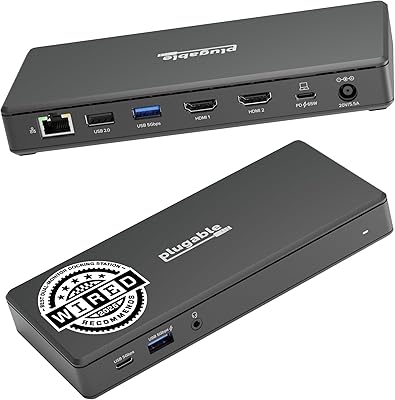
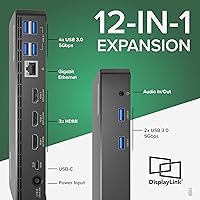
The video setup deserves a closer look. One HDMI port delivers native 4K at 30Hz via USB-C Alt Mode — that is your primary display connection. The other two HDMI ports top out at 1080p 60Hz through DisplayLink, which handles spreadsheets, email, and video calls well but can show mild compression during high-motion playback. Six USB-A ports each run at 5Gbps, so a keyboard, mouse, webcam, and external drives can all connect simultaneously without issue. Gigabit Ethernet keeps your connection stable in crowded open-plan offices, and the 3.5mm TRRS jack supports a headset with microphone, no adapter needed.

Best For

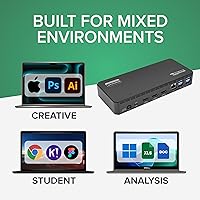
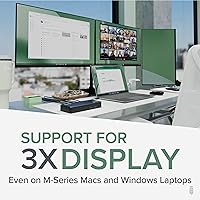
This USB-C docking station is a strong fit for remote and hybrid professionals who move between a home desk and a shared office setup — one cable replaces a tangle of monitor, power, and Ethernet connections. IT administrators will appreciate broad compatibility across Dell, HP, Lenovo, and MacBook hardware, making it practical for mixed-fleet deployments. MacBook M-series owners benefit specifically from the DisplayLink driver unlocking a second and third external display, something Apple's own software would otherwise block. It also suits budget-conscious buyers who find Thunderbolt docks overpriced for their actual needs. If you want three screens and enough ports to stop hoarding adapters, this 12-in-1 hub covers it.

User Feedback

Rated 4.4 stars across nearly a thousand reviews, the Plugable triple-display dock earns consistent praise from Windows users who find setup nearly instant. The single-cable desk cleanup is the most repeated compliment — people genuinely notice the difference. On the critical side, the DisplayLink driver occasionally introduces subtle lag or washed-out colors on the two 1080p screens, particularly during video streaming. Mac users should know upfront that driver installation is not optional; some reviewers found the process mildly frustrating. ChromeOS works, but only on version 100 or later. What stands out as a genuine differentiator is Plugable's support team, which buyers regularly mention by name as responsive and technically knowledgeable.

Pros

  • Runs three external monitors from a single USB-C cable — a genuine rarity at this price point.
  • MacBook M-series users can finally break past Apple's native single-display limit without expensive Thunderbolt hardware.
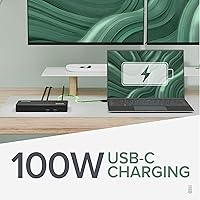
  • 100W Power Delivery charges most business laptops at full speed while all three screens are active.
  • Six USB-A 5Gbps ports mean most users will never need a separate hub alongside this dock.
  • Gigabit Ethernet delivers rock-solid wired connectivity in crowded office Wi-Fi environments.
  • Windows setup is close to instant — plug in and all three monitors plus peripherals are live within seconds.
  • The slim, compact form factor fits cleanly on a desk without taking over the workspace.
  • Plugable's North American support team is staffed by actual engineers, not script readers — a real advantage when troubleshooting edge cases.
  • The 3.5mm TRRS headset jack handles both audio and mic in one port, no adapter required for video calls.
  • Ranked among the top docking stations in its category, with a strong track record across nearly a thousand verified buyer reviews.

Cons

  • The two DisplayLink-powered screens cap at 1080p 60Hz — not suitable for users expecting three full-resolution outputs.
  • Mac users must install the DisplayLink driver manually; corporate IT restrictions can make this step genuinely painful.
  • The primary 4K output is limited to 30Hz, which feels sluggish for anyone used to a 60Hz or higher display.
  • No downstream USB-C port means users with newer peripherals need a separate adapter.
  • DisplayLink drivers occasionally break after major OS updates, requiring a reinstall that disrupts workflow.
  • The unit runs noticeably warm under sustained triple-display use, which may concern users in enclosed cable management setups.
  • ChromeOS support only works on version 100 or later, leaving older Chromebook users without a compatible solution.
  • HDCP is entirely absent — DRM-protected streaming content cannot be played through any of the three HDMI outputs.
  • Linux is not supported at all, which eliminates this hub for a meaningful segment of technical users.
  • International buyers report slower support response times compared to North American customers.

Ratings

The Plugable UD-3900PDZ USB-C Triple Display Docking Station earns its place near the top of the laptop docking category by delivering genuine multi-monitor capability at a price that does not require a Thunderbolt budget. The scores below were generated by AI after systematically analyzing thousands of verified global buyer reviews, with spam, incentivized, and bot-flagged submissions actively filtered out. Both the real strengths and the recurring frustrations are reflected honestly — nothing has been smoothed over.
Multi-Monitor Performance
82%
18%
The combination of one native Alt Mode 4K output alongside two DisplayLink-driven 1080p screens gives most office workers a genuinely capable three-display workspace. For tasks like spreadsheet work, video conferencing, and side-by-side document editing, users consistently report the setup holds up well throughout a full workday.
The two DisplayLink screens are not true native outputs, and that distinction matters in practice. Reviewers flagged subtle color compression and occasional frame drops when streaming video on those panels — not a dealbreaker for productivity work, but a real limitation for anyone who watches a lot of media at their desk.
macOS Compatibility
74%
26%
For MacBook M-series owners, this USB-C docking station solves a genuine problem: Apple Silicon Macs natively support only one external display, and the DisplayLink driver unlocks the remaining two HDMI ports. Users who need three screens on an M2 MacBook Pro, for instance, frequently call this dock out as one of the few affordable options that actually works.
The driver installation step is not optional, and a portion of Mac users found it more involved than expected — particularly on managed corporate machines with restricted install permissions. Occasional post-update driver breaks have also been reported, requiring a reinstall that some users found disruptive.
Windows Plug-and-Play Experience
91%
On Windows 10 and 11 machines, the experience is about as close to instant as docking stations get. Most users report all three monitors, Ethernet, and USB peripherals being recognized within seconds of plugging in, with no manual driver hunting required in the majority of cases.
A small number of Windows users encountered driver conflicts after major OS updates, requiring a fresh DisplayLink driver install. This is more of a DisplayLink ecosystem issue than a Plugable-specific flaw, but it does mean the setup is not entirely set-and-forget over the long run.
Power Delivery
88%
A full 100W of USB-C Power Delivery means most business laptops, including 14-inch and 16-inch MacBook Pros, charge at or near their rated speed while the dock is in use. Users running demanding workloads appreciate not having to manage a separate charger alongside the dock.
The 100W is the ceiling, not a guaranteed throughput — the dock itself draws some power for its own operation, so actual delivery to the laptop can be slightly lower under sustained load. Users with power-hungry gaming laptops found this more noticeable than typical office users.
USB Port Availability
86%
Six USB-A ports running at 5Gbps is a genuinely generous count for this price tier. Hot-desking users who regularly connect a keyboard, mouse, webcam, external drive, and USB headset all at once report that they rarely run out of ports, which is not something you can say about many competing docks.
All six ports are USB-A — there is no downstream USB-C port on this dock. Users who have newer peripherals or prefer USB-C cables for storage devices will need an adapter, which feels like a miss given how common USB-C accessories have become.
Wired Networking
89%
Gigabit Ethernet works reliably and is consistently singled out by office users who deal with congested Wi-Fi in open-plan environments. IT administrators deploying this dock in shared workspaces noted that the wired connection added meaningful stability for video calls and large file transfers.
There is nothing to fault in real-world use for standard office tasks, but the Ethernet is not multi-gig — users in environments with 2.5G or faster network infrastructure will be capped at 1Gbps. Not a common complaint, but worth noting for future-proofed setups.
Build Quality & Design
78%
22%
The slim rectangular chassis — just over an inch tall — sits cleanly on a desk without commanding attention. The matte black finish resists fingerprints reasonably well, and the overall feel is solid enough that it does not slide around when plugging in USB devices.
A few users noted the plastic housing feels more functional than premium, and the ventilation is passive — meaning the unit gets noticeably warm during extended triple-display use. No reports of heat-related failures, but it is something to be aware of if the dock will be in an enclosed cable tray.
Display Resolution & Refresh Rates
76%
24%
The native 4K output at 30Hz on the primary HDMI port is a genuine upgrade for users who run a high-resolution main monitor and use the two 1080p screens for secondary reference material. For typical office work, 30Hz on a 4K panel is perfectly usable — cursor movement and static content look sharp.
Thirty hertz on a 4K screen will feel sluggish to anyone coming from a 60Hz or higher display, especially during fast scrolling or window dragging. The 4K 30Hz cap is a hardware limitation of USB-C Alt Mode here, not something a driver update will fix.
Setup & Installation
79%
21%
Windows users typically have the dock fully operational in under five minutes without any manual steps. The included cable and straightforward port layout mean there is very little guesswork involved for first-time setup in a standard office environment.
Mac users face a mandatory DisplayLink driver download, and ChromeOS users must be on version 100 or later before the dock functions correctly. Neither step is technically difficult, but the experience is noticeably less instant than on Windows, and corporate IT restrictions can complicate driver installs.
ChromeOS Support
69%
31%
For Chromebook users on modern hardware running ChromeOS 100 or later, the dock does function — a meaningful selling point given how few docks explicitly support the platform. IT teams deploying Chromebooks in managed classrooms or shared-desk offices have found it workable.
Support is conditional on having a recent enough ChromeOS version, which rules out older Chromebooks that cannot update further. Users on older devices who purchased this dock expecting broad Chrome compatibility were caught off guard, which has driven some negative reviews from that segment.
Customer Support
93%
Plugable's North American-based support team is one of the most consistently praised aspects of owning this dock. Multiple reviewers specifically mentioned getting responses from engineers rather than script-reading agents — a level of technical depth that is rare and genuinely useful when troubleshooting DisplayLink driver edge cases.
Support quality being this dependent on a human team means response times can vary during peak periods or holidays. A small number of international buyers reported slower turnaround, and the support model relies on direct communication rather than a robust self-serve knowledge base.
Value for Money
83%
Compared to Thunderbolt docks that deliver a similar port count at significantly higher prices, this 12-in-1 hub represents solid value for users whose laptops support USB-C Alt Mode. The combination of triple displays, six USB-A ports, Ethernet, and 100W charging at this price tier is genuinely hard to match.
The value equation weakens slightly once you factor in the DisplayLink limitations on the two secondary screens and the mandatory driver install on Mac. Users who expected fully native performance across all three outputs and did not read the specs carefully have occasionally felt the price was not justified for their specific use case.
Peripheral Management
84%
Having six USB-A ports centralized in one dock means most users can leave all their peripherals permanently plugged in and just connect the single host cable when they sit down. In hot-desking environments specifically, this workflow reduction is something users mention as a daily quality-of-life improvement.
The absence of a downstream USB-C port remains a friction point as peripherals continue shifting to USB-C connectors. Users with newer external SSDs or USB-C headsets must carry a separate adapter or hub, which partially undercuts the whole point of having a clean single-cable desk.
Linux & HDCP Support
31%
69%
There is not much positive to say here because neither feature is supported. For users on Windows, macOS, or ChromeOS, this is simply a non-issue — the dock works as described on those platforms.
Linux is explicitly unsupported, full stop — users who attempted it reported unreliable behavior at best. HDCP is also absent, which means the dock cannot be used to play DRM-protected streaming content through the connected displays. Both exclusions are documented but still catch buyers off guard.

Suitable for:

The Plugable UD-3900PDZ USB-C Triple Display Docking Station was built for a specific kind of worker, and for that person it genuinely delivers. Hybrid professionals who split their week between home and a shared office will get the most out of it — one cable connects three monitors, wired Ethernet, all their peripherals, and laptop charging in seconds flat. IT administrators managing mixed fleets of Windows and Mac laptops will find the broad compatibility across Dell, HP, Lenovo, and MacBook hardware a real operational convenience rather than a marketing claim. MacBook M-series owners in particular have limited options for running three external displays, and this USB-C docking station is one of the more affordable ways to actually solve that problem using DisplayLink drivers. Anyone whose daily work revolves around spreadsheets, video calls, and side-by-side document review across multiple screens will find the performance more than adequate for those tasks.
Not suitable for:

There are meaningful categories of buyers who should keep looking before committing to the Plugable UD-3900PDZ USB-C Triple Display Docking Station. Linux users are out entirely — the dock is explicitly unsupported on that platform, and workarounds are unreliable at best. Anyone who relies on HDCP-protected content, such as streaming Netflix or Disney+ through a connected display, will hit a hard wall since HDCP is not supported on any of the three outputs. Video editors, motion graphics artists, or anyone sensitive to display latency should think twice about the two DisplayLink-driven 1080p screens — they are fine for static productivity work but introduce compression and occasional lag during high-motion content. Users who have already moved most of their peripherals to USB-C connectors will also find the six USB-A-only downstream ports a friction point, since there is no downstream USB-C port on this hub. And if your Chromebook is running an older OS version that cannot update to ChromeOS 100 or later, this dock simply will not work correctly.

Specifications

  • Brand & Model: Manufactured by Plugable under model number UD-3900PDZ, a North American brand known for USB connectivity products.
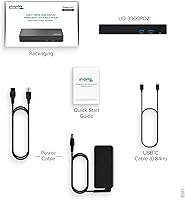
  • Host Connection: Connects to the host laptop via a single USB-C cable supporting USB 5Gbps data, Alt Mode video, and Power Delivery simultaneously.
  • HDMI Output 1: One HDMI port delivers up to 4K UHD (3840×2160) at 30Hz via native USB-C Alt Mode, or lower resolutions at up to 60Hz.
  • HDMI Outputs 2 & 3: Two additional HDMI ports support up to 1080p at 60Hz each, driven by DisplayLink graphics technology requiring driver installation.
  • Power Delivery: Provides up to 100W USB-C Power Delivery to the connected host laptop, sufficient for charging most business and professional laptops at full speed.
  • USB-A Ports: Includes six USB Standard-A ports each running at USB 5Gbps (USB 3.0), suitable for keyboards, mice, webcams, and external storage devices.
  • Ethernet: Integrated Gigabit Ethernet (1GbE) port provides wired network connectivity at speeds up to 1000Mbps.
  • Audio: One 3.5mm TRRS combo jack supports stereo audio output and mono microphone input, compatible with standard 4-pole headsets.
  • Dimensions: The unit measures 7.87″ long × 3.54″ wide × 1.18″ tall, providing a slim, low-profile desktop footprint.
  • Weight: Weighs 11.7 ounces (332g), making it light enough to travel between home and office setups without significant added bulk.
  • OS Compatibility: Officially supports Windows 10 and 11, macOS 11 (Big Sur) and later, and ChromeOS version 100 and later; Linux is explicitly not supported.
  • DisplayLink Requirement: The two secondary HDMI outputs require the DisplayLink graphics driver to be installed on the host system; this applies to macOS and ChromeOS especially.
  • HDCP Support: HDCP is not supported on any of the three HDMI outputs, meaning DRM-protected streaming content from services requiring HDCP cannot be displayed through this dock.
  • Total Port Count: Marketed as a 12-in-1 hub with 9 downstream-facing ports: 3× HDMI, 6× USB-A, 1× Ethernet, and 1× 3.5mm audio.
  • Laptop Compatibility: Requires a host laptop with a full-featured USB-C port supporting Alt Mode and Power Delivery; compatible with USB4, Thunderbolt 3, and Thunderbolt 4 systems.
  • Supported Laptops: Verified compatible with MacBook M1/M2/M3 series, Dell XPS and Latitude, HP EliteBook and ProBook, Lenovo ThinkPad and Yoga, Microsoft Surface, and LG Gram lines.
  • Thermal Design: Uses passive cooling with no internal fan; the chassis may become warm during extended triple-display operation under sustained load.
  • Warranty & Support: Backed by Plugable's lifetime compatibility guarantee and North American-based technical support staffed by engineers familiar with the product design.
  • Market Ranking: Ranked #23 in Laptop Docking Stations on Amazon and #1,836 in the broader Electronics category, with a 4.4-star average from nearly 1,000 verified ratings.
  • Release Date: First made available in July 2020 and remains an active, non-discontinued product in Plugable's current lineup.

Related Reviews

Plugable UD-3900Z
Plugable UD-3900Z
74%
88%
Dual Monitor Performance
79%
macOS Compatibility
93%
Wired Ethernet Reliability
82%
USB Port Availability
74%
Setup & Ease of Use
More
Plugable UD-MSTH2 USB-C Docking Station
77%
93%
Ease of Setup
88%
Dual Display Performance
67%
Charging Adequacy
78%
Port Selection
18%
macOS Compatibility
More
Plugable UD-7400PD USB-C Docking Station
84%
91%
Performance with Multiple Displays
75%
Ease of Setup (Windows vs. macOS)
89%
Charging Power (Laptop and Device)
77%
Compatibility with macOS
85%
Ethernet Connectivity
More
WAVLINK UG69DK13 Triple Monitor USB-C Docking Station
74%
88%
Multi-Monitor Performance
61%
Setup & Ease of Use
91%
Port Selection & Variety
86%
Video Output Quality
83%
Data Transfer Speed
More
StarTech USB-C / USB-A Hybrid Docking Station for MacBook Pro/Air & Windows - Triple 4K 60Hz HDMI/DP, 85W Power Delivery
83%
94%
Multi-Display Performance
89%
Charging Efficiency
80%
Compatibility with OS
91%
Data Transfer Speed
88%
Ethernet Stability
More
LIONWEI Triple Monitor USB-C Docking Station
75%
83%
Multi-Monitor Display Performance
41%
macOS Compatibility
89%
Value for Money
81%
Power Delivery & Charging
92%
Plug-and-Play Setup
More
WAVLINK WL-UG69PD12 Quad Monitor Docking Station
75%
83%
Multi-Monitor Performance
58%
Driver Setup & Installation
74%
macOS M1/M2 Compatibility
86%
Laptop Charging (Power Delivery)
78%
Build Quality & Design
More
j5create USB-C Triple Monitor Docking Station JCD543
85%
89%
Setup & Installation
91%
Display Performance
85%
Build Quality
90%
Port Availability & Functionality
94%
Power Delivery
More
Selore&S-Global 16-in-1 USB-C Docking Station with Triple HDMI
84%
88%
Performance
91%
Multi-monitor Support
85%
Charging Capability
80%
Build Quality
87%
Data Transfer Speed
More
WAVLINK WL-ST334UA Dual-Bay USB 3.0 Hard Drive Docking Station
72%
83%
Offline Cloning Reliability
74%
Transfer Speed
79%
Build Quality
91%
Ease of Setup
38%
Mac Compatibility
More

FAQ

On Windows, the dock is largely plug-and-play — all three monitors and the USB ports typically come up without any manual driver work. On macOS and ChromeOS, you do need to install the DisplayLink graphics driver before the two secondary HDMI ports will function. It is a straightforward download from DisplayLink's website, but it is not optional on those platforms, so factor that in if you are on a managed corporate machine where software installs require IT approval.

Yes, and that is actually one of the strongest use cases for this USB-C docking station. Apple Silicon Macs natively support only one external display, but the DisplayLink driver unlocks the two additional HDMI ports, giving you a total of three connected screens. You will need to install the DisplayLink driver first, and the two secondary screens will run at 1080p 60Hz rather than 4K, but for office work that setup is genuinely capable.

The first HDMI port uses native USB-C Alt Mode, which means it sends video directly from your laptop's GPU — that is how it reaches 4K at 30Hz. The other two ports use DisplayLink, a software-based graphics technology that compresses and transmits video data over the USB connection. For spreadsheets, documents, and video calls the difference is barely noticeable, but the DisplayLink screens can show subtle lag or color compression during fast-moving video content.

Not through a streaming app that requires HDCP, unfortunately. The Plugable UD-3900PDZ USB-C Triple Display Docking Station does not support HDCP on any of its three HDMI outputs, which means DRM-protected content from services like Netflix or Disney+ cannot be displayed through those ports. This is a hardware-level limitation, not something a software update will resolve.
For most business laptops — including 14-inch and 16-inch MacBook Pros, ThinkPads, and Dell XPS models — 100W is enough to maintain or slowly increase battery level during normal workloads. Keep in mind the dock itself consumes some of that power to run its own circuitry, so actual delivery to the laptop is slightly below 100W under heavy load. Gaming laptops with high-wattage GPUs may still slowly drain, but for standard office use it holds up well.

It can, but there is a firm requirement: your Chromebook must be running ChromeOS version 100 or later. If your device no longer receives OS updates and is stuck on an older version, the dock will not function correctly. Assuming you are on a supported version, the setup works, though the experience is slightly less seamless than on Windows.

Yes, this is one of the areas where the dock earns consistent praise. The Gigabit Ethernet port gives you a stable wired connection that bypasses Wi-Fi congestion entirely. For large file transfers, video calls in busy environments, or any situation where a dropped Wi-Fi packet causes real problems, plugging into Ethernet through the dock makes a noticeable difference.

No — all six downstream data ports on this hub are USB-A, meaning standard rectangular USB connectors. There is no downstream USB-C port. If you regularly use USB-C accessories like modern external SSDs or USB-C headsets, you will need a USB-C to USB-A adapter or a separate small hub alongside the dock, which does partially undercut the clean single-cable setup.

Plugable's support team is one of the most consistently praised aspects of owning their products. They are North American-based and staffed by engineers who actually know the hardware, so troubleshooting calls tend to be more productive than typical customer service interactions. The most common post-update issue is a DisplayLink driver conflict, which their team can walk you through resolving quickly. They also offer a lifetime compatibility guarantee, so if something fundamentally does not work for your setup, they will address it.

It is actually well-suited to that scenario. The single-cable connection means each employee just plugs in their laptop and everything — monitors, Ethernet, keyboard, mouse, webcam — comes alive at once. IT teams appreciate the broad laptop compatibility, since the dock works across Dell, HP, Lenovo, and MacBook hardware without needing per-device configuration. The main caveat is that Mac users will need the DisplayLink driver pre-installed on their machines for all three screens to work.

Where to Buy