Overview

The WAVLINK WL-UG69PD12 Quad Monitor Docking Station is a DisplayLink-based USB-C dock built for users who need to drive four external displays without being locked into an expensive Thunderbolt-only ecosystem. It runs on Windows, macOS (including M1 and M2 chips), ChromeOS, and Ubuntu — that level of cross-platform flexibility is genuinely uncommon at this price tier. The bundled 180W power adapter and 100W laptop charging passthrough make it more capable than lighter, lower-powered alternatives. One honest heads-up: setup requires installing DisplayLink drivers, which adds a step that plug-and-play buyers should know about upfront. This dock is aimed squarely at remote workers, creative professionals, and power users who need serious screen real estate.
Features & Benefits

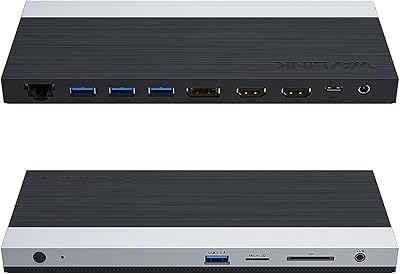
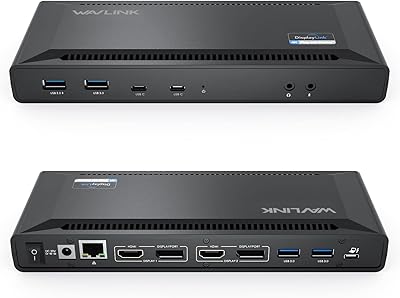
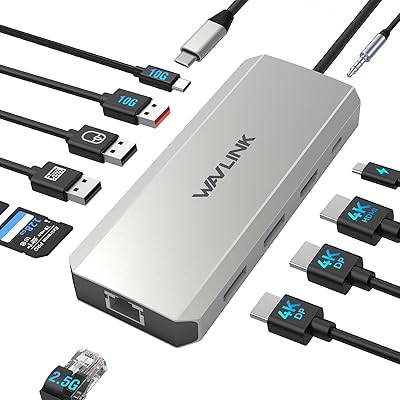
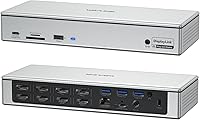
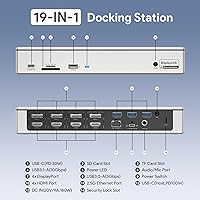
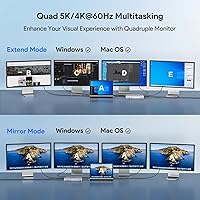
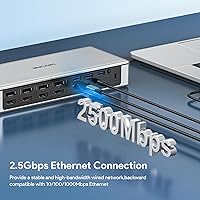
The port selection on this USB-C dock is genuinely impressive for the category. You get four HDMI and four DisplayPort outputs, capable of running quad monitors simultaneously at up to 5K ultrawide or 4K@60Hz resolution. The 2.5Gbps Ethernet port is a standout — it is noticeably faster than standard gigabit LAN, which matters when pushing large files across a network. An SD 4.0 card reader handles fast media offloading, and four USB 3.2 Gen 2 ports plus a front 30W USB-C charging port keep peripherals and devices powered without extra adapters. A 3.5mm audio jack rounds things out, so headphones plug in directly.

Best For

This docking station makes the most sense for home-office or hybrid workers who want a single-cable setup to handle displays, charging, and peripherals all at once. It is especially valuable for M1 and M2 Mac users — Apple limits native external display output on those chips, and DisplayLink-based docks are one of the few reliable ways to bypass that restriction and run four screens. Photographers and video editors will appreciate the fast card reader and quick LAN for file transfers. IT professionals on Ubuntu or ChromeOS benefit from the broad OS support, and anyone needing strong charging passthrough alongside multi-display output gets both in one device.

User Feedback

Across 850-plus ratings, the WAVLINK quad-display dock holds a 4.2-star average — solid, though not without legitimate criticism. Buyers consistently praise the reliable multi-screen performance and the sturdy, well-built chassis, and the port variety gets frequent positive mentions. On the downside, the DisplayLink driver setup trips up some users expecting a fully plug-and-play experience; occasional lag and sleep/wake issues on Macs are the most repeated complaints. The 180W power brick is another common gripe — it is bulky and takes up real desk space. Setup complexity comes up often enough that less tech-savvy buyers should read through the instructions before plugging anything in.

Pros

  • Drives four external monitors simultaneously — a rare capability at this price point.
  • Unlocks multi-monitor support for M1 and M2 Mac users who are otherwise limited by Apple hardware.
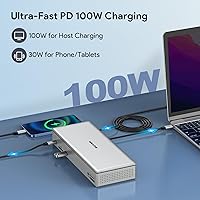
  • 100W Power Delivery keeps most high-performance laptops fully charged under load.
  • 2.5Gbps Ethernet delivers noticeably faster wired speeds than the gigabit ports found on most competing docks.
  • SD 4.0 card reader meaningfully speeds up media offloading for photographers and video editors.
  • Works across Windows, macOS, ChromeOS, and Ubuntu — cross-platform support this broad is uncommon.
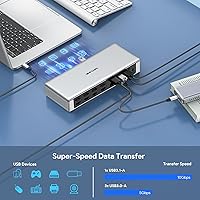
  • Four USB 3.2 Gen 2 ports ensure fast peripherals actually run at their rated speeds.
  • Front-panel USB-C port adds convenient 30W charging for phones and tablets without reaching around the back.
  • Solid metal build stays cool during typical workloads and feels durable enough for permanent desk use.
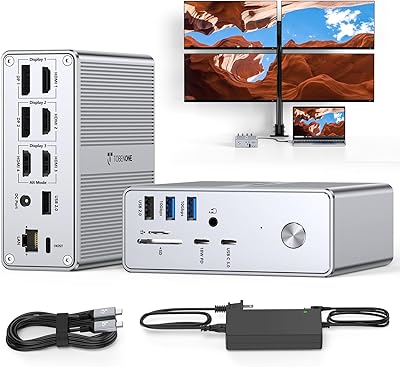
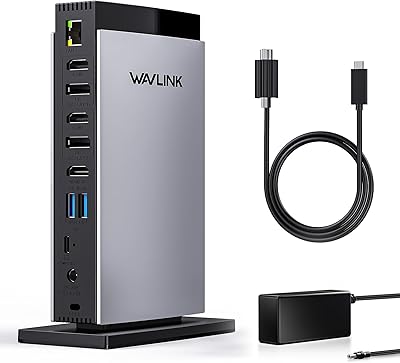
  • Port layout separates display and network cables at the rear from daily-use ports at the front, keeping desks tidier.

Cons

  • DisplayLink driver installation is required — this dock is not plug-and-play out of the box.
  • Displays occasionally fail to reconnect after sleep on macOS, requiring a manual driver restart or cable replug.
  • CPU overhead from DisplayLink is noticeable on older or less powerful laptops during multi-screen use.
  • The 180W external power brick is large, heavy, and generates heat during sustained use.
  • Only four USB-A ports total, which is not enough for users with larger peripheral setups.
  • No microSD slot, making it less convenient for drone or action camera users.
  • ChromeOS and Ubuntu support works but can require additional manual driver steps on some devices.
  • System updates can break the DisplayLink driver version, occasionally requiring a reinstall to restore display output.
  • Peak thermal performance under maximum load leaves limited headroom in warm ambient environments.
  • Cable bulk from four display outputs plus the power brick makes achieving a truly minimal desk setup difficult.

Ratings

The WAVLINK WL-UG69PD12 Quad Monitor Docking Station scores below are generated by AI after analyzing thousands of verified global user reviews, with spam, bot activity, and incentivized feedback actively filtered out. Ratings reflect the full spectrum of real-world experience — from daily remote work setups to creative studio workflows — capturing both what this USB-C dock does well and where it falls short. Strengths and frustrations are weighted equally so buyers can make an informed decision.
Multi-Monitor Performance
83%
Running four displays simultaneously is the core promise here, and for most users it holds up. Reviewers working across spreadsheets, code editors, and video previews on separate screens report stable output at 4K@60Hz with no dropped signals during long sessions.
DisplayLink technology introduces a CPU overhead that native Thunderbolt docks avoid — users on older or less powerful laptops occasionally report choppy rendering during GPU-intensive tasks. A small number of buyers also experienced resolution cap issues when mixing HDMI and DisplayPort outputs.
Driver Setup & Installation
58%
42%
Once the DisplayLink driver is correctly installed, the dock operates reliably across Windows and macOS. Users who followed the setup guide carefully reported a smooth experience and appreciated having a stable configuration afterward.
This is the most consistent pain point in user feedback. The dock is not plug-and-play — DisplayLink drivers must be downloaded and installed manually, which catches many buyers off guard. On some systems, driver conflicts or version mismatches required multiple reinstall attempts before displays were recognized.
macOS M1/M2 Compatibility
74%
26%
For M1 and M2 MacBook users who are blocked by Apple's native two-display limit, this docking station is one of the few practical solutions available. Multiple reviewers confirmed successfully running three or four external monitors on Apple silicon machines after installing the DisplayLink driver.
Sleep and wake behavior on macOS is a recurring complaint — displays sometimes fail to reconnect after the laptop wakes, requiring a manual driver restart or cable replug. A subset of users also noted increased fan activity on their MacBooks during extended multi-display use, likely tied to DisplayLink CPU load.
Laptop Charging (Power Delivery)
86%
The 100W USB-C Power Delivery over the host connection is a genuine differentiator. Users running demanding laptops like the MacBook Pro 16-inch or Dell XPS 15 confirmed that the dock kept their machines fully charged even under sustained load, eliminating the need for a separate charger on their desk.
The 100W output is the ceiling, not the floor — some laptops cap charging speed based on their own PD negotiation limits. A few users also noted that the front-panel 30W USB-C port, while handy for phones and tablets, is not fast enough for charging larger laptops as a secondary option.
Build Quality & Design
78%
22%
The chassis feels solid and purposefully built for a permanent desk setup rather than a travel accessory. Reviewers appreciated the metal housing, which stays cool during extended use, and the logical port layout that keeps cables organized on both front and rear panels.
At over four pounds and with an 11-inch footprint, this is not a compact dock. Some buyers found it took up more desk space than expected, especially when factoring in the large external power brick, which adds to the overall clutter.
Power Adapter (180W Brick)
54%
46%
The 180W adapter is what enables simultaneous quad-display output and 100W laptop charging without throttling. Users who prioritized raw power over desk aesthetics appreciated that nothing felt underpowered even with multiple displays and peripherals active.
The power brick itself is large, heavy, and generates noticeable heat during long sessions. Multiple buyers flagged it as an unwelcome presence under the desk, and a few noted the cable length between the brick and dock is shorter than they would like for flexible placement.
Ethernet (2.5Gbps LAN)
89%
Users with 2.5Gbps-capable routers or NAS devices reported real-world transfer speeds that left standard gigabit connections behind. Video editors pulling large project files from a NAS and remote workers on fiber connections both called this out as a meaningful upgrade over typical dock LAN ports.
The benefit is only realized if the rest of the network infrastructure supports 2.5Gbps — users on standard gigabit home routers effectively use it as a gigabit port. A small number of Linux users reported needing to manually install a network driver to get the port recognized.
SD Card Reader (SD 4.0)
81%
19%
Photographers and videographers offloading from modern SD cards praised the SD 4.0 reader for noticeably faster transfer speeds compared to the UHS-I readers built into many older docks and laptops. Dumping a full card of RAW files felt quicker and less of a bottleneck.
The reader supports SD 4.0 but tops out at its rated ceiling, meaning users with the fastest UHS-III or CFexpress cards won't see any additional benefit. There is also no microSD slot, which some buyers flagged as an oversight for drone and action camera users.
USB Port Performance
76%
24%
Having four USB 3.2 Gen 2 ports means fast peripherals — external SSDs, high-speed hubs — actually hit their rated speeds rather than being bottlenecked. Users managing multiple external drives for video editing appreciated not having to compromise on which devices got a fast port.
With only four USB-A ports total, buyers with large peripheral setups found themselves reaching for a separate hub. There is no USB 3.2 Gen 2x2 or USB4 port among the USB-A lineup, so users wanting the absolute fastest USB transfers will need to rely on the host USB-C connection instead.
Windows Compatibility
88%
Windows 10 and 11 users reported the smoothest overall experience with this docking station. Driver installation is straightforward on Windows, display detection was reliable across a range of tested laptops, and Power Delivery negotiation worked without issues for most mainstream machines.
A minority of Windows users encountered display flickering after system updates that changed the DisplayLink driver version. While typically resolved with a driver reinstall, it is a periodic maintenance task that some buyers found annoying on what they expected to be a set-and-forget device.
ChromeOS & Ubuntu Support
69%
31%
Cross-platform support is a genuine selling point, and IT professionals running Ubuntu or ChromeOS praised the fact that this USB-C dock worked at all on non-Windows systems — something many competing docks do not bother to support.
Support on these platforms is functional but thinner. Ubuntu users occasionally needed to manually load DisplayLink kernel modules, and ChromeOS users noted that not all four display outputs were always available depending on the Chromebook model and Chrome version in use.
Value for Money
77%
23%
For a quad-display dock with 100W charging, 2.5Gbps LAN, and SD 4.0 at this price point, the hardware spec-to-cost ratio is hard to argue with. Buyers comparing it against higher-priced Thunderbolt alternatives consistently noted they were getting most of the functionality for considerably less.
The value calculation shifts if you factor in the DisplayLink limitations — CPU overhead, driver maintenance, and the occasional Mac sleep/wake issue have a real usability cost. Users who later switched to a native Thunderbolt dock said they felt the extra expense was worth it for the hassle-free experience.
Cable Management & Desk Integration
63%
37%
The front/rear port split helps keep the desk cleaner than docks that cluster everything in one location. Users with permanent desk setups appreciated being able to route display and network cables to the back while keeping USB and audio accessible at the front.
The combination of the dock body, the oversized power brick, and up to four display cables makes the total cable situation on the desk considerable. Buyers who hoped for a minimal, tidy setup found the reality more involved than the product photos suggested.
Thermal Management
71%
29%
Under typical workloads — four monitors, active LAN, a few USB peripherals — the dock stays at a manageable temperature. The metal housing helps dissipate heat passively, and most users running standard office or light creative tasks reported no thermal throttling or unusual warmth.
During sustained high-bandwidth use, such as transferring large files over 2.5Gbps LAN while running all four displays, the dock and the power brick both get noticeably warm. A small number of users reported automatic shutoffs in hot ambient environments, suggesting limited thermal headroom at peak load.

Suitable for:

The WAVLINK WL-UG69PD12 Quad Monitor Docking Station is a strong fit for remote workers and home-office professionals who want to consolidate an entire desk setup — four monitors, wired internet, peripherals, and laptop charging — into a single cable connection. It is particularly well-suited to M1 and M2 MacBook users who have hit Apple's native display output ceiling and need a proven workaround to run three or four external screens simultaneously. Creative professionals like photographers and video editors will find the SD 4.0 card reader and 2.5Gbps LAN genuinely useful for day-to-day file-heavy workflows. IT administrators and power users on Ubuntu or ChromeOS will appreciate that this USB-C dock actually supports their OS rather than treating it as an afterthought. Anyone comfortable with a one-time driver installation and who prioritizes raw port density and charging power over plug-and-play simplicity will get solid daily value from this dock.
Not suitable for:

The WAVLINK WL-UG69PD12 Quad Monitor Docking Station is not the right choice for buyers who expect a true plug-and-play experience — DisplayLink drivers are mandatory, and the setup process has frustrated users who did not anticipate it. If you rely on your laptop for GPU-accelerated tasks like 3D rendering or high-framerate gaming across multiple screens, the CPU overhead that DisplayLink technology introduces will be a real and noticeable limitation. Mac users who frequently close their laptops and wake them remotely should be aware that display reconnection after sleep is an ongoing complaint in user feedback, not an isolated edge case. Those working in tight desk spaces or who travel with their dock will find the bulky 180W power brick and 4-plus-pound chassis impractical. And if you are already invested in a Thunderbolt 4 ecosystem and want native, driver-free multi-display performance, a dedicated Thunderbolt dock will serve you better despite the higher price.
Specifications

  • Model Number: The model identifier for this dock is WL-UG69PD12, manufactured by WAVLINK.
  • Host Connection: Connects to the host laptop via a single USB-C port, compatible with Thunderbolt 3 and Thunderbolt 4 interfaces.
  • Video Outputs: Provides 4x HDMI ports and 4x DisplayPort ports on the rear panel, supporting up to four external monitors simultaneously.
  • Max Resolution: Supports up to 5120x1440@60Hz (5K ultrawide) via quad DisplayPort, or up to 4096x2160@60Hz (Cinema 4K) across HDMI and DisplayPort outputs.
  • Display Technology: Video output is powered by DisplayLink technology, which requires the DisplayLink driver to be installed on the host machine before use.
  • Laptop Charging: Delivers up to 100W Power Delivery via the USB-C host port to charge the connected laptop while in use.
  • Front USB-C PD: A front-panel USB-C port provides up to 30W Power Delivery for charging phones, tablets, and other USB-C devices.
  • USB-A Ports: Includes 4x USB 3.2 Gen 2 Type-A ports supporting data transfer speeds of up to 10Gbps for external drives and peripherals.
  • Ethernet: Equipped with a 2.5Gbps RJ-45 LAN port for wired network connections faster than standard gigabit Ethernet.
  • Card Reader: Built-in SD 4.0 card reader supports high-speed media card offloading for photographers and video professionals.
  • Audio: Includes a 3.5mm combo audio jack on the front panel for direct connection of headphones or external speakers.
  • Power Adapter: Comes bundled with an external 180W power brick required to drive all ports and displays at full capacity simultaneously.
  • OS Compatibility: Compatible with Windows 10/11, macOS 10.14 and later (including M1 and M2 Apple silicon), ChromeOS, and Ubuntu Linux.
  • Chip Compatibility: Supports host devices running Apple M1, M2, and Intel processors; Thunderbolt 3 or 4 host port is recommended for full functionality.
  • Total Port Count: The dock provides 19 ports in total across display outputs, USB, LAN, audio, and card reader interfaces.
  • Dimensions: The dock unit measures 11.1 x 5.2 x 4.45 inches, designed for stationary desktop use rather than portability.
  • Weight: The dock unit weighs 4.24 pounds, not including the external 180W power adapter, which adds additional bulk.
  • Brand & Warranty: Manufactured and sold directly by WAVLINK; standard manufacturer warranty and support apply as listed on the product page.

Related Reviews
TobenONE Quad Monitor Docking Station UDS033B
85%
91%
Performance with Multiple Displays
85%
Ease of Setup
93%
Charging Speed and Power Delivery
87%
Build Quality and Durability
88%
Connectivity Options
More
StarTech USB-C Quad Monitor Docking Station DK31C4DPPD
86%
93%
Multi-monitor Support
85%
Setup & Installation
90%
Connectivity & Compatibility
91%
Power Delivery
89%
Display Quality (4K Resolution)
More
WAVLINK DisplayLink Laptop Docking Station WL-UG69PD2-Pro-US
87%
92%
Dual Monitor Performance
90%
Video Quality (Resolution)
87%
USB Ports Functionality
94%
Charging Speed (100W Power Delivery)
85%
Compatibility (Operating Systems)
More
WAVLINK USB C Docking Station 3 Monitor 100W PD
87%
90%
Display Performance
88%
Build Quality
85%
Ease of Setup
92%
Charging Speed
87%
Connectivity Options
More
TobenONE USB-C Docking Station 3 Monitors & Dual Monitor
89%
92%
Value for Money
94%
Ease of Setup
89%
Performance with Multi-Monitor Setups
88%
Build Quality
90%
USB Port Functionality
More
WAVLINK UMD306B Docking Station

88%
91%
Dual Monitor Performance
88%
Data Transfer Speed
89%
Build Quality
92%
Ease of Setup
87%
Network Connectivity (Ethernet)
More
LIONWEI USB C Docking Station Triple Monitor
85%
88%
Display Performance
91%
Ease of Setup
93%
USB-C Compatibility
89%
Build Quality
87%
Power Delivery
More
VisionTek VT4510
VisionTek VT4510
73%
84%
Dual Display Performance
52%
Driver Setup & Ease of Use
74%
Laptop Charging & Power Delivery
61%
macOS & Apple Silicon Compatibility
88%
Port Selection & Connectivity
More
j5create USB-C Triple Monitor Docking Station JCD543
85%
89%
Setup & Installation
91%
Display Performance
85%
Build Quality
90%
Port Availability & Functionality
94%
Power Delivery
More
WAVLINK USB C DisplayLink Triple Display Docking Station
84%
91%
Display Performance
88%
Ease of Setup
85%
Build Quality
89%
Connectivity Options
92%
Compatibility with MacBook
More

FAQ

You do need to install the DisplayLink driver before the dock will output video — it will not work plug-and-play for displays. The driver is free to download from the DisplayLink website and takes only a few minutes to set up, but skipping this step is the most common reason buyers report that their monitors are not being detected. USB, Ethernet, and charging functions may work without the driver, but display output will not.

Yes, and this is actually one of the strongest use cases for the WAVLINK WL-UG69PD12 Quad Monitor Docking Station. Apple silicon Macs natively support only one external display, but because this dock uses DisplayLink technology rather than relying on the Mac's native GPU output, you can run three or four external monitors simultaneously after installing the DisplayLink driver for macOS. Just be aware that the driver does add some CPU overhead, and a small number of users have reported display reconnection issues after the Mac wakes from sleep.

For most laptops, yes. The dock delivers up to 100W of Power Delivery through the host USB-C connection, which is enough to keep most mainstream laptops — including 14-inch and 16-inch MacBook Pros and many Windows ultrabooks — fully charged even under sustained load. If your laptop's charger normally exceeds 100W (some high-end mobile workstations do), the dock may slow-charge rather than maintain a full battery under heavy use.

Honestly, not on its own. If your router or switch only supports standard gigabit (1Gbps), the 2.5Gbps LAN port on this docking station will cap out at gigabit speeds just like any other dock. Where it becomes genuinely useful is if you have a 2.5Gbps-capable router, a NAS device, or a direct connection to another 2.5Gbps machine for fast file transfers. If your network is all gigabit, treat it as a future-proofing feature rather than an immediate upgrade.

It does work on both Ubuntu and ChromeOS, though the experience requires a bit more manual effort than on Windows. Ubuntu users typically need to install the DisplayLink kernel module separately, while ChromeOS support works on most Chromebooks but some users have found that not all four display outputs are available depending on the specific model and OS version. If Linux or ChromeOS is your primary OS, it is worth checking the DisplayLink compatibility list for your specific device before purchasing.

The 180W external power adapter is noticeably large — roughly the size of a small laptop charger, but heavier. Most users tuck it under the desk or behind the dock, but it is worth planning for. A few buyers have mentioned that the cable between the brick and the dock is shorter than ideal, which limits how discreetly you can position it. If a clean, minimal desk setup is a top priority, the bulk of the power adapter is a real consideration.

The dock is compatible with both, but Thunderbolt 3 or 4 is recommended for the best performance. Thunderbolt connections provide more bandwidth, which helps when running multiple 4K displays simultaneously. A standard USB-C port (without Thunderbolt) may limit the number of displays that can run at full resolution or reduce data transfer speeds. If your laptop only has USB-C without Thunderbolt, the dock will still function, but you may not be able to use all four display outputs at maximum resolution at the same time.

This is a known issue reported by a subset of Mac users specifically, and it is tied to how macOS handles DisplayLink drivers during sleep and wake cycles. The most common fixes are reinstalling the latest version of the DisplayLink manager, adjusting your Mac's display sleep settings to prevent the issue from triggering, or simply unplugging and replugging the host USB-C cable after waking. It does not affect all users, but it is frequent enough that Mac users should be aware of it going in.

It depends on your setup. Four USB 3.2 Gen 2 ports is a reasonable count for a keyboard, mouse, and one or two other peripherals, but users with more complex desks — external drives, a webcam, a USB audio interface, dongles — will likely find themselves needing an additional hub. The front USB-C port adds one more connection point, but it is optimized for charging rather than high-speed data. If you have more than five or six USB devices regularly connected, plan for a hub from the start.

Yes, closed-lid or clamshell mode works with this USB-C dock, provided your laptop's operating system supports it. On macOS, you will need a keyboard, mouse, and power source connected for clamshell mode to activate — the dock handles all three. On Windows, you typically need to adjust power settings so the laptop does not sleep when the lid is closed. This is a common setup for users who want a clean desk with only external monitors in view.