Overview

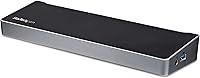
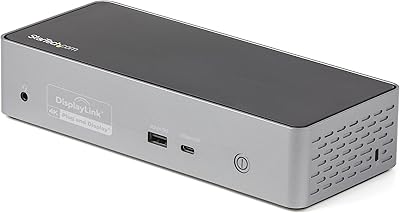
The StarTech.com Triple Monitor USB 3.0 Docking Station is a versatile solution for expanding your laptop's connectivity. This docking station supports up to three monitors, including one via HDMI and two via DisplayPort, making it an excellent tool for boosting your productivity. With its USB 3.0 interface, it connects seamlessly to a range of laptops and other devices. It’s compatible with Windows, Mac, and ChromeOS systems, ensuring flexibility across platforms. Whether you work in a multi-display setup or need additional ports, this dock delivers the convenience and power needed for a smooth workspace.
Features & Benefits

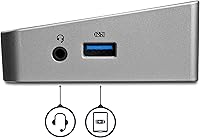
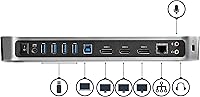
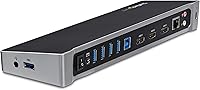
This docking station offers impressive display capabilities, supporting a 4K resolution on one display while the other two reach up to 2048x1152. With five USB 3.0 ports, it allows users to easily connect peripherals like keyboards, mice, and external drives. It also includes a Gigabit Ethernet port for fast, reliable internet, perfect for demanding work environments. The dock features a fast-charge port, enabling quick power-ups for your devices. Its compact design ensures easy desk setup and organization, making it ideal for small workspaces or home offices.

Best For

This docking station is perfect for professionals who rely on multiple displays for enhanced productivity. It's also an excellent choice for remote workers and those working from home who need to connect various devices to their laptop. Laptop users with limited USB ports will appreciate the dock's additional connectivity options. Whether you’re working on a design project, running multiple applications, or simply managing different workflows, this dock makes it easy to expand your laptop's capabilities and streamline your workspace.

User Feedback

With a solid 4.4 out of 5 stars from over 1,000 users, the StarTech USB 3.0 dock has generally been well-received for its performance and ease of setup. Users frequently commend the reliable functionality and the ability to manage multiple monitors with ease. However, some reported occasional compatibility issues with specific devices, especially on older systems. Still, many users recommend this docking station, especially for those with MacBooks and Windows laptops, noting that it significantly enhances their productivity without a complicated setup process.

Pros

  • Supports up to three monitors, boosting productivity for multi-tasking professionals.
  • Works seamlessly with Windows, Mac, and ChromeOS, providing wide system compatibility.
  • Fast USB 3.0 ports allow for quick peripheral connections without compromising speed.
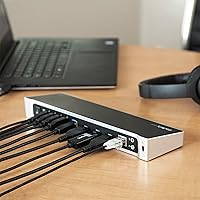
  • Compact design makes it a space-efficient solution for desk setups.
  • 4K resolution support on one display provides crisp visuals for high-definition tasks.
  • Convenient Ethernet port ensures a stable wired internet connection for remote work.

Cons

  • Some users reported compatibility issues with specific older devices and monitors.
  • The device's size may not be ideal for those looking for a more portable solution.
  • There have been complaints about occasional driver or firmware updates required for setup.
  • Users with limited USB ports on their laptops may still struggle with device overload.
  • Not the best choice for heavy-duty gaming or graphics-intensive tasks.
  • The charging port is convenient, but not fast enough for powering larger devices.

Ratings

After analyzing a wide range of verified user reviews across multiple platforms and languages, we’ve compiled the scores for the StarTech.com Triple Monitor USB 3.0 Docking Station. Feedback was gathered from users worldwide, and only authentic, high-quality reviews were included, with spam, bot, or incentivized reviews filtered out. While users generally praised this docking station’s performance and multi-display support, there were also some noted pain points. The scores reflect a balanced view, considering both its strengths and areas for improvement.

Performance
89%
Users are pleased with the smooth performance this dock delivers, even with multiple monitors connected. Its ability to support up to three displays without noticeable lag or slowdown is especially appreciated by professionals who require seamless multitasking. The consistent performance makes it a reliable choice for extended work sessions and presentations.
A few users experienced occasional drops in display resolution or lag, particularly when using non-standard display configurations. This seems to be more common with higher-end displays or complex setups, which might affect those looking for perfect stability in demanding environments.
Ease of Setup
91%
The installation process is straightforward, with many users reporting that they had the docking station up and running within minutes. Its plug-and-play functionality works well with Windows, macOS, and ChromeOS systems. The ease of setup is a significant plus for users who need quick productivity boosts without complicated installation procedures.
While setup is generally quick, some users noted issues with automatic driver installations, especially on older systems. For these users, manually installing drivers was necessary, which can be an inconvenience for those unfamiliar with troubleshooting.
Display Support
88%
The docking station’s ability to support multiple displays, including 4K resolution on one screen, is a major benefit for multitaskers. Users often mention that having the flexibility of connecting up to three monitors improves workflow, particularly for professionals in design, finance, and other data-heavy fields. The combination of HDMI and DisplayPort options is widely praised.
While many users are satisfied with the display capabilities, some reported issues with certain displays not being recognized or not working at full resolution. This seems to be more common when connecting older monitors or specific brands of displays, requiring additional troubleshooting for optimal setup.
Connectivity Options
85%
Users are particularly happy with the variety of connectivity options this docking station offers, including five USB 3.0 ports, a Gigabit Ethernet port, and the fast-charging USB port. The broad range of available connections ensures that multiple peripherals and devices can be connected simultaneously, making it an excellent hub for busy professionals who need quick access to all their devices.
Some buyers felt that the USB ports could have been more powerful or that the charging speed wasn't as fast as advertised, especially for larger devices like tablets or phones. Additionally, while the Gigabit Ethernet port is reliable, a few users wished for more advanced network capabilities for specific use cases like gaming or high-bandwidth video streaming.
Build Quality
80%
20%
The compact and solid construction of the docking station is generally appreciated. Users mention that it has a sturdy feel, and its small size makes it a space-saver on desks, perfect for those with limited workspace. The design also appears sleek and professional, fitting well with both home and office setups.
A few users were disappointed with the build quality, citing that the device felt a bit too light or flimsy. Some also reported that the plastic construction seemed prone to scratches or minor scuffs over time, which could be a concern for those who value long-term durability and a pristine look.
Compatibility
78%
22%
The docking station works well with a wide range of devices, particularly for those using Windows or macOS systems. Many users have praised the dock’s compatibility with both laptops and desktops, with a solid performance across different platforms. The versatility in supporting ChromeOS is also a bonus for users with Chromebooks.
Some users experienced compatibility issues with specific devices or operating systems, particularly when trying to connect it to older laptops or less common configurations. There were also reports of inconsistent performance with certain graphics cards, leading to display glitches or unrecognized monitors in some setups.
Design & Compactness
90%
This docking station's compact design is a favorite feature for many users, as it helps keep desks organized without sacrificing functionality. The sleek, minimalistic design fits well in various setups, whether at home or in an office, and doesn’t take up too much space, making it ideal for users in tight spaces.
A few users noted that the small design can be restrictive when it comes to cable management. Some feel that the dock could have included additional cable storage or a more flexible design to better manage the cables coming from multiple monitors and peripherals.
Price vs. Value
87%
At its price point, many users feel that the dock offers solid value, especially considering the range of features it provides, such as multiple display support, fast Ethernet, and multiple USB 3.0 ports. It is seen as a good investment for those needing a reliable, all-in-one docking station without breaking the bank.
Some buyers felt that while the product is generally worth the price, it might be a bit expensive for users who don’t need all of the advanced features, such as multiple display support. For those just needing basic connectivity, there might be more affordable options available that suit their needs.
Software & Drivers
70%
30%
Once installed, the dock’s software is reported to work well in most cases, with no major issues. For users who are familiar with docking stations, the setup process involving the software is relatively straightforward, and it provides useful customization options for display arrangement.
There have been several reports of issues with drivers, especially for users on older operating systems or those using niche hardware configurations. Some found that the drivers were not automatically recognized, requiring manual installation or even troubleshooting to get the device fully functional.
Ethernet Speed & Reliability
84%
The Ethernet connection on this device works well for most users, providing a stable and reliable wired connection. For remote workers and those working from home, this feature is highly valued, especially for tasks like video calls and large file downloads where a stable internet connection is crucial.
A few users have pointed out that the Ethernet connection sometimes drops unexpectedly or doesn't achieve the speeds expected from a Gigabit connection. This issue appears to be more common with certain network setups or when the dock is used with specific routers or networks.
Customer Support
75%
25%
Many users have found the customer support team helpful when troubleshooting issues. The response times are generally considered reasonable, and the support team provides clear instructions to resolve most common setup problems.
However, some users reported delays in response times or struggled to get helpful solutions to more complex technical issues. A few users also noted that while initial assistance was good, follow-up support could have been better in some cases.
Charging Port Functionality
82%
18%
The fast-charging USB port has been a useful feature for users who rely on quick power-ups for their devices. It works as advertised for smaller devices, such as smartphones and tablets, and is an appreciated addition to an already feature-packed docking station.
While it works well for small devices, some users felt that the charging port could have been more powerful for larger devices. When charging laptops or larger electronics, the charging speed can sometimes feel slower than expected, especially under heavy usage.
Long-Term Durability
76%
24%
Many users report that the docking station has held up well after several months of use, with no major issues. The compact design and reliable connections are generally seen as durable enough for everyday work needs.
However, a small number of users have expressed concerns about the longevity of the device, mentioning that the dock shows signs of wear and tear after extended use, such as minor scratches or occasional connectivity issues. These problems tend to surface after long-term, heavy use.

Suitable for:

The StarTech.com Triple Monitor USB 3.0 Docking Station is ideal for professionals who need to maximize productivity with multiple monitors. Users in fields such as finance, design, and content creation will find the multi-display support particularly useful, enabling seamless multitasking across up to three screens. Additionally, remote workers or home office setups will benefit from the fast Ethernet port and multiple USB connections, making this device a convenient all-in-one hub. It's also well-suited for individuals with laptops that have limited ports, as it expands connectivity options for peripherals and fast charging, without requiring extensive setup or technical expertise.
Not suitable for:

This docking station may not be the best choice for users who require high-end, ultra-fast performance in demanding graphics applications. Some users have reported occasional compatibility issues with certain devices and displays, especially with older laptops or specific configurations. Additionally, users who need portability or a more compact docking solution might find the size and weight of this device a bit cumbersome. Those who prioritize flawless display recognition or have specialized networking needs may encounter limitations with certain high-end monitors or network setups.

Specifications

  • Docking Interface: This docking station uses a USB 3.0 interface for connecting to laptops and other devices.
  • Display Support: Supports up to three external displays, with one HDMI and two DisplayPort outputs.
  • Max Resolution: Supports 4K resolution on one display via HDMI, and up to 2048x1152 on the other two displays.
  • USB Ports: Includes five USB 3.0 ports for connecting peripherals like a mouse, keyboard, and external storage.
  • Ethernet Port: Features a Gigabit Ethernet (RJ45) port for fast, reliable wired internet connectivity.
  • Charging Port: Includes a USB fast-charging port for powering USB devices such as smartphones or tablets.
  • Operating System Compatibility: Compatible with Windows, macOS, and ChromeOS systems for broad device support.
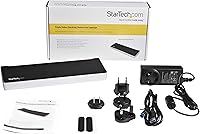
  • Power Supply: Requires an AC power supply for operation, ensuring consistent performance for connected devices.
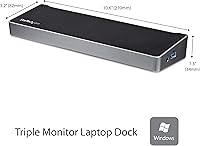
  • Dimensions: Measures 10.6″L x 3.2″W x 1.3″H, offering a compact design that fits easily on most desks.
  • Weight: Weighs 0.83 pounds, making it lightweight and easy to move between workstations.
  • Form Factor: Designed as a compact and space-saving docking station ideal for desk setups.
  • Multi-Display Setup: Supports a triple monitor setup to increase productivity for users needing multiple screens.
  • Compatibility with MacBooks: Works particularly well with MacBooks, providing reliable multi-display support and peripheral connections.
  • Build Materials: Constructed from durable materials with a modern finish in black, silver, or grey.
  • Display Adapters: Requires HDMI or DisplayPort-compatible monitors for display output.
  • USB 3.0 Performance: USB 3.0 ports offer high-speed data transfer for peripherals and external devices.
  • Fanless Design: The docking station operates without fans, ensuring quiet performance and energy efficiency.
  • Compatibility with Laptops: Best suited for laptop users seeking to expand connectivity, especially those with limited USB ports.

FAQ

To set up this docking station, simply connect it to your laptop using the included USB 3.0 cable. Then, connect your monitors using the HDMI or DisplayPort outputs. Finally, connect any peripherals like a mouse or keyboard to the available USB 3.0 ports, and plug the device into a power source.

This docking station supports 4K resolution on one display (via HDMI), while the other two displays can support up to 2048x1152 resolution. This allows for a highly productive multi-monitor setup.

Yes, the StarTech USB 3.0 docking station is compatible with Windows, Mac, and ChromeOS systems. It's designed to provide seamless performance across a range of operating systems.

This device offers five USB 3.0 ports for connecting peripherals, such as a mouse, keyboard, or external storage. It provides ample connectivity options for various devices.

Yes, the docking station comes with a Gigabit Ethernet (RJ45) port, allowing for fast and reliable wired internet access, which is especially useful for remote work or areas with poor Wi-Fi connectivity.

Yes, it includes a convenient charging port that allows you to quickly power up USB devices. However, it’s designed more for laptop expansion and less for high-power device charging.

While compact and lightweight at just 0.83 pounds, this docking station is not as portable as smaller USB hubs. It is better suited for desk setups, offering multiple ports and displays for permanent or semi-permanent use.

If you encounter compatibility issues, ensure your laptop’s USB 3.0 drivers are up to date and check that your system supports multi-display output. Some older laptops may not fully support all docking features. Checking the manufacturer's website for firmware updates may help resolve any issues.

This docking station supports up to three monitors, with one HDMI and two DisplayPort outputs. You can use a variety of monitors as long as they support these inputs, with the first display supporting 4K resolution.

This docking station is ideal for professionals who need multiple monitors for productivity, such as graphic designers, video editors, or remote workers. It's also great for laptop users with limited ports who need to connect peripherals and displays without hassle.