Overview

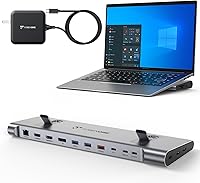
The TobenONE UDS041W USB-C Triple Monitor Docking Station sits squarely in the mid-range for professionals who want a proper multi-monitor setup without committing to a dedicated workstation. Its slim horizontal profile houses 16 ports, covering video, data, audio, and card reading in one compact unit. Windows 10/11 and ChromeOS users will find it plug-and-play ready — Mac users, stop here, it genuinely does not work with macOS. The 100W GaN III charger built into the unit is a real convenience, eliminating the need for a separate power brick on your desk. One important caveat: your laptop's USB-C port must support DP 1.4 and DSC to unlock triple-display output. Without that, you are limited to two screens.
Features & Benefits

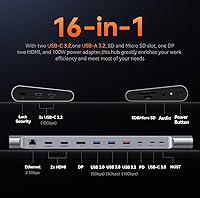
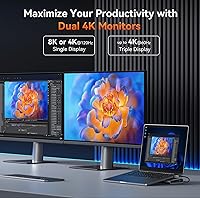
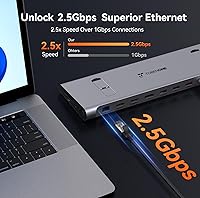
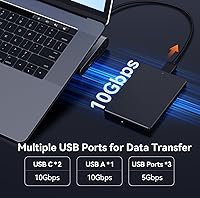
The video output flexibility here is genuinely impressive. Running triple 4K at 60Hz simultaneously is possible through dual HDMI and one DisplayPort — and if you drop down to a single screen, the dock can push 4K at 120Hz or even 8K at 30Hz. The 2.5Gbps Ethernet port outpaces a standard Gigabit connection meaningfully, which matters for anyone regularly moving large files over a network or joining bandwidth-heavy video calls. Data transfers via the 10Gbps USB ports are similarly quick — copying a large video project takes seconds rather than minutes. The SD and microSD slots are a quiet but welcome addition, and the physical power switch on the unit, while easy to miss, prevents accidental shutdowns.

Best For

This docking station is well-suited to remote workers and hybrid professionals who want a tidy desk with multiple screens and a single cable connecting their laptop. Dell XPS, Lenovo ThinkPad, and HP Spectre owners running Windows will have the smoothest experience, provided their USB-C port is fully featured. Video editors and designers chasing high-refresh output will appreciate the single-monitor 4K@120Hz mode. It also makes practical sense for anyone tired of juggling a separate laptop charger — the integrated 100W supply handles both duties cleanly. Heavy file-movers who rely on fast local network transfers will get real-world value from the 2.5Gbps Ethernet and 10Gbps USB combination.

User Feedback

Early buyers of the TobenONE dock — around 60 at this point — have been largely positive, citing reliable triple-monitor detection right out of the box and a compact form factor that suits smaller desks. The integrated charger gets consistent praise for keeping laptops running without battery warnings during demanding sessions. A few users have hit the two-screen limit when their laptop lacked DP 1.4 support — a compatibility detail buried in the product notes that catches people off guard. One recurring setup tip worth flagging: the physical power button must be pressed after plugging in, which is easy to overlook and the source of some early confusion. The sample size is still small, so treat these impressions as early signals rather than a settled verdict.

Pros

  • All three monitors activate reliably on compatible laptops with zero driver installation required.
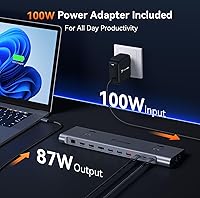
  • The built-in 100W GaN charger keeps laptops fully powered through heavy workloads without a separate adapter.
  • Triple 4K at 60Hz across all outputs is a real capability, not just a marketing claim, on supported hardware.
  • The 2.5Gbps Ethernet port delivers noticeably more stable connectivity than standard Gigabit adapters for network-heavy tasks.
  • Fast 10Gbps USB ports cut file transfer times dramatically compared to typical USB 3.0 hubs.
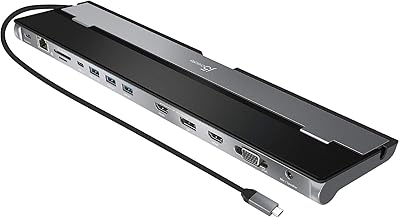
  • The slim horizontal design takes up minimal desk space while housing 16 functional ports.
  • SD and microSD slots remove the need for a separate card reader, keeping the desk cleaner.
  • Single-monitor mode unlocks 4K at 120Hz, a useful option for designers or editors needing a high-refresh reference display.
  • A single USB-C cable replaces the tangle of separate power, display, and peripheral cables on the desk.

Cons

  • Triple-display output requires DP 1.4 and DSC on the laptop — many mid-range USB-C ports do not qualify.
  • The physical power button on the unit is easy to overlook, causing unnecessary troubleshooting confusion at first setup.
  • The plastic chassis feels somewhat lightweight relative to the price point and heat generated during heavy use.
  • Dell and HP laptops may display a third-party charger warning when connected, which is unsettling if unexpected.
  • Port labeling on the unit is small and difficult to read, especially in a dimly lit workspace.
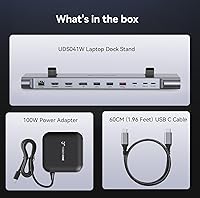
  • No carrying case, cable organizer, or protective sleeve is included for users who occasionally move the dock between locations.
  • Extended triple-monitor sessions cause the underside of the unit to run noticeably warm, raising long-term durability questions.
  • The 2.5Gbps Ethernet advantage is wasted on any home or office network still running standard Gigabit infrastructure.
  • With only around 60 published reviews, long-term reliability data is still too thin to draw firm conclusions.

Ratings

The TobenONE UDS041W USB-C Triple Monitor Docking Station has been evaluated using AI-driven analysis of verified global user reviews, with spam, bot-generated, and incentivized feedback actively filtered out before scoring. The scores below reflect the honest spread of real buyer experiences — strengths and frustrations alike — so you can make an informed call before purchasing. Compatibility limitations, setup nuances, and daily performance are all factored in transparently.
Multi-Monitor Output
84%
Users running Windows laptops with full DP 1.4 support report that all three displays activate reliably on the first connection, with sharp 4K output across every screen. For people moving from a single-monitor setup, the productivity jump is immediate and noticeable.
The triple-display capability is strictly gated behind DP 1.4 and DSC support on the host laptop — a requirement that catches a meaningful number of buyers off guard. Those with older USB-C ports often find only two screens light up, with no clear error message to explain why.
Single-Display Performance
91%
Dropping to a single monitor unlocks genuinely impressive output — 4K at 120Hz for smooth high-refresh workflows, or 8K at 30Hz for pixel-dense creative work. Video editors and designers who occasionally need one ultra-sharp reference display will find this mode punches well above the product tier.
Achieving 4K at 120Hz requires the laptop, cable, and monitor to all support the spec simultaneously, which is a chain of requirements that not every setup satisfies cleanly. A few users reported needing to swap cables before hitting the advertised refresh rate.
Integrated 100W Charging
93%
The built-in GaN III charger is one of the dock's most practical strengths. Users consistently note that their laptops stay fully charged through long editing sessions or back-to-back video calls without any battery drain — all through a single cable connection.
Some Dell and HP laptops display a third-party charger warning when connected, which can be alarming if you are not expecting it. The dock cannot charge monitors, only the laptop itself, so those hoping to power a USB-C display through this port will be disappointed.
Data Transfer Speed
88%
The 10Gbps USB-A and USB-C ports make a tangible difference for anyone regularly moving large video files or disk images. Users transferring multi-gigabyte project folders report that the process takes a fraction of the time compared to a standard USB 3.0 hub.
The speed advantage is only realized when using the correct ports with compatible storage drives — plugging a USB 2.0 device into a 10Gbps port will not improve anything. A couple of users noted the port labeling on the unit itself is small and easy to misread.
Ethernet Performance
79%
21%
The 2.5Gbps Ethernet port delivers noticeably more stable and faster wired connectivity than a standard Gigabit adapter, which is appreciated during large file downloads or latency-sensitive video conferencing. Users on home networks with 2.5G routers report full utilization.
Real-world speeds depend heavily on the rest of the network infrastructure — on standard Gigabit routers, the extra bandwidth headroom goes unused. A handful of users also reported needing to install a driver manually on some Windows configurations before the port was recognized.
Port Selection & Variety
86%
Sixteen ports across a device this slim covers most professional desk needs in one shot — dual HDMI, DisplayPort, SD and microSD slots, audio jack, and multiple USB-A and USB-C data ports. Photographers and hybrid workers in particular appreciate not needing a separate card reader.
With all ports active simultaneously, there can be some bandwidth sharing between high-throughput connections. Users running triple 4K displays while transferring large files via USB may notice minor performance trade-offs compared to using each subsystem independently.
Build Quality & Design
77%
23%
The slim horizontal form factor keeps the desk looking clean, and the unit feels sturdy enough for daily stationary use. At just over two pounds, it does not shift around easily, and the port spacing is generous enough to accommodate wider USB adapters side by side.
The chassis is plastic throughout, which feels slightly out of step with the premium pricing bracket. A few users also noted that the unit gets noticeably warm during extended triple-monitor sessions, though no thermal shutdowns have been reported in early feedback.
Setup & Ease of Use
74%
26%
For laptops that meet the compatibility requirements, the setup is genuinely plug-and-play — no drivers, no software, screens appear within seconds. Most users report that the initial configuration takes under two minutes from unboxing to a working multi-monitor desk.
The physical power button on the unit is not immediately obvious, and a surprising number of early buyers assumed the dock was defective before discovering they simply had not pressed it. The compatibility checklist — DP 1.4, DSC, Windows version — also requires more pre-purchase research than the packaging suggests.
Compatibility Breadth
68%
32%
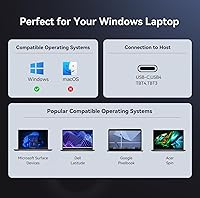
The dock works well across a solid range of Windows 10 and 11 laptops and ChromeOS devices with full-featured USB-C ports. Popular business and creator laptops from Dell, Lenovo, and HP are well-covered, which spans the majority of the target audience.
Mac users are completely unsupported, and this is a firm limitation, not a workaround situation. Beyond that, even within the Windows ecosystem, laptops with USB-C ports that lack DP 1.4 or DSC will not get the full experience, narrowing the compatible pool more than the marketing implies.
Cable Management
72%
28%
Having a single USB-C cable running from the dock to the laptop meaningfully reduces desk clutter compared to managing separate power, display, and peripheral cables. Users who previously juggled three or four cables appreciate the cleaner setup immediately.
The dock itself has no integrated cable routing channels or velcro straps, so the multiple output cables connecting to monitors and peripherals still need to be managed manually. On busier desks, the back of the dock can become its own tangle point.
Value for Money
81%
19%
Relative to dedicated docking solutions from major laptop brands, this dock offers a competitive feature set at a lower entry point. The inclusion of a 100W GaN charger, 2.5Gbps Ethernet, and triple 4K output in one unit represents solid overall value for compatible setups.
If your laptop does not support DP 1.4 and DSC, you are effectively paying for triple-display capability you cannot use. In that scenario, cheaper dual-monitor docks would deliver the same functional result for less money, making the value proposition conditional on laptop specs.
Portability
58%
42%
At under an inch thick and with a relatively modest footprint, the dock can technically travel in a laptop bag. Users who move between a home office and a secondary desk find it manageable to pack alongside their laptop without significant added bulk.
At 2.27 pounds and with no carrying case or travel pouch included, it is not designed with frequent travel in mind. The external power supply requirement also means one more adapter to pack, and the unit does not include a cable organizer or protective sleeve.
Thermal Management
66%
34%
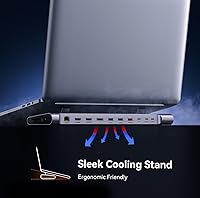
Under normal workloads — triple monitors with moderate USB usage — the dock maintains acceptable temperatures without affecting performance. The passive cooling design keeps the unit silent, which matters in quiet office or studio environments.
During extended heavy-use sessions combining triple 4K output with active 10Gbps data transfers, the unit gets warm to the touch on the underside. No thermal throttling has been widely reported yet, but the early review pool is small enough that long-term heat behavior remains an open question.
Documentation & Support
61%
39%
The included notes cover the most critical compatibility requirements, and the no-driver promise is accurate for supported configurations. Users who read the full product notes before setup tend to have a smoother experience than those who skip straight to plugging in.
The documentation buries important requirements — like the DP 1.4 and DSC dependency — in footnotes rather than leading with them. Customer support responsiveness has not yet been widely tested given the product is relatively new to market, leaving some uncertainty for buyers who run into edge cases.

Suitable for:

The TobenONE UDS041W USB-C Triple Monitor Docking Station is built for Windows-based professionals who want a genuinely productive desk setup without the complexity of a full workstation. Remote workers and hybrid employees who spend long hours across multiple applications — spreadsheets on one screen, video calls on another, reference material on a third — will find the triple 4K output genuinely transforms how they work. Dell XPS, Lenovo ThinkPad, and HP Spectre users are particularly well-served, as these laptops commonly ship with fully-featured USB-C ports that meet the DP 1.4 and DSC requirements. Creatives who occasionally need a single ultra-sharp or high-refresh display for color grading or motion work will also appreciate the dock's ability to push 4K at 120Hz when connected to one monitor. Anyone tired of hunting for a free outlet mid-day will welcome the integrated 100W GaN charger handling both the dock and laptop through a single cable. Photographers and videographers get the added bonus of on-board SD and microSD slots, cutting out yet another peripheral from the desk equation.
Not suitable for:

The TobenONE UDS041W USB-C Triple Monitor Docking Station is simply not a viable option for Mac users — this is not a workaround situation, macOS is architecturally unsupported and the manufacturer confirms it. Beyond that, Windows laptop owners whose USB-C ports do not support DP 1.4 and DSC will hit a hard ceiling at two active displays, regardless of what the box implies, so checking your laptop specs before purchasing is non-negotiable. Users who travel frequently will find the 2.27-pound weight and lack of a carrying case make it a poor fit for a mobile kit. If your home or office network runs on a standard Gigabit router, the 2.5Gbps Ethernet port offers no real-world benefit over a cheaper dock. Those expecting to power a USB-C monitor through the dock's charging port will also be disappointed — it charges the laptop only. Finally, buyers on a tight budget who only need two monitors should honestly consider a less expensive dual-display dock that does not require paying for triple-output capability they cannot use.
Specifications

  • Brand & Model: Manufactured by Shenzhen XiYuanYuan Technology Co., Ltd under the TobenONE brand, model number UDS041W.
  • Dimensions: The unit measures 11.81″ in length, 3.14″ in width, and 0.86″ in height, making it a slim horizontal desktop dock.
  • Weight: The dock weighs 2.27 pounds, which is sturdy enough to stay in place on a desk without being impractical to relocate.
  • Total Ports: Sixteen ports in total are distributed across video output, USB data, networking, audio, card reading, and power delivery functions.
  • Video Outputs: Three display outputs are provided: two full-size HDMI ports and one DisplayPort, supporting simultaneous triple-monitor configurations.
  • Max Triple Resolution: When all three displays are active simultaneously, the maximum supported resolution per screen is 4K at 60Hz, provided the host laptop supports DP 1.4 and DSC.
  • Max Single Resolution: In single-display mode, the dock can output up to 4K at 120Hz for high-refresh setups, or 8K at 30Hz for ultra-high-resolution monitors.
  • USB Data Ports: Six USB data ports are included, comprising a mix of USB-A and USB-C connections running at up to 10Gbps throughput.
  • Ethernet: A 2.5Gbps Ethernet port provides wired network connectivity that surpasses standard Gigabit adapters in throughput capacity.
  • Power Delivery: The integrated GaN III charger delivers up to 100W of power delivery to the connected laptop via the upstream USB-C connection.
  • Card Slots: One full-size SD card slot and one microSD slot are built into the unit for direct media access without an external reader.
  • Audio: A single 3.5mm audio jack supports headphone or headset connectivity for users who prefer wired audio at their desk.
  • Compatible OS: The dock is officially supported on Windows 10 and Windows 11, as well as ChromeOS version 100 and newer.
  • Host Requirements: The connected laptop must have a full-featured USB-C port with DisplayPort Alt Mode support, specifically DP 1.4 and DSC, to enable triple-display output.
  • Mac Compatibility: macOS is not supported; this dock is explicitly designed for Windows and ChromeOS environments only.
  • Driver Requirement: No software or driver installation is required for supported configurations — the dock operates as a plug-and-play device on compatible systems.
  • Power Switch: A physical power button is located on the unit and must be pressed after connecting the dock for it to begin operating.
  • Charging Scope: The 100W power delivery charges the host laptop only; it does not pass power through to connected monitors or other downstream devices.

Related Reviews

LIONWEI Triple Monitor USB-C Docking Station
75%
83%
Multi-Monitor Display Performance
41%
macOS Compatibility
89%
Value for Money
81%
Power Delivery & Charging
92%
Plug-and-Play Setup
More
j5create USB-C Triple Monitor Docking Station JCD543

85%
89%
Setup & Installation
91%
Display Performance
85%
Build Quality
90%
Port Availability & Functionality
94%
Power Delivery
More
StarTech USB-C / USB-A Hybrid Docking Station for MacBook Pro/Air & Windows - Triple 4K 60Hz HDMI/DP, 85W Power Delivery
83%
94%
Multi-Display Performance
89%
Charging Efficiency
80%
Compatibility with OS
91%
Data Transfer Speed
88%
Ethernet Stability
More
WAVLINK UG69DK13 Triple Monitor USB-C Docking Station
74%
88%
Multi-Monitor Performance
61%
Setup & Ease of Use
91%
Port Selection & Variety
86%
Video Output Quality
83%
Data Transfer Speed
More
StarTech DK31C4DPPD Quad Monitor USB-C Dock
76%
88%
Multi-Monitor Performance
51%
Driver Setup Experience
74%
Power Delivery
91%
OS & Hardware Compatibility
83%
Build Quality
More
WAVLINK USB C Docking Station 3 Monitor 100W PD
87%
90%
Display Performance
88%
Build Quality
85%
Ease of Setup
92%
Charging Speed
87%
Connectivity Options
More
StarTech.com Triple Monitor USB 3.0 Docking Station
83%
89%
Performance
91%
Ease of Setup
88%
Display Support
85%
Connectivity Options
80%
Build Quality
More
Plugable UD-3900PDZ USB-C Triple Display Docking Station
79%
82%
Multi-Monitor Performance
74%
macOS Compatibility
91%
Windows Plug-and-Play Experience
88%
Power Delivery
86%
USB Port Availability
More
CMSTEDCD SW532 KVM Docking Station
78%
88%
KVM Switch Reliability
84%
Multi-Monitor Display Performance
67%
Laptop Compatibility
79%
Power Delivery & Charging
91%
Port Selection & Variety
More
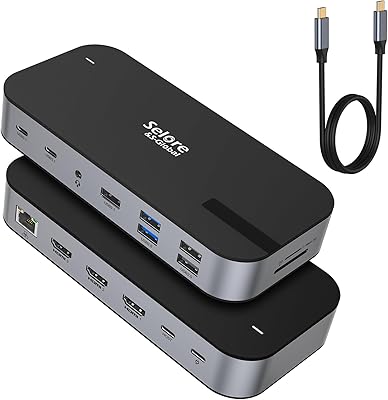
Selore&S-Global 16-in-1 USB-C Docking Station with Triple HDMI
84%
88%
Performance
91%
Multi-monitor Support
85%
Charging Capability
80%
Build Quality
87%
Data Transfer Speed
More

FAQ

It genuinely does support three monitors at 4K and 60Hz simultaneously — but only if your laptop's USB-C port supports DP 1.4 and DSC. That is the key requirement most people miss. If your port does not meet that spec, you will get two active displays at most, regardless of what the listing says.

No, and there is no workaround for this. The dock is built for Windows and ChromeOS environments, and macOS is architecturally incompatible. TobenONE makes a separate model designed specifically for Mac users, so look for that one instead.

You need to check that your port supports DisplayPort Alt Mode with DP 1.4 and DSC — not just charging or data. A good starting point is looking up your exact laptop model on the manufacturer's spec page and searching for USB-C display output capabilities. Thunderbolt 3, Thunderbolt 4, and USB4 ports are almost always fully compatible.

There is a physical power button on the unit that needs to be pressed after you connect everything. It is easy to overlook, but that is almost certainly the issue. Press the button, give it a few seconds, and your displays should activate.

For most laptops, yes. A 100W supply through USB-C is sufficient to power and charge the majority of Windows laptops simultaneously, even during demanding tasks like video rendering or extended video calls. That said, gaming laptops with very high power draw may see slower charging rather than maintaining full battery under peak load.

No installation is required for supported systems. On Windows 10, Windows 11, and ChromeOS 100 or newer, the dock is recognized automatically as a plug-and-play device. Just connect the upstream USB-C cable, press the power button, and your peripherals should appear.

No, the power delivery is reserved for the host laptop only. It cannot pass charging power through to a USB-C monitor or any other downstream device. If you need to power a USB-C display, that monitor will need its own power source.

This is a known and common behavior with Dell and some HP laptops when connected to third-party charging hardware. The warning is cosmetic — the dock will still charge your laptop normally. You can safely dismiss it; it does not indicate a malfunction or any risk to your device.

Honestly, not really — at least not for networking speed. The 2.5Gbps port can only deliver that extra throughput if your router and network switch also support 2.5G. On a standard Gigabit network, you will get the same speeds as any other Gigabit adapter. It is more of a future-proofing feature than an immediate upgrade for most home setups.

Yes, absolutely. If your ThinkPad's USB-C port does not fully support DP 1.4 and DSC, the dock will still drive two displays without issue. You will have full access to all the other ports — USB data, Ethernet, card slots, audio — and the 100W charging will still work normally. You just will not get the third monitor active at the same time.