Overview

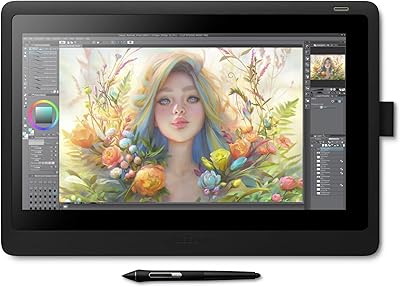
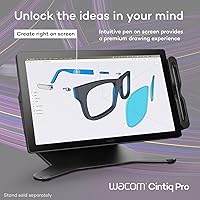
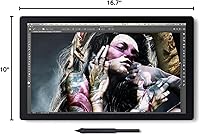
The Wacom Cintiq Pro 17 Pen Display sits squarely in Wacom's professional lineup — a meaningful step up from the Cintiq 16 series, but without the eye-watering cost of the 27-inch flagship. This is a pen display, not a standalone device, so you'll need a connected Mac, Windows PC, or Linux machine to drive it. That distinction matters when budgeting for professional tools. The price puts it firmly in working-professional territory — hobbyists and weekend illustrators will likely hesitate, and honestly, they probably should. But for working creative professionals who depend on accurate color and responsive pen input every day, the Cintiq Pro 17 makes a genuinely compelling case.

Features & Benefits

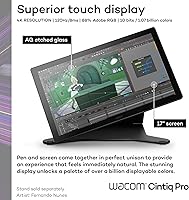
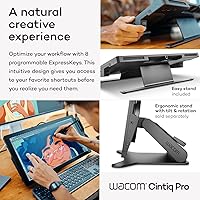
The 17.3″ 4K IPS panel is the headline, and it earns that status. At 120Hz with 8ms response, drawing feels immediate — the kind of lag you'd normally notice on a pen display just isn't present here. Color coverage is serious: 10-bit output with DCI-P3 at 99% and Pantone validation means what you see on screen translates reliably to print or final deliverables. The Pro Pen 3 adds real refinement — three customizable side switches, adjustable grip weight, and 8192 pressure levels that respond accurately from the lightest sketch to a heavy ink stroke. Eight ExpressKeys and on-screen menus round out a workflow that's quick to personalize.

Best For

This drawing tablet is built for professionals who can't afford to guess on color — print designers, brand identity artists, and illustrators working with clients who expect files that match what they approved on screen. The high refresh rate and large 15.0 x 8.5-inch active area also make it a natural fit for animation and storyboard work, where fluid motion and drawing real estate both matter. Anyone switching from a screenless tablet will notice the difference immediately; drawing directly where you look removes a cognitive friction you don't fully appreciate until it's gone. Windows and macOS users will find driver setup reliable and consistent across major creative applications.

User Feedback

Across several hundred verified ratings, this pen display holds a strong overall score, and the tone of reviews suggests genuine day-to-day satisfaction rather than early-adopter hype. Pen feel and build draw consistent praise, with many upgraders from older Cintiq models noting a clear improvement in responsiveness. That said, the price-to-value question surfaces regularly — some users feel the premium is steep relative to competing displays entering the market. A few report minor parallax at screen edges, and driver quirks on fresh installs are a recurring, if minor, complaint. The Easy Stand is appreciated, though some users want steeper angle options. Linux users describe it as workable, but expect occasional driver friction.

Pros

  • The 4K 120Hz display makes drawing feel immediate and accurate, reducing the perceptible gap between pen and mark.
  • Pro Pen 3 pressure sensitivity and adjustable grip weight deliver a natural, fatigue-reducing drawing experience.
  • Pantone Validated color certification gives print and branding professionals genuine confidence in on-screen color accuracy.
  • 10-bit color output with near-complete DCI-P3 coverage handles demanding color-critical work reliably.
  • Eight customizable ExpressKeys and on-screen menus help experienced users build an efficient, personalized shortcut workflow.
  • The package includes extra nibs, grip options, and button plates — practical extras that reflect real daily use rather than box-filler.
  • Broad connectivity options including HDMI and Mini DisplayPort make it compatible with a wide range of existing desktop setups.
  • 10-point multi-touch support adds intuitive gesture-based navigation that complements pen input naturally.
  • Compared to older Cintiq generations, users consistently report a clear improvement in pen responsiveness and overall build quality.
  • macOS and Windows driver support is stable and well-maintained across major creative applications.

Cons

  • The price is a significant barrier; this is not an investment most hobbyists or part-time creatives can reasonably justify.
  • Requires a separate computer to function, meaning total setup cost is considerably higher than the display price alone.
  • Some users report minor parallax at screen edges, which can affect precision in detailed work near the borders.
  • Driver installation on fresh systems occasionally introduces quirks that require troubleshooting before the display performs as expected.
  • Linux support exists on paper but is inconsistent in practice, with community reports of unreliable driver behavior.
  • The included Easy Stand offers only a fixed tilt angle, which frustrates users who prefer a more ergonomically flexible setup.
  • At nearly 5 pounds, the display is not practical to move between workspaces regularly.
  • The active drawing area, while large, is smaller than the physical panel size, which can surprise first-time pen display buyers.
  • Competing pen displays at lower price points have narrowed the feature gap enough to make the value proposition harder to defend for budget-conscious buyers.

Ratings

The scores below reflect an AI-driven analysis of verified global buyer reviews for the Wacom Cintiq Pro 17 Pen Display, with spam, bot activity, and incentivized feedback actively filtered out before scoring. Each category is rated independently to give you an honest picture of where this drawing tablet genuinely excels and where real users have run into friction. Both the strengths and the recurring pain points are weighted transparently, so the numbers tell the full story.

Pen Performance
93%
The Pro Pen 3 is widely praised as the most responsive pen Wacom has shipped in this price range. Artists report that pressure transitions feel organic and predictable, whether laying down light pencil sketches or heavy ink strokes, and the adjustable grip weight reduces hand fatigue during long sessions.
A small number of users noted occasional tilt recognition inconsistencies at extreme angles, which matters for calligraphy-style work. The three side switches, while useful, require deliberate repositioning of the hand to reach, which can interrupt workflow for fast-moving illustrators.
Display Quality
91%
The 4K IPS panel draws consistent praise for sharpness and color richness straight out of the box. Print designers in particular highlight how reliably their on-screen colors match final physical output, crediting the Pantone validation as a practical differentiator rather than a marketing claim.
Some users noted that out-of-box brightness calibration skews slightly warm and recommends a manual calibration pass before beginning color-critical work. A few reviewers also flagged that glare management could be better in brightly lit studio environments without an added matte screen protector.
Color Accuracy
92%
Coverage of DCI-P3 at 99% and 10-bit color depth make this one of the more capable pen displays for work that demands accurate representation of wide color spaces. Illustrators working with HDR-aware pipelines report that the display handles gradients and tonal transitions without the banding artifacts common on 8-bit panels.
Adobe RGB coverage at 88% leaves a small but real gap for users whose entire workflow is calibrated to that color space, such as certain print prepress operations. Hitting true accuracy still requires a hardware colorimeter; factory calibration alone is not sufficient for the most demanding color-critical studios.
Latency & Responsiveness
89%
The 120Hz refresh rate combined with 8ms response time produces a drawing experience that most users describe as feeling immediate and natural. Animators who work on frame-by-frame sequences particularly appreciate the lack of visible lag when scrubbing or making quick, gestural corrections at speed.
A handful of users on older Windows machines reported that latency felt less controlled when running GPU-heavy applications alongside the display driver, suggesting that the host computer's performance plays a meaningful role in the final experience. This is not a display-side flaw, but it is worth factoring into your overall setup.
Build Quality
86%
The physical construction earns reliable praise across reviews, with users noting the sturdy, low-flex panel and premium-feeling surface texture. Those upgrading from older Cintiq generations consistently describe the build as a tangible step forward, with tighter tolerances and a more confident feel during use.
At roughly 5 pounds the display is sturdy but not particularly portable, and a few users noted that the bezel collects fingerprints visibly when touch input is in regular use. The matte drawing surface, while pleasant, does show wear over time and may need replacement for heavy users within a year or two.
Value for Money
61%
39%
For full-time professional illustrators and designers who bill for their work, the combination of display quality, pen accuracy, and color certification makes the price defensible when spread across a multi-year professional lifespan. The included accessories — extra nibs, grip options, and button plates — add practical value without feeling like filler.
The price sits at a level where competing pen displays have started to erode the justification for casual or semi-professional buyers. A significant portion of negative reviews are not about performance failures but about whether the step up in quality is proportionate to the step up in cost compared to mid-range alternatives.
Ergonomics & Stand
67%
33%
The included Easy Stand keeps the display stable at a comfortable working angle for most seated desk setups, and many users appreciate having a functional stand ready immediately out of the box without additional purchases. The overall weight distribution feels balanced when the stand is positioned correctly.
The fixed-angle limitation of the Easy Stand is one of the most frequently mentioned frustrations in reviews, with users who prefer a near-flat or steeply reclined drawing position finding it immediately inadequate. Many professional users end up purchasing a third-party VESA arm to get the ergonomic flexibility they need, which adds to the total cost.
Touch Input
74%
26%
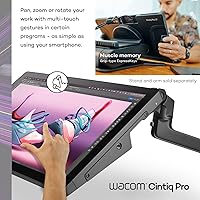
The 10-point multi-touch is responsive and accurate enough to make canvas navigation genuinely useful, particularly for zooming and rotating during illustration work. Users who adopt a habit of toggling touch off during detailed pen work and on during navigation find it integrates well into a natural rhythm.
Accidental palm input is a real issue for some users, especially those who rest their hand on the display while drawing. The palm rejection algorithm has improved from earlier Cintiq generations but still prompts enough unintended canvas movements that a notable share of users simply disable touch permanently.
Software & Driver Stability
68%
32%
On macOS and Windows, the Wacom Desktop Center provides a reasonably polished experience for mapping keys, customizing the pen, and managing display settings. Most users on these platforms describe initial setup as straightforward, with drivers that stay stable across application updates.
Driver-related complaints appear consistently across reviews, including occasional loss of pressure sensitivity after system sleep, the need to restart the driver service manually, and compatibility hiccups following OS updates. These are not dealbreakers but represent an ongoing friction point that Wacom has not fully resolved across its product line.
Connectivity
83%
The range of connection options — USB-C with DisplayPort Alt Mode, HDMI, and Mini DisplayPort — means this pen display fits into almost any existing desktop configuration without requiring new adapters. Users with multi-monitor setups particularly appreciate the flexibility in routing video signal from different host ports.
The USB-C Alt Mode connection, while convenient, requires a cable and host port that both support DisplayPort output, which trips up some users on machines with USB-C ports that carry power only. A clearer guide in the packaging about which USB-C ports on common laptops support video output would prevent a lot of initial setup confusion.
Linux Compatibility
44%
56%
Wacom does maintain open-source driver support for Linux, and technically proficient users on mainstream distributions like Ubuntu have reported functional setups with basic pen input working reliably. For a Linux-based creative professional willing to invest setup time, it is possible to get a working configuration.
Community reports consistently describe an inconsistent experience depending on kernel version, display manager, and distribution. Pressure sensitivity, touch input, and ExpressKey mapping frequently require manual configuration or patching, and there is no guarantee that a system update will not break the setup. Linux is clearly a secondary platform for this device.
Setup Experience
77%
23%
Most Windows and macOS users describe the initial unboxing and connection process as quick, with the Wacom Desktop Center guiding driver installation clearly. The cable and adapter selection in the box covers most common connection scenarios without requiring an immediate accessory purchase.
Some users encounter an extra step when Windows Update silently installs a generic HID driver that conflicts with the Wacom-specific driver, requiring a manual rollback. First-time pen display owners occasionally struggle with understanding display resolution and scaling settings across dual-monitor setups, which is a setup complexity rather than a product defect.
Included Accessories
81%
19%
The box contents are genuinely practical: ten replacement nibs means you are not immediately shopping for consumables, and the three interchangeable button plate styles on the Pro Pen 3 allow a meaningful degree of personalization for different grip styles and working habits.
The nib removal tool, while included, is small enough to misplace easily, and replacement tools are not always easy to find locally. A few users also noted that the extra grip options require a bit of disassembly to swap, which is not difficult but feels fiddlier than it should be for a product at this price tier.
Parallax
71%
29%
For the majority of the drawing surface — particularly the central working area — the laminated display keeps the gap between cursor and pen tip negligible during normal working distances. Most users do not find parallax disruptive during everyday illustration and design tasks.
At the screen edges and corners, a detectable offset appears that can frustrate precise work near panel borders, such as panel borders in comic illustration or fine details at the edge of a composition. Users who frequently work across the full drawing area are more likely to notice this than those who keep their focal point centered.

Suitable for:

The Wacom Cintiq Pro 17 Pen Display was built for creative professionals who depend on accurate color reproduction and a highly responsive drawing surface as part of their daily workflow. Print and branding designers will appreciate the Pantone validation and wide color gamut coverage, which removes a lot of guesswork when preparing files for physical output. Illustrators and concept artists who spend long hours drawing will notice how the 120Hz refresh rate and well-tuned Pro Pen 3 make the experience feel closer to working on paper than any previous generation of this display. Animation and storyboard artists benefit from the generous active drawing area and the fluid motion that comes with a high-refresh panel. Professionals already invested in the Adobe or Clip Studio ecosystem — primarily on macOS or Windows — will find driver support reliable and integration smooth. If your livelihood depends on getting color right and you want a display that can keep up with fast, expressive mark-making, this drawing tablet is a serious tool worth the investment.

Not suitable for:

The Wacom Cintiq Pro 17 Pen Display is not a standalone device, and that is a firm requirement you need to plan around — it requires a capable connected computer to function, adding to the total cost of your setup. Hobbyists, students, or casual digital artists who draw occasionally will find it difficult to justify the premium, especially when more affordable pen displays have closed the gap considerably in recent years. Users hoping to use it primarily with Linux should temper their expectations; while compatibility is listed, community feedback consistently describes driver support as inconsistent and occasionally frustrating. Those who need a highly adjustable ergonomic stand will also find the included Easy Stand limiting, since it offers only a fixed angle rather than a flexible range of tilt positions. If portability is important to your workflow, the weight and size make this a dedicated desk setup rather than something you carry between locations. Buyers on a tight budget who are primarily interested in digital painting as a hobby rather than a profession should look at lower-cost alternatives first.

Specifications

  • Display Size: The active screen measures 17.3″ diagonally, providing a generous drawing surface without reaching the desk footprint of the larger 22-inch and 27-inch models in the Cintiq Pro line.
  • Resolution: The panel outputs at 3840×2160 (4K UHD), delivering sharp detail that makes fine linework and intricate textures easy to evaluate at actual working scale.
  • Refresh Rate: A 120Hz refresh rate with 8ms response time keeps visual feedback tightly coupled to pen movement, reducing the perceptible delay that is common on lower-spec pen displays.
  • Color Depth: 10-bit color output supports approximately 1.07 billion colors, enabling smooth gradients and accurate tonal transitions across complex illustrations and photo composites.
  • Color Gamut: The display covers DCI-P3 at 99% and Adobe RGB at 88% (CIE1931), and carries both Pantone Validated and Pantone SkinTone Validated certifications for color-critical professional work.
  • Pen Model: The included Pro Pen 3 offers 8192 levels of pressure sensitivity, three customizable side switches, interchangeable grip options, and an adjustable balance weight for personalized handling.
  • Active Area: The usable drawing surface measures 15.0 × 8.5 inches, which is notably larger than the Cintiq Pro 16 and better suited to broad gesture-based strokes and multi-panel layouts.
  • Multi-Touch: Ten-point capacitive multi-touch supports pinch-to-zoom, rotate, and scroll gestures, allowing natural canvas navigation without interrupting pen-based work.
  • ExpressKeys: Eight programmable ExpressKeys are built into the display bezel, supplemented by customizable on-screen radial menus for quick access to application shortcuts.
  • Connectivity: The display includes one USB-C port with DisplayPort Alt Mode, one additional USB-C port, one HDMI port, and one Mini DisplayPort, covering a wide range of host computer configurations.
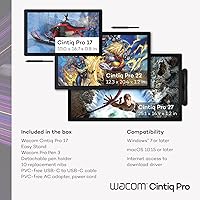
  • OS Compatibility: Official driver support covers Windows 10 and later, macOS 11 and later, and Linux, though Linux driver stability varies and is not as consistently maintained as the other two platforms.
  • Physical Weight: The display weighs 4.9 pounds without the stand attached, which is manageable for a permanent desk installation but not practical for frequent transport.
  • Dimensions: Overall physical dimensions are 16.7 × 10.0 × 0.1 inches, reflecting a slim panel profile designed to minimize desk depth while maximizing screen real estate.
  • Included Stand: The Easy Stand is included in the box and supports the display at a fixed angle, offering basic height and tilt adjustment without a fully articulating arm range.
  • Included Accessories: The box includes the Pro Pen 3, two additional grip options, three interchangeable button plates, a balance piece, ten replacement nibs, a nib removal tool, a USB-C cable, and an AC power adapter.
  • Power: The display is powered via the included AC adapter rather than through the USB-C data connection alone, so a wall outlet is required at the workstation.
  • HDR Support: The panel supports HDR gamma, allowing compatible workflows in applications that output or preview HDR content, though peak brightness specifications should be verified against individual use-case requirements.
  • Model Number: The official model identifier is DTH172K0A, which can be used when searching for compatible accessories, replacement parts, or driver downloads on the Wacom support portal.

Related Reviews
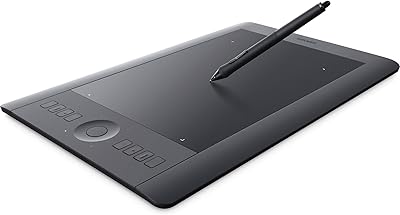
Wacom Intuos Pro Pen and Touch Tablet Medium (PTH651)
88%
94%
Performance
97%
Precision & Responsiveness
90%
Wireless Connectivity
89%
Customization Options
92%
Build Quality
More
XP-Pen Artist 16 2nd Pen Display
86%
92%
Display Quality
85%
Stylus Performance
78%
Ease of Setup
88%
Build Quality
90%
Ergonomics/Comfort
More
Wacom One by Wacom Medium Pen Tablet CTL-672
84%
92%
Value for Money
89%
Pen Performance (Pressure Sensitivity)
72%
Build Quality
94%
Ease of Setup
90%
Portability/Size
More
ASUS ProArt Display PA169CDV 15.6” 4K Pen Display
87%
94%
Color Accuracy
89%
Portability
90%
Touchscreen Responsiveness
85%
Build Quality
92%
Wacom Pen Precision
More
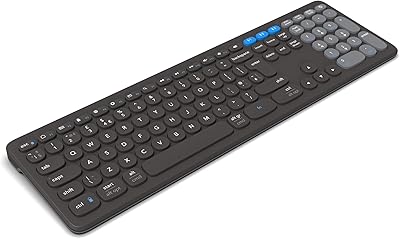
ZAGG Pro Keyboard 17
87%
91%
Typing Comfort
89%
Battery Life
93%
Ergonomic Design
84%
Connectivity
88%
Multi-Device Pairing
More
XP-Pen Deco Pro Medium Graphics Tablet
78%
91%
Pen Performance
88%
Active Area Size
83%
Dual-Wheel Control
79%
Build Quality
61%
Driver & Setup Experience
More
Wacom Cintiq 16 Pen Display Tablet
76%
94%
Pen Accuracy & Responsiveness
88%
Display Color Accuracy
83%
Anti-Glare Performance
86%
Pen Tilt Recognition
81%
Screen Size & Active Area
More
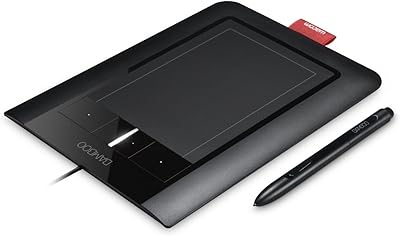
Wacom Bamboo Pen and Touch CTH460
85%
88%
Pen Sensitivity
85%
Touch Responsiveness
91%
Portability/Size
87%
Usability/Ergonomics
92%
Value for Money
More
Calibrite ColorChecker Display Pro Colorimeter
78%
91%
Calibration Accuracy
88%
Cross-Panel Consistency
67%
Software Experience
84%
Projector Profiling
82%
Ambient Light Measurement
More
GAOMON PD1220 11.6-inch Pen Display
78%
86%
Display Clarity
89%
Full Lamination Quality
88%
Pen Performance
74%
Color Accuracy
83%
Build Quality & Durability
More

FAQ

It requires a connected computer to function — it is a display tablet, not a standalone drawing computer. You will need a Windows PC, Mac, or Linux machine to drive it, connected via USB-C, HDMI, or Mini DisplayPort.

Yes, it works well with modern MacBook Pro models. You can connect using a USB-C cable with DisplayPort Alt Mode for both video and data in a single cable, or use HDMI if your setup requires it. Driver installation through the Wacom Desktop Center on macOS is generally straightforward.

For most of the active area, parallax is minimal and unlikely to affect everyday drawing. A small number of users report slightly more noticeable offset near the screen edges, particularly when working at steep angles. If you typically draw near the center of the display, this is unlikely to be a practical concern.

No — the Cintiq Pro 17 is designed specifically for the Pro Pen 3, which uses a different internal technology than earlier Wacom pen generations. Older pens like the Pro Pen 2 are not compatible with this display.

The Easy Stand holds the display at a fixed ergonomic angle and is a solid starting point for most desk setups. If you need a wider range of tilt angles or want to mount the display on a monitor arm, you can use a compatible VESA mount solution instead, which many professional users prefer for longer sessions.

The 10-point multi-touch is genuinely useful for canvas navigation — pinching to zoom, rotating, and scrolling all work responsively. Most professional users keep touch active for navigation but disable it during detailed pen work to avoid accidental input, which is easy to toggle via an ExpressKey.

It performs very well for print-oriented workflows. The Pantone Validated certification and wide color gamut make it one of the more reliable pen displays for work that needs to translate predictably to CMYK or physical print output. That said, professional print studios will still typically use a hardware colorimeter for full display calibration.

The package includes trial licenses for Clip Studio Paint EX, Toon Boom Harmony, Toon Boom Storyboard Pro, and the MASV large file transfer service. These trials are aimed at customers in the Americas; availability may vary by region. No perpetual software licenses are bundled.

Wacom does provide Linux drivers and the display is listed as compatible, but the experience is notably less polished than on Windows or macOS. Community feedback suggests that driver behavior can be inconsistent depending on the Linux distribution and kernel version. If Linux is your primary OS, test driver compatibility carefully before committing.

Replacement nibs are widely available directly from Wacom and through third-party retailers, and the box already includes ten extras to get you started. Nib wear depends heavily on the surface texture you use — the standard drawing surface wears nibs faster than a smooth glass protector. Most users find that a single nib lasts anywhere from a few weeks to several months depending on drawing pressure and frequency.

Where to Buy

B&H Photo-Video-Audio
In stock $2,374.95
Newegg.com
In stock $2,499.95
Microless.com
In stock $3,109.04
SHI International
In stock $2,499.95
Wacom eStore
In stock $1,799.95
Mac Hollywood
In stock $1,999.95