Wacom Bamboo CTH460 Pen and Touch Tablet
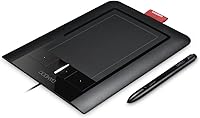
Wacom Bamboo CTH460 Pen and Touch Tablet — image 1
71%
29%

Overview

The Wacom Bamboo CTH460 Pen and Touch Tablet is Wacom's answer to creatives who are just getting started and don't want to spend professional-grade money to find out if digital drawing is for them. It combines a pressure-sensitive stylus with a multitouch surface — two distinct input methods on one compact slab — which is a genuinely useful combination for anyone transitioning from mouse-based workflows. The tablet ships with Adobe Photoshop Elements, a solid bonus that removes the software barrier for newcomers. Plug it in via USB, install the drivers, and you're largely ready to go. Consumer-grade build, honest price — that's the right frame for evaluating this Wacom tablet.

Features & Benefits

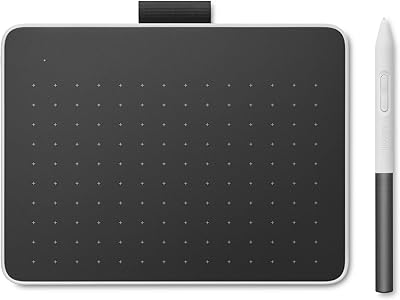
The pen is where this pen and touch tablet earns its keep. With 512 levels of pressure sensitivity, line weight responds naturally to how hard you press — thin for sketching, thicker for confident strokes. The stylus is battery-free, which sounds like a small thing until you've used tablets that need charging at inconvenient moments. Two side switches on the barrel handle common tasks like right-clicking or erasing without breaking your grip. The four programmable ExpressKeys along the tablet's edge are worth using — map your undo shortcut there and you'll reach for it constantly. The active area measures 4.9″ x 3.4″, adequate for casual work, and USB setup is refreshingly straightforward.

Best For

If you're picking up digital art or photo editing for the first time, the Bamboo CTH460 is a sensible starting point. Students and hobbyists especially tend to get good mileage from it — the price doesn't sting if you later decide it's not your thing, but the pen-to-screen feel is convincing enough to keep most people interested. Photo editors who've grown frustrated with mouse-based retouching will immediately notice how much more control a pressure-sensitive pen gives over tools like the healing brush or dodge and burn. Bundled Photoshop Elements means no extra software cost to get started, which is a genuine perk for home creatives.

User Feedback

Across verified buyer reviews, the pen feel gets consistent praise — people who switch from a mouse often describe it as an immediate improvement for detail work. ExpressKeys draw praise too, particularly from users who build muscle memory for undo and zoom shortcuts. Where things get mixed is the touch surface: some find the gesture recognition smooth and intuitive, while others report accidental inputs when their palm brushes the active area during pen use. The relatively small drawing surface can feel cramped on a large monitor. A handful of long-term owners flag driver compatibility on modern systems as a friction point. Still, a 4.5-star average across nearly 400 ratings tells a clear overall story.

Pros

  • The battery-free pen feels natural in hand and never needs charging mid-session.
  • 512 pressure levels give beginners genuine line-weight variation for drawing and brushwork.
  • Four programmable ExpressKeys make repetitive shortcuts noticeably faster to execute.
  • Bundled Photoshop Elements means you can start editing photos right out of the box.
  • USB setup is simple — no complex driver installation ritual required for most users.
  • The lightweight build makes this pen and touch tablet easy to move or store between sessions.
  • Multitouch gestures like pinch-to-zoom work well as a complement to pen-based navigation.
  • At this price tier, the overall build quality is solid and the pen surface texture feels good.
  • Photo retouching precision improves meaningfully over mouse-based workflows, even for casual users.

Cons

  • The active drawing area can feel cramped when mapped to a large or wide monitor.
  • Palm rejection during pen use is imperfect, leading to occasional accidental touch inputs.
  • Driver compatibility on newer operating systems has caused headaches for some long-term owners.
  • Touch gesture recognition is inconsistent enough that some users end up disabling it entirely.
  • The 512 pressure levels, while fine for beginners, will feel limiting to more experienced artists.
  • There is no tilt sensitivity on the pen, which restricts certain brush effects in art applications.
  • The tablet itself has a plasticky feel that reflects its consumer-grade positioning honestly but noticeably.
  • No wireless option exists — the USB cable can become awkward depending on your desk layout.

Ratings

The scores below for the Wacom Bamboo CTH460 Pen and Touch Tablet were generated by our AI system after analyzing verified buyer reviews from multiple global platforms, with spam, bot activity, and incentivized feedback actively filtered out. Each category reflects the honest distribution of praise and frustration found across hundreds of real user experiences — strengths are acknowledged where earned, and pain points are not softened.

Pen Accuracy
83%
The pressure-sensitive stylus consistently earns praise for feeling natural during sketching and photo retouching tasks. Users transitioning from a mouse frequently note that pen-based selections and brush strokes feel noticeably more precise, especially in detail-heavy work like masking or healing in photo editors.
At 512 pressure levels, the pen lacks the fine gradation that intermediate artists start to expect after building skill. Some users doing fast, expressive strokes report slight jitter at the edges of the active area, which can be distracting during detailed illustration work.
Touch Input
57%
43%
For users who primarily navigate — zooming in on a canvas or scrolling through a photo library — the multitouch surface handles basic two-finger gestures well enough to reduce how often you need to reach for the keyboard. The concept of combining pen and touch in one device is genuinely useful when it works cleanly.
Palm rejection is the recurring complaint: the tablet struggles to distinguish between intentional touch and accidental contact when the pen hand rests near the surface, leading to frustrating misfires mid-stroke. A meaningful portion of buyers report disabling touch input entirely after a few weeks, which effectively reduces the device to pen-only use.
Build Quality
68%
32%
The tablet feels sturdy enough for everyday desk use, and the surface texture strikes a reasonable balance between grip and smoothness that most beginners find comfortable. The slim profile and relatively light weight make it easy to position without it feeling flimsy or toy-like.
The all-plastic construction is noticeable, and the tablet lacks the premium solidity that even slightly higher-tier Wacom models offer. Over months of heavy use, the surface can accumulate faint scratches, and the ExpressKey buttons develop a slightly mushy feel that suggests the hardware was value-engineered at this price point.
ExpressKeys Utility
81%
19%
Users who take the time to configure the four programmable keys consistently report a genuine workflow improvement — particularly mapping undo and zoom, which become almost reflexive habits. For photo editors working in Photoshop, having undo on a physical button rather than a keyboard shortcut reduces wrist movement noticeably during long sessions.
Four keys is a modest allocation, and power users will quickly wish for more. The keys themselves are not clearly labeled by default, so new users face a short but real memorization curve, and the buttons sit close enough together that accidental presses happen occasionally.
Active Area Size
61%
39%
For a single standard monitor at typical desk distances, the 4.9″ x 3.4″ drawing surface covers most beginner needs adequately. Users doing casual sketching or photo retouching on a 1080p monitor generally adapt to the mapping without major friction.
On large or ultrawide monitors, the small active area creates a compressed hand-to-screen ratio that many users describe as feeling cramped and imprecise. Artists who prefer large, gestural arm movements when drawing will find the active area a consistent source of frustration that no setting adjustment fully resolves.
Pen Ergonomics
84%
The battery-free design is a standout practical advantage — the pen is always ready, never needs charging, and feels noticeably lighter in hand than styluses with internal batteries. The two side switches are positioned intuitively for right-handed users, and most people find their natural grip without much adjustment.
Left-handed users occasionally note that the side switch placement feels slightly awkward for their grip angle. The pen is also on the slimmer side, which some users with larger hands find less comfortable during multi-hour sessions compared to thicker, more grip-friendly stylus designs.
Setup & Compatibility
74%
26%
For its intended audience — beginners plugging in a tablet for the first time — the USB setup is refreshingly low-friction. Most users report being up and running within minutes on Windows systems, and the broad software compatibility means it works with everything from Krita to Photoshop without special configuration.
Driver compatibility on current operating systems is a real and recurring issue flagged by longer-term owners. Users who purchased this Wacom tablet years ago and later upgraded to a newer OS sometimes find driver support has lapsed, requiring workarounds or forcing a hardware upgrade sooner than expected.
Value for Money
79%
21%
For someone genuinely unsure whether digital drawing is a hobby they will stick with, the price-to-capability ratio is difficult to argue with. The bundled Photoshop Elements adds meaningful practical value, effectively reducing the real cost of entry into a complete digital editing setup.
As a long-term investment, the value calculation weakens: users who progress past beginner level often find themselves wanting to upgrade within a year or two, making the total cost of ownership higher than it first appears. Those who already own editing software also get less from the bundle than newcomers do.
Software Bundle
76%
24%
Shipping with Adobe Photoshop Elements is a tangible benefit for buyers who have no existing creative software — it covers photo editing, basic retouching, and sharing workflows competently enough for home use, and removes a potential barrier for first-time tablet owners.
The bundled versions (7.0 for Windows, 6.0 for Mac) are significantly dated, and users who are already subscribed to Adobe Creative Cloud or own a newer standalone app will find the bundle redundant. The software also lacks the depth that serious digital illustrators need, limiting its usefulness for drawing-focused buyers.
Multitouch Gestures
55%
45%
When the surface reliably registers deliberate gestures, scrolling through a long document or zooming into a canvas with two fingers feels intuitive and quick. Users coming from modern laptop trackpads will find the gesture vocabulary familiar and comfortable in light navigation scenarios.
Consistency is the problem — the gesture recognition is sensitive enough to misfire but not always responsive enough when deliberately triggered. Several users report that the touch surface becomes noticeably less reliable after extended use, and the lack of a dedicated toggle button to switch modes quickly is a notable design oversight.
Driver Stability
58%
42%
On the originally supported operating systems, the driver runs quietly in the background without consuming noticeable resources or causing application conflicts. Users on older Windows setups generally describe a stable, set-and-forget experience once the initial configuration is done.
Wacom's driver support for this model has thinned out as operating systems advanced, and users on modern Windows 10 or 11 environments report occasional disconnections, tablet not being recognized after sleep, or touch and pen modes falling out of sync. Resolving these issues typically requires manual driver management that beginners are not well equipped for.
Learning Curve
77%
23%
The hand-eye coordination adjustment required to draw on a surface while watching a screen is an inherent challenge of any pen tablet, and the Bamboo CTH460 does not make it harder than necessary. Most users report feeling reasonably comfortable within one to two weeks of regular practice.
The included documentation is minimal, and Wacom's onboarding materials for this older model are limited compared to what newer products receive. Beginners who struggle with the initial coordination shift have few first-party resources to fall back on, often relying on third-party tutorials to bridge the gap.

Suitable for:

The Wacom Bamboo CTH460 Pen and Touch Tablet is a strong fit for anyone stepping into digital creativity without wanting to commit serious money before they know if it will stick. Beginners exploring digital illustration, sketching, or photo retouching will find the pressure-sensitive pen intuitive enough to build real skills on, and the learning curve is far gentler than jumping straight to a professional-grade device. Students on a budget get a particularly good deal here — the bundled Photoshop Elements removes the need for an immediate additional software purchase, which matters when you're already watching costs. Photo editors who have been struggling with mouse-based retouching will notice an immediate improvement in precision, especially for tasks like masking, dodging, or detailed cloning work. The compact footprint and USB plug-and-play setup also make this pen and touch tablet a practical choice for anyone with a small desk or who occasionally works from different locations.

Not suitable for:

The Wacom Bamboo CTH460 Pen and Touch Tablet is not the right tool for working professionals or serious illustrators who depend on their tablet daily. The 512 pressure levels and 4.9″ x 3.4″ active area are genuinely adequate for casual use, but experienced artists accustomed to higher-end Wacom hardware will find both figures limiting — particularly when working on a large monitor where the hand-to-screen mapping feels compressed. The touch input, while a nice idea, is inconsistent enough in practice that users who rely heavily on gesture navigation may find it more frustrating than helpful. Long-term reliability on modern operating systems has also been flagged by some owners, meaning buyers on current Windows or macOS versions should verify driver support before purchasing. Anyone expecting professional output quality or planning to use this Wacom tablet as a primary production tool for client work should look further up the Wacom product line.

Specifications

  • Model Number: The tablet carries the official model designation CTH460, manufactured by Wacom, Inc.
  • Active Area: The pen-sensitive drawing surface measures 4.9″ x 3.4″ (124mm x 86mm), providing a compact but workable input zone for casual creative tasks.
  • Tablet Dimensions: The full tablet body measures 9.8 x 6.9 x 0.2 inches, keeping the overall footprint slim and desk-friendly.
  • Item Weight: The tablet weighs 12.6 ounces, making it light enough to move between workspaces without any hassle.
  • Pressure Sensitivity: The included stylus supports 512 levels of pressure sensitivity, allowing for natural variation in line weight during drawing and brushwork.
  • Pen Design: The ergonomic stylus is battery-free and features two programmable side switches for quick access to functions like right-click or erase.
  • ExpressKeys: Four customizable ExpressKeys are built into the tablet surface, allowing users to assign frequently used shortcuts for faster creative workflows.
  • Input Types: The tablet supports two distinct input modes: pressure-sensitive pen input and capacitive multitouch finger gestures.
  • Touch Gestures: The multitouch surface recognizes common gestures including two-finger scroll, pinch-to-zoom, and rotate, mirroring familiar touchpad interactions.
  • Connectivity: The tablet connects to a computer via USB, with no wireless option available on this model.
  • Compatible OS: The Bamboo CTH460 was designed for Windows XP and above; buyers on current operating systems should verify the latest driver availability from Wacom directly.
  • Bundled Software: Adobe Photoshop Elements 7.0 for Windows and 6.0 for Mac is included in the box, giving new users a capable photo editing application from day one.
  • Pen Dimensions: The stylus measures 5.8″ x 3.6″, sized to feel comfortable in adult hands during extended drawing or editing sessions.
  • Release Date: This pen and touch tablet was first made available in September 2009, establishing it as one of Wacom's earlier consumer dual-input offerings.
  • Manufacturer: The tablet is designed and manufactured by Wacom, Inc., a company widely recognized as the industry standard for pen input devices.

Related Reviews
Wacom Bamboo Splash CTL471 Pen Tablet
74%
88%
Pen Feel & Responsiveness
61%
Active Area Size
91%
Ease of Setup
53%
OS & Software Compatibility
74%
Build Quality & Durability
More
Wacom Intuos Pro Medium Pen Tablet
78%
93%
Pen Accuracy
91%
Pressure Sensitivity
88%
Build Quality
84%
Wireless Performance
86%
Express Keys & Touch Ring
More
Wacom One CTL-672 Medium Pen Tablet
76%
88%
Pen Feel & Responsiveness
76%
Pressure Sensitivity
84%
Driver Stability
83%
Build Quality & Durability
79%
Active Area & Drawing Space
More
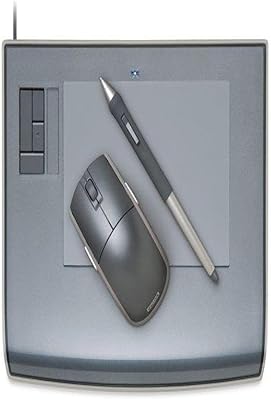
Wacom Intuos3 4 x 6-Inch Pen Tablet
85%
96%
Pressure Sensitivity
88%
Build Quality & Durability
85%
Size & Portability
90%
Ease of Use
89%
Software Compatibility
More
Wacom Movink 13 OLED Pen Display
79%
93%
Display Quality
91%
Pen Performance
88%
Portability & Build
89%
Color Accuracy
64%
Value for Money
More
Wacom Cintiq 16 Pen Display Tablet
76%
94%
Pen Accuracy & Responsiveness
88%
Display Color Accuracy
83%
Anti-Glare Performance
86%
Pen Tilt Recognition
81%
Screen Size & Active Area
More
XP-Pen Deco 03 Drawing Tablet
77%
88%
Pen Accuracy & Pressure
83%
Wireless Reliability
61%
Driver & Software Setup
79%
Multi-Function Dial
86%
Active Area Size
More
XP-Pen Deco MW Wireless Drawing Tablet
79%
91%
Stylus Performance
83%
Wireless Reliability
94%
Value for Money
61%
Driver & Software Setup
79%
Build Quality
More
XP-Pen Star03 V2 Drawing Tablet
76%
93%
Active Area Size
88%
Pen Pressure Accuracy
84%
Stylus Ergonomics
74%
Express Key Usability
69%
Driver Stability
More
Wacom Cintiq Pro 17 Pen Display
77%
93%
Pen Performance
91%
Display Quality
92%
Color Accuracy
89%
Latency & Responsiveness
86%
Build Quality
More

FAQ

Yes, the Bamboo CTH460 supports both platforms. It shipped with Photoshop Elements for both Windows and Mac, and Wacom provided drivers for both operating systems. That said, if you're on a recent macOS version, it's worth checking Wacom's driver download page before purchasing, since older hardware sometimes loses support in major OS updates.

No — the stylus is completely battery-free. It draws power inductively from the tablet surface itself, so you can pick it up and start drawing immediately without ever worrying about it dying mid-session.

Technically yes, but in practice many users find it's better to work in one mode at a time. The tablet doesn't always distinguish cleanly between an intentional touch gesture and an accidental palm contact when the pen is nearby, which can lead to unwanted inputs. Some people end up disabling touch entirely and just using the pen.

Absolutely. This pen and touch tablet is compatible with a wide range of creative software, including Adobe Photoshop, Illustrator, Clip Studio Paint, Krita, GIMP, and Corel Painter, among others. Essentially any application that supports pressure-sensitive input from a Wacom device will work with it.

For beginners and casual users, the 4.9″ x 3.4″ area is generally sufficient. Where it can feel limiting is if you're working on a large or wide monitor — the hand movement required to traverse the screen can feel disproportionately small. If you work primarily on a standard single monitor, most users adapt quickly.

ExpressKeys are four programmable buttons built into the edge of the tablet. You can map any keyboard shortcut to them — things like undo, zoom, or switching brush sizes. Most users who take a few minutes to configure them end up relying on them heavily, especially for undo, which becomes almost instinctive after a while.

It's one of the more sensible entry points available at this tier. The pen feels natural fairly quickly, the setup is straightforward, and the bundled software means you're not immediately hunting for applications. The learning curve is mostly about adjusting to the hand-eye coordination of looking at the screen while drawing on the tablet — that part takes a week or two regardless of which tablet you start on.

No internet connection is required for basic use. You'll install the Wacom driver from the included disc or from Wacom's website, and the tablet works locally from there. Registration is optional and not required for the hardware to function.

Some people do use it that way, and the touch surface makes general navigation reasonably comfortable. That said, it takes some adjustment, and not everyone finds pen navigation more efficient than a mouse for everyday computing tasks like browsing or document work. Most users end up keeping a mouse on the desk alongside it.

The drawing surface is a smooth plastic that can develop faint scratch marks with heavy use over months, though this rarely affects performance. The pen nib does wear down gradually, particularly if you press firmly — Wacom includes a few replacement nibs in the box, and additional nib packs can be purchased separately when those run out.

Where to Buy