

Overview

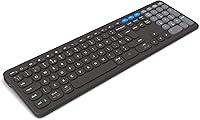
The ZAGG Pro Keyboard 17 Wireless Keyboard enters a crowded mid-range market with a clear pitch: full-size convenience without the cable clutter. ZAGG built its reputation on mobile accessories — phone cases, screen protectors — so this move into desktop peripherals is a deliberate expansion. What sets this wireless desktop keyboard apart isn't just the Bluetooth connectivity; it's the Qi wireless charging support, letting you power it up on the same pad you might already use for your phone. That said, set expectations accordingly. This is a productivity-focused board built for comfortable daily typing, not a mechanical enthusiast keyboard or gaming peripheral.

Features & Benefits

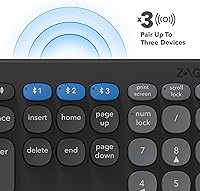
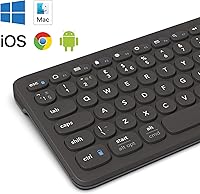
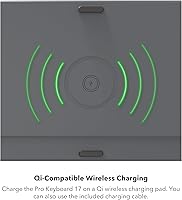
The Qi wireless charging capability is the headline feature here. If you already own a Qi pad on your desk, you can set this wireless desktop keyboard on it overnight and wake up to a full battery — no hunting for USB cables required. The three-device pairing is genuinely practical: switch between your laptop, tablet, and phone without disconnecting and re-pairing every time. Coverage spans all major operating systems, though Mac users should note that some Windows-specific keys may need minor remapping. Key spacing and travel feel comfortable enough for long work sessions, and the Li-polymer battery holds up for weeks of typical office use on a single charge.

Best For

This full-size Bluetooth keyboard makes the most sense for home office workers who bounce between multiple devices throughout the day. If your desk already has a Qi charging pad, the value proposition sharpens considerably — you're consolidating your charging setup without buying new hardware. Mac and iOS users will likely get the most mileage from the cross-device pairing, especially if they toggle regularly between a MacBook and an iPad or iPhone. Anyone frustrated by compact or tenkeyless boards will appreciate having a proper numpad back in reach. It's also worth noting for sustainability-minded shoppers: the recycled material content is modest but legitimate, not just marketing spin.

User Feedback

With a 4.4-star average from just over 120 reviewers, the ZAGG Pro Keyboard 17 has a positive but still-developing reputation — that sample size means trends could shift with more data. Buyers consistently highlight typing comfort and reliable wireless performance as genuine strengths. The battery longevity also earns praise, with many reporting it comfortably outlasts their expectations for daily office use. Where things get more nuanced is key feel: if you're coming from a mechanical or low-profile board, the membrane-style keys won't replicate that tactile feedback. A few users also flag occasional lag when switching between operating systems, and some find the all-plastic shell feels lighter than expected.

Pros

  • Qi wireless charging removes cable clutter entirely if you already own a compatible pad.
  • Three-device Bluetooth pairing makes switching between laptop, tablet, and phone genuinely effortless.
  • Full 108-key layout gives you a proper numpad that most wireless competitors cut to save space.
  • Cross-platform compatibility covers all five major operating systems without needing separate keyboards.
  • Battery life holds up well in practice, with many users reporting weeks of comfortable use between charges.
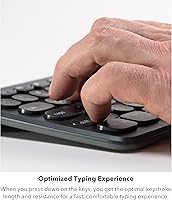
  • Ergonomic key spacing reduces finger fatigue during long writing or data-entry sessions.
  • A compact charging footprint means it fits desk setups without dominating the workspace.
  • Includes 10% recycled materials — a small but factual sustainability credential for eco-aware shoppers.
  • The 4.4-star average rating reflects consistently positive typing comfort and wireless reliability feedback.

Cons

  • Membrane key feel will disappoint anyone upgrading from a mechanical or quality low-profile keyboard.
  • Occasional lag when switching between operating systems is a recurring complaint from multi-OS users.
  • The all-plastic shell feels lighter and less premium than the price point might suggest.
  • No onboard backlighting makes this full-size Bluetooth keyboard a poor choice for low-light environments.
  • Buyers without an existing Qi pad lose the main differentiating feature and need extra hardware to unlock it.
  • OS-specific key layout quirks require some manual remapping, particularly for macOS function key shortcuts.
  • With only around 120 reviews, long-term durability and keycap wear data remain genuinely uncertain.
  • No dedicated software or companion app limits customization options compared to rivals at a similar price.
  • Build quality feedback is mixed — some users note the keyboard feels less sturdy than expected for daily heavy use.

Ratings

The scores below were produced by our AI review engine after analyzing verified buyer feedback for the ZAGG Pro Keyboard 17 Wireless Keyboard from global sources, with spam, bot-generated, and incentivized reviews actively filtered out before scoring. Each category reflects the honest distribution of real user sentiment — strengths are credited where earned, and recurring frustrations are weighted transparently into every number. The result is a balanced snapshot of what actual buyers experienced, not a polished marketing summary.

Wireless Reliability
88%
Users consistently report stable Bluetooth connections across typical home office distances, with very few complaints about random disconnections during active typing sessions. People who keep this full-size Bluetooth keyboard paired to a laptop and a tablet simultaneously found the connection held steady throughout the workday without requiring manual reconnection.
A subset of users noted that the connection occasionally stutters when switching between paired devices, particularly when jumping between a Windows PC and a macOS machine. The lag is brief but noticeable enough to interrupt workflow rhythm for people who switch devices frequently.
Multi-Device Switching
76%
24%
The three-device pairing setup is one of the more practical features on this wireless desktop keyboard, and buyers who juggle a laptop, tablet, and smartphone throughout the day find real value in being able to tap a key and move on. Initial pairing for all three slots is straightforward and does not require any software.
The switching speed between devices draws mixed feedback — some users find it quick enough, while others describe a two-to-three-second delay that feels sluggish compared to competing keyboards at a similar price. Cross-OS switching in particular, such as going from ChromeOS to iOS, seems to produce the most noticeable lag.
Typing Comfort
83%
Extended typing sessions are where this keyboard earns its strongest praise. Writers and data-entry workers who spend four or more hours a day at the keyboard report noticeably less wrist and finger fatigue compared to cheaper flat keyboards, crediting the key spacing and slightly ergonomic layout for the difference.
Users migrating from mechanical or high-quality low-profile keyboards often find the membrane key feel underwhelming — the keys register cleanly but lack any satisfying tactile response. For touch typists who rely on physical feedback cues, the adjustment period can take longer than expected.
Qi Wireless Charging
81%
19%
For buyers who already own a Qi charging pad on their desk, this feature genuinely reduces cable clutter without any extra setup. Several users specifically mentioned that being able to charge the keyboard the same way they charge their phone made the overall desk setup feel cleaner and more organized.
The Qi charging feature is meaningless without a separate compatible pad, which is not included in the box. Buyers who purchase this keyboard expecting to charge it out of the box with the feature will be disappointed until they source a pad — a detail that catches some people off guard.
Battery Life
84%
Real-world battery performance holds up well for typical office users, with many buyers reporting four to six weeks of comfortable use without reaching for a charger — even if not quite the advertised three months. For people who do not want to think about keyboard maintenance regularly, this longevity is a genuine selling point.
Heavy typists who use the keyboard for six or more hours daily report falling short of the three-month claim, sometimes significantly. The battery life estimate appears calibrated for light-to-moderate use, so all-day power users should treat the spec as an optimistic ceiling rather than a reliable average.
Key Feel & Feedback
62%
38%
Buyers coming from basic office keyboards or laptop-style chiclet keys tend to find the key travel and spacing a step up from what they were used to. The keys register consistently without requiring excessive force, which keeps the experience comfortable during routine typing tasks.
This is the most polarizing aspect of the keyboard among reviewers. Anyone with experience using a mechanical or quality low-profile keyboard will find the membrane feel soft, vague, and unsatisfying — a criticism that appears repeatedly across negative reviews. The keys do the job, but they do not inspire confidence in the typing experience.
Build Quality
66%
34%
The keyboard feels solid enough for desk use and does not flex noticeably during normal typing. The keycap printing appears consistent and well-aligned out of the box, and most buyers report no cosmetic defects upon arrival.
The all-plastic construction feels noticeably lightweight — some buyers describe it as feeling cheaper than the price point suggests when they first pick it up. A handful of users raised concerns about long-term keycap durability and whether the legends will hold up to heavy daily use over a year or more, though data on this is still limited given the product's relatively short market history.
OS Compatibility
79%
21%
The breadth of OS support is genuinely impressive for a keyboard at this price — covering Windows, macOS, iOS, Android, and ChromeOS without needing drivers or third-party software is a meaningful convenience for mixed-device households and offices.
Mac users in particular run into some friction around function key behavior and keyboard shortcut mapping, since the physical layout follows Windows conventions. It is workable, but it requires a brief adjustment period and occasional manual remapping for macOS-specific workflows.
Setup & Pairing Ease
86%
Initial Bluetooth pairing is fast and intuitive — most users report being up and running within two or three minutes of opening the box. There is no software to install, no USB dongle to lose, and no account to create, which makes onboarding unusually frictionless for a multi-device keyboard.
A small number of users report occasional difficulty getting the keyboard recognized on the first pairing attempt, particularly on Android devices. These cases appear to be exceptions rather than a systemic issue, but they do show up consistently enough in feedback to be worth noting.
Desk Footprint & Layout
74%
26%
Having a full numpad and complete function row on a wireless keyboard is a real differentiator for users who do a lot of spreadsheet work or data entry. Many buyers switched to this keyboard specifically because they missed the numpad after using a compact wireless option.
The full-size layout naturally requires more desk real estate than tenkeyless or compact wireless alternatives, which can be a problem on smaller desks or multi-monitor setups where space is tight. Users who do not regularly use the numpad may find the extra width more of a burden than a benefit.
Value for Money
71%
29%
For buyers who genuinely use the Qi charging and multi-device pairing features, the price feels fair given the combination of a full-size layout and wireless convenience. Users who came from budget membrane keyboards view it as a meaningful upgrade in both comfort and functionality.
Buyers comparing this wireless desktop keyboard against similarly priced competitors with backlit keys, better build materials, or more refined key feel often feel the value proposition is thin. The Qi charging feature only justifies the cost if you already own a compatible pad — without it, the keyboard is harder to recommend at this price over rivals.
Noise Level
87%
The membrane key construction keeps typing noise very low, which is a practical benefit in open-plan offices or shared home workspaces where click noise would be disruptive. Several users specifically praised the quiet operation as a reason they chose this over a mechanical alternative.
A small number of users noted occasional hollow or slightly plasticky key sound on harder keystrokes, particularly on the larger keys like the spacebar and enter key. It is not loud, but the resonance from the plastic chassis can be noticeable in very quiet environments.
Portability
58%
42%
The keyboard is lighter than most full-size boards, which means it can be moved between rooms or packed for occasional travel without much hassle. Users who hot-desk or move between a home office and a shared workspace find this a minor but genuine convenience.
At 19.2 inches long, this is still a full-size keyboard and does not fit comfortably in a standard laptop bag or backpack alongside other gear. It is light enough to carry but not compact enough to travel with regularly — buyers who need genuine portability should be looking at a different category of keyboard entirely.
Sustainability Credentials
61%
39%
The inclusion of 10% post-industrial recycled materials is a factual, verifiable credential rather than a vague green marketing claim, which eco-conscious buyers tend to appreciate. It signals at least a baseline level of environmental consideration in the manufacturing process.
Ten percent recycled content is a modest figure, and environmentally motivated buyers comparing this against competitors with more aggressive sustainability targets will likely find it underwhelming. It is a step in the right direction but not a meaningful differentiator on its own for buyers who prioritize sustainability heavily.

Suitable for:

The ZAGG Pro Keyboard 17 Wireless Keyboard is a strong fit for home office workers who regularly switch between multiple devices throughout the day — think someone typing a document on a Windows laptop, then jumping to answer messages on an iPad, then reviewing something on an Android phone. If your desk already hosts a Qi wireless charging pad, this keyboard slides right into that setup without adding another cable to manage, which is a genuinely underrated convenience over time. People who find compact or tenkeyless keyboards frustrating will appreciate having a proper numpad and a full key layout that does not require any mental adjustment. Mac and iOS users in particular tend to get strong cross-device value here, since pairing across Apple hardware is generally smooth. Buyers who care about modest sustainability credentials will also find the recycled material content a small but honest differentiator.

Not suitable for:

The ZAGG Pro Keyboard 17 Wireless Keyboard is not the right choice for anyone coming from a mechanical keyboard who values tactile key feedback — the membrane-style keys simply will not replicate that feel, and no amount of ergonomic layout design changes that reality. Gamers should look elsewhere entirely; this board is built for office productivity, not low-latency input or programmable macro support. If you do not already own a Qi charging pad, the headline charging feature loses much of its practical appeal, and you would essentially be paying for convenience you cannot yet use. Power users who need advanced software customization, dedicated media controls, or onboard backlighting will find this wireless desktop keyboard fairly bare-bones in those departments. With just over 120 reviews at the time of writing, long-term durability data is still thin, so buyers prioritizing proven build longevity over several years may want to wait for a larger feedback pool.

Specifications

  • Key Layout: Full-size 108-key layout including a dedicated numpad, function row, and standard navigation cluster.
  • Connectivity: Bluetooth wireless connection with no USB dongle required for pairing.
  • Multi-Device: Supports simultaneous pairing with up to 3 devices, switchable via dedicated keys.
  • OS Support: Compatible with Windows, macOS, iOS, Android, and ChromeOS out of the box.
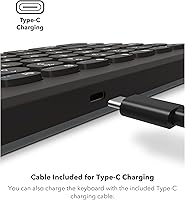
  • Charging Method: Charges via any Qi-compatible wireless charging pad; a USB cable is also included for wired charging backup.
  • Battery Type: Built-in Li-polymer rechargeable battery, not user-replaceable.
  • Battery Life: Rated for up to 3 months of use per charge under typical office typing conditions.
  • Dimensions: Package dimensions measure 19.2 x 6 x 1 inches, reflecting the full-size desktop footprint.
  • Weight: Item weight is listed at 1.6 ounces, making it lighter than most full-size desktop keyboards.
  • Material: Primary construction is plastic, incorporating 10% post-industrial recycled materials.
  • Color: Available in black only based on current product listing data.
  • Key Type: Membrane-style keys with an ergonomic layout designed to minimize typing fatigue during extended sessions.
  • Backlighting: No backlighting is included; this is a non-illuminated keyboard intended for standard lighting conditions.
  • Included Items: Package includes the keyboard and a USB cable; a Qi charging pad is not included and must be sourced separately.
  • Brand: Manufactured by ZAGG, a brand primarily known for mobile accessories and screen protection products.
  • Recycled Content: Contains 10% post-industrial recycled materials as part of ZAGG's stated sustainability effort.
  • BSR Ranking: Holds a Best Sellers Rank of #889 in Computer Keyboards on Amazon at the time of listing.
  • Availability Date: First made available on Amazon on June 29, 2023.

Related Reviews
Alienware Pro Wireless Gaming Keyboard
87%
93%
Connectivity
89%
Customization (Hot-Swappable Switches)
91%
Ergonomics and Layout
88%
RGB Lighting
85%
Battery Life
More
Keychron B6 Pro
Keychron B6 Pro
80%
93%
Battery Life
88%
Wireless Connectivity
71%
Typing Experience
91%
Mac Compatibility
67%
Build Quality
More
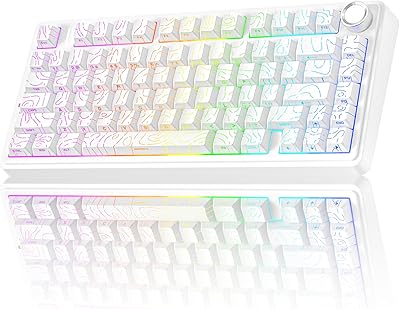
Keychron B1 Pro Wireless Bluetooth Keyboard
86%
88%
Overall Performance
91%
Typing Experience
93%
Battery Life
89%
Portability & Size
84%
Build Quality
More
AULA F75 Pro
AULA F75 Pro
82%
91%
Typing Sound & Feel
83%
Build Quality & Construction
89%
Hot-Swap & Customizability
86%
Wireless Performance
82%
Battery Life
More
SABLUTE KL3 Pro
SABLUTE KL3 Pro
76%
91%
Value for Money
83%
Typing Comfort
88%
Key Quietness
79%
RGB Lighting Quality
67%
Mouse Performance
More
Womier RD75 Pro 75% Wireless Mechanical Keyboard
79%
91%
Build Quality
84%
Typing Feel
86%
Wireless Performance
73%
Battery Life
88%
Value for Money
More
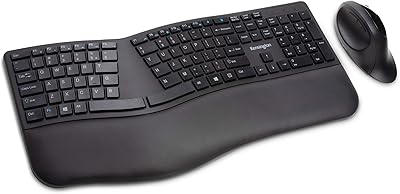
Kensington Pro Fit Ergonomic Wireless Keyboard K75401US
85%
91%
Ergonomic Comfort
87%
Wireless Connectivity
90%
Key Quietness and Typing Experience
88%
Build Quality
84%
Ease of Setup
More
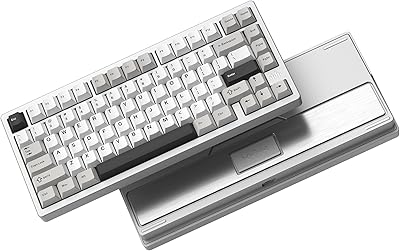
Kensington Pro Fit Ergonomic Wireless Keyboard Mouse
74%
78%
Ergonomic Design
74%
Keyboard Feel & Typing Experience
58%
Mouse Comfort & Usability
82%
Wireless Connectivity
88%
Security
More
GravaStar Mercury K1 Pro Mechanical Gaming Keyboard

80%
91%
Build Quality
88%
Typing Feel
86%
Switch Performance
79%
Wireless Reliability
74%
Battery Life
More
Arteck HW192 Wireless Keyboard and Mouse Combo
78%
78%
Build Quality
72%
Typing Experience
63%
Mouse Comfort & Ergonomics
81%
Battery Life
69%
Wireless Connectivity
More

FAQ

Yes, a Qi charging pad is not included in the box. The ZAGG Pro Keyboard 17 Wireless Keyboard comes with a USB cable as a backup charging option, but to use the wireless Qi charging feature you will need a compatible pad. If you already have one on your desk for your phone or earbuds, it should work without any issues.

Switching between paired devices is handled through dedicated keys on the keyboard, so you do not need to dig into Bluetooth settings on your computer or phone. In practice, the switch takes a couple of seconds to complete, which is fast enough for most workflows. A small number of users have noted occasional lag when jumping between different operating systems, so it may not feel instant every time.

It works with macOS and iOS without any additional drivers or software, and multi-device pairing between a MacBook and an iPad is one of its more popular use cases. That said, the physical key labeling follows a Windows-style layout, so some Mac-specific shortcuts may require a bit of remapping or mental adjustment early on. Nothing that takes more than a day or two to get comfortable with, but worth knowing upfront.

Honestly, it does not. This is a membrane-style keyboard, which means the keys are quieter and softer but lack the tactile click or resistance that mechanical keyboards deliver. If you are switching from a mechanical board and that feedback is important to you, this wireless desktop keyboard will feel noticeably different. It is designed for comfortable, low-fatigue office typing rather than satisfying keystroke response.

It depends heavily on how many hours a day you type. Three months assumes typical office use, which ZAGG generally defines as around a few hours of active typing per day with the keyboard idle or sleeping the rest of the time. Heavy all-day typists may need to recharge more frequently, but most users report the battery easily outlasting their expectations for casual to moderate use.

It pairs with iPads, Android tablets, and smartphones just as easily as it does with a desktop or laptop. The full-size layout can feel a bit oversized next to a tablet, but for someone who does serious writing or data entry on a tablet, having a proper keyboard with a numpad is a real convenience. iOS and Android are both officially supported operating systems.

No companion app or driver installation is required for basic use — you pair it via Bluetooth and it works. There is no dedicated software for remapping keys or customizing functions, which keeps setup simple but does mean you cannot go beyond the default key behavior if you need more advanced customization.

No, there is no backlighting on this full-size Bluetooth keyboard. If you regularly work in dim conditions or need to type in the dark, this would be a meaningful limitation to consider before buying.

The keyboard is built primarily from plastic, which keeps it lightweight but does give it a less solid feel than metal-framed alternatives. Some buyers have mentioned that the build feels slightly lighter than expected at this price point. Long-term durability data is still somewhat limited given that the product has a relatively modest review count, so it is hard to make strong claims about how the keycaps and housing hold up after a year or more of heavy use.

Yes, ChromeOS is one of the five officially supported operating systems, so it should pair and function normally with a Chromebook without requiring any workarounds. Just use standard Bluetooth pairing and you should be up and running in under a minute.

Where to Buy