Overview

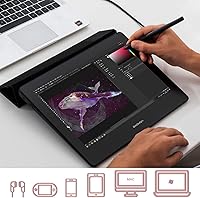
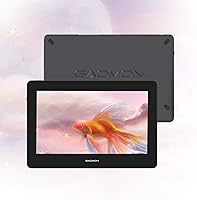
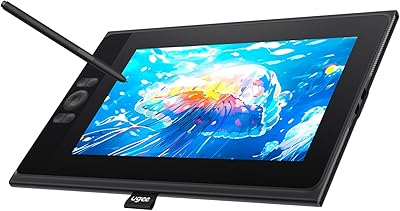
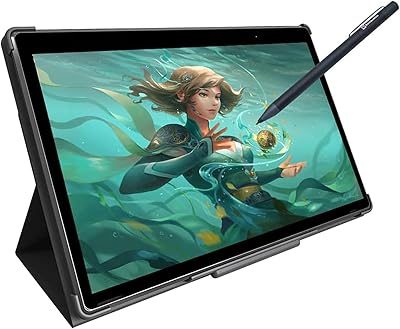
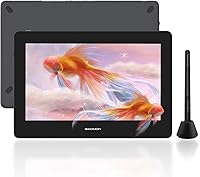
The GAOMON PD1220 11.6-inch Pen Display sits in a competitive sweet spot for hobbyists and emerging digital artists who want a real screen-based drawing experience without spending Wacom money. Its fully laminated panel is the headline feature — the lamination closes the gap between the glass surface and the display beneath, making the pen feel far more connected to what you are actually drawing. Against rivals like XP-Pen in the same size class, this drawing tablet holds its ground on build and display quality. It also runs on Windows, macOS, and Android, giving it genuine flexibility for users who work across multiple devices.
Features & Benefits

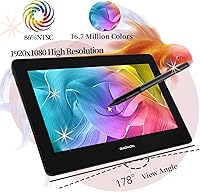
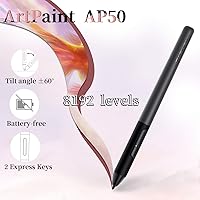
The full lamination does real work here — drawing feels precise because there is minimal parallax between your pen tip and the cursor on screen. Colors land well for illustration work; the 86% NTSC coverage produces punchy, accurate hues that hold up in Photoshop or Clip Studio Paint, though this pen display is not the right tool for professional color grading. The battery-free AP50 stylus reads 8192 pressure levels and handles tilt up to 60 degrees, which matters when you are varying line weight or mimicking the natural angle of a brush. USB-C connectivity keeps the cable situation tidy. The one genuine omission is that there are no express keys built into the device.

Best For

Students picking up digital illustration for the first time will find this drawing tablet approachable — drawing directly on screen removes the disconnect you get with a screenless tablet, and the price does not punish you for being new. Comic artists and manga illustrators who rely on tilt-sensitive brushwork will appreciate how naturally the stylus responds when angled. It is also a strong fit for anyone splitting time between Windows, Mac, and Android, since driver support covers all three platforms. Apps like Krita and Clip Studio work with minimal configuration out of the box. If desk space is limited, the compact footprint is a practical bonus.

User Feedback

Across close to 2,000 ratings, the GAOMON PD1220 holds a 4.3-star average — a score that reflects genuine satisfaction rather than a flood of early reviews. Buyers consistently praise the display clarity and sturdy construction for the price, and many note that pen pressure feels accurate and responsive right away. The lack of express keys comes up regularly in critical reviews, and it is a fair point; anyone accustomed to Wacom's shortcut buttons will feel the absence. A handful of users also mention occasional friction getting drivers installed, especially on Android where device compatibility can vary. Still, most buyers recommend it as a capable, affordable alternative to pricier options for everyday creative work.

Pros

  • The fully laminated screen eliminates the frustrating gap between pen tip and cursor that plagues cheaper non-laminated tablets.
  • Battery-free stylus means you never interrupt a drawing session to charge or swap a pen battery.
  • 8192 pressure levels deliver smooth, predictable line variation from the lightest sketch to a bold fill stroke.
  • 60-degree tilt support adds genuine nuance to brushwork in apps that take advantage of it.
  • USB-C connectivity keeps the desk clean and removes the multi-cable tangle older pen displays required.
  • Works out of the box with Clip Studio Paint, Krita, Photoshop, and most major illustration apps without manual configuration.
  • The compact 11.6-inch size is genuinely practical for students and anyone with limited desk space.
  • Solid build quality that holds up well over time, with no reports of structural failure from long-term owners.
  • Color output is vibrant and accurate enough for illustration and comic work without requiring extensive calibration.
  • At this price tier, the combination of lamination, tilt support, and a battery-free pen is difficult to find elsewhere.

Cons

  • No built-in express keys means constant keyboard interruptions to switch tools or undo strokes during drawing.
  • Android compatibility is officially listed but unreliable enough in practice that it should not be a primary purchase reason.
  • The driver interface looks and feels outdated compared to competitors, making advanced customization unnecessarily tedious.
  • Default color profile ships slightly off and requires manual calibration before colors look accurate.
  • Replacement nibs for the AP50 stylus are not easy to find in local stores, which matters for heavy daily users.
  • The integrated anti-glare coating cannot be swapped out, so users who prefer a glossy drawing surface have no option.
  • Screen size limits working comfort for artists who draw large compositions or detailed full-body character illustrations.
  • Stand angle adjustment range is narrow, which can become an ergonomic issue during long drawing sessions.
  • Some users report that the lowest pressure threshold requires a noticeable initial force, which affects feather-light stroke starts.
  • Driver updates after major OS patches occasionally require a full reinstall, disrupting workflow at inconvenient times.

Ratings

The GAOMON PD1220 11.6-inch Pen Display earned its 4.3-star standing across nearly 2,000 verified global ratings, and the scores below reflect what buyers actually experienced — not what the spec sheet promises. Our AI rating engine processed that feedback while actively filtering out incentivized, bot-generated, and unverified submissions. The result is an honest picture of where this drawing tablet genuinely excels and where it falls short for real users.
Display Clarity
86%
Most buyers drawing in Clip Studio Paint or Krita commented that the 1920x1080 panel looks noticeably crisp at 11.6 inches — fine linework and text stay sharp without any visible pixel grain. The wide 178-degree viewing angle also means colors do not shift when you tilt the screen slightly during long sessions.
A small number of users noted that the panel can look slightly cool or blue-shifted out of the box, requiring a calibration pass before colors feel natural. At this screen size, 1080p is adequate but not exceptional for artists who work with very fine detail at high zoom levels.
Full Lamination Quality
89%
The laminated screen is the feature buyers praise most consistently — drawing feels direct and connected because the gap between the glass and the display is essentially eliminated. Artists switching from non-laminated tablets frequently described it as a revelation for detailed inking and precision work.
A few users mentioned that the anti-glare coating, while effective indoors, can introduce a slight haziness in very bright environments. The coating is factory-integrated, so if it picks up stubborn smudges over time, there is no way to remove or replace it independently.
Pen Performance
88%
The battery-free AP50 stylus draws consistent praise for its natural feel and responsive pressure curve. Illustrators working on comic pages noted that transitioning from a thin sketch line to a thick fill stroke feels smooth and predictable, and the 60-degree tilt support adds real nuance when using brush-style tools.
Some users reported a very slight initial activation force before the lowest pressure levels register, which can frustrate artists who prefer ultra-light touch at the start of a stroke. Replacement nibs are not always easy to source locally, which a handful of buyers flagged as a longer-term concern.
Color Accuracy
74%
26%
For illustration, character art, and comic coloring, the 86% NTSC gamut produces vivid, punchy results that look great on screen and translate reasonably well to print. Hobbyists and students doing everyday creative work rarely reported any meaningful color complaints.
Professional photo editors and print designers will find the color coverage insufficient — this pen display is not a substitute for a wide-gamut professional monitor in color-critical workflows. Some users also noted that the default color profile needed adjustment to avoid oversaturated reds and oranges straight out of the box.
Build Quality & Durability
83%
The chassis feels solid and well-finished for its price tier, with no flex in the display panel and a stable stand that holds chosen angles reliably during drawing sessions. Multiple long-term owners reported no structural degradation after a year or more of regular use.
The plastic housing, while sturdy, does show fingerprints and light scratches on the back panel over time. A few users also mentioned that the stand adjustment mechanism feels slightly stiff initially and can loosen marginally after extended use.
Stylus Tilt Support
81%
19%
The 60-degree tilt detection works reliably in major apps like Photoshop and Clip Studio Paint, giving brush strokes a more organic, hand-drawn quality when the pen is held at a natural angle. Manga and comic artists in particular called out tilt support as a key reason they chose this tablet over non-tilt alternatives.
Tilt performance is less consistent in some less mainstream applications that do not fully implement the tilt API, leading to unpredictable brush behavior in those specific tools. A small number of users also noted that tilt accuracy at extreme angles near the 60-degree limit can feel slightly imprecise.
Connectivity & Setup
77%
23%
USB-C input is a genuine practical improvement — most users appreciated being able to connect with a single cable type they already owned, and the option for a USB-C to USB-C single-cable setup keeps desks tidy. Initial hardware recognition on Windows and macOS was described as straightforward by the majority of buyers.
Android compatibility, while officially supported, generated the most setup complaints in the user base — device-specific quirks mean the experience is inconsistent depending on which Android phone or tablet you are using. A handful of Windows users also reported needing to manually reinstall drivers after system updates.
Driver & Software Experience
68%
32%
On Windows and macOS, the GAOMON driver software covers the basics well — pressure curve adjustment, tilt calibration, and app-specific profiles all work as expected for most users. The plug-and-play experience on supported operating systems was consistently described as reliable for daily illustration work.
The driver interface itself looks dated and is less intuitive than what Wacom offers, which frustrated users trying to fine-tune settings beyond the defaults. Android driver support remains the weakest link, with some users reporting that pressure sensitivity did not activate at all on certain devices without manual workarounds.
Value for Money
91%
This is arguably where the GAOMON PD1220 makes its strongest case — buyers repeatedly noted that getting a laminated, tilt-capable pen display with a battery-free stylus at this price point is genuinely difficult to match. Several users who upgraded from significantly pricier alternatives said the daily drawing experience was comparable for their needs.
The value equation weakens slightly if you need to invest in a separate keypad to compensate for the missing express keys, which adds to the effective cost. Users who later outgrew the screen size also noted that upgrading felt like spending the same money over again rather than building on an existing investment.
Screen Size & Portability
78%
22%
The 11.6-inch footprint is compact enough to fit comfortably on a crowded student desk or a secondary work surface alongside a main monitor. At 4.46 pounds it is light enough to move between rooms without hassle, which buyers working in multiple spaces found genuinely useful.
Artists who prefer working at larger scales found the canvas size limiting for detailed full-body character illustrations or complex scene compositions. The screen real estate also shrinks noticeably once you account for the toolbar and panel chrome in apps like Photoshop.
Express Keys & Shortcut Access
41%
59%
The slim, clean design that results from omitting express keys does appeal to minimalist users who prefer managing shortcuts via keyboard anyway. Artists who already have a programmable keypad or a keyboard within easy reach rarely flagged the omission as a problem in practice.
For users coming from any tablet with built-in shortcut keys, the absence is felt immediately — switching tools, undoing strokes, and adjusting brush size all require breaking drawing flow to reach the keyboard. This is the single most frequent complaint in the entire review corpus and a genuine ergonomic limitation for extended sessions.
Anti-Glare Film
79%
21%
The factory-integrated AG film does its job well in typical indoor lighting, diffusing reflections enough that most users never felt the need for an aftermarket screen protector. Artists working near windows noted a meaningful reduction in eye strain compared to glossy display alternatives.
The matte coating introduces a very slight texture to the drawing surface that some users find less satisfying than a glossy panel, particularly when doing smooth vector-style linework. Because it is integrated rather than applied as a film, users cannot swap it out for a glossy alternative if they prefer that feel.
Compatibility with Drawing Apps
87%
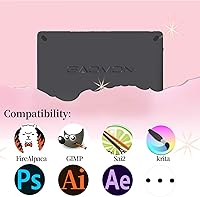
Out-of-the-box compatibility with Clip Studio Paint, Krita, Paint Tool SAI 2, and Photoshop was consistently described as trouble-free, with pressure sensitivity and tilt registering correctly on first launch. Artists using niche or open-source tools like FireAlpaca and OpenCanvas also reported solid results without manual configuration.
A small subset of users working with older or less common illustration software encountered pressure mapping issues that required manual driver tweaks to resolve. Compatibility with some professional-tier tools on the creative side of video production was occasionally inconsistent.
Stand & Ergonomics
71%
29%
The built-in stand provides a stable working angle that most users found comfortable for hour-long drawing sessions, and the screen sits at a reasonable height relative to a standard desk surface. Buyers who draw for extended periods appreciated not needing to buy a separate stand accessory.
The stand offers limited angle adjustment compared to purpose-built tablet arms or aftermarket stands, which frustrated users who prefer drawing at a steeper incline. Those with repetitive strain concerns noted that the fixed angle range is not ideal for adapting posture throughout a long work session.

Suitable for:

The GAOMON PD1220 11.6-inch Pen Display is a strong match for students, hobbyists, and self-taught illustrators who are ready to move beyond a screenless tablet but are not yet prepared to commit to a professional-tier price point. If you spend most of your time in Clip Studio Paint, Krita, or Photoshop working on character art, comics, or digital illustrations, this drawing tablet delivers the laminated screen experience that makes drawing feel natural without a steep learning curve. Comic artists and manga creators will particularly appreciate how the tilt-sensitive stylus responds when holding the pen at an angle to vary line weight — it is the kind of nuance that screenless tablets simply cannot replicate. People working across multiple devices will also find real practical value here, since the tablet runs reliably on Windows and macOS, and works with Android for users who occasionally draw on a compatible phone or tablet. Compact desk setups benefit too, as the 11.6-inch footprint leaves room for a keyboard and reference materials without turning your workspace into a cable nightmare.
Not suitable for:

Professional designers, photographers, and print production artists should look elsewhere — the GAOMON PD1220 11.6-inch Pen Display covers 86% NTSC, which is perfectly adequate for illustration but falls short of the wide-gamut coverage that color-critical workflows demand. If you rely heavily on express keys and programmable shortcuts built directly into your tablet to maintain drawing flow, the complete absence of hardware shortcut buttons will be a daily frustration that no workaround fully resolves. Artists who prefer working large — painting expansive landscapes, detailed full-body figures, or complex multi-character scenes — will quickly feel constrained by the 11.6-inch canvas, regardless of how good the panel quality is at that size. Users hoping to use this drawing tablet primarily with an Android device should also temper their expectations, since Android compatibility is officially supported but inconsistent enough in practice that it cannot be treated as a reliable primary use case. Finally, anyone who expects a plug-and-play experience on less common software or who runs a heavily customized Windows environment may encounter driver friction that requires patience to resolve.
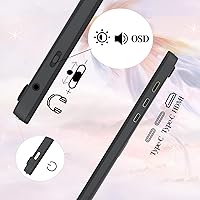
Specifications

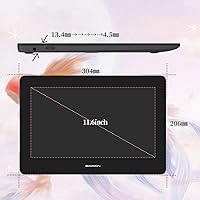
  • Screen Size: The active display area measures 11.6 inches diagonally, providing a compact but usable canvas for digital illustration and photo editing.
  • Resolution: The panel outputs at 1920x1080 (16:9 aspect ratio), delivering full HD sharpness that keeps fine linework and text crisp at normal working distances.
  • Color Gamut: The display covers 86% NTSC, equivalent to approximately 100% sRGB, making it well-suited for illustration and general creative work.
  • Color Depth: 16.7 million colors are reproduced via an 8-bit panel, supporting smooth gradients and tonal transitions across artwork.
  • Viewing Angle: The IPS panel offers a 178-degree viewing angle both horizontally and vertically, so colors stay consistent even when the screen is slightly tilted during use.
  • Lamination: The display uses full lamination technology, bonding the glass and panel layers together to minimize parallax and reduce the visual gap between the pen nib and the on-screen cursor.
  • Anti-Glare Film: An integrated anti-glare protection film is factory-applied to the screen surface and does not require manual installation or periodic replacement.
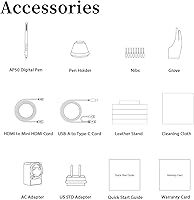
  • Stylus Model: The included battery-free AP50 passive stylus requires no charging and maintains consistent weight and balance throughout use.
  • Pressure Sensitivity: The AP50 stylus detects 8192 levels of pressure sensitivity, enabling fine gradations between light sketch strokes and heavy fills.
  • Tilt Support: The stylus supports up to 60 degrees of tilt detection, allowing compatible drawing applications to automatically adjust brush angle and width based on pen inclination.
  • Connectivity: The tablet connects via USB-C (data and power) and HDMI (video output), with support for a single-cable USB-C to USB-C connection when used with a compatible host device.
  • OS Compatibility: The pen display is officially supported on Windows 7 and later, macOS 10.12 and later, and Android 6.0 and later (requiring USB 3.0 with DisplayPort 1.2 on Android).
  • Dimensions: The unit measures 13 x 9.4 x 3.2 inches, giving it a compact footprint that fits comfortably on a standard student or home office desk.
  • Weight: At 4.46 pounds, the tablet is light enough to reposition easily between workspaces without requiring a dedicated permanent setup.
  • Express Keys: The device includes no built-in express keys or programmable shortcut buttons; users manage shortcuts via keyboard or a separate external keypad.
  • In-Box Cables: The package includes one USB cable and one HDMI cable; a USB-C to USB-C cable for single-cable connection is sold separately.
  • Stand: A built-in adjustable stand is integrated into the back of the unit, supporting the display at a fixed range of incline angles during use.
  • App Compatibility: The tablet is compatible with major illustration and design applications including Adobe Photoshop, Illustrator, Clip Studio Paint, Krita, Paint Tool SAI 2, Manga Studio, CorelPainter, FireAlpaca, and OpenCanvas.

Related Reviews
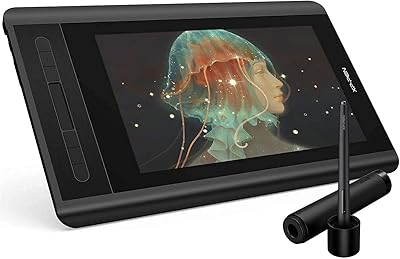
XP-Pen Artist 12 11.6-inch Pen Display

78%
88%
Pen Performance
82%
Display Quality
79%
Build Quality
63%
Ease of Setup
74%
Shortcut Keys & Touch Bar
More
ASUS ProArt Display PA169CDV 15.6” 4K Pen Display
87%
94%
Color Accuracy
89%
Portability
90%
Touchscreen Responsiveness
85%
Build Quality
92%
Wacom Pen Precision
More
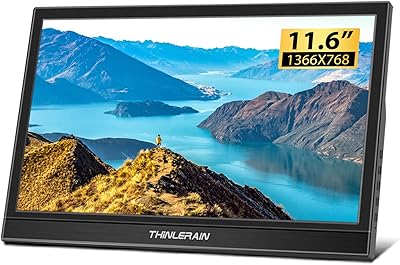
Thinlerain 11.6-inch Portable Monitor
81%
94%
Portability
76%
Display Quality
88%
Ease of Setup
82%
Build Quality
90%
Compatibility
More
Zbark YHRF116M 11.6-inch Car Overhead Monitor
64%
78%
Picture Brightness
63%
Picture Quality
44%
Installation Experience
57%
Build Quality
84%
HDMI Connectivity
More
FMC 15.6-Inch Wireless Portable Monitor
73%
74%
Wireless Connectivity
83%
Display Quality
89%
Portability
71%
Ease of Setup
67%
Build Quality
More
UGEE UE12 11.6-inch Drawing Tablet
86%
88%
Pressure Sensitivity
92%
Display Quality
85%
Ease of Setup
90%
Compatibility with Devices
87%
Stylus Performance
More
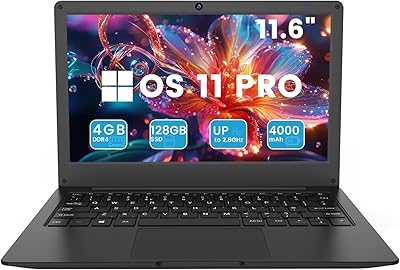
Azeyou CG11Q6-US 11.6-inch Laptop
80%
90%
Value for Money
92%
Portability
86%
Battery Life
78%
Build Quality
64%
Display Quality
More
Simbans PicassoTab XL Standalone Drawing Tablet
72%
83%
Portability & Form Factor
61%
Stylus Performance
74%
Display Quality
71%
App Ecosystem
63%
Performance & Speed
More
Wacom Intuos3 4 x 6-Inch Pen Tablet
85%
96%
Pressure Sensitivity
88%
Build Quality & Durability
85%
Size & Portability
90%
Ease of Use
89%
Software Compatibility
More
Samsung Chromebook 2 XE500C12-K01US 11.6-inch Laptop
81%
89%
Value for Money
85%
Battery Life
93%
Portability & Weight
80%
Build Quality
78%
Display Quality
More

FAQ

Yes, for a standard setup you need both — the HDMI cable carries the video signal to your monitor output, while the USB cable handles pen data and power. If your computer or laptop has a USB-C port that supports DisplayPort Alt Mode, you can simplify this to a single USB-C to USB-C cable, but that cable is not included in the box.

No, the AP50 stylus is completely battery-free, so there is nothing to charge. You can take it out of the box and start drawing immediately without any prep.

For most users on Windows and macOS, pressure sensitivity and tilt detection activate automatically once the GAOMON driver is installed. Clip Studio Paint, Krita, and Photoshop in particular tend to recognize the tablet without any manual configuration. It is worth running a quick pressure test in the driver panel after installation just to confirm everything is mapped correctly.

It comes fully integrated from the factory — you do not apply anything yourself. The coating is bonded directly to the screen surface, so there is no film to peel, align, or worry about bubbling.

Officially yes, but with some caveats. Android support requires USB 3.0 with DisplayPort 1.2 on the host device, and compatibility varies significantly depending on the specific Android device you own. It works reliably for some users and not at all for others, so if Android is your primary use case, it is worth checking compatibility with your exact device model before purchasing.

Both brands occupy a similar price and feature tier, and the honest answer is that neither is dramatically superior for everyday illustration use. The GAOMON PD1220 is frequently praised for its lamination quality and pen feel at this size, while XP-Pen models in the same range often offer built-in express keys that this tablet lacks. Your choice may come down to whether shortcut keys matter more to you than a slightly more refined drawing surface feel.

There are none — this is one of the most common things buyers ask about and one of the most frequent complaints in user reviews. You will need to rely entirely on your keyboard or invest in a separate programmable keypad if shortcut access during drawing is important to your workflow.

At that screen size, 1080p produces a pixel density that keeps linework and text looking clean for most drawing tasks. It is not a retina-level display, but the sharpness is more than adequate for comic art, character illustration, and general creative work. Artists who regularly zoom to very high magnification for micro-detail work may eventually feel the limits, but it is not a practical issue for most users at this level.

The AP50 stylus does use replaceable nibs, and GAOMON sells replacement packs through their official store and some third-party retailers. The nibs wear down slowly under normal use, but it is worth ordering a spare set early since they are not always stocked in local electronics stores.

Occasionally, yes — a small number of users have reported that major Windows updates can disrupt driver functionality, requiring a reinstall. It is not a universal problem, but it is worth knowing so you are not caught off guard mid-project. Keeping the GAOMON driver software up to date and bookmarking the official driver download page takes care of this in most cases.

Where to Buy